3.12. sample_audio User Guide
3.12.1. Function Overview
sample_audio is an audio sample project for verifying the basic audio environment of the X5 platform, and can also serve as a reference implementation for audio-related projects. The project currently contains two independent command-line sample programs:
sample_alsa: An audio recording and playback program based on ALSA (Advanced Linux Sound Architecture). It supports configuring sampling rate, bit depth, channels, recording duration, and capture/playback devices via command-line arguments, saves recorded audio as WAV files, and provides interactive commands for recording, playback, and querying hardware capabilities.
sample_hat_loopback: A full-duplex loopback self-test program for the Waveshare Audio Driver HAT REV2 (ES7210+ES8156) external sound card. Through a two-phase flow of “record first, then play while recording”, it verifies whether the HAT sound card is properly registered and capable of 8-channel full-duplex transmit/receive.
Note: The EVB does not have an onboard Audio Codec, so an external sound card is required to use this sample. Please refer to Hardware Environment Setup.
3.12.1.1. Software Architecture Description
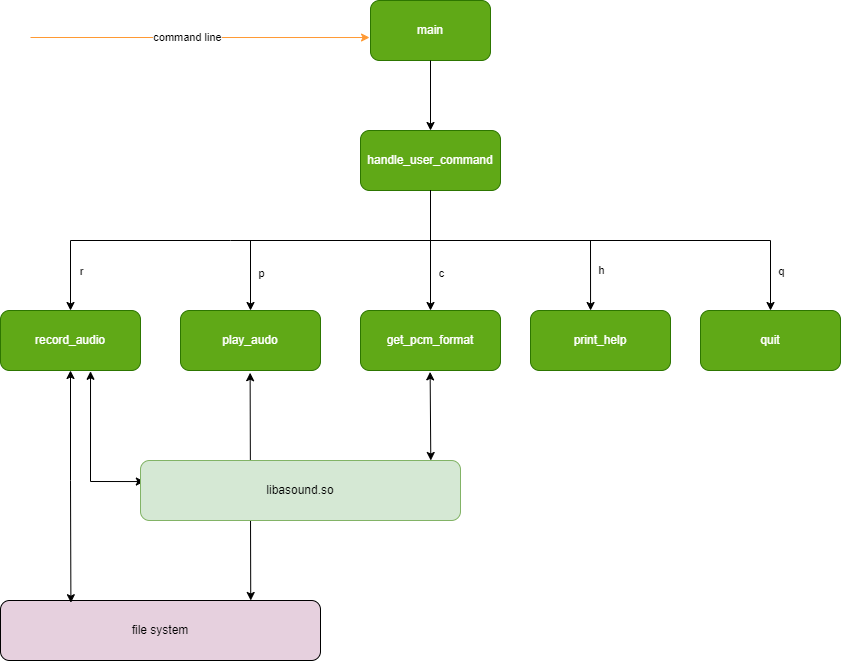
Both programs in the sample_audio project are developed based on the ALSA library (libasound) using C language. sample_alsa is primarily divided into the following components:
Parse command-line arguments, including
--capture/--playbackto specify capture/playback PCM devices, and audio parameters such as-r/-b/-c/-d/-fSet mixer controls (capture side
ADC PGA Gain, playback sideDAC); if the corresponding control does not exist on the sound card, print a warning and skip itAudio recording function, responsible for capturing audio data from input devices, applying digital gain based on bit depth, and writing it to a WAV file
Audio playback function, reading header parameters from a WAV file to configure the PCM device, then playing through the output device
Handle user interaction commands, responsible for obtaining user input and providing detailed guidance
Query hardware-supported formats, sampling rates, and number of channels
Software architecture diagram: After receiving the user command, sample_alsa invokes interfaces from the ALSA library (libasound) according to different business operations to implement recording, playback, and hardware parameter checking.
3.12.1.2. Code Location and Directory Structure
Code location:
app/samples/platform_samples/sample_audioDirectory structure:
.
├── sample_alsa
│   ├── Makefile
│   └── sample_alsa.c
└── sample_hat_loopback
    ├── Makefile
    └── sample_hat_loopback.c
sample_alsa/Makefile, sample_hat_loopback/Makefile: Makefiles used to compile the two sample programs respectively.
sample_alsa.c: Main source code file of the sample_alsa program.
sample_hat_loopback.c: Main source code file of the sample_hat_loopback program.
3.12.1.3. Tool Location and Directory Structure
/app/platform_samples/sample_audio
This directory contains two subdirectories, sample_alsa and sample_hat_loopback, which store the compiled executables of each program and the audio files generated during execution.
3.12.1.4. Background Knowledge
ALSA library (libasound): A standard audio processing library in Linux systems, providing rich audio processing interfaces, including opening/configuring/reading/writing PCM devices, setting mixer controls, and probing hardware capabilities.
WAV file format: A lossless audio file format widely supported and used; this sample uses a standard 44-byte PCM WAV header.
ALSA device naming:
hw:card,devicedirectly accesses the device-th PCM device on sound card card;plughw:adds a plugin layer on top of it. sample_alsa only accepts thehw:form.
3.12.1.5. API Process Description
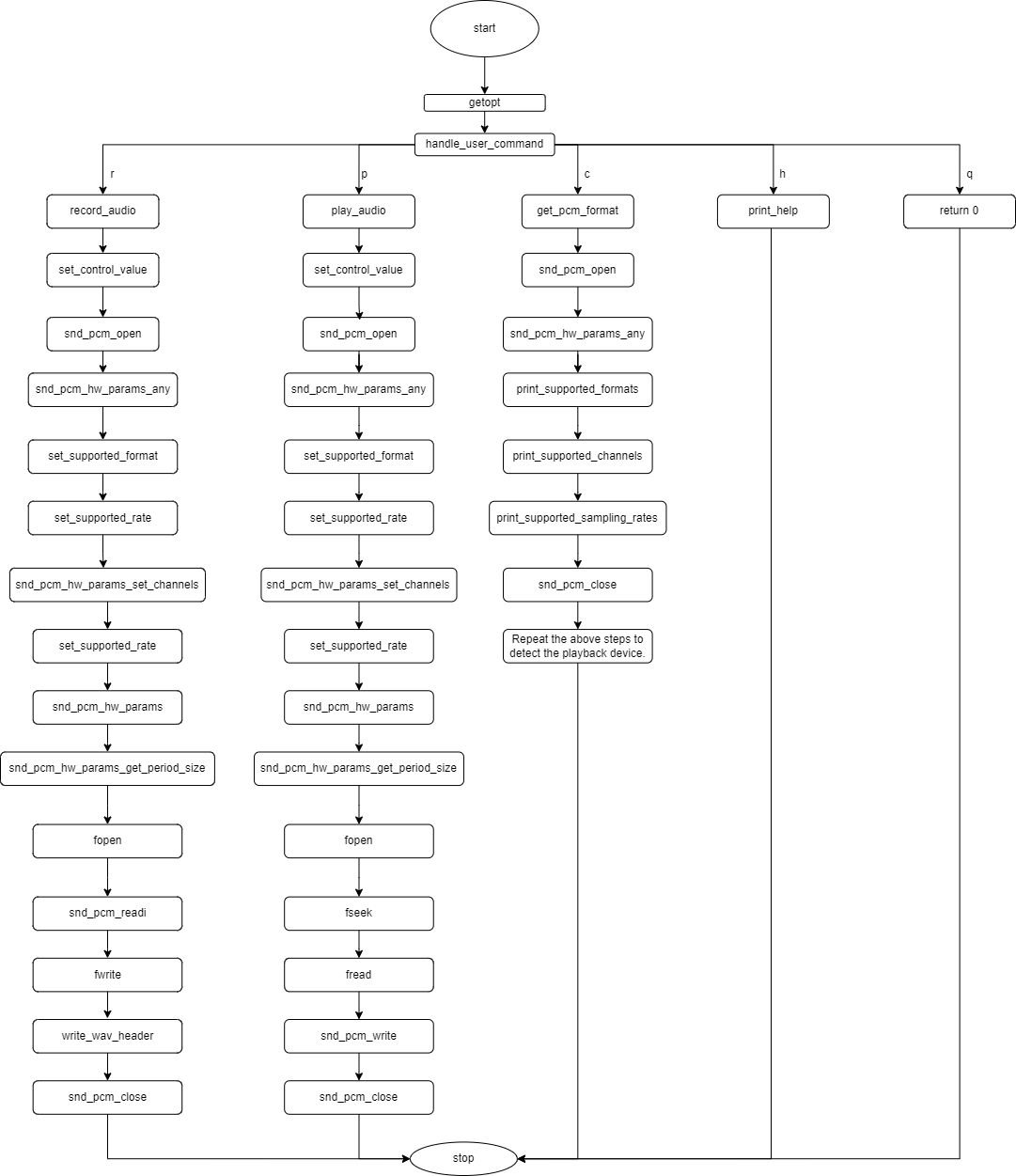
sample_alsa mainly uses the following ALSA library API flow (record_audio and play_audio are basically identical):
snd_pcm_open: Open the PCM device (SND_PCM_STREAM_CAPTURE for recording, SND_PCM_STREAM_PLAYBACK for playback).
snd_mixer_open / snd_mixer_attach / snd_mixer_selem_register / snd_mixer_load / snd_mixer_find_selem / snd_mixer_selem_set_capture_volume_all / snd_mixer_selem_set_playback_volume_all / snd_mixer_close: Used to set mixer controls such as
ADC PGA Gainbefore recording andDACbefore playback; if the corresponding control is not found, the program prints a warning and skips it without terminating.snd_pcm_hw_params_any: Initialize the hardware parameter object.
snd_pcm_hw_params_set_access: Set the data access method (the program uses SND_PCM_ACCESS_RW_INTERLEAVED, i.e. interleaved left/right channels).
snd_pcm_hw_params_set_format: Set the audio format; before setting, snd_pcm_hw_params_test_format probes whether the hardware supports the format corresponding to the specified bit depth; if not, it falls back to SND_PCM_FORMAT_S16_LE.
snd_pcm_hw_params_set_rate_near: Set the sampling rate; before setting, snd_pcm_hw_params_test_rate probes whether the hardware supports the specified sampling rate; if not, it falls back to 44100 Hz.
snd_pcm_hw_params_set_channels: Set the number of channels.
snd_pcm_hw_params: Apply the hardware parameters to the device.
snd_pcm_hw_params_get_period_size: Get the period size, used to allocate read/write buffers.
snd_pcm_readi and snd_pcm_writei: Used to read and write audio data; when -EPIPE (buffer overrun/underrun) is returned, snd_pcm_prepare is called to recover and continue.
snd_pcm_drain: Drain remaining data at the end of playback.
snd_pcm_close: Close the PCM device and release resources.
Querying hardware capabilities (the c command) also uses:
snd_pcm_hw_params_test_format: Test each PCM format supported by the hardware.
snd_pcm_hw_params_test_rate: Test each sampling rate supported by the hardware.
snd_pcm_hw_params_get_channels_min / snd_pcm_hw_params_get_channels_max: Get the minimum/maximum number of channels supported by the hardware.
3.12.2. Compilation and Deployment
3.12.2.1. Compilation
The two sample programs are compiled independently; enter the corresponding directory and run make:
cd sample_alsa && make        # compile sample_alsa
cd sample_hat_loopback && make  # compile sample_hat_loopback
For example, run directly in the sample code directory:
root@ubuntu:/app/platform_samples/sample_audio/sample_alsa# make
This will generate the sample_alsa executable in the current directory; sample_hat_loopback works the same way.
3.12.2.2. Hardware Environment Setup
Refer to the interface examples in the 40-pin interface section of the development board user guide:
After installing the external sound card (e.g. Waveshare Audio Driver HAT REV2) onto the 40-pin header and enabling it on the system side, run cat /proc/asound/cards to check the actual registered card number, then use that card number in the --capture/--playback arguments. For example, when the HAT is registered as card 1, the capture device is hw:1,1 and the playback device is hw:1,0.
3.12.2.3. Program Deployment
The compiled executables are located in their respective subdirectories:
sample_audio/
├── sample_alsa
│   ├── Makefile
│   ├── sample_alsa
│   ├── sample_alsa.c
│   └── sample_alsa.o
└── sample_hat_loopback
    ├── Makefile
    ├── sample_hat_loopback
    ├── sample_hat_loopback.c
    └── sample_hat_loopback.o
The on-board paths are also separated by subdirectory:
The sample_alsa executable of this sample is located at
/app/platform_samples/sample_audio/sample_alsa/sample_alsaon the target board.The sample_hat_loopback executable of this sample is located at
/app/platform_samples/sample_audio/sample_hat_loopback/sample_hat_loopbackon the target board.
3.12.3. sample_alsa Running
3.12.3.1. How to Run the Program
Run the executable directly (using the default device hw:0,0, sampling rate 48000 Hz, bit depth 16 bit, 2 channels, 5 seconds):
./sample_alsa
Or specify configurations using command-line arguments:
./sample_alsa -r 16000 -b 16 -c 2 -d 5 -f record_test.wav
The EVB has no onboard Codec, so an external sound card is usually required in practice. After the external sound card is registered successfully, run cat /proc/asound/cards to check its registered card number, then use --capture/--playback to specify the corresponding PCM device. For example, when the external sound card is registered as card 1, the capture device is hw:1,1 and the playback device is hw:1,0:
./sample_alsa --capture hw:1,1 --playback hw:1,0
3.12.3.2. Program Parameter Options
--capture <hw:card,device>     Specify capture PCM device (default hw:0,0)    (Specify capture device, hw:card,device only)
--playback <hw:card,device>    Specify playback PCM device (default hw:0,0)   (Specify playback device, hw:card,device only)
-r <Sampling rate>             Specify sample rate for record or playback     (Specify sampling rate)
-b <Bit depth>                 Specify bit depth for record or playback       (Specify bit depth)
-c <Number of channels>        Specify channels for record or playback        (Specify number of channels)
-d <Duration>                  Specify duration for record or playback        (Specify recording duration)
-f <File name>                 Specify file for record or playback            (Specify file name)
-h                             Show this help message                         (Show help message)
Note: --capture/--playback only accept the hw:card,device form (direct hw access, plughw:/plug: not supported); the hw: prefix can be omitted and abbreviated as card,device. During playback, the actual sampling rate, channels, and bit depth used are taken from the WAV file header; the command-line -r/-c/-b only apply to recording.
3.12.3.3. Running Output Examples
The program records audio according to the user-specified parameters, saves it as a WAV file after recording finishes, and then plays it back according to the user command.
Output of direct execution (default device hw:0,0):
root@buildroot:/app/platform_samples/sample_audio/sample_alsa# ./sample_alsa
Audio Recording and Playback Program
Settings:
  Capture Device        : hw:0,0
  Playback Device       : hw:0,0
  Sampling Rate         : 48000 Hz
  Bit Depth             : 16 bit
  Channels              : 2
  Duration              : 5 seconds
  File Name             : record_test.wav

***************  Command Lists  ***************
 q  -- Quit
 r  -- Start recording
 p  -- Playback
 c  -- Check hardware support
 h  -- Print help message

Command:
Output using an external sound card (registered as card 1):
root@buildroot:/app/platform_samples/sample_audio/sample_alsa# ./sample_alsa --capture hw:1,1 --playback hw:1,0
Audio Recording and Playback Program
Settings:
  Capture Device        : hw:1,1
  Playback Device       : hw:1,0
  Sampling Rate         : 48000 Hz
  Bit Depth             : 16 bit
  Channels              : 2
  Duration              : 5 seconds
  File Name             : record_test.wav

***************  Command Lists  ***************
 q  -- Quit
 r  -- Start recording
 p  -- Playback
 c  -- Check hardware support
 h  -- Print help message

Command:
Output when specifying audio parameters via command-line arguments:
root@buildroot:/app/platform_samples/sample_audio/sample_alsa# ./sample_alsa --capture hw:1,1 --playback hw:1,0 -r 16000 -b 16 -c 2 -d 5
Audio Recording and Playback Program
Settings:
  Capture Device        : hw:1,1
  Playback Device       : hw:1,0
  Sampling Rate         : 16000 Hz
  Bit Depth             : 16 bit
  Channels              : 2
  Duration              : 5 seconds
  File Name             : record_test.wav

***************  Command Lists  ***************
 q  -- Quit
 r  -- Start recording
 p  -- Playback
 c  -- Check hardware support
 h  -- Print help message

Command:
Output during recording (when the ADC PGA Gain control is not found on the external sound card, a warning is printed and the setting is skipped, then recording continues):
Command: r
Warning: mixer control 'ADC PGA Gain' not set on hw:1,1 (skipped)
         Use amixer -c <card> contents to check control names.
Start recording: record_test.wav (5 sec, 48000 Hz, 2 ch, 16 bit, device hw:1,1)
Recording finished: record_test.wav (960000 bytes, 5.00 sec, 48000 Hz, 2 ch, 16 bit)

Command:
Note: Warning: mixer control 'ADC PGA Gain' not set means no mixer control named ADC PGA Gain was found on the sound card corresponding to hw:1,1; the program skips this gain setting and continues recording without affecting subsequent flow. Use amixer -c <card> contents to view the actual control names supported by that sound card. The 960000 bytes in the Recording finished line is the byte count of the recorded data, calculated as sampling rate × channels × (bit depth/8) × duration = 48000 × 2 × 2 × 5.
Output during playback:
Command: p
Playing file: record_test.wav (48000 Hz, 2 ch, 16 bit, 5.00 sec, device hw:1,0)
[ 2208.795534] es8156_startup start
Playback finished: record_test.wav

Command:
Note: Lines starting with [ xxxxxxx ] (such as [ 2208.795534] es8156_startup start) are kernel logs printed to the console; here it is the message output by the kernel when the es8156 codec starts up, not content printed by the sample_alsa program itself. The parameters in the Playing file line come from the WAV file header rather than command-line arguments; if the WAV header differs from the command-line settings, the program additionally prints a Note: WAV format differs from current CLI settings ... notice.
Output of checking hardware support (results vary depending on actual hardware support):
Command: c
capture_device:
Supported formats:
Format                        Support                                           Description
----------------------------------------------------------------------------------------------
S8                            Signed 8 bit                                      Not Supported
U8                            Unsigned 8 bit                                    Not Supported
S16_LE                        Signed 16 bit Little Endian                       Supported
S16_BE                        Signed 16 bit Big Endian                          Not Supported
U16_LE                        Unsigned 16 bit Little Endian                     Not Supported
U16_BE                        Unsigned 16 bit Big Endian                        Not Supported
S24_LE                        Signed 24 bit Little Endian                       Supported
S24_BE                        Signed 24 bit Big Endian                          Not Supported
U24_LE                        Unsigned 24 bit Little Endian                     Not Supported
U24_BE                        Unsigned 24 bit Big Endian                        Not Supported
S32_LE                        Signed 32 bit Little Endian                       Not Supported
S32_BE                        Signed 32 bit Big Endian                          Not Supported
U32_LE                        Unsigned 32 bit Little Endian                     Not Supported
U32_BE                        Unsigned 32 bit Big Endian                        Not Supported
IEC958_SUBFRAME_LE            IEC-958 Little Endian                             Not Supported
IEC958_SUBFRAME_BE            IEC-958 Big Endian                                Not Supported
MU_LAW                        Mu-Law                                            Not Supported
A_LAW                         A-Law                                             Not Supported
IMA_ADPCM                     Ima-ADPCM                                         Not Supported
MPEG                          MPEG                                              Not Supported
GSM                           GSM                                               Not Supported

Channels                      SupportNum
--------------------------------------------------------
Max                              2
Min                              2

Sampling Rate (Hz)            Support
--------------------------------------------------------
8000                           Supported
16000                          Supported
22050                          Supported
44100                          Supported
48000                          Supported
96000                          Not Supported
192000                         Not Supported
playback_device:
Supported formats:
Format                        Support                                           Description
----------------------------------------------------------------------------------------------
S8                            Signed 8 bit                                      Not Supported
U8                            Unsigned 8 bit                                    Not Supported
S16_LE                        Signed 16 bit Little Endian                       Supported
S16_BE                        Signed 16 bit Big Endian                          Not Supported
U16_LE                        Unsigned 16 bit Little Endian                     Not Supported
U16_BE                        Unsigned 16 bit Big Endian                        Not Supported
S24_LE                        Signed 24 bit Little Endian                       Supported
S24_BE                        Signed 24 bit Big Endian                          Not Supported
U24_LE                        Unsigned 24 bit Little Endian                     Not Supported
U24_BE                        Unsigned 24 bit Big Endian                        Not Supported
S32_LE                        Signed 32 bit Little Endian                       Not Supported
S32_BE                        Signed 32 bit Big Endian                          Not Supported
U32_LE                        Unsigned 32 bit Little Endian                     Not Supported
U32_BE                        Unsigned 32 bit Big Endian                        Not Supported
IEC958_SUBFRAME_LE            IEC-958 Little Endian                             Not Supported
IEC958_SUBFRAME_BE            IEC-958 Big Endian                                Not Supported
MU_LAW                        Mu-Law                                            Not Supported
A_LAW                         A-Law                                             Not Supported
IMA_ADPCM                     Ima-ADPCM                                         Not Supported
MPEG                          MPEG                                              Not Supported
GSM                           GSM                                               Not Supported

Channels                      SupportNum
--------------------------------------------------------
Max                              2
Min                              2

Sampling Rate (Hz)            Support
--------------------------------------------------------
8000                           Supported
16000                          Supported
22050                          Supported
44100                          Supported
48000                          Supported
96000                          Not Supported
192000                         Not Supported

***************  Command Lists  ***************
 q  -- Quit
 r  -- Start recording
 p  -- Playback
 c  -- Check hardware support
 h  -- Print help message

Command:
Output when quitting the program:
Command: q
Quit

Command: root@buildroot:/app/platform_samples/sample_audio/sample_alsa#
3.12.4. sample_hat_loopback
3.12.4.1. Function Overview
sample_hat_loopback is a full-duplex loopback self-test program dedicated to the Waveshare Audio Driver HAT REV2 (ES7210+ES8156) external sound card. Through a two-phase flow of “record a segment of voice first, then play while recording”, it verifies whether the HAT sound card is properly registered and capable of 8-channel full-duplex transmit/receive, and gives a PASS/FAIL conclusion based on the peak values of the loopback capture channels. The fixed parameters are 8 channels, 16000 Hz, 16 bit, period 512 frames, capture device plughw:1,1, playback device plughw:1,0.
3.12.4.2. Software Architecture Description
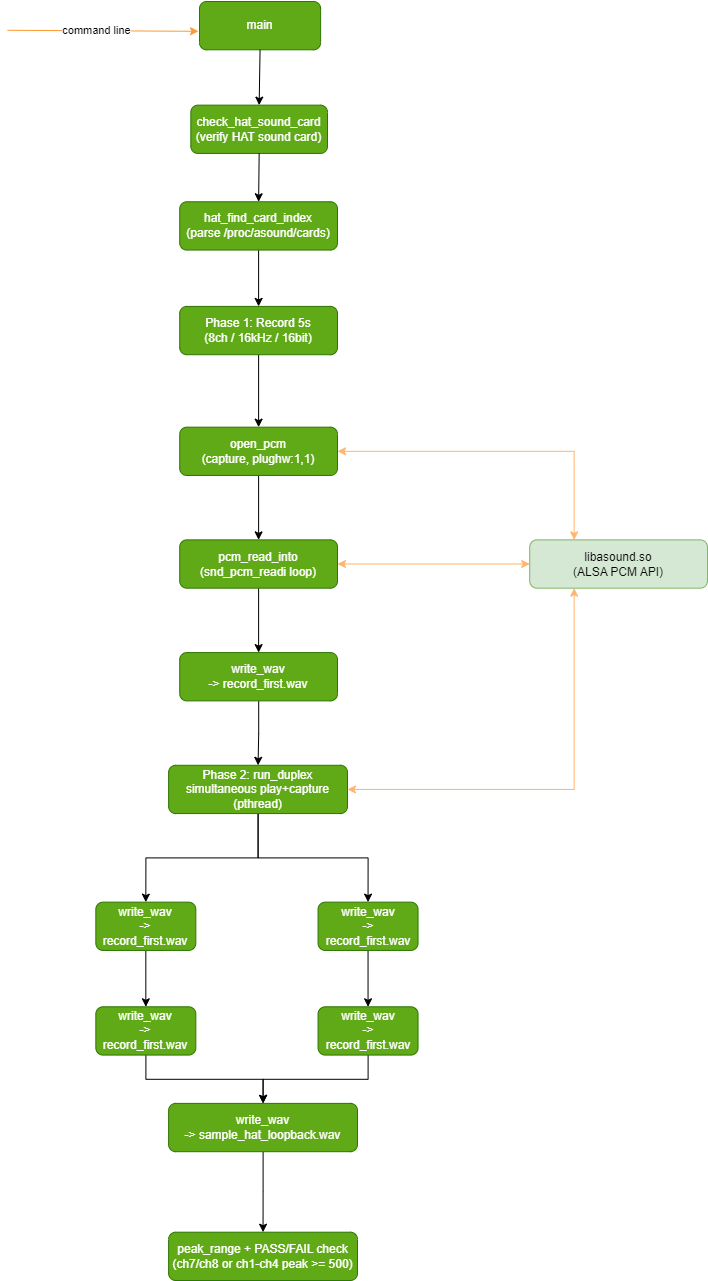
sample_hat_loopback is also developed based on the ALSA library (libasound) using C language, and additionally uses pthread to implement parallel full-duplex capture/playback. It targets the Waveshare Audio Driver HAT REV2 (ES7210+ES8156) external sound card and is primarily divided into the following components:
Sound card detection module, parses
/proc/asound/cardsto find the sound card namedduplexaudio, and verifies whether it is registered as card 1 (corresponding toplughw:1,1/plughw:1,0)Phase 1 recording module, opens
plughw:1,1to record 5 seconds of 8-channel voice, saves it asrecord_first.wavand prints the peak of each channelPhase 2 full-duplex module, runs in parallel through two pthreads — the playback thread plays the phase 1 recording twice consecutively (with a 2-second silence gap in between), while the capture thread simultaneously records the complete 8-channel stream and saves it as
sample_hat_loopback.wavPeak decision module, counts the peaks of ch7/ch8 (PCB loopback) and ch1-ch4 (wired loopback) in the captured data; peak >= 500 (i.e. the maximum absolute value of the channel’s PCM samples reaches 500; the 16-bit range is 0-32768, reaching 500 means the loopback capture path actually captured a valid signal rather than noise floor/silence) judges PASS, otherwise FAIL
Software architecture diagram: sample_hat_loopback first detects the HAT sound card at the main entry, then sequentially enters phase 1 recording and phase 2 full-duplex (pthread dual-thread play-while-record), and finally gives a PASS/FAIL conclusion from the peak decision module, relying on libasound’s PCM interfaces, the pthread threading library, and the file system to store WAV files.
The program runs as follows:
At startup, it searches
/proc/asound/cardsfor the sound card namedduplexaudioand verifies whether it is registered as card 1 (corresponding toplughw:1,1/plughw:1,0). If the HAT is not detected or the card number does not match, it prints a troubleshooting hint and exits.Phase 1: opens the
plughw:1,1capture device, speaks into the microphone for 5 seconds, saves the 8-channel voice asrecord_first.wav, and prints the peak of each channel.Phase 2: opens the capture and playback devices again, and runs in parallel through two threads (pthread) — the playback thread plays the voice recorded in phase 1 twice consecutively (with a 2-second silence gap in between), while the capture thread simultaneously records the complete 8-channel stream and saves it as
sample_hat_loopback.wav.Counts the peaks of ch7/ch8 (PCB loopback channels) and ch1-ch4 (wired loopback channels) in the captured data; peak >= 500 judges PASS, otherwise FAIL.
3.12.4.3. API Process Description
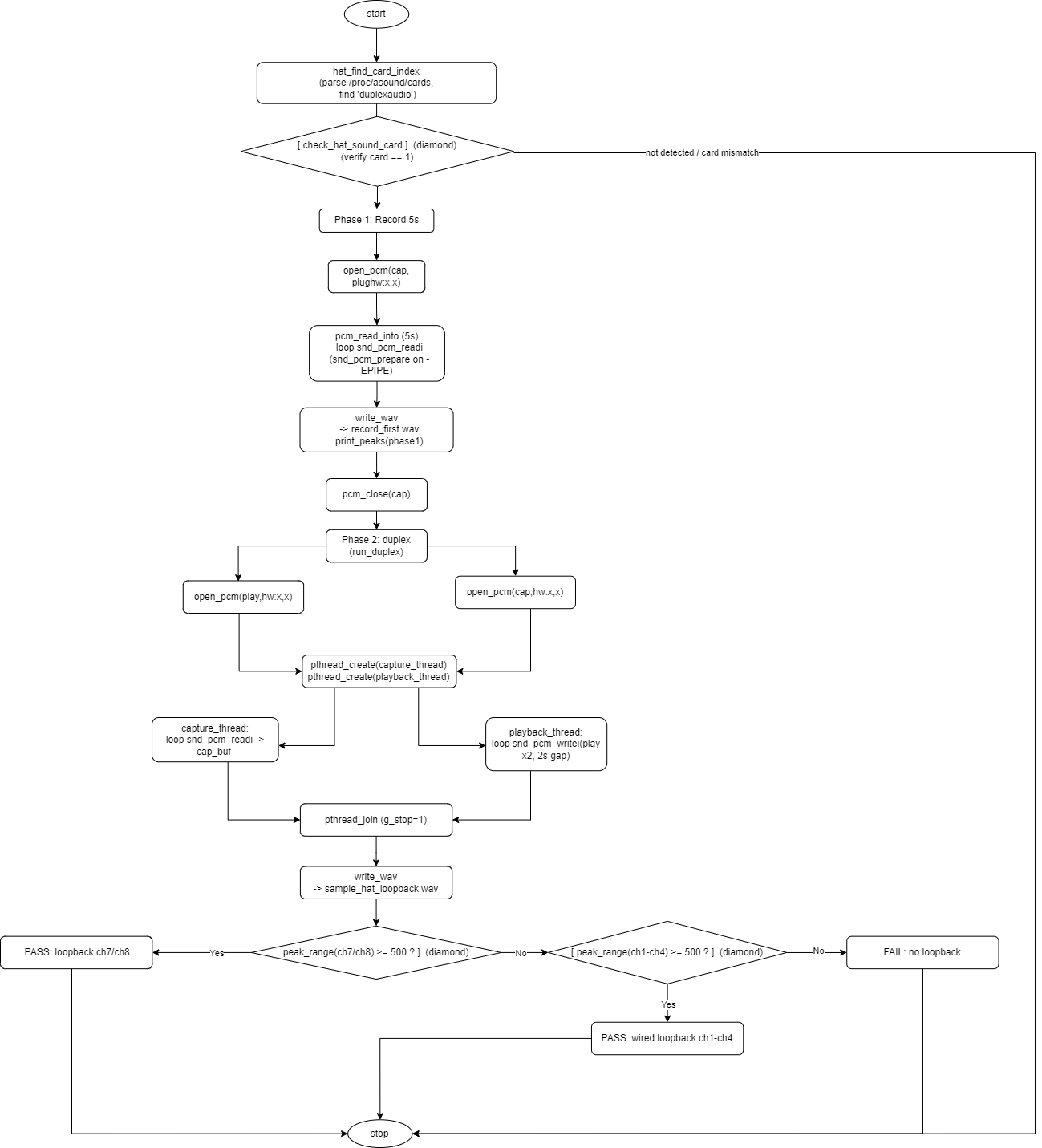
sample_hat_loopback is also developed based on the ALSA library (libasound), and additionally uses pthread to implement full-duplex parallelism. Main API flow:
hat_find_card_index: parses
/proc/asound/cardsto locate the HAT sound card number.snd_pcm_open: opens the capture (SND_PCM_STREAM_CAPTURE) and playback (SND_PCM_STREAM_PLAYBACK) PCM devices respectively, using
plughw:1,1/plughw:1,0.snd_pcm_hw_params_any / snd_pcm_hw_params_set_access / snd_pcm_hw_params_set_format / snd_pcm_hw_params_set_channels / snd_pcm_hw_params_set_rate_near / snd_pcm_hw_params_set_period_size_near / snd_pcm_hw_params_set_buffer_size_near / snd_pcm_hw_params: configure and apply hardware parameters.
snd_pcm_prepare: prepare the device.
pthread_create / pthread_join: create and wait for the capture and playback threads.
snd_pcm_readi / snd_pcm_writei: the capture thread reads and the playback thread writes audio data; when -EPIPE is returned, snd_pcm_prepare is called to recover.
snd_pcm_close: close the PCM device.
Custom write_wav: writes 8-channel PCM data to a standard WAV file.
3.12.4.4. How to Run the Program
On the target board, enter the sample_hat_loopback directory and run directly (the program has no command-line arguments and uses plughw:1,1/plughw:1,0):
cd /app/platform_samples/sample_audio/sample_hat_loopback
./sample_hat_loopback
Before running, please confirm:
The audio sub-card has been installed on the 40-pin header
3.12.4.5. Running Output Examples
Typical output when the audio sub-card passes detection and completes the two-phase test:
OK: ALSA card 1 'duplexaudio' matches Audio Driver HAT REV2 driver config.
     Driver/overlay check only confirm the mounted board is
     Waveshare Audio Driver HAT REV2 (ES7210+ES8156), 3x DIP OFF, then continue.
     playback plughw:1,0  capture plughw:1,1

format: 8ch 16000Hz 16bit period=512
=== phase 1: speak into mic (5s) ===
saved record_first.wav (80000 frames, 5.0s)
phase1 peak: ch1=xxxx ch2=xxxx ch3=xxxx ch4=xxxx ch5=xxxx ch6=xxxx ch7=xxxx ch8=xxxx

=== phase 2: play voice x2 (gap 2s) + capture ===
capture length: 12.0s
saved sample_hat_loopback.wav (192000 frames, 12.0s)
phase2 peak: ch1=xxxx ch2=xxxx ch3=xxxx ch4=xxxx ch5=xxxx ch6=xxxx ch7=xxxx ch8=xxxx

PASS: PCB loopback ch7/ch8 (peak xxxx)
Decision explanation:
If the peak of ch7/ch8 (HAT onboard PCB loopback channels) >= 500, it prints
PASS: PCB loopback ch7/ch8 (peak xxxx), indicating the HAT onboard loopback capture path is normal.If ch7/ch8 do not meet the threshold but the peak of ch1-ch4 (external wired loopback channels) >= 500, it prints
PASS: wired loopback ch1-ch4 (peak xxxx), with an accompanying ch7/ch8 peak hint.If the peaks of both channel groups are below 500, it prints
FAIL: no loopback ..., indicating no valid loopback capture was detected; check the HAT installation, DIP switches, and system enable configuration.
Output when the HAT is not detected:
FAIL: Audio Driver HAT REV2 not detected (missing 'duplexaudio').

Please check:
  1. HAT on 40-pin header, all 3 DIP switches OFF
  2. srpi-config -> Interface Options -> Audio -> Audio Driver HAT V2
  3. Reboot after setup: sync && reboot
  4. Run: cat /proc/asound/cards
Note: The xxxx in the above output are the actual sampling peaks of each channel, which vary with microphone input, playback volume, and wiring. The final return value of the program: PASS is 0, FAIL is 1, which can be used in scripts to determine the test result.
3.12.5. Common Issues
Program fails to open the audio device:
Ensure the ALSA library is properly installed and the audio device driver is functioning correctly.
Confirm the device string format is correct; sample_alsa only accepts
hw:card,device(plughw:/plug:not supported). Usecat /proc/asound/cardsto check the actually available card numbers.
Warning Warning: mixer control 'ADC PGA Gain' not set ... (skipped) appears during recording:
This means no mixer control named
ADC PGA Gainexists on the current sound card; the program skips this gain setting and continues recording, which is normal behavior. Useamixer -c <card> contentsto view the actual control names supported by the sound card, and modifycontrol_namein the source code to match the actual control if needed.
Recorded audio file cannot be played:
Ensure the audio file format is correct; use WAV format.
sample_alsa applies digital gain to samples based on bit depth during recording (default gain=10); if clipping distortion occurs during playback, reduce or disable
gaininrecord_audio()in the source code and recompile.
Playback parameters are inconsistent with command-line settings:
sample_alsa configures the PCM device using the sampling rate, channels, and bit depth from the WAV file header during playback; the command-line
-r/-c/-bonly apply to recording. If the file header differs from the command-line settings, the program prints aNote: WAV format differs from current CLI settings ...notice, which is normal behavior.
Buffer overflow error (Buffer overflow error occurred!) occurs during program execution:
This may be due to improper hardware parameter settings or device driver issues; try adjusting parameters or checking the driver. When the program encounters this error (-EPIPE), it automatically calls
snd_pcm_prepareto recover and continue; occasional occurrences can be ignored, but frequent occurrences require checking system load and sampling parameters.
sample_hat_loopback reports FAIL: Audio Driver HAT REV2 not detected:
Confirm the HAT is correctly installed on the 40-pin header and all 3 DIP switches are OFF;
Enable it via
srpi-config -> Interface Options -> Audio -> Audio Driver HAT V2, then runsync && rebootto reboot;After reboot, run
cat /proc/asound/cardsto confirmduplexaudioexists and its number is 1 (the program usesplughw:1,1/plughw:1,0).
sample_hat_loopback reports FAIL: no loopback:
This means the loopback capture peaks of both ch7/ch8 and ch1-ch4 are below the threshold 500. Check whether the HAT onboard PCB loopback channel is normal, or connect an external wired loopback on ch1-ch4; also confirm that speaking into the microphone in phase 1 produced normal input (refer to the
phase1 peakoutput).