3.18. sample_trustzone Usage Guide
3.18.1. Function Overview
sample_trustzone provides simple example code for both TA and CA. Users can learn how to create and use TA and CA for command interaction through sample_ta and sample_ca.
sample_ta implements three custom commands to handle integer and string data types:
Increment command
TA_SAMPLE_CMD_INC_VALUE: The TA increments the input value by 1 and returns it to the CA.Decrement command
TA_SAMPLE_CMD_DEC_VALUE: The TA decrements the input value by 1 and returns it to the CA.String echo command
TA_SAMPLE_CMD_ECHO_STR: The TA appends[TA]to the input string and echoes it back to the CA.
3.18.1.1. Software Architecture Description
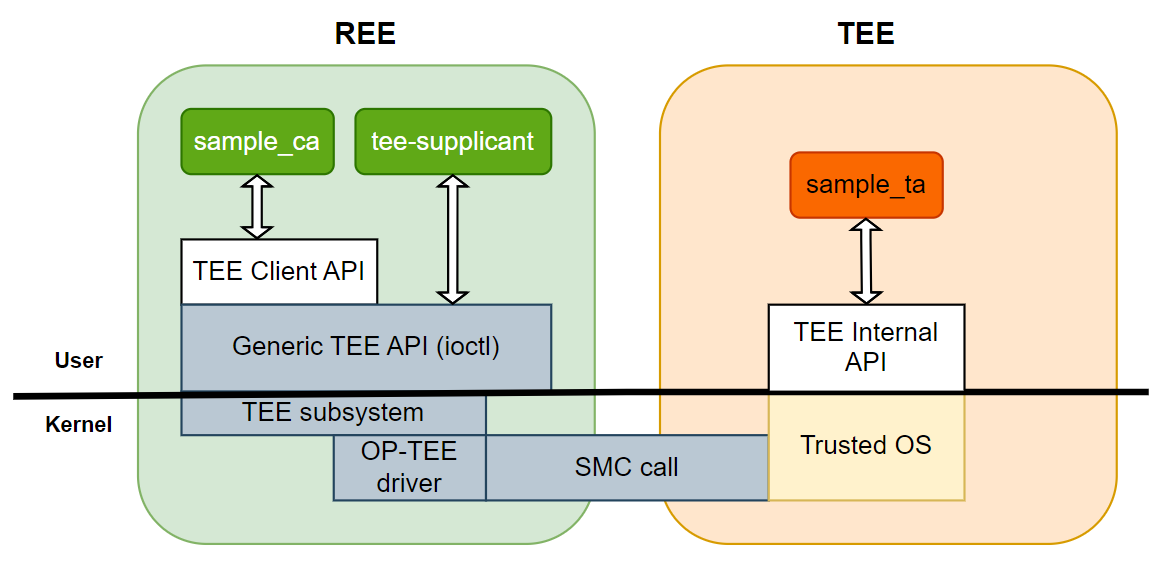
3.18.1.2. Code Location and Directory Structure
Code location:
app/samples/platform_samples/sample_trustzoneDirectory structure
sample_trustzone
├── sample_ca
│   ├── Makefile
│   └── sample_ca.c
└── sample_ta
    ├── Makefile
    ├── include
    │   └── sample_ta.h
    ├── sample_ta.c
    ├── sub.mk
    └── user_ta_header_defines.h
3.18.1.3. API Process Description
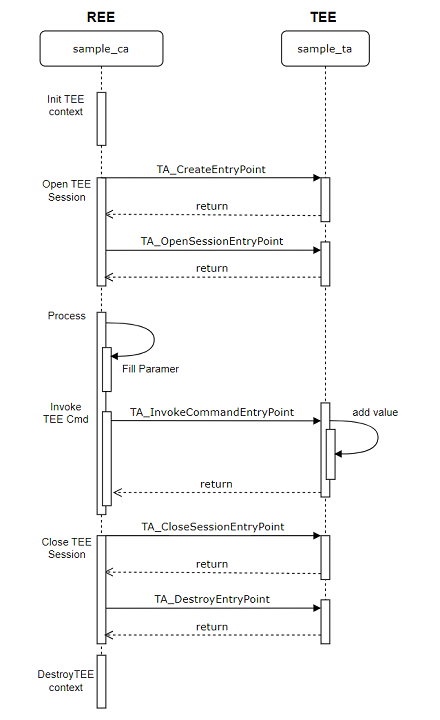
3.18.2. Compilation
The following sections describe the compilation methods for sample_ta and sample_ca respectively.
3.18.2.1. sample_ta Compilation
Copy sample_ta source code
Note: sample_ta is not compiled directly under the platform_samples directory. It needs to be copied to miniboot/optee/hobot_tee_devkit/ta/customer for compilation.
Use the following command:
cp app/samples/platform_samples/sample_trustzone/sample_ta miniboot/optee/hobot_tee_devkit/ta/customer/ -rf
Generate UUID
This step can be skipped if using the UUID provided in the example.
Multiple TAs can coexist in the system, each requiring a unique UUID.
UUIDs can be generated at: https://www.uuidgenerator.net/
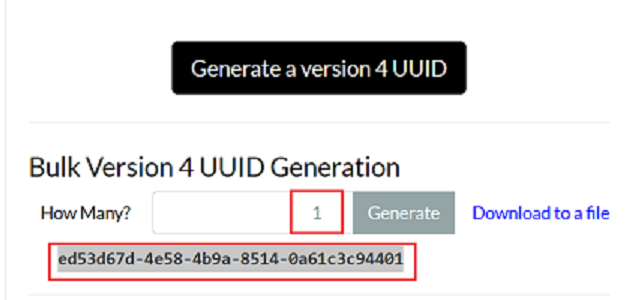
As shown above, the generated UUID value is ed53d67d-4e58-4b9a-8514-0a61c3c94401.
Configure UUID
This step can be skipped if using the UUID provided in the example.
The UUID generated in the previous step must be inserted into the following source files.
File path: sample_ta/include/sample_ta.h
#define TA_SAMPLE_UUID \
	{ 0xed53d67d, 0x4e58, 0x4b9a, \
		{ 0x85, 0x14, 0x0a, 0x61, 0xc3, 0xc9, 0x44, 0x01} }
File path: sample_ta/Makefile
# The UUID for the Trusted Application
BINARY=ed53d67d-4e58-4b9a-8514-0a61c3c94401
Add sample_ta to build options
Modify miniboot/optee/hobot_tee_devkit/ta/customer/Makefile and append sample_ta to the variable CTA_DIRS:
CTA_DIRS := sample_ta
Compile
Run the command ./bd.sh miniboot at the SDK root directory to automatically compile sample_ta.
The compiled output will be located at miniboot/optee/hobot_tee_devkit/out/ta/sample_ta.
The TA executable follows the naming rule [UUID].ta. Based on the UUID configured earlier, the file will be named ed53d67d-4e58-4b9a-8514-0a61c3c94401.ta.
3.18.2.2. sample_ca Compilation
Configure UUID
This step can be skipped if using the UUID provided in the example.
The CA specifies the TA to invoke via UUID, so the TA’s UUID must be configured in the code.
// Match the TA UUID configured in the previous step
TEEC_UUID uuid =  { 0xed53d67d, 0x4e58, 0x4b9a, \
		{ 0x85, 0x14, 0x0a, 0x61, 0xc3, 0xc9, 0x44, 0x01} };

// ...(code omitted)...
// Pass the UUID when opening the session
res = TEEC_OpenSession(&ctx, &sess, &uuid,
			       TEEC_LOGIN_PUBLIC, NULL, NULL, &err_origin);
// ...(code omitted)...
Compile
Run the make command in the sample_ca source directory to complete compilation:
cd /app/samples/platform_samples/sample_trustzone/sample_ca
make
For detailed compilation instructions, refer to the Compilation Method section.
3.18.3. Deployment
The following sections describe the deployment methods for sample_ta and sample_ca respectively.
3.18.3.1. sample_ta Deployment
Copy the compiled sample_ta binary from the previous step to the directory out/deploy/system/usr/lib/optee_armtz.
Run ./bd.sh system to package the sample_ta binary into the system partition.
After flashing the system image, the sample_ta file will be located on the device at: /usr/lib/optee_armtz.
3.18.3.2. sample_ca Deployment
After flashing the system image, the sample_ca executable will be located on the device at: /app/platform_samples/sample_trustzone/sample_ca.
3.18.4. Execution
3.18.4.1. Program Execution Method
Run the program directly with
./sample_ca -hto get help information:
3.18.4.2. Program Parameter Options
Usage: sample_ca [OPTIONS] [value]
Options:
  -i <value>      Increase value From TA
  -d <value>      Decrease value From TA
  -c <string>     Echo string From TA
  -h              Show this help message
Options:
i <value>: The TA increments the input value by 1 and returns it to the CA.d <value>: The TA decrements the input value by 1 and returns it to the CA.c <string>: The TA appends[TA]to the input string and echoes it back to the CA.h: Display help message.
3.18.4.3. Execution Results
Verify Increment Command
Run the command ./sample_ca -i 10 to pass 10 to sample_ta.
The printed log is as follows:
Establish Context with OP-TEE!
Establish Session with TA!
I/TC: RPMB: Using generated key
D/TA:  TA_CreateEntryPoint:39 has been called
D/TA:  TA_OpenSessionEntryPoint:68 has been called
D/TA:  inc_value:105 has been called
I/TA: Got value: 10 from NW
I/TA: Increase value to: 11
TA incremented value to 11
Disconnect Session with TA!
D/TA:  TA_DestroyEntryPoint:50 has been called
Disconnect Context with OP-TEE!
It can be seen that the TA processed and returned the value 11 to the CA.
Verify Decrement Command
Run the command ./sample_ca -d 10 to pass 10 to sample_ta.
The printed log is as follows:
Establish Context with OP-TEE!
Establish Session with TA!
D/TA:  TA_CreateEntryPoint:39 has been called
D/TA:  TA_OpenSessionEntryPoint:68 has been called
D/TA:  dec_value:125 has been called
I/TA: Got value: 10 from NW
I/TA: Decrease value to: 9
TA incremented value to 9
Disconnect Session with TA!
D/TA:  TA_DestroyEntryPoint:50 has been called
Disconnect Context with OP-TEE!
It can be seen that the TA processed and returned the value 9 to the CA.
Verify String Echo Command
Run the command ./sample_ca -c hello to pass the string to sample_ta.
The printed log is as follows:
Establish Context with OP-TEE!
Establish Session with TA!
D/TA:  TA_CreateEntryPoint:39 has been called
D/TA:  TA_OpenSessionEntryPoint:68 has been called
D/TA:  echo_str:146 has been called
I/TA: Got sting from NW: hello
TA Echo: hello[TA]
Disconnect Session with TA!
D/TA:  TA_DestroyEntryPoint:50 has been called
Disconnect Context with OP-TEE!
It can be seen that the TA processed and returned the string hello[TA] to the CA.
3.18.5. Common Issues
3.18.5.1. CA Program Fails to Call TA with “Verify key” Error

Solution:
TA loading depends on the user root key.
For instructions on burning the user root key, please refer to efuse