3.21. sample_lvgl_camera Usage Guide
3.21.1. Overview
sample_lvgl_camera is an LVGL-based camera UI sample. On a MIPI panel in the quick-start environment, it demonstrates a full application path: live preview, touch interaction, capture / record, and gallery playback (video has no audio).
Features:
Live preview: Camera Sensor output goes through
VIN → ISP → VSEas NV12 and is shown full-screen on a DRM video plane.Touch UI: LVGL draws semi-transparent widgets on a DRM ARGB overlay plane. Touch uses Linux evdev (not LVGL’s built-in
LV_USE_EVDEV).Capture: Asynchronous JPEG still capture with timestamp watermark and shutter feedback.
Record: Hardware H.264 encode, muxed to MP4; gallery list supports browse / delete.
Gallery playback: Stills are hardware-decoded JPEG and shown full-screen on the UI layer by default; tapping a video demuxes with FFmpeg, then VPU hardware-decodes H.264 onto the video plane.
Status: Remaining shot estimate and free storage; when space is low, shows
FULL, refuses saves, and may auto-stop recording.
Note: This sample targets a specific product setup (720×1280 portrait MIPI LCD + 720×1280 touch panel + SC230AI).
3.21.1.1. Software Architecture
Software layers (top to bottom):
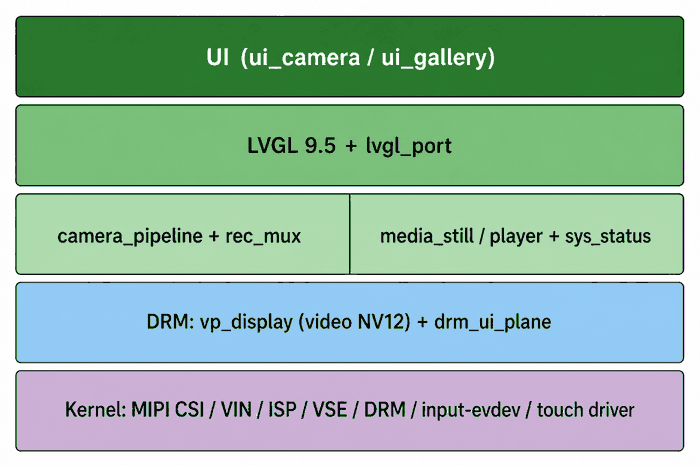
Application UI:
ui_camera/ui_gallery— camera main UI, status bar, shutter / REC / gallery controls.LVGL framework: LVGL 9.x widgets, timers, and event loop; flush and input go through the port layer.
Display / input port:
lvgl_display(ARGB8888 → DRM overlay),lvgl_input(evdev touch).Camera business logic:
camera_pipeline— preview thread, JPEG capture, H.264 record and remux, still / video playback.Multimedia and display: VIN / ISP / VSE, encoder,
vp_displayvideo plane,drm_ui_planeUI overlay.System status:
sys_statusreads battery (/sys/class/power_supply; show if present, hide if not) and free storage for the status bar and storage-guard logic.
Dual-plane display:
| Layer | Typical plane | Format | Content |
|---|---|---|---|
| Video | 33 | NV12 | Camera preview; gallery video / stills |
| UI | Runtime-scanned ARGB overlay (e.g. 40) | ARGB8888 | LVGL viewfinder UI (cream frame / bottom bar + controls, with alpha blend) |
3.21.1.2. Code Location and Directory Structure
Location:
app/samples/platform_samples/sample_lvgl_cameraLayout:
sample_lvgl_camera/
├── Makefile
├── README.md
├── setup_lvgl.sh                      # Fetch LVGL 9.5.0 → third_party/lvgl
├── config/
│   └── lv_conf.h                      # LVGL build-time config (color depth, features, etc.)
├── src/
│   ├── main.c                         # Entry, args, main loop
│   ├── camera/
│   │   ├── camera_pipeline.c/.h       # VIN→ISP→VSE preview + capture/record
│   │   ├── media_still.c/.h           # JPEG / watermark / sidecars
│   │   ├── media_player.c/.h          # Gallery MP4 hardware decode playback
│   │   └── rec_mux.c/.h               # Annex-B H.264 → MP4
│   ├── drm/
│   │   ├── drm_ui_plane.c/.h          # UI ARGB overlay
│   │   ├── vp_display.c/.h            # Video DRM plane (with overlay)
│   │   └── uthash.h                   # Used by vp_display
│   ├── lvgl_port/
│   │   ├── lvgl_display.c/.h          # LVGL → DRM ARGB flush
│   │   └── lvgl_input.c/.h            # Linux evdev + board calibration
│   ├── system/
│   │   └── sys_status.c/.h            # Poll battery, temperature, and storage; UI shows free space (FULL / xxMB / xxGB), and battery % when capacity is available.
│   │
│   │
│   └── ui/
│       ├── ui_camera.c/.h             # Camera UI + shutter feedback
│       └── ui_gallery.c/.h            # Gallery
└── third_party/lvgl/                  # LVGL sources (created by setup_lvgl.sh)
The build also links sibling trees:
platform_samples/utils/*.cplatform_samples/vp_sensors/**(sensor config tables)
3.21.1.3. API Flow Description
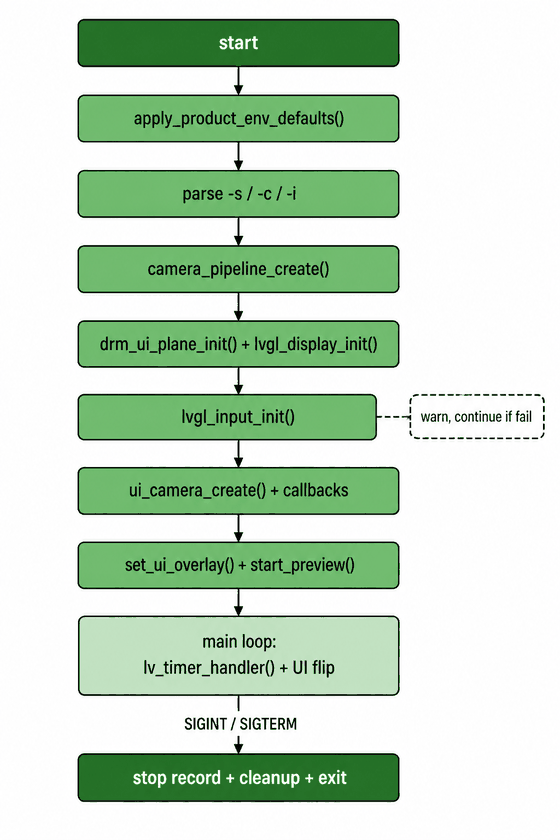
Typical startup:
apply_product_env_defaults(): apply default environment variables (rotation, frame, touch offset, etc.).Parse
-s/-c/-i.camera_pipeline_init(): create sensor path, start VSE drain thread, init MIPI DRM video plane.drm_ui_plane_init()+lvgl_display_init(): create UI overlay and LVGL display.lvgl_input_init(): open touch device and register pointer indev (warn only on failure; can run without touch).ui_camera_create(): create camera UI and bind capture / record / gallery callbacks.camera_pipeline_start_preview(): commit video + UI together.Main loop:
lv_timer_handler()+ DRM UI flip; onSIGINT/SIGTERM, stop recording and release resources.
3.21.2. Environment Preparation
SC230AI module, correctly connected to MIPI CSI
MIPI LCD (product defaults tuned for 720×1280 portrait)
Touch driver loaded;
/dev/input/event*present (product uses gt9xx, for example, loading the driver withmodprobe gt9xx_core)DRM display path available (
/dev/drinodes present)
3.21.3. Build and Deploy
3.21.3.1. Build
This sample builds as part of the SDK and needs headers/libs such as those under out/deploy/system.
Build options:
Full / recommended build:
# From the SDK root, perform a complete build.
./bd.sh

# Or build platform_samples (includes sample_lvgl_camera) from the SDK root.
./bd.sh app
This directory only:
cd app/samples/platform_samples/sample_lvgl_camera
make
# Output: ./lvgl_camera
3.21.3.2. Deploy
After build and install, the binary is typically on the board at:
/app/platform_samples/sample_lvgl_camera/lvgl_camera
You may also copy lvgl_camera to the board (e.g. /userdata) and make it executable:
chmod +x lvgl_camera
3.21.4. Running
3.21.4.1. How to Run
On the board:
cd /app/platform_samples/sample_lvgl_camera
./lvgl_camera
3.21.4.2. UI Controls
Figure 1 — Preview (viewfinder)
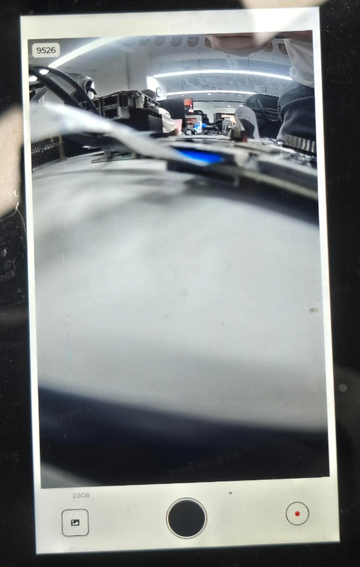
Live preview sits in the cream-colored frame. The bottom bar, left to right: Album, Shutter (large black circle), REC (small red circle). Tap shutter to save a JPEG; tap REC to start / stop recording.
Figure 2 — Gallery
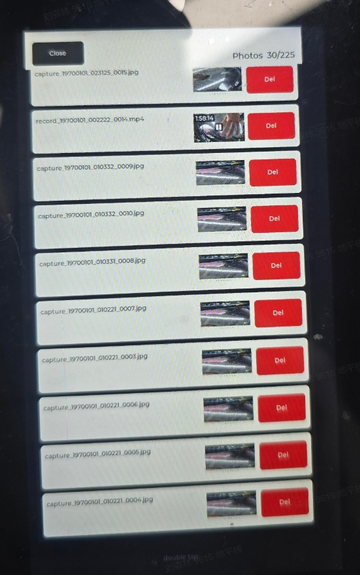
Recent photos and videos are listed newest first. Tap an item to view a still or play an MP4 (no audio). Del removes the item; Close returns to the preview.
| Control | Action | Output |
|---|---|---|
| Shutter (large black circle, center of bottom bar) | JPEG capture (timestamp watermark) + shutter feedback | /userdata/lvgl_camera/capture_*.jpg |
| REC (small red circle next to shutter) | Start / stop recording | /userdata/lvgl_camera/record_*.mp4 and sidecars |
| Gallery | List, delete, view stills, play video | — |
Sidecar files next to each recording (same basename):
| File | Purpose |
|---|---|
.mp4 |
Video file |
.poster.jpg |
First-frame poster for list / pre-roll |
.a565 |
Short looping list thumb (~first 3 s, 5 fps, 160×90 RGB565) |
.vdur |
Duration in seconds (text) for list / progress |
Deleting a media item also removes these sidecars. .poster.jpg is not listed as a standalone album entry. Photo list thumbs decode JPEG on the fly by default.
3.21.4.3. Expected Behavior
When running successfully:
MIPI panel shows dual planes — live preview underneath; cream frame / bottom bar UI on top (gallery / shutter / REC).
Tap Capture to write JPEG; tap REC to start, tap again to stop and write MP4.
Open the gallery to browse recent media; tap a video for hardware-decoded playback (no audio).
Serial logs similar to:
Camera pipeline ready (1920x1080 -> MIPI plane 33),sample_lvgl_camera running,lvgl_input: touch ready ....
Clean exit: send Ctrl+C on the serial console; the app stops recording and releases DRM / LVGL resources.