3.4. sample_vse User Guide
3.4.1. Function Overview
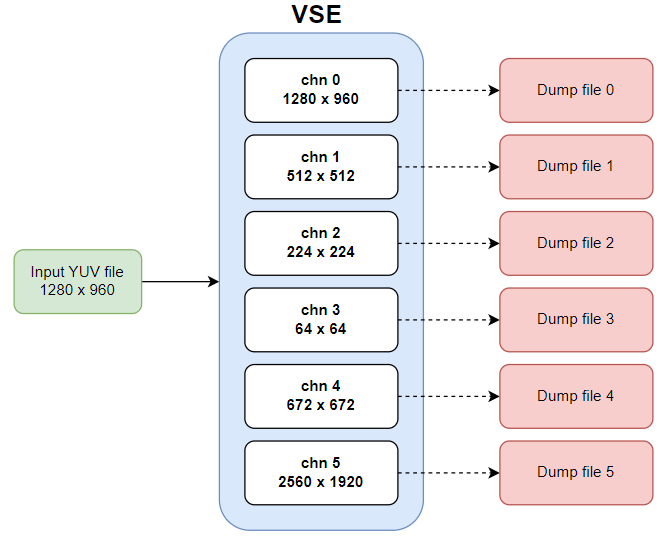
sample_vse initializes the VSE module, configures input and output channel parameters, and implements one input stream and six output streams after scaling and cropping.
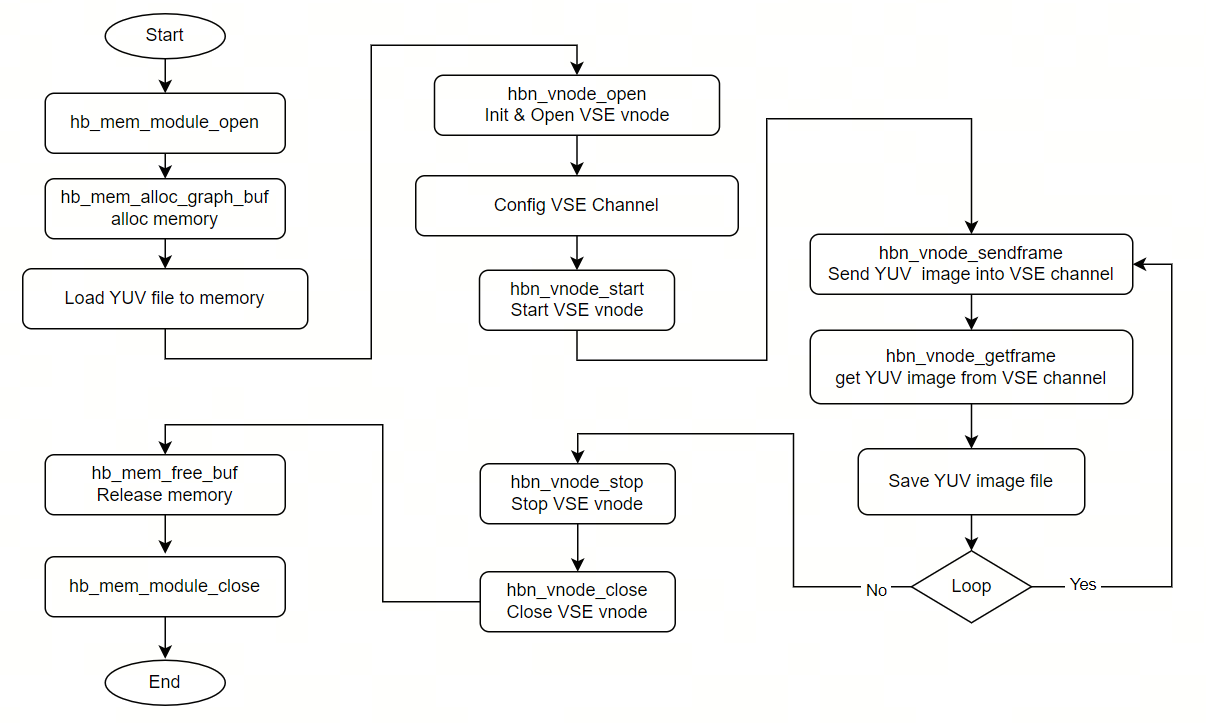
sample_vse also demonstrates how to send video frames to VSE via the asynchronous interface
hbn_vnode_sendframe_async.
3.4.1.1. Software Architecture Description
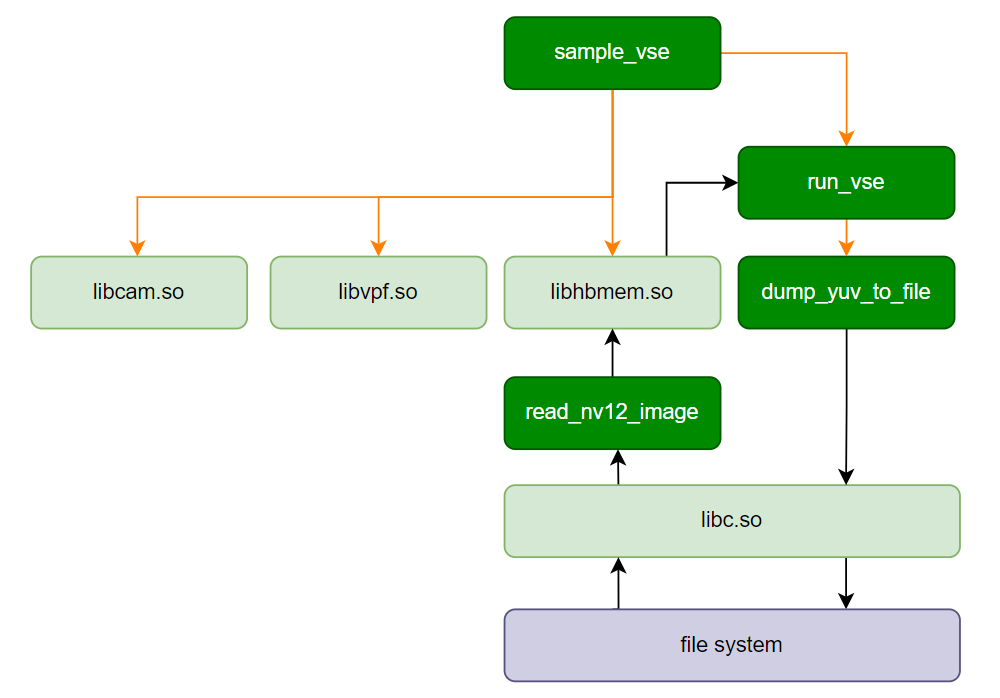
sample_vse primarily depends on libcam.so libvpf.so libhbmem.so. It reads YUV files into memory allocated by HBM and passes them to the VSE channels for scaling (up or down). Finally, the processed YUV data is dumped to the file system.
3.4.1.2. Data Flow Description
The sample program pipeline is shown below. Only one vflow is created, which contains a single VSE vnode. Six internal channels within the VSE vnode achieve scaling at different resolutions.
3.4.1.3. Code Location and Directory Structure
Code location:
app/samples/platform_samples/sample_vseDirectory structure:
sample_vse/
├── Makefile
└── sample_vse.c
3.4.1.4. API Flow Description
3.4.2. Build and Deployment
3.4.2.1. Build
Enter the sample_vse directory and run
maketo compile.The output binary is
sample_vselocated in the source directory.For detailed compilation instructions, refer to the Build Method section.
3.4.2.2. Program Deployment
After uploading sample_vse/sample_vse to the development board, run the command chmod +x sample_vse to grant execution permission.
3.4.3. Execution
3.4.3.1. Execution Method
Running the program directly with ./sample_vse displays help information:
3.4.3.2. Program Parameter Options
./sample_vse
Usage: sample_vse [OPTIONS]
Options:
  -i, --input_file FILE   Input NV12 file path
  -w, --input_width W     Input width in pixels
  -h, --input_height H    Input height in pixels
  -f, --feedback          Feedback mode (hbn_vnode_start)
  -V, --verbose           Verbose dump of frame structures
  -a, --async             Use hbn_vnode_sendframe_async (default: sync sendframe)
  -b, --buf-num N         Ichn buffer index rotation count [1..16], default 1
  -n, --frames N          Send/Get frame loop iterations (default 1)
  -y, --save-yuv          Save ochn NV12 to ./vse_output_nv12_run*_chn*.yuv
i: Specifies the input YUV file; the test program defaults to NV12 format.
w: Input YUV image width.
h: Input YUV image height.
f: Run the VSE node in feedback mode (without creating a vflow).
V: Print detailed information for each frame.
a: Use the asynchronous interface to send YUV images to VSE.
b: Input channel buffer rotation count, range: 1~16, default: 1. Note: when using the asynchronous interface to send YUV images to VSE, this parameter must be greater than or equal to 3.
n: Number of Send/Get loop iterations.
y: Save NV12 images, naming convention: ./vse_output_nv12_run*_chn*.yuv
3.4.3.3. Execution Results
Example 1
Taking a YUV image with input resolution 1280 x 720 as an example, execute: ./sample_vse -i 1280x720_NV12.yuv -w 1280 -h 720 -n 10 -y.
One YUV image is fed into the VSE, and six channels are initialized. Channels 0-4 perform image downscaling, while channel 5 performs upscaling. The processed images are saved as YUV files:
Channel 0 outputs the original input resolution: 1280 x 720.
Channel 1 outputs a commonly used algorithm resolution with 16-pixel alignment: 512 x 512.
Channel 2 outputs a commonly used algorithm resolution without 16-pixel alignment: 224 x 224.
Channel 3 outputs a ROI centered on the original image, with width and height each halved. The output image size equals the ROI size, scaled down to the minimum supported resolution: 64 x 64.
Channel 4 outputs a commonly used algorithm resolution: 672 x 672.
Channel 5 outputs an upscaled image to the maximum supported resolution (note: image can be enlarged up to 4x): 2560 x 1440.
Send/Get loop iterates 10 times.
Added
-yparameter to save images.
Output log:
VSE work mode: vflow
sendframe: sync
ichn buffer rotation count (-b): 1
run loop count (-n): 10
save_yuv: yes (-y)
input: 1280x720_NV12.yuv, 1280x720
(read_yuvv_nv12_file):file read(1280x720_NV12.yuv), y-size(921600)
ichn input width = 1280
ichn input height = 720
hbn_vnode_set_ochn_attr: 0, 1280x720
hbn_vnode_set_ochn_attr: 1, 512x512
hbn_vnode_set_ochn_attr: 2, 224x224
hbn_vnode_set_ochn_attr: 3, 64x64
hbn_vnode_set_ochn_attr: 4, 672x672
hbn_vnode_set_ochn_attr: 5, 2560x1440
sample_vse: completed 10 send/get frame iteration(s)
Example 2
Running in Feedback mode with a 1920 x 1080 YUV image as input, execute: ./sample_vse -i 1920x1080_NV12.yuv -w 1920 -h 1080 -n 10 -f -y.
Send/Get loop iterates 10 times.
Added
-fparameter to enable Feedback mode.Added
-yparameter to save images.
Output log:
VSE work mode: feedback
sendframe: sync
ichn buffer rotation count (-b): 1
run loop count (-n): 10
save_yuv: yes (-y)
input: 1920x1080_NV12.yuv, 1920x1080
(read_yuvv_nv12_file):file read(1920x1080_NV12.yuv), y-size(2073600)
ichn input width = 1920
ichn input height = 1080
hbn_vnode_set_ochn_attr: 0, 1920x1080
hbn_vnode_set_ochn_attr: 1, 512x512
hbn_vnode_set_ochn_attr: 2, 224x224
hbn_vnode_set_ochn_attr: 3, 64x64
hbn_vnode_set_ochn_attr: 4, 672x672
hbn_vnode_set_ochn_attr: 5, 3840x2160
sample_vse: completed 10 send/get frame iteration(s)
Example 3
Running in asynchronous frame sending mode with a 1920 x 1080 YUV image as input, execute: ./sample_vse -i 1920x1080_NV12.yuv -w 1920 -h 1080 -n 30 -a -b 6 -y.
Send/Get loop iterates 30 times.
Added
-aparameter to enable the asynchronous interface.When using the asynchronous interface, the minimum buffer rotation count is 3; this example sets it to 6.
Added
-yparameter to save images.
Output log:
VSE work mode: vflow
sendframe: async
ichn buffer rotation count (-b): 6
run loop count (-n): 30
save_yuv: yes (-y)
input: 1920x1080_NV12.yuv, 1920x1080
(read_yuvv_nv12_file):file read(1920x1080_NV12.yuv), y-size(2073600)
(read_yuvv_nv12_file):file read(1920x1080_NV12.yuv), y-size(2073600)
(read_yuvv_nv12_file):file read(1920x1080_NV12.yuv), y-size(2073600)
(read_yuvv_nv12_file):file read(1920x1080_NV12.yuv), y-size(2073600)
(read_yuvv_nv12_file):file read(1920x1080_NV12.yuv), y-size(2073600)
(read_yuvv_nv12_file):file read(1920x1080_NV12.yuv), y-size(2073600)
ichn input width = 1920
ichn input height = 1080
hbn_vnode_set_ochn_attr: 0, 1920x1080
hbn_vnode_set_ochn_attr: 1, 512x512
hbn_vnode_set_ochn_attr: 2, 224x224
hbn_vnode_set_ochn_attr: 3, 64x64
hbn_vnode_set_ochn_attr: 4, 672x672
hbn_vnode_set_ochn_attr: 5, 3840x2160
sample_vse: completed 30 send/get frame iteration(s)
Viewing YUV Images
Please refer to the Hobot Player static image section for image viewing. The image parameter configuration is described as follows: Configure options as shown in the figure below. In file config, pay attention to the settings of pic_type, yuv_type, width, and height. For example, for
vse_output_nv12_run0_chn0_1280x720_stride_1280.yuv, the configuration should be (PIC_YUV, YUV_NV12, 1280, 720).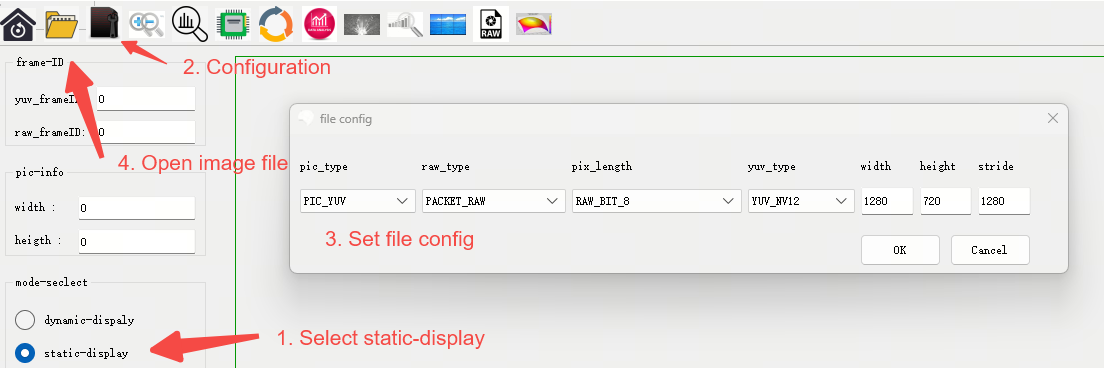
3.4.4. Notes
Channel 5 of the VSE supports only upscaling. If the input resolution is smaller than the default resolution set for VSE channels 0-4 in the test program, an error will occur. For example, using a 64x64 image as input will result in the following error message:
[   51.037647] [L485]vse_ochn_attr_check: Invalid Param attr->target_w: 512, min: 64, max: 64
[   51.045960] vse_ochn_attr_check failed