3.2. sample_vin Instructions
3.2.1. get_vin_data
3.2.1.1. Function Overview
get_vin_data completes the initialization of the Camera Sensor, MIPI CSI, and SIF modules, enabling the retrieval of video frame data from the VIN module. It supports acquiring images in either Raw or YUV format from the VIN module.
Software Architecture Description
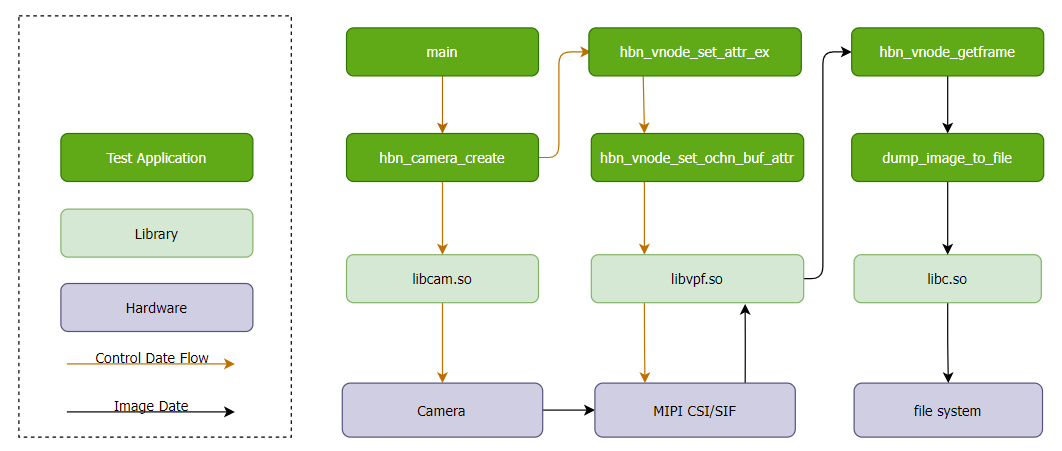
Code Location and Directory Structure
Code location:
app/samples/platform_samples/sample_vin/get_vin_dataDirectory structure
sample_vin/
└── get_vin_data
    ├── get_vin_data.c
    └── Makefile
API Flow Description
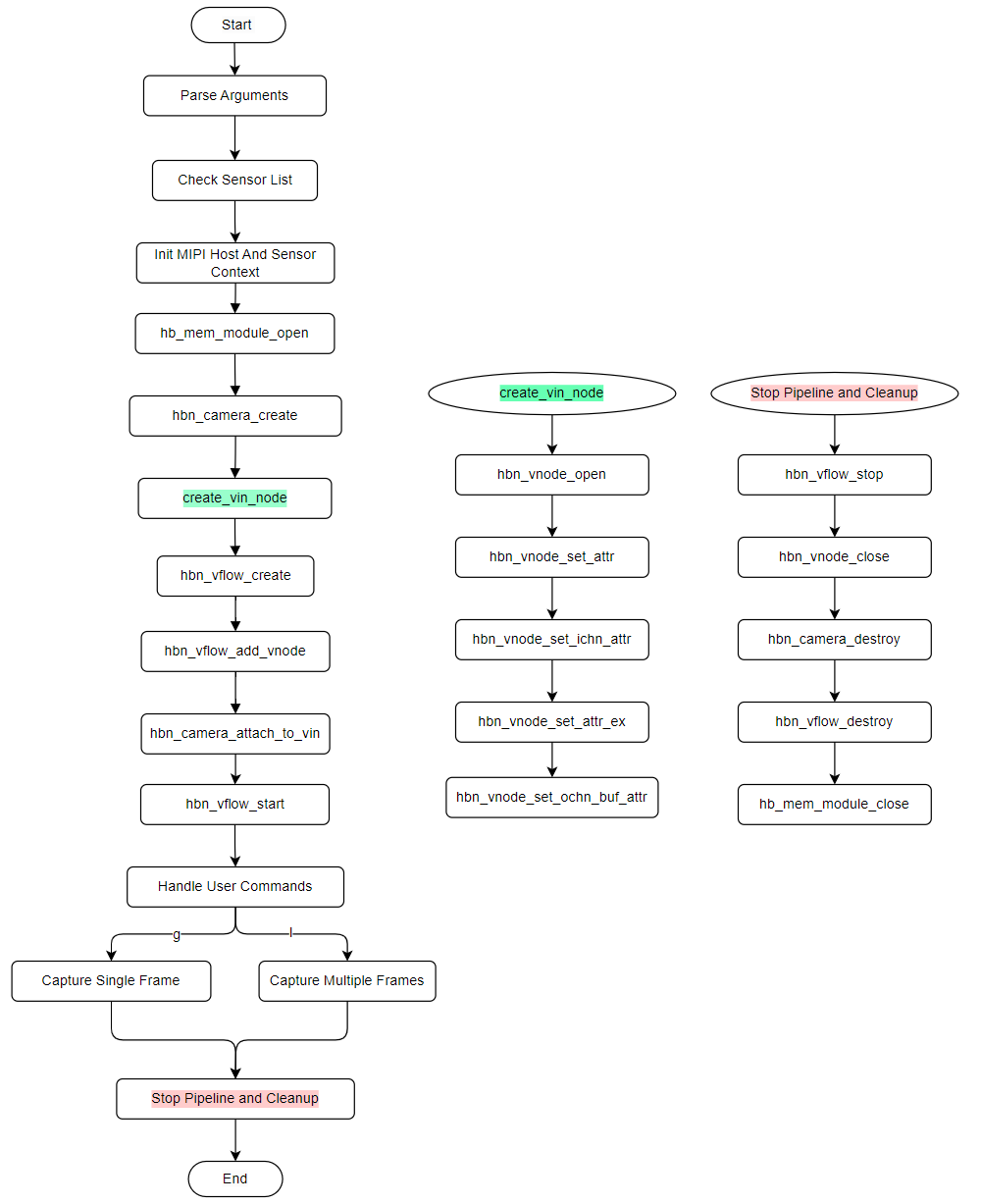
3.2.1.2. Build and Deployment
Build
Enter the
get_vin_datadirectory and runmaketo compile.The output is the executable
get_vin_datalocated in the source directory.For detailed compilation methods, refer to the Build Methods section.
Program Deployment
After flashing the system software image, the executable file of this sample is located on the board at: /app/platform_samples/sample_vin/get_vin_data.
3.2.1.3. Run
How to Run the Program
Run
./get_vin_data -hto display help information.Run
./get_vin_data -s 3to start with sensor index 3 (sc230ai-30fps as example).Run
./get_vin_data -s 3 -f 15to specify the sensor index and configure a target FPS of 15.After launch, the program enters interactive mode. See section 3.2.3.3 for execution results.
Note: This sample implements frame skipping via SIF hardware (indirectly changing the sensor output frame rate) and supports configuring skip parameters both at init and at runtime:
-fcommand-line option: configures skip parameters at initialization.sinteractive command: configures skip parameters dynamically at runtime.
Program Option Descriptions
Usage: get_vin_data [OPTIONS]
Options:
  -s <sensor_index>      Specify sensor index
  -m <sensor_mode>       Specify sensor mode of camera_config_t, support 'm' and 's'
                m: Master
                s: Slave
                The default value is determined by the configuration in vp_sensor
  -e <extern_param>          Specify extension parameters through a JSON file
  -f <target_fps>        Specify target output FPS (0 = disable, sensor native)
  -h                     Show this help message
index: 0  sensor_name: sc1330t                  config_file:linear_1280x960_raw10_30fps_1lane.c
index: 1  sensor_name: irs2875-tof              config_file:linear_208x1413_raw12_15fps_2lane.c
index: 2  sensor_name: sc230ai-10fps            config_file:linear_1920x1080_raw10_10fps_1lane.c
index: 3  sensor_name: sc230ai-30fps            config_file:linear_1920x1080_raw10_30fps_1lane.c
index: 4  sensor_name: sc230ai-dol2-30fps       config_file:dol2_1920x1080_raw10_30fps_2lane.c
index: 5  sensor_name: sc132gs-1280p            config_file:linear_1088x1280_raw10_60fps_1lane.c
index: 6  sensor_name: sc132gs-hdr-2lane        config_file:hdr_1088x1280_raw10_30fps_2lane.c
index: 7  sensor_name: sc035hgs                 config_file:linear_640x480_raw10_30fps_1lane.c
index: 8  sensor_name: sc035hgs_mono            config_file:linear_mono_640x480_raw10_30fps_1lane.c
index: 9  sensor_name: ov5640                   config_file:linear_1920x1080_raw10_30fps_2lane.c
index: 10  sensor_name: f37                     config_file:linear_1920x1080_raw10_30fps_1lane.c
index: 11  sensor_name: imx415-30fps-2lane      config_file:linear_3840x2160_raw10_30fps_2lane.c
index: 12  sensor_name: imx415-30fps-4lane      config_file:linear_3840x2160_raw10_30fps_4lane.c
index: 13  sensor_name: sc202cs-1600x1200       config_file:linear_1600x1200_raw10_30fps_1lane.c
index: 14  sensor_name: irs2381c-tof            config_file:linear_224x1903_raw12_5fps_2lane.c
index: 15  sensor_name: sc035hgs-vc0            config_file:linear_640x480_raw10_30fps_2lane_vc0.c
index: 16  sensor_name: sc035hgs-vc1            config_file:linear_640x480_raw10_30fps_2lane_vc1.c
index: 17  sensor_name: sc231ai-30fps           config_file:linear_1920x1080_raw10_30fps_2lane.c
index: 18  sensor_name: imx586-30fps-4lane      config_file:linear_3840x2160_raw10_30fps_4lane.c
index: 19  sensor_name: os08c10-30fps-2lane     config_file:linear_3840x2160_raw12_30fps_2lane.c
index: 20  sensor_name: ar0233-30fps            config_file:linear_1920x1080_raw12_30fps_2lane.c
index: 21  sensor_name: ar0820std-30fps         config_file:linear_3840x2160_yuv422_30fps_4lane.c
index: 22  sensor_name: sc1336                  config_file:linear_1280x720_raw10_15fps_2lane.c
index: 23  sensor_name: dummy                   config_file:dummy_sensor.c
index: 24  sensor_name: ar0233-30fps            config_file:ar0233_linear_1920x1080_raw12_30fps_2lane_vc0.c
index: 25  sensor_name: ar0233-30fps            config_file:ar0233_linear_1920x1080_raw12_30fps_2lane_vc1.c
index: 26  sensor_name: ov9782-200fps-2lane     config_file:linear_640x360_raw10_200fps_2lane.c
index: 27  sensor_name: ov9782-120fps-2lane     config_file:linear_1280x720_raw10_120fps_2lane.c
index: 28  sensor_name: imx219-640x480-30fps    config_file:linear_640x480_raw10_30fps_2lane.c
index: 29  sensor_name: imx219-1632x1232-30fps  config_file:linear_1632x1232_raw10_30fps_2lane.c
index: 30  sensor_name: imx219-1920x1080-30fps  config_file:linear_1920x1080_raw10_30fps_2lane.c
index: 31  sensor_name: imx219-3264x2464-15fps  config_file:linear_3264x2464_raw10_15fps_2lane.c
index: 32  sensor_name: imx219-3264x2464-21fps  config_file:linear_3264x2464_raw10_21fps_2lane.c
index: 33  sensor_name: ov5647-640x480-60fps    config_file:linear_640x480_raw10_60fps_2lane.c
index: 34  sensor_name: ov5647-1280x960-30fps   config_file:linear_1280x960_raw10_30fps_2lane.c
index: 35  sensor_name: ov5647-1920x1080-30fps  config_file:linear_1920x1080_raw10_30fps_2lane.c
index: 36  sensor_name: ov5647-2592x1944-15fps  config_file:linear_2592x1944_raw10_15fps_2lane.c
index: 37  sensor_name: imx678-30fps-4lane      config_file:linear_3840x2160_raw12_30fps_4lane.c
index: 38  sensor_name: imx678-30fps-4lane-dol2 config_file:dol2_3840x2160_raw12_30fps_4lane.c
index: 39  sensor_name: imx477-1280x960-120fps  config_file:linear_1280x960_raw10_120fps_2lane.c
index: 40  sensor_name: imx477-1920x1080-50fps  config_file:linear_1920x1080_raw12_50fps_2lane.c
index: 41  sensor_name: imx477-2016x1520-21fps  config_file:linear_2016x1520_raw12_21fps_2lane.c
index: 42  sensor_name: imx477-4000x3000-10fps  config_file:linear_4000x3000_raw12_10fps_2lane.c
index: 43  sensor_name: ov50h40-30fps-4lane     config_file:linear_4096x3072_raw10_30fps_4lane.c
index: 44  sensor_name: ox05b1s                 config_file:linear_2592x1944_raw10_30fps_4lane.c
index: 45  sensor_name: ox05b1s_2lane           config_file:linear_2592x1944_raw10_10fps_2lane.c
index: 46  sensor_name: imx415-60fps-4lane      config_file:linear_3840x2160_raw10_60fps_4lane.c
index: 47  sensor_name: sc850sl-30fps           config_file:linear_3840x2160_raw10_30fps_4lane.c
index: 48  sensor_name: shw3g-30fps             config_file:linear_2064x1552_raw12_30fps_4lane.c
index: 49  sensor_name: shw3g-30fps_vc1         config_file:linear_2064x1552_raw12_30fps_4lane_vc1.c
index: 50  sensor_name: sc235hai-30fps          config_file:linear_1920x1080_raw10_30fps_2lane.c
index: 51  sensor_name: cv4006-60fps-2lane      config_file:linear_1280x720_raw10_60fps_2lane.c
index: 52  sensor_name: ov50h40-30fps-4lane     config_file:linear_3840x2160_raw10_30fps_4lane.c
index: 53  sensor_name: ov50h40-30fps-4lane     config_file:linear_4096x3072_raw14_30fps_4lane.c
index: 54  sensor_name: sc132gs-slave-right     config_file:linear_1088x1280_raw10_30fps_slave_1lane_right.c
index: 55  sensor_name: sc132gs-slave-left      config_file:linear_1088x1280_raw10_30fps_slave_1lane_left.c
index: 56  sensor_name: sc132gsstd_vc0          config_file:linear_1088x1280_raw10_10fps_1lane_vc0.c
index: 57  sensor_name: sc132gsstd_vc1          config_file:linear_1088x1280_raw10_10fps_1lane_vc1.c
index: 58  sensor_name: sc132gsstd_vc2          config_file:linear_1088x1280_raw10_10fps_1lane_vc2.c
index: 59  sensor_name: sc132gsstd_vc3          config_file:linear_1088x1280_raw10_10fps_1lane_vc3.c
index: 60  sensor_name: imx415-30fps-4lane-dol2 config_file:dol2_3840x2160_raw10_30fps_4lane.c
index: 61  sensor_name: isx031-30fps-vc0        config_file:isx031_linear_1920x1536_yuv422_30fps_4lane_vc0.c
index: 62  sensor_name: isx031-30fps-vc1        config_file:isx031_linear_1920x1536_yuv422_30fps_4lane_vc1.c
index: 63  sensor_name: isx031-30fps-vc2        config_file:isx031_linear_1920x1536_yuv422_30fps_4lane_vc2.c
index: 64  sensor_name: isx031-30fps-vc3        config_file:isx031_linear_1920x1536_yuv422_30fps_4lane_vc3.c
Options:
s <sensor_index>: Specifies the camera sensor index to use. Can be specified multiple times (up to 4 sensors).m <sensor_mode>: Specifies the sensor mode in the camera configuration.e <extern_param>: Specifies a JSON format file used to quickly change parameters during the camera sensor power-up stage. For details, see the following files in theget_vin_datasource directory:sensor_param_sample1.json,sensor_param_sample2.json,sensor_param_sample3.json.f <target_fps>: Specifies the target output frame rate via SIF hardware. If not configured, the default frame rate is used. The configurable range is 1 to the default frame rate (e.g. for a 30fps sensor, the valid range is 1 to 30).h: Displays help message.
List of currently supported sensors and their corresponding configuration files:
| Index | Sensor Name | Configuration File |
|---|---|---|
| 0 | sc1330t | linear_1280x960_raw10_30fps_1lane.c |
| 1 | irs2875-tof | linear_208x1413_raw12_15fps_2lane.c |
| 2 | sc230ai-10fps | linear_1920x1080_raw10_10fps_1lane.c |
| 3 | sc230ai-30fps | linear_1920x1080_raw10_30fps_1lane.c |
| 4 | sc230ai-dol2-30fps | dol2_1920x1080_raw10_30fps_2lane.c |
| 5 | sc132gs-1280p | linear_1088x1280_raw10_60fps_1lane.c |
| 6 | sc132gs-hdr-2lane | hdr_1088x1280_raw10_30fps_2lane.c |
| 7 | sc035hgs | linear_640x480_raw10_30fps_1lane.c |
| 8 | sc035hgs_mono | linear_mono_640x480_raw10_30fps_1lane.c |
| 9 | ov5640 | linear_1920x1080_raw10_30fps_2lane.c |
| 10 | f37 | linear_1920x1080_raw10_30fps_1lane.c |
| 11 | imx415-30fps-2lane | linear_3840x2160_raw10_30fps_2lane.c |
| 12 | imx415-30fps-4lane | linear_3840x2160_raw10_30fps_4lane.c |
| 13 | sc202cs-1600x1200 | linear_1600x1200_raw10_30fps_1lane.c |
| 14 | irs2381c-tof | linear_224x1903_raw12_5fps_2lane.c |
| 15 | sc035hgs-vc0 | linear_640x480_raw10_30fps_2lane_vc0.c |
| 16 | sc035hgs-vc1 | linear_640x480_raw10_30fps_2lane_vc1.c |
| 17 | sc231ai-30fps | linear_1920x1080_raw10_30fps_2lane.c |
| 18 | imx586-30fps-4lane | linear_3840x2160_raw10_30fps_4lane.c |
| 19 | os08c10-30fps-2lane | linear_3840x2160_raw12_30fps_2lane.c |
| 20 | ar0233-30fps | linear_1920x1080_raw12_30fps_2lane.c |
| 21 | ar0820std-30fps | linear_3840x2160_yuv422_30fps_4lane.c |
| 22 | sc1336 | linear_1280x720_raw10_15fps_2lane.c |
| 23 | dummy | dummy_sensor.c |
| 24 | ar0233-30fps | ar0233_linear_1920x1080_raw12_30fps_2lane_vc0.c |
| 25 | ar0233-30fps | ar0233_linear_1920x1080_raw12_30fps_2lane_vc1.c |
| 26 | ov9782-200fps-2lane | linear_640x360_raw10_200fps_2lane.c |
| 27 | ov9782-120fps-2lane | linear_1280x720_raw10_120fps_2lane.c |
| 28 | imx219-640x480-30fps | linear_640x480_raw10_30fps_2lane.c |
| 29 | imx219-1632x1232-30fps | linear_1632x1232_raw10_30fps_2lane.c |
| 30 | imx219-1920x1080-30fps | linear_1920x1080_raw10_30fps_2lane.c |
| 31 | imx219-3264x2464-15fps | linear_3264x2464_raw10_15fps_2lane.c |
| 32 | imx219-3264x2464-21fps | linear_3264x2464_raw10_21fps_2lane.c |
| 33 | ov5647-640x480-60fps | linear_640x480_raw10_60fps_2lane.c |
| 34 | ov5647-1280x960-30fps | linear_1280x960_raw10_30fps_2lane.c |
| 35 | ov5647-1920x1080-30fps | linear_1920x1080_raw10_30fps_2lane.c |
| 36 | ov5647-2592x1944-15fps | linear_2592x1944_raw10_15fps_2lane.c |
| 37 | imx678-30fps-4lane | linear_3840x2160_raw12_30fps_4lane.c |
| 38 | imx678-30fps-4lane-dol2 | dol2_3840x2160_raw12_30fps_4lane.c |
| 39 | imx477-1280x960-120fps | linear_1280x960_raw10_120fps_2lane.c |
| 40 | imx477-1920x1080-50fps | linear_1920x1080_raw12_50fps_2lane.c |
| 41 | imx477-2016x1520-21fps | linear_2016x1520_raw12_21fps_2lane.c |
| 42 | imx477-4000x3000-10fps | linear_4000x3000_raw12_10fps_2lane.c |
| 43 | ov50h40-30fps-4lane | linear_4096x3072_raw10_30fps_4lane.c |
| 44 | ox05b1s | linear_2592x1944_raw10_30fps_4lane.c |
| 45 | ox05b1s_2lane | linear_2592x1944_raw10_10fps_2lane.c |
| 46 | imx415-60fps-4lane | linear_3840x2160_raw10_60fps_4lane.c |
| 47 | sc850sl-30fps | linear_3840x2160_raw10_30fps_4lane.c |
| 48 | shw3g-30fps | linear_2064x1552_raw12_30fps_4lane.c |
| 49 | shw3g-30fps_vc1 | linear_2064x1552_raw12_30fps_4lane_vc1.c |
| 50 | sc235hai-30fps | linear_1920x1080_raw10_30fps_2lane.c |
| 51 | cv4006-60fps-2lane | linear_1280x720_raw10_60fps_2lane.c |
| 52 | ov50h40-30fps-4lane | linear_3840x2160_raw10_30fps_4lane.c |
| 53 | ov50h40-30fps-4lane | linear_4096x3072_raw14_30fps_4lane.c |
| 54 | sc132gs-slave-right | linear_1088x1280_raw10_30fps_slave_1lane_right.c |
| 55 | sc132gs-slave-left | linear_1088x1280_raw10_30fps_slave_1lane_left.c |
| 56 | sc132gsstd_vc0 | linear_1088x1280_raw10_10fps_1lane_vc0.c |
| 57 | sc132gsstd_vc1 | linear_1088x1280_raw10_10fps_1lane_vc1.c |
| 58 | sc132gsstd_vc2 | linear_1088x1280_raw10_10fps_1lane_vc2.c |
| 59 | sc132gsstd_vc3 | linear_1088x1280_raw10_10fps_1lane_vc3.c |
| 60 | imx415-30fps-4lane-dol2 | dol2_3840x2160_raw10_30fps_4lane.c |
| 61 | isx031-30fps-vc0 | isx031_linear_1920x1536_yuv422_30fps_4lane_vc0.c |
| 62 | isx031-30fps-vc1 | isx031_linear_1920x1536_yuv422_30fps_4lane_vc1.c |
| 63 | isx031-30fps-vc2 | isx031_linear_1920x1536_yuv422_30fps_4lane_vc2.c |
| 64 | isx031-30fps-vc3 | isx031_linear_1920x1536_yuv422_30fps_4lane_vc3.c |
Execution Results
Single Sensor Mode
Based on the prompt, select the sensor name currently connected to the development board. Taking
sc230ai-30fpsas an example, run./get_vin_data -s 3.Use
-f <fps>to specify the target output frame rate, e.g../get_vin_data -s 3 -f 15to output at 15fps.After executing the command, it automatically loads the sc230ai-30fps configuration file
linear_1920x1080_raw10_30fps_1lane.cto initialize the Camera Sensor, MIPI CSI, and SIF modules.After initialization, the system enters interactive mode. The prompt displays each sensor’s short name and current output frame rate, e.g.
Command [sc230ai:30fps]:.
Execution commands:
cd sample_vin/get_vin_data
chmod +x get_vin_data
./get_vin_data -s 3
Execution log:
g: Get one frame. Multiple ‘g’ inputs are supported for continuous image capture. For example, entering
ggggwill capture 4 images.
Using index:3  sensor_name:sc230ai-30fps  config_file:linear_1920x1080_raw10_30fps_1lane.c
mipi mclk is configed.
Searching camera sensor on device: /proc/device-tree/soc/cam/vcon@0 i2c bus: 4 mipi rx phy: 0
INFO: Found sensor_name:sc230ai-30fps on mipi rx csi 0, i2c addr 0x30, config_file:linear_1920x1080_raw10_30fps_1lane.c
Not config sensor mode, so use default mode.


***************  Command Lists  ***************
 g      -- get single frame
 l      -- get a set frames
 f      -- check frame rate and compare with configured fps
 s      -- set target FPS
 q      -- quit
 h      -- print help message

Command [sc230ai:30fps]: g
Dumping RAW data: handle 34661, resolution: 1920x1080 (stride: 3840), size: 4147200, frame id: 0, timestamp: 320230295485
Dump image to file(handle_34661_chn0_vc0_1920x1080_stride_3840_frameid_0_ts_320230295485.raw), size(4147200) succeeded
l: Continuously capture 12 frames, equivalent to entering 12 ‘g’ commands.
Command [sc230ai:30fps]: l
Dumping RAW data: handle 34661, resolution: 1920x1080 (stride: 3840), size: 4147200, frame id: 1, timestamp: 46024435294737
Dump image to file(handle_34661_chn0_vc0_1920x1080_stride_3840_frameid_1_ts_46024435294737.raw), size(4147200) succeeded
... (omitted, total of 12 frames dumped) ...
Dumping RAW data: handle 34661, resolution: 1920x1080 (stride: 3840), size: 4147200, frame id: 424, timestamp: 46038535296244
Dump image to file(handle_34661_chn0_vc0_1920x1080_stride_3840_frameid_424_ts_46038535296244.raw), size(4147200) succeeded
f: Calculate the actual frame rate and determine whether the configured frame rate is correct.
Command [sc230ai:30fps]: f

======================== Frame Rate Check =======================
Sensor sc230ai-30fps: Target FPS = 30fps
Statistics (timestamp): Average FPS = 30.25
First frame_id = 130, Last frame_id = 281, Frame count = 152
First timestamp = 116917846862208, Last timestamp = 116922871251586
Sensor sc230ai-30fps: Frame rate check: Success
=================== Frame Rate Check Complete ===================
s: Set the target output frame rate. Select the sensor index first, then enter the target FPS. Use
fto verify afterward.
Command [sc230ai:12fps]: s

Enter sensor index (0..0): 0
Enter target FPS (0 = disable skip, restore native): 13
[FPS] Sensor[sc230ai] 30 -> 13 fps
Use 'f' to check frame rate
q: Quit the program.
Command [sc230ai:30fps]: q
quit
Multi-Sensor Mode
The -s option can be specified multiple times, up to 4 sensors simultaneously. -f applies to the most recent -s preceding it, allowing per-sensor FPS configuration. For example, ./get_vin_data -s 2 -f 5 -s 60 -f 15 sets sensor 2 to 5fps and sensor 60 to 15fps.
The following is the startup log for ./get_vin_data -s 2 -s 60, where each sensor independently completes CSI detection and initialization:
Using index:2  sensor_name:sc230ai-10fps  config_file:linear_1920x1080_raw10_10fps_1lane.c
mipi mclk is configed.
Searching camera sensor on device: /proc/device-tree/soc/cam/vcon@2 i2c bus: 2 mipi rx phy: 2
INFO: Found sensor_name:sc230ai-10fps on mipi rx csi 2, i2c addr 0x30, config_file:linear_1920x1080_raw10_10fps_1lane.c
Using index:60  sensor_name:imx415-30fps-4lane-dol2  config_file:dol2_3840x2160_raw10_30fps_4lane.c
mipi mclk is configed.
Searching camera sensor on device: /proc/device-tree/soc/cam/vcon@0 i2c bus: 4 mipi rx phy: 0
INFO: Found sensor_name:imx415-30fps-4lane-dol2 on mipi rx csi 0, i2c addr 0x1a, config_file:dol2_3840x2160_raw10_30fps_4lane.c
Not config sensor mode, so use default mode.

***************  Command Lists  ***************
 g      -- get single frame
 l      -- get a set frames
 f      -- check frame rate and compare with configured fps
 s      -- set target FPS
 q      -- quit
 h      -- print help message
Command [sc230ai:10fps, imx415:30fps]:
g: Get one frame from each sensor.
Command [sc230ai:10fps, imx415:30fps]: g
Dumping RAW data: handle 34661, resolution: 1920x1080 (stride: 3840), size: 4147200, frame id: 500, timestamp: 36387692251350
Dump image to file(handle_34661_chn0_vc0_1920x1080_stride_3840_frameid_500_ts_36387692251350.raw), size(4147200) succeeded
Dumping RAW data: handle 100197, resolution: 3840x2160 (stride: 7680), size: 16588800, frame id: 1631, timestamp: 36392514268144
Dump image to file(handle_100197_chn0_vc0_3840x2160_stride_7680_frameid_1631_ts_36392514268144.raw), size(16588800) succeeded
l: Continuously capture 12 frames from each sensor.
Command [sc230ai:10fps, imx415:30fps]: l
Dumping RAW data: handle 34661, resolution: 1920x1080 (stride: 3840), size: 4147200, frame id: 504, timestamp: 36388092014976
Dump image to file(handle_34661_chn0_vc0_1920x1080_stride_3840_frameid_504_ts_36388092014976.raw), size(4147200) succeeded
Dumping RAW data: handle 100197, resolution: 3840x2160 (stride: 7680), size: 16588800, frame id: 1633, timestamp: 36392580945394
Dump image to file(handle_100197_chn0_vc0_3840x2160_stride_7680_frameid_1633_ts_36392580945394.raw), size(16588800) succeeded
... (omitted, 12 frames dumped per sensor) ...
f: Check frame rate for each sensor, separated by
---.
Command [sc230ai:10fps, imx415:30fps]: f

======================== Frame Rate Check =======================
Sensor sc230ai-10fps: Target FPS = 10fps
Statistics (timestamp): Average FPS = 10.20
First frame_id = 191, Last frame_id = 242, Frame count = 52
First timestamp = 117070885035740, Last timestamp = 117075982024326
Sensor sc230ai-10fps: Frame rate check: Success
=================== Frame Rate Check Complete ===================

======================== Frame Rate Check =======================
Sensor imx415-30fps-4lane-dol2: Target FPS = 30fps
Statistics (timestamp): Average FPS = 30.20
First frame_id = 714, Last frame_id = 864, Frame count = 151
First timestamp = 117076018166701, Last timestamp = 117081018969245
Sensor imx415-30fps-4lane-dol2: Frame rate check: Success
=================== Frame Rate Check Complete ===================
s: In multi-sensor mode, select the sensor index first, then enter the target FPS.
Command [sc230ai:10fps, imx415:30fps]: s

Enter sensor index (0..1): 0
Enter target FPS (0 = disable skip, restore native): 7
[FPS] Sensor[sc230ai] 10 -> 7 fps
Use 'f' to check frame rate
Command [sc230ai:7fps, imx415:30fps]: s

Enter sensor index (0..1): 1
Enter target FPS (0 = disable skip, restore native): 15
[FPS] Sensor[imx415] 30 -> 15 fps
Use 'f' to check frame rate
Execution Result Explanation
After running the program, Raw images with filenames in the format like handle_34661_chn0_vc0_1920x1080_stride_3840_frameid_424_ts_46038535296244.raw will be obtained.
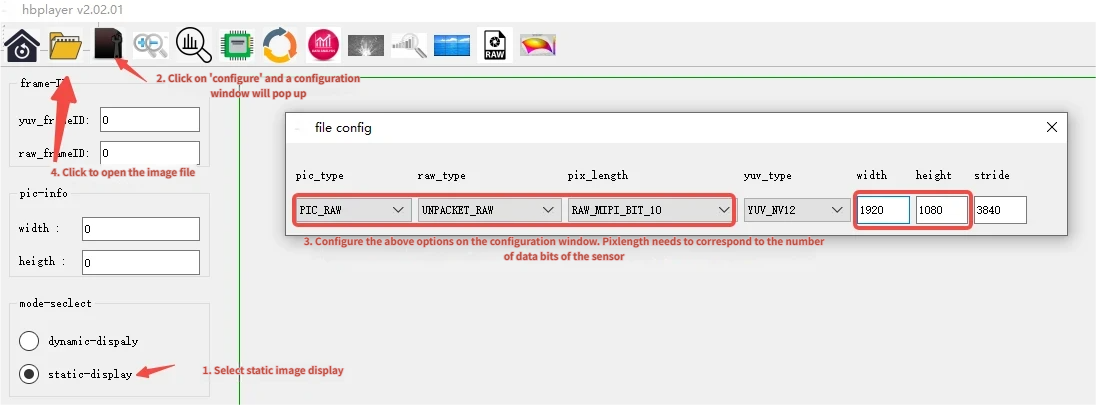
Refer to the Hobot Player Static Image section to view the images. The image parameter configuration is described as follows:
Viewing RAW Images
Configure the options as shown in the figure below. Pay attention to the settings in the file config, including pic_type, raw_type, pix_length, width, and height. For sc1330t, set to (PIC_RAW, UNPACKET_RAW, RAW_MIPI_BIT_10, 1920, 1080).
3.2.1.4. Common Issues
1. “No Camera Sensor found” displayed
Cause Analysis:
The actual camera model connected to the board does not match the camera specified by
./get_vin_data -s.Poor FPC cable contact or loose interface causes test abnormalities.
Solutions:
Ensure the actual connected camera matches the camera specified by
./get_vin_data -s.Check the FPC cable connection and ensure the interface is securely connected.
3.2.2. time_synchronization
3.2.2.1. Function Overview
time_synchronization demonstrates the function of time synchronization between the camera and other peripherals.
The camera’s timestamp is set through the SIF module, and the camera’s timestamp can be obtained via the
hbn_frame_info_tstructure.There are 4 timestamps in
hbn_frame_info_t, described as follows:
| Field | Meaning | Source | Affected by NTP |
|---|---|---|---|
timestamps |
Kernel timestamp at SIF frame start interrupt, counts from system boot | ktime_get_raw_ns() |
No |
sys_timestamps |
Wall clock time at SIF frame start interrupt (Unix nanoseconds) | ktime_get_real_ns() |
Yes |
tv |
Hardware timestamp latched by SIF at the SIF frame start moment | SIF IPI_TS_VSYNC register |
No |
trig_tv |
Hardware timestamp latched by SIF at the LPWM rising edge moment | SIF IPI_TS_TRIG register |
No |
The field parameters of the time-stamp configuration-related structure vin_node_attr.cim_attr.func are as follows:
| Field | Description |
|---|---|
enable_frame_id |
Whether to enable frame_id; only after enabling can getframe obtain frame_id |
time_stamp_en |
Whether to enable the SIF hardware timestamp; only after enabling do trig_tv/tv have values; does not affect timestamps/sys_timestamps |
time_stamp_mode |
SIF latching type, bitmask combinable: 0x01=VSYNC (latch tv), 0x02=TRIGGER (latch trig_tv), 0x03=latch both (recommended) |
ts_src |
Source that triggers SIF latching, 1-8 correspond to LPWM0/1 channels, must match the LPWM connected to hardware trigger exposure |
Method for time synchronization with other sensors:
Other sensors can use
ktime_get_raw_nsorktime_get_real_nsto obtain timestamps.The camera selects the timestamp with the same time base as the other sensor for computation.
Use timestamps - (tv - trig_tv) to obtain the exposure-moment timestamp based on timestamps
Key points:
timestampsis raw monotonic counted from system boot, not affected by NTP frequency adjustment, suitable as a stable userspace synchronization baseline.sys_timestampsis wall clock time, may jump due to NTP adjustment, not recommended as a synchronization baseline, only suitable for cross-device alignment scenarios such as logging/auditing.trig_tv: latched at the moment the LPWM trigger pulse edge reaches SIF (the pulse is split into two paths simultaneously: one to the sensor to trigger exposure, one to SIF for timestamp latching;trig_tvmarks the moment the latter reaches SIF, which is not equal to the moment the sensor actually starts exposure).tv: latched at the moment the MIPI VSYNC (frame start signal) edge reaches SIF, read out from the register by the SIF frame start interrupt.Both are latched into registers by the AON RTC (Always-On domain hardware counter, driven by the 24M crystal) at the signal edge; software reads the raw tick from the register in the frame start interrupt, then converts it to
tv_sec/tv_usec(1 us precision) according totimestamp_clkand fills it into the buffer. Not affected by NTP.tv - trig_tvis the inherent delay from “LPWM trigger pulse arrival” to “MIPI frame start signal arrival” (including sensor exposure + readout + MIPI transfer).
Software Architecture Description
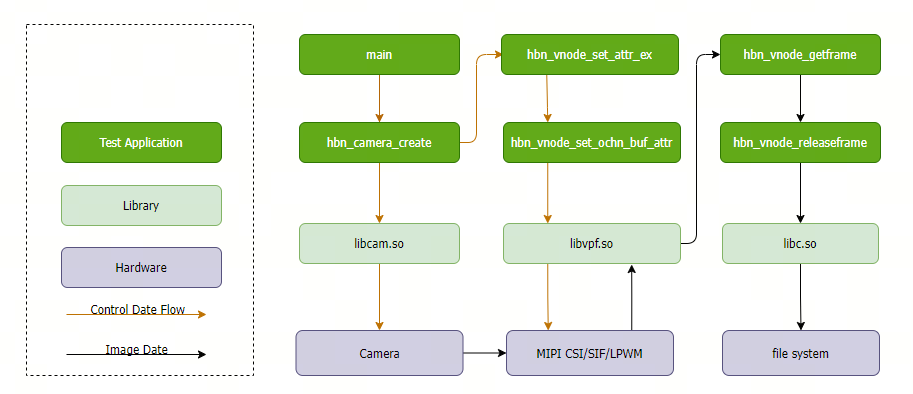
Code Location and Directory Structure
Code location:
app/samples/platform_samples/sample_vin/time_synchronizationDirectory structure
app/samples/platform_samples/sample_vin/time_synchronization/
└── time_synchronization
    ├── Makefile
    ├── time_synchronization.c
API Flow Description
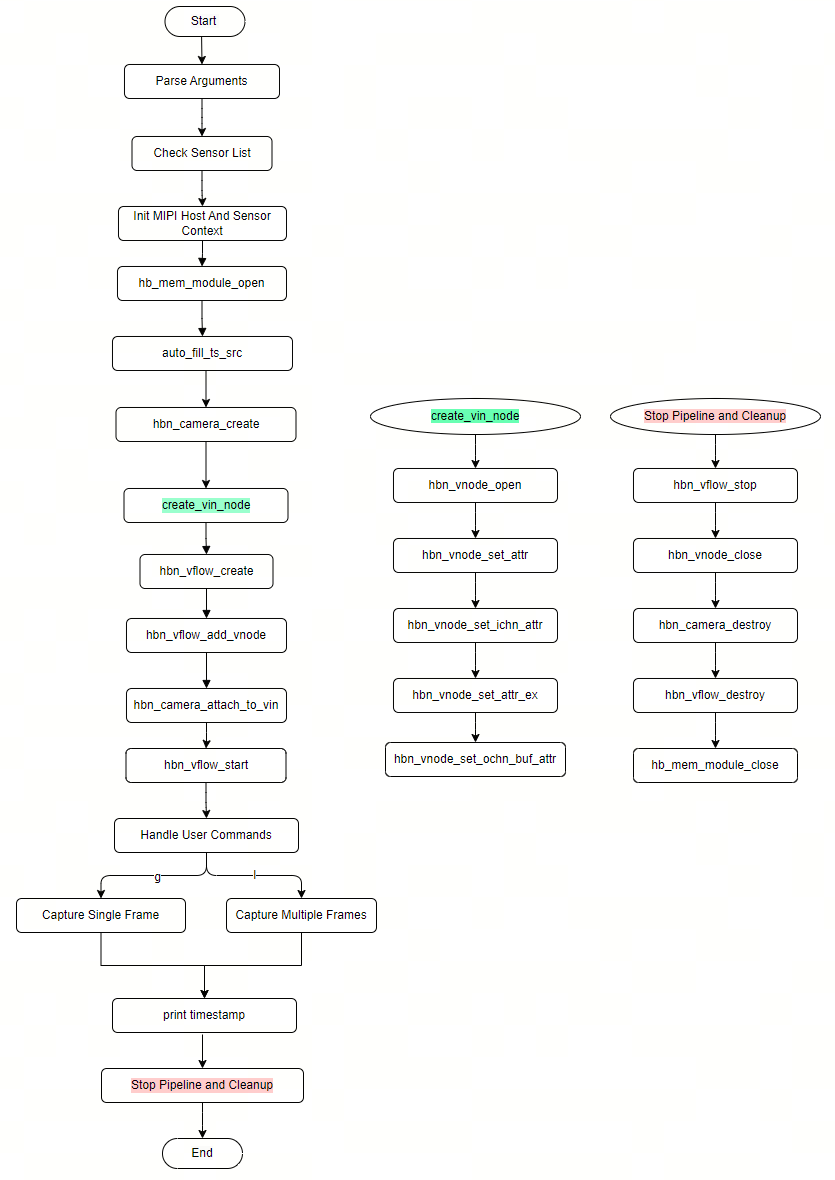
time_synchronization is implemented based on the VIN pipeline, the main flow is as follows:
Parse command line parameters, verify the sensor mode (
-mselects master/slave; if not specified, the sensor config default mode is used).auto_fill_ts_srcreadslpwm_chnfrom the device tree, setsts_src/time_stamp_en/time_stamp_mode(SLAVE mode latches tv+trig_tv; non-SLAVE latches tv only).Create the VIN pipeline (
hbn_camera_create/hbn_vnode_*/hbn_vflow_*), enable LPWM in SLAVE mode.hbn_vnode_getframe()gets one frame, reads the four timestamps.Print the four timestamp values, clock domain description, and exposure-to-mipi delay (
tv - trig_tv).hbn_vnode_releaseframe()releases the frame; release VIN resources on exit.
3.2.2.2. Build and Deployment
Build
Enter the
time_synchronizationdirectory and runmaketo compileThe output is
time_synchronizationin the source directoryFor detailed compilation methods, refer to the Build Methods section
Program Deployment
After flashing the system software image, the executable file of this sample is located on the board at: /app/platform_samples/sample_vin/time_synchronization.
The sensor index can be viewed via the -h parameter; select the sensor actually connected to the board, e.g., sc230ai-10fps corresponds to index 2.
3.2.2.3. Run
How to Run the Program
./time_synchronization -s 2 -m s
After starting, the program enters an interactive command menu: press g to grab a single frame, l to grab 12 consecutive frames, q to quit, h for help.
Program Option Description
./time_synchronization [-s <index> -m <m|s>] [-h]
-s <index>(required): sensor index, view the list via-hm <m|s>(optional): sensor mode-h: show help
Interactive commands:
| Command | Description |
|---|---|
g |
Grab one frame and print four timestamps |
l |
Grab 12 consecutive frames and print timestamps |
q |
Quit the program |
h |
Show command help |
Execution Results
Sensor index=2  name=sc230ai-10fps  config=linear_1920x1080_raw10_10fps_1lane.c
[INFO] RDK board_id is 0x0503, so skip csi test for index 1 and index 3
mipi mclk is not configed.
Searching camera sensor on device: /proc/device-tree/soc/cam/vcon@0 i2c bus: 6 mipi rx phy: 0
INFO: Found sensor_name:sc230ai-10fps on mipi rx csi 0, i2c addr 0x30, config_file:linear_1920x1080_raw10_10fps_1lane.c
Sensor mode: SLAVE_M
vcon@0: lpwm_chn=4 -> ts_src=5, time_stamp_en=1, mode=0x03
csi0: no mclk configured, skip mclk attr.

***************  Command Lists  ***************
 g  -- grab one frame and print four timestamps
 l  -- grab 12 frames and print timestamps
 q  -- quit
 h  -- this help

Command: g
frame_id=0       1920x1080 stride=3840
  timestamps       = 336060994951 ns  (raw monotonic, ktime_get_raw_ns; NOT NTP-adjusted)
  sys_timestamps    = 946705156915582076 ns  (realtime, ktime_get_real_ns; wall clock, NTP-adjusted)
  trig_tv           = 342.216467 s  -> 342216467000 ns  (AON RTC, exposure trigger)
  tv                = 342.216618 s  -> 342216618000 ns  (AON RTC, frame start)
  exposure->mipi duration (tv - trig_tv)    = +151000 ns = +151.000 us
......
Field description:
timestamps: raw monotonic timestamp (ns) at the SIF frame start interrupt, counts from system boot, not affected by NTP adjustmentsys_timestamps: realtime timestamp (ns) at the SIF frame start interrupt, wall clock, may jump due to NTP adjustmenttrig_tv: AON RTC hardware timestamp (ns) latched at the moment the LPWM trigger pulse reaches SIFtv: AON RTC hardware timestamp (ns) latched at the moment the MIPI VSYNC (frame start signal) reaches SIFexposure->mipi duration (tv - trig_tv): the inherent delay from “LPWM trigger pulse arrival” to “MIPI frame start signal arrival” (including sensor exposure + readout + MIPI transfer)
3.2.2.4. Common Issues
1. trig_tv is zero
Confirm
time_stamp_en=1andtime_stamp_modecontains the corresponding bit (0x02latches trig_tv,0x01latches tv,0x03latches both).Confirm
ts_srcmatches the LPWM channel used by hardware trigger exposure (this sample auto-derives from the device treelpwm_chn; if it is 0, the device tree is not configured).Confirm the sensor is in SLAVE mode (master mode has no LPWM trigger,
trig_tvis always 0).