3.11. sample_dsp User Guide
First of all, it should be noted: this section is intended to clarify the usage of DSP and does not include secondary development functions for DSP. Therefore, the adsp directory cannot be found in the BSP’s platform_source_code. The code and directories involved are only for illustrative purposes to aid understanding. If you wish to develop for DSP and the examples provided are insufficient, please contact our business team to apply for DSP secondary development. Only after your application is approved will the corresponding adsp code be made available.
Related documents: This example only demonstrates the usage flow of DSP and does not cover DSP-side firmware secondary development. For DSP firmware secondary development (authorization required), see HIFI5 User Guide, SSF Development Guide, and HIFI5 Interface Document.
3.11.1. Function Overview
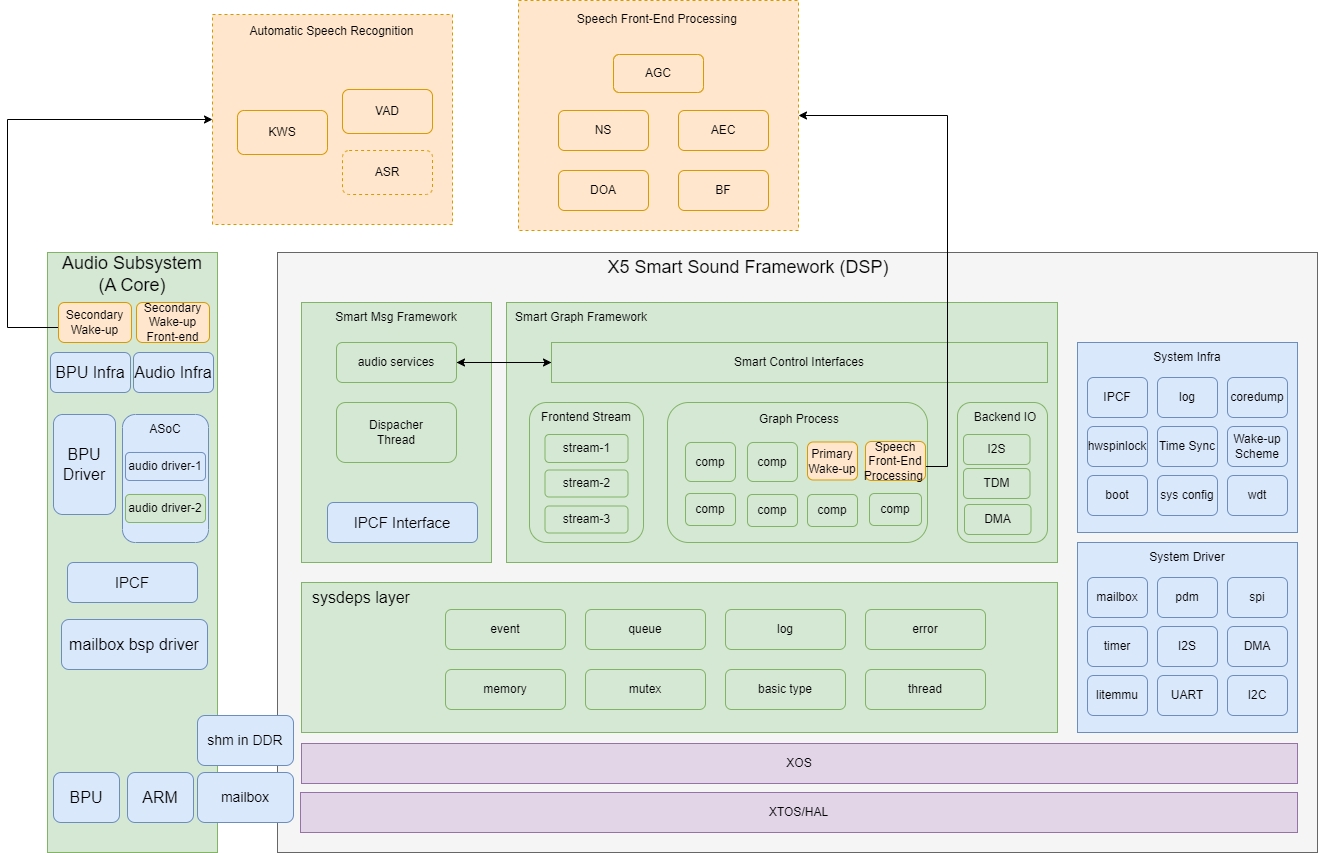
This example mainly illustrates how to simply use DSP for task processing on the chip. The implemented functionality is that the ARM side prepares data and initiates an IPC (Inter-Process Communication) call, the DSP receives the task from the ARM side, calls the algorithm to complete the computational task, and then sends the result back to the ARM side.
3.11.1.1. Software Architecture Description
After receiving a user command, sample_dsp loads and starts adsp_firmware via hb_dsp_start; then the send thread sends the task parameters to the DSP via hb_ipcfhal_send over IPC, and after adsp_firmware finishes processing the task, the receive thread retrieves the execution result via hb_ipcfhal_recv over IPC.
3.11.1.2. Code Location and Directory Structure
DSP side (partial): This refers to the adsp directory mentioned above, which is not open without authorization.

adsp:
├── sample
│   ├── main.c                              # main function
│   └── Makefile                            # build script

......

├── bsp_project/no-archive/algo/            # operator example source files directory
│   ├── hifi5_fft_cplx_32x32
│   │   ├── fft_cplx_32x32.c
│   │   ├── input.c
│   │   ├── readme.txt
│   │   ├── ref_output.c
│   │   └── twiddle32_1024.c
│   └── horizon_sample
│       └── horizon_algo_sample.c

......

ARM side: /app/platform_samples/sample_dsp/
├── Makefile
├── sample_config.json                     # JSON file required for IPC initialization
└── sample_dsp.cpp                        # main function, sample example
3.11.1.3. Tool Location and Directory Structure
/app/platform_samples/sample_dsp/: This directory contains the compiled executable file sample_dsp.
.
├── Makefile
├── sample_config.json
├── sample_dsp
├── sample_dsp.cpp
└── sample_dsp.o
Another location is /usr/hobot/lib/firmware/.
.
├── adsp                                # firmware for voice wake-up
├── adsp-sample                         # complex algorithm firmware
├── bkfir__32x32_taps256_n80.out        # filter-related firmware
└── libmm                               # video-related firmware
This location stores the firmware compiled on the DSP side.
3.11.1.4. Background Knowledge
DSP (Digital Signal Processor) is a specialized microprocessor designed for digital signal processing. It is widely used in fields such as audio processing, speech recognition, and image processing. The HiFi5 DSP subsystem is designed for voice control and audio processing.
3.11.1.5. API Process Description
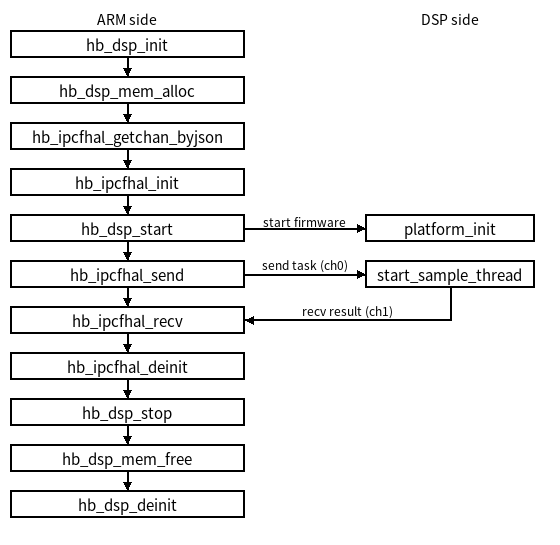
The API flowchart details each step from initialization to data processing. Below is a brief explanation of the process:
| Function Name | Description |
|---|---|
| hb_dsp_init | Initializes the DSP environment. |
| hb_dsp_mem_alloc | Allocates necessary memory for DSP operations. |
| hb_ipcfhal_getchan_byjson | Retrieves the IPC channel. |
| hb_ipcfhal_init | Initializes the IPC channel. |
| hb_dsp_start | Starts DSP processing. |
| hb_ipcfhal_send | Sends task parameters to the DSP via IPC (called in the send thread). |
| hb_ipcfhal_recv | Receives the DSP processing result via IPC (called in the receive thread). |
| hb_ipcfhal_deinit | Releases the IPC channel. |
| hb_dsp_stop | Stops DSP processing. |
| hb_dsp_mem_free | Frees previously allocated memory. |
| hb_dsp_deinit | Deinitializes the DSP environment. |
3.11.2. Compilation and Deployment
3.11.2.1. Compilation
Prerequisites: Ensure the corresponding toolchain exists under the adsp/toolchain/ directory; otherwise, normal compilation cannot proceed.
The compilation process is also divided into two parts:
DSP side: Enter the DSP side directory: First, source the environment variables, then make selections according to the numbers at the end of each step, and finally compile.
source env_hf5.sh

please input adsp version: 0: debug or 1: release: 0
adsp target version is debug
Need test cases or not : 0: no or 1: yes: 0
adsp without test cases
Enable stress cases or not : 0: no or 1: yes: 0
Enable algo sample or not : 0: no or 1: yes: 1

make -j4
ARM side: Supports full compilation or compiling only the app directory including sample_dsp
./bd.sh
./bd.sh app
3.11.2.2. Tool Deployment and Configuration
Also divided into two parts:
DSP side: Output product is located at adsp/output/adsp-sample
Partners who haven’t applied for adsp access need not worry; our released image includes the firmware for experiencing the workflow.ARM side: Output files are located at out/deploy/app/platform_samples/sample_dsp/
This is the location of the example and its compiled artifacts. After compilation, refer to the program execution method to run.
3.11.3. Execution
3.11.3.1. Program Execution Method
Prerequisites:
Check whether the firmware named adsp-sample exists under /usr/hobot/lib/firmware on the board (the release version name may differ, e.g., adsp-sample-release). If it does not exist and you have write permission to /usr/hobot/lib/firmware, push the compiled firmware to /usr/hobot/lib/firmware on the board. If you cannot obtain write permission to this path, recompile the debug version of the ADSP firmware along with the corresponding platform image to run sample_dsp.
3.11.3.2. Program Parameter Options Description
Usage: ./sample_dsp
        -p --dsp_path         Specifying firmware paths (used to specify dsp firmware path. [Mandatory])
        -t --algo_type        Specifying algo type (used to specify algorithm type. Default type is 1)
        -n --dsp_name         Specifying dsp name (used to specify the firmware name to load. Default value is adsp)
        -h --help             print usage (used to print usage help)
For example: ./sample_dsp -p /usr/hobot/lib/firmware/ -n adsp-sample
(If using a release version image, the -n parameter needs to be updated to adsp-sample-release, e.g.: ./sample_dsp -p /usr/hobot/lib/firmware/ -n adsp-sample-release)
Detailed explanation:
| Parameter | Description |
|---|---|
| -p | Used to specify the dsp firmware path. [Mandatory] |
| -t | Optional parameter with two choices: 0 for one algorithm, 1 for another. The definitions are pre-defined before compiling the ADSP firmware. With authorization, these can be modified or new parameters added. |
| -n | Firmware name. When multiple firmwares exist under /usr/hobot/lib/firmware/, such as adsp-sample, adsp, etc., use the -n parameter to select. |
| -h | Used to print usage help |
3.11.3.3. Configuration File Description
sample_config.json is the configuration file for this example, located in the same directory as sample_dsp.cpp. It defines the parameters and behavior of IPC (Inter-Process Communication).
{
        "log_level": 0,
        "config_num": 2,
        "config_num_max":256,
        "config_0": {
                "name": "cpu2dsp_ins2ch0",
                "instance": 2,
                "channel": 0,
                "pkg_size_max": 4096,
                "fifo_size": 64000,
                "fifo_type": 0,
                "ipcf_dev_path":"/dev/ipcdrv",
                "ipcf_dev_name":"ipcdrv"
        },
        "config_1": {
                "name": "cpu2dsp_ins2ch1",
                "instance": 2,
                "channel": 1,
                "pkg_size_max": 4096,
                "fifo_size": 64000,
                "fifo_type": 0,
                "ipcf_dev_path":"/dev/ipcdrv",
                "ipcf_dev_name":"ipcdrv"
        }
}
Detailed explanation of each field in the configuration file:
| Field | Sub-field | Value | Description |
|---|---|---|---|
| log_level | 0 | Defines the verbosity level of logging. 0 means fully enabled; other options include: 10000, 15000, 20000, etc., corresponding to TRACE_LOG, DEBUG_LOG, VERBOSE_LOG levels, respectively. | |
| config_num | 2 | Specifies the number of configured channels. | |
| config_num_max | 256 | Maximum number of configurable channels; the system supports up to 256 channels. | |
| config_0 | name | cpu2dsp_ins2ch0 | Channel name, used to identify the IPC channel. |
| instance | 2 | Number of IPC channel instances. | |
| channel | 0 | Channel number, used to distinguish different channels. | |
| pkg_size_max | 4096 | Maximum packet size; each packet can contain up to 4096 bytes. | |
| fifo_size | 64000 | Size of FIFO (First-In-First-Out queue) used to store packets. | |
| fifo_type | 0 | Type of FIFO, possibly indicating a specific FIFO implementation or feature. | |
| ipcf_dev_path | /dev/ipcdrv | Path to IPC device file; path to the IPC driver device in the system. | |
| ipcf_dev_name | ipcdrv | Name of IPC device file; name of the IPC driver device. |
3.11.3.4. Execution Results
Using /usr/hobot/lib/firmware/adsp-sample firmware:
Log in to the development board via serial port, execute the command in /app/platform_samples/sample_dsp directory: ./sample_dsp -p /usr/hobot/lib/firmware/ -n adsp-sample. The following feedback will appear, indicating successful communication and passed test.
(Note: For the release version, make sure to update the -n parameter to adsp-sample-release)
root@buildroot:/app/platform_samples/sample_dsp# ./sample_dsp -p /usr/hobot/lib/firmware/ -n adsp-sample
[INFO][hb_ipcf_hal.cpp:272] [channel] cpu2dsp_ins2ch0 [id] 0 init success.
[INFO][hb_ipcf_hal.cpp:325] [channel] cpu2dsp_ins2ch0 [id] 0 config success.
[INFO][hb_ipcf_hal.cpp:272] [channel] cpu2dsp_ins2ch1 [id] 1 init success.
[INFO][hb_ipcf_hal.cpp:325] [channel] cpu2dsp_ins2ch1 [id] 1 config success.
[DSP0-I][]DSP_FREQ = 811000000, xos_get_clock_freq = 811000000, TICK_CYCLES = 811000
[DSP0-I][]--------WELCOME ADSP0 START---------
The example algorithm hifi-fft-cplx takes 19741 cycles
Test Passed.
The example algorithm hifi-fft-cplx takes 7490 cycles
Test Passed.
The example algorithm hifi-fft-cplx takes 8858 cycles
Test Passed.
The example algorithm hifi-fft-cplx takes 9033 cycles
Test Passed.
The example algorithm hifi-fft-cplx takes 8668 cycles
Test Passed.
The example algorithm hifi-fft-cplx takes 8805 cycles
Test Passed.

......

The example algorithm hifi-fft-cplx takes 7789 cycles
Test Passed.
The example algorithm hifi-fft-cplx takes 7670 cycles
Test Passed.
[INFO][hb_ipcf_hal.cpp:500] [channel] cpu2dsp_ins2ch0 [id] 0 deinit success.
The example algorithm hifi-fft-cplx takes 7286 cycles
Test Passed.
[INFO][hb_ipcf_hal.cpp:500] [channel] cpu2dsp_ins2ch1 [id] 1 deinit success.
root@buildroot:/app/platform_samples/sample_dsp#
If logging in via network terminal, messages starting with [DSP-I] will not be printed to the terminal; they can only be viewed by using dmesg to print Kernel Logs.
3.11.4. Common Issues
Q: Error message indicating IPC communication failure, showing the following output:
root@buildroot:/app/platform_samples/sample_dsp# ./sample_dsp -p /usr/hobot/lib/firmware/
[  613.038429] hobot-dsp dsp0: Not attached to any iommu, using physical address!
[INFO][hb_ipcf_hal.cpp:244] [channel] cpu2dsp_ins2ch0 [id] 0 init success.
[INFO][hb_ipcf_hal.cpp:297] [channel] cpu2dsp_ins2ch0 [id] 0 config success.
[DSP0-I][]DSP_FREQ = 811000000, xos_get_clock_freq = 811000000, TICK_CYCLES = 811000
[DSP0-I][]--------WELCOME ADSP0 START---------
[DSP0-I][]platform_init
[DSP0-I][]main
SSF version: V0.1
build: Dec 23 2024 18:24:01
-------- Start SSF Main --------
[  616.094545] remoteproc remoteproc0: wait for boot timeout
[  616.100035] ipc-drv: ipc_shm_acquire_buf() [763]: No free buffer found in channel 0
[  616.107726] ipc-drv: hb_ipc_acquire_buf() [226]: buf acquire failed
[  616.114001] ipc-shm-hal: hal_ipc_shm_write(): [Ins 2 channel 0] sample_dsp(1034) can't obtain buf size 72 from channel cnt 1.
[ERROR][][/Data16T/sw_ae/wangfuhua/sdk-x5-20241227/app/samples/platform_samples/sample_dsp/sample_dsp.cpp:123] ipcfhal send error
[ERROR][][/Data16T/sw_ae/wangfuhua/sdk-x5-20241227/app/samples/platform_samples/sample_dsp/sample_dsp.cpp:212] dsp call fail:-14
root@buildroot:/app/platform_samples/sample_dsp#
A: This issue usually occurs when the firmware name is not specified via the -n parameter when running sample_dsp. If not specified, use the -n parameter to explicitly specify the firmware name.
Q: When executing
./sample_dsp -p /usr/hobot/lib/firmware/ -n adsp-sample, the following error occurs. How should I troubleshoot this?
root@buildroot:/app/platform_samples/sample_dsp# ./sample_dsp -p /usr/hobot/lib/firmware/ -n adsp-sample
[INFO][hb_ipcf_hal.cpp:272] [channel] cpu2dsp_ins2ch0 [id] 0 init success.
[INFO][hb_ipcf_hal.cpp:325] [channel] cpu2dsp_ins2ch[ 4874.846815] remoteproc remoteproc0: hobot_remoteproc_shutdown_hifi5 dsp state is not running
0 [id] 0 config success.
[INFO][hb_ipcf_hal.cpp:272] [channel] [ 4874.848494] hobot-dsp dsp0: dsp_char_ioctl: dsp0 cmd -1071627262 execute error, ret =-22
cpu2dsp_ins2ch1 [id] 1 init success.
[INFO][hb_ipcf_hal.cpp:325] [channel] cpu2dsp_ins2ch1 [id] 1 config success.
[ERROR][][/Data16T/jenkins_slave/workspace/X5_SDK_Publish/platform_source_code/app/samples/platform_samples/sample_dsp/sample_dsp.cpp:290] hb_dsp_start failed, ret -7
[INFO][hb_ipcf_hal.cpp:500] [channel] cpu2dsp_ins2ch0 [id] 0 deinit success.
[INFO][hb_ipcf_hal.cpp:500] [channel] cpu2dsp_ins2ch1 [id] 1 deinit success.
root@buildroot:/app/platform_samples/sample_dsp#
A: Check the log file at /userdata/log/usr/message for error messages. For instance, regarding the aforementioned issue, you may encounter a log entry such as /usr/hobot/lib/firmware/adsp-sample is not exist. Verify the location indicated in the message to determine whether the adsp-sample file is missing.