3.7. sample_codec User Guide
3.7.1. Function Overview
sample_codec is a sample program for video encoding and decoding. It performs video encoding and decoding based on configuration items defined in the configuration file (codec_config.ini), helping users debug video codecs.
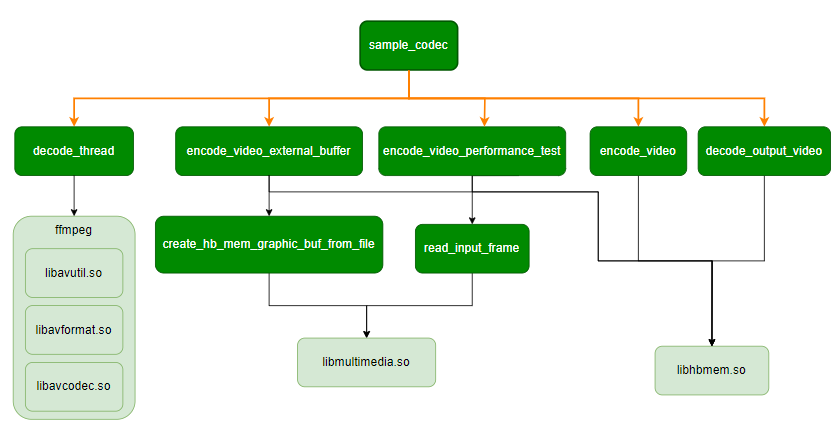
3.7.1.1. Software Architecture
3.7.1.2. Data Flow Description
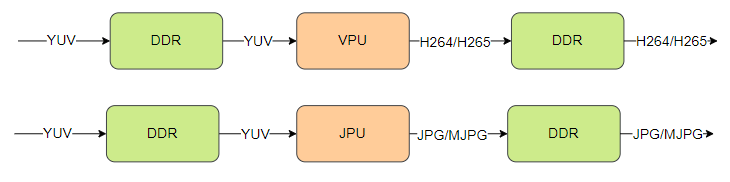
Encoding Data Flow
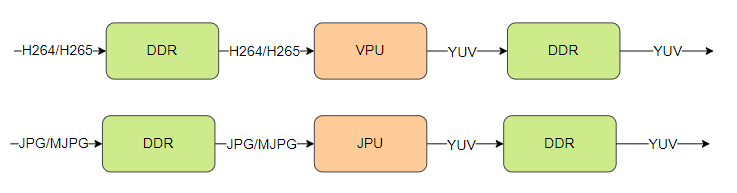
Decoding Data Flow
3.7.1.3. Code Location and Directory Structure
Code location:
app/samples/platform_samples/sample_codecDirectory structure
sample_codec/
├── 1280x720_NV12.yuv
├── 1920x1080_NV12.yuv
├── 640x480_30fps.h264
├── codec_config.ini
├── Makefile
├── Readme.md
├── sample_codec.c
└── sample_codec.h
3.7.1.4. API Workflow Description
Encoding Workflow
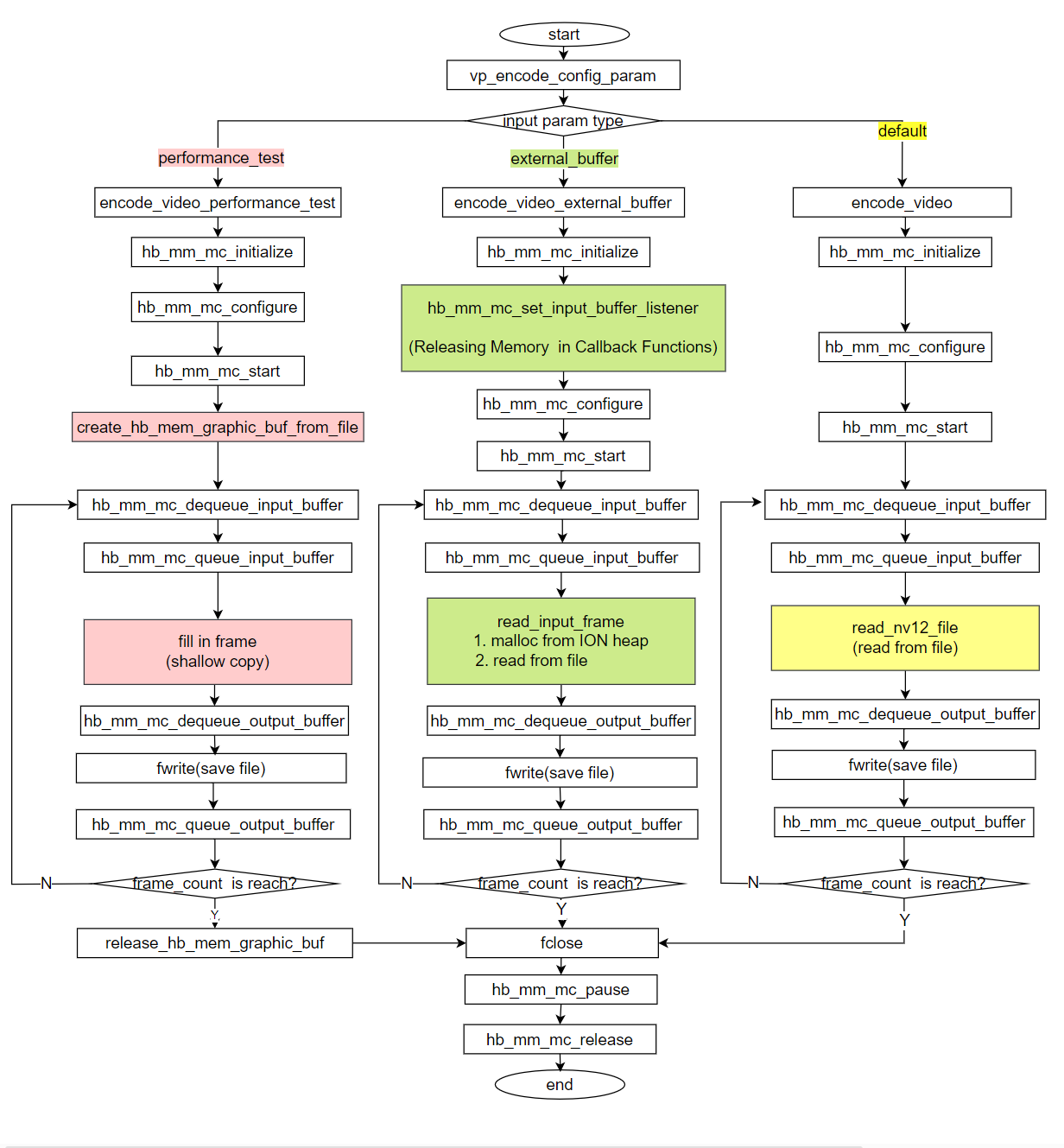
Depending on different input parameters, the encoding workflow is divided into three scenarios:
| Scenario Description | Characteristics | Differences (text background color in diagram) |
|---|---|---|
| Performance Testing | Pre-load YUV data into memory; no file reading during loop | Red |
| Input with External Buffer | 1. Read file and store into memory allocated via hbmem interface as input buffer 2. Release through callback function |
Green |
| Input with Internal Buffer | Use buffer allocated within the MediaCodec framework | Yellow |
Decoding Workflow
Encoded File Reading Thread
Encoded file reading thread: Calls ffmpeg interface to read video file and feeds data into hardware decoder via MediaCodec framework functions.
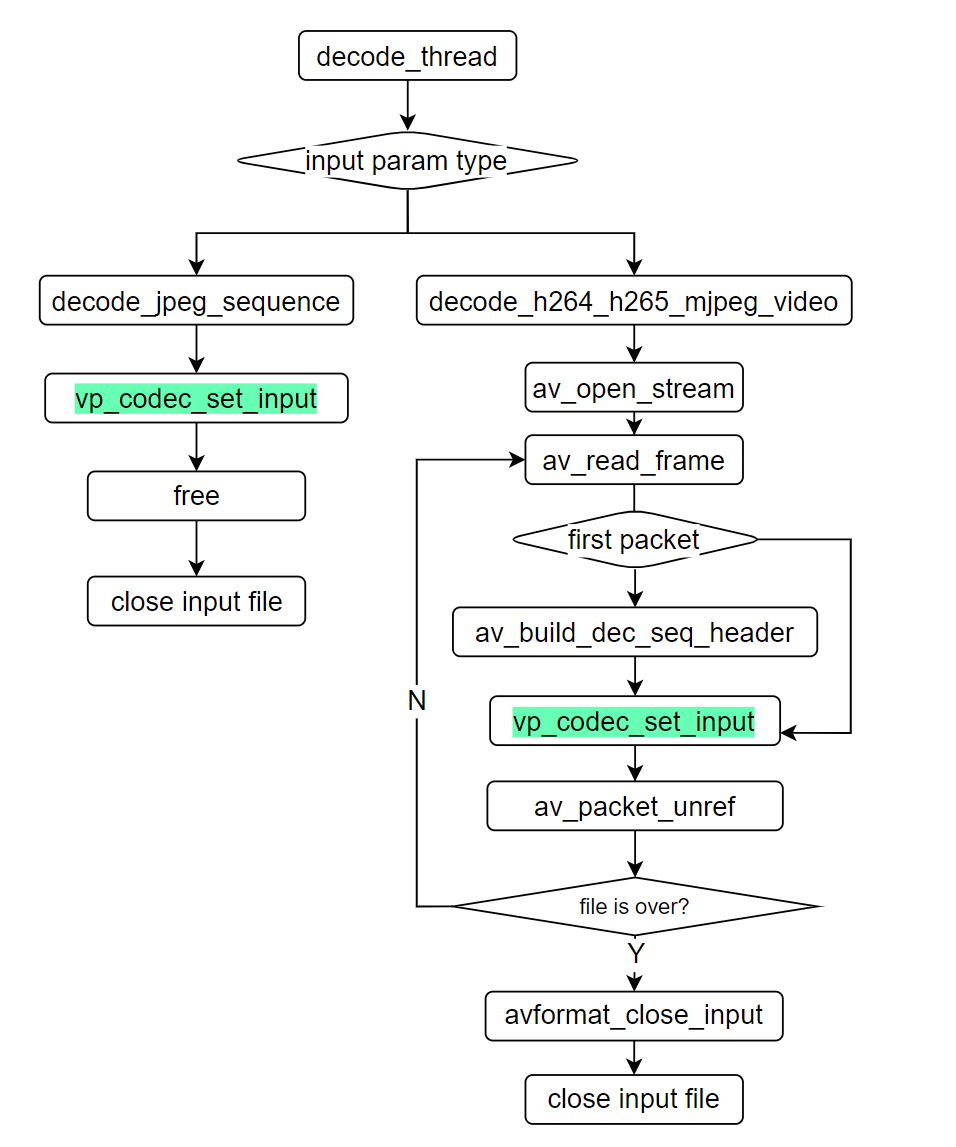
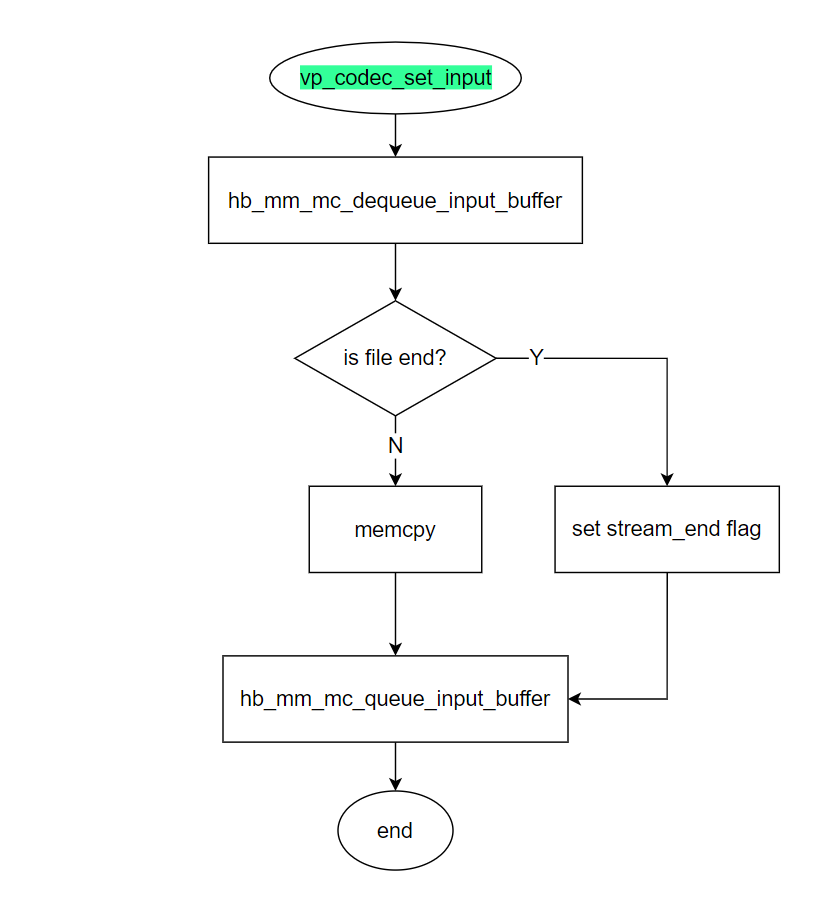
In the encoded file reading thread diagram, vp_codec_set_input (text background in green) calls MediaCodec framework functions to fill the input buffer. The process is as follows:
Hardware Decoding Thread
Hardware decoding thread: Reads decoded data from the hardware decoder via MediaCodec framework functions and writes it to a file.
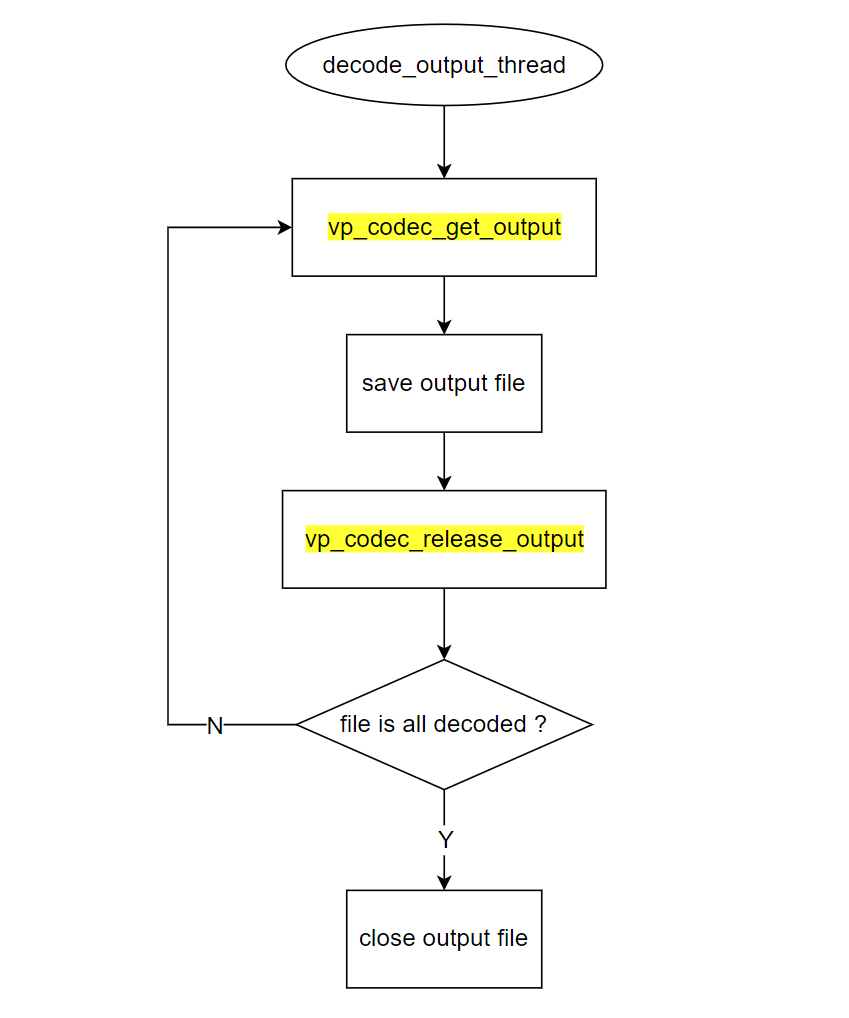
In the hardware decoding thread diagram, vp_codec_get_output (text background in yellow) calls MediaCodec framework functions to retrieve the output buffer. The process is as follows:
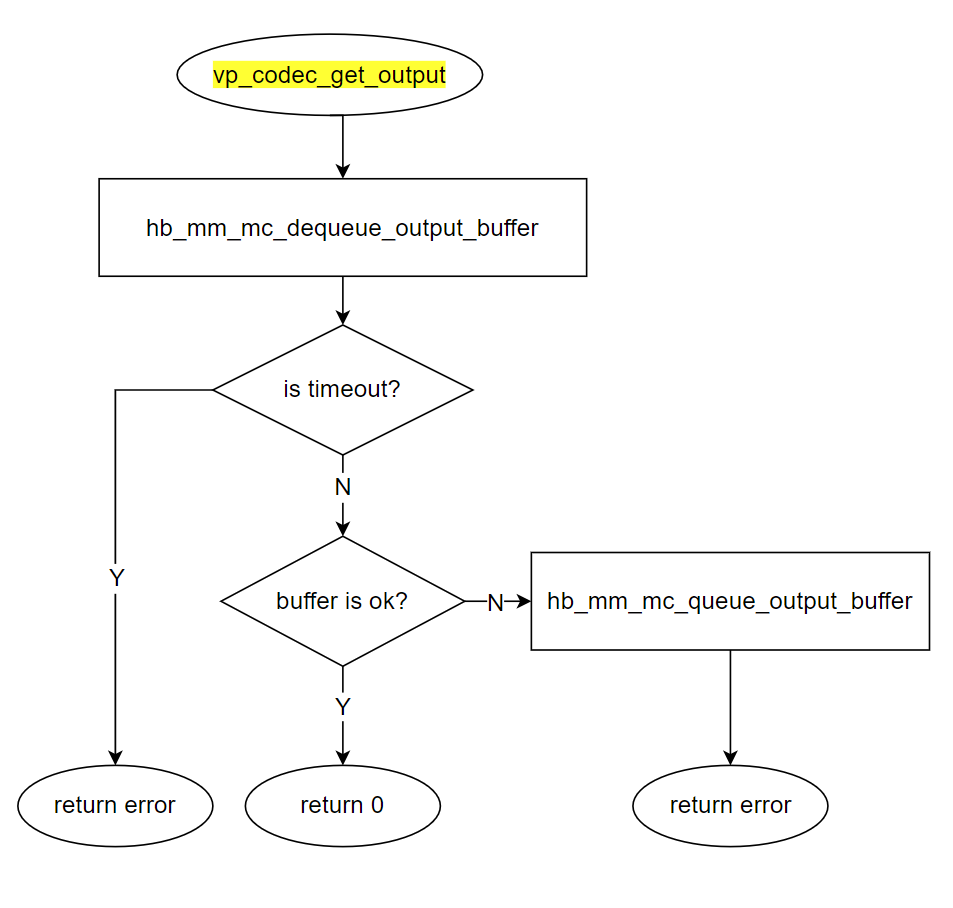
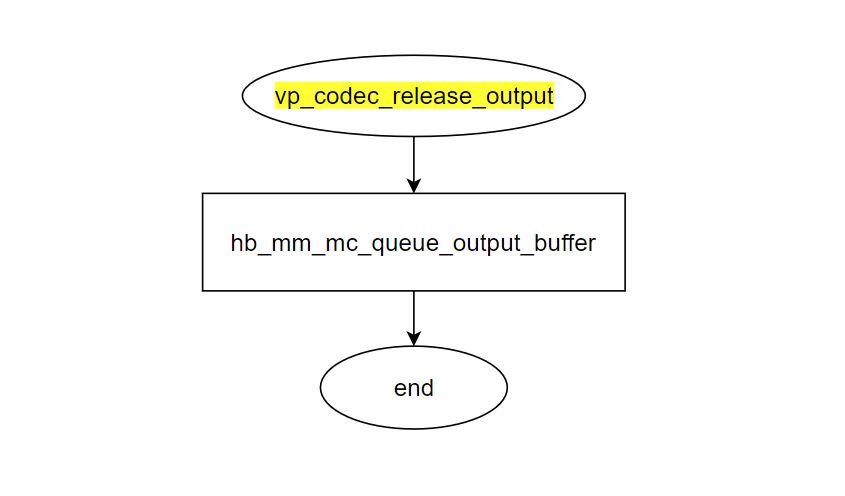
In the hardware decoding thread diagram, vp_codec_release_output (text background in yellow) calls MediaCodec framework functions to release the output buffer. The process is as follows:
3.7.2. Build and Deployment
3.7.2.1. Build
Enter the sample_codec directory and execute
maketo compile.The output binary is
sample_codeclocated in the source directory.For detailed build instructions, refer to the Build Methods section.
3.7.2.2. Program Deployment
Upload sample_codec/sample_codec, codec_config.ini, and required image/video bitstream files (e.g., 1920x1080.yuv, *.264, *.265, etc.) to the development board, then run chmod +x sample_codec to grant executable permissions.
Tip: The example code directory already includes resource files 1280x720_NV12.yuv, 1920x1080_NV12.yuv, and 640x480_30fps.h264. You can use these files to quickly run 720P and 1080P encoding examples, and a 640x480 H264 decoding example. To run encoding/decoding tasks with other resolutions, refer to the codec_config.ini configuration to add or modify configuration entries, and prepare the input files accordingly.
3.7.3. Running
3.7.3.1. How to Run the Program
Execute ./sample_codec -h to get help information:
3.7.3.2. Program Parameter Options
./sample_codec -h
Usage: sample_codec -f config_file [-e encode_option] [-d decode_option] [-v] [-h]
Options:
  -f, --config_file FILE     Set the configuration file
  -e, --encode [OPTION]      Set the encoding option (optional), override encode_streams option
  -d, --decode [OPTION]      Set the decoding option (optional), override decode_streams option
  -v, --verbose              Enable verbose mode
  -h, --help                 Print this help message

Examples:
  Start codec video with codec_config.ini:
    sample_codec

  Start the specified encoding stream in codec_config.ini:
    sample_codec -e 0x1  -- Start the venc_stream1
    sample_codec -e 0x3  -- Start the venc_stream1 and venc_stream2

  Start the specified decoding stream in codec_config.ini:
    sample_codec -d 0x1  -- Start the vdec_stream1
    sample_codec -d 0x3  -- Start the vdec_stream1 and vdec_stream2

  Enable verbose mode for detailed logging:
    sample_codec -v

  Display this help message:
    sample_codec -h
Options:
-f, –config_file FILE: Specify the path of the configuration file (optional), default is
codec_config.ini.-e, –encode [OPTION]: Set encoding option (optional). If used, this will override the
encode_streamsoption in the configuration file.-d, –decode [OPTION]: Set decoding option (optional). If used, this will override the
decode_streamsoption in the configuration file.-v, –verbose: Enable verbose mode to display more log information.
-h, –help: Show help message.
Usage Examples
Start encoding/decoding using configurations in
codec_config.ini(by default, one H264 encoding stream is enabled:encode_streams = 0x1). No parameters are needed when running:
./sample_codec
Start specified encoding streams (defined in
codec_config.ini):
./sample_codec -e 0x1  # Start venc_stream1
./sample_codec -e 0x3  # Start venc_stream1 and venc_stream2
Start specified decoding streams (defined in
codec_config.ini):
./sample_codec -e 0 -d 0x1 # Disable encoding, start vdec_stream1
./sample_codec -e 0 -d 0x3  # Disable encoding, start vdec_stream1 and vdec_stream2
Enable verbose mode for more detailed logs:
./sample_codec -v
Display help message:
./sample_codec -h
3.7.3.3. Configuration File Description
The codec_config.ini file defines various video encoding and decoding parameters, including the default number of codec channels to enable.
Encoding parameter options are described below:
[encode]
; Enable encoding using bitwise operations
; 0x0 means encoding is disabled
; 0x01 means only venc_stream1 is enabled
; 0x02 means only venc_stream2 is enabled
; 0x03 means the first two encoding streams (venc_stream1 and venc_stream2) are enabled, 0x07 means the first three streams are enabled, 0x0f means the first four streams are enabled, etc.
encode_streams = 0x1

[venc_stream1]
; Codec type (0: H264, 1: H265, 2: MJPEG, 3: JPEG)
codec_type = 0
width = 1920
height = 1080
frame_rate = 30
bit_rate = 8192
input = 1920x1080.yuv
output = 1920x1080_30fps.264
frame_num = 100
; Buffer usage type (undefined/0: internal buffer, 1: external buffer)
external_buffer = 1
; Profile, level, tier configuration
; H264 supports common Baseline/Main/High Profiles up to Level 5.2 (i.e., up to High@L5.2)
; H265 supports common Main/Main Still Picture Profile up to Level 5.1 High Tier
; For details, please refer to the code...
profile = h264_main@L4

[decode]
; Enable decoding using bitwise operations
; 0x0 means decoding is disabled
; 0x01 means only vdec_stream1 is enabled
; 0x02 means only vdec_stream2 is enabled
; 0x03 means the first two decoding streams (vdec_stream1 and vdec_stream2) are enabled, 0x07 means the first three streams are enabled, 0x0f means the first four streams are enabled, etc.
decode_streams = 0x0

[vdec_stream1]
; Codec type (0: H264, 1: H265, 2: MJPEG, 3: JPEG)
codec_type = 0
width = 1920
height = 1080
input = 1920x1080_30fps.264
output = 1920x1080.yuv
Encoding Configuration
[encode]
encode_streams: Specifies which encoding streams to enable, using bitwise representation. For example,
0x1enables onlyvenc_stream1, while0x3enables the first two streams (venc_stream1andvenc_stream2). This value can be overridden by the command-line-eparameter.
[venc_stream]
codec_type: Specifies the encoding type:
0(H264),1(H265),2(MJPEG), or3(JPEG).width: Width of the video frame.
height: Height of the video frame.
frame_rate: Frame rate of the video.
bit_rate: Bitrate of the video.
input: Input image file, supporting only NV12 format YUV images. Multiple frames can be stored consecutively in one file, and they are read sequentially and cyclically during encoding.
output: Output encoded video file.
frame_num: Number of video frames to encode. If the number of frames in the input file is less than this value, the file will be read cyclically until the specified number of frames is reached or exceeded.
external_buffer: Type of input buffer (
0: internal buffer,1: external buffer).lossless_mode: 0 to disable lossless mode, 1 to enable lossless mode (only supported by H265).
profile: Profile, level, and tier configuration.
H264 supports Baseline/Main/High Profiles up to Level 5.2 (maximum High@L5.2).
H265 supports Main/Main Still Picture Profile up to Level 5.1 High Tier.
Decoding Configuration
[decode]
decode_streams: Specifies which decoding streams to enable, using bitwise representation. For example,
0x1enables onlyvdec_stream1, while0x3enables the first two streams (vdec_stream1andvdec_stream2).
[vdec_stream]
codec_type: Specifies the video codec type for decoding:
0(H264),1(H265),2(MJPEG), or3(JPEG).width: Width of the decoded video frame.
height: Height of the decoded video frame.
input: Path to the input video file to be decoded. Depending on
codec_type, this can be a bitstream file or an RTSP stream.output: Path to the output decoded image file, supporting only NV12 format YUV output. Decoded images are saved consecutively into a single file, so ensure sufficient disk space at the output path. Note that YUV images typically consume significant disk space, especially for high-resolution or long-duration videos. Ensure the target storage device has adequate available space when selecting the output path.
3.7.3.4. Running Output
Take enabling the first H264 encoding stream in the configuration file (encode_streams = 0x1) as an example:
./sample_codec
Config file: codec_config.ini
encode_streams: 0x1
decode_streams: 0x0
Encoding video...
Encode params...
 codec_type: 0, width: 1920, height: 1080, frame_rate: 30, bit_rate: 8192, input_file: 1920x1080_NV12.yuv, output_file: 1920x1080_30fps.h264, frame_num: 100
Encode idx: 0, init successful
Encode idx: 0, start successful
Encode idx: 0, frame= 1
Encode idx: 0, frame= 2
Encode idx: 0, frame= 3
... ...
Encode idx: 0, frame= 98
Encode idx: 0, frame= 99
Encode idx: 0, frame= 100
According to the configuration frame_num = 100 in codec_config.ini, the program automatically exits after encoding 100 frames.