3.9. sample_gpu_3d Instructions
X53D GPU supports the following standard APIs:
EGL
OpenGLES
Vulkan
OpenCL
Among these, EGL acts as an intermediate layer API that provides interaction support with underlying hardware. Therefore, sample code is provided for the following three APIs:
OpenGLES example
Vulkan example
OpenCL example
Please select the appropriate API example based on your specific needs for reference and use.
3.9.1. OpenGL ES
3.9.1.1. sample_bezier
Function Overview
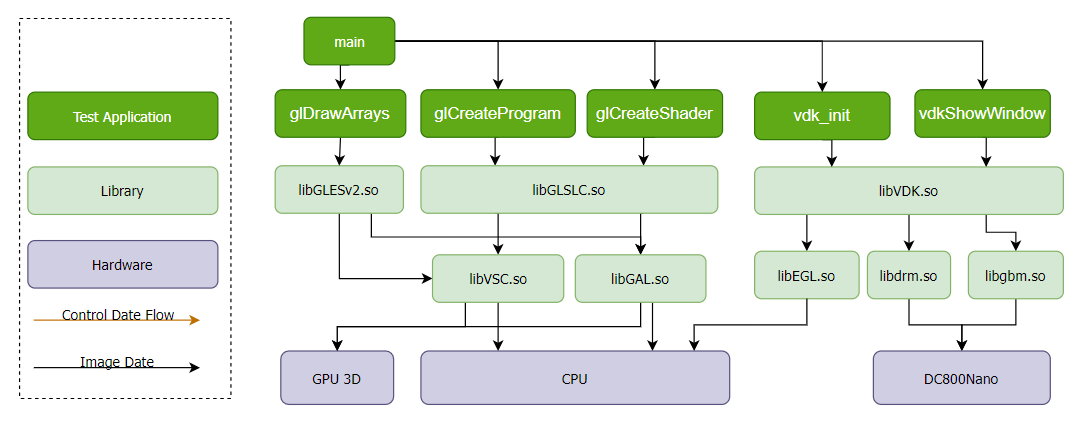
Function Description: sample_bezier uses the 3D GPU to draw a Bezier curve and saves the image to a file.
Software Architecture Description
sample_bezier supports two rendering modes:
Onscreen mode (default): Presents the EGL surface on an HDMI monitor via DRM + GBM.
Offscreen mode: Renders offscreen via fbdev virtual framebuffer, no physical monitor required.
Code Location and Directory Structure
Code Location:
app/samples/platform_samples/sample_gpu_3d/gles/sample_bezierDirectory Structure
sample_bezier/
├── common
│   ├── bmp.c
│   ├── bmp.h
│   ├── vdk_common.c
│   └── vdk_common.h
└── sample_bezier
    ├── bezier.c
    └── Makefile
API Flow Description
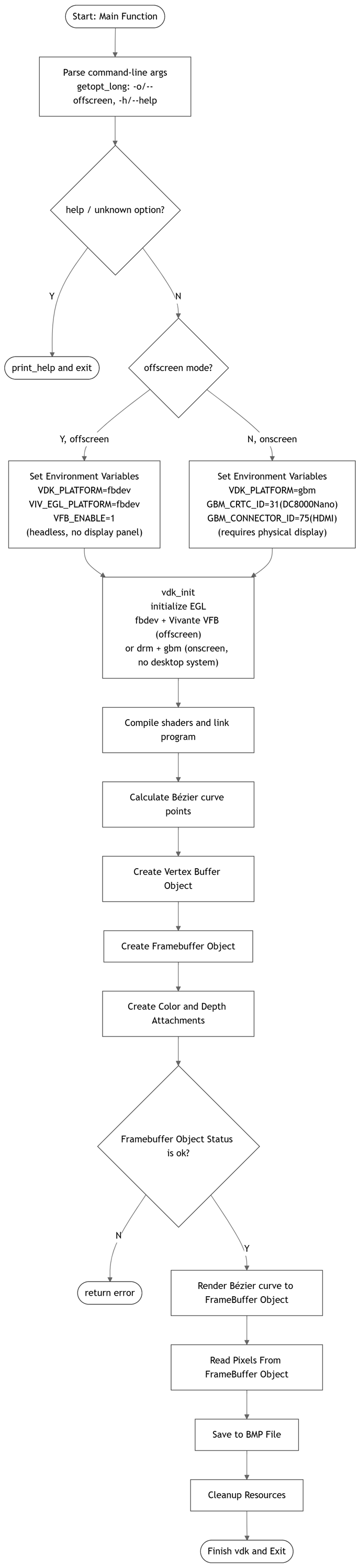
Overall Flow
vdk_init
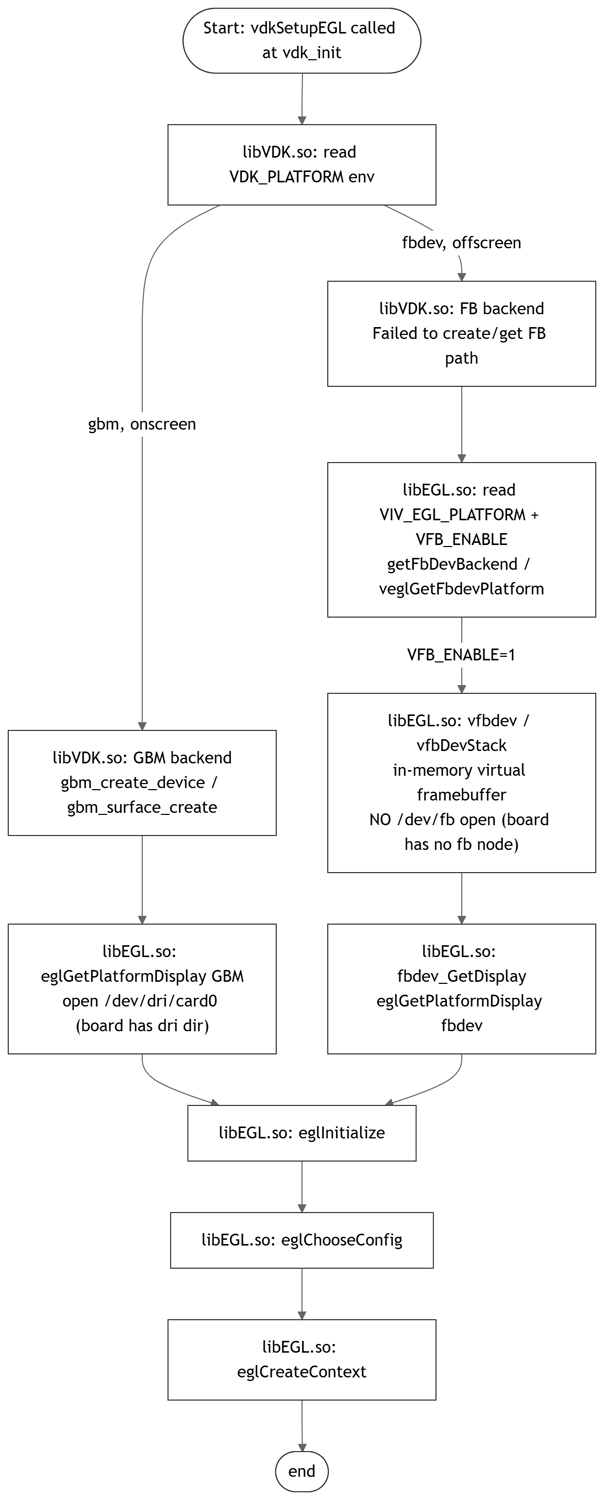
vdk_init is a function in libVDK.so that encapsulates the EGL interface and completes the initialization of the EGL context based on DRM+GBM or fbdev when no desktop system is available. Which path is used is determined by the VDK_PLATFORM environment variable set when the program starts:
Onscreen mode:
VDK_PLATFORM=gbmOffscreen mode:
VDK_PLATFORM=fbdev, withVIV_EGL_PLATFORM=fbdevandVFB_ENABLE=1set
Compilation and Deployment
Compilation
Enter the sample_bezier directory and run
maketo compile.The output artifact is
bezierlocated in the sample_bezier source directory.For detailed compilation methods, please refer to the Compilation Method section.
Program Deployment
Upload the
sample_bezierdirectory to the/userdatadirectory of the development board.Enter the
sample_bezierdirectory and run the commandchmod +x bezierto grant execution permission to the program.
Running
sample_bezier runs in Onscreen mode (DRM + GBM) by default and requires a display panel connected via HDMI. For development boards without a display panel, you can switch to Offscreen mode fbdev for offscreen rendering via the -o/--offscreen option. The resulting bezier.bmp is identical to that of Onscreen mode.
Program Parameter Options
| Option | Description |
|---|---|
-o, --offscreen |
Offscreen rendering mode, renders via fbdev (no physical display panel required). If not specified, renders via GBM (requires a display panel connected) |
-h, --help |
Print help information and exit |
How to Run the Program
Onscreen mode (default, requires an HDMI display panel)
Load the drivers:
modprobe panel-jc-050hd134
modprobe galcore
modprobe vio_n2d
modprobe lontium_lt8618
modprobe vs-x5-syscon-bridge
modprobe vs_drm
Connect a monitor via the HDMI interface, and run the program:
Execution command:
./bezier
Runtime log:
Render mode: onscreen (gbm)
Offscreen mode (-o, for boards without a display panel)
Execution command:
./bezier -o
Runtime log:
Render mode: offscreen (fbdev)
Running Results
Result description:
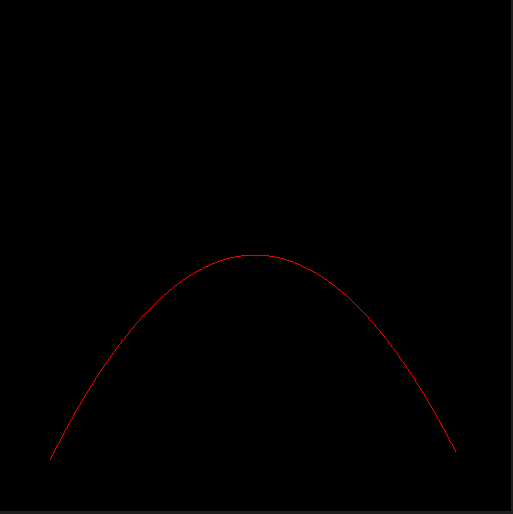
In the current directory, a BMP image file named bezier.bmp will be generated. The red line in the file represents a Bezier curve. The bezier.bmp generated in Onscreen and Offscreen modes is identical.
3.9.2. OpenCL
3.9.2.1. sample_matrix_multiply
Function Overview
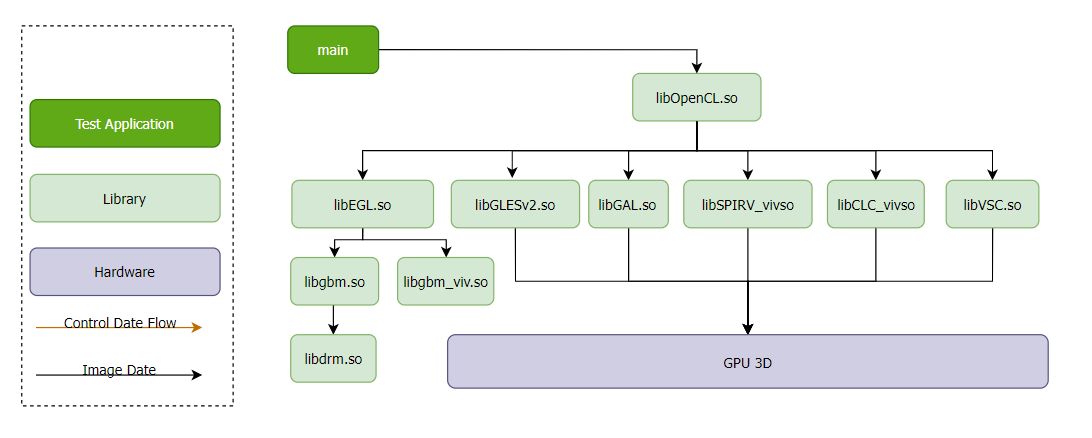
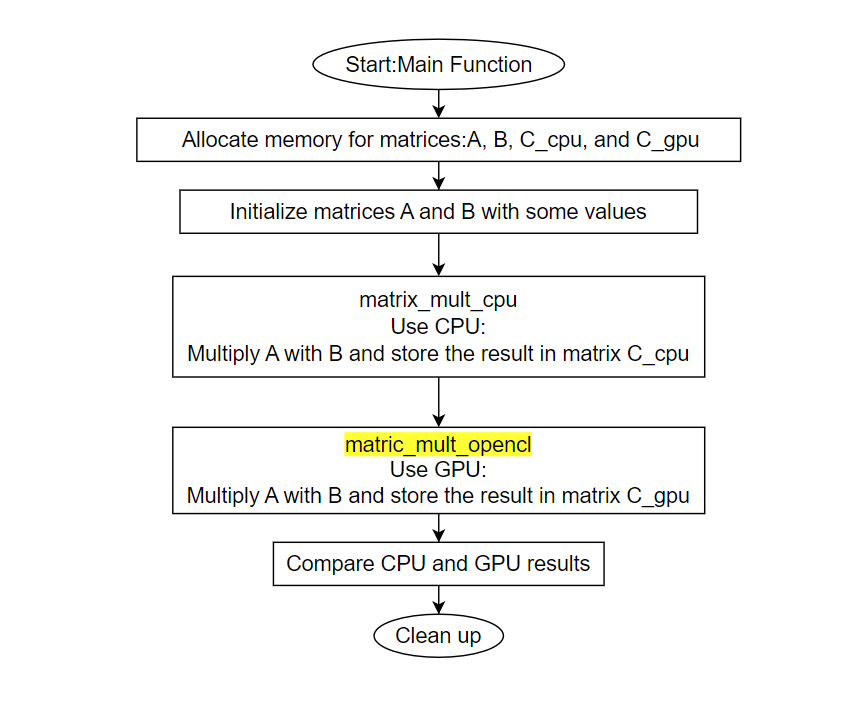
Function Description: sample_matrix_multiply performs identical matrix operations using both the 3D GPU and CPU, and prints the execution time for both.
Software Architecture Description
Code Location and Directory Structure
Code Location:
app/samples/platform_samples/sample_gpu_3d/cl/sample_matrix_multiplyDirectory Structure
└── sample_matrix_multiply
    ├── Makefile
    └── matrix_multiply.c
API Flow Description
Overall Flow
matirc_mult_opencl
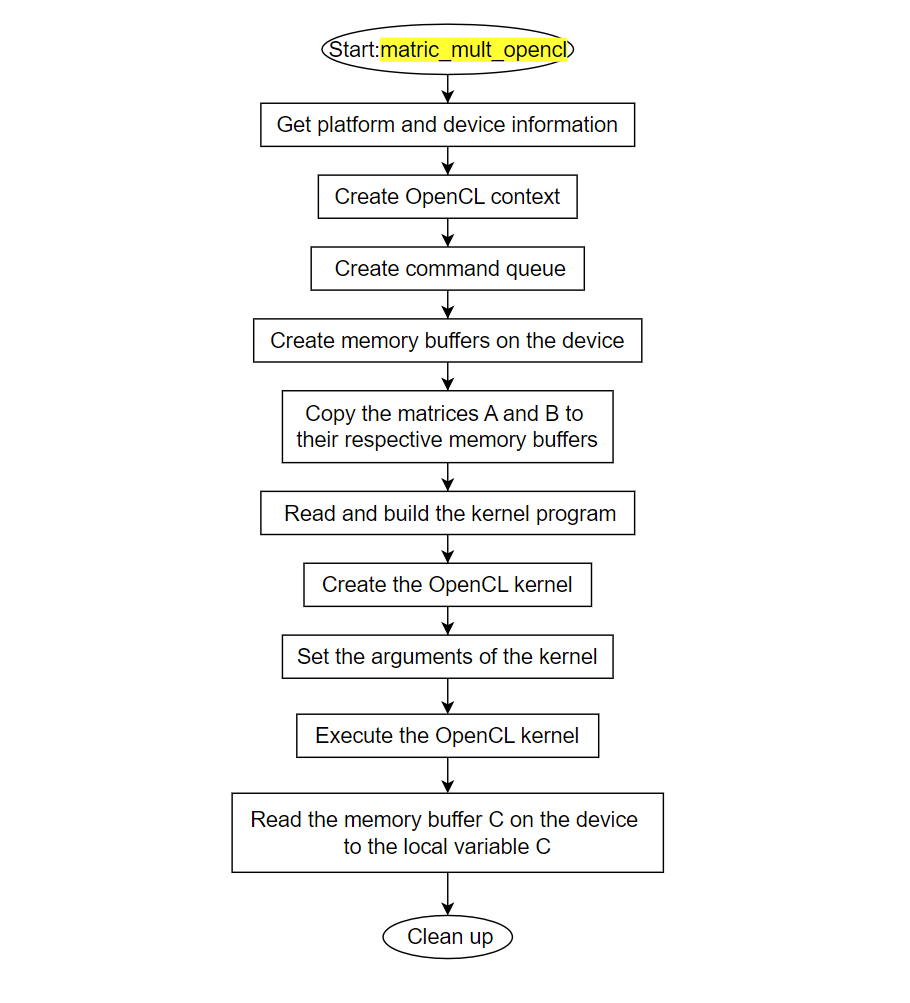
The function matirc_mult_opencl uses the GPU to perform matrix multiplication, as shown in the following process (corresponding to the yellow background section in the overall flow):
Compilation and Deployment
Compilation
Enter the sample_matrix_multiply directory and execute
maketo compile.The output artifact is
matrix_multiplylocated in the sample_matrix_multiply source directory.For detailed compilation methods, please refer to the Compilation Method section.
Program Deployment
Upload the
sample_matrix_multiplydirectory to the/userdatadirectory of the development board.Enter the
sample_matrix_multiplydirectory and run the commandchmod +x matrix_multiplyto grant execution permission to the program.
Running
How to Run the Program
Run the executable: ./matrix_multiply
Program Parameter Options
None
Running Results
Execution command:
./matrix_multiply
Runtime log:
./matrix_multiply
CPU execution time: 19.133549 seconds
OpenCL execution time: 0.792543 seconds
Matrices are identical!
Result description: For the same matrix multiplication operation:
CPU execution time: 19.133549 seconds
GPU execution time: 0.792543 seconds
From the total execution time, it can be seen that the GPU has significantly better performance than the CPU in matrix multiplication operations.