3.20. sample_qt Usage Instructions
3.20.1. Overview
sample_qt is a UI sample program based on Qt + DRM eglfs, demonstrating the complete process of building graphical interfaces, performing graphics rendering, and responding to input events on the chip.
Validates display path: Qt renders directly to the screen via eglfs/DRM, verifying that the DRM display pipeline works correctly.
Validates input path: Interacts with the interface through input devices such as touchscreen, mouse, or keyboard, verifying that input events can be correctly received and processed by the Qt program.
Reference implementation: Provides a basic project template and code reference for developing Qt graphical applications on this platform.
3.20.1.1. Software Architecture
The overall software architecture of sample_qt is shown in the following diagram:
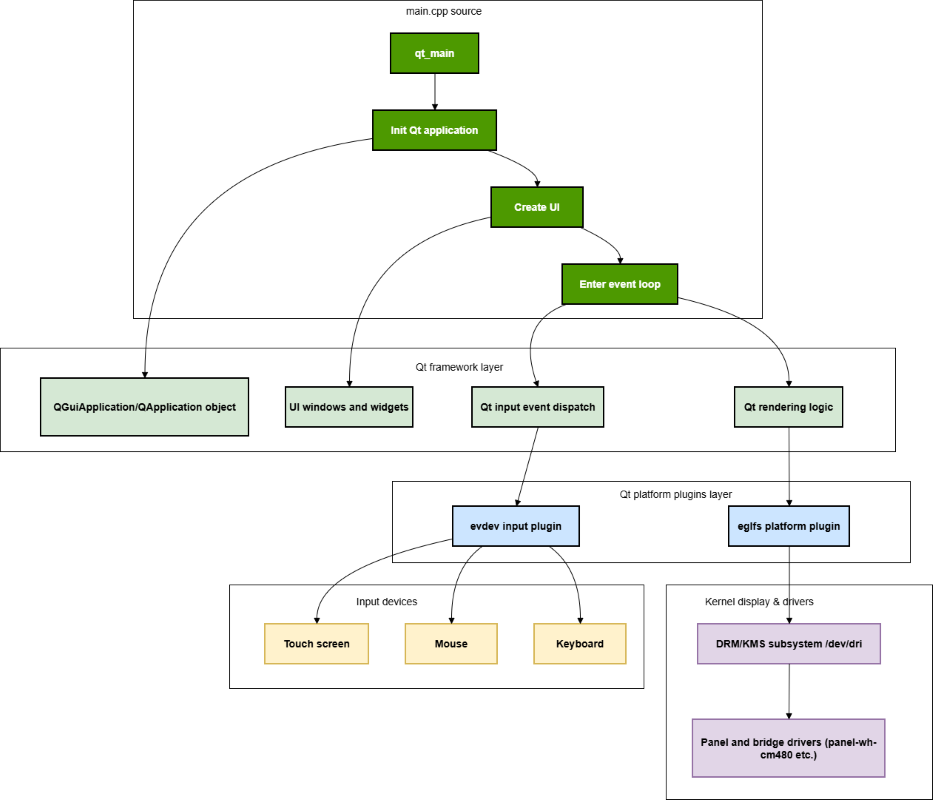
From top to bottom, it mainly includes the following layers:
main.cppsource code layer: Containsqt_main, “Initialize Qt Application”, “Create Interface”, “Enter Event Loop” and other steps. Through these functions, Qt application initialization, interface creation, and finally entering the event loop are completed in sequence.Qt framework layer: Consists of
QGuiApplication/QApplicationobjects, interface windows and controls, Qt input event dispatching, Qt rendering processing and other modules, responsible for managing application lifecycle, displaying interfaces, and processing input events from users.Qt platform plugin layer: Contains
eglfsplatform plugin andevdevinput plugin. The former outputs Qt rendering results to display devices provided by DRM/KMS, while the latter reads events from input devices and hands them to the Qt framework for dispatching.Display and input hardware layer: At the bottom are DRM/KMS subsystem (
/dev/dri) and its underlying display driver, panel and bridge chip drivers (such aspanel-wh-cm480, etc.), as well as input devices such as touchscreen, mouse, keyboard (/dev/input/event*), which together complete the final image display and input acquisition.
3.20.1.2. Code Location and Directory Structure
Code location:
app/samples/platform_samples/sample_qtDirectory structure:
sample_qt/
├── README.md
├── eglfs_kms_config.json
├── main.cpp
├── run.sh
└── Makefile.bak
main.cpp: Qt application entry point and main logic code.eglfs_kms_config.json: eglfs KMS related configuration file, used to specify output device, resolution and other parameters (refer to the actual file for specific content).run.sh: Auxiliary script for running the sample program in the development environment.README.md: Brief documentation in the source code directory.Makefile.bak: Backup Makefile file, which needs to be renamed toMakefilefor actual compilation.
3.20.1.3. API Flow Description
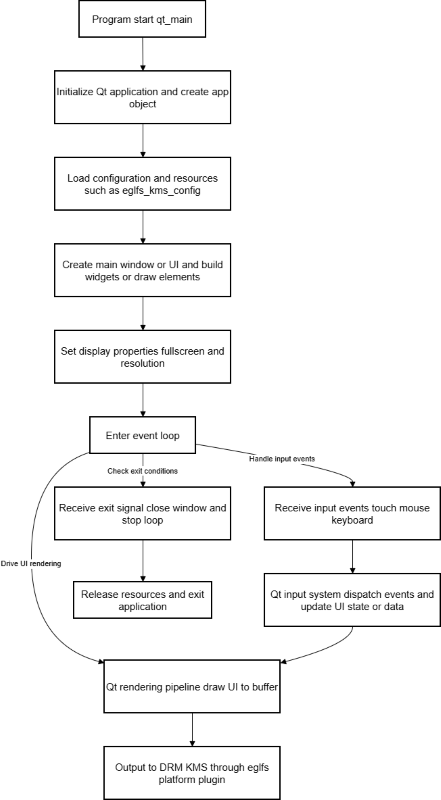
The typical call flow of this sample is as follows:
Qt application initialization:
Create
QGuiApplicationorQApplicationobject inmain.cppto complete basic initialization of the Qt runtime environment (including platform plugins, fonts, translations, etc.).
Interface creation and rendering:
Create main window or scene, add basic controls or drawing elements for demonstrating Qt rendering effects and input response.
Set the window to full screen display to adapt to the current DRM output resolution.
Platform and display adaptation:
Through Qt’s
eglfsplatform plugin, bind the rendering target to DRM framebuffer, and select output device and mode according to the configuration ineglfs_kms_config.json.
Event loop and input processing:
Enter Qt main event loop, continuously read input events from devices such as
/dev/input/event*(completed through Qt input plugin), and dispatch them to corresponding windows and controls.
Resource release and exit:
When the user exits the program or the system sends an exit signal, the Qt application exits the event loop, releases windows and related resources, and finally ends the process normally.
For further understanding of the specific function call relationships in the code, you can read the main.cpp source code together with Qt official documentation.
3.20.2. Compilation and Deployment
3.20.2.1. Compilation
sample_qt is compiled as part of the BSP project. It is recommended to complete the build through the BSP-provided compilation framework:
Compile BSP entirely (including all samples):
./bd.sh
Compile only samples under
app/samples/platform_samples(includingsample_qt):
./bd.sh app samples/platform_samples
For detailed program compilation methods, please refer to the Compilation Method section.
Important: To run the sample_qt sample, you must use a root filesystem with QT5 support package!
The rootfs image (system rootfs) provided by default in the current BSP does not include QT5 related libraries and dependencies. After directly flashing, you cannot run any Qt programs. Please be sure to refer to the “Creating QT Support Package” section to compile and flash a dedicated rootfs image containing QT5 support, otherwise the Qt sample will not be usable.
In addition, only
Makefile.bakfile is provided by default in thesample_qtsource code directory. Please rename it toMakefilebefore actually compiling the sample.
3.20.2.2. Program Deployment
After completing BSP compilation and flashing the system software image, the executable file of this sample will be installed in the /app/platform_samples/sample_qt directory on the development board:
Executable program:
/app/platform_samples/sample_qt/sample_qt
If you have manually compiled and generated the executable file in the development environment, you can also copy the entire sample_qt directory (including necessary configuration and resource files) to directories such as /userdata on the development board, grant execution permissions, and then run it manually:
chmod +x sample_qt
./sample_qt
3.20.3. Running
3.20.3.1. Program Execution Method
Before running this sample, you need to complete the DRM/eglfs display environment preparation.
Confirm DRM device node:
Use the command to check if
/dev/drirelated device nodes exist:
ls /dev/driIf
/dev/dridevice node does not exist, you need to load relevant kernel modules first:
modprobe drm_kms_helper
modprobe vs_x5_syscon_bridge
modprobe vs_drm
modprobe panel-wh-cm480
modprobe panel-jc-050hd134
modprobe sii902x
modprobe lontium-lt8618
Configure Qt platform plugin (if needed):
This sample uses
drm eglfsdisplay stack. Ifeglfsis not enabled by default in the system, you can set environment variables before running:
export QT_QPA_PLATFORM=eglfs
Confirm input devices:
Check if input devices such as touchscreen, mouse, keyboard are visible in the system:
ls /dev/input/event*Run the program on the board:
Run directly from the installation directory:
cd /app/platform_samples/sample_qt
./sample_qt
You can also use the
run.shscript to run:
./run.sh
3.20.3.2. Program Parameter Options
None
3.20.3.3. Running Results
After successfully running sample_qt, a simple Qt-based menu interface will be displayed on the screen connected to the development board:
The upper left corner of the interface displays prompt text:
Select Operation:Below the prompt text, 4 buttons are arranged vertically, each button occupies an entire row. The button texts are in order:
Button 1: PromptButton 2: GreetingButton 3: AboutButton 4: Close
The buttons use a strip layout with a dark overall background. The button areas are slightly lighter strips with light-colored text for clear visibility on the screen.
When clicking different buttons on the touchscreen (or using mouse/touchscreen and confirming):
The currently clicked button will have obvious highlight or state change, indicating it has been selected.
The program executes corresponding logic according to button functions, for example:
Click “Button 1: Prompt” to display prompt information.
Click “Button 2: Greeting” to display greeting information.
Click “Button 3: About” to display about information.
Click “Button 4: Close” to exit the sample program and close the interface.
On the serial terminal, you can see log output similar to the following, indicating that the Qt application has started normally and entered the event loop:
root@buildroot:/app/platform_samples/sample_qt# ./run.sh
QStandardPaths: XDG_RUNTIME_DIR not set, defaulting to '/tmp/runtime-root'
If the screen can normally display the above menu interface, and when clicking each button the interface has obvious response, the program behavior is consistent with the button meaning, and there are no abnormal errors in the log, it indicates that the sample_qt sample is running normally.
3.20.4. Common Issues
3.20.4.1. Error: Cannot Find DRM Device or Qt Platform Plugin at Startup
Problem Description:
After executing
./sample_qt, it prompts that the DRM device cannot be opened, or prompts that theeglfsplatform cannot be found (such as “Could not find the Qt platform plugin “eglfs””, etc.).
Possible Causes:
The kernel has not loaded relevant DRM/display drivers, resulting in
/dev/dridevice node not existing.The Qt runtime environment is not correctly configured with
eglfsplatform plugin.
Solutions:
Follow the steps in the “Program Execution Method” section to check and load the following kernel modules:
modprobe drm_kms_helper
modprobe vs_x5_syscon_bridge
modprobe vs_drm
modprobe panel-wh-cm480
modprobe panel-jc-050hd134
modprobe sii902x
modprobe lontium-lt8618
If necessary, set the Qt platform environment variable:
export QT_QPA_PLATFORM=eglfs