3.3. sample_isp User Guide
3.3.1. get_isp_data
3.3.1.1. Function Overview
get_isp_data completes the initialization of the Camera Sensor, MIPI CSI, SIF, and ISP modules, enabling the retrieval of video frame data from the ISP module. It supports acquiring images in YUV format from the ISP module. Different parameter commands allow selection between online and offline modes.
Users can use this program to debug and verify the MIPI CSI, SIF, and ISP hardware modules.
Software Architecture Description
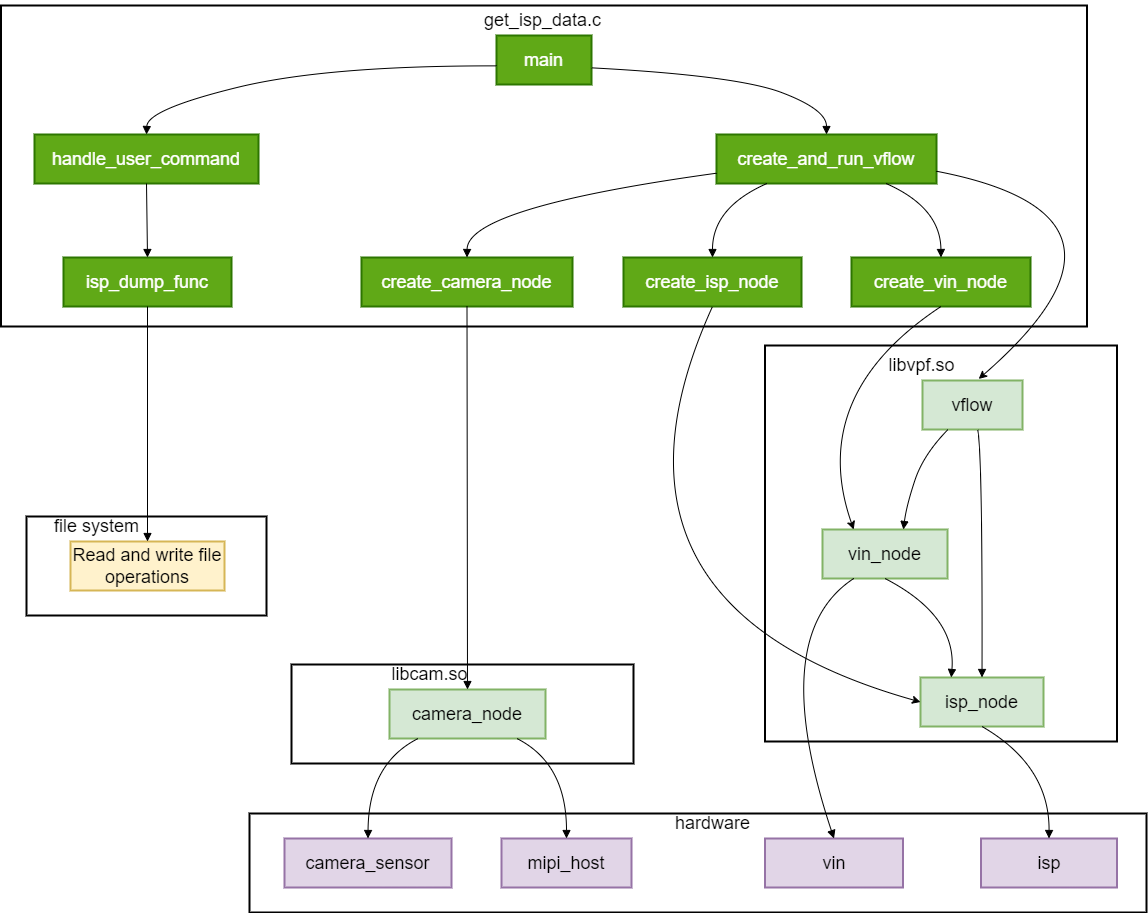
The functional modules in get_isp_data code achieve camera management and video stream processing by calling functions from libcam.so and libvpf.so. The camera module mainly relies on the camera control functions provided by libcam.so, while the video processing module depends on the video stream processing and node management functions provided by libvpf.so.
The get_isp_data software architecture is shown below:
The
mainfunction inget_isp_data.cserves as the program entry point. It calls thecreate_and_run_vflowfunction to create and run the video stream, and calls thehandle_user_commandfunction to process user commands.The
create_and_run_vflowfunction is responsible for creating various nodes in the video stream, including the camera node, video input node, and image signal processing node, as well as creating and starting the video stream.The
create_camera_nodefunction is used to create the camera node, which is associated with the camera sensor and MIPI host in hardware, implemented viacamera_nodeinlibcam.so.The
create_vin_nodefunction is used to create the video input node, which is associated with the video input engine in hardware, implemented viavin_nodeinlibvpf.so.The
create_isp_nodefunction is used to create the image signal processing node, which is associated with the image signal processing engine in hardware, implemented viaisp_nodeinlibvpf.so.The
handle_user_commandfunction calls corresponding functions based on user input commands. Theisp_dump_funcfunction is used to acquire frame data from the image signal processing node and write it into a file in the file system.The
vflownode represents the video stream, connecting the video input node and the image signal processing node, implemented via related functions inlibvpf.so.Hardware nodes include the camera sensor, MIPI host, video input engine, and image signal processing engine. They are associated with corresponding software nodes, jointly completing image data acquisition, transmission, and processing.
Code Location and Directory Structure
The source code path for get_isp_data is app/samples/platform_samples/sample_isp/get_isp_data, with the following code structure:
── get_isp_data
   ├── get_isp_data.c
   └── Makefile
Makefile: Makefile used to compile the program.
get_isp_data.c: Main source code file of the program.
Tool Location and Directory Structure
The tool is located at the board-side directory /app/platform_samples/sample_isp/get_isp_data:
root@buildroot:/app/platform_samples/sample_isp/get_isp_data# ls
get_isp_data
get_isp_data is the executable file compiled from the source code.
API Flow Description
The program flow of get_isp_data is as follows:
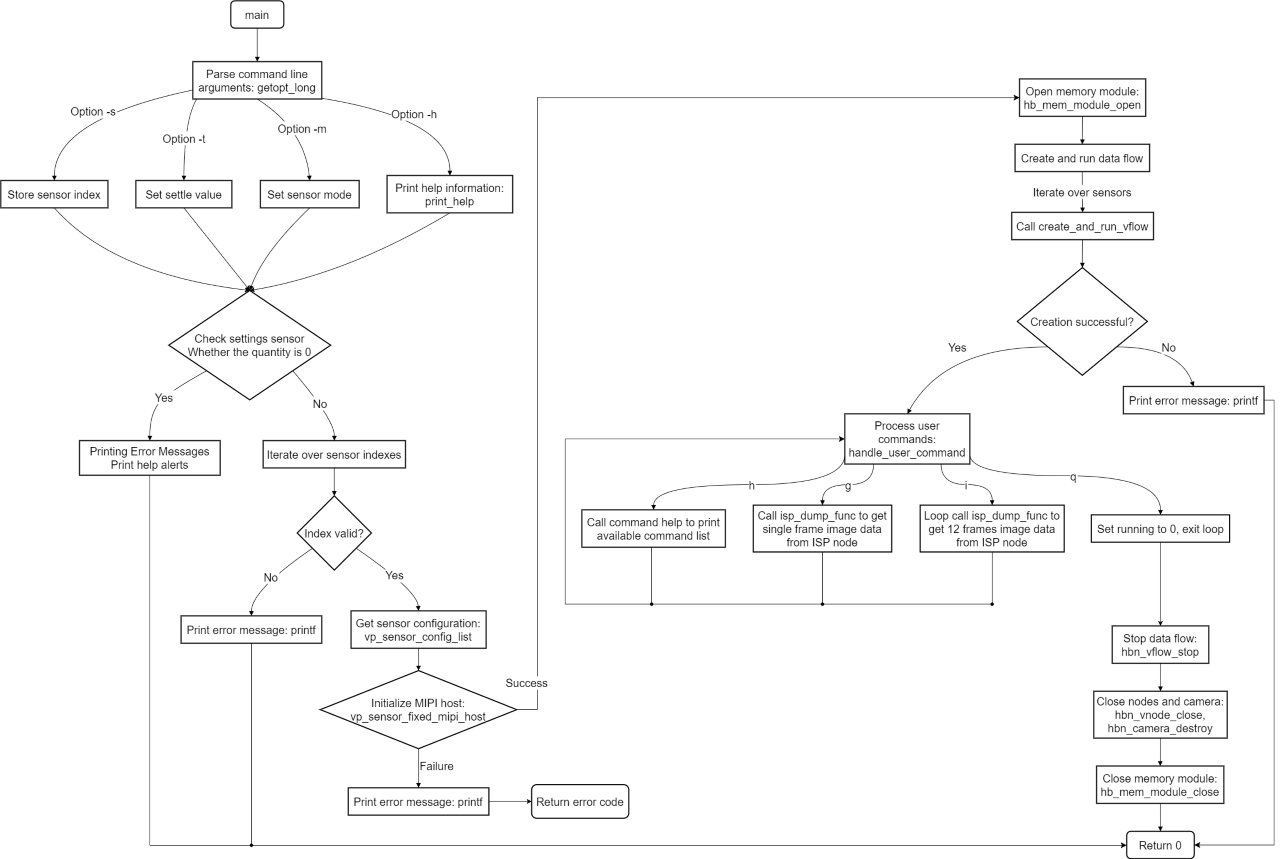
Description:
Parse command-line arguments: Use the
getopt_longfunction to parse command-line arguments.Print help information: Call the
print_helpfunction to display help information.Obtain sensor configuration: Retrieve configuration from
vp_sensor_config_list.Initialize MIPI host: Call the
vp_sensor_fixed_mipi_hostfunction for initialization.Open memory module: Call the
hb_mem_module_openfunction to initialize the memory management module.Create and run data stream: Call the
create_and_run_vflowfunction to create and start the data stream for each sensor.Handle user commands: Call the
handle_user_commandfunction to enter user interaction mode.Stop data stream: Call the
hbn_vflow_stopfunction to stop the data stream.Close nodes and camera: Call the
hbn_vnode_closeandhbn_camera_destroyfunctions to release resources.Close memory module: Call the
hb_mem_module_closefunction to close the memory management module.
3.3.1.2. Compilation and Deployment
Compilation
Execute the make command under the source code path to complete compilation:
cd app/samples/platform_samples/sample_isp/get_isp_data
make
For detailed program compilation methods, refer to the Compilation Methods section.
Hardware Environment Setup
For instructions on connecting a Camera Sensor to the development board, refer to the Camera (MIPI CSI) Interface section.
Program Deployment
The compiled executable file is generally located in the app/samples/platform_samples/sample_isp/get_isp_data directory:
├── Makefile
├── get_isp_data
├── get_isp_data.c
└── get_isp_data.o
The executable file for this sample is located at the board-side directory /app/platform_samples/sample_isp/get_isp_data. After each compilation, you need to upload get_isp_data to the corresponding directory on the board and run the chmod +x get_isp_data command to grant execute permissions before use.
3.3.1.3. Execution
Program Execution Method
On the board, navigate to the /app/platform_samples/sample_isp/get_isp_data directory and directly run the executable file. The command format is as follows:
./get_isp_data <Option> <Sensor_index>
Example:
root@buildroot:~# cd /app/platform_samples/sample_isp/get_isp_data/
root@buildroot:/app/platform_samples/sample_isp/get_isp_data# ./get_isp_data -s 7
Note:
When using a dol2 sensor configuration, the -c vo parameter must be added. For example, when using sc230ai-dol2-30fps, the command is as follows:
root@buildroot:~# cd /app/platform_samples/sample_isp/get_isp_data/
root@buildroot:/app/platform_samples/sample_isp/get_isp_data# ./get_isp_data -s 4 -c vo
Important Notice: When an HDR sensor is connected, the VIN-ISP connection must use online mode. Since online mode exclusively occupies the ISP resource, only 1 stream is supported.
Program Parameter Options Description
Executing the command ./get_isp_data -h will display help information and the supported Camera Sensor list.
root@buildroot:/app/platform_samples/sample_isp/get_isp_data# ./get_isp_data -h
Usage: get_isp_data [OPTIONS]
Options:
  -s <sensor_index>      Specify sensor index
  -m <sensor_mode>       Specify sensor mode of camera_config_t, support 'm' and 's'
                m: Master
                s: Slave
                The default value is determined by the configuration in vp_sensor.
  -c <channel_type>             Specify channel type: vo and vf
                                        1. vo: vin online isp
                                        2. vf: vin offline isp
                                        3. default is vf
  -h                     Show this help message
index: 0  sensor_name: sc1330t                  config_file:linear_1280x960_raw10_30fps_1lane.c
index: 1  sensor_name: irs2875-tof              config_file:linear_208x1413_raw12_15fps_2lane.c
index: 2  sensor_name: sc230ai-10fps            config_file:linear_1920x1080_raw10_10fps_1lane.c
index: 3  sensor_name: sc230ai-30fps            config_file:linear_1920x1080_raw10_30fps_1lane.c
index: 4  sensor_name: sc230ai-dol2-30fps       config_file:dol2_1920x1080_raw10_30fps_2lane.c
index: 5  sensor_name: sc132gs-1280p            config_file:linear_1088x1280_raw10_60fps_1lane.c
index: 6  sensor_name: sc132gs-hdr-2lane        config_file:hdr_1088x1280_raw10_30fps_2lane.c
index: 7  sensor_name: sc035hgs                 config_file:linear_640x480_raw10_30fps_1lane.c
index: 8  sensor_name: sc035hgs_mono            config_file:linear_mono_640x480_raw10_30fps_1lane.c
index: 9  sensor_name: ov5640                   config_file:linear_1920x1080_raw10_30fps_2lane.c
index: 10  sensor_name: f37                     config_file:linear_1920x1080_raw10_30fps_1lane.c
index: 11  sensor_name: imx415-30fps-2lane      config_file:linear_3840x2160_raw10_30fps_2lane.c
index: 12  sensor_name: imx415-30fps-4lane      config_file:linear_3840x2160_raw10_30fps_4lane.c
index: 13  sensor_name: sc202cs-1600x1200       config_file:linear_1600x1200_raw10_30fps_1lane.c
index: 14  sensor_name: irs2381c-tof            config_file:linear_224x1903_raw12_5fps_2lane.c
index: 15  sensor_name: sc035hgs-vc0            config_file:linear_640x480_raw10_30fps_2lane_vc0.c
index: 16  sensor_name: sc035hgs-vc1            config_file:linear_640x480_raw10_30fps_2lane_vc1.c
index: 17  sensor_name: sc231ai-30fps           config_file:linear_1920x1080_raw10_30fps_2lane.c
index: 18  sensor_name: imx586-30fps-4lane      config_file:linear_3840x2160_raw10_30fps_4lane.c
index: 19  sensor_name: os08c10-30fps-2lane     config_file:linear_3840x2160_raw12_30fps_2lane.c
index: 20  sensor_name: ar0233-30fps            config_file:linear_1920x1080_raw12_30fps_2lane.c
index: 21  sensor_name: ar0820std-30fps         config_file:linear_3840x2160_yuv422_30fps_4lane.c
index: 22  sensor_name: sc1336                  config_file:linear_1280x720_raw10_15fps_2lane.c
index: 23  sensor_name: dummy                   config_file:dummy_sensor.c
index: 24  sensor_name: ar0233-30fps            config_file:ar0233_linear_1920x1080_raw12_30fps_2lane_vc0.c
index: 25  sensor_name: ar0233-30fps            config_file:ar0233_linear_1920x1080_raw12_30fps_2lane_vc1.c
index: 26  sensor_name: ov9782-200fps-2lane     config_file:linear_640x360_raw10_200fps_2lane.c
index: 27  sensor_name: ov9782-120fps-2lane     config_file:linear_1280x720_raw10_120fps_2lane.c
index: 28  sensor_name: imx219-640x480-30fps    config_file:linear_640x480_raw10_30fps_2lane.c
index: 29  sensor_name: imx219-1632x1232-30fps  config_file:linear_1632x1232_raw10_30fps_2lane.c
index: 30  sensor_name: imx219-1920x1080-30fps  config_file:linear_1920x1080_raw10_30fps_2lane.c
index: 31  sensor_name: imx219-3264x2464-15fps  config_file:linear_3264x2464_raw10_15fps_2lane.c
index: 32  sensor_name: imx219-3264x2464-21fps  config_file:linear_3264x2464_raw10_21fps_2lane.c
index: 33  sensor_name: ov5647-640x480-60fps    config_file:linear_640x480_raw10_60fps_2lane.c
index: 34  sensor_name: ov5647-1280x960-30fps   config_file:linear_1280x960_raw10_30fps_2lane.c
index: 35  sensor_name: ov5647-1920x1080-30fps  config_file:linear_1920x1080_raw10_30fps_2lane.c
index: 36  sensor_name: ov5647-2592x1944-15fps  config_file:linear_2592x1944_raw10_15fps_2lane.c
index: 37  sensor_name: imx678-30fps-4lane      config_file:linear_3840x2160_raw12_30fps_4lane.c
index: 38  sensor_name: imx678-30fps-4lane-dol2         config_file:dol2_3840x2160_raw12_30fps_4lane.c
index: 39  sensor_name: imx477-1280x960-120fps  config_file:linear_1280x960_raw10_120fps_2lane.c
index: 40  sensor_name: imx477-1920x1080-50fps  config_file:linear_1920x1080_raw12_50fps_2lane.c
index: 41  sensor_name: imx477-2016x1520-21fps  config_file:linear_2016x1520_raw12_21fps_2lane.c
index: 42  sensor_name: imx477-4000x3000-10fps  config_file:linear_4000x3000_raw12_10fps_2lane.c
index: 43  sensor_name: ov50h40-30fps-4lane     config_file:linear_4096x3072_raw10_30fps_4lane.c
index: 44  sensor_name: ox05b1s                 config_file:linear_2592x1944_raw10_30fps_4lane.c
index: 45  sensor_name: ox05b1s_2lane           config_file:linear_2592x1944_raw10_10fps_2lane.c
index: 46  sensor_name: imx415-60fps-4lane      config_file:linear_3840x2160_raw10_60fps_4lane.c
index: 47  sensor_name: sc850sl-30fps           config_file:linear_3840x2160_raw10_30fps_4lane.c
index: 48  sensor_name: shw3g-30fps             config_file:linear_2064x1552_raw12_30fps_4lane.c
index: 49  sensor_name: shw3g-30fps_vc1         config_file:linear_2064x1552_raw12_30fps_4lane_vc1.c
index: 50  sensor_name: sc235hai-30fps          config_file:linear_1920x1080_raw10_30fps_2lane.c
index: 51  sensor_name: cv4006-60fps-2lane        config_file:linear_1280x720_raw10_60fps_2lane.c
index: 52  sensor_name: ov50h40-30fps-4lane       config_file:linear_3840x2160_raw10_30fps_4lane.c
index: 53  sensor_name: ov50h40-30fps-4lane       config_file:linear_4096x3072_raw14_30fps_4lane.c
index: 54  sensor_name: sc132gs-slave-right       config_file:linear_1088x1280_raw10_30fps_slave_1lane_right.c
index: 55  sensor_name: sc132gs-slave-left        config_file:linear_1088x1280_raw10_30fps_slave_1lane_left.c
index: 56  sensor_name: sc132gsstd_vc0            config_file:linear_1088x1280_raw10_10fps_1lane_vc0.c
index: 57  sensor_name: sc132gsstd_vc1            config_file:linear_1088x1280_raw10_10fps_1lane_vc1.c
index: 58  sensor_name: sc132gsstd_vc2            config_file:linear_1088x1280_raw10_10fps_1lane_vc2.c
index: 59  sensor_name: sc132gsstd_vc3            config_file:linear_1088x1280_raw10_10fps_1lane_vc3.c
index: 60  sensor_name: imx415-30fps-4lane-dol2   config_file:dol2_3840x2160_raw10_30fps_4lane.c
index: 61  sensor_name: isx031-30fps-vc0          config_file:isx031_linear_1920x1536_yuv422_30fps_4lane_vc0.c
index: 62  sensor_name: isx031-30fps-vc1          config_file:isx031_linear_1920x1536_yuv422_30fps_4lane_vc1.c
index: 63  sensor_name: isx031-30fps-vc2          config_file:isx031_linear_1920x1536_yuv422_30fps_4lane_vc2.c
index: 64  sensor_name: isx031-30fps-vc3          config_file:isx031_linear_1920x1536_yuv422_30fps_4lane_vc3.c
Command Parameter Description:
s <sensor_index>: This option specifies the sensor index to be used. Users need to provide a valid index value.
t <settle_value>: MIPI dphy settle time configuration; adjustable when PHY errors occur. This option specifies the settle time for debugging.
m <sensor_mode>: This option specifies the sensor mode in camera_config_t.
h: Display help information.
List of currently supported sensors and their corresponding configuration files:
| Index | Sensor Name | Configuration File |
|---|---|---|
| 0 | sc1330t | linear_1280x960_raw10_30fps_1lane.c |
| 1 | irs2875-tof | linear_208x1413_raw12_15fps_2lane.c |
| 2 | sc230ai-10fps | linear_1920x1080_raw10_10fps_1lane.c |
| 3 | sc230ai-30fps | linear_1920x1080_raw10_30fps_1lane.c |
| 4 | sc230ai-dol2-30fps | dol2_1920x1080_raw10_30fps_2lane.c |
| 5 | sc132gs-1280p | linear_1088x1280_raw10_30fps_1lane.c |
| 6 | sc132gs-hdr-2lane | hdr_1088x1280_raw10_30fps_2lane.c |
| 7 | sc035hgs | linear_640x480_raw10_30fps_1lane.c |
| 8 | sc035hgs_mono | linear_mono_640x480_raw10_30fps_1lane.c |
| 9 | ov5640 | linear_1920x1080_raw10_30fps_2lane.c |
| 10 | f37 | linear_1920x1080_raw10_30fps_1lane.c |
| 11 | imx415-30fps-2lane | linear_3840x2160_raw10_30fps_2lane.c |
| 12 | imx415-30fps-4lane | linear_3840x2160_raw10_30fps_4lane.c |
| 13 | sc202cs-1600x1200 | linear_1600x1200_raw10_30fps_1lane.c |
| 14 | irs2381c-tof | linear_224x1903_raw12_5fps_2lane.c |
| 15 | sc035hgs-vc0 | linear_640x480_raw10_30fps_2lane_vc0.c |
| 16 | sc035hgs-vc1 | linear_640x480_raw10_30fps_2lane_vc1.c |
| 17 | sc231ai-30fps | linear_1920x1080_raw10_30fps_2lane.c |
| 18 | imx586-30fps-4lane | linear_3840x2160_raw10_30fps_4lane.c |
| 19 | os08c10-30fps-2lane | linear_3840x2160_raw12_30fps_2lane.c |
| 20 | ar0233-30fps | linear_1920x1080_raw12_30fps_2lane.c |
| 21 | ar0820std-30fps | linear_3840x2160_yuv422_30fps_4lane.c |
| 22 | sc1336 | linear_1280x720_raw10_15fps_2lane.c |
| 23 | dummy | dummy_sensor.c |
| 24 | ar0233-30fps | ar0233_linear_1920x1080_raw12_30fps_2lane_vc0.c |
| 25 | ar0233-30fps | ar0233_linear_1920x1080_raw12_30fps_2lane_vc1.c |
| 26 | ov9782-200fps-2lane | linear_640x360_raw10_200fps_2lane.c |
| 27 | ov9782-120fps-2lane | linear_1280x720_raw10_120fps_2lane.c |
| 28 | imx219-640x480-30fps | linear_640x480_raw10_30fps_2lane.c |
| 29 | imx219-1632x1232-30fps | linear_1632x1232_raw10_30fps_2lane.c |
| 30 | imx219-1920x1080-30fps | linear_1920x1080_raw10_30fps_2lane.c |
| 31 | imx219-3264x2464-15fps | linear_3264x2464_raw10_15fps_2lane.c |
| 32 | imx219-3264x2464-21fps | linear_3264x2464_raw10_21fps_2lane.c |
| 33 | ov5647-640x480-60fps | linear_640x480_raw10_60fps_2lane.c |
| 34 | ov5647-1280x960-30fps | linear_1280x960_raw10_30fps_2lane.c |
| 35 | ov5647-1920x1080-30fps | linear_1920x1080_raw10_30fps_2lane.c |
| 36 | ov5647-2592x1944-15fps | linear_2592x1944_raw10_15fps_2lane.c |
| 37 | imx678-30fps-4lane | linear_3840x2160_raw12_30fps_4lane.c |
| 38 | imx678-30fps-4lane-dol2 | dol2_3840x2160_raw12_30fps_4lane.c |
| 39 | imx477-1280x960-120fps | linear_1280x960_raw10_120fps_2lane.c |
| 40 | imx477-1920x1080-50fps | linear_1920x1080_raw12_50fps_2lane.c |
| 41 | imx477-2016x1520-40fps | linear_2016x1520_raw12_40fps_2lane.c |
| 42 | imx477-4000x3000-10fps | linear_4000x3000_raw12_10fps_2lane.c |
| 43 | ov50h40-30fps-4lane | linear_4096x3072_raw10_30fps_4lane.c |
| 44 | ox05b1s | linear_2592x1944_raw10_30fps_4lane.c |
| 45 | ox05b1s_2lane | linear_2592x1944_raw10_10fps_2lane.c |
| 46 | imx415-60fps-4lane | linear_3840x2160_raw10_60fps_4lane.c |
| 47 | sc850sl-30fps | linear_3840x2160_raw10_30fps_4lane.c |
| 48 | shw3g-30fps | linear_2064x1552_raw12_30fps_4lane.c |
| 49 | shw3g-30fps_vc1 | linear_2064x1552_raw12_30fps_4lane_vc1.c |
| 50 | sc235hai-30fps | linear_1920x1080_raw10_30fps_2lane.c |
| 51 | cv4006-60fps-2lane | linear_1280x720_raw10_60fps_2lane.c |
| 52 | ov50h40-30fps-4lane | linear_3840x2160_raw10_30fps_4lane.c |
| 53 | ov50h40-30fps-4lane | linear_4096x3072_raw14_30fps_4lane.c |
| 54 | sc132gs-slave-right | linear_1088x1280_raw10_30fps_slave_1lane_right.c |
| 55 | sc132gs-slave-left | linear_1088x1280_raw10_30fps_slave_1lane_left.c |
| 56 | sc132gsstd_vc0 | linear_1088x1280_raw10_10fps_1lane_vc0.c |
| 57 | sc132gsstd_vc1 | linear_1088x1280_raw10_10fps_1lane_vc1.c |
| 58 | sc132gsstd_vc2 | linear_1088x1280_raw10_10fps_1lane_vc2.c |
| 59 | sc132gsstd_vc3 | linear_1088x1280_raw10_10fps_1lane_vc3.c |
| 60 | imx415-30fps-4lane-dol2 | dol2_3840x2160_raw10_30fps_4lane.c |
| 61 | isx031-30fps-vc0 | isx031_linear_1920x1536_yuv422_30fps_4lane_vc0.c |
| 62 | isx031-30fps-vc1 | isx031_linear_1920x1536_yuv422_30fps_4lane_vc1.c |
| 63 | isx031-30fps-vc2 | isx031_linear_1920x1536_yuv422_30fps_4lane_vc2.c |
| 64 | isx031-30fps-vc3 | isx031_linear_1920x1536_yuv422_30fps_4lane_vc3.c |
get_isp_data Configuration File Description
All currently supported sensors have corresponding configuration files, which are maintained in the app/samples/platform_samples/vp_sensors directory.
Take the configuration file linear_1920x1080_raw10_30fps_1lane.c for f37 as an example to explain the configuration file:
// app/samples/platform_samples/vp_sensors/f37/linear_1920x1080_raw10_30fps_1lane.c
#include "vp_sensors.h"

#define SENSOR_WIDTH  1920
#define SENSOR_HEIGHT  1080
#define SENSOE_FPS 30
#define RAW10 0x2B

static mipi_config_t mipi_config = {
	.rx_enable = 1,
	.rx_attr = {
		.phy = 0,
		.lane = 1,
		.datatype = RAW10,
		.fps = SENSOE_FPS,
		.mclk = 24,
		.mipiclk = 864,
		.width = SENSOR_WIDTH,
		.height = SENSOR_HEIGHT,
		.linelenth = 2560,
		.framelenth = 1125,
		.settle = 20,
		.channel_num = 1,
		.channel_sel = {0},
	},
};

static camera_config_t camera_config = {
	.name = "f37",
	.addr = 0x40,
	.sensor_mode = NORMAL_M,
	.fps = SENSOE_FPS,
	.format = RAW10,
	.width = SENSOR_WIDTH,
	.height = SENSOR_HEIGHT,
	.mipi_cfg = &mipi_config,
	.gpio_enable_bit = 0x01,
	.gpio_level_bit = 0x00,
	.calib_lname = "disable",
};

static vin_node_attr_t vin_node_attr = {
	.cim_attr = {
		.mipi_rx = 2,
		.vc_index = 0,
		.ipi_channel = 1,
		.cim_isp_flyby = 1,
		.func = {
			.enable_frame_id = 1,
			.set_init_frame_id = 0,
			.hdr_mode = NOT_HDR,
			.time_stamp_en = 0,
		},

	},
};

static vin_attr_ex_t vin_attr_ex = {
	.vin_attr_ex_mask = 0x80,
	.mclk_ex_attr = {
		.mclk_freq = 24000000,
	},
};

static vin_ichn_attr_t vin_ichn_attr = {
	.width = SENSOR_WIDTH,
	.height = SENSOR_HEIGHT,
	.format = RAW10,
};

static vin_ochn_attr_t vin_ochn_attr = {
	.ddr_en = 1,
	.ochn_attr_type = VIN_BASIC_ATTR,
	.vin_basic_attr = {
		.format = RAW10,
		// Hardware stride matches format, calculated based on pixel width and raw data bit depth
		// 8bit: x1, 10bit: x2, 12bit: x2, 16bit: x2, e.g., raw10, 1920 x 2 = 3840
		.wstride = (SENSOR_WIDTH) * 2,
	},
};

static isp_attr_t isp_attr = {
	.input_mode = 1, // 0: online, 1: mcm, similar to offline
	.sensor_mode= ISP_NORMAL_M,
	.crop = {
		.x = 0,
		.y = 0,
		.h = SENSOR_HEIGHT,
		.w = SENSOR_WIDTH,
	},
};

static isp_ichn_attr_t isp_ichn_attr = {
	.width = SENSOR_WIDTH,
	.height = SENSOR_HEIGHT,
	.fmt = FRM_FMT_RAW,
	.bit_width = 10,
};

static isp_ochn_attr_t isp_ochn_attr = {
	.ddr_en = 1,
	.fmt = FRM_FMT_NV12,
	.bit_width = 8,
};

vp_sensor_config_t f37_linear_1920x1080_raw10_30fps_1lane = {
	.chip_id_reg = 0x0a0b,
	.chip_id = 0x0f37,
	.sensor_name = "f37",
	.config_file = "linear_1920x1080_raw10_30fps_1lane.c",
	.camera_config = &camera_config,
	.vin_ichn_attr = &vin_ichn_attr,
	.vin_node_attr = &vin_node_attr,
	.vin_attr_ex   = &vin_attr_ex,
	.vin_ochn_attr = &vin_ochn_attr,
	.isp_attr      = &isp_attr,
	.isp_ichn_attr = &isp_ichn_attr,
	.isp_ochn_attr = &isp_ochn_attr,
};
Macro Definitions
#define SENSOR_WIDTH  1920
#define SENSOR_HEIGHT  1080
#define SENSOE_FPS 30
#define RAW10 0x2B
SENSOR_WIDTH: Sensor width set to 1920 pixels.
SENSOR_HEIGHT: Sensor height set to 1080 pixels.
SENSOE_FPS: Sensor frame rate set to 30 frames per second.
RAW10: Data format defined as RAW10, represented by hexadecimal value 0x2B.
MIPI Configuration
static mipi_config_t mipi_config = {
	.rx_enable = 1,
	.rx_attr = {
		.phy = 0,
		.lane = 1,
		.datatype = RAW10,
		.fps = SENSOE_FPS,
		.mclk = 24,
		.mipiclk = 864,
		.width = SENSOR_WIDTH,
		.height = SENSOR_HEIGHT,
		.linelenth = 2560,
		.framelenth = 1125,
		.settle = 20,
		.channel_num = 1,
		.channel_sel = {0},
	},
};
rx_enable: Receive enable, set to 1 to enable.
rx_attr: Contains MIPI interface attributes:
phy: Physical interface set to 0.
lane: Uses 1 data lane.
datatype: Data type is RAW10.
fps: Frame rate is 30.
mclk: Master clock frequency is 24MHz.
mipiclk: MIPI clock frequency is 864MHz, lane rate is mipiclk/lane.
width: Image width is 1920.
height: Image height is 1080.
linelenth: Line length is 2560.
framelenth: Frame length is 1125.
settle: Settle time is 20.
channel_num: Number of channels is 1.
channel_sel: Selected channel is 0.
Camera Configuration
static camera_config_t camera_config = {
	.name = "f37",
	.addr = 0x40,
	.sensor_mode = NORMAL_M,
	.fps = SENSOE_FPS,
	.format = RAW10,
	.width = SENSOR_WIDTH,
	.height = SENSOR_HEIGHT,
	.mipi_cfg = &mipi_config,
	.gpio_enable_bit = 0x01,
	.gpio_level_bit = 0x00,
	.calib_lname = "disable",
};
name: Camera name is “f37”.
addr: I2C address is 0x40.
sensor_mode: Sensor mode set to NORMAL_M. Currently supported modes include:
NORMAL_M = 1;
DOL2_M = 2;
DOL3_M = 3;
DOL4_M = 4;
PWL_M = 5;
SLAVE_M = 6.
fps: Frame rate is 30 frames per second.
format: Data format is RAW10.
mipi_cfg: Pointer to MIPI configuration.
gpio_enable_bit: Number of GPIO enables is 1.
gpio_level_bit: GPIO level bit is 0x00.
calib_lname: Sensor calibration library path. Default path is
/usr/hobot/lib/sensor, supports custom paths with total length not exceeding 100 bytes. When set to “disable”, the code will default to using relevant properties from the<sensor_name>_tuning.jsonfile.
VIN Node Attributes
static vin_node_attr_t vin_node_attr = {
	.cim_attr = {
		.mipi_rx = 2,
		.vc_index = 0,
		.ipi_channel = 1,
		.cim_isp_flyby = 1,
		.func = {
			.enable_frame_id = 1,
			.set_init_frame_id = 0,
			.hdr_mode = NOT_HDR,
			.time_stamp_en = 0,
		},
	},
};
cim_attr: Contains VIN node attributes:
mipi_rx: MIPI receive channel set to 2.
vc_index: Virtual channel index is 0.
ipi_channel: IPI channel set to 1.
cim_isp_flyby: Set to 1 indicates sif online to isp, data does not go through DDR.
func: Contains functional settings:
enable_frame_id: Enable frame ID.
set_init_frame_id: Initial frame ID set to 0.
hdr_mode: HDR mode set to NOT_HDR.
time_stamp_en: Timestamp enable set to 0.
VIN Extended Attributes
static vin_attr_ex_t vin_attr_ex = {
	.vin_attr_ex_mask = 0x80,
	.mclk_ex_attr = {
		.mclk_freq = 24000000,
	},
};
vin_attr_ex_mask: Extended attribute mask set to 0x80.
mclk_ex_attr: Contains main clock frequency setting, frequency is 24MHz.
Input Channel Attributes
static vin_ichn_attr_t vin_ichn_attr = {
	.width = SENSOR_WIDTH,
	.height = SENSOR_HEIGHT,
	.format = RAW10,
};
vin_ichn_attr: Input channel attributes, setting width, height, and format to RAW10.
Output Channel Attributes
  static vin_ochn_attr_t vin_ochn_attr = {
  	.ddr_en = 1,
  	.ochn_attr_type = VIN_BASIC_ATTR,
  	.vin_basic_attr = {
  		.format = RAW10,
  		.wstride = (SENSOR_WIDTH) * 2,
  	},
  };
vin_ochn_attr: Output channel attributes:
ddr_en: DDR enable is set to 1.
ochn_attr_type: Output channel attribute type is VIN_BASIC_ATTR.
vin_basic_attr: Contains basic attributes:
format: Output format is RAW10.
wstride: Width stride is calculated as 1920 * 2 = 3840 (since RAW10 format occupies 2 bytes per pixel).
ISP Attributes
static isp_attr_t isp_attr = {
	.input_mode = 1, // 0: online, 1: mcm, similar to offline
	.sensor_mode= ISP_NORMAL_M,
	.crop = {
		.x = 0,
		.y = 0,
		.h = SENSOR_HEIGHT,
		.w = SENSOR_WIDTH,
	},
};
input_mode: Path mode from SIF to ISP,
0: Indicates SIF directly connected to ISP (only supports 1 stream);
1: Indicates SIF directly connected to ISP, with multiple streams internally scheduled by MCM in ISP (supports up to 4 streams);
2: Indicates SIF goes through DDR to ISP.
Notes:
When
input_modeis 0 or 1,cim_isp_flybymust be set to 1, and SIF must bind output channel 1 to ISP’s input channel.When
input_modeis 2,cim_isp_flybymust be set to 0, the DDR function under SIF must be enabled, and SIF must bind output channel 0 to ISP’s input channel.
sensor_mode: ISP mode is set to ISP_NORMAL_M. Currently supported modes include:
ISP_NORMAL_M = 0;
ISP_DOL2_M = 1;
ISP_PWL_M = 2.
crop: Parameters for cropping input image to ISP. The cropping region starts at (0,0), with width and height the same as the sensor. Used as ISP output dimensions; when set to 0, the driver defaults to using input dimensions as output. Original output dimensions are currently unused.
ISP Input and Output Channel Attributes
static isp_ichn_attr_t isp_ichn_attr = {
	.width = SENSOR_WIDTH,
	.height = SENSOR_HEIGHT,
	.fmt = FRM_FMT_RAW,
	.bit_width = 10,
};

static isp_ochn_attr_t isp_ochn_attr = {
	.ddr_en = 1,
	.fmt = FRM_FMT_NV12,
	.bit_width = 8,
};
isp_ichn_attr: ISP input channel attributes, setting width, height, format to RAW, and bit width to 10.
isp_ochn_attr: ISP output channel attributes, DDR enable set to 1, output format is NV12, bit width is 8.
Sensor Configuration Structure
vp_sensor_config_t f37_linear_1920x1080_raw10_30fps_1lane = {
	.chip_id_reg = 0x0a0b,
	.chip_id = 0x0f37,
	.sensor_name = "f37",
	.config_file = "linear_1920x1080_raw10_30fps_1lane.c",
	.camera_config = &camera_config,
	.vin_ichn_attr = &vin_ichn_attr,
	.vin_node_attr = &vin_node_attr,
	.vin_attr_ex   = &vin_attr_ex,
	.vin_ochn_attr = &vin_ochn_attr,
	.isp_attr      = &isp_attr,
	.isp_ichn_attr = &isp_ichn_attr,
	.isp_ochn_attr = &isp_ochn_attr,
};
vp_sensor_config_t: Defines the sensor configuration structure, including various sensor attributes and configuration file information:
chip_id_reg: Chip ID register address is 0x0A0B.
chip_id: Chip ID is 0x0F37.
sensor_name: Sensor name is “f37”.
config_file: Configuration file name is “linear_1920x1080_raw10_30fps_1lane.c”.
Other attributes point to previously defined configuration structures.
Execution Results
Next, we can select the type of sensor currently connected to the development board according to the prompt, then run the entire system. The following demonstrations will use f37 as an example:
./get_isp_data -s 7
Using index:7  sensor_name:f37  config_file:linear_1920x1080_raw10_30fps_1lane.c
Searching camera sensor on device: /proc/device-tree/soc/cam/vcon@0 i2c bus: 4 mipi rx phy: 0
Searching camera sensor on device: /proc/device-tree/soc/cam/vcon@2 i2c bus: 2 mipi rx phy: 2
INFO: Found sensor_name:f37 on mipi rx csi 2, i2c addr 0x40, config_file:linear_1920x1080_raw10_30fps_1lane.c

***************  Command Lists  ***************
 g      -- get single frame
 l      -- get a set frames
 q      -- quit
 h      -- print help message

Command:
g: Capture one frame. Multiple ‘g’ inputs are supported for continuous capture, e.g., inputting gggg
Command: g
isp dump yuv 1920x1080(stride:1920), buffer size: 2073600 + 1036800 frame id: 0, timestamp: 197145649052
l: Continuously capture 12 frames, equivalent to entering 12 ‘g’ commands
Command: l
isp dump yuv 1920x1080(stride:1920), buffer size: 2073600 + 1036800 frame id: 1, timestamp: 197178981635
isp dump yuv 1920x1080(stride:1920), buffer size: 2073600 + 1036800 frame id: 355, timestamp: 208978985224
... (omitted, total 12 frames dumped) ...
isp dump yuv 1920x1080(stride:1920), buffer size: 2073600 + 1036800 frame id: 394, timestamp: 210278982766
isp dump yuv 1920x1080(stride:1920), buffer size: 2073600 + 1036800 frame id: 395, timestamp: 210312316183
q: Quit the program
Command: q
quit
After running the program, YUV images with naming format like isp_chn0_1280x960_stride_1280_sframeid_1.yuv will be obtained.
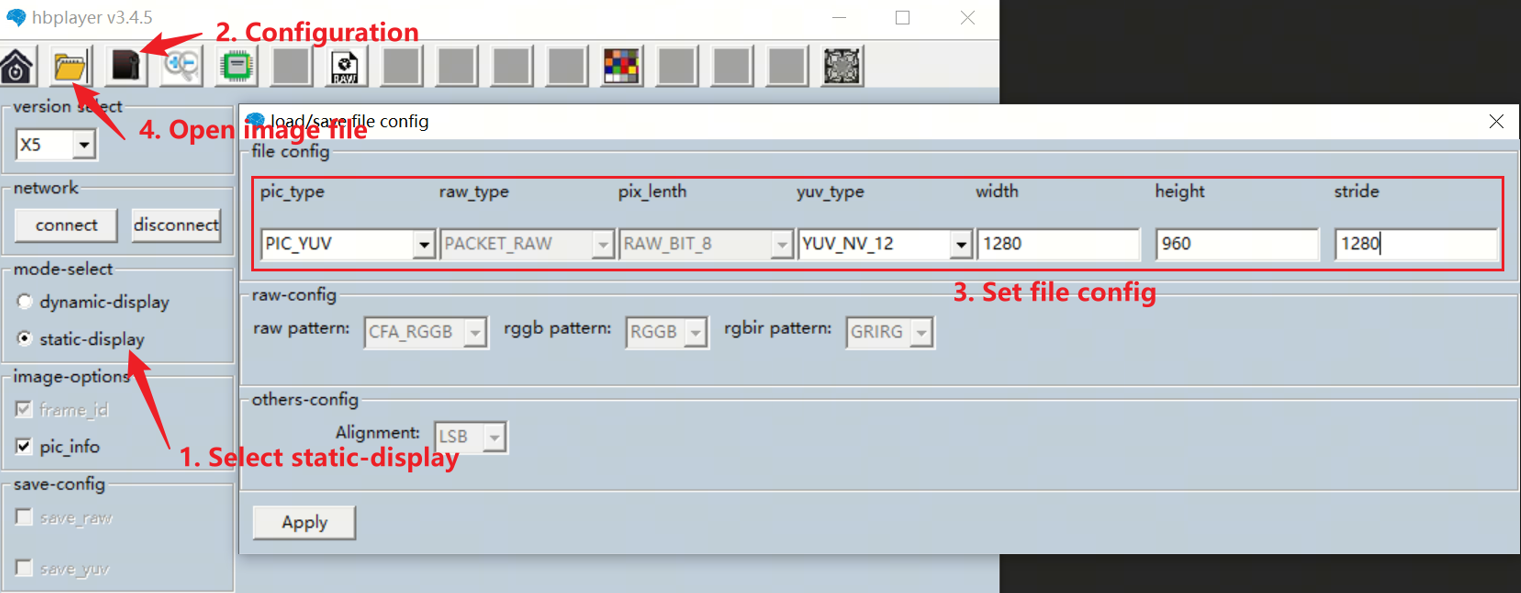
You can use the Hobot player tool to view the images. The image parameter configuration is explained as follows:
View YUV Image
Configure options as shown in the figure below. In the file config, pay attention to the settings of pic_type, yuv_type, width, and height. For sc1330t, configure as (PIC_YUV, YUV_NV12, 1280, 960).
3.3.1.4. Common Issues
Abnormal testing due to poor hardware contact or loose interfaces Check hardware connection status to ensure stable connections.
3.3.2. multi_isp_vflow
3.3.2.1. Function Overview
multi_isp_vflow initializes the Camera Sensor, MIPI CSI, SIF, and ISP modules, achieving the functionality where after VIN acquires Raw image data, it sends the data to two ISP instances for processing, enabling different ISP tuning on a single frame from the Camera Sensor. It supports retrieving YUV-formatted images from the ISP module.
Users can use this program to debug and verify the MIPI CSI, SIF, and ISP hardware modules, and it provides an example of how to initialize the ISP module independently.
For compilation instructions, refer to the Compilation Methods section.
For instructions on connecting a Camera Sensor to the development board, see the Camera (MIPI CSI) Interface section.
Software Architecture Description
multi_isp_vflow calls APIs from libcam.so and libvpf.so to implement camera initialization, image capture, video input, and ISP processing, constructing a complete software architecture for image signal processing and video input processing. Among them, libcam.so is responsible for camera device driver and control, while libvpf.so provides core functions for video input and ISP processing. These two libraries work together to achieve input, processing, and output of image signals.
The software architecture of multi_isp_vflow is shown below:
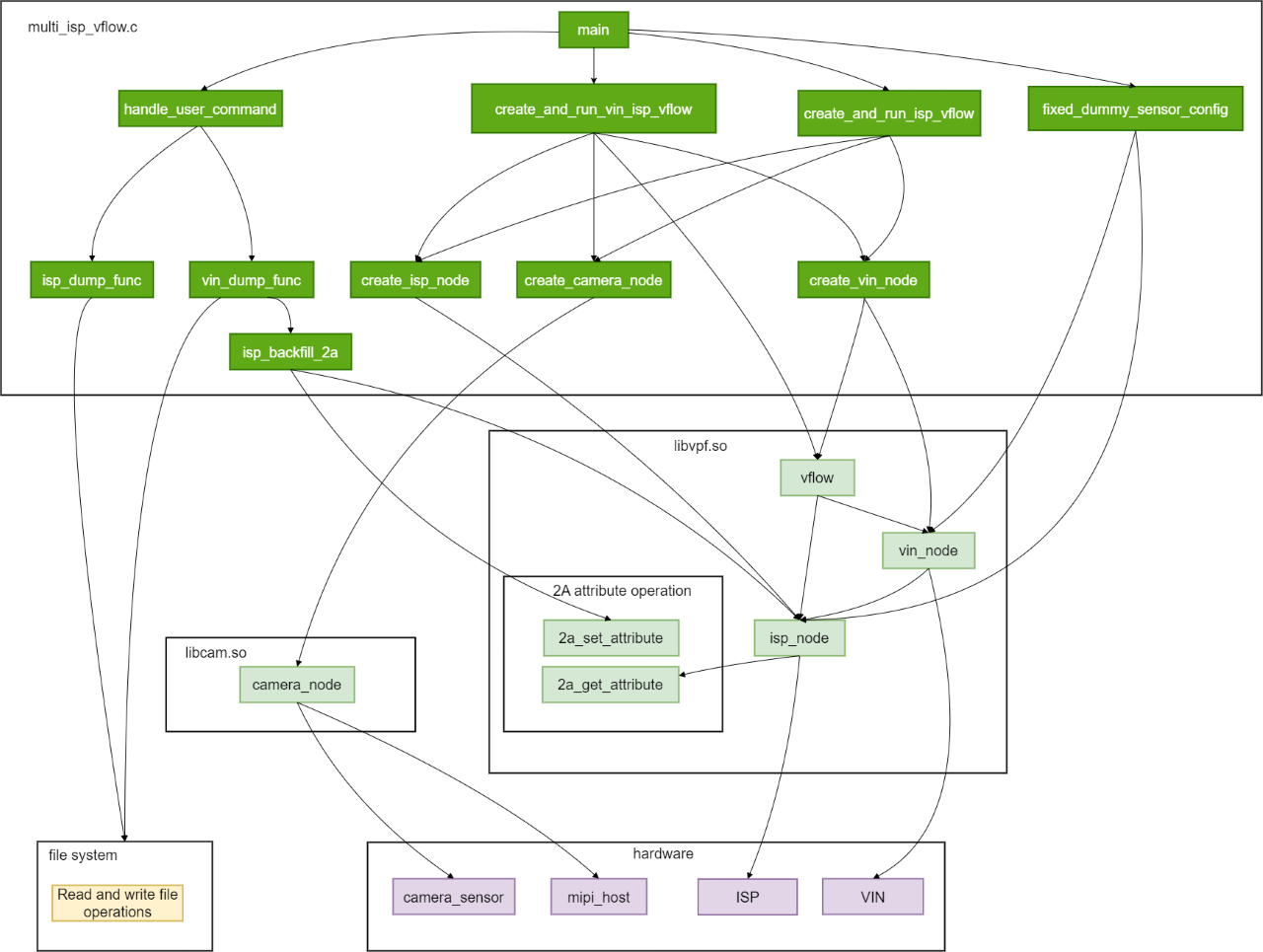
libcam.so, as a low-level camera driver library, provides driving and control functions for camera devices. By calling APIs from libcam.so, multi_isp_vflow achieves camera initialization, image capture, and resource release operations, enabling the camera to work collaboratively with other modules for image signal input and processing. Core functions include:
hbn_camera_create: Creates a camera node and initializes the camera device for image capture.hbn_camera_attach_to_vin: Binds the camera node to a video input node, establishing a connection between the camera and video input, ensuring captured image data is transmitted to the video input node for further processing.hbn_camera_destroy: Destroys the camera node and releases camera device resources, ending the camera’s image capture function.
libvpf.so, as a low-level video processing framework library, provides core functions for video input and ISP processing. By calling APIs from libvpf.so, multi_isp_vflow implements creation, configuration, data processing, and management of video input and ISP nodes, enabling video input and ISP processing to collaborate with other modules for image signal input, processing, and output. Core functions include:
hbn_vnode_open: Opens a video input node or ISP node, initializing the node device for data processing.hbn_vnode_set_attr,hbn_vnode_set_ichn_attr,hbn_vnode_set_ochn_attr: Set node attributes, input channel attributes, and output channel attributes to configure working parameters such as resolution, frame rate, and color format to meet different processing needs.hbn_vnode_getframe,hbn_vnode_releaseframe: Retrieve and release frame data from nodes to achieve data reading and management.hbn_vflow_create,hbn_vflow_add_vnode,hbn_vflow_bind_vnode,hbn_vflow_start,hbn_vflow_stop,hbn_vflow_destroy: Create, manage, bind, start, stop, and destroy data flows (vflow), controlling data transmission and processing workflows between different nodes.hbn_isp_get_awb_attr,hbn_isp_set_awb_attr,hbn_isp_get_exposure_attr,hbn_isp_set_exposure_attr: Get and set ISP auto white balance (AWB) and exposure (AE) attributes to adjust and control image quality.
Code Location and Directory Structure
The source code path for multi_isp_vflow is /app/samples/platform_samples/sample_isp. The code structure is as follows:
└── multi_isp_vflow
    ├── Makefile
    └── multi_isp_vflow.c
Makefile: Makefile used to compile the program.
multi_isp_vflow.c: Main source code file of the program.
Tool Location and Directory Structure
The tool is located in the board directory /app/platform_samples/sample_isp/multi_isp_vflow:
root@buildroot:/app/platform_samples/sample_isp/multi_isp_vflow# ls
multi_isp_vflow
multi_isp_vflow is the executable file compiled from the source code.
API Flow Description
The program flow of get_isp_data is as follows:
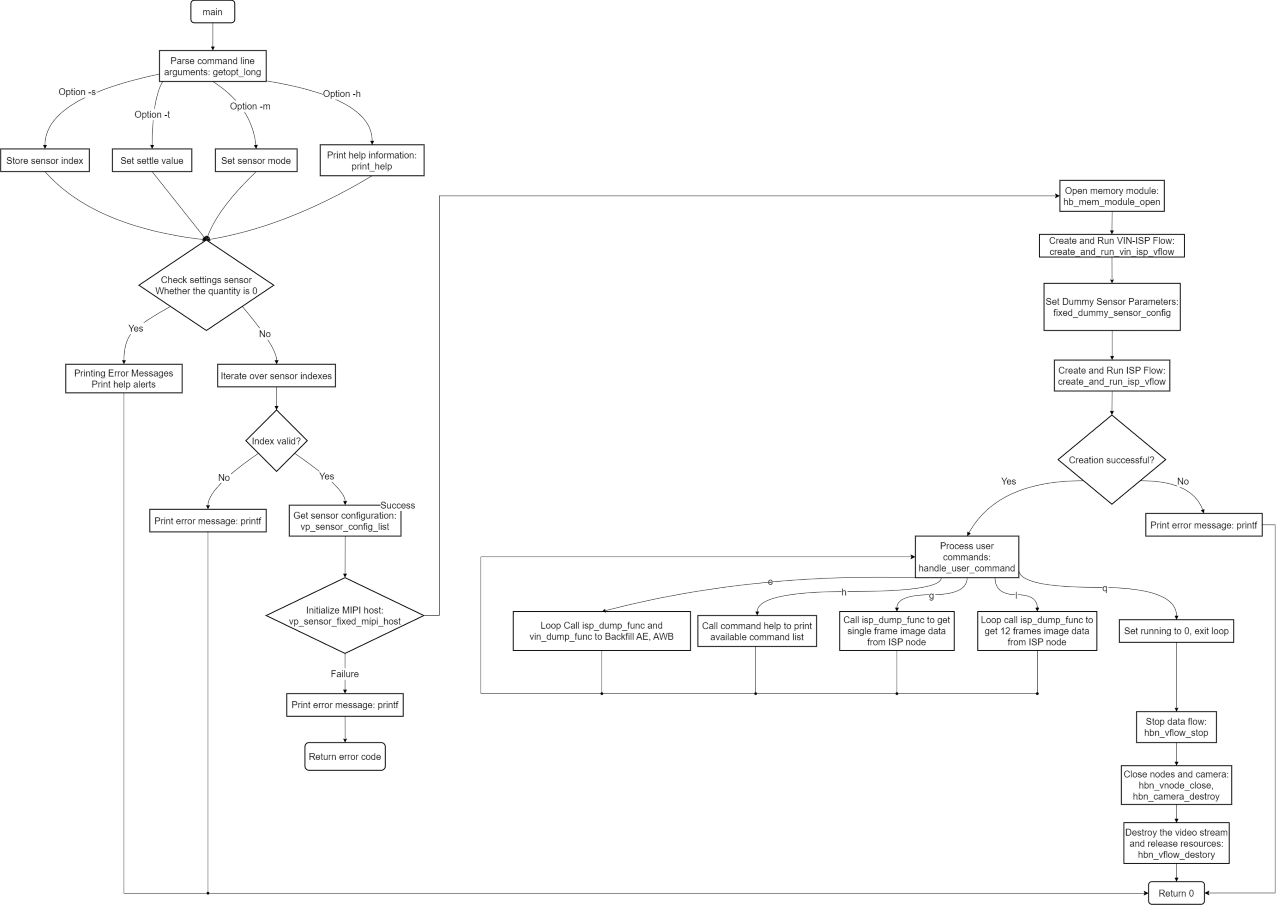
Description:
Parse command-line arguments: Use
getopt_long()to parse command-line input.Get sensor configuration: Obtain the sensor configuration at the specified index via
vp_sensor_config_list[index].Initialize MIPI host: Call
vp_sensor_fixed_mipi_host()to initialize the MIPI host.Create and run VIN-ISP flow: Use
create_and_run_vin_isp_vflow(&vin_isp_contex)andcreate_and_run_isp_vflow(&isp_contex)to create and run data flows.Set dummy sensor parameters: Set related parameters of the dummy sensor via
fixed_dummy_sensor_config(&vin_isp_contex, &dummy_sensor_config).Handle user commands: Process user input commands via
handle_user_command(vin_isp_contex, isp_contex).Stop VIN flow: Call
hbn_vnode_releaseframe()to release frame data.Close VIN and ISP nodes: Use
hbn_vnode_close()to close nodes.Destroy camera: Call
vp_sensor_destroy()to release camera resources.Print help information: If the sensor index is invalid, call
print_help()to print help information.
3.3.2.2. Compilation and Deployment
Compilation
Run the make command in the source code directory to complete the compilation:
cd app/samples/platform_samples/sample_isp/multi_isp_vflow
make
For detailed compilation instructions, refer to the Build Method section.
Hardware Environment Setup
For instructions on connecting a Camera Sensor to the development board, see the Camera (MIPI CSI) section.
Program Deployment
The compiled executable file is generally located in the app/samples/platform_samples/sample_isp/multi_isp_vflow directory:
├── Makefile
├── multi_isp_vflow
├── multi_isp_vflow.c
└── multi_isp_vflow.o
The executable file for this sample is located on the board at /app/platform_samples/sample_isp/multi_isp_vflow. After each compilation, you need to upload multi_isp_vflow to the corresponding directory on the board and run chmod +x multi_isp_vflow to grant execution permission before use.
3.3.2.3. Execution
Program Execution Method
On the board, navigate to the /app/platform_samples/sample_isp/multi_isp_vflow directory, then run the executable directly. Command format is as follows:
./multi_isp_vflow <Option> <Sensor_index>
Example:
root@buildroot:~# cd /app/platform_samples/sample_isp/multi_isp_vflow/
root@buildroot:/app/platform_samples/sample_isp/multi_isp_vflow# ./multi_isp_vflow -s 7
Program Parameter Options
Run ./multi_isp_vflow -h to get help information and the supported Camera Sensor list.
root@buildroot:/app/platform_samples/sample_isp/multi_isp_vflow# ./multi_isp_vflow -h
Usage: multi_isp_vflow [OPTIONS]
Options:
  -s <sensor_index>      Specify sensor index
  -h                     Show this help message
index: 0  sensor_name: sc1330t                  config_file:linear_1280x960_raw10_30fps_1lane.c
index: 1  sensor_name: irs2875-tof              config_file:linear_208x1413_raw12_15fps_2lane.c
index: 2  sensor_name: sc230ai-10fps            config_file:linear_1920x1080_raw10_10fps_1lane.c
index: 3  sensor_name: sc230ai-30fps            config_file:linear_1920x1080_raw10_30fps_1lane.c
index: 4  sensor_name: sc230ai-dol2-30fps       config_file:dol2_1920x1080_raw10_30fps_2lane.c
index: 5  sensor_name: sc132gs-1280p            config_file:linear_1088x1280_raw10_60fps_1lane.c
index: 6  sensor_name: sc132gs-hdr-2lane        config_file:hdr_1088x1280_raw10_30fps_2lane.c
index: 7  sensor_name: sc035hgs                 config_file:linear_640x480_raw10_30fps_1lane.c
index: 8  sensor_name: sc035hgs_mono            config_file:linear_mono_640x480_raw10_30fps_1lane.c
index: 9  sensor_name: ov5640                   config_file:linear_1920x1080_raw10_30fps_2lane.c
index: 10  sensor_name: f37                     config_file:linear_1920x1080_raw10_30fps_1lane.c
index: 11  sensor_name: imx415-30fps-2lane      config_file:linear_3840x2160_raw10_30fps_2lane.c
index: 12  sensor_name: imx415-30fps-4lane      config_file:linear_3840x2160_raw10_30fps_4lane.c
index: 13  sensor_name: sc202cs-1600x1200       config_file:linear_1600x1200_raw10_30fps_1lane.c
index: 14  sensor_name: irs2381c-tof            config_file:linear_224x1903_raw12_5fps_2lane.c
index: 15  sensor_name: sc035hgs-vc0            config_file:linear_640x480_raw10_30fps_2lane_vc0.c
index: 16  sensor_name: sc035hgs-vc1            config_file:linear_640x480_raw10_30fps_2lane_vc1.c
index: 17  sensor_name: sc231ai-30fps           config_file:linear_1920x1080_raw10_30fps_2lane.c
index: 18  sensor_name: imx586-30fps-4lane      config_file:linear_3840x2160_raw10_30fps_4lane.c
index: 19  sensor_name: os08c10-30fps-2lane     config_file:linear_3840x2160_raw12_30fps_2lane.c
index: 20  sensor_name: ar0233-30fps            config_file:linear_1920x1080_raw12_30fps_2lane.c
index: 21  sensor_name: ar0820std-30fps         config_file:linear_3840x2160_yuv422_30fps_4lane.c
index: 22  sensor_name: sc1336                  config_file:linear_1280x720_raw10_15fps_2lane.c
index: 23  sensor_name: dummy                   config_file:dummy_sensor.c
index: 24  sensor_name: ar0233-30fps            config_file:ar0233_linear_1920x1080_raw12_30fps_2lane_vc0.c
index: 25  sensor_name: ar0233-30fps            config_file:ar0233_linear_1920x1080_raw12_30fps_2lane_vc1.c
index: 26  sensor_name: ov9782-200fps-2lane     config_file:linear_640x360_raw10_200fps_2lane.c
index: 27  sensor_name: ov9782-120fps-2lane     config_file:linear_1280x720_raw10_120fps_2lane.c
index: 28  sensor_name: imx219-640x480-30fps    config_file:linear_640x480_raw10_30fps_2lane.c
index: 29  sensor_name: imx219-1632x1232-30fps  config_file:linear_1632x1232_raw10_30fps_2lane.c
index: 30  sensor_name: imx219-1920x1080-30fps  config_file:linear_1920x1080_raw10_30fps_2lane.c
index: 31  sensor_name: imx219-3264x2464-15fps  config_file:linear_3264x2464_raw10_15fps_2lane.c
index: 32  sensor_name: imx219-3264x2464-21fps  config_file:linear_3264x2464_raw10_21fps_2lane.c
index: 33  sensor_name: ov5647-640x480-60fps    config_file:linear_640x480_raw10_60fps_2lane.c
index: 34  sensor_name: ov5647-1280x960-30fps   config_file:linear_1280x960_raw10_30fps_2lane.c
index: 35  sensor_name: ov5647-1920x1080-30fps  config_file:linear_1920x1080_raw10_30fps_2lane.c
index: 36  sensor_name: ov5647-2592x1944-15fps  config_file:linear_2592x1944_raw10_15fps_2lane.c
index: 37  sensor_name: imx678-30fps-4lane      config_file:linear_3840x2160_raw12_30fps_4lane.c
index: 38  sensor_name: imx678-30fps-4lane-dol2         config_file:dol2_3840x2160_raw12_30fps_4lane.c
index: 39  sensor_name: imx477-1280x960-120fps  config_file:linear_1280x960_raw10_120fps_2lane.c
index: 40  sensor_name: imx477-1920x1080-50fps  config_file:linear_1920x1080_raw12_50fps_2lane.c
index: 41  sensor_name: imx477-2016x1520-21fps  config_file:linear_2016x1520_raw12_21fps_2lane.c
index: 42  sensor_name: imx477-4000x3000-10fps  config_file:linear_4000x3000_raw12_10fps_2lane.c
index: 43  sensor_name: ov50h40-30fps-4lane     config_file:linear_4096x3072_raw10_30fps_4lane.c
index: 44  sensor_name: ox05b1s                 config_file:linear_2592x1944_raw10_30fps_4lane.c
index: 45  sensor_name: ox05b1s_2lane           config_file:linear_2592x1944_raw10_10fps_2lane.c
index: 46  sensor_name: imx415-60fps-4lane      config_file:linear_3840x2160_raw10_60fps_4lane.c
index: 47  sensor_name: sc850sl-30fps           config_file:linear_3840x2160_raw10_30fps_4lane.c
index: 48  sensor_name: shw3g-30fps             config_file:linear_2064x1552_raw12_30fps_4lane.c
index: 49  sensor_name: shw3g-30fps_vc1         config_file:linear_2064x1552_raw12_30fps_4lane_vc1.c
index: 50  sensor_name: sc235hai-30fps          config_file:linear_1920x1080_raw10_30fps_2lane.c
index: 51  sensor_name: cv4006-60fps-2lane        config_file:linear_1280x720_raw10_60fps_2lane.c
index: 52  sensor_name: ov50h40-30fps-4lane       config_file:linear_3840x2160_raw10_30fps_4lane.c
index: 53  sensor_name: ov50h40-30fps-4lane       config_file:linear_4096x3072_raw14_30fps_4lane.c
index: 54  sensor_name: sc132gs-slave-right       config_file:linear_1088x1280_raw10_30fps_slave_1lane_right.c
index: 55  sensor_name: sc132gs-slave-left        config_file:linear_1088x1280_raw10_30fps_slave_1lane_left.c
index: 56  sensor_name: sc132gsstd_vc0            config_file:linear_1088x1280_raw10_10fps_1lane_vc0.c
index: 57  sensor_name: sc132gsstd_vc1            config_file:linear_1088x1280_raw10_10fps_1lane_vc1.c
index: 58  sensor_name: sc132gsstd_vc2            config_file:linear_1088x1280_raw10_10fps_1lane_vc2.c
index: 59  sensor_name: sc132gsstd_vc3            config_file:linear_1088x1280_raw10_10fps_1lane_vc3.c
index: 60  sensor_name: imx415-30fps-4lane-dol2   config_file:dol2_3840x2160_raw10_30fps_4lane.c
index: 61  sensor_name: isx031-30fps-vc0          config_file:isx031_linear_1920x1536_yuv422_30fps_4lane_vc0.c
index: 62  sensor_name: isx031-30fps-vc1          config_file:isx031_linear_1920x1536_yuv422_30fps_4lane_vc1.c
index: 63  sensor_name: isx031-30fps-vc2          config_file:isx031_linear_1920x1536_yuv422_30fps_4lane_vc2.c
index: 64  sensor_name: isx031-30fps-vc3          config_file:isx031_linear_1920x1536_yuv422_30fps_4lane_vc3.c
Command Parameter Description:
s <sensor_index>: This option specifies the sensor index to use. The user needs to provide a valid index value.
h: Display help information.
Currently supported sensors and their corresponding configuration files:
| Index | Sensor Name | Configuration File |
|---|---|---|
| 0 | sc1330t | linear_1280x960_raw10_30fps_1lane.c |
| 1 | irs2875-tof | linear_208x1413_raw12_15fps_2lane.c |
| 2 | sc230ai-10fps | linear_1920x1080_raw10_10fps_1lane.c |
| 3 | sc230ai-30fps | linear_1920x1080_raw10_30fps_1lane.c |
| 4 | sc230ai-dol2-30fps | dol2_1920x1080_raw10_30fps_2lane.c |
| 5 | sc132gs-1280p | linear_1088x1280_raw10_30fps_1lane.c |
| 6 | sc132gs-hdr-2lane | hdr_1088x1280_raw10_30fps_2lane.c |
| 7 | sc035hgs | linear_640x480_raw10_30fps_1lane.c |
| 8 | sc035hgs_mono | linear_mono_640x480_raw10_30fps_1lane.c |
| 9 | ov5640 | linear_1920x1080_raw10_30fps_2lane.c |
| 10 | f37 | linear_1920x1080_raw10_30fps_1lane.c |
| 11 | imx415-30fps-2lane | linear_3840x2160_raw10_30fps_2lane.c |
| 12 | imx415-30fps-4lane | linear_3840x2160_raw10_30fps_4lane.c |
| 13 | sc202cs-1600x1200 | linear_1600x1200_raw10_30fps_1lane.c |
| 14 | irs2381c-tof | linear_224x1903_raw12_5fps_2lane.c |
| 15 | sc035hgs-vc0 | linear_640x480_raw10_30fps_2lane_vc0.c |
| 16 | sc035hgs-vc1 | linear_640x480_raw10_30fps_2lane_vc1.c |
| 17 | sc231ai-30fps | linear_1920x1080_raw10_30fps_2lane.c |
| 18 | imx586-30fps-4lane | linear_3840x2160_raw10_30fps_4lane.c |
| 19 | os08c10-30fps-2lane | linear_3840x2160_raw12_30fps_2lane.c |
| 20 | ar0233-30fps | linear_1920x1080_raw12_30fps_2lane.c |
| 21 | ar0820std-30fps | linear_3840x2160_yuv422_30fps_4lane.c |
| 22 | sc1336 | linear_1280x720_raw10_15fps_2lane.c |
| 23 | dummy | dummy_sensor.c |
| 24 | ar0233-30fps | ar0233_linear_1920x1080_raw12_30fps_2lane_vc0.c |
| 25 | ar0233-30fps | ar0233_linear_1920x1080_raw12_30fps_2lane_vc1.c |
| 26 | ov9782-200fps-2lane | linear_640x360_raw10_200fps_2lane.c |
| 27 | ov9782-120fps-2lane | linear_1280x720_raw10_120fps_2lane.c |
| 28 | imx219-640x480-30fps | linear_640x480_raw10_30fps_2lane.c |
| 29 | imx219-1632x1232-30fps | linear_1632x1232_raw10_30fps_2lane.c |
| 30 | imx219-1920x1080-30fps | linear_1920x1080_raw10_30fps_2lane.c |
| 31 | imx219-3264x2464-15fps | linear_3264x2464_raw10_15fps_2lane.c |
| 32 | imx219-3264x2464-21fps | linear_3264x2464_raw10_21fps_2lane.c |
| 33 | ov5647-640x480-60fps | linear_640x480_raw10_60fps_2lane.c |
| 34 | ov5647-1280x960-30fps | linear_1280x960_raw10_30fps_2lane.c |
| 35 | ov5647-1920x1080-30fps | linear_1920x1080_raw10_30fps_2lane.c |
| 36 | ov5647-2592x1944-15fps | linear_2592x1944_raw10_15fps_2lane.c |
| 37 | imx678-30fps-4lane | linear_3840x2160_raw12_30fps_4lane.c |
| 38 | imx678-30fps-4lane-dol2 | dol2_3840x2160_raw12_30fps_4lane.c |
| 39 | imx477-1280x960-120fps | linear_1280x960_raw10_120fps_2lane.c |
| 40 | imx477-1920x1080-50fps | linear_1920x1080_raw12_50fps_2lane.c |
| 41 | imx477-2016x1520-40fps | linear_2016x1520_raw12_40fps_2lane.c |
| 42 | imx477-4000x3000-10fps | linear_4000x3000_raw12_10fps_2lane.c |
| 43 | ov50h40-30fps-4lane | linear_4096x3072_raw10_30fps_4lane.c |
| 44 | ox05b1s | linear_2592x1944_raw10_30fps_4lane.c |
| 45 | ox05b1s_2lane | linear_2592x1944_raw10_10fps_2lane.c |
| 46 | imx415-60fps-4lane | linear_3840x2160_raw10_60fps_4lane.c |
| 47 | sc850sl-30fps | linear_3840x2160_raw10_30fps_4lane.c |
| 48 | shw3g-30fps | linear_2064x1552_raw12_30fps_4lane.c |
| 49 | shw3g-30fps_vc1 | linear_2064x1552_raw12_30fps_4lane_vc1.c |
| 50 | sc235hai-30fps | linear_1920x1080_raw10_30fps_2lane.c |
| 51 | cv4006-60fps-2lane | linear_1280x720_raw10_60fps_2lane.c |
| 52 | ov50h40-30fps-4lane | linear_3840x2160_raw10_30fps_4lane.c |
| 53 | ov50h40-30fps-4lane | linear_4096x3072_raw14_30fps_4lane.c |
| 54 | sc132gs-slave-right | linear_1088x1280_raw10_30fps_slave_1lane_right.c |
| 55 | sc132gs-slave-left | linear_1088x1280_raw10_30fps_slave_1lane_left.c |
| 56 | sc132gsstd_vc0 | linear_1088x1280_raw10_10fps_1lane_vc0.c |
| 57 | sc132gsstd_vc1 | linear_1088x1280_raw10_10fps_1lane_vc1.c |
| 58 | sc132gsstd_vc2 | linear_1088x1280_raw10_10fps_1lane_vc2.c |
| 59 | sc132gsstd_vc3 | linear_1088x1280_raw10_10fps_1lane_vc3.c |
| 60 | imx415-30fps-4lane-dol2 | dol2_3840x2160_raw10_30fps_4lane.c |
| 61 | isx031-30fps-vc0 | isx031_linear_1920x1536_yuv422_30fps_4lane_vc0.c |
| 62 | isx031-30fps-vc1 | isx031_linear_1920x1536_yuv422_30fps_4lane_vc1.c |
| 63 | isx031-30fps-vc2 | isx031_linear_1920x1536_yuv422_30fps_4lane_vc2.c |
| 64 | isx031-30fps-vc3 | isx031_linear_1920x1536_yuv422_30fps_4lane_vc3.c |
Configuration File Description
All currently supported sensors have corresponding configuration files, maintained in the app/samples/platform_samples/vp_sensors directory.
For related explanations, refer to the get_isp_data Configuration File Description section in this document.
Execution Results
Next, we can select the type of sensor currently connected to the development board according to the prompt, then run the entire system. The following demonstrations will use sc230ai as an example:
./multi_isp_vflow -s 3
Using index:3  sensor_name:sc230ai-30fps  config_file:linear_1920x1080_raw10_30fps_1lane.c
... (irrelevant logs omitted) ...
Searching camera sensor on device: /proc/device-tree/soc/cam/vcon@3 i2c bus: 7 mipi rx phy: 3
INFO: Found sensor_name:sc230ai-30fps on mipi rx csi 3, i2c addr 0x30, config_file:linear_1920x1080_raw10_30fps_1lane.c
[INFO] Create isp node handle: 165733
[INFO] Create isp node handle: 296805

***************  Command Lists  ***************
 g      -- get single frame
 l      -- get a set frames
 e      -- get a set frames and backfill ae, awb
 q      -- quit
 h      -- print help message

Command:
Command Explanation:
g: Capture one frame (Raw), send the Raw image to two ISP instances for processing respectively, and save the processed YUV images (saving images, whether to memory or disk, will significantly affect performance). Finally, each ISP generates one YUV image file.
Supports multiple ‘g’ inputs for continuous capture, e.g., inputting gggg, which results in each ISP generating 4 YUV image files.
Command: g
vin dump raw 1920x1080(stride:3840), buffer size: 4147200 frame id: 1, timestamp: 8831341125627
isp(165733) dump yuv 1920x1080(stride:1920), buffer size: 2073600 + 1036800 frame id: 1, timestamp: 8831341125627
isp(296805) dump yuv 1920x1080(stride:1920), buffer size: 2073600 + 1036800 frame id: 1, timestamp: 8831341125627
l: Continuously capture 12 frames, equivalent to entering 12 ‘g’ commands, resulting in each ISP generating 12 YUV image files.
Command: l
vin dump raw 1920x1080(stride:3840), buffer size: 4147200 frame id: 5326, timestamp: 9008841124337
isp(165733) dump yuv 1920x1080(stride:1920), buffer size: 2073600 + 1036800 frame id: 5326, timestamp: 9008841124337
isp(296805) dump yuv 1920x1080(stride:1920), buffer size: 2073600 + 1036800 frame id: 5326, timestamp: 9008841124337
vin dump raw 1920x1080(stride:3840), buffer size: 4147200 frame id: 5327, timestamp: 9008874457587
isp(165733) dump yuv 1920x1080(stride:1920), buffer size: 2073600 + 1036800 frame id: 5327, timestamp: 9008874457587
isp(296805) dump yuv 1920x1080(stride:1920), buffer size: 2073600 + 1036800 frame id: 5327, timestamp: 9008874457587
... (omitted, total 12 frames dumped) ...
vin dump raw 1920x1080(stride:3840), buffer size: 4147200 frame id: 5426, timestamp: 9012174457588
isp(165733) dump yuv 1920x1080(stride:1920), buffer size: 2073600 + 1036800 frame id: 5426, timestamp: 9012174457588
isp(296805) dump yuv 1920x1080(stride:1920), buffer size: 2073600 + 1036800 frame id: 5426, timestamp: 9012174457588
e: Continuously capture 12 frames, backfill 2A (AE and AWB) from the primary ISP path to the secondary path, dump images and 2A information from both paths, resulting in each ISP generating 12 YUV image files.
Command: e
(dump_awb_attr)handle 100197 awb: version 0 mode 0manual_attr: gain: rgain: 2.271484grgain: 1.067383gbgain: 1.067383bgain: 1.876953
(dump_exp_attr)handle 100197 exp: version 0 mode 0manual_attr: gain: exp_time: 2.271484again: 0.009985
dgain: 2.650473ispgain: 1.000000ae_exp: 1.000000cur_lux 1108738304
isp(100197) dump yuv 1920x1080(stride:1920), buffer size: 2073600 + 1036800 frame id: 1, timestamp: 59184108316179
>>> awb backfill...
>>> ae backfill...
vin dump raw 1920x1080(stride:3840), buffer size: 4147200 frame id: 76, timestamp: 59186608321055
(dump_awb_attr)handle 231269 awb: version 0 mode 1manual_attr: gain: rgain: 2.271484grgain: 1.067383gbgain: 1.067383bgain: 1.876953
(dump_exp_attr)handle 231269 exp: version 0 mode 1manual_attr: gain: exp_time: 2.271484again: 0.009985
dgain: 2.650473ispgain: 1.000000ae_exp: 1.000000cur_lux 0
isp(231269) dump yuv 1920x1080(stride:1920), buffer size: 2073600 + 1036800 frame id: 76, timestamp: 59186608321055
... (omitted, total 12 frames dumped) ...
q: Quit the program
Command: q
quit
Note: multi_isp_vflow currently only supports the sc230ai module; other modules require modifications to the dummy sensor library for adaptation.
After the program runs and executes ‘g’ or ‘l’, YUV images with the following naming format will be saved in the current directory:
isp_handle_165733_chn0_1920x1080_stride_1920_frameid_1860_ts_8893307792615.yuv
Field Description:
isp_handle: Handle number of the ISP instance, used to distinguish different ISP instances.
Example:
165733
chn: ISP channel number, always
0for ISP.1920x1080_stride_1920: Image resolution (width x height) and aligned width.
Example:
1920x1080_stride_1920
frameid: Frame ID, unique identifier for the image frame.
Example:
1860
ts: Timestamp, time when the image was captured, in nanoseconds.
Example:
8893307792615
Note: frameid and ts will only be effective if the following parameters are enabled in the Camera Sensor configuration:
Defined in the Camera Sensor configuration file under the vp_sensors directory:
static vin_node_attr_t sc230ai_vin_node_attr = {
	.cim_attr = {
		... ...
		.func = {
			.enable_frame_id = 1,   # enable frameid
			.set_init_frame_id = 0,
			.hdr_mode = NOT_HDR,
			.time_stamp_en = 0,     # enable ts, ts is automatically enabled if enable_frame_id is 1
		},
	},
};
3.3.2.4. Common Issues
multi_isp_vflowcurrently only supports the sc230ai module; other modules require modifications to the dummy sensor library for compatibility.
3.3.3. isp_feedback
3.3.3.1. Function Overview
isp_feedbackinitializes the MIPI CSI, SIF, and ISP modules through a virtual Camera Sensor, reads RAW image data, and feeds it back into the ISP for tuning to generate YUV images.During tuning,
isp_feedbackapplies parameters from the specified Camera Sensor and uses the corresponding ISP effect library.For compilation instructions, refer to the Compilation Methods section.
Software Architecture Description
isp_feedback leverages APIs from libcam.so and libvpf.so to implement initialization of the virtual Camera Sensor, image acquisition, video input, and ISP processing, forming a complete software architecture for image signal and video input processing.
libcam.so: Manages the driver and control of the virtual Camera Sensor device.libvpf.so: Provides core functions for video input and ISP processing.
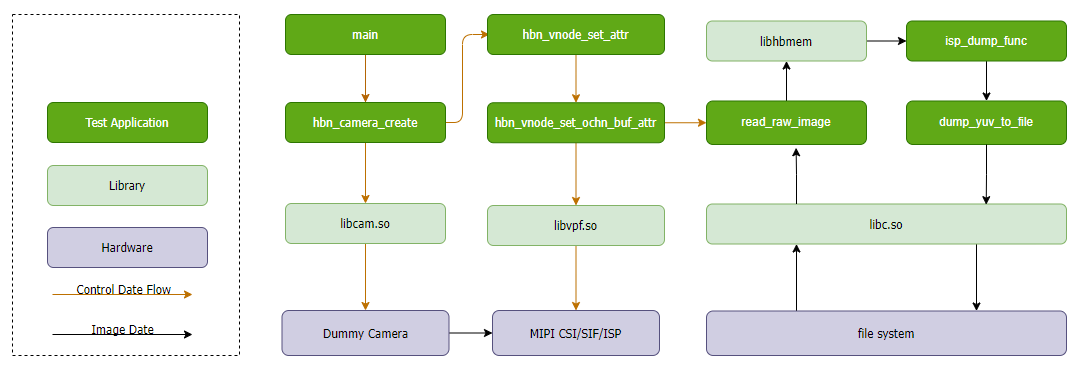
Main API Descriptions
hbn_camera_create: Creates a virtual Camera Sensor node and initializes the Camera Sensor device.hbn_camera_attach_to_vin: Binds the virtual Camera Sensor to a video input node to enable data transmission.hbn_camera_destroy: Destroys the virtual Camera Sensor node and releases device resources.hbn_vnode_open: Opens a video input or ISP node, initializes the node device, and enables data processing.hbn_vnode_set_attr,hbn_vnode_set_ichn_attr,hbn_vnode_set_ochn_attr: Set node attributes, input channel attributes, and output channel attributes to configure operational parameters such as resolution, frame rate, and color format to meet various processing needs.hbn_vnode_getframe,hbn_vnode_releaseframe: Retrieve and release frame data from the node, enabling data reading and management.hbn_vflow_create,hbn_vflow_add_vnode,hbn_vflow_start,hbn_vflow_stop,hbn_vflow_destroy: Create, manage, bind, start, stop, and destroy data flows (vflow), controlling data transmission and processing across nodes.hbn_isp_get_awb_attr,hbn_isp_set_awb_attr,hbn_isp_get_exposure_attr,hbn_isp_set_exposure_attr: Get and set ISP Auto White Balance (AWB) and Exposure (AE) attributes to adjust and control image quality.
Code Location and Directory Structure
The source code for isp_feedback is located at /app/samples/platform_samples/sample_isp. The code structure is as follows:
└── isp_feedback
    ├── Makefile
    └── isp_feedback.c
Makefile: The Makefile used to compile the program.
isp_feedback.c: The main source code file of the program.
Tool Location and Directory Structure
The tool is located on the board under /app/platform_samples/sample_isp/isp_feedback:
root@buildroot:/app/platform_samples/sample_isp/isp_feedback# ls
isp_feedback
API Workflow Description
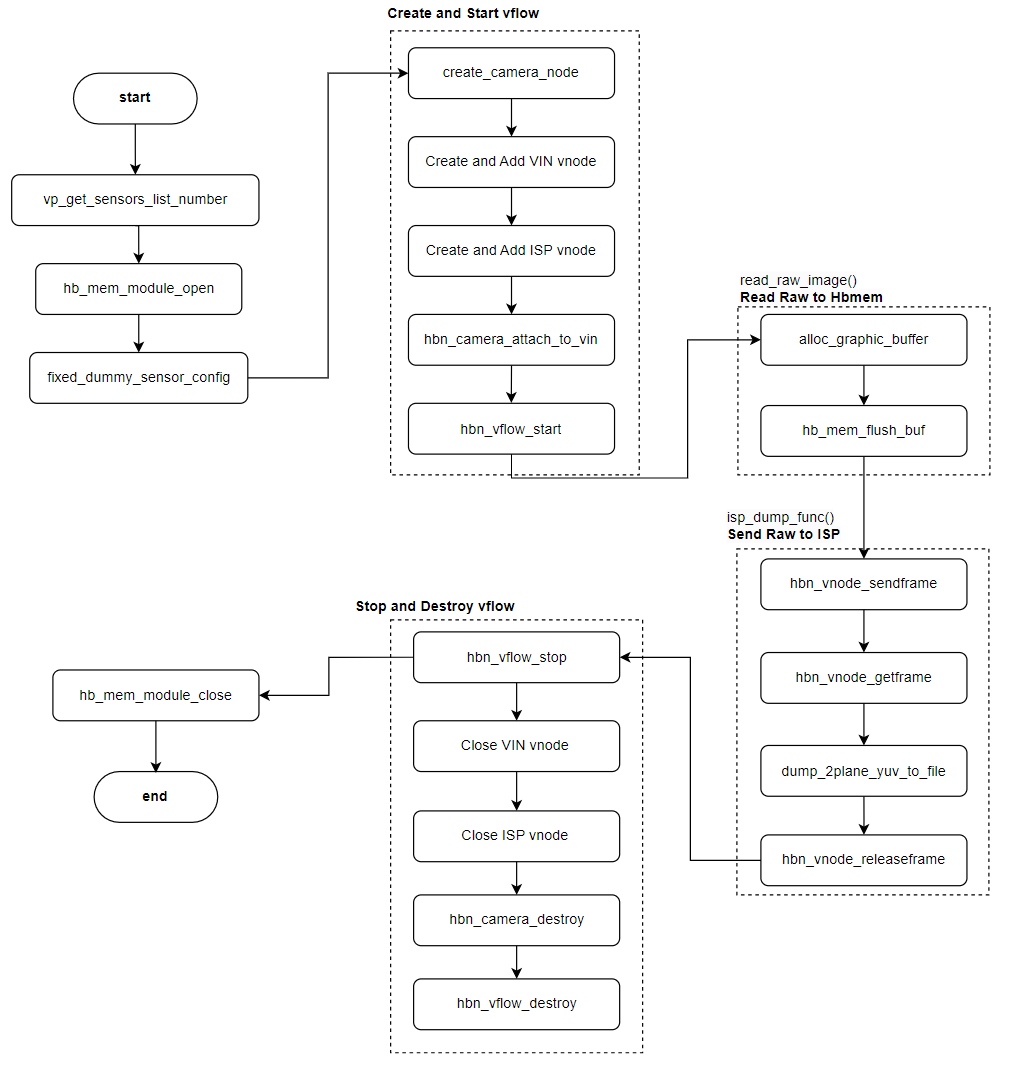
Description:
Parse Command-Line Arguments: Use
getopt_long()to parse command-line input.Retrieve Sensor Configuration: Obtain the sensor configuration at the specified index via
vp_sensor_config_list[index].Create and Run VIN-ISP Flow: Use
create_and_run_isp_vflow(&isp_contex)to create and start the data flow.Set Virtual Sensor Parameters: Configure virtual sensor parameters using
fixed_dummy_sensor_config(&vin_isp_contex, &dummy_sensor_config).Stop VIN Flow: Call
hbn_vnode_releaseframe()to release frame data.Close VIN and ISP Nodes: Use
hbn_vnode_close()to close the nodes.Destroy Camera Sensor: Call
vp_sensor_destroy()to release Camera Sensor resources.Print Help Information: If the sensor index is invalid, call
print_help()to display help information.
3.3.3.2. Compilation and Deployment
Compilation
Navigate to the
sample_isp/isp_feedbackdirectory and executemaketo compile.The output is the
isp_feedbackexecutable in thesample_ispsource directory.For detailed compilation instructions, refer to the Compilation Methods section.
Run the
makecommand in the source directory to complete compilation:
Hardware Environment Setup
For instructions on connecting a Camera Sensor to the development board, refer to the Camera (MIPI CSI) Interface section.
Program Deployment
The compiled executable is typically located in the app/samples/platform_samples/sample_isp/isp_feedback directory:
├── Makefile
├── isp_feedback
├── isp_feedback.c
After flashing the system image, the executable for this sample is located on the board at: /app/platform_samples/sample_isp/isp_feedback.
3.3.3.3. Execution
Execution Method
Run the program directly with
./isp_feedback -hto view help information:
Program Options Description
Unsupport sensor index:-1
Usage: isp_feedback [OPTIONS]
Options:
  -s <sensor_index>      Specify sensor index
  -f <file>              Specify Raw filename
  -h                     Show this help message
index: 0  sensor_name: sc1330t                  config_file:linear_1280x960_raw10_30fps_1lane.c
index: 1  sensor_name: irs2875-tof              config_file:linear_208x1413_raw12_15fps_2lane.c
index: 2  sensor_name: sc230ai-10fps            config_file:linear_1920x1080_raw10_10fps_1lane.c
index: 3  sensor_name: sc230ai-30fps            config_file:linear_1920x1080_raw10_30fps_1lane.c
index: 4  sensor_name: sc230ai-dol2-30fps       config_file:dol2_1920x1080_raw10_30fps_2lane.c
index: 5  sensor_name: sc132gs-1280p            config_file:linear_1088x1280_raw10_60fps_1lane.c
index: 6  sensor_name: sc132gs-hdr-2lane        config_file:hdr_1088x1280_raw10_30fps_2lane.c
index: 7  sensor_name: sc035hgs                 config_file:linear_640x480_raw10_30fps_1lane.c
index: 8  sensor_name: sc035hgs_mono            config_file:linear_mono_640x480_raw10_30fps_1lane.c
index: 9  sensor_name: ov5640                   config_file:linear_1920x1080_raw10_30fps_2lane.c
index: 10  sensor_name: f37                     config_file:linear_1920x1080_raw10_30fps_1lane.c
index: 11  sensor_name: imx415-30fps-2lane      config_file:linear_3840x2160_raw10_30fps_2lane.c
index: 12  sensor_name: imx415-30fps-4lane      config_file:linear_3840x2160_raw10_30fps_4lane.c
index: 13  sensor_name: sc202cs-1600x1200       config_file:linear_1600x1200_raw10_30fps_1lane.c
index: 14  sensor_name: irs2381c-tof            config_file:linear_224x1903_raw12_5fps_2lane.c
index: 15  sensor_name: sc035hgs-vc0            config_file:linear_640x480_raw10_30fps_2lane_vc0.c
index: 16  sensor_name: sc035hgs-vc1            config_file:linear_640x480_raw10_30fps_2lane_vc1.c
index: 17  sensor_name: sc231ai-30fps           config_file:linear_1920x1080_raw10_30fps_2lane.c
index: 18  sensor_name: imx586-30fps-4lane      config_file:linear_3840x2160_raw10_30fps_4lane.c
index: 19  sensor_name: os08c10-30fps-2lane     config_file:linear_3840x2160_raw12_30fps_2lane.c
index: 20  sensor_name: ar0233-30fps            config_file:linear_1920x1080_raw12_30fps_2lane.c
index: 21  sensor_name: ar0820std-30fps         config_file:linear_3840x2160_yuv422_30fps_4lane.c
index: 22  sensor_name: sc1336                  config_file:linear_1280x720_raw10_15fps_2lane.c
index: 23  sensor_name: dummy                   config_file:dummy_sensor.c
index: 24  sensor_name: ar0233-30fps            config_file:ar0233_linear_1920x1080_raw12_30fps_2lane_vc0.c
index: 25  sensor_name: ar0233-30fps            config_file:ar0233_linear_1920x1080_raw12_30fps_2lane_vc1.c
index: 26  sensor_name: ov9782-200fps-2lane     config_file:linear_640x360_raw10_200fps_2lane.c
index: 27  sensor_name: ov9782-120fps-2lane     config_file:linear_1280x720_raw10_120fps_2lane.c
index: 28  sensor_name: imx219-640x480-30fps    config_file:linear_640x480_raw10_30fps_2lane.c
index: 29  sensor_name: imx219-1632x1232-30fps  config_file:linear_1632x1232_raw10_30fps_2lane.c
index: 30  sensor_name: imx219-1920x1080-30fps  config_file:linear_1920x1080_raw10_30fps_2lane.c
index: 31  sensor_name: imx219-3264x2464-15fps  config_file:linear_3264x2464_raw10_15fps_2lane.c
index: 32  sensor_name: imx219-3264x2464-21fps  config_file:linear_3264x2464_raw10_21fps_2lane.c
index: 33  sensor_name: ov5647-640x480-60fps    config_file:linear_640x480_raw10_60fps_2lane.c
index: 34  sensor_name: ov5647-1280x960-30fps   config_file:linear_1280x960_raw10_30fps_2lane.c
index: 35  sensor_name: ov5647-1920x1080-30fps  config_file:linear_1920x1080_raw10_30fps_2lane.c
index: 36  sensor_name: ov5647-2592x1944-15fps  config_file:linear_2592x1944_raw10_15fps_2lane.c
index: 37  sensor_name: imx678-30fps-4lane      config_file:linear_3840x2160_raw12_30fps_4lane.c
index: 38  sensor_name: imx678-30fps-4lane-dol2         config_file:dol2_3840x2160_raw12_30fps_4lane.c
index: 39  sensor_name: imx477-1280x960-120fps  config_file:linear_1280x960_raw10_120fps_2lane.c
index: 40  sensor_name: imx477-1920x1080-50fps  config_file:linear_1920x1080_raw12_50fps_2lane.c
index: 41  sensor_name: imx477-2016x1520-21fps  config_file:linear_2016x1520_raw12_21fps_2lane.c
index: 42  sensor_name: imx477-4000x3000-10fps  config_file:linear_4000x3000_raw12_10fps_2lane.c
index: 43  sensor_name: ov50h40-30fps-4lane     config_file:linear_4096x3072_raw10_30fps_4lane.c
index: 44  sensor_name: ox05b1s                 config_file:linear_2592x1944_raw10_30fps_4lane.c
index: 45  sensor_name: ox05b1s_2lane           config_file:linear_2592x1944_raw10_10fps_2lane.c
index: 46  sensor_name: imx415-60fps-4lane      config_file:linear_3840x2160_raw10_60fps_4lane.c
index: 47  sensor_name: sc850sl-30fps           config_file:linear_3840x2160_raw10_30fps_4lane.c
index: 48  sensor_name: shw3g-30fps             config_file:linear_2064x1552_raw12_30fps_4lane.c
index: 49  sensor_name: shw3g-30fps_vc1         config_file:linear_2064x1552_raw12_30fps_4lane_vc1.c
index: 50  sensor_name: sc235hai-30fps          config_file:linear_1920x1080_raw10_30fps_2lane.c
index: 51  sensor_name: cv4006-60fps-2lane        config_file:linear_1280x720_raw10_60fps_2lane.c
index: 52  sensor_name: ov50h40-30fps-4lane       config_file:linear_3840x2160_raw10_30fps_4lane.c
index: 53  sensor_name: ov50h40-30fps-4lane       config_file:linear_4096x3072_raw14_30fps_4lane.c
index: 54  sensor_name: sc132gs-slave-right       config_file:linear_1088x1280_raw10_30fps_slave_1lane_right.c
index: 55  sensor_name: sc132gs-slave-left        config_file:linear_1088x1280_raw10_30fps_slave_1lane_left.c
index: 56  sensor_name: sc132gsstd_vc0            config_file:linear_1088x1280_raw10_10fps_1lane_vc0.c
index: 57  sensor_name: sc132gsstd_vc1            config_file:linear_1088x1280_raw10_10fps_1lane_vc1.c
index: 58  sensor_name: sc132gsstd_vc2            config_file:linear_1088x1280_raw10_10fps_1lane_vc2.c
index: 59  sensor_name: sc132gsstd_vc3            config_file:linear_1088x1280_raw10_10fps_1lane_vc3.c
index: 60  sensor_name: imx415-30fps-4lane-dol2   config_file:dol2_3840x2160_raw10_30fps_4lane.c
index: 61  sensor_name: isx031-30fps-vc0          config_file:isx031_linear_1920x1536_yuv422_30fps_4lane_vc0.c
index: 62  sensor_name: isx031-30fps-vc1          config_file:isx031_linear_1920x1536_yuv422_30fps_4lane_vc1.c
index: 63  sensor_name: isx031-30fps-vc2          config_file:isx031_linear_1920x1536_yuv422_30fps_4lane_vc2.c
index: 64  sensor_name: isx031-30fps-vc3          config_file:isx031_linear_1920x1536_yuv422_30fps_4lane_vc3.c
index: 51  sensor_name: cv4006-60fps-2lane      config_file:linear_1280x720_raw10_60fps_2lane.c
Command Parameter Descriptions:
-s <sensor_index>: Specifies the Camera Sensor effect library to use; no physical Camera is required.-f <file>: Specifies the filename of the RAW image to use.-h: Displays help information.
List of Currently Supported Sensors and Corresponding Configuration Files:
| Index | Sensor Name | Configuration File |
|---|---|---|
| 0 | sc1330t | linear_1280x960_raw10_30fps_1lane.c |
| 1 | irs2875-tof | linear_208x1413_raw12_15fps_2lane.c |
| 2 | sc230ai-10fps | linear_1920x1080_raw10_10fps_1lane.c |
| 3 | sc230ai-30fps | linear_1920x1080_raw10_30fps_1lane.c |
| 4 | sc230ai-dol2-30fps | dol2_1920x1080_raw10_30fps_2lane.c |
| 5 | sc132gs-1280p | linear_1088x1280_raw10_30fps_1lane.c |
| 6 | sc132gs-hdr-2lane | hdr_1088x1280_raw10_30fps_2lane.c |
| 7 | sc035hgs | linear_640x480_raw10_30fps_1lane.c |
| 8 | sc035hgs_mono | linear_mono_640x480_raw10_30fps_1lane.c |
| 9 | ov5640 | linear_1920x1080_raw10_30fps_2lane.c |
| 10 | f37 | linear_1920x1080_raw10_30fps_1lane.c |
| 11 | imx415-30fps-2lane | linear_3840x2160_raw10_30fps_2lane.c |
| 12 | imx415-30fps-4lane | linear_3840x2160_raw10_30fps_4lane.c |
| 13 | sc202cs-1600x1200 | linear_1600x1200_raw10_30fps_1lane.c |
| 14 | irs2381c-tof | linear_224x1903_raw12_5fps_2lane.c |
| 15 | sc035hgs-vc0 | linear_640x480_raw10_30fps_2lane_vc0.c |
| 16 | sc035hgs-vc1 | linear_640x480_raw10_30fps_2lane_vc1.c |
| 17 | sc231ai-30fps | linear_1920x1080_raw10_30fps_2lane.c |
| 18 | imx586-30fps-4lane | linear_3840x2160_raw10_30fps_4lane.c |
| 19 | os08c10-30fps-2lane | linear_3840x2160_raw12_30fps_2lane.c |
| 20 | ar0233-30fps | linear_1920x1080_raw12_30fps_2lane.c |
| 21 | ar0820std-30fps | linear_3840x2160_yuv422_30fps_4lane.c |
| 22 | sc1336 | linear_1280x720_raw10_15fps_2lane.c |
| 23 | dummy | dummy_sensor.c |
| 24 | ar0233-30fps | ar0233_linear_1920x1080_raw12_30fps_2lane_vc0.c |
| 25 | ar0233-30fps | ar0233_linear_1920x1080_raw12_30fps_2lane_vc1.c |
| 26 | ov9782-200fps-2lane | linear_640x360_raw10_200fps_2lane.c |
| 27 | ov9782-120fps-2lane | linear_1280x720_raw10_120fps_2lane.c |
| 28 | imx219-640x480-30fps | linear_640x480_raw10_30fps_2lane.c |
| 29 | imx219-1632x1232-30fps | linear_1632x1232_raw10_30fps_2lane.c |
| 30 | imx219-1920x1080-30fps | linear_1920x1080_raw10_30fps_2lane.c |
| 31 | imx219-3264x2464-15fps | linear_3264x2464_raw10_15fps_2lane.c |
| 32 | imx219-3264x2464-21fps | linear_3264x2464_raw10_21fps_2lane.c |
| 33 | ov5647-640x480-60fps | linear_640x480_raw10_60fps_2lane.c |
| 34 | ov5647-1280x960-30fps | linear_1280x960_raw10_30fps_2lane.c |
| 35 | ov5647-1920x1080-30fps | linear_1920x1080_raw10_30fps_2lane.c |
| 36 | ov5647-2592x1944-15fps | linear_2592x1944_raw10_15fps_2lane.c |
| 37 | imx477-1280x960-120fps | linear_1280x960_raw10_120fps_2lane.c |
| 38 | imx477-1920x1080-50fps | linear_1920x1080_raw12_50fps_2lane.c |
| 39 | imx477-2016x1520-40fps | linear_2016x1520_raw12_40fps_2lane.c |
| 40 | imx477-4000x3000-10fps | linear_4000x3000_raw12_10fps_2lane.c |
| 41 | ov50h40-30fps-4lane | linear_4096x3072_raw10_30fps_4lane.c |
| 42 | ox05b1s | linear_2592x1944_raw10_30fps_4lane.c |
| 43 | ox05b1s_2lane | linear_2592x1944_raw10_10fps_2lane.c |
| 44 | imx415-60fps-4lane | linear_3840x2160_raw10_60fps_4lane.c |
| 45 | sc850sl-30fps | linear_3840x2160_raw10_30fps_4lane.c |
| 46 | shw3g-30fps | linear_2064x1552_raw12_30fps_4lane.c |
Configuration File Description
Each supported sensor has a corresponding configuration file, maintained under the app/samples/platform_samples/vp_sensors directory.
For more details, refer to the get_isp_data Configuration File Description section in this document.
Execution Results
First, use
get_vin_data -s 3to obtain a RAW image from sc230ai. For more details onget_vin_data, refer to sample_vin.Then, select the corresponding Camera Sensor and the prepared RAW image. During ISP feedback, the system will use the ISP effect library of the selected Camera Sensor for tuning.
When selecting a specific Camera Sensor, no physical hardware connection is required. The system will apply the sensor's parameters to the virtual Camera Sensor and use the corresponding ISP effect library for tuning.
./isp_feedback -s 3 -f handle_34661_vin_chn0_1920x1080_stride_3840_frameid_0_ts_18369924580342.raw
root@buildroot:/userdata# ./isp_feedback -s 3 -f handle_34661_vin_chn0_1920x1080_stride_3840_frameid_0_ts_18369924580342.raw
Using index:3  sensor_name:sc230ai-30fps  config_file:linear_1920x1080_raw10_30fps_1lane.c
dummy use calib sc230ai_tuning.json
[INFO] Create isp node handle: 100197
(dump_awb_attr)handle 100197 awb: version 1 mode 0manual_attr: gain: rgain: 0.000000grgain: 0.004043gbgain: 0.000000bgain: 0.004043
(dump_exp_attr)handle 100197 exp: version 0 mode 0manual_attr: gain: exp_time: 0.007022again: 1.000000dgain: 1.000000ispgain: 1.000000ae_exp: 79.692368cur_lux 0
isp(100197) dump yuv 1920x1080(stride:1920), buffer size: 2073600 + 1036800 frame id: 0, timestamp: 0
Upon execution, the tuned YUV image will be saved in the current directory:
isp_handle_100197_chn0_1920x1080_stride_1920_frameid_0_ts_0.yuv
3.3.3.4. Common Issues
isp_feedbackoperates normally only when the resolution and format of the specified RAW image match exactly with those of the selected Camera Sensor.Mismatched resolution or format between the selected Camera Sensor and the input image may result in image anomalies.
If the colors appear incorrect during feedback, you need to modify the
sensor_paramattribute of the dummy sensor according to the actualbayer_startandbayer_patternof the sensor specified by-s.The actual
bayer_startandbayer_patterncan be found in the corresponding sensor’s spec.
3.3.4. get_isp_rgb_ir
3.3.4.1. Function Overview
get_isp_rgb_ir is an extension of get_isp_data, specifically designed to separate RGB (visible light) and IR (infrared) components from YUV image data, and output them as independent image frames. Its core functions include:
RGB/IR Separation: Physically separates sensor raw data via ISP (removing IR contamination and interpolating reconstruction).
Dual-Channel Output:
isp_schn 0→ RGB image (YUV format, only UV components, visible light)isp_schn 2→ IR image (YUV format, only Y component, infrared)
Software Architecture Description
The software architecture of get_isp_rgb_ir is largely similar to that of get_isp_data, with the addition of RGB and IR separation and separate data frame saving, as illustrated below:
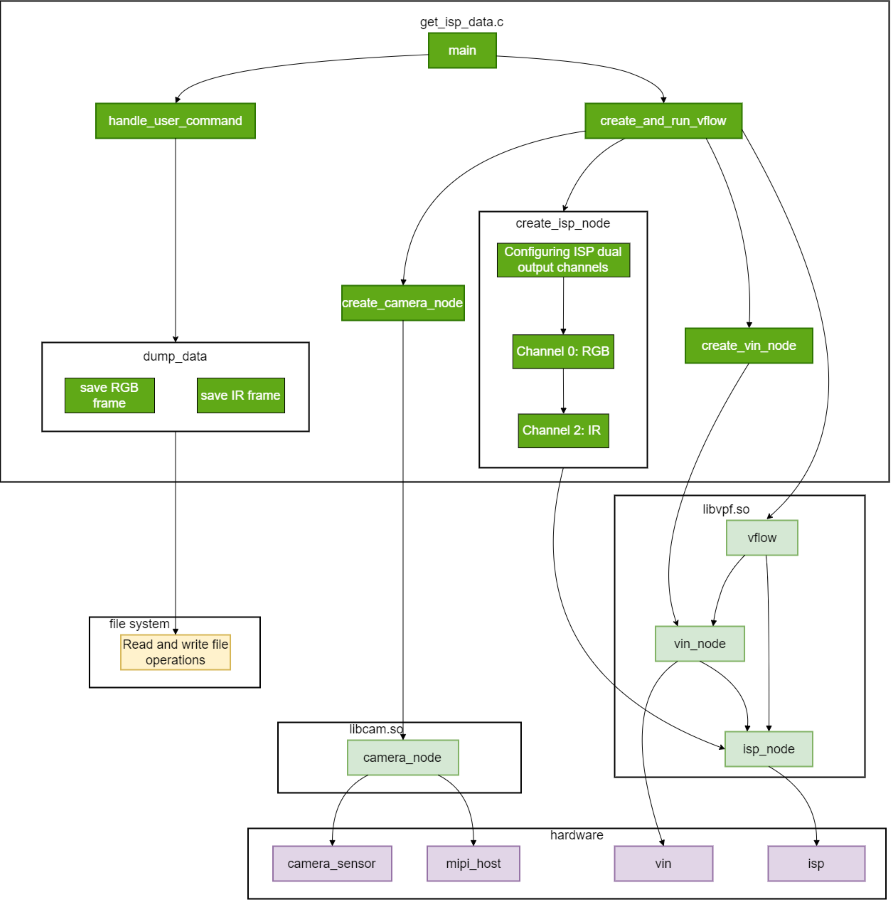
Most nodes in the diagram are explained in get_isp_data Software Architecture Description. The key differences from get_isp_data are:
ISP Node Configuration Extension
Added dual-channel output configuration in
create_isp_node:Channel 0: Outputs RGB visible light component.
Channel 2: Outputs IR infrared component.
Modified Data Capture and Save Logic
dump_dataperforms two steps:RGB Channel: Calls
hbn_vnode_getframe(0)to retrieve RGB frame data.IR Channel: Calls
hbn_vnode_getframe(2)to retrieve IR frame data.
Code Location and Directory Structure
The source code for get_isp_rgb_ir is located at app/samples/platform_samples/sample_isp/get_isp_rgb_ir, with the following structure:
.
├── Makefile
└── get_isp_rgb_ir.c
Makefile: The Makefile used for compilation.
get_isp_rgb_ir.c: The main source code file.
Tool Location and Directory Structure
The tool is located on the board under /app/platform_samples/sample_isp/get_isp_rgb_ir:
root@buildroot:/app/platform_samples/sample_isp/get_isp_rgb_ir# ls
get_isp_rgb_ir
get_isp_rgb_ir is the compiled executable.
API Workflow Description
The program flow of get_isp_rgb_ir is as follows:
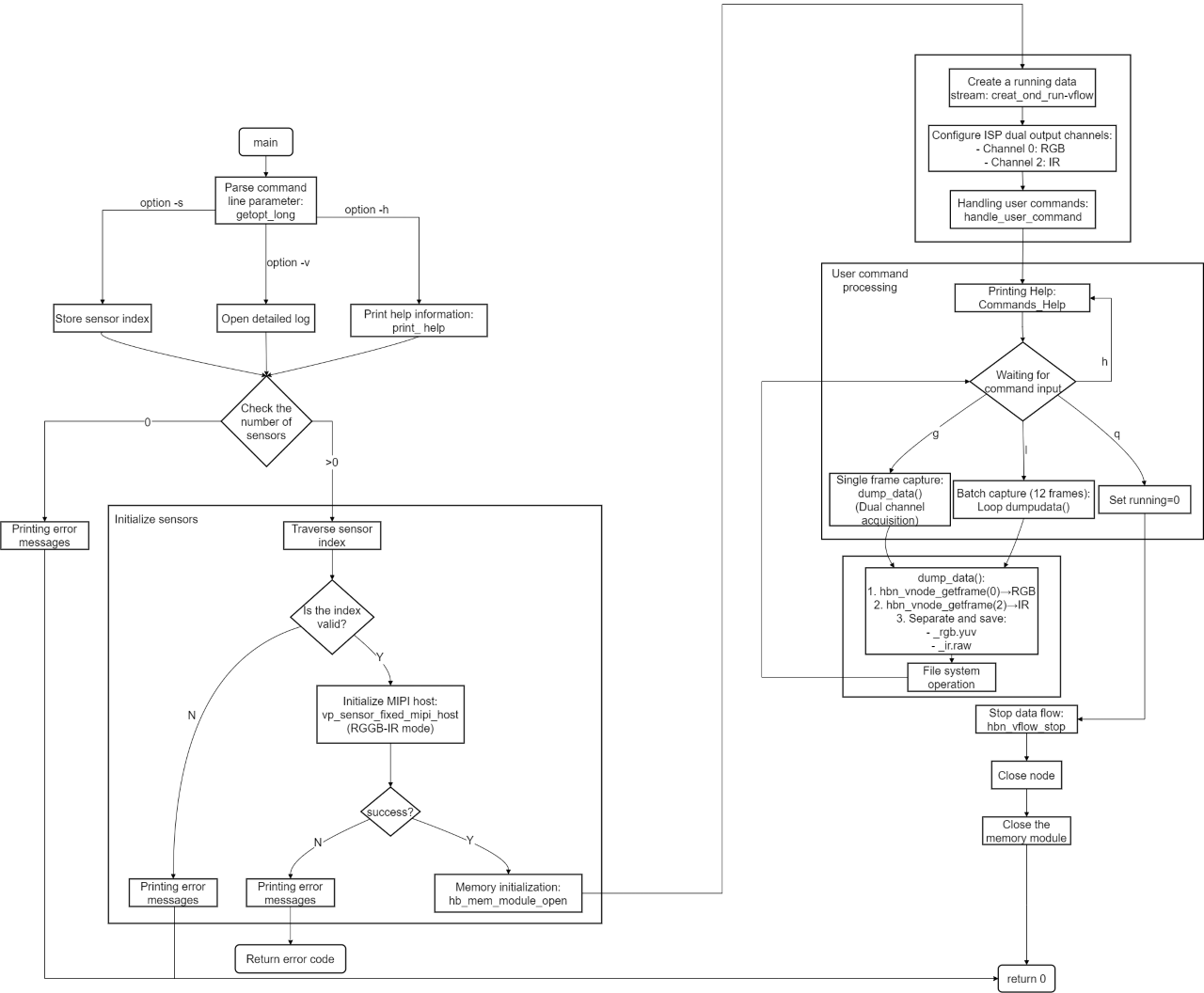
Most steps are identical to get_isp_data, with the following key changes:
Option Adjustments:
Added
-vflag for verbose logging.Removed
-t(settle value) and-m(sensor mode) options.
ISP Channel Modifications:
Added dual-channel configuration:
create_isp_nodecreates two ISP channels and buffers forRGBandIR.
Data Acquisition Flow Changes:
dump_data()performs sequential dual-channel capture:hbn_vnode_getframe(isp_node, 0, ...); // RGB hbn_vnode_getframe(isp_node, 2, ...); // IR
3.3.4.2. Compilation and Deployment
Compilation
Run the make command in the source directory to compile:
cd app/samples/platform_samples/sample_isp/get_isp_rgb_ir
make
For detailed compilation instructions, refer to the Compilation Methods section.
Hardware Environment Setup
For instructions on connecting a Camera Sensor to the board, refer to Camera (MIPI CSI) Interface.
Program Deployment
The compiled executable is typically located in app/samples/platform_samples/sample_isp/get_isp_rgb_ir:
├── Makefile
├── get_isp_rgb_ir
├── get_isp_rgb_ir.c
└── get_isp_rgb_ir.o
The executable is located on the board at /app/platform_samples/sample_isp/get_isp_rgb_ir. After each compilation, you can temporarily upload get_isp_rgb_ir to the board’s /userdata directory and run chmod +x get_isp_rgb_ir to grant execution permission before use.
3.3.4.3. Execution
Execution Method
On the board, navigate to /app/platform_samples/sample_isp/get_isp_rgb_ir and run the executable. Command format:
./get_isp_rgb_ir <Option> <Sensor_index>
Example:
root@buildroot:~# cd /app/platform_samples/sample_isp/get_isp_rgb_ir/
root@buildroot:/app/platform_samples/sample_isp/get_isp_rgb_ir# ./get_isp_rgb_ir -s 45
Note: get_isp_rgb_ir only supports sensors capable of capturing RGBIR patterns; currently only Sensor OX05b1s is supported.
Program Options Description
Run ./get_isp_rgb_ir -h to view help and the list of supported Camera Sensors on the current system.
root@buildroot:/app/platform_samples/sample_isp/get_isp_rgb_ir# ./get_isp_rgb_ir -h
get_isp_rgb_ir -s/--sensor sensor_index
Options:
  -s <sensor_index>      Specify sensor index
  -c <channel_type>             Specify channel type: vo and vf
                                        1. vo: vin online isp
                                        2. vf: vin offline isp
                                        3. default is vf
  -v, --verbose               Enable detailed log information
Note: Default Offline Mode
index: 0  sensor_name: sc1330t                  config_file:linear_1280x960_raw10_30fps_1lane.c
index: 1  sensor_name: irs2875-tof              config_file:linear_208x1413_raw12_15fps_2lane.c
index: 2  sensor_name: sc230ai-10fps            config_file:linear_1920x1080_raw10_10fps_1lane.c
index: 3  sensor_name: sc230ai-30fps            config_file:linear_1920x1080_raw10_30fps_1lane.c
index: 4  sensor_name: sc230ai-dol2-30fps       config_file:dol2_1920x1080_raw10_30fps_2lane.c
index: 5  sensor_name: sc132gs-1280p            config_file:linear_1088x1280_raw10_60fps_1lane.c
index: 6  sensor_name: sc132gs-hdr-2lane        config_file:hdr_1088x1280_raw10_30fps_2lane.c
index: 7  sensor_name: sc035hgs                 config_file:linear_640x480_raw10_30fps_1lane.c
index: 8  sensor_name: sc035hgs_mono            config_file:linear_mono_640x480_raw10_30fps_1lane.c
index: 9  sensor_name: ov5640                   config_file:linear_1920x1080_raw10_30fps_2lane.c
index: 10  sensor_name: f37                     config_file:linear_1920x1080_raw10_30fps_1lane.c
index: 11  sensor_name: imx415-30fps-2lane      config_file:linear_3840x2160_raw10_30fps_2lane.c
index: 12  sensor_name: imx415-30fps-4lane      config_file:linear_3840x2160_raw10_30fps_4lane.c
index: 13  sensor_name: sc202cs-1600x1200       config_file:linear_1600x1200_raw10_30fps_1lane.c
index: 14  sensor_name: irs2381c-tof            config_file:linear_224x1903_raw12_5fps_2lane.c
index: 15  sensor_name: sc035hgs-vc0            config_file:linear_640x480_raw10_30fps_2lane_vc0.c
index: 16  sensor_name: sc035hgs-vc1            config_file:linear_640x480_raw10_30fps_2lane_vc1.c
index: 17  sensor_name: sc231ai-30fps           config_file:linear_1920x1080_raw10_30fps_2lane.c
index: 18  sensor_name: imx586-30fps-4lane      config_file:linear_3840x2160_raw10_30fps_4lane.c
index: 19  sensor_name: os08c10-30fps-2lane     config_file:linear_3840x2160_raw12_30fps_2lane.c
index: 20  sensor_name: ar0233-30fps            config_file:linear_1920x1080_raw12_30fps_2lane.c
index: 21  sensor_name: ar0820std-30fps         config_file:linear_3840x2160_yuv422_30fps_4lane.c
index: 22  sensor_name: sc1336                  config_file:linear_1280x720_raw10_15fps_2lane.c
index: 23  sensor_name: dummy                   config_file:dummy_sensor.c
index: 24  sensor_name: ar0233-30fps            config_file:ar0233_linear_1920x1080_raw12_30fps_2lane_vc0.c
index: 25  sensor_name: ar0233-30fps            config_file:ar0233_linear_1920x1080_raw12_30fps_2lane_vc1.c
index: 26  sensor_name: ov9782-200fps-2lane     config_file:linear_640x360_raw10_200fps_2lane.c
index: 27  sensor_name: ov9782-120fps-2lane     config_file:linear_1280x720_raw10_120fps_2lane.c
index: 28  sensor_name: imx219-640x480-30fps    config_file:linear_640x480_raw10_30fps_2lane.c
index: 29  sensor_name: imx219-1632x1232-30fps  config_file:linear_1632x1232_raw10_30fps_2lane.c
index: 30  sensor_name: imx219-1920x1080-30fps  config_file:linear_1920x1080_raw10_30fps_2lane.c
index: 31  sensor_name: imx219-3264x2464-15fps  config_file:linear_3264x2464_raw10_15fps_2lane.c
index: 32  sensor_name: imx219-3264x2464-21fps  config_file:linear_3264x2464_raw10_21fps_2lane.c
index: 33  sensor_name: ov5647-640x480-60fps    config_file:linear_640x480_raw10_60fps_2lane.c
index: 34  sensor_name: ov5647-1280x960-30fps   config_file:linear_1280x960_raw10_30fps_2lane.c
index: 35  sensor_name: ov5647-1920x1080-30fps  config_file:linear_1920x1080_raw10_30fps_2lane.c
index: 36  sensor_name: ov5647-2592x1944-15fps  config_file:linear_2592x1944_raw10_15fps_2lane.c
index: 37  sensor_name: imx678-30fps-4lane      config_file:linear_3840x2160_raw12_30fps_4lane.c
index: 38  sensor_name: imx678-30fps-4lane-dol2         config_file:dol2_3840x2160_raw12_30fps_4lane.c
index: 39  sensor_name: imx477-1280x960-120fps  config_file:linear_1280x960_raw10_120fps_2lane.c
index: 40  sensor_name: imx477-1920x1080-50fps  config_file:linear_1920x1080_raw12_50fps_2lane.c
index: 41  sensor_name: imx477-2016x1520-21fps  config_file:linear_2016x1520_raw12_21fps_2lane.c
index: 42  sensor_name: imx477-4000x3000-10fps  config_file:linear_4000x3000_raw12_10fps_2lane.c
index: 43  sensor_name: ov50h40-30fps-4lane     config_file:linear_4096x3072_raw10_30fps_4lane.c
index: 44  sensor_name: ox05b1s                 config_file:linear_2592x1944_raw10_30fps_4lane.c
index: 45  sensor_name: ox05b1s_2lane           config_file:linear_2592x1944_raw10_10fps_2lane.c
index: 46  sensor_name: imx415-60fps-4lane      config_file:linear_3840x2160_raw10_60fps_4lane.c
index: 47  sensor_name: sc850sl-30fps           config_file:linear_3840x2160_raw10_30fps_4lane.c
index: 48  sensor_name: shw3g-30fps             config_file:linear_2064x1552_raw12_30fps_4lane.c
index: 49  sensor_name: shw3g-30fps_vc1         config_file:linear_2064x1552_raw12_30fps_4lane_vc1.c
index: 50  sensor_name: sc235hai-30fps          config_file:linear_1920x1080_raw10_30fps_2lane.c
index: 51  sensor_name: cv4006-60fps-2lane        config_file:linear_1280x720_raw10_60fps_2lane.c
index: 52  sensor_name: ov50h40-30fps-4lane       config_file:linear_3840x2160_raw10_30fps_4lane.c
index: 53  sensor_name: ov50h40-30fps-4lane       config_file:linear_4096x3072_raw14_30fps_4lane.c
index: 54  sensor_name: sc132gs-slave-right       config_file:linear_1088x1280_raw10_30fps_slave_1lane_right.c
index: 55  sensor_name: sc132gs-slave-left        config_file:linear_1088x1280_raw10_30fps_slave_1lane_left.c
index: 56  sensor_name: sc132gsstd_vc0            config_file:linear_1088x1280_raw10_10fps_1lane_vc0.c
index: 57  sensor_name: sc132gsstd_vc1            config_file:linear_1088x1280_raw10_10fps_1lane_vc1.c
index: 58  sensor_name: sc132gsstd_vc2            config_file:linear_1088x1280_raw10_10fps_1lane_vc2.c
index: 59  sensor_name: sc132gsstd_vc3            config_file:linear_1088x1280_raw10_10fps_1lane_vc3.c
index: 60  sensor_name: imx415-30fps-4lane-dol2   config_file:dol2_3840x2160_raw10_30fps_4lane.c
index: 61  sensor_name: isx031-30fps-vc0          config_file:isx031_linear_1920x1536_yuv422_30fps_4lane_vc0.c
index: 62  sensor_name: isx031-30fps-vc1          config_file:isx031_linear_1920x1536_yuv422_30fps_4lane_vc1.c
index: 63  sensor_name: isx031-30fps-vc2          config_file:isx031_linear_1920x1536_yuv422_30fps_4lane_vc2.c
index: 64  sensor_name: isx031-30fps-vc3          config_file:isx031_linear_1920x1536_yuv422_30fps_4lane_vc3.c
Note: index: 44 sensor_name: ox05b1s in the list above is the 4-lane configuration of ox05b1s, which requires modifying the ox05b1s driver code to load 4-lane register settings.
Parameter Options Description:
| Option | Meaning | Required |
|---|---|---|
-s <index> |
Sensor index (output of vp_show_sensors_list) |
Yes |
-c <channel_type> |
Specifies the channel type to use. vo represents VIN online ISP, vf represents VIN offline ISP. If this parameter is not specified, VIN offline ISP is used by default. |
No |
-v |
Enable detailed frame output (hbn_vnode_image_t) |
No |
-h |
Show help information | No |
Configuration File Description
Each supported sensor has a corresponding configuration file, maintained in the app/samples/platform_samples/vp_sensors directory.
For more information, refer to the get_isp_data Configuration File Description section.
Note: get_isp_rgb_ir defaults to offline mode for the sensor’s vin → isp path. Therefore, the sensor config must also be set to offline mode, particularly the cim_isp_flyby and input_mode attributes:
static vin_node_attr_t vin_node_attr = {
	.cim_attr = {
		.mipi_rx = 0,  // vcon 0
		.vc_index = 0,
		.ipi_channel = 1,
		.cim_isp_flyby = 0,  // 0: offline ; 1: online
		......
}

static isp_attr_t isp_attr = {
	.input_mode = 2, // 0: online, 2: offline
	......
}
Execution Results
The execution effect of get_isp_rgb_ir is similar to get_isp_data. For details, refer to the get_isp_data Execution Results section. The main difference is that get_isp_rgb_ir generates two YUV files per execution: one for the RGB component and one for the IR component:
root@buildroot:/app/platform_samples/sample_isp/get_isp_rgb_ir# ./get_isp_rgb_ir -s 45
Using index:45  sensor_name:ox05b1s_2lane  config_file:linear_2592x1944_raw10_30fps_2lane.c
mipi mclk is configed.
Searching camera sensor on device: /proc/device-tree/soc/cam/vcon@0 i2c bus: 4 mipi rx phy: 0
INFO: Found sensor_name:ox05b1s_2lane on mipi rx csi 0, i2c addr 0x36, config_file:linear_2592x1944_raw10_30fps_2lane.c

***************  Command Lists  ***************
 g      -- get single frame
 l      -- get a set frames
 q      -- quit
 h      -- print help message

Command: g
Dumping rgb frame to file: handle_100197_ox05b1s_2lane_rgb_frameid_0_ts_1026275109155.yuv
Dumping ir frame to file: handle_100197_ox05b1s_2lane_ir_frameid_0_ts_1026275109155.yuv

Command: l
Dumping rgb frame to file: handle_100197_ox05b1s_2lane_rgb_frameid_1_ts_1026408535614.yuv
Dumping ir frame to file: handle_100197_ox05b1s_2lane_ir_frameid_1_ts_1026408535614.yuv
Dumping rgb frame to file: handle_100197_ox05b1s_2lane_rgb_frameid_2_ts_1026508510822.yuv
Dumping ir frame to file: handle_100197_ox05b1s_2lane_ir_frameid_2_ts_1026508510822.yuv
Dumping rgb frame to file: handle_100197_ox05b1s_2lane_rgb_frameid_3_ts_1026608501822.yuv
Dumping ir frame to file: handle_100197_ox05b1s_2lane_ir_frameid_3_ts_1026608501822.yuv
Dumping rgb frame to file: handle_100197_ox05b1s_2lane_rgb_frameid_4_ts_1026708507781.yuv
Dumping ir frame to file: handle_100197_ox05b1s_2lane_ir_frameid_4_ts_1026708507781.yuv
Dumping rgb frame to file: handle_100197_ox05b1s_2lane_rgb_frameid_7_ts_1027008512614.yuv
Dumping ir frame to file: handle_100197_ox05b1s_2lane_ir_frameid_7_ts_1027008512614.yuv
Dumping rgb frame to file: handle_100197_ox05b1s_2lane_rgb_frameid_29_ts_1029208508573.yuv
Dumping ir frame to file: handle_100197_ox05b1s_2lane_ir_frameid_30_ts_1029308514907.yuv
Dumping rgb frame to file: handle_100197_ox05b1s_2lane_rgb_frameid_30_ts_1029308514907.yuv
Dumping ir frame to file: handle_100197_ox05b1s_2lane_ir_frameid_31_ts_1029408504532.yuv
Dumping rgb frame to file: handle_100197_ox05b1s_2lane_rgb_frameid_31_ts_1029408504532.yuv
Dumping ir frame to file: handle_100197_ox05b1s_2lane_ir_frameid_32_ts_1029508510074.yuv
Dumping rgb frame to file: handle_100197_ox05b1s_2lane_rgb_frameid_32_ts_1029508510074.yuv
Dumping ir frame to file: handle_100197_ox05b1s_2lane_ir_frameid_33_ts_1029608516740.yuv
Dumping rgb frame to file: handle_100197_ox05b1s_2lane_rgb_frameid_33_ts_1029608516740.yuv
Dumping ir frame to file: handle_100197_ox05b1s_2lane_ir_frameid_34_ts_1029708507240.yuv
Dumping rgb frame to file: handle_100197_ox05b1s_2lane_rgb_frameid_34_ts_1029708507240.yuv
Dumping ir frame to file: handle_100197_ox05b1s_2lane_ir_frameid_35_ts_1029808515365.yuv
Dumping rgb frame to file: handle_100197_ox05b1s_2lane_rgb_frameid_35_ts_1029808515365.yuv
Dumping ir frame to file: handle_100197_ox05b1s_2lane_ir_frameid_36_ts_1029908519865.yuv

Command: q
quit
As can be seen, after executing get_isp_rgb_ir, two files with identical timestamps will be obtained. These two files represent the RGB and IR components separated from the same ISP frame, respectively.
Common Issues
The sensor config is not set to offline mode, causing execution to fail.
The sensor hardware used for testing does not support RGBIR pattern, causing execution to fail.