4.3.29.2. Voice Wake-up and Sleep Example
Example Function Overview
An A-core side example that records audio using tinyalsa and retrieves audio processed on the DSP side through different device nodes defined by the HIFI5 middleware.
There are four pipelines in total, meeting requirements for raw audio, 3-channel wake-up audio after noise reduction, and single-channel ASR audio after noise reduction.
Combined with the intelligent voice wake-up algorithm on the A-core, it enables low-power wake-up with secondary verification, normal-power noise-reduced wake-up, ASR audio VAD trimming, and other functions.
Example Source Code Structure
The directory structure of sample_wakeup is as follows:
.
├── CMakeLists.txt                      # CMake file required for compilation
├── hobot_speech_x5_sdk                 # Algorithm directory
│   ├── example                         # Algorithm examples
│   ├── hrsc                            # Configuration files
│   ├── include                         # Algorithm header files
│   │   └── horizonspeechsdk
│   │       └── hrsc_sdk.h
│   ├── lib                             # Algorithm library files
│   │   ├── libhisf.so
│   │   ├── libhisfvad.so
│   │   └── libhrsc.so
│   └── ReadMe.txt
├── i2c_control.sh                      # Audio board configuration script
├── include                             # Example header files
│   ├── HrscAudioRecorder.h
│   └── HrscDemo.h
├── README.md
├── src                                 # Example source files
│   ├── hobot_speech_device_test.cpp    # Audio device test
│   ├── HrscAudioRecorder.cpp           # TinyALSA encapsulation implementation
│   ├── HrscDemo.cc                     # Implementation of common and callback functions
│   ├── hrsc_sdk_demo_files.cc          # File-based test implementation
│   ├── hrsc_sdk_demo_lp_to_normal.cc   # Low-power mode to normal mode wake-up verification implementation
│   ├── hrsc_sdk_demo_pipeline0.cc      # Native audio sent to A-core; noise reduction and wake-up processing on A-core
│   ├── hrsc_sdk_demo_pipeline1.cc      # Single-channel ASR audio acquisition in low-power mode (deprecated)
│   ├── hrsc_sdk_demo_pipeline2.cc      # Dual-channel enhanced wake-word audio acquisition in low-power mode; ASR audio can be obtained after wake-up
│   └── hrsc_sdk_demo_pipeline4.cc      # Normal-power mode: pre-noise reduction processing on DSP, wake-up processing on A-core
├── x5audio_init.sh                     # Environment setup script
└── xbuild.sh                           # Compilation script
Compilation Dependencies
First, compile the SDK’s bsp source code, selecting the version corresponding to your development board. For details, see Environment Setup and Build Instructions, and flash the firmware.
Second, compile the adsp’s firmware. For details, refer to Quick Start.
Then, run the following command under the /adsp/sample_wakeup directory:
./xbuild.sh
This will generate an out directory in the current folder, structured as follows:
.
├── adsp                                            # firmware
├── hrsc                                            # Algorithm configuration file directory
│   ├── asr_vad
│   │   ├── DGRU_ECNR.meanvar
│   │   ├── DGRU_ECNR.params
│   │   └── hisf_config.ini
│   ├── CRGRU_SUBBAND_HIOK_reset_hx_-1.meanvar
│   ├── CRGRU_SUBBAND_HIOK_reset_hx_-1.params
│   ├── hesr_conf.txt
│   ├── hisf_config_encrypt.ini
│   ├── hrsc_config.cfg                             # Log printing and saving, audio saving, etc.
│   ├── libmono.so
│   ├── meanvar_prior
│   ├── mxfeats_v36_okyiko.pack
│   ├── phone_strs
│   ├── tree-out2
│   └── wakeup_graph.bin
├── hobot_speech_device_test                        # Audio device test executable
├── hrsc_sdk_demo_files                             # Offline audio file test executable
├── hrsc_sdk_demo_lp_to_normal                      # Full-path test executable from low-power to normal-power mode
├── hrsc_sdk_demo_pipeline0                         # Pipeline0 voice wake-up test executable
├── hrsc_sdk_demo_pipeline1                         # Pipeline1 voice wake-up test executable
├── hrsc_sdk_demo_pipeline2                         # Pipeline2 voice wake-up test executable
├── hrsc_sdk_demo_pipeline4                         # Pipeline4 voice wake-up test executable
├── i2c_control.sh                                  # Audio board configuration script
├── lib                                             # Algorithm libraries
│   ├── libhisf.so
│   ├── libhisfvad.so
│   └── libhrsc.so
└── x5audio_init.sh                                 # Environment configuration script
Voice Wake-up Procedure
Environment Configuration
Refer to Environment Deployment
You can use the asound command to record audio, which indicates the environment is correctly set up.
Test Commands
-i: Path to the audio file when performing file-based testing.
-ch: Number of audio channels to test. When testing 4-channel raw audio, set ch to 4.
-switch: Audio saving toggle, 1 for on, 0 for off.
-o: Output path, including VAD-trimmed ASR audio, wake-word audio, etc., when switch is set to 1. The example uses the log folder in the parent directory of the executable.
-cfg: Path to the configuration file.
Note: The demo has no predefined runtime duration; manually terminate with Ctrl+C
# Device 0 test. Options: 0, 1, 2, 4, corresponding to four pipelines
chmod 777 hobot_speech_device_test
export LD_LIBRARY_PATH=./lib
./hobot_speech_device_test  0

chmod 777 hrsc_sdk_demo_files
export LD_LIBRARY_PATH=./lib
./hrsc_sdk_demo_files  -i ./audio.pcm  -o ../log -cfg ./hrsc -ch 2 -switch 1

chmod 777 hrsc_sdk_demo_pipeline0
export LD_LIBRARY_PATH=./lib
./hrsc_sdk_demo_pipeline0  -o ../log -cfg ./hrsc  -switch 1

chmod 777 hrsc_sdk_demo_pipeline1
export LD_LIBRARY_PATH=./lib
./hrsc_sdk_demo_pipeline1  -o ../log -cfg ./hrsc  -switch 1

chmod 777 hrsc_sdk_demo_pipeline2
export LD_LIBRARY_PATH=./lib
./hrsc_sdk_demo_pipeline2  -o /mnt/log -cfg ./hrsc  -switch 1

chmod 777 hrsc_sdk_demo_pipeline4
export LD_LIBRARY_PATH=./lib
./hrsc_sdk_demo_pipeline4  -o ../log -cfg ./hrsc  -switch 1

chmod 777 hrsc_sdk_demo_lp_to_normal
export LD_LIBRARY_PATH=./lib
./hrsc_sdk_demo_lp_to_normal  -o ../log -cfg ./hrsc  -switch 1
hobot_speech_device_test is an audio device test program that records audio from the specified device and saves it in the same directory. Used for recording tests.
hrsc_sdk_demo_files is an offline audio test program that uses a specified audio file as input to verify algorithm accuracy.
hrsc_sdk_demo_pipeline0 is a pure A-core algorithm verification program. It acquires original 3+1 audio from i2s to the A-core and performs noise reduction preprocessing and voice wake-up algorithms on the A-core.
hrsc_sdk_demo_pipeline1 is a single-channel ASR audio test program output by the low-power algorithm on the DSP side. After recording this audio to the A-core, perform VAD trimming.
hrsc_sdk_demo_pipeline2 outputs dual-channel enhance wake-word audio from the low-power algorithm on the DSP side. The first 2 seconds of the audio contain the wake-word used for primary wake-up, intended for secondary wake-up verification.
hrsc_sdk_demo_pipeline4 is a four-channel audio test program using the normal-power algorithm on the DSP side. The first three channels carry enhance wake-word audio for 3-mic voice recognition algorithms, while the fourth channel carries ASR audio for VAD trimming and local storage.
hrsc_sdk_demo_lp_to_normal is a full-path normal operation test. The A-core enters litesleep state and performs first-stage wake-up on the DSP side. After wake-up, the wake-word audio is transmitted to the A-core via pipeline2 for secondary verification. Upon successful verification, single-channel ASR audio is acquired, trimmed by VAD, and saved locally (in actual applications, it may be sent to cloud or on-device ASR engines for speech recognition). Currently, the ASR audio reuses the second channel of pipeline2 to save bandwidth and storage space.
Algorithm Debugging Instructions
Modify the following parameters in the file sample_wakeup/hobot_speech_x5_sdk/hrsc/hrsc_config.cfg to enable log and audio saving.
Below is an example that saves logs and audio files to the log directory located in the same level as the parent directory of the executable:
[HRSC_CONFIG]
# HRSC SDK CONFIG FILE
[LOG]
LOG_LEVEL=2                                     # Log level: 1: debug, 2: info, 3: warning, 4: error; generally recommended value is 3
SAVE_LOG_PATH="/mnt/log/log.txt"                # Log save path, absolute path
SAVE_LOG_FLAG=1                                 # Log saving toggle: 1 for on, 0 for off
[DATA]
# save data mode, 0 is new mode, 1 is previous mode
SAVE_DATA_MODE=0                                # Audio saving mode, no need to modify
# switch flag 1
SAVE_DATA_FLAG1="./hobot_speech_device_test"    # Path to any existing file, e.g., path to executable including filename
# file name 1
SAVE_DATA_PATH1="../log"                        # Audio save path, absolute or relative to executable
# switch flag 2
SAVE_DATA_FLAG2=""
# file name 2
SAVE_DATA_PATH2=""
# valid if only SAVE_DATA_MODE is 1
SAVE_AUDIO_FLAG=""
# valid if only SAVE_DATA_MODE is 1
SAVE_AUDIO_PATH=""
# limit file size, support G,M,K, default K
PER_FILE_LIMIT_SIZE=0K
[ASR]
SAVE_ASR_FLAG=""
SAVE_ASR_PATH=""
[CPU]
CPU_THRESHOLD_FREQ="1008000"
[TCP TEST]
TCP_TEST_FLAG=0
TEST_IP=""
TEST_PORT=""
[WAKERESULT]
SAVE_WAKE_RESULT_FLAG=0
SAVE_WAKE_RESULT_PATH=""
[THREAD_ID]
THREAD_ID_FILE=""
[AUTH]
ACTIVATE_DEVICE_SN=""
AUTH_PATH="/data/"
AUTH_CHECK_TIME=5
[VERSION]
VERSION="x5-0.0.5"                     # Algorithm version number
Runtime Result Demonstration
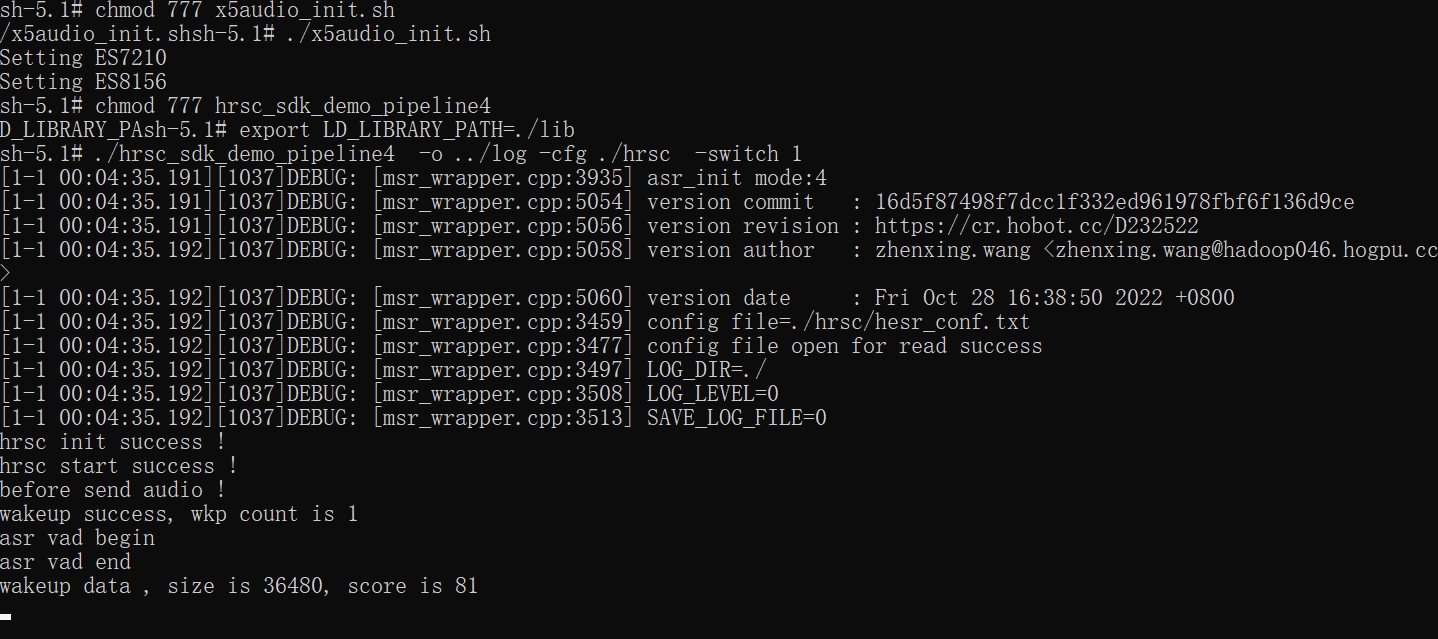
Test result of pipeline4 with log_level set to 3 is shown below:
Log and audio saving results are shown below:
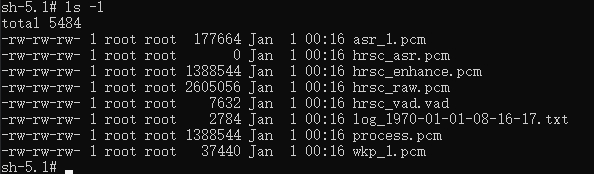
wkp_x.pcm and asr_x.pcm are single-channel wake-word audio and VAD-trimmed ASR audio respectively, where x is the wake-up sequence number.
hrsc_asr.pcm is the saved single-channel ASR audio.
hrsc_enhance.pcm is the three-channel noise-reduced audio, used for voice wake-up.
hrsc_raw.pcm is the four-channel audio. Its content varies depending on the input audio and represents the complete set of audio fed into the algorithm. Audio with fewer than four channels will be padded to four channels. For example, if a single-channel ASR audio is input, the first channel of the raw file contains the input single-channel data, and the remaining three channels are padded with zeros.
hrsc_vad.vad contains VAD flags (0 and 1), used for algorithm performance debugging.
log_xxx.txt is the log file name defined in the log saving configuration, where xxx represents the system timestamp.
process.pcm is the processed audio, i.e., the source audio fed into the algorithm.