4.3.3. UART Driver Debug Guide
4.3.3.1. Overview
The chip provides 8 UART interfaces, named UART0 to UART7, among which UART0 is used as the debug serial port.
UART1 and UART7 support hardware automatic flow control.
These UARTs support multiple bit rates, including 115200 bps, 230400 bps, 460800 bps, 921600 bps, 1500000 bps, 2000000 bps, and 4000000 bps.
Support transmission modes based on interrupt or DMA.
4.3.3.2. Functional Description
Typical Applications
UART is commonly used for asynchronous communication between devices, such as connecting microcontrollers with computers, sensors with data acquisition equipment, etc. UART can be used in various scenarios including debugging, data transmission, and device control.
A common scenario involves using a serial port for debugging, where a computer and a microcontroller exchange information via a serial interface. During debugging, the typical configuration is as follows:
| Parameter | Value |
|---|---|
| Baud Rate | 115200 |
| Data Bits | 8 |
| Parity | None |
| Stop Bits | 1 |
| Flow Control | None |
Functional Principle
UART typically requires three wires: TX, RX, and GND. TX is used for data transmission, RX for data reception, and GND provides a reference potential.
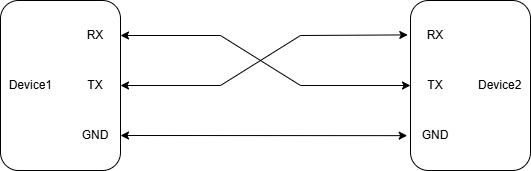
It should be noted that each device’s TX and RX are defined from the perspective of the local device. That is, the local device’s RX is responsible for receiving data and must be connected to the other device’s TX to enable normal communication.
UART sends and receives data through a serial interface, transmitting data in frames. Each frame contains a start bit, data bits, an optional parity bit, and stop bits, among others.

Explanation:
Start Bit: One logic 0 (low level) is sent to indicate the beginning of data transmission.
Data Bits: Can be 5–8 bits of data, transmitted LSB-first (least significant bit first), then MSB. Commonly used is 8 bits (1 byte), though others like 7-bit ASCII codes exist.
Parity Bit: Odd or even parity. With even parity, the total number of 1s (including the parity bit) is even; with odd parity, it is odd.
Stop Bit: Indicates the end of data transmission, can be 1, 1.5, or 2 bits of logic 1 (high level).
Idle Bit: When idle, the data line remains at a high level, indicating no data transmission.

If we transmit the data 0x33 (binary 00110011), the corresponding waveform would be as shown above. Since LSB is transmitted first, the 8 data bits are sent in the order: 11001100.
To send additional data, simply repeat this process.
Operation Modes
Interrupt Mode: Data reception and transmission are handled via interrupts, suitable for scenarios with small data volumes or high real-time requirements.
DMA Mode: Data is transferred via DMA, suitable for large data volumes or high-throughput scenarios.
Except for UART0, which is the default UART output for the kernel and prohibited from using DMA in Linux, all other UARTs support DMA transfers.
For details, refer to the Device Tree Node Configuration section.
4.3.3.3. Driver Code
U-Boot Driver Code
DTSI file location:
uboot/arch/arm/dts/x5.dtsi
dsp_uart: serial@32120000 {
	compatible = "ns16550a";  /*Specify the compatible type of the UART controller*/
	reg = <0x32120000 0x10000>;  /*Define the base address and address space size of UART registers*/
	clock-frequency = <UART_CLK_FREQ>;  /*Specify the input clock frequency of the UART*/
	reg-shift = <2>;  /*Register access offset*/
	current-speed = <115200>;  /*UART baud rate used: 115200*/
	u-boot,dm-pre-reloc;  /*Indicates this device needs initialization in early stage of u-boot*/
	status = "okay";  /*Indicates the device is enabled*/
};
Driver file:
uboot/drivers/serial/ns16550.c
Kernel Driver Code, Configuration, and Device Tree
Code Paths
drivers/tty/serial/8250/8250_dw.c
drivers/tty/serial/8250/8250_dwlib.c
drivers/tty/serial/8250/8250_dwlib.h
Kernel Configuration
SERIAL_8250_DW
SERIAL_8250_DWLIB
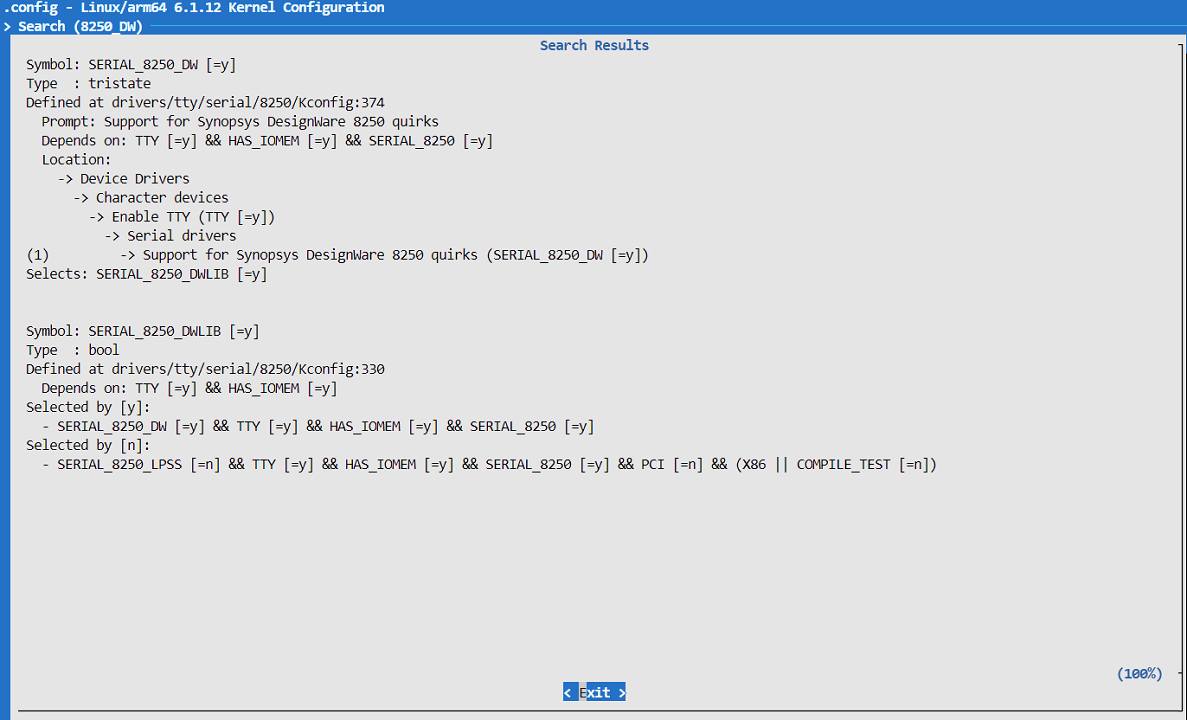
Device Tree Node Configuration
The device tree definition for the UART controller is located in the file arch/arm64/boot/dts/hobot/x5.dtsi under the Kernel folder of the SDK package.
By default, X5’s UART controllers are disabled. To enable a specific UART, modify or add custom configurations in the board-specific device tree file.
For example, enabling uart0, uart2, and uart5 in x5-evb.dts:
/* arch/arm64/boot/dts/hobot/x5-evb.dts */
...
&uart0 {
	status = "okay";
};

&uart2 {
	status = "okay";
	pinctrl-names = "default"; /*Define pin control name group, default is "default"*/
	pinctrl-0 = <&pinctrl_uart2>;  /*Apply pinctrl_uart2 pin configuration to UART2*/
	...
};

&uart5 {
	status = "okay";
	pinctrl-names = "default";
	pinctrl-0 = <&pinctrl_uart5>;
};
...
Note: Nodes in x5.dtsi mainly declare SoC common features and are unrelated to specific circuit boards; generally, they should not be modified.
DTS Configuration for DMA Binding
All UARTs on X5 support DMA transfers.
Take UART7 as an example:
&uart7 {
	status = "okay";  /*Enable the device*/
	pinctrl-names = "default";  /*Define pin control name group, default is "default"*/
	pinctrl-0 = <&pinctrl_uart7>;  /*Apply pinctrl_uart7 pin configuration to UART7*/
	dma-names = "tx", "rx";  /*Define DMA channel names: tx and rx*/
	dmas = <&axi_dmac 1>, <&axi_dmac 0>;  /*Assign DMA channels for UART7 transmission and reception; 0 for receive, 1 for transmit*/
}
Attention:
On the EVB, UART7 is by default configured as GPIO. To use UART7, first remove the corresponding pins (
lsio_gpio0_0~lsio_gpio0_3) fromls_gpio0_porta.UART0, being the kernel’s default UART output, must not use DMA in Linux.
UART DMA handshake binding list:
| RX | TX | |
|---|---|---|
| UART1 | 2 | 3 |
| UART2 | 4 | 5 |
| UART3 | 6 | 7 |
| UART4 | 8 | 9 |
| UART5 | 35 | 36 |
| UART6 | 37 | 38 |
| UART7 | 0 | 1 |
4.3.3.4. Functional Usage
Usage in U-Boot Stage
Check baud rate:
printenv baudrate
Set baud rate:
setenv bootargs "console=tty1 console=ttyS0,115200"
saveenv
Usage in Kernel Stage
Usage during the kernel stage mainly involves configuring the device tree and checking kernel boot parameters.
For example: Modify the device tree to disable certain UARTs
&uart5 {
	status = "disabled"; /*Disable UART5*/
	pinctrl-names = "default";
	pinctrl-0 = <&pinctrl_uart5>;
};
Or use the following command to view kernel boot parameters, where console=ttyS0,115200n8 specifies that the kernel console output during system boot uses the serial device ttyS0, with a baud rate of 115200, no parity, and 8 data bits per frame.
root@buildroot:~# cat /proc/cmdline
console=ttyS0,115200n8 root=/dev/mmcblk0p9 ro rootwait hobotboot.slot_suffix=_a hobotboot.reason=COLD_BOOT hobotboot.medium=MMC hobotboot.mode=normal hobotboot.ab_switch_reason=normal hobotboot.pmic_type=single-pmic
Usage in User Space Stage
This stage primarily involves accessing standard Linux serial device files.
In Linux systems, serial ports are typically represented as device files, usually located at:
/dev/ttySx: Standard serial ports, where x is the index starting from 0.
/dev/ttyUSBx: USB-to-serial devices.
We can use user-space tools to operate the serial port or use software APIs.
Common Tool: microcom
First, ensure the device node exists, is functional, and not occupied.lsof /dev/ttyS1
If not occupied, open UART1 with the following command:microcom -s 115200 /dev/ttyS1
Then type characters you want to send in the terminal.
For example: Hello D-Robotics
Observe whether the remote end receives the message.
Type characters on the remote end and observe whether they are received locally.
Software API (Example: Loopback Test)
Connect the TX and RX pins of UART2 together on hardware.
Refer to the following jumper connection: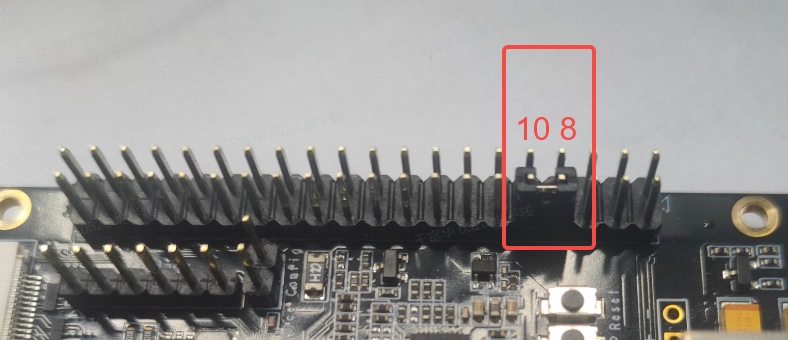
Compile the uart_duplex.c code. Before compiling, please adjust the cross-compilation toolchain path in the command below.
Create a new directory, for example: mkdir uart_duplex
Then enter: cd uart_duplex, and build using the following command:
/opt/arm-gnu-toolchain-11.3.rel1-x86_64-aarch64-none-linux-gnu/bin/aarch64-none-linux-gnu-gcc -o uart_duplex uart_duplex.c -lpthread
After successful build, you will see the executable and source file in the directory:
.
├── uart_duplex
└── uart_duplex.c
Push the executable to the target board, for example, to a writable partition /userdata/uart_duplex.
The uart_duplex.c source code is as follows:
#include <stdio.h>
#include <stdint.h>
#include <stdlib.h>
#include <unistd.h>
#include <fcntl.h>
#include <termios.h>
#include <errno.h>
#include <string.h>
#include <getopt.h>
#include <sys/time.h>
#include <pthread.h>
#include <semaphore.h>
#include <stdlib.h>

#define BUFF_SIZE (20 * 1024 * 1024)
pthread_t recv_thread_id;
pthread_t recv_check_thread_id;
pthread_t send_thread_id;
char send_buffer[BUFF_SIZE] = {0};
char recv_buffer[BUFF_SIZE] = {0};
static uint32_t test_size = 1024;
static uint32_t baud = 4000000;
static uint32_t test_count = 0;
int g_fd;
uint64_t recv_total = 0;
sem_t sem_check;

#define FRAME_LEN 512
#if 1
static void dump_recv_data(uint32_t sum, uint32_t len)
{
	int ii = 0;
	printf("dump receive data:\n");
	for (ii = 0; ii < len; ii += 4) {
		printf("0x%x: 0x%x, 0x%x, 0x%x, 0x%x\n", sum + ii,
				recv_buffer[sum + ii],
				recv_buffer[sum + ii + 1],
				recv_buffer[sum + ii + 2],
				recv_buffer[sum + ii + 3]);

	}

}

static void dump_send_data(uint32_t sum, uint32_t len)
{
	int ii = 0;
	printf("dump send data:\n");
	for (ii = 0; ii < len; ii += 4) {
		printf("0x%x: 0x%x, 0x%x, 0x%x, 0x%x\n", sum + ii,
				send_buffer[sum + ii],
				send_buffer[sum + ii + 1],
				send_buffer[sum + ii + 2],
				send_buffer[sum + ii + 3]);

	}

}
#endif

static void set_baudrate(int fd, int nSpeed)
{
	struct termios newtio;

	tcgetattr(fd, &newtio);

	switch (nSpeed) {
	case 2400:
		cfsetispeed(&newtio, B2400);
		cfsetospeed(&newtio, B2400);
		break;

	case 4800:
		cfsetispeed(&newtio, B4800);
		cfsetospeed(&newtio, B4800);
		break;

	case 9600:
		cfsetispeed(&newtio, B9600);
		cfsetospeed(&newtio, B9600);
		break;

	case 19200:
		cfsetispeed(&newtio, B19200);
		cfsetospeed(&newtio, B19200);
		break;

	case 38400:
		cfsetispeed(&newtio, B38400);
		cfsetospeed(&newtio, B38400);
		break;

	case 57600:
		cfsetispeed(&newtio, B57600);
		cfsetospeed(&newtio, B57600);
		break;

	case 115200:
		cfsetispeed(&newtio, B115200);
		cfsetospeed(&newtio, B115200);
		break;
	case 230400:
		cfsetispeed(&newtio, B230400);
		cfsetospeed(&newtio, B230400);
		break;
	case 921600:
		cfsetispeed(&newtio, B921600);
		cfsetospeed(&newtio, B921600);
		break;
	case 1000000:
		cfsetispeed(&newtio, B1000000);
		cfsetospeed(&newtio, B1000000);
		break;

	case 1152000:
		cfsetispeed(&newtio, B1152000);
		cfsetospeed(&newtio, B1152000);
		break;
	case 1500000:
		cfsetispeed(&newtio, B1500000);
		cfsetospeed(&newtio, B1500000);
		break;
	case 2000000:
		cfsetispeed(&newtio, B2000000);
		cfsetospeed(&newtio, B2000000);
		break;
	case 2500000:
		cfsetispeed(&newtio, B2500000);
		cfsetospeed(&newtio, B2500000);
		break;
	case 3000000:
		cfsetispeed(&newtio, B3000000);
		cfsetospeed(&newtio, B3000000);
		break;
	case 3500000:
		cfsetispeed(&newtio, B3500000);
		cfsetospeed(&newtio, B3500000);
		break;

	case 4000000:
		cfsetispeed(&newtio, B4000000);
		cfsetospeed(&newtio, B4000000);
		break;

	default:
		printf("\tSorry, Unsupported baud rate, use previous baudrate!\n\n");
		break;
	}
	tcsetattr(fd,TCSANOW,&newtio);
}

static void set_termios(int fd)
{
	struct termios term;

	tcgetattr(fd, &term);
	term.c_cflag &= ~(CSIZE | CSTOPB | PARENB | INPCK);
	term.c_cflag |= (CS8 | CLOCAL | CREAD);
	term.c_lflag &= ~(ICANON | ECHO | ECHOE | ISIG);
	term.c_oflag &= ~(OPOST | ONLCR | OCRNL);
	term.c_iflag &= ~(ICRNL |INLCR | IXON | IXOFF | IXANY);
	term.c_cc[VTIME] = 0;
	term.c_cc[VMIN] = 1;
	tcsetattr(fd, TCSAFLUSH, &term);
}

static void *send_test(void *times)
{
	/*send thread*/
	struct timeval start, end;
	int32_t i = 0;
	uint32_t j = 0;
	uint32_t tmp = 0;
	uint32_t exe_count = 0;
	int32_t ret = 0;
	float ts = 0;

	printf("Start send thread\n");

	sleep(1);
	if (test_count == 0) {
		tmp = 10;
	} else
		tmp = test_count;
	for (j = 0; j < tmp; j++) {
		if (test_count == 0)
			j = 0;
		sleep(1);
		printf("This is uart send %d times\n", ++exe_count);
		gettimeofday(&start, NULL);
		for (i = 0; i <  test_size * 1024; i = i + FRAME_LEN) {
			ret = write(g_fd, &send_buffer[i], FRAME_LEN);
			if (ret < FRAME_LEN) {
				printf("write ttyS2 error\n");
				return NULL;
			}
		}
#if 1
		gettimeofday(&end, NULL);
		//		printf("start %ld sec, %ld usec, end %ld sec, %ld usec\n", start.tv_sec, start.tv_usec, end.tv_sec, end.tv_usec);
		ts = ((end.tv_sec * 1000000 + end.tv_usec) - (start.tv_sec * 1000000 + start.tv_usec)) / 1000;
		printf("send %dKbytes,time:%fms, BPS:%f\n", test_size, ts, test_size * 1000 / (ts / 1000));
#endif
	}
	// close(g_fd);
	return NULL;
}

static void *recv_test(void *times)
{
	int32_t j = 0;
	uint32_t exe_count = 0;
	int tmp = 0;
	int size = 0;
	int sum = 0;
	int last_count = 0;
	int len = 0;
	int len_frame = 0; /*use to get correct frame len*/

	printf("Start receive thread\n");

	memset(recv_buffer, 0, sizeof(recv_buffer));

	if (test_count == 0) {
		tmp = 10;
	} else
		tmp = test_count;
	for (j = 0; j < tmp; j++) {
		sum = 0;
		last_count = 0;
		if (test_count == 0)
			j = 0;
		printf("This is receive test %d times\n", ++exe_count);
		//gettimeofday(&start, NULL);
		size = test_size * 1024;
		while (size > 0) {
			len = read(g_fd, &recv_buffer[sum], FRAME_LEN);
			if (len < 0) {
				if (errno == EAGAIN || errno == EWOULDBLOCK) {
					usleep(1000); // Wait 1ms before retry
					continue;
				} else {
					perror("read error");
					return NULL;
				}
			}
			recv_total += len;
			len_frame += len;
			if (len_frame >= FRAME_LEN) {
				len_frame -= FRAME_LEN;
				sem_post(&sem_check);
			}

#if 0
			ret = memcmp(&recv_buffer[sum], &send_buffer[sum], len);
			if (ret != 0) {
				printf("data compare error\n");
				return NULL;
			}
#endif
		}
	}
	return NULL;
}

#endif
			sum +=len;
			size -= len;
			if ((sum - last_count) > 100 * 1024) {
				printf("receive sum:%d bytes\n", sum);
				last_count = sum;
			}
		}
#if 0
		gettimeofday(&end, NULL);
		printf("start %ld sec, %ld usec, end %ld sec, %ld usec\n", start.tv_sec, start.tv_usec, end.tv_sec, end.tv_usec);
		ts = ((end.tv_sec * 1000000 + end.tv_usec) - (start.tv_sec * 1000000 + start.tv_usec)) / 1000;

		printf("receive %dKbytes,time:%fms, BPS:%f\n", test_size, ts, test_size * 1000 / (ts / 1000));
#endif
	}
	// close(g_fd);
	return NULL;
}

int32_t error_bit(uint64_t *data1, uint64_t *data2, int32_t len)
{
	uint64_t c=0;
	int32_t sum = 0;
	int i = 0;
	for(i = 0; i < len / 8; i++) {
		c = data1[i] ^ data2[i];
		while(c!=0) {
			c &= (c - 1);
			sum++;
		}
	}
	return sum;
}

static void *recv_check_test(void *times)
{
	int32_t check_pos = 0;
	uint32_t *cur_frame = NULL;
	int32_t error_bit_cnt = 0;
	printf("Start recv_check thread\n");
	while (1) {
		sem_wait(&sem_check);
		/*check data*/
		cur_frame = (uint32_t *)&recv_buffer[check_pos];
		if (*cur_frame != check_pos / FRAME_LEN) {
			printf("error: may lost frame, curruent frame is %d, expected frame is %d position: 0x%x\n",
					*cur_frame, check_pos / FRAME_LEN, check_pos);
			//dump_recv_data(check_pos, FRAME_LEN);
			//dump_send_data(check_pos, FRAME_LEN);
			error_bit_cnt = 0;
			error_bit_cnt = error_bit((uint64_t *)&recv_buffer[check_pos],
					(uint64_t *)&send_buffer[check_pos],
					FRAME_LEN / 8);
			check_pos += FRAME_LEN;
			printf("test total data: 0x%lx, error bit count:%d\n", recv_total, error_bit_cnt);
			if (check_pos == test_size * 1024) {
				//exit(1);
				printf("uart: frame head error\n");

			}
			continue;
		}
		error_bit_cnt = 0;
		error_bit_cnt = error_bit((uint64_t *)&recv_buffer[check_pos],
				(uint64_t *)&send_buffer[check_pos],
				FRAME_LEN / 8);
		if (error_bit_cnt) {
			printf("test total data: 0x%lx!!!!!!!, error bit count:%d\n", recv_total, error_bit_cnt);
			//dump_recv_data(check_pos, FRAME_LEN);
			//dump_send_data(check_pos, FRAME_LEN);
			check_pos += FRAME_LEN;
			if (check_pos == test_size * 1024) {
				//exit(1);
				printf("uart: frame data error\n");
			}
			continue;
		}
		memset(&recv_buffer[check_pos], 0, FRAME_LEN);
		check_pos += FRAME_LEN;
		if (check_pos == test_size * 1024) {
			check_pos = 0;
			printf("### Check the received data is correct ###\n");
		}
	}
	return NULL;
}

static const char short_options[] = "s:u:c:b:d:h";
static const struct option long_options[] = {
	{"size", required_argument, NULL, 's'},
	{"baudrate", required_argument, NULL, 'b'},
	{"count", required_argument, NULL, 'c'},
	{"device", required_argument, NULL, 'd'},
	{"help", no_argument, NULL, 'h'},
	{0, 0, 0, 0}};
int main(int argc, char *argv[])
{
	int ret = 0;
	char *pDevice = NULL;
	int i = 0;
	int32_t cmd_parser_ret = 0;
	uint32_t *frame_num = NULL;
	uint32_t *frame_value = NULL;

	while ((cmd_parser_ret = getopt_long(argc, argv, short_options, long_options, NULL)) != -1) {
		switch (cmd_parser_ret) {
		case 's':
			test_size = atoi(optarg);
			break;

		case 'b':
			baud = atoi(optarg);
			break;

		case 'c':
			test_count = atoi(optarg);
			break;
		case 'd':
			pDevice = optarg;
			break;

		case 'h':
			printf("**********UART STRESS TEST HELP INFORMATION*********\n");
			printf(">>> -s/--size     [test size,unit--Kbytes,default is 1M, MAX is 20M]\n");
			printf(">>> -b/--baudrate  [baud,default is 4M]\n");
			printf(">>> -c/--count  [test count,default is forever]\n");
			printf(">>> -d/--uart  [uart device, user must set this]\n");
			return 0;
		}
	}
	if (baud > 4000000) {
		printf("baud is larger than max baud\n");
		return -1;
	}
	g_fd = open(pDevice, O_RDWR | O_NOCTTY);
	if (0 > g_fd) {
		printf("open fail\n");
		return -1;
	}
	set_baudrate(g_fd, baud);
	set_termios(g_fd);
	printf("test size:%d Kbytes, baud:%d\n", test_size, baud);
	for (i = 0; i < test_size * 1024; i+=4) {
		if (i % FRAME_LEN) {
			frame_value = (uint32_t *)&send_buffer[i];
			*frame_value = rand();
		}

	}
	for (i = 0; i < test_size * 1024 / FRAME_LEN; i++) {
		frame_num = (uint32_t *)&send_buffer[i * FRAME_LEN];
		*frame_num = i;
		//        printf("pos:0x%x, value:0x%x\n", i * FRAME_LEN, *frame_num);
	}

	sem_init(&sem_check, 0, 0);
	ret = pthread_create(&recv_thread_id,
			NULL,
			recv_test,
			NULL);
	if (ret < 0) {
		printf("create uart1 test thread failed\n");
		return -1;
	}
	ret = pthread_create(&send_thread_id,
			NULL,
			send_test,
			NULL);
	if (ret < 0) {
		printf("create uart2 test thread failed\n");
		return -1;
	}
	ret = pthread_create(&recv_check_thread_id,
			NULL,
			recv_check_test,
			NULL);
	if (ret < 0) {
		printf("create receive check thread failed\n");
		return -1;
	}
	pthread_join(recv_thread_id, NULL);
	pthread_join(recv_check_thread_id, NULL);
	pthread_join(send_thread_id, NULL);
	close(g_fd);
	return 0;
}
Example command for 100-loopback test (parameter specified by -c):
# ./uart_duplex -c 100 -d /dev/ttyS2
test size:1024 Kbytes, baud:4000000
Start receive thread
Start send thread
Start recv_check thread
This is receive test 1 times
This is uart send 1 times
receive sum:102416 bytes
receive sum:204832 bytes
...
receive sum:819328 bytes
receive sum:921744 bytes
receive sum:1024160 bytes
send 1024Kbytes,time:4507.000000ms, BPS:227202.125000
This is receive test 2 times
### Check the received data is correct ###
This is uart send 2 times
receive sum:102416 bytes
receive sum:204832 bytes
...
receive sum:921744 bytes
receive sum:1024160 bytes
send 1024Kbytes,time:4609.000000ms, BPS:222174.000000
This is receive test 3 times
### Check the received data is correct ###
This is uart send 3 times
receive sum:102416 bytes
receive sum:204832 bytes
...
Command Description: Open /dev/ttyS2, default baud rate 4Mbps, default 1MB data per test round, perform 100 rounds of testing. Read and write operations are performed simultaneously. A data integrity check is conducted every 512 bytes sent/received. After each complete test round, if no errors occur, a message indicating successful verification is printed.
Refer to its help information for additional usage options.
A brief explanation of this example program:
This sample program communicates with a serial device via the UART interface, implementing data transmission, reception, and verification. It uses multiple threads to handle sending, receiving, and checking functions separately, and employs semaphores for thread synchronization. For details, refer to the flowchart below: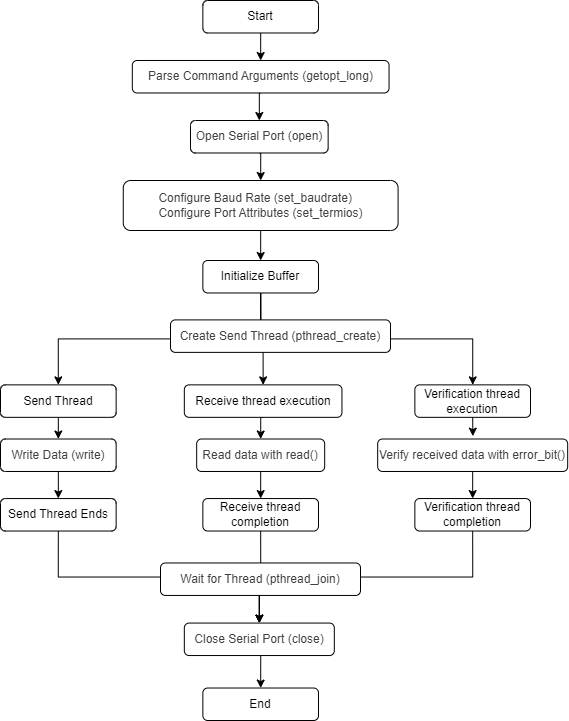
Key Function Descriptions
| Function / Code Snippet | Description |
|---|---|
g_fd = open(pDevice, O_RDWR ...) |
Opens the serial device file. |
set_baudrate(int fd, int nSpeed) |
Sets the baud rate of the serial port. |
set_termios(int fd) |
Configures other serial port attributes, such as character size, stop bits, parity, etc. |
len = read(g_fd, &recv_buffer[sum], FRAME_LEN) |
Reads data from the serial port into recv_buffer, each time reading data of length FRAME_LEN. |
ret = write(g_fd, &send_buffer[i], FRAME_LEN) |
Sends data through the serial port, taking data from send_buffer, each time sending data of length FRAME_LEN. |
send_test(void *times) |
Entry function for the sending thread, responsible for sending data to the serial port. |
recv_test(void *times) |
Entry function for the receiving thread, responsible for reading data from the serial port. |
recv_check_test(void *times) |
Entry function for the checking thread, responsible for verifying received data. |
error_bit(uint64_t *data1, uint64_t *data2, int32_t len) |
Calculates the number of differing bits between two data blocks. |
main(int argc, char *argv[]) |
Parses command-line arguments, opens the serial device, sets serial port attributes, initializes buffers, starts sending, receiving, and checking threads, and waits for these threads to finish. |
4.3.3.5. Common Issues
Besides baud rate, UART protocol may require settings for stop bits, parity bits, etc., depending on specific modules or communication protocols; these must be configured consistently on both sides.
When using serial debugging tools, some have a Flow control option (e.g., Xon/Xoff). If set to None, the microcontroller might not respond when typing during debugging.
Before use, verify that device nodes like /dev/ttySx actually exist.
Before use, check whether device nodes like /dev/ttySx are already in use (e.g., using
lsof /dev/ttySx).