4.3.2. Configure U-Boot and Kernel Option Parameters
In embedded system development, configuring functional options (also known as trimming) for U-Boot and the Kernel is a common and critical step. By adjusting configuration options, users can remove unnecessary features based on actual system requirements, thereby improving system efficiency and reliability. Below are two commonly used methods to configure U-Boot and Kernel options: using the xbuild command or manual configuration.
4.3.2.1. Configuring U-Boot Option Parameters
Configuring Using the xbuild Command
Within the xbuild build system, an automated tool is provided to configure U-Boot options. The following command simplifies the configuration process by automatically setting up the environment, generating configuration files, and saving them:
./bd.sh uboot menuconfig
# Or use the shortcut command after running source build/quickcmd.sh to set up the environment
bumc
Upon successful execution, the system launches a graphical configuration interface. Users can enable desired features or disable unwanted ones within this interface.
After opening the configuration interface, a series of options will be displayed. Users can interactively select features to enable or disable.
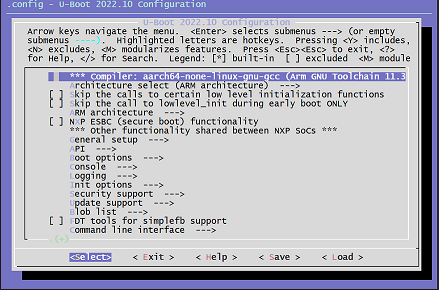
After completing the configuration, select
Exit. The system will prompt whether to save changes. ChooseYesto save the configuration into the.configfile.
Automatic Saving and Cleaning:
When the configuration interface is launched via ./bd.sh uboot menuconfig, upon exiting and saving, xbuild automatically performs the following steps:
Clean configuration file: Run
make savedefconfigto clean the configuration, keeping only necessary entries and removing redundant or implied ones, generating a newdefconfigfile.Update configuration file: Copy the generated
defconfigfile into the board-specific configuration file, replacing the original U-Boot configuration.
Example operations:
make savedefconfig                                 # Clean configuration, remove implied entries, generate defconfig file
cp -f defconfig <U-Boot config file in board configuration>  # Overwrite board-level configuration file
Manual Configuration
Note: Manually configuring U-Boot options corresponds to breaking down the ./bd.sh uboot menuconfig command into individual steps. Users should understand the meaning and purpose of each configuration file and parameter involved.
Below are the manual configuration steps, using uboot/configs/hobot_x5_soc_defconfig as an example:
Step 1: Enter the U-Boot directory and apply default configuration:
cd uboot
make ARCH=arm64 hobot_x5_soc_defconfig
This command loads the
hobot_x5_soc_defconfigconfiguration file, sets up the U-Boot compilation environment, and generates a.configfile in the root directory. The command output log is as follows:$ make ARCH=arm hobot_x5_soc_defconfig HOSTCC scripts/basic/fixdep HOSTCC scripts/kconfig/conf.o YACC scripts/kconfig/zconf.tab.c LEX scripts/kconfig/zconf.lex.c HOSTCC scripts/kconfig/zconf.tab.o HOSTLD scripts/kconfig/conf # # configuration written to .config #
Explanation of the above make command (for understanding only, no need to execute):
The
makecommand first executes the Makefile in the top-level directory. In this Makefile, all targets ending withconfigshare a common rule:%config: scripts_basic outputmakefile FORCE $(Q)$(MAKE) $(build)=scripts/kconfig $@This code expands to:
make -f ./scripts/Makefile.build obj=scripts/kconfig hobot_x5_soc_defconfig
Step 2: Enter the graphical configuration interface:
make ARCH=arm menuconfig
After executing the command, the graphical configuration interface appears, allowing users to enable or disable relevant features.
Step 3: Save configuration and generate cleaned
defconfigfile:After completing the configuration, select
Exitand save the configuration when prompted. Then run the following command to generate a cleaneddefconfigfile:make ARCH=arm savedefconfig
Step 4: Compare configuration before and after (optional)
To ensure changes meet expectations, use the
diffcommand to compare configuration differences:diff defconfig configs/hobot_x5_soc_defconfig
Step 5: Update configuration file and clean build environment:
Copy the generated
defconfigfile to the source configuration file and clean the build environment:cp defconfig configs/hobot_x5_soc_defconfig # Overwrite source configuration file # Clean .config and other files from source directory; otherwise, recompiling may prompt "xxx is not clean, please run 'make mrproper'" make distclean # Or use the command suggested by the error message make mrproper
Step 6: Recompile U-Boot
After completing the configuration, recompile U-Boot with the following command:
./bd.sh uboot
4.3.2.2. Configuring Kernel Option Parameters
Configuring Using the xbuild Command
Configuring the Kernel is similar to configuring U-Boot. The xbuild system also provides a graphical interface to assist users in configuring Kernel options. Run the following command to open the Kernel configuration interface:
./bd.sh boot menuconfig
# Or use the shortcut command after running source build/quickcmd.sh to set up the environment
bbmc
Upon successful execution, the graphical configuration interface will automatically launch, allowing users to enable or disable required features.
After opening the configuration interface, a list of options will be displayed. Users can interactively select features to enable or disable.
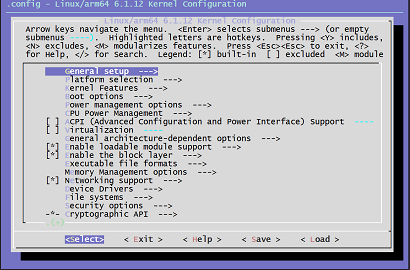
After completing the configuration, select
Exit. The system will prompt whether to save changes. SelectYesto save the configuration into the.configfile.
Automatic Saving and Cleaning:
When configuration is launched via ./bd.sh boot menuconfig, upon exiting, xbuild automatically performs the following steps:
Clean configuration file: Use
make savedefconfigto clean the configuration and generate adefconfigfile.Update configuration file: Copy the
defconfigfile into the board-specific configuration file.
Example operations:
make savedefconfig                               # Clean and generate defconfig file
cp defconfig <Kernel config file in board configuration>  # Overwrite board-level configuration file
Manual Configuration
Note: Manually configuring Kernel options corresponds to breaking down the ./bd.sh boot menuconfig command into individual steps. Users should understand the meaning and purpose of each configuration file and parameter involved.
Below are the detailed manual configuration steps, using kernel/arch/arm64/configs/hobot_x5_soc_defconfig as an example:
Step 1: Enter the Kernel directory and apply default configuration:
cd kernel
make ARCH=arm64 hobot_x5_soc_defconfig
This command generates the
.configfile and sets up the Kernel build environment.Step 2: Enter the graphical configuration interface
make ARCH=arm64 menuconfig
After executing the command, the Kernel’s graphical configuration interface appears, allowing users to enable or disable various features.
Step 3: Save configuration and generate cleaned
defconfigfileAfter completing the configuration, exit and save the configuration, then run the following command to generate a cleaned
defconfigfile:make ARCH=arm64 savedefconfig
Step 4: Compare configuration before and after (optional)
To ensure accuracy of configuration changes, compare differences before and after:
diff defconfig arch/arm64/configs/hobot_x5_soc_defconfig
Step 5: Update configuration file and clean build environment
Copy the new
defconfigfile to the original configuration file and clean the build environment:cp -f defconfig arch/arm64/configs/hobot_x5_soc_defconfig # Overwrite source configuration file # Clean .config and other files from source directory; otherwise, recompiling may prompt "xxx is not clean, please run 'make mrproper'" make distclean # Or use the command suggested by the error message make mrproper
Step 6: Recompile the Kernel
After completing the configuration, recompile the Kernel using the following command:
./bd.sh boot