4.3.23. QoS Debug Guide
4.3.23.1. Overview
The X5 chip adopts QoS (Quality of Service) under the NOC (Network on Chip) architecture, primarily for the following reasons:
SoC Development Requirements
As SoCs continue to evolve, on-chip interconnect architectures have gradually transitioned from bus-based structures to complex network topologies, giving rise to the concept of Network-on-Chip (NoC). Efficient communication and resource allocation between different on-chip cores and modules are required, necessitating the introduction of QoS mechanisms to ensure system performance and stability.
Solving Bandwidth and Latency Allocation Issues
Inside the X5 chip, numerous modules (such as CPU, VIN, BPU, CODEC, GPU, etc.) need to exchange data through the NOC. Each module has different requirements for bandwidth and latency. For example, video modules demand high bandwidth and real-time performance. Without a QoS mechanism to properly allocate and manage resources, bandwidth contention may lead to data transmission delays, packet loss, and other issues, negatively impacting overall system performance. The QoS mechanism enables optimized allocation of bandwidth and latency based on each module’s actual needs, ensuring that every module receives resources matching its requirements.
Addressing Uneven Data Traffic Distribution
Under different application scenarios, data traffic among various modules within the chip can be highly imbalanced. For instance, in high-definition video processing scenarios, modules involved in image acquisition, encoding/decoding, and display generate large data flows. However, in simpler task scenarios, the traffic of these modules is relatively low. The QoS mechanism can dynamically adjust and flexibly allocate resources according to actual traffic conditions. During traffic peaks, it prioritizes critical modules’ resource demands; during lulls, it efficiently reallocates remaining resources, improving resource utilization and ensuring the entire chip system operates efficiently and stably across varying workloads.
In summary, the X5 chip adopts QoS under the NOC architecture to adapt to SoC evolution, meet diverse service demands, optimize resource allocation and utilization, and handle complex and dynamic data traffic patterns—thereby enhancing the chip’s overall performance and stability and better supporting various applications and functionalities.
4.3.23.2. Features
In the X5 chip’s NOC, QoS exhibits a series of new characteristics that significantly enhance on-chip network service quality, as follows:
Enables differentiated traffic management to accommodate diverse application scenario requirements.
Supports multiple operating modes, including Fixed, Limiter, Regulator, and Bypass modes.
Covers numerous modules such as CPU, VIN, BPU, CODEC, GPU, HSIO, HIFI5, etc., with each module having corresponding IPs (e.g., SIF2, SIF3, SIIF_DISP, BPU, VIDEO_CODEC), all of which can be individually configured for QoS, enabling fine-grained adjustments tailored to different scenarios.
Supports QoS configuration via sysfs nodes.
X5 QoS Supported Modules and Their IPs
| Module | IP |
|---|---|
| CPU | cpu_ace / cpu_perif |
| VIN | bt1120 / dc8000 / dw230_gdc / dw230_scalar2 / dw230_scalar3 / isp_axi5_hdr / isp_axi4_mcm / isp_axi3_sp2 / isp_axi1_mp / sif0 / sif1 / sif2 / sif3 / sif_disp |
| BPU | bpu |
| CODEC | video / jpeg |
| GPU | gpu2d / gpu3d |
| HSIO | dma0 / emmc / gmac / sd / sdio / security / usb2 / usb3 / etr |
| HIFI5 | hifi5 |
4.3.23.3. Functional Description
Typical Applications
The QoS functionality of the X5 chip plays an important role in various scenarios. Below are some typical application cases:
High-Resolution Display Scenarios
For example, in a dual 4K scenario, which demands high resolution and high priority for modules in the pipeline (such as the HDMI display module), adjusting the display output QoS ensures the required priority and bandwidth for high-resolution display, guaranteeing stable video output.
Multimedia Processing Scenarios
In multimedia processing, multiple modules work collaboratively, each with different bandwidth and priority requirements. For modules such as video encoding/decoding and Image Signal Processing (ISP), QoS enables reasonable bandwidth allocation and priority setting, ensuring smooth multimedia processing and avoiding issues like frame drops or screen flickering.
Complex Sensor Integration Scenarios
When the X5 chip is used in devices such as robotic vacuum cleaners, lawn mowers, or home companion robots that require connecting multiple complex sensors, the QoS function can allocate priorities and bandwidth for data transmission from different sensors. Critical sensor data may be assigned higher priority to ensure real-time performance and accuracy, while sensors with high bandwidth demands can be allocated sufficient bandwidth, ensuring stable system operation and enabling robots to better perceive their environment, make decisions, and act accordingly.
Functional Principles
QoS refers to the statistical allocation of throughput and latency for transactions between initiators and targets in terms of bandwidth and delay. QoS is analogous to VIP services at a bank—network traffic is classified and assigned different service qualities, where high-priority traffic is forwarded first, while lower-priority traffic is served on a best-effort basis.
The X5 QoS driver source code is located at drivers/soc/hobot/ddr_monitor/horizon_noc_qos.c. This section mainly introduces the basic principles and usage methods of QoS, without delving into the driver code.
QoS supports four modes: Fixed, Limiter, Regulator, and Bypass. The following sections describe each mode and its underlying principles.
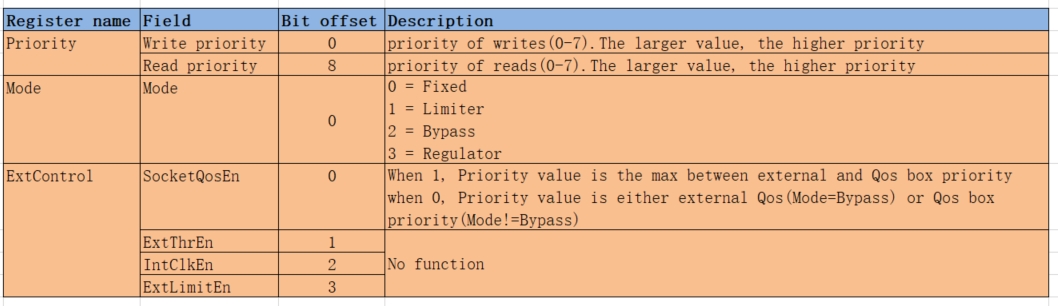
Fixed Mode
Characteristics of Fixed Mode
Used to assign a predefined priority level statically.
Allows separate configuration of read and write transaction priorities.
Register definition under Fixed Mode:
Limiter Mode
Characteristics of Limiter Mode
Performs traffic control when a predefined bandwidth threshold is exceeded.
Allows separate configuration of read and write transaction priorities.
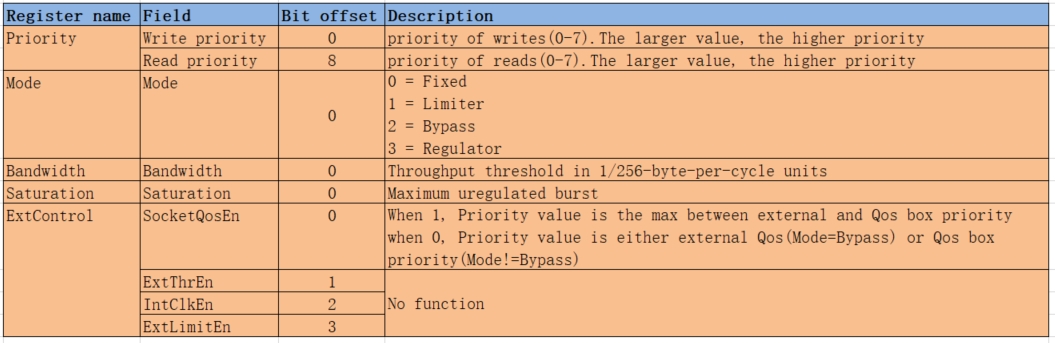
Configurable registers include:
Bandwidth,Saturation, andExtControl.When a port’s bandwidth exceeds
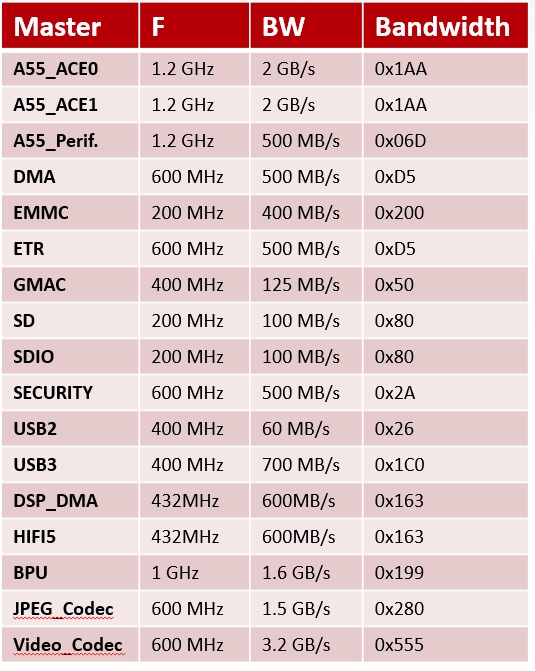
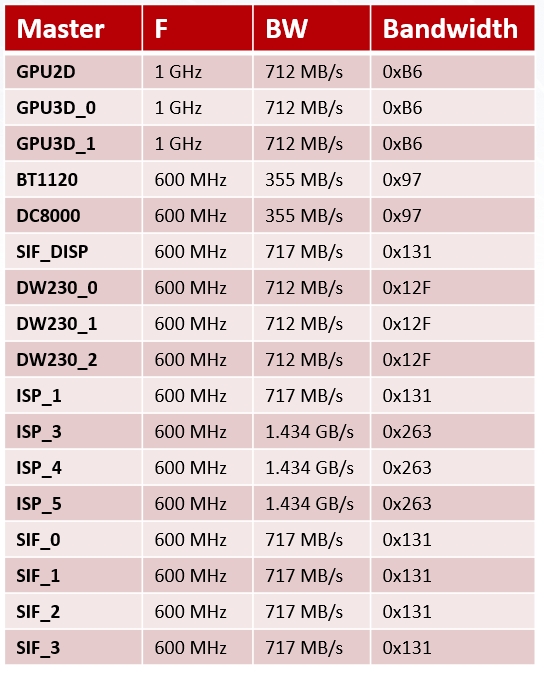
BWand surpasses thethresholdin bytes, the port will be throttled (backpressure applied). Here,Bandwidth register value = 256 * BW/F, andThreshold = Saturation register × 16.
Parameter Description
BW: Expected memory bandwidth limitthreshold: Threshold betweenBWand QoS throttlingF: Module frequency; refer to QoS Register Default Configuration Table for frequencies of individual modules
Register definition under Limiter Mode:
Regulator Mode
Characteristics of Regulator Mode
Ensures the initiator receives the required bandwidth from the target.
Does not allow separate configuration of read and write transaction priorities; read and write share the same priority in this mode.
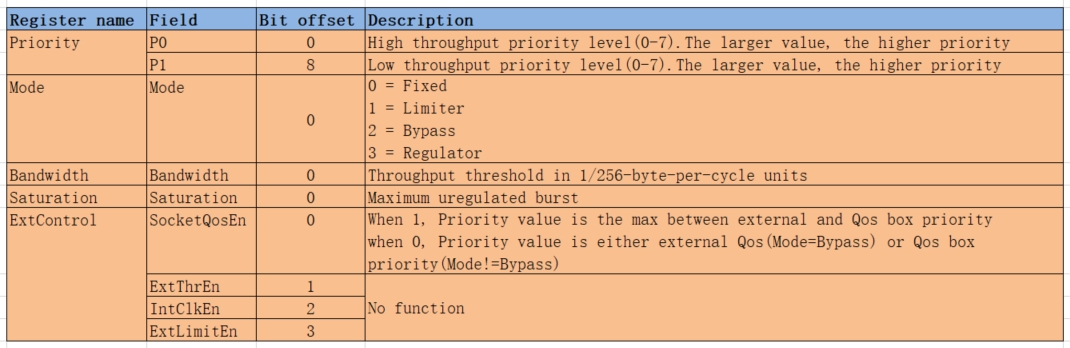
Configurable registers include:
Bandwidth,Saturation, andExtControl.The Regulator mode adjusts read/write priorities based on bandwidth:
When bandwidth exceeds the expected value, i.e., when port bandwidth is higher than
BW + threshold, QoS reduces read/write priority toP0.When bandwidth is below the expected value, i.e., when port bandwidth is lower than
BW - threshold, QoS increases read/write priority toP1.Where
Bandwidth register value = 256 * BW/F, andThreshold = Saturation register × 16.
Parameter Description
P0: Read/write priority, high priorityP1: Read/write priority, low priorityBW: Expected memory bandwidth limitthreshold: Threshold betweenBWand QoS adjustmentF: Module frequency; refer to QoS Register Default Configuration Table for frequencies of individual modules
Register definition under Regulator Mode:
Bypass Mode
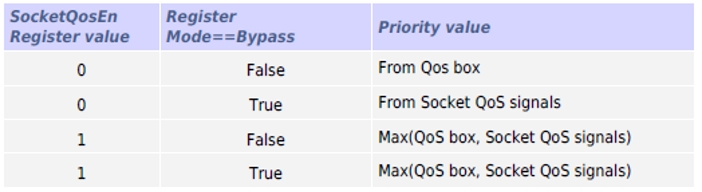
Bypass mode is more complex, where the value of the Priority register is determined by both Socket qos signals and Qos box:
Socket qos signalsrefer to internal QoS adjustment values (the maximum ofAxQOSandHurry), where:AxQos: Value adjusted by the IP itselfHurry: A signal supported only by SIF, which increases the processing priority of pending transactions that haven’t received a response for a long time. The SIF Hurry signal is driven by the almost-full signal of the relevant FIFO.
Qos boxrefers to thepriorityregister value described earlier.
Main cases include:
When the SocketQosEn register value is 0 and the current mode is not Bypass, the priority is set via the
priorityregister.When the SocketQosEn register value is 0 and the current mode is Bypass, the priority is set by
Socket qos signals.When the SocketQosEn register value is 1, the maximum of
Socket qos signalsandQos boxis used as the priority.
Priority values follow the rules shown in the table below:
4.3.23.4. QoS Register Default Configuration
Bandwidth, BW, F Register Values
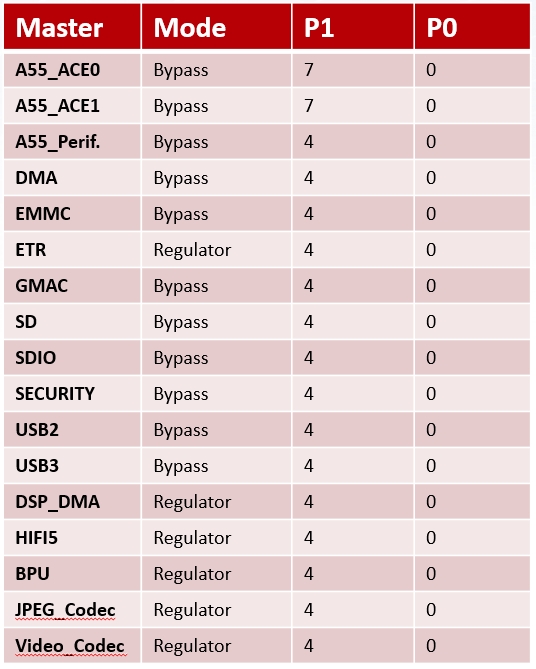
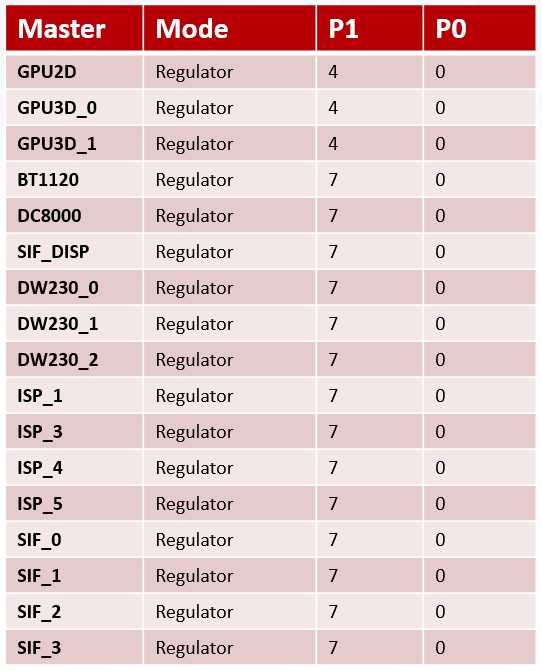
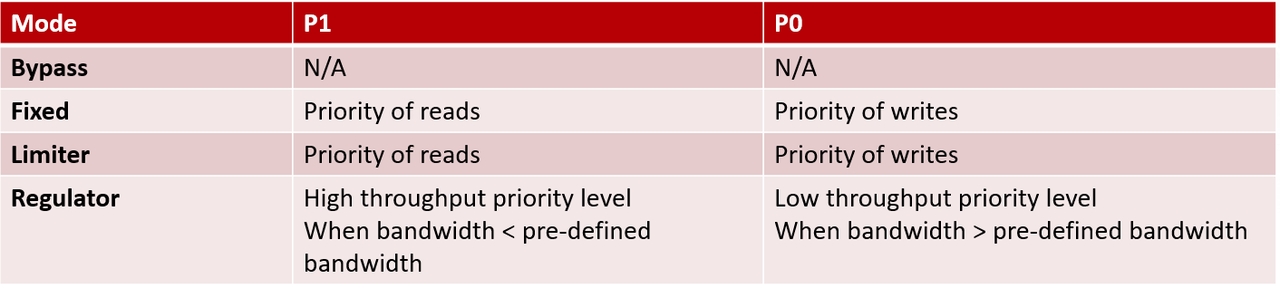
Mode, P1, P0 Registers
Notes
The X5 chip typically uses Fixed mode. To switch to Limiter, Regulator, or Bypass modes, see the Advanced Mode Configuration Section.
Priority register definitions differ across modes:
In Fixed and Limiter modes: P0 represents write priority, P1 represents read priority.
In Mode and Regulator modes: P0 represents low priority, P1 represents high priority.
Definitions of write\P0 and read\P1 priorities:
write\P0 priority is determined by bits [0:2] of the Priority register, range [0–7]
read\P1 priority is determined by bits [8:10] of the Priority register, range [0–7]
Higher numerical values indicate higher priority
4.3.23.5. Usage Methods
The X5 chip supports QoS configuration via sysfs, allowing users to bypass complex register settings and directly operate through sysfs nodes. The operation mode is divided into common mode and advanced mode; the usage of each is described below.
Common Mode
The X5 system defaults to common mode, i.e., Fixed mode. When configuring priorities via sysfs, QoS automatically configures itself into Fixed mode.
Reading and Writing the Priority Register
The QoS module directory is /sys/bus/platform/drivers/noc_qos, which contains subdirectories for all QoS-configurable modules in the X5 system.

For Fixed mode, both read and write priorities can be configured under each module, located at the read_priority_qos_ctrl/priority and write_priority_qos_ctrl/priority nodes within each module’s directory.
Example using sif0 qos to read and configure read/write priorities
cd /sys/bus/platform/drivers/noc_qos    # Enter qos directory

cd 20510500.sif0_qos                    # Enter sif0 qos subdirectory

cat read_priority_qos_ctrl/priority     # Read read priority
# read_priority : 7                     # Current read priority is 7

echo 5 > read_priority_qos_ctrl/priority     # Set read priority to 5


cat write_priority_qos_ctrl/priority     # Read write priority
# write_priority : 7                     # Current write priority is 7

echo 5 > write_priority_qos_ctrl/priority     # Set write priority to 5
Advanced Mode
Configuring Advanced Mode
The X5 QoS defaults to common mode. Every time a priority is configured, the driver automatically sets the mode to Fixed. To enter advanced mode, automatic configuration must first be disabled. X5 QoS uses the mode_qos_ctrl/advanced node under each module’s directory to enable/disable automatic configuration.
Example using sif0 qos
Check whether automatic Fixed mode configuration is currently enabled:
cd /sys/bus/platform/drivers/noc_qos/20510500.sif0_qos

cat mode_qos_ctrl/advanced
qos_advanced : 0              # 0 indicates automatic mode setting to Fixed
Disable automatic Fixed mode configuration:
echo 1 > mode_qos_ctrl/advanced

cat mode_qos_ctrl/advanced
qos_advanced : 1
Configuring Priority
In advanced mode, the main configurable register directories under each module’s subdirectory are:
mode_qos_ctrl: Containsadvanced,bandwidth,extcontrol,mode,saturationregistersread_priority_qos_ctrl: Containspriority, corresponding to read / P1 prioritywrite_priority_qos_ctrl: Containspriority, corresponding to write / P0 priority
Note: Configuration values must be converted to decimal
Example using cpu_ace_qos
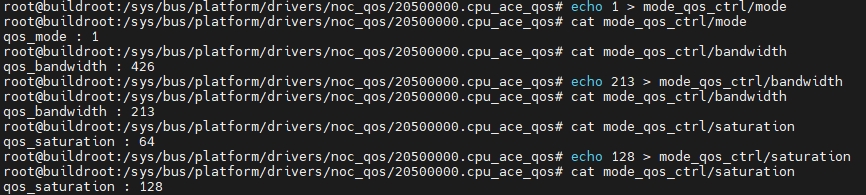
Set Limiter mode with BW = 1 GB/s, threshold = 2 MB, where F = 1.2 GHz (module frequency; refer to QoS Register Default Configuration Table for module-specific frequencies). The Bandwidth register value is 0xD5, and the Saturation register value is 0x80.
QoS Module Parameter Display Script
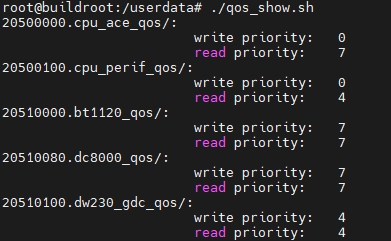
X5 provides a script qos_show.sh to help users quickly view read and write priority parameters for all modules.
Script parameters:
No arguments (default): Only displays
write priorityandread priorityinformation-a: Also displaysadvanced,mode,bandwidth,saturation,extcontrolparameter information
Note: This script is not included in the onboard firmware by default; users may copy it to any path on the board and execute it.
Script code:
#!/bin/bash

# cd /sys/bus/platform/drivers/noc_qos
cd /sys/bus/platform/drivers/noc_qos || exit

for dir in */; do
    if [[ $dir == *qos* ]]; then
            cd "$dir" || continue
    fi
    echo "$dir: "

    val=$(cat write_priority_qos_ctrl/priority | awk '{print $NF}')
    printf "\t\t\t%-18s%-10s\n" "write priority:" $val

    val=$(cat read_priority_qos_ctrl/priority | awk '{print $NF}')
    printf "\t\t\t%-18s%-10s\n" "read priority:" $val

    if [ "$1" != "-a" ]; then
        cd ..
        continue
    fi

    val=$(cat mode_qos_ctrl/mode | awk '{print $NF}')
    printf "\t\t\t%-18s%-10s\n" "mode val:" $val

    val=$(cat mode_qos_ctrl/advanced | awk '{print $NF}')
    printf "\t\t\t%-18s%-10s\n" "advanced val:" $val

    val=$(cat mode_qos_ctrl/bandwidth | awk '{print $NF}')
    num=$((val))
    printf "\t\t\t%-18s%s%-10x\n" "bandwidth val:" "0x" $((val))

    val=$(cat mode_qos_ctrl/saturation | awk '{print $NF}')
    num=$((val))
    printf "\t\t\t%-18s%s%-10x\n" "saturation val:" "0x" $((val))

    val=$(cat mode_qos_ctrl/extcontrol | awk '{print $NF}')
    printf "\t\t\t%-18s%-10s\n" "extcontrol val:" $val

    cd ..

done
Without parameters (only read/write priorities displayed)
With -a parameter (all register values displayed)

QoS Configuration Tool qos_tool.sh
The SDK provides a shell script at /usr/hobot/bin/qos_tool.sh on the board for convenient QoS configuration via sysfs. The source code is located at hbre/hbutils/qos_tool/qos_tool.sh. The tool supports set configuration for Fixed, Limiter, and Regulator modes, and can batch-apply or back up complex mode configurations via apply / save. It automatically performs register conversion, controls write order, and verifies read-back values—no need to operate individual sysfs nodes manually.
Module Aliases and Frequencies
The module parameter accepts a full ID (e.g. 20510500.sif0_qos) or an alias from the table below; fuzzy matching is also supported (e.g. entering gdc matches *gdc*_qos). Frequency F is used for bandwidth register conversion in calc / set limiter / set regulator / apply. Typical values are listed below (see QoS Register Default Configuration Table; use actual board clocks as the reference):
| Module ID | alias | Group | F (MHz) |
|---|---|---|---|
| 20500000.cpu_ace_qos | cpu_ace | CPU | 1200 |
| 20500100.cpu_perif_qos | cpu_perif | CPU | 1200 |
| 20510000.bt1120_qos | bt1120 | VIN | 600 |
| 20510080.dc8000_qos | dc8000 | VIN | 600 |
| 20510100.dw230_gdc_qos | gdc | VIN | 600 |
| 20510180.dw230_scalar2_qos | vse_scalar2 | VIN | 600 |
| 20510200.dw230_scalar3_qos | vse_scalar3 | VIN | 600 |
| 20510280.isp_axi5_hdr_qos | isp_hdr | VIN | 600 |
| 20510300.isp_axi4_mcm_qos | isp_mcm | VIN | 600 |
| 20510380.isp_axi3_sp2_qos | isp_sp2 | VIN | 600 |
| 20510480.isp_axi1_mp_qos | isp_mp | VIN | 600 |
| 20510500.sif0_qos | sif0 | VIN | 600 |
| 20510580.sif1_qos | sif1 | VIN | 600 |
| 20510600.sif2_qos | sif2 | VIN | 600 |
| 20510680.sif3_qos | sif3 | VIN | 600 |
| 20510700.sif_disp_qos | sif_disp | VIN | 600 |
| 20520000.bpu_qos | bpu | BPU | 1000 |
| 20530000.video_qos | video | CODEC | 600 |
| 20530080.jpeg_qos | jpeg | CODEC | 600 |
| 20540000.gpu2d_qos | gpu2d | GPU | 1000 |
| 20540080.gpu3d_qos | gpu3d | GPU | 1000 |
| 20550000.dma0_qos | dma0 | HSIO | 600 |
| 20550080.emmc_qos | emmc | HSIO | 200 |
| 20550100.gmac_qos | gmac | HSIO | 400 |
| 20550180.sd_qos | sd | HSIO | 200 |
| 20550200.sdio_qos | sdio | HSIO | 200 |
| 20550280.security_qos | security | HSIO | 600 |
| 20550300.usb2_qos | usb2 | HSIO | 400 |
| 20550380.usb3_qos | usb3 | HSIO | 400 |
| 20550400.etr_qos | etr | HSIO | 600 |
| 20560000.hifi5_qos | hifi5 | HIFI5 | 432 |
Script Usage
# qos_tool.sh --help
Usage:
  qos_tool.sh list [-a]
  qos_tool.sh show [module...] [-a]
  qos_tool.sh set <module> fixed <read_p> <write_p>
  qos_tool.sh set <module> limiter <read_p> <write_p> <bw_mbps> <threshold_kb>
  qos_tool.sh set <module> regulator <p0_low> <p1_high> <bw_mbps> <threshold_kb>
  qos_tool.sh apply <profile.conf>
  qos_tool.sh save [-o file.conf] [module...]
  qos_tool.sh calc <module> <bw_mbps> [threshold_kb] [--freq mhz]

Profile format (pipe-separated, # for comments):
  module_id|mode|read_p|write_p|bw_mbps|threshold_kb|bw_reg|sat_reg

Notes:
  - module can be alias (e.g. sif0) or full id (20510500.sif0_qos)
  - Regulator: profile read_p=P1(high), write_p=P0(low)
  - set limiter/regulator requires threshold_kb; maps to saturation (bytes/16), max register 1023
  - save output may include an extra extcontrol field for backup; apply accepts it
  - Requires root to write sysfs under /sys/bus/platform/drivers/noc_qos
Parameter Reference
| Command | Syntax | Description |
|---|---|---|
| List modules | list [-a] |
List all QoS modules; -a also shows advanced, mode, bandwidth, saturation, extcontrol, and other registers |
| Show configuration | show [module...] [-a] |
Show specified or all modules; module supports aliases such as cpu_ace or full ID 20500000.cpu_ace_qos |
| Set Fixed | set {module} fixed {read_p} {write_p} |
Fixed read/write priorities; {read_p} is read priority P1, {write_p} is write priority P0, range 0~7, higher value means higher priority |
| Set Limiter | set {module} limiter {read_p} {write_p} {bw_mbps} {threshold_kb} |
Cap maximum bandwidth; {bw_mbps} (MB/s) is the desired bandwidth limit, {threshold_kb} (KB) is the adjustment threshold—rate limiting starts when bandwidth exceeds bw_mbps + threshold |
| Set Regulator | set {module} regulator {p0_low} {p1_high} {bw_mbps} {threshold_kb} |
Guaranteed bandwidth; dynamically adjusts read/write priorities around target bandwidth {bw_mbps} (MB/s). {p0_low} is low priority P0, {p1_high} is high priority P1, P1 ≥ P0 required; drops to P0 when bandwidth exceeds bw_mbps + threshold, rises to P1 when below bw_mbps - threshold, keeps current priority within the adjustment band |
| Batch apply | apply {profile.conf} |
Batch-write QoS settings from a profile file; supports fixed / limiter / regulator / bypass |
| Save backup | save [-o file.conf] [module...] |
Export current hardware QoS to a file; without -o, saves to /tmp/qos_backup_{timestamp}.conf |
| Register conversion | calc {module} {bw_mbps} [threshold_kb] [--freq mhz] |
Calculate only, no hardware write; converts {bw_mbps} (MB/s) to the bandwidth register; if {threshold_kb} (KB) is given, also converts the saturation register. Frequency F defaults to the embedded module table in the script; use {--freq mhz} to override. Both {threshold_kb} and {--freq mhz} are optional. Preview register values before configuring Limiter / Regulator |
Additional parameter notes:
module: Module alias or full ID; see the table above, or list full IDs under
/sys/bus/platform/drivers/noc_qos/threshold_kb: Bandwidth adjustment threshold for Limiter / Regulator, written to the saturation register; conversion:
saturation = threshold_kb × 1024 / 16(i.e.threshold_bytes = saturation × 16). Register range 0~1023, corresponding to a maximum threshold of about 16368 bytes (max KB parameter forset/calcis 15). Common values: 1~2. Required forset limiter/set regulator; inapplyprofiles, eitherthreshold_kborsat_regmay be used.bw_mbps conversion:
Bandwidth register = 256 × BW / F, where F comes from the embedded module table in the script orcalc --freqRegulator mode: Hardware does not adjust read/write separately; it switches between P0 (low) and P1 (high) based on bandwidth. Read/write share the same priority set—different from read/write semantics under Fixed / Limiter.
Usage Examples
List modules and configuration
# qos_tool.sh list  # List all QoS modules and current read/write priorities
# qos_tool.sh list -a  # Same as above, plus advanced, mode, bandwidth, saturation, extcontrol (full-capability modules)

# qos_tool.sh show sif0  # Show a specific module; sif0 is an alias in the script
# qos_tool.sh show -a cpu_ace  # Show cpu_ace with mode, bandwidth, and other register details

# Example: list all modules and read/write priorities
# qos_tool.sh  list
20500000.cpu_ace_qos             read=7 write=4
20500100.cpu_perif_qos           read=4 write=0
20510000.bt1120_qos              read=7 write=7
20510080.dc8000_qos              read=7 write=7
20510100.dw230_gdc_qos           read=4 write=4
20510180.dw230_scalar2_qos       read=4 write=4
20510200.dw230_scalar3_qos       read=4 write=4
20510280.isp_axi5_hdr_qos        read=4 write=4
20510300.isp_axi4_mcm_qos        read=4 write=4
20510380.isp_axi3_sp2_qos        read=4 write=4
20510480.isp_axi1_mp_qos         read=4 write=4
20510500.sif0_qos                read=7 write=7
20510580.sif1_qos                read=7 write=7
20510600.sif2_qos                read=7 write=7
20510680.sif3_qos                read=7 write=7
20510700.sif_disp_qos            read=7 write=0
20520000.bpu_qos                 read=1 write=1
20530000.video_qos               read=0 write=0
20530080.jpeg_qos                read=0 write=0
20540000.gpu2d_qos               read=0 write=0
20540080.gpu3d_qos               read=0 write=0
20550000.dma0_qos                read=4 write=0
20550080.emmc_qos                read=4 write=0
20550100.gmac_qos                read=4 write=0
20550180.sd_qos                  read=4 write=0
20550200.sdio_qos                read=4 write=0
20550280.security_qos            read=4 write=0
20550300.usb2_qos                read=4 write=0
20550380.usb3_qos                read=4 write=0
20550400.etr_qos                 read=4 write=0
20560000.hifi5_qos               read=4 write=0
Set Fixed mode
# Set cpu_ace read/write priorities to 7
# qos_tool.sh  set cpu_ace fixed  7 7
ok: 20500000.cpu_ace_qos mode=fixed read=7 write=7
Set Limiter mode
# BPU read/write priority 0, bandwidth cap 500 MB/s, threshold 2 KB
# qos_tool.sh set bpu limiter 0 0 500 2
ok: 20520000.bpu_qos mode=limiter read=0 write=0 bw=128 sat=128 ext=0
Set Regulator mode
# cpu_ace: P0=4 (low), P1=7 (high), target bandwidth 800 MB/s, threshold 2 KB
# qos_tool.sh set cpu_ace regulator 4 7 800 2
ok: 20500000.cpu_ace_qos mode=regulator read=7 write=4 bw=170 sat=128 ext=0
Register conversion (no hardware write)
# Convert using module frequency from the embedded module table
# qos_tool.sh calc cpu_ace 800 2
module     : 20500000.cpu_ace_qos
freq_mhz   : 1200
bw_mbps    : 800
bandwidth  : 170 (0xaa)
threshold  : 2 KB (2*1024 bytes)
saturation : 128 (0x80)

# Manually specify frequency F (MHz)
# qos_tool.sh calc cpu_ace 1000 2 --freq 1200
module     : 20500000.cpu_ace_qos
freq_mhz   : 1200
bw_mbps    : 1000
bandwidth  : 213 (0xd5)
threshold  : 2 KB (2*1024 bytes)
saturation : 128 (0x80)
Batch apply and backup
# Back up current hardware configuration
# qos_tool.sh save -o /tmp/qos_backup.conf
saved to /tmp/qos_backup.conf

# Apply a custom profile (format described in "Profile File Format" below)
# qos_tool.sh apply /tmp/my_qos_profile.conf
ok: 20510500.sif0_qos mode=fixed read=7 write=7
ok: 20510580.sif1_qos mode=fixed read=7 write=7
ok: 20510280.isp_axi5_hdr_qos mode=fixed read=4 write=4
ok: 20510300.isp_axi4_mcm_qos mode=fixed read=4 write=4
ok: 20510380.isp_axi3_sp2_qos mode=fixed read=4 write=4
ok: 20510480.isp_axi1_mp_qos mode=fixed read=4 write=4
ok: 20510100.dw230_gdc_qos mode=fixed read=4 write=4
ok: 20510180.dw230_scalar2_qos mode=fixed read=4 write=4
ok: 20510200.dw230_scalar3_qos mode=fixed read=4 write=4
ok: 20520000.bpu_qos mode=limiter read=0 write=0 bw=128 sat=0 ext=0
ok: 20510000.bt1120_qos mode=fixed read=7 write=7
ok: 20510080.dc8000_qos mode=fixed read=7 write=7
ok: 20530000.video_qos mode=fixed read=0 write=0
ok: 20530080.jpeg_qos mode=fixed read=0 write=0
apply done: 14 entries, exit=0

# Verify configuration took effect
# qos_tool.sh show -a
Note: Batch profiles must be written for your actual scenario, or exported with save and then modified; do not apply them directly to production without evaluation.
Profile File Format
Profiles used by apply and save are pipe-separated (|) text with one module per line; lines starting with # are comments.
Field definitions
| Field | Description | Fixed | Limiter | Regulator | Bypass |
|---|---|---|---|---|---|
| module_id | Full module ID (e.g. 20510500.sif0_qos) |
Required | Required | Required | Required |
| mode | fixed / limiter / regulator / bypass |
Required | Required | Required | Required |
| read_p | Fixed/Limiter: read priority; Regulator: P1 (high) | Required | Required | Required | Required |
| write_p | Fixed/Limiter: write priority; Regulator: P0 (low) | Required | Required | Required | Required |
| bw_mbps | Target bandwidth (MB/s); tool auto-converts to bandwidth | — | Either | Either | — |
| threshold_kb | Adjustment threshold (KB); tool auto-converts to saturation | — | Optional | Optional | — |
| bw_reg | bandwidth register value (decimal) | — | Either | Either | Required |
| sat_reg | saturation register value (decimal) | — | Optional | Optional | Optional |
| extcontrol | Extended control register | — | Optional | Optional | Optional |
Notes:
Limiter / Regulator bandwidth: At least one of
bw_mbpsorbw_regis required. For hand-written profiles,bw_mbpsis recommended;savebackups usually contain onlybw_regand can be restored withapplydirectly. Ifbw_regis already filled, the register value is used as-is (for save restore or fine tuning).Limiter / Regulator threshold: The
setcommand requiresthreshold_kb. Inapplyprofiles, at least one ofthreshold_kborsat_regis required (either/or): for hand-written profiles,threshold_kbis recommended (commonly 1~2) and auto-converted by the tool;savebackups usually includesat_regfor direct restore. If both are omitted, Limiter/Regulator threshold behavior becomes unpredictable and is suitable for debugging only. For Bypass,sat_regmay be omitted (defaults to 0).Bypass: Not supported by the
setcommand; usually exported viasaveand restored viaapply; limited configuration options.extcontrol:
savebackup may append an extra column at the end;applyaccepts it. Hand-written profiles may omit it (defaults to 0).Empty fields: Consecutive
|means the column is left blank, e.g. Fixed line20510500.sif0_qos|fixed|7|7||||.
Examples:
# module_id|mode|read_p|write_p|bw_mbps|threshold_kb|bw_reg|sat_reg|extcontrol
# Fixed: priority only
20510500.sif0_qos|fixed|7|7||||

# Limiter: auto-convert from bw_mbps + threshold_kb
20520000.bpu_qos|limiter|0|0|500|2|||

# Regulator: read_p=P1 (high), write_p=P0 (low)
20500000.cpu_ace_qos|regulator|7|4|800|2|||

# Bypass: usually from save export; fill bw_reg / sat_reg
20500000.cpu_ace_qos|bypass|7|0|||426|64
Mode Selection Guidelines
SIF, HDMI, ISP, GDC, VSE and other real-time pipelines: use Fixed with higher priority
BPU, codec and other background modules: use Fixed with low priority or Limiter to cap bandwidth
CPU and other modules needing dynamic bandwidth adjustment: optionally use Regulator
Notes
advanced and mode may differ (common after power-on)
# qos_tool.sh show cpu_ace -a
20500000.cpu_ace_qos             read=7 write=0
                        advanced=0 mode=2(bypass) bandwidth=426 saturation=64 extcontrol=0
| Node | Storage | Value | Meaning |
|---|---|---|---|
mode |
Hardware register | 0~3 | Module current operating mode: 0=Fixed, 1=Limiter, 2=Bypass, 3=Regulator. Use this to determine actual behavior |
advanced |
Driver memory (default 0) | 0 | Simple mode: writing write_priority_qos_ctrl / read_priority_qos_ctrl priority also sets mode to Fixed(0) |
advanced |
Driver memory (default 0) | 1 | Advanced mode: writing priority does not change mode; Limiter / Regulator / Bypass remain effective |
Before active configuration after power-on,
advancedis usually 0 whilemoderetains the SoC boot defaultWhen
advanced=0,set fixedor writing priority forcesmodeback to 0 (Fixed)set limiter/set regulatorautomatically setsadvanced=1saverecords the hardwaremodeas-is and does not mis-record asfixedwhenadvanced=0;applycan restorebypass/limiter/regulatorconfigurationsModule frequency F embedded in the script is derived from the QoS Register Default Configuration Table; if board clocks differ from the defaults, edit
QOS_MODULES_CONF_DATAinhbre/hbutils/qos_tool/qos_tool.sh, or specify--freqincalc