4.3.23. QoS调试指南
4.3.23.1. 概述
X5芯片
SoC发展
随着 SoC 不断
解决
在X5芯片
应对
不同
综上,X5 芯片
4.3.23.2. 特点
在 X5 芯片 NOC 中,QoS 呈现出
实现
了 流量 的 差异化 管理,以 适应 多样化 的 应用 场景 需求。 支持
丰富 的 模式 支持,包括 Fixed 模式、Limiter 模式、Regulator 模式、Bypass 模式。 涵盖
众多 模块,包括 CPU、VIN、BPU、CODEC、GPU、HSIO、HIFI5 等,且 每个 模块 都 有 对应 的 IP,例如 SIF2、SIF3、SIIF_DISP、BPU、VIDEO_CODEC等,都 可 单独 进行 QoS 配置,方便 用户 针对 不同 场景 进行 精细化 调整。 支持
通过 sysfs 下 的 节点 来 配置 QoS
X5 QoS 支持
| 模块 | IP |
|---|---|
| CPU | cpu_ace / cpu_perif |
| VIN | bt1120 / dc8000 / dw230_gdc / dw230_scalar2 / dw230_scalar3 / isp_axi5_hdr / isp_axi4_mcm / isp_axi3_sp2 / isp_axi1_mp / sif0 / sif1 / sif2 / sif3 / sif_disp |
| BPU | bpu |
| CODEC | video / jpeg |
| GPU | gpu2d / gpu3d |
| HSIO | dma0 / emmc / gmac / sd / sdio / security / usb2 / usb3 / etr |
| HIFI5 | hifi5 |
4.3.23.3. 功能描述
典型应用
X5 芯片
高分辨率
显示 场景
例如 2路4K场景,该
多媒体
处理 场景
在
复杂
传感器 接入 场景
当X5芯片
功能原理
QoS 是
X5 QoS 驱动drivers/soc/hobot/ddr_monitor/horizon_noc_qos.c,本
QoS 支持 Fixed、Limiter、Regulator、Bypass 四种
Fixed 模式
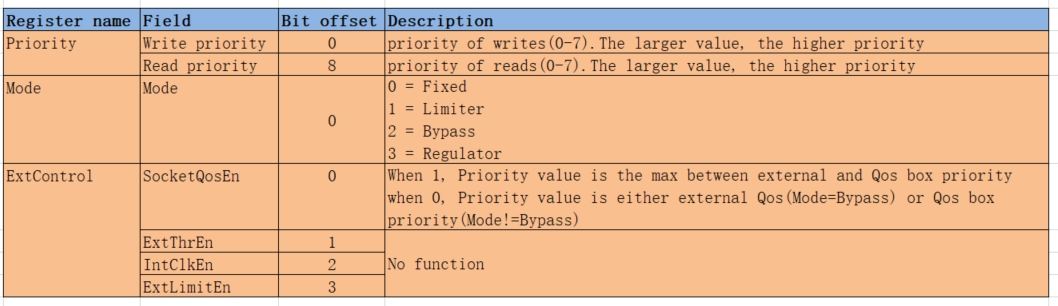
Fixed 模式
用于
固定 分配 一个 预定 义 的 优先级 级别 可以
分别 设置 读 和 写 事务 的 优先级
Fixed 模式
Limiter 模式
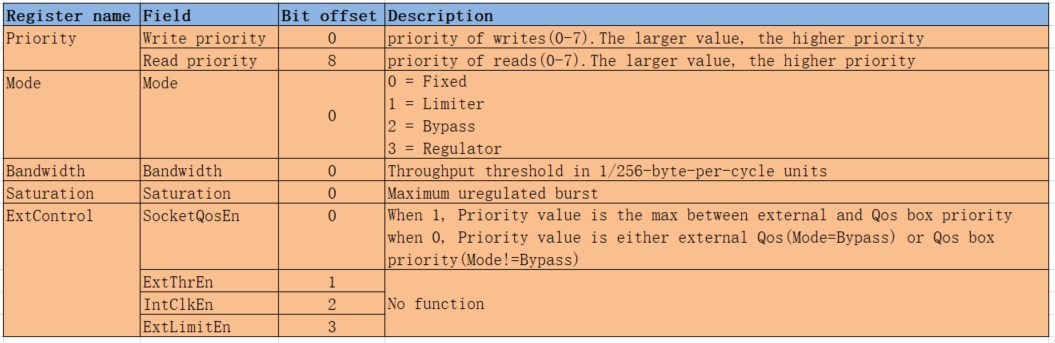
Limiter 模式
在
达到 预定 义 的 带宽 阈值 时 进行 流量 控制 可以
分别 设置 读 和 写 事务 的 优先级 可
设置 的 寄存器 包括: BandwidthSaturation以及ExtControl寄存器当
端口 的 带宽 超过 BW时并且 超出 threshold字节,该端口 会 被 限流(反压)。其中 Bandwidth寄存器值 = 256 * BW/F,Threshold = Saturation寄存器 ×16
参数
BW: 预期的 内存 带宽 限制 值 threshold: 从BW到 QoS 限流之间 的 门槛 值 F: 模块频率,各个 模块 对应 的 频率 可 查看 QoS寄存器 默认 配置 表格
Limiter 模式
Regulator 模式
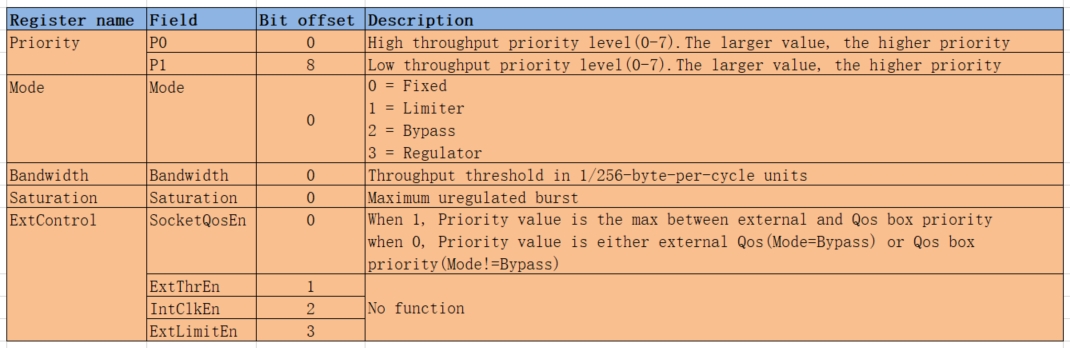
Regulator 模式
用于
确保 启动器 从 目标 获得 所 需 的 带宽 不
可以 分别 设置 读 和 写 事务 的 优先级,此时 读 和 写 事务 的 优先级 一致 可
设置 的 寄存器 包括: BandwidthSaturation以及ExtControl寄存器。Regulator 模式
会 根据 带宽 调节 读写 优先级。 当
带宽 大于 预期 带宽 时,即当 端口 带宽 高于 BW + threshold,QoS 将读写 优先级 调小至 P0优先级当
带宽 小于 预期 带宽 时,即当 端口 带宽 低于 BW - threshold,QoS 将读写 优先级 调大至 P1优先级其中
Bandwidth寄存器值 = 256 * BW/F,Threshold = Saturation寄存器 ×16
参数
P0: 读写优先级,高 优先级 P1: 读写优先级,低优先级 BW: 预期的 内存 带宽 限制 值 threshold: 从BW到 QoS 调节之间 的 门槛 值 F: 模块频率,各个 模块 对应 的 频率 可 查看 QoS寄存器 默认 配置 表格
Regulator 模式
Bypass 模式
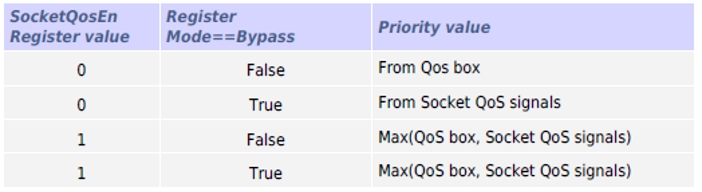
Bypass 模式Socket qos signals 和 Qos box 决定 Priority 寄存器
Socket qos signals指的 是 QoS 内部 调节 的 值( AxQOS和Hurry两者取其 最大),其中 AxQos: 为 IP 本身所 调节 出 的 值 Hurry:Hurry信号只有 SIF 支持 的 信号,其 可以 提高 长时间 未 收到 响应 的 挂 起 事务 的 处理 优先级。而 SIF Hurry 信号 是 由 相关 FIFO 中 的 almost-full 信号 驱动 的
Qos box指的 是 上 文中 priority寄存器值。
主要
当 SocketQosEn 寄存器
值为 0,且 当前 不是 Bypass 模式,则 通过 priority寄存器设置 优先级 当 SocketQosEn 寄存器
值为 0,且 当前 是 Bypass 模式,由 Socket qos signals设置优先级 当 SocketQosEn 寄存器
值为 1,则 取 Socket qos signals和Qos box中的 最大值 作为 优先级
优先级
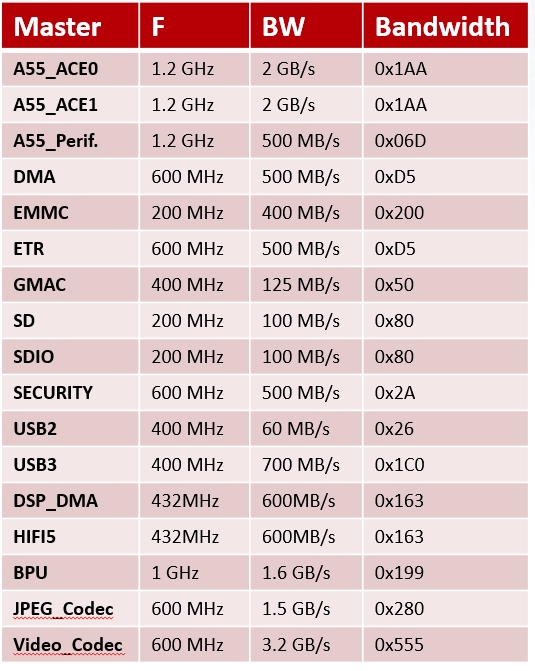
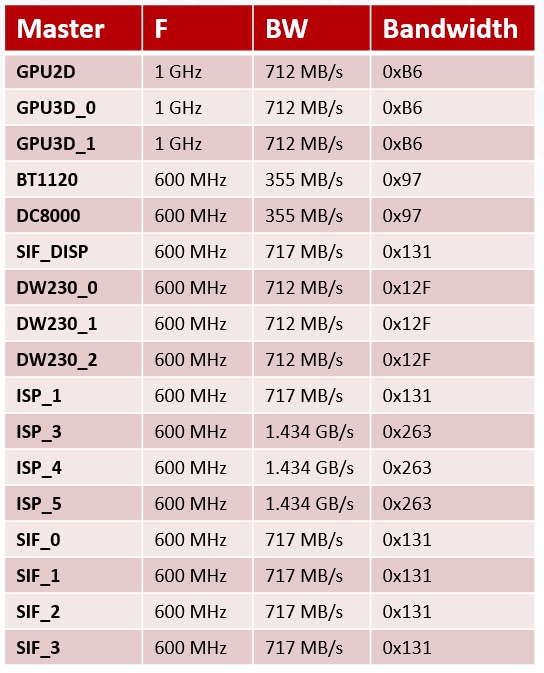
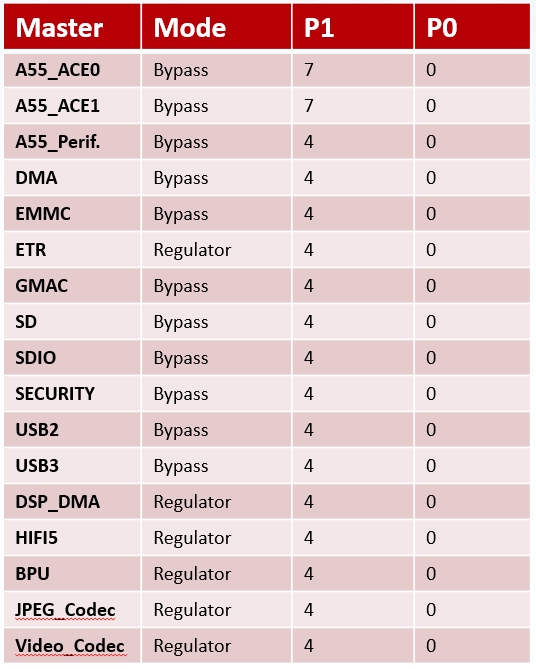
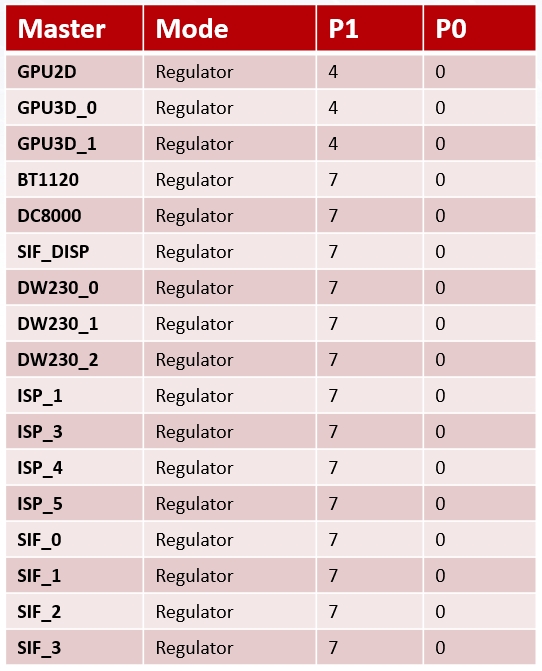
4.3.23.4. QoS寄存器默认配置
Bandwidth、BW、F寄存器值
Mode、P1、P0寄存器
注意事项
X5 芯片
通常 使用 Fixed 模式,如果 想 调整 为Limiter、Regulator以及Bypass模式,细节 见复杂 模式 配置 章节 各个
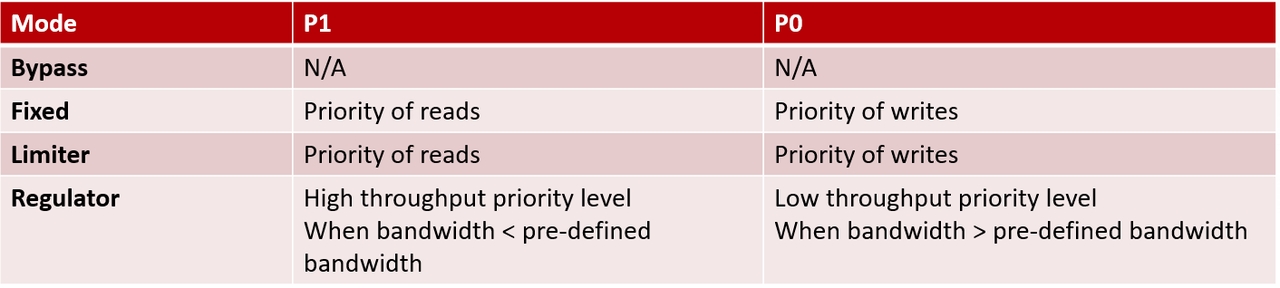
模式 Priority 寄存器 定义 不 一样 Fixed 和 Limiter 模式: P0 代表 write 优先级,P1 代表 read 优先级
Mode 和 Regulator 模式: P0 代表
低优先级,P1 代表 高 优先级
write\P0 优先级 和 read\P1 优先级
定义 如下 write\P0 优先级
由 Priority 寄存器 bit[0:2]决定,范围[0-7] read\P1 优先级
由 Priority 寄存器 bit[8:10]决定,范围[0-7] 数值
越大,优先级 越高
4.3.23.5. 使用方法
X5 芯片 QoS 支持
常见模式
X5 系统
读写 Priority 寄存器
QoS 模块/sys/bus/platform/drivers/noc_qos,该

对于 Fixed 模式,可以read_priority_qos_ctrl/priority 和 write_priority_qos_ctrl/priority 节点。
以 sif0 qos 为例,读取
cd /sys/bus/platform/drivers/noc_qos    # 进入 qos 目录

cd 20510500.sif0_qos                    # 进入 sif0 qos 子目录

cat read_priority_qos_ctrl/priority     # 读取 read priority
# read_priority : 7                     # 显示当前 read priority 值为 7

echo 5 > read_priority_qos_ctrl/priority     # 设置 read priority 值为 5


cat write_priority_qos_ctrl/priority     # 读取 write priority
# write_priority : 7                     # 显示当前 write priority 值为 7

echo 5 > write_priority_qos_ctrl/priority     # 设置 write priority 值为 5
复杂模式
配置复杂模式
X5 QoS 默认mode_qos_ctrl/advanced 节点
以 sif0 qos 为例
查看
cd /sys/bus/platform/drivers/noc_qos/20510500.sif0_qos

cat mode_qos_ctrl/advanced
qos_advanced : 0              # 0 表示当前自动设置 mode 为 Fixed 模式
关闭
echo 1 > mode_qos_ctrl/advanced

cat mode_qos_ctrl/advanced
qos_advanced : 1
配置优先级
在
mode_qos_ctrl目录: 包含advancedbandwidthextcontrolmodesaturation寄存器read_priority_qos_ctrl目录: 包含priority,对应 read / P1 优先级write_priority_qos_ctrl目录: 包含priority,对应 write / P0 优先级
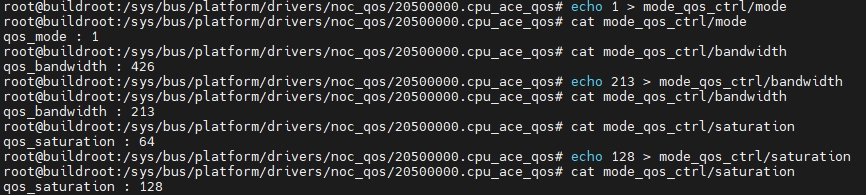
注意: 配置
以 cpu_ace_qos 为例
设置 Limiter 模式,BW 为 1GB/s, threshold 为 2MB, 其中 F = 1.2GHZ (模块
QoS 各模块参数展示脚本
X5 提供qos_show.sh 方便
脚本
默认
不带 参数: 只 显示 write priority和read priority参数信息-a: 同时显示 advancedmodebandwidthsaturationextcontrol参数信息
注意: 该
脚本
#!/bin/bash

# cd /sys/bus/platform/drivers/noc_qos
cd /sys/bus/platform/drivers/noc_qos || exit

for dir in */; do
    if [[ $dir == *qos* ]]; then
            cd "$dir" || continue
    fi
    echo "$dir: "

    val=$(cat write_priority_qos_ctrl/priority | awk '{print $NF}')
    printf "\t\t\t%-18s%-10s\n" "write priority:" $val

    val=$(cat read_priority_qos_ctrl/priority | awk '{print $NF}')
    printf "\t\t\t%-18s%-10s\n" "read priority:" $val

    if [ "$1" != "-a" ]; then
        cd ..
        continue
    fi

    val=$(cat mode_qos_ctrl/mode | awk '{print $NF}')
    printf "\t\t\t%-18s%-10s\n" "mode val:" $val

    val=$(cat mode_qos_ctrl/advanced | awk '{print $NF}')
    printf "\t\t\t%-18s%-10s\n" "advanced val:" $val

    val=$(cat mode_qos_ctrl/bandwidth | awk '{print $NF}')
    num=$((val))
    printf "\t\t\t%-18s%s%-10x\n" "bandwidth val:" "0x" $((val))

    val=$(cat mode_qos_ctrl/saturation | awk '{print $NF}')
    num=$((val))
    printf "\t\t\t%-18s%s%-10x\n" "saturation val:" "0x" $((val))

    val=$(cat mode_qos_ctrl/extcontrol | awk '{print $NF}')
    printf "\t\t\t%-18s%-10s\n" "extcontrol val:" $val

    cd ..

done
默认不带参数,仅显示读写优先级
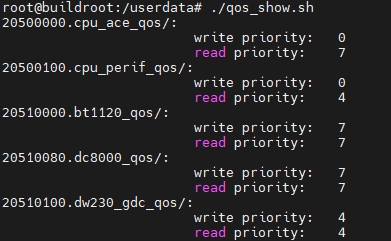
带 -a 参数,显示所有寄存器值

QoS 配置工具 qos_tool.sh
SDK 在/usr/hobot/bin/qos_tool.sh,用于hbre/hbutils/qos_tool/qos_tool.sh 。该set 配置,并apply / save 批量
模块别名与频率
module 参数20510500.sif0_qos)或gdc 可*gdc*_qos)。频率 F 用于 calc / set limiter / set regulator / apply 中
| 模块 ID | alias | 分组 | F (MHz) |
|---|---|---|---|
| 20500000.cpu_ace_qos | cpu_ace | CPU | 1200 |
| 20500100.cpu_perif_qos | cpu_perif | CPU | 1200 |
| 20510000.bt1120_qos | bt1120 | VIN | 600 |
| 20510080.dc8000_qos | dc8000 | VIN | 600 |
| 20510100.dw230_gdc_qos | gdc | VIN | 600 |
| 20510180.dw230_scalar2_qos | vse_scalar2 | VIN | 600 |
| 20510200.dw230_scalar3_qos | vse_scalar3 | VIN | 600 |
| 20510280.isp_axi5_hdr_qos | isp_hdr | VIN | 600 |
| 20510300.isp_axi4_mcm_qos | isp_mcm | VIN | 600 |
| 20510380.isp_axi3_sp2_qos | isp_sp2 | VIN | 600 |
| 20510480.isp_axi1_mp_qos | isp_mp | VIN | 600 |
| 20510500.sif0_qos | sif0 | VIN | 600 |
| 20510580.sif1_qos | sif1 | VIN | 600 |
| 20510600.sif2_qos | sif2 | VIN | 600 |
| 20510680.sif3_qos | sif3 | VIN | 600 |
| 20510700.sif_disp_qos | sif_disp | VIN | 600 |
| 20520000.bpu_qos | bpu | BPU | 1000 |
| 20530000.video_qos | video | CODEC | 600 |
| 20530080.jpeg_qos | jpeg | CODEC | 600 |
| 20540000.gpu2d_qos | gpu2d | GPU | 1000 |
| 20540080.gpu3d_qos | gpu3d | GPU | 1000 |
| 20550000.dma0_qos | dma0 | HSIO | 600 |
| 20550080.emmc_qos | emmc | HSIO | 200 |
| 20550100.gmac_qos | gmac | HSIO | 400 |
| 20550180.sd_qos | sd | HSIO | 200 |
| 20550200.sdio_qos | sdio | HSIO | 200 |
| 20550280.security_qos | security | HSIO | 600 |
| 20550300.usb2_qos | usb2 | HSIO | 400 |
| 20550380.usb3_qos | usb3 | HSIO | 400 |
| 20550400.etr_qos | etr | HSIO | 600 |
| 20560000.hifi5_qos | hifi5 | HIFI5 | 432 |
脚本使用说明
# qos_tool.sh --help
Usage:
  qos_tool.sh list [-a]
  qos_tool.sh show [module...] [-a]
  qos_tool.sh set <module> fixed <read_p> <write_p>
  qos_tool.sh set <module> limiter <read_p> <write_p> <bw_mbps> <threshold_kb>
  qos_tool.sh set <module> regulator <p0_low> <p1_high> <bw_mbps> <threshold_kb>
  qos_tool.sh apply <profile.conf>
  qos_tool.sh save [-o file.conf] [module...]
  qos_tool.sh calc <module> <bw_mbps> [threshold_kb] [--freq mhz]

Profile format (pipe-separated, # for comments):
  module_id|mode|read_p|write_p|bw_mbps|threshold_kb|bw_reg|sat_reg

Notes:
  - module can be alias (e.g. sif0) or full id (20510500.sif0_qos)
  - Regulator: profile read_p=P1(high), write_p=P0(low)
  - set limiter/regulator requires threshold_kb; maps to saturation (bytes/16), max register 1023
  - save output may include an extra extcontrol field for backup; apply accepts it
  - Requires root to write sysfs under /sys/bus/platform/drivers/noc_qos
参数说明
| 命令 | 语法 | 说明 |
|---|---|---|
| 列出 |
list [-a] |
列出-a 额外advanced、mode、bandwidth、saturation、extcontrol 等 |
| 查看 |
show [module...] [-a] |
查看module 支持 alias 如 cpu_ace 或20500000.cpu_ace_qos |
| 设置 Fixed | set {module} fixed {read_p} {write_p} |
固定{read_p} 为读{write_p} 为 |
| 设置 Limiter | set {module} limiter {read_p} {write_p} {bw_mbps} {threshold_kb} |
限制{bw_mbps} (MB/s)为{threshold_kb} (KB) 为bw_mbps + threshold 才 |
| 设置 Regulator | set {module} regulator {p0_low} {p1_high} {bw_mbps} {threshold_kb} |
保障{bw_mbps}(MB/s)动态{p0_low} 为{p1_high} 为bw_mbps + threshold 后降bw_mbps - threshold 后升 |
| 批量 |
apply {profile.conf} |
从fixed / limiter / regulator / bypass |
| 设置 |
save [-o file.conf] [module...] |
导出-o 则/tmp/qos_backup_时间戳.conf |
| 寄存器 |
calc {module} {bw_mbps} [threshold_kb] [--freq mhz] |
仅{bw_mbps}(MB/s)换算 bandwidth 寄存器;若{threshold_kb}(KB)则saturation 寄存器。频率 F 默认{--freq mhz} 手动{threshold_kb} 与 {--freq mhz} 均Limiter / Regulator 前 |
参数
module:模块
别名 或 完整 ID 可 查看 上表,或 完整 ID 在 /sys/bus/platform/drivers/noc_qos/查看threshold_kb:Limiter / Regulator 的
带宽 调节 阈值,写入 saturation 寄存器,换算 关系: saturation = threshold_kb × 1024 / 16(即threshold_bytes = saturation × 16)。寄存器取值 0~1023,对应 threshold最大约 16368 字节( set/calc的 KB 参数最大 填 15)。常用 1~2。 set limiter/set regulator命令必填 ;applyprofile 可与 sat_reg二选一。 bw_mbps 换算:
Bandwidth寄存器 = 256 × BW / F,F 取自脚本 内嵌 模块 表 或 calc --freqRegulator 模式:硬件
不 分开 调 read / write,而是根据 带宽 在 P0(低) 和 P1(高) 之间 切换,读写 用同 一套 优先级 与 Fixed / Limiter 下 read/write 含义 不同。
使用示例
查看
# qos_tool.sh list  # 列出所有 QoS 模块及当前 read/write 优先级
# qos_tool.sh list -a  # 同上,并额外显示 advanced、mode、bandwidth、saturation、extcontrol(full 能力模块)

# qos_tool.sh show sif0  # 查看指定模块;sif0 为脚本内 alias
# qos_tool.sh show -a cpu_ace # 查看 cpu_ace,并显示 mode、bandwidth 等寄存器详情

# 如列出全部模块及 read/write 优先级
# qos_tool.sh  list
20500000.cpu_ace_qos             read=7 write=4
20500100.cpu_perif_qos           read=4 write=0
20510000.bt1120_qos              read=7 write=7
20510080.dc8000_qos              read=7 write=7
20510100.dw230_gdc_qos           read=4 write=4
20510180.dw230_scalar2_qos       read=4 write=4
20510200.dw230_scalar3_qos       read=4 write=4
20510280.isp_axi5_hdr_qos        read=4 write=4
20510300.isp_axi4_mcm_qos        read=4 write=4
20510380.isp_axi3_sp2_qos        read=4 write=4
20510480.isp_axi1_mp_qos         read=4 write=4
20510500.sif0_qos                read=7 write=7
20510580.sif1_qos                read=7 write=7
20510600.sif2_qos                read=7 write=7
20510680.sif3_qos                read=7 write=7
20510700.sif_disp_qos            read=7 write=0
20520000.bpu_qos                 read=1 write=1
20530000.video_qos               read=0 write=0
20530080.jpeg_qos                read=0 write=0
20540000.gpu2d_qos               read=0 write=0
20540080.gpu3d_qos               read=0 write=0
20550000.dma0_qos                read=4 write=0
20550080.emmc_qos                read=4 write=0
20550100.gmac_qos                read=4 write=0
20550180.sd_qos                  read=4 write=0
20550200.sdio_qos                read=4 write=0
20550280.security_qos            read=4 write=0
20550300.usb2_qos                read=4 write=0
20550380.usb3_qos                read=4 write=0
20550400.etr_qos                 read=4 write=0
20560000.hifi5_qos               read=4 write=0
设置 Fixed 模式
# 设置 cpu_ace 读写优先级均为 7
# qos_tool.sh  set cpu_ace fixed  7 7
ok: 20500000.cpu_ace_qos mode=fixed read=7 write=7
设置 Limiter 模式
# BPU 读写优先级 0,带宽上限 500 MB/s,threshold 2 KB
# qos_tool.sh set bpu limiter 0 0 500 2
ok: 20520000.bpu_qos mode=limiter read=0 write=0 bw=128 sat=128 ext=0
设置 Regulator 模式
# cpu_ace:P0=4(低),P1=7(高),目标带宽 800 MB/s,threshold 2 KB
# qos_tool.sh set cpu_ace regulator 4 7 800 2
ok: 20500000.cpu_ace_qos mode=regulator read=7 write=4 bw=170 sat=128 ext=0
寄存器
# 按脚本内嵌模块频率换算
# qos_tool.sh calc cpu_ace 800 2
module     : 20500000.cpu_ace_qos
freq_mhz   : 1200
bw_mbps    : 800
bandwidth  : 170 (0xaa)
threshold  : 2 KB (2*1024 bytes)
saturation : 128 (0x80)

# 手动指定频率 F(MHz)
# qos_tool.sh calc cpu_ace 1000 2 --freq 1200
module     : 20500000.cpu_ace_qos
freq_mhz   : 1200
bw_mbps    : 1000
bandwidth  : 213 (0xd5)
threshold  : 2 KB (2*1024 bytes)
saturation : 128 (0x80)
批量
# 备份当前硬件配置
# qos_tool.sh save -o /tmp/qos_backup.conf
saved to /tmp/qos_backup.conf

# 应用自定义 profile(格式见下文「配置文件格式」)
# qos_tool.sh apply /tmp/my_qos_profile.conf
ok: 20510500.sif0_qos mode=fixed read=7 write=7
ok: 20510580.sif1_qos mode=fixed read=7 write=7
ok: 20510280.isp_axi5_hdr_qos mode=fixed read=4 write=4
ok: 20510300.isp_axi4_mcm_qos mode=fixed read=4 write=4
ok: 20510380.isp_axi3_sp2_qos mode=fixed read=4 write=4
ok: 20510480.isp_axi1_mp_qos mode=fixed read=4 write=4
ok: 20510100.dw230_gdc_qos mode=fixed read=4 write=4
ok: 20510180.dw230_scalar2_qos mode=fixed read=4 write=4
ok: 20510200.dw230_scalar3_qos mode=fixed read=4 write=4
ok: 20520000.bpu_qos mode=limiter read=0 write=0 bw=128 sat=0 ext=0
ok: 20510000.bt1120_qos mode=fixed read=7 write=7
ok: 20510080.dc8000_qos mode=fixed read=7 write=7
ok: 20530000.video_qos mode=fixed read=0 write=0
ok: 20530080.jpeg_qos mode=fixed read=0 write=0
apply done: 14 entries, exit=0

# 查看配置是否生效
# qos_tool.sh show -a
注意: 批量 profile 需save 导出
配置文件格式
apply 和 save 使用|)分隔# 开头
字
| 字 |
说明 | Fixed | Limiter | Regulator | Bypass |
|---|---|---|---|---|---|
| module_id | 模块20510500.sif0_qos) |
必填 | 必填 | 必填 | 必填 |
| mode | fixed / limiter / regulator / bypass |
必填 | 必填 | 必填 | 必填 |
| read_p | Fixed/Limiter:读 |
必填 | 必填 | 必填 | 必填 |
| write_p | Fixed/Limiter:写 |
必填 | 必填 | 必填 | 必填 |
| bw_mbps | 目标 |
— | 二选 |
二选 |
— |
| threshold_kb | 调节 |
— | 可 |
可 |
— |
| bw_reg | bandwidth 寄存器 |
— | 二选 |
二选 |
必填 |
| sat_reg | saturation 寄存器 |
— | 可 |
可 |
可 |
| extcontrol | 扩展 |
— | 可 |
可 |
可 |
注意:
Limiter / Regulator 带宽:
bw_mbps与bw_reg至少填 。自行一项 编写 profile 推荐 填 bw_mbps;save备份通常 只含 bw_reg,可直接 apply还原。已填 bw_reg时直接 使用 寄存器 值(适合 save 还原 或 精细 调参)。 Limiter / Regulator 阈值:
set命令要求 提供 threshold_kb。applyprofile 中threshold_kb与sat_reg至少填 (二选一项 一):自行 编写 profile 建议填 threshold_kb(常用 1~2),由工具 自动 换算; save备份通常 含 sat_reg,可直接 apply还原。两者都 不 填时 Limiter/Regulator 阈值 行为 不 可控,仅 适合 调试。Bypass 下 sat_reg可省略,默认 按 0 处理。 Bypass:工具
set命令不 支持,通常 由 save导出后经 apply还原,配置有限。 extcontrol:
save备份可能 在 末尾 多 一列; apply兼容读取。自行 编写 profile 可 省略,默认 按 0 处理。 空字段:连续
|表示该列 留空,例如 Fixed 行 20510500.sif0_qos|fixed|7|7||||。
示例:
# module_id|mode|read_p|write_p|bw_mbps|threshold_kb|bw_reg|sat_reg|extcontrol
# Fixed:仅 priority
20510500.sif0_qos|fixed|7|7||||

# Limiter:bw_mbps + threshold_kb 自动换算
20520000.bpu_qos|limiter|0|0|500|2|||

# Regulator:read_p=P1(高),write_p=P0(低)
20500000.cpu_ace_qos|regulator|7|4|800|2|||

# Bypass:通常由 save 导出,填 bw_reg / sat_reg
20500000.cpu_ace_qos|bypass|7|0|||426|64
模式选择建议
SIF、HDMI、ISP、GDC、VSE 等
实时 链路:使用 Fixed,设置 较 高 priority BPU、编解码 等
后台 模块:使用 Fixed 低 priority 或 Limiter 限制 带宽 上限 CPU 等
需要 动态 带宽 调节 的 模块:可 选 Regulator
注意事项
advanced 与 mode 可能
# qos_tool.sh show cpu_ace -a
20500000.cpu_ace_qos             read=7 write=0
                        advanced=0 mode=2(bypass) bandwidth=426 saturation=64 extcontrol=0
| 节点 | 存储 |
取值 | 含义 |
|---|---|---|---|
mode |
硬件 |
0~3 | 模块当前 |
advanced |
驱动 |
0 | 简单 |
advanced |
驱动 |
1 | 高级 |
上电后
尚未 主动 配置 时, advanced通常为 0,而 mode保留 SoC boot 默认advanced=0时,使用set fixed或写 priority 会 把 mode强制改 回 0(Fixed) set limiter/set regulator会自动 设置 advanced=1save按硬件 mode保存实际 模式,不会 因 advanced=0误记为 fixed;apply可还原 bypass/limiter/regulator配置脚本
内嵌 各 模块 频率 F 由 QoS寄存器 默认 整理配置 表格 获得;若板 端 时钟 与 默认值 不符,请 修改 源码 hbre/hbutils/qos_tool/qos_tool.sh中QOS_MODULES_CONF_DATA,或在 calc时使用 --freq指定