3.6. sample_gdc 使用说明
sample_gdc 目录
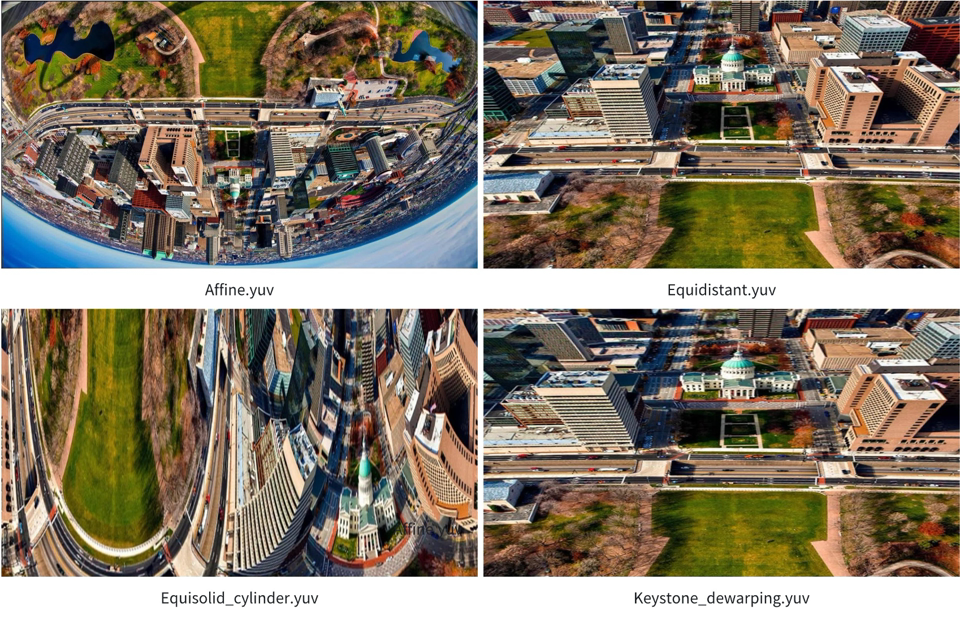
generate_custom_config.py: 生成 GDC 的矫正 标定 配置 参数。 generate_bin: 读取本地 json 配置文件,生成 对应 的 gdc.bin文件。gdc_static_valid: 读取本地 gdc.bin文件和 原始 YUV 文件 送入 GDC 做 变化 处理 后 保存 为 YUV 文件。 gdc_stress_test: 读取本地 gdc.bin文件并 将 原始 YUV 文件 循环 送入 GDC 做 GDC 性能 测试。 gdc_equisolid: 读取本地 NV12 的 YUV 图,把 图片 送入 GDC 做(全景 panoramic)校正 处理。 gdc_transformation: 读取本地 的 json 配置文件,把 图片 送入 GDC 做180线性变换、圆柱形 变换、等距 变换 和 梯形 校正+去 畸变 处理。
GDC 各种
GDC 的
3.6.1. 1-custom_config
3.6.1.1. 功能概述
本
3.6.1.2. 代码位置及目录结构
代码
位置 app/samples/platform_samples/sample_gdc目录
结构
sample_gdc/
├── 1-custom_config
│   ├── Makefile
│   ├── chessboard
│   ├── chessboard.png
│   ├── custom_config.txt
│   └── generate_custom_config.py
3.6.1.3. 开发和使用流程
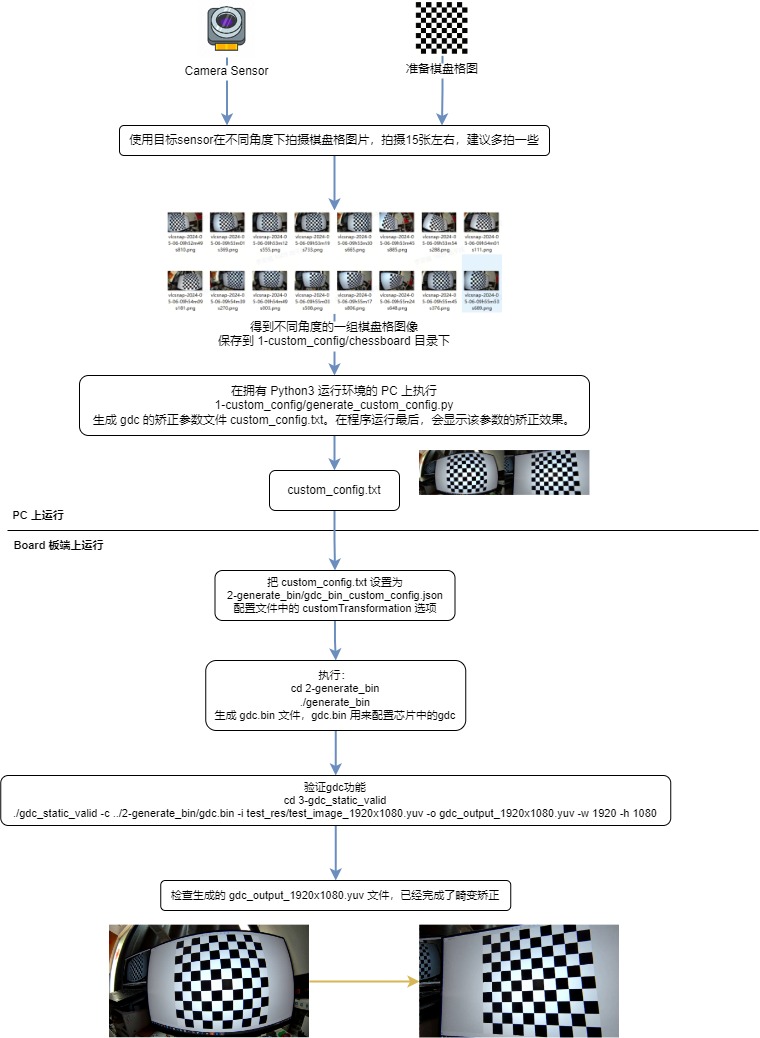
在 PC 上generate_custom_config.py 程序
准备
棋盘 格 图片(chessboard.png), 可以 打印 出来,或者 用 显示器 预览。 使用
目标 Camera Sensor 在 不同 角度 下 拍摄 棋盘 格 图片,拍摄15张 左右,建议 多 拍 一些。 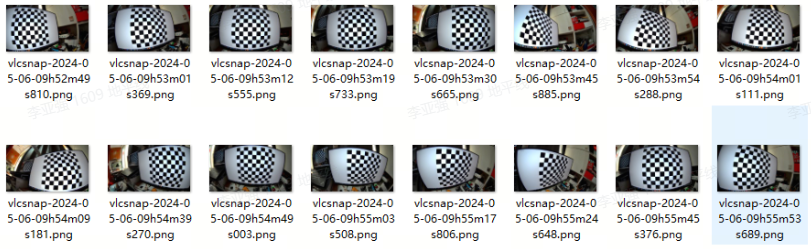
以
上面 的 棋盘 格 图片 作为 输入,执行 以下 python 程序(确保 系统 支持 Python 3,和 安装 了 opencv-python库),生成 GDC 的矫正 标定 参数 文件(custom_config.txt): cd 1-custom_config python3 ./generate_custom_config.py
在
字符 终端 运行 时 的 日志: No graphical environment detected. Skipping display of images. Input images directory: ./chessboard Test image file: ./chessboard/vlcsnap-2024-05-06-09h53m19s733.jpg Output file: custom_config.txt i: 0 i: 1 ... 省略 ... i: 15 Intrinsic matrix (mtx): [[784.57179685 0. 939.01168998] [ 0. 784.35388599 554.71639175] [ 0. 0. 1. ]] Distortion coefficients (dist): [[-3.16520533e-01 1.02422375e-01 -2.60692201e-04 7.23624256e-04 -1.44726239e-02]] Rotation vectors (rvecs): (array([[-0.07424795], [ 0.17820099], [-0.04684888]]), array([[0.44453246], [0.01540531], [0.03596364]]), array([[-0.38217217], [-0.4097845 ], [ 0.16419408]]), array([[-0.0713388 ], [-0.04356189], [ 0.00918689]]), array([[ 0.40326625], [-0.65705694], [ 0.07152059]]), array([[-0.28933582], [ 0.07433653], [ 0.09031559]]), array([[-0.1353966 ], [-0.61689018], [-0.06274773]]), array([[ 0.02193021], [-0.52159079], [ 0.08910704]]), array([[-0.10002557], [-0.25580186], [-0.08683701]]), array([[-0.37827059], [-0.98115358], [ 0.175653 ]]), array([[0.33652166], [0.12869965], [0.03961734]]), array([[ 0.40214666], [-0.38128926], [-0.0051477 ]]), array([[-0.04168182], [ 0.0922567 ], [-0.03109347]])) Translation vectors (tvecs): (array([[ -71.275847 ], [-106.35748096], [ 224.27593215]]), array([[ 3.80981104], [-81.7694762 ], [183.44645072]]), array([[ -81.59651772], [-122.67796656], [ 240.51602851]]), array([[ -86.84292041], [-114.12437351], [ 203.11264832]]), array([[-51.05204629], [-57.97011932], [168.23228488]]), array([[ -25.79903668], [-139.06100345], [ 248.06228137]]), array([[-193.45812779], [-116.55450795], [ 135.39187735]]), array([[ -91.12813213], [-111.74470892], [ 150.61397733]]), array([[ -89.4296275 ], [-117.79736921], [ 196.30732053]]), array([[-156.41212161], [-146.02467216], [ 191.13039641]]), array([[ -60.65720996], [-111.66378957], [ 191.3402483 ]]), array([[-56.56159122], [-72.97166982], [149.97470497]]), array([[ -60.28586566], [-111.66429463], [ 196.1187917 ]])) New camera matrix (newcameramtx): [[784.57179685 0. 939.01168998] [ 0. 784.35388599 554.71639175] [ 0. 0. 1. ]] Validation of distortion correction Saving mapx and mapy to 'custom_config.txt' No graphical environment detected. The output image has been saved to 'custom_config.txt'.
如果
在 图形化 桌面 的 终端 运行,会 显示 执行 过程 中 的 标定 和 矫正 效果: 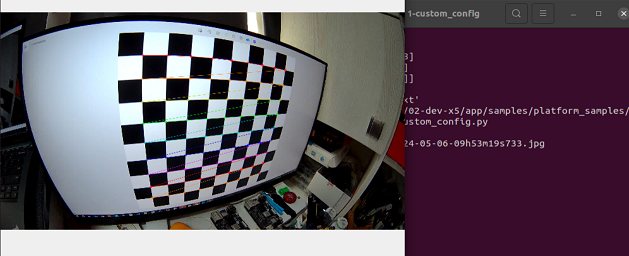
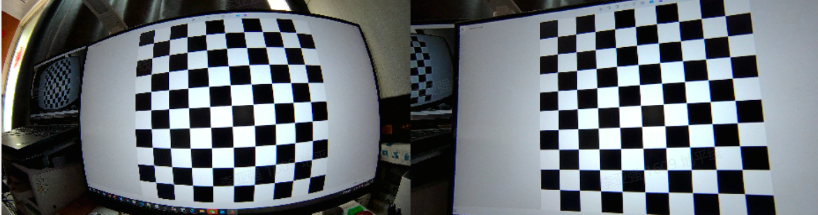
generate_custom_config.py 的
usage: generate_custom_config.py [-h] [-i INPUT_IMAGES_DIR] [-t TEST_IMAGE]
                                 [-o OUTPUT_FILE]

Gdc calibration and image undistortion.

optional arguments:
  -h, --help            show this help message and exit
  -i INPUT_IMAGES_DIR, --input_images_dir INPUT_IMAGES_DIR
                        Directory containing the chessboard images.
  -t TEST_IMAGE, --test_image TEST_IMAGE
                        File path of the image to be undistorted.
  -o OUTPUT_FILE, --output_file OUTPUT_FILE
                        File path for the output configuration.
3.6.2. 2-generate_bin
3.6.2.1. 功能概述
本gdc_bin_custom_config.json 配置文件,生成gdc.bin 文件。
软件架构说明
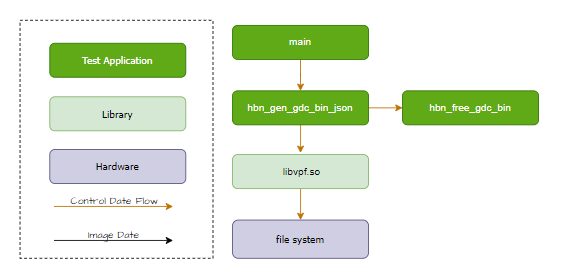
代码位置及目录结构
代码
位置 app/samples/platform_samples/sample_gdc目录
结构
sample_gdc/
├── 2-generate_bin
│   ├── Makefile
│   ├── gdc_bin_custom_config.json
│   └── generate_bin.c
API 流程说明
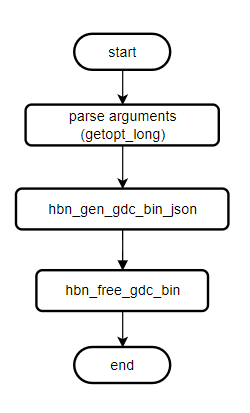
3.6.2.2. 编译部署
编译
进入 sample_gdc 目录,执行
make编译输出
成果 物是 sample_gdc/2-generate_bin 目录 下 的 generate_bin详细
程序 编译 方式 请 查阅 编译 方法 章节
程序部署
刷写
3.6.2.3. 运行
程序运行方法
直接./generate_bin -h 可以
./generate_bin -h
genereate_bin [-c json_config_file] [-o output_file]
程序参数选项说明
选项:
[-c json_config_file]:指定配置 GDC 的 模块 的 json 参数 文件(可 选),默认 为 ./gdc_bin_custom_config.json。[-o output_file]:指定输出 GDC bin 文件 的 路径(可 选),默认 为 ./gdc.bin。
运行效果
执行命令:
cd 2-generate_bin
chmod +x generate_bin
./generate_bin
运行日志:
Gdc bin custom config: ./gdc_bin_custom_config.json
Generate gdc bin file: ./gdc.bin
Generate bin file size:10972
3.6.3. 3-gdc_static_valid
3.6.3.1. 功能概述
gdc_static_valid 程序
软件架构说明
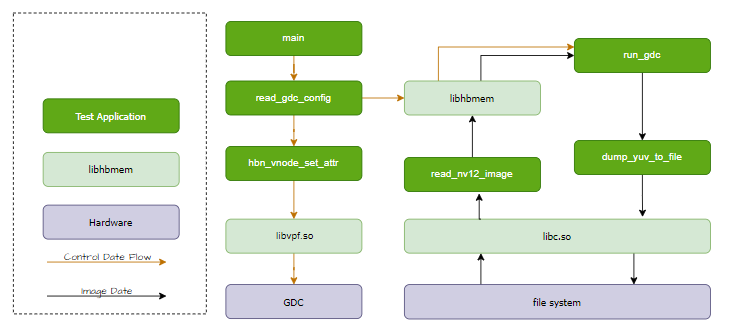
代码位置及目录结构
代码
位置 app/samples/platform_samples/sample_gdc目录
结构
sample_gdc/
├── 3-gdc_static_valid
│   ├── Makefile
│   ├── gdc_static_valid.c
│   └── test_res
│       ├── test_image_1920x1080.jpg
│       └── test_image_1920x1080.yuv
API 流程说明
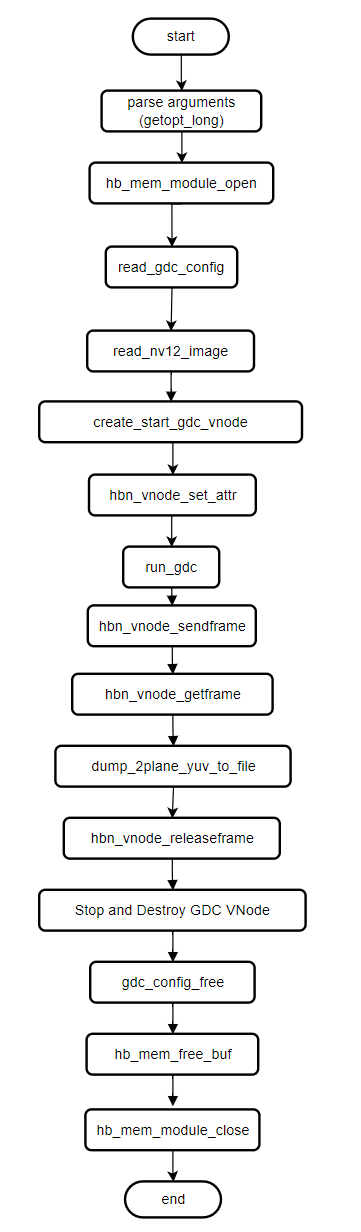
3.6.3.2. 编译部署
编译
进入 sample_gdc 目录,执行
make编译输出
成果 物是 sample_gdc/3-gdc_static_valid 目录 下 的 gdc_static_valid详细
程序 编译 方式 请 查阅 编译 方法 章节
程序部署
刷写
3.6.3.3. 运行
程序运行方法
直接./gdc_static_valid 可以
Usage: gdc_static_valid [OPTIONS]
Options:
  c, --config <gdc_bin_file>    Specify the gdc configuration bin file.
  i, --input <input_file>       Specify the input image file.
  o, --output <output_file>     Specify the output image file.
  w, --iw <input_width>         Specify the width of the input image.
  h, --ih <input_height>        Specify the height of the input image.
  x, --ow [output_width]        Specify the width of the output image (optional).
  y, --oh [output_height]       Specify the height of the output image (optional).
  f, --feedback                 Specify feedback mode

If --ow and --oh are not specified, they will default to the input width and height, respectively.
程序参数选项说明
gdc_static_valid 的
参数
c, --config:指定 gdc.bin 配置文件i, --input:指定输入 NV12图像 o, --output:指定输出 NV12图像 w, --iw:指定输入 图像 水平 方向 分辨率(宽) h, --ih:指定输入 图像 垂直 方向 分辨率(高) x, --ow:指定输出 图像 水平 方向 分辨率(宽)(可 选),默认 和 –iw 保持 一样 y, --oh:指定输出 图像 垂直 方向 分辨率(高)(可 选),默认 和 –ih 保持 一样 f, --feedback:使用回灌 的 方式
运行效果
执行命令
cd 3-gdc_static_valid
chmod +x gdc_static_valid
./gdc_static_valid -c ../2-generate_bin/gdc.bin -i test_res/test_image_1920x1080.yuv -o gdc_output_1920x1080.yuv -w 1920 -h 1080
运行日志:
config file: ../2-generate_bin/gdc.bin
input image: test_res/test_image_1920x1080.yuv
output image: gdc_output_1920x1080.yuv
input:1920x1080
output:1920x1080
(read_yuvv_nv12_file):file read(test_res/test_image_1920x1080.yuv), y-size(2073600)
3.6.4. 4-gdc_stress_test
3.6.4.1. 功能概述
gdc_stress_test 程序
软件架构说明
代码位置及目录结构
代码
位置 app/samples/platform_samples/sample_gdc目录
结构
sample_gdc/
├── 4-gdc_stress_test
│   ├── Makefile
│   ├── gdc_1920x1080.bin
│   ├── gdc_stress_test.c
│   ├── test.sh
│   └── test_res
│       ├── test_image_1920x1080.jpg
│       └── test_image_1920x1080.yuv
API 流程说明
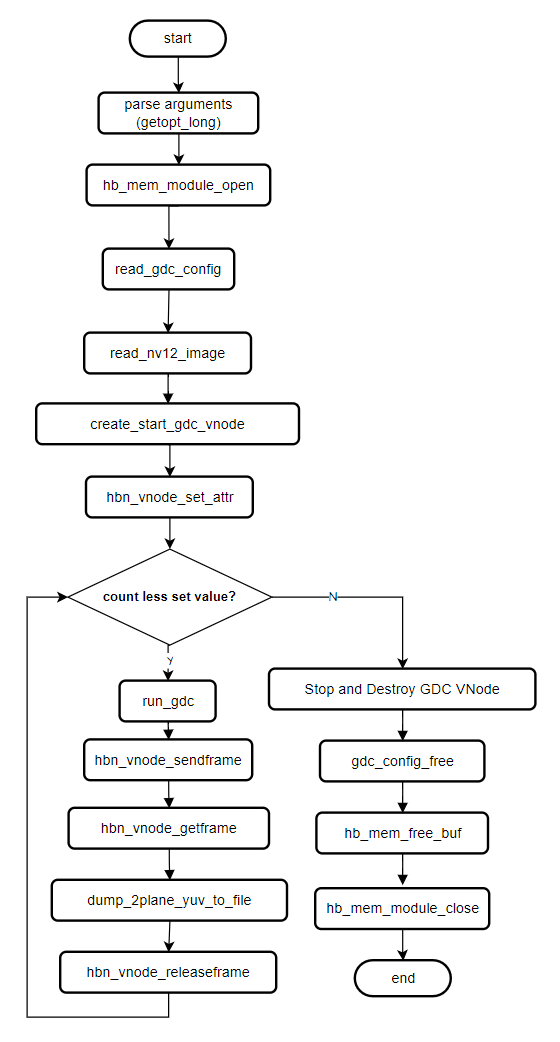
3.6.4.2. 编译部署
编译
进入 sample_gdc 目录,执行
make编译输出
成果 物是 sample_gdc/4-gdc_stress_test 目录 下 的 gdc_stress_test详细
程序 编译 方式 请 查阅 编译 方法 章节
程序部署
刷写
3.6.4.3. 运行
程序运行方法
直接./gdc_stress_test 可以
Usage: gdc_stress_test [OPTIONS]
Options:
  c, --config <gdc_bin_file>    Specify the gdc configuration bin file.
  i, --input <input_file>       Specify the input image file.
  o, --output <output_file>     Specify the output image file.
  w, --iw <input_width>         Specify the width of the input image.
  h, --ih <input_height>        Specify the height of the input image.
  x, --ow [output_width]        Specify the width of the output image (optional).
  y, --oh [output_height]       Specify the height of the output image (optional).
  C, --Count [run count]        Specify gdc sendframe and getframe count.
  p, --p [process id]           Specify id of process.
  f, --feedback                 Specify feedback mode

If --ow and --oh are not specified, they will default to the input width and height, respectively.
程序参数选项说明
gdc_stress_test 的
参数
c, --config:指定 gdc.bin 配置文件i, --input:指定输入 NV12图像 o, --output:指定输出 NV12图像 w, --iw:指定输入 图像 水平 方向 分辨率(宽) h, --ih:指定输入 图像 垂直 方向 分辨率(高) x, --ow:指定输出 图像 水平 方向 分辨率(宽)(可 选),默认 和 –iw 保持 一样 y, --oh:指定输出 图像 垂直 方向 分辨率(高)(可 选),默认 和 –ih 保持 一样 C, --Count:指定发送给 GDC 模块 的 图像 的 次数。 p, --p:指定进程 的 id。 f, --feedback:使用回灌 的 方式。
运行效果
执行命令:
cd 4-gdc_stress_test
chmod +x gdc_stress_test
sh test.sh
运行日志:
sh test.sh
GDC vnode work mode: vflow
config file: ./gdc_1920x1080.bin
input image: ./test_res/test_image_1920x1080.yuv
output image: ./gdc_output_1920x1080.yuv
input:1920x1080
output:1920x1080
GDC vnode work mode: vflow
config file: ./gdc_1920x1080.bin
input image: ./test_res/test_image_1920x1080.yuv
output image: ./gdc_output_1920x1080.yuv
input:1920x1080
output:1920x1080
GDC vnode work mode: vflow
config file: ./gdc_1920x1080.bin
input image: ./test_res/test_image_1920x1080.yuv
output image: ./gdc_output_1920x1080.yuv
input:1920x1080
output:1920x1080
(read_yuvv_nv12_file):file read(./test_res/test_image_1920x1080.yuv), y-size(2073600)
(read_yuvv_nv12_file):file read(./test_res/test_image_1920x1080.yuv), y-size(2073600)
(read_yuvv_nv12_file):file read(./test_res/test_image_1920x1080.yuv), y-size(2073600)
gdc temp fps [process1] = 50
gdc temp fps [process3] = 50
gdc temp fps [process2] = 50
gdc temp fps [process1] = 75
gdc temp fps [process3] = 75
gdc temp fps [process2] = 75
.......
gdc temp fps [process1] = 87
gdc temp fps [process3] = 87
Gdc time consuming [process1]: 28
fps average gdc [process1] = 107
Gdc time consuming [process3]: 28
fps average gdc [process3] = 107
Gdc time consuming [process2]: 28
fps average gdc [process2] = 107
3.6.5. 5-gdc_equisolid
3.6.5.1. 功能概述
gdc_equisolid 程序
软件架构说明
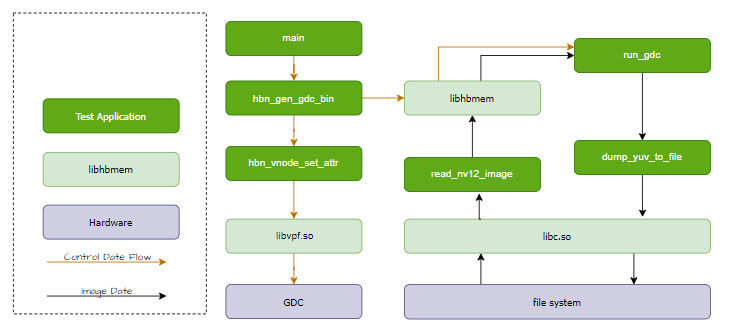
代码位置及目录结构
代码
位置 app/samples/platform_samples/sample_gdc目录
结构
sample_gdc/
├── 5-gdc_equisolid
│   ├── Makefile
│   └── gdc_equisolid.c
API 流程说明
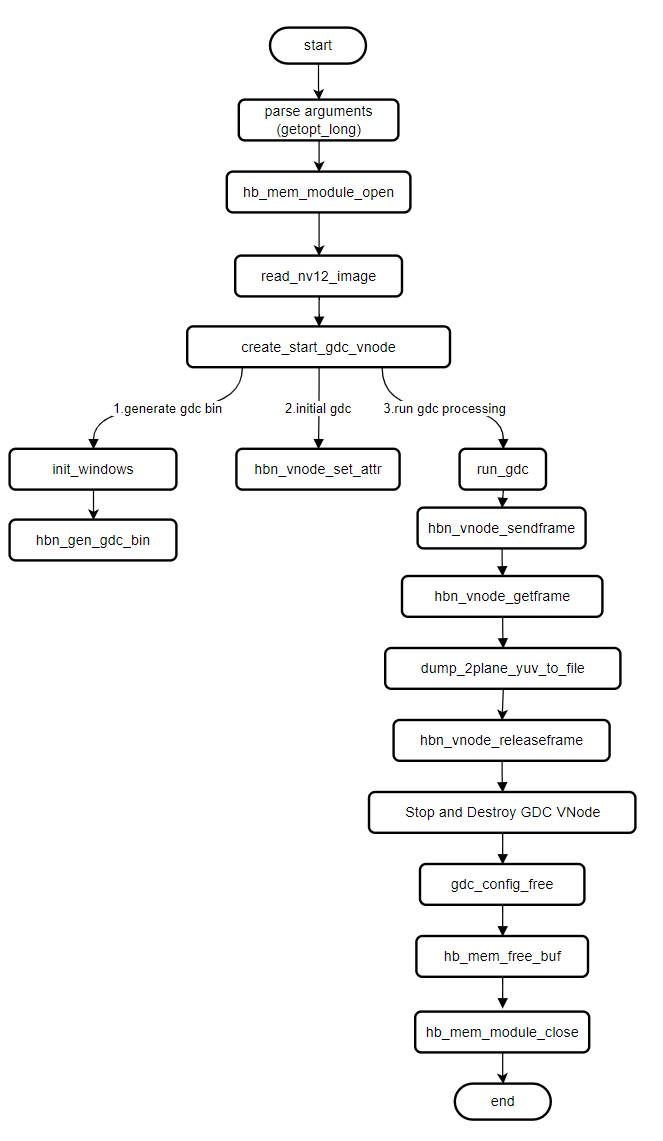
3.6.5.2. 编译部署
编译
进入 sample_gdc 目录,执行
make编译输出
成果 物是 sample_gdc/5-gdc_equisolid 目录 下 的 gdc_equisolid详细
程序 编译 方式 请 查阅 编译 方法 章节
程序部署
刷写
3.6.5.3. 运行
程序运行方法
直接./gdc_equisolid -h 可以
Usage: gdc_equisolid [OPTIONS]
Options:
  i, --input <input_file>       Specify the input image file.
  o, --output <output_file>     Specify the output image file.
  w, --iw <input_width>         Specify the width of the input image.
  h, --ih <input_height>        Specify the height of the input image.
  f, --feedback                 Specify feedback mode
程序参数选项说明
gdc_equisolid 的
参数
i, --input:指定输入 NV12图像 o, --output:指定输出 NV12图像(可 选) w, --iw:指定输入 图像 水平 方向 分辨率(宽) h, --ih:指定输入 图像 垂直 方向 分辨率(高) f, --feedback:使用回灌 的 方式。
运行效果
执行命令
cd 5-gdc_equisolid
chmod +x gdc_equisolid
./gdc_equisolid -i ../3-gdc_static_valid/test_res/test_image_1920x1080.yuv --iw 1920 --ih 1080
运行日志:
input file: ../3-gdc_static_valid/test_res/test_image_1920x1080.yuv
output file: gdc_output_1080x1920.yuv
input:1920x1080
(read_yuvv_nv12_file):file read(../3-gdc_static_valid/test_res/test_image_1920x1080.yuv), y-size(2073600)
3.6.6. 6-gdc_transformation
3.6.6.1. 功能概述
本文
软件架构说明:
gdc_transformation 程序libgdcbin.so将 GDC 坐标
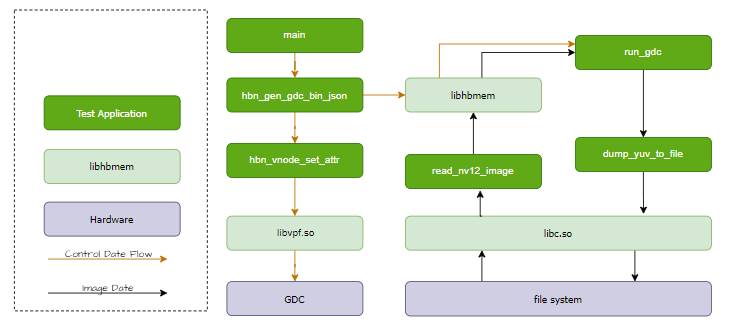
使用 GDC Tool 生成
注意:gdc_res 目录
代码位置及目录结构
代码
位置 app/samples/platform_samples/sample_gdc目录
结构
sample_gdc/
└── 6-gdc_transformation
    ├── Makefile
    ├── gdc_res
    │   ├── Affine.json
    │   ├── Equidistant.json
    │   ├── Equisolid_cylinder.json
    │   ├── Keystone_dewarping.json
    │   └── test_building_1920x1080.yuv
    └── gdc_transformation.c
根目录
API 流程说明
示例:
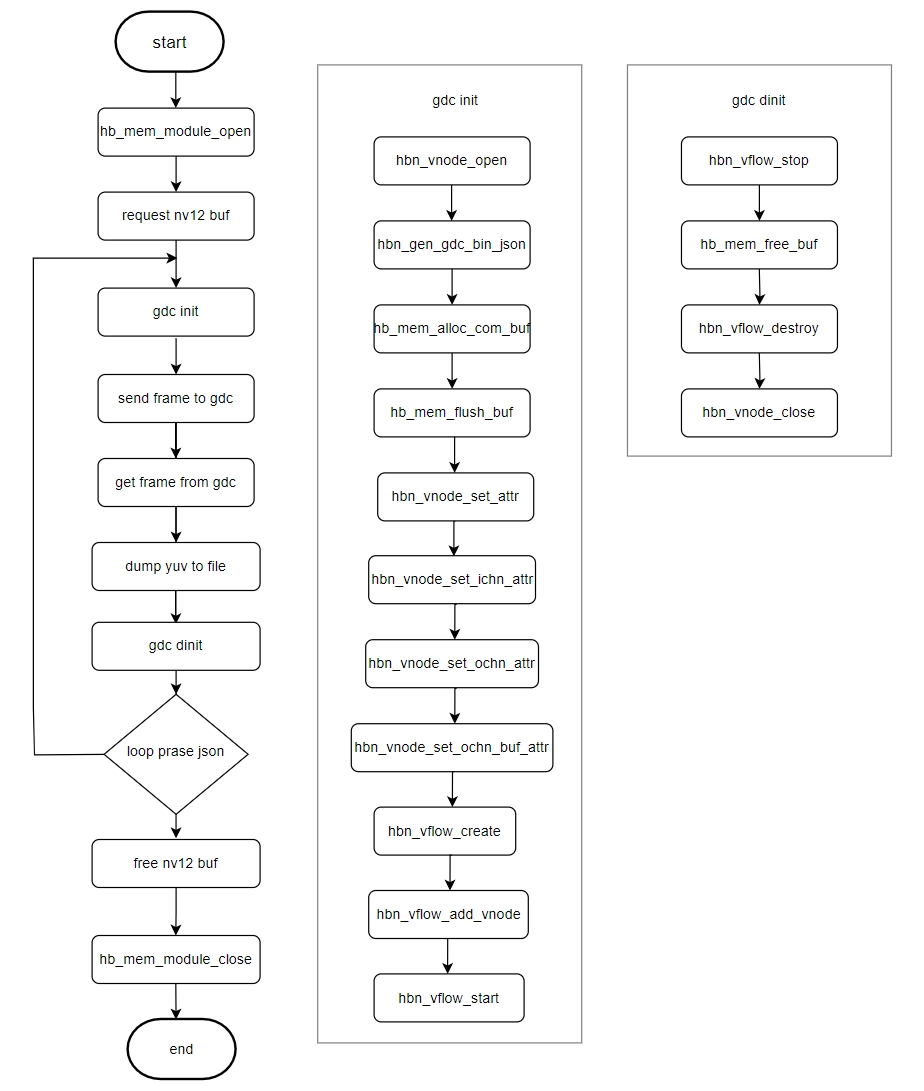
3.6.6.2. 编译部署
编译
进入 sample_gdc 目录,执行
make编译输出
成果 物是 sample_gdc/6-gdc_transformation 目录 下 的 gdc_transformation详细
程序 编译 方式 请 查阅 编译 方法 章节
程序部署
刷写
3.6.6.3. 运行
程序运行方法
直接./gdc_transformation 可以
Usage: gdc_transformation [OPTIONS]
Options:
  i, --input <input_file>       Specify the input image file.
  x, --ix <input_width>         Specify the width of the input image.
  y, --iy <input_height>        Specify the height of the input image.
程序参数选项说明
gdc_transformation 的
参数
i, --input:指定输入 NV12图像 x, --ix:指定输入 图像 水平 方向 分辨率(宽) y, --iy:指定输入 图像 垂直 方向 分辨率(高)
运行效果
执行命令
cd 6-gdc_transformation
chmod +x gdc_transformation
./gdc_transformation -i gdc_res/test_building_1920x1080.yuv --ix 1920 --iy 1080
运行日志:
#./gdc_transformation -i gdc_res/test_building_1920x1080.yuv --ix 1920 --iy 1080
input file: gdc_res/test_building_1920x1080.yuv
input:1920x1080
(read_yuvv_nv12_file):file read(gdc_res/test_building_1920x1080.yuv), y-size(2073600)
Dump image to file(Equidistant.yuv), size(2073600) + size1(1036800) succeeded
Dump image to file(Keystone_dewarping.yuv), size(2073600) + size1(1036800) succeeded
Dump image to file(Affine.yuv), size(2073600) + size1(1036800) succeeded
Dump image to file(Equisolid_cylinder.yuv), size(2073600) + size1(1036800) succeeded
gdc_transformation 的
#./gdc_transformation -h
Usage: gdc_transformation [OPTIONS]
Options:
  i, --input <input_file>       Specify the input image file.
  x, --ix <input_width>         Specify the width of the input image.
  y, --iy <input_height>        Specify the height of the input image.
运行效果说明
原始
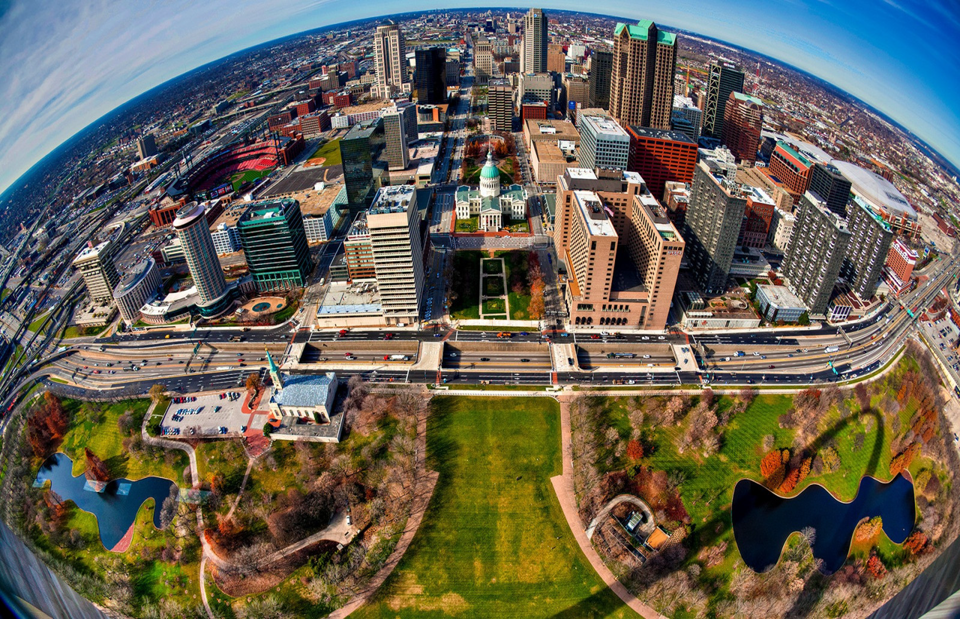
分别