5.10.4. GDC Tool
5.10.4.1. GDC Tool 介绍
GDC Tool 是
GDC Tool 启动
1.window 环境
安装
工具
安装npm install express。
启动node.exe app.js,使用 Chrome 浏览器
2.unix 环境
安装brew install node。
安装npm install -production。
启动node app.js,打开
3.开始仿真
使用 GDC Tool 一般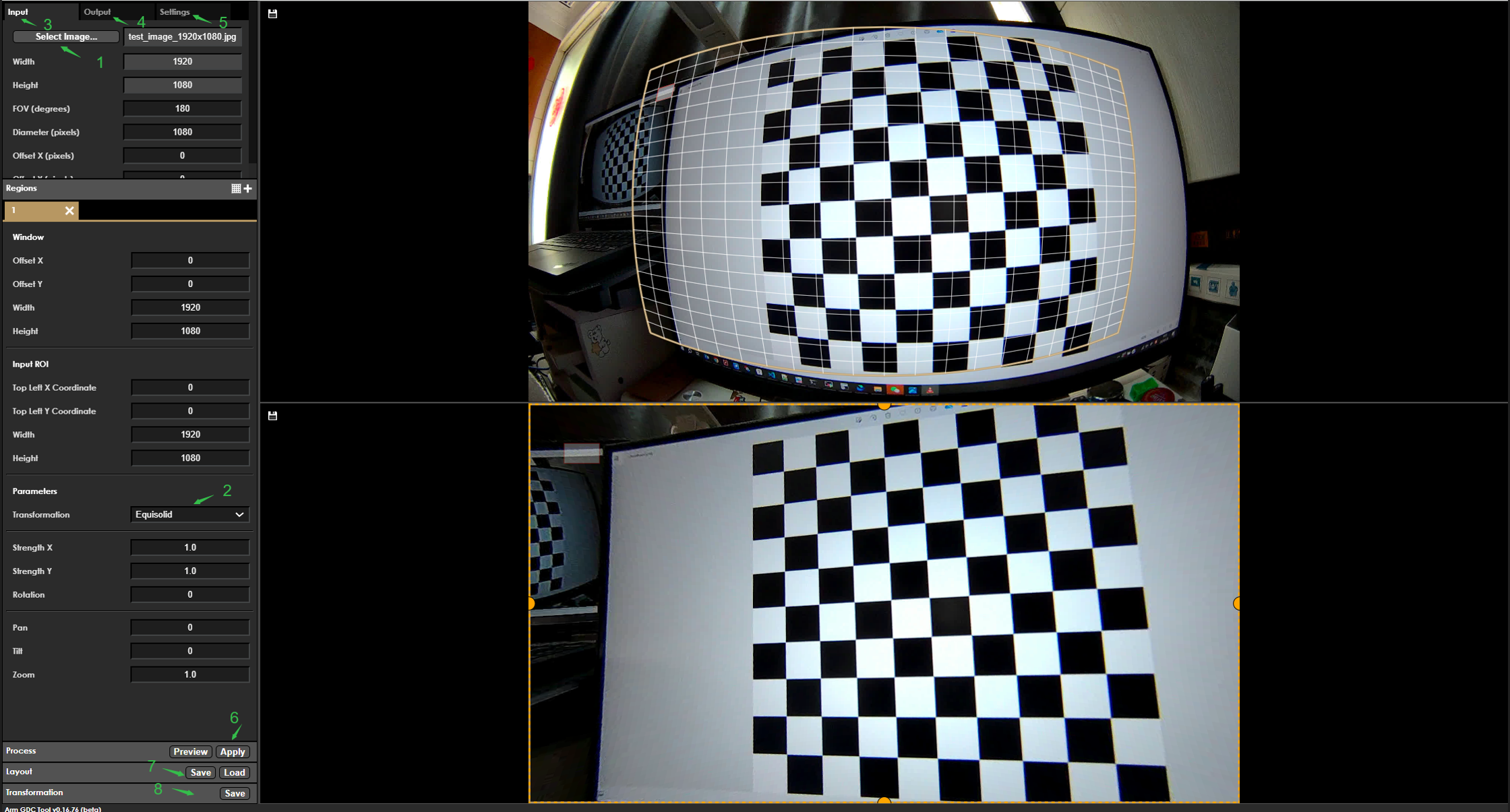
上
登录
网页 成功 后,参考 上传 准备 好 的 sensor 采集 到 的 图像 上传,上传 前 需要 将 采集 到 的 图像 的 YUV 图像 转换 为 jpg 图像。 准备 jpg 图像:可以
使用 ffmpeg 将 sensor 获取 到 的 YUV 文件 转换成 jpg 图像 进行 上传,方法 参考 如下: ffmpeg -s 1920x1080 -pix_fmt yuv420p -i handle_100197_isp_chn0_1920x1080_stride_1920_frameid_0_ts_2411352368066.yuv output.jpg
根据
使用 场景 确认 使用 的 变换 模式。设置 Transformation 为 对应 的 变换 模式,如果 使用 的 是 custom 模式,需要 同时 准备 GDC 的 矫正 标定 参数 文件 上传。 根据
变换 模式 配置 GDC 的 参数信息,配置图 中 Input 。详细 请 查看 章节 变换 模式 。参数 说明 根据
变换 模式 配置 GDC 的 参数信息,配置图 中 Output。 详细 请 查看 章节 变换 模式 。参数 说明 根据
变换 模式 配置 GDC 的 参数信息,配置图 中 Settings。 详细 请 查看 章节 变换 模式 。参数 说明 配置 GDC 的
参数信息 成功 后,点击 Preview 进行 预览,确认 是否 符合 预期。 确认
仿真 效果 符合 预期 后,可以 导出 layout.json文件进行 使用。使用 方法 可以 参考 GDC 示例 代码 sample_gdc 章节。 确认
仿真 效果 符合 预期 后,可以 导出 bin 文件 进行 使用。使用 方法 可以 参考 GDC 示例 代码 sample_gdc 章节。
GDC Tool 中的变换模式
GDC Tool 提供
下表是
| 变换 |
用途 |
|---|---|
| Affine | 一种 |
| Equisolid | 全景 |
| Equisolid (cylinder) | 圆柱形 |
| Equidistant | 等距 |
| Keystone + dewarping | 相对 |
| Custom | 用户 |
所有
以下
Pan
水平

Tile
垂直

Zoom
按

Affine
【功能描述】
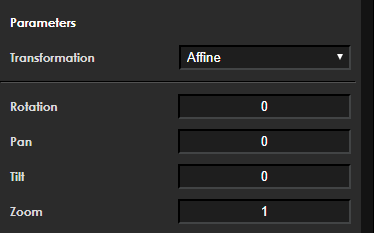
提供
【成员说明】
| 成员 | 含义 |
|---|---|
| int32_t pan | default 0, 不 |
| int32_t tilt | default 0, 不 |
| zoom | 按 |
| double angle (rotation) | 0/90/180/270 |
Equisolid
【功能描述】
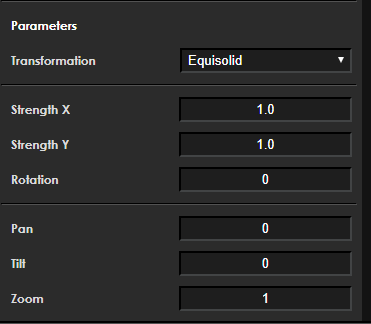
此
【成员说明】
| 成员 | 含义 |
|---|---|
| int32_t pan | default 0, 不 |
| int32_t tilt | default 0, 不 |
| zoom | 按 |
| double strength | 沿 X 轴 |
| double strengthY | 沿 Y 轴 |
| double angle (rotation) | 0/90/180/270 |
strength x 调试

strength y 调试

Rotation 调试

Equisold(cylinder)
【功能描述】
此
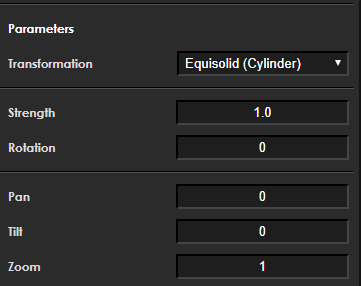
【成员说明】
| 成员 | 含义 |
|---|---|
| int32_t pan | default 0, 不 |
| int32_t tilt | default 0, 不 |
| zoom | 按 |
| strength | 转换 |
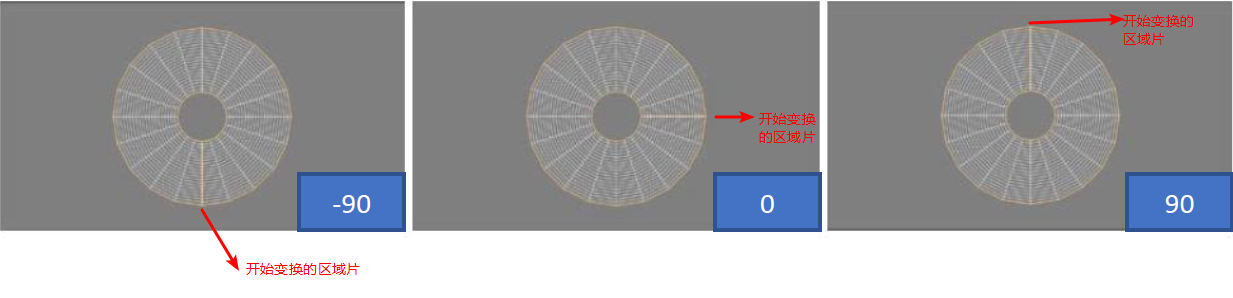
| double angle (rotation) | 0/90/180/270 |
strength 调试

rotation 调试
Equidistant
【功能描述】
等距
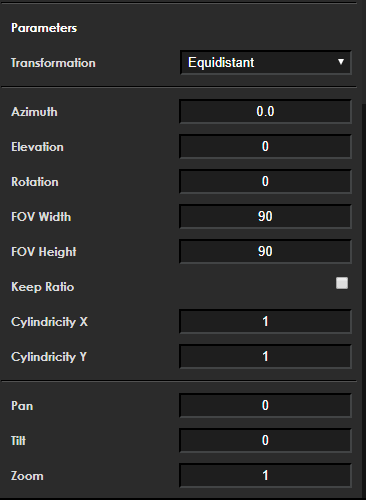
【成员说明】
| 成员 | 含义 |
|---|---|
| int32_t pan | 水平 |
| int32_t tilt | 垂直 |
| zoom | 按 |
| double angle(rotation) | 图像 |
| double elevation | 定义 |
| double azimuth | 定义 |
| int32_t keep_ratio | 当“保持 |
| double FOV_h | 描述 |
| double FOV_w | 描述 |
| double cylindricity_y | 描述 |
| double cylindricity_x | 描述 |
输入输出
正常
如果 cylindricity_x 和 cylindricity_y 圆柱
elevation 调试

azimuth 调试

rotation 调试

cylindricity x 调试
描述
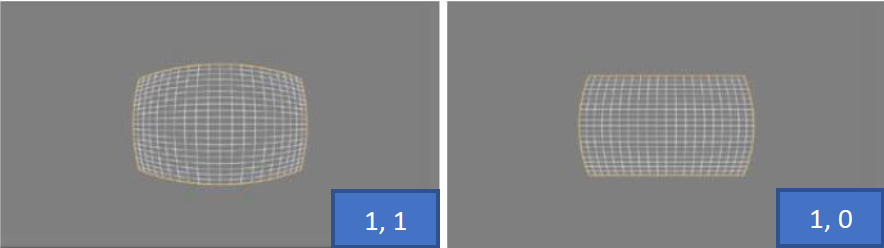
cylindricity y 调试
描述
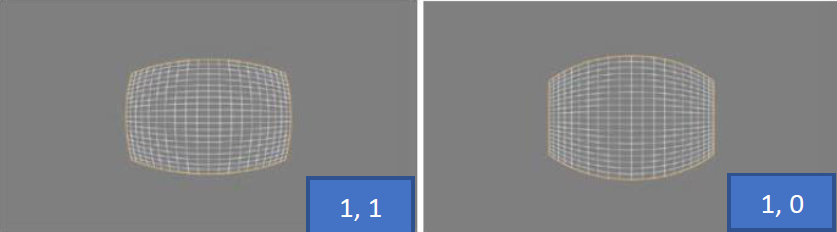
Custom
【功能描述】
采用 custom 变换
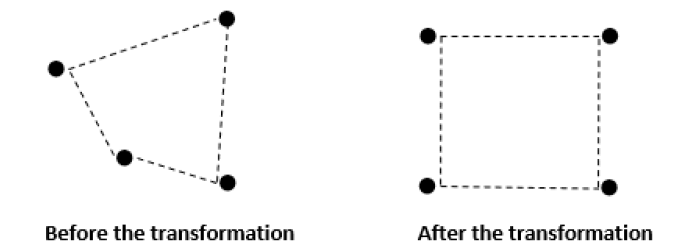
它们
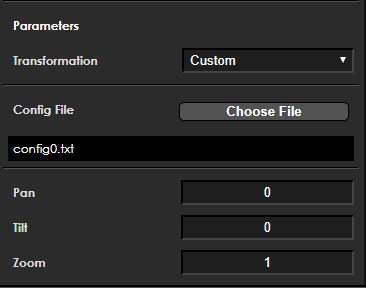
【成员说明】
| 成员 | 含义 |
|---|---|
| int32_t pan | 水平 |
| int32_t tilt | 垂直 |
| zoom | 按 |
| char custom_file[128] | 采样 |
| custom_tranformation_t custom | 解析 |
采样
采样
第一行
是 在 像素 计算 中使 能 full tile, 1 是 enable, 0 是 disable。 第二行
是 如果 使能 了 full tile,则 要 跳 过 的 像素 数量;这些 值 需要 大于 0 ,数字 越小, libgdc 的 性能 越慢(性能 越慢 是 指 libgdc 生成 的 bin 文件 的 大小 更大, libgdc 生成 bin 的 时间 更长 )。 第三行
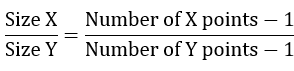
是 垂直 方向 和 水平 方向 采样 点 的 个数, 第一个 值 Y = 1081 指 的 是 垂直 方向 有 1081 个 采样 点,第二个 值 X = 1921 指 的 水平 是 方向 有 1921 个 采样 点。 第四行
是 选中 区域 的 中心点,通常 是 (Y-1)/2 、(X-1)/2 。 采样
点 必须 是 大于 等于 0 的 int 或 float 类型、相邻 两行 的 采样 点 不能 重复。
eg. 下图
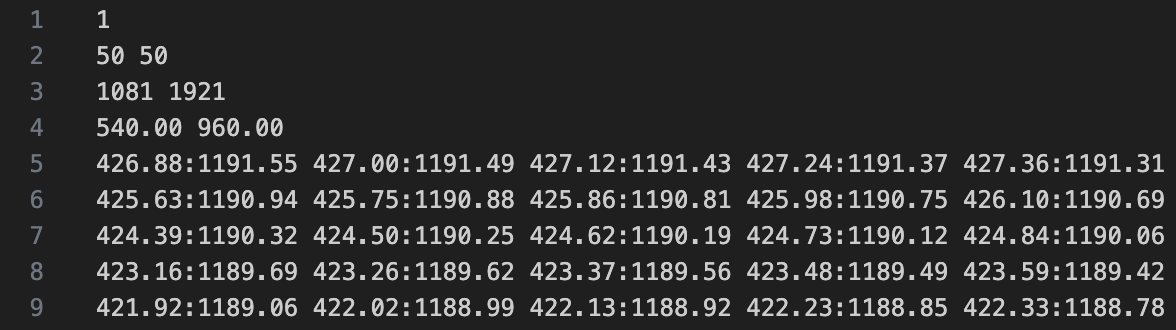
由于
采样 点 必须 是 等 距离 的,这 意味着 输出 图片 的 分辨率 取决于 采样 点 的 点数。
eg. 输出
下图
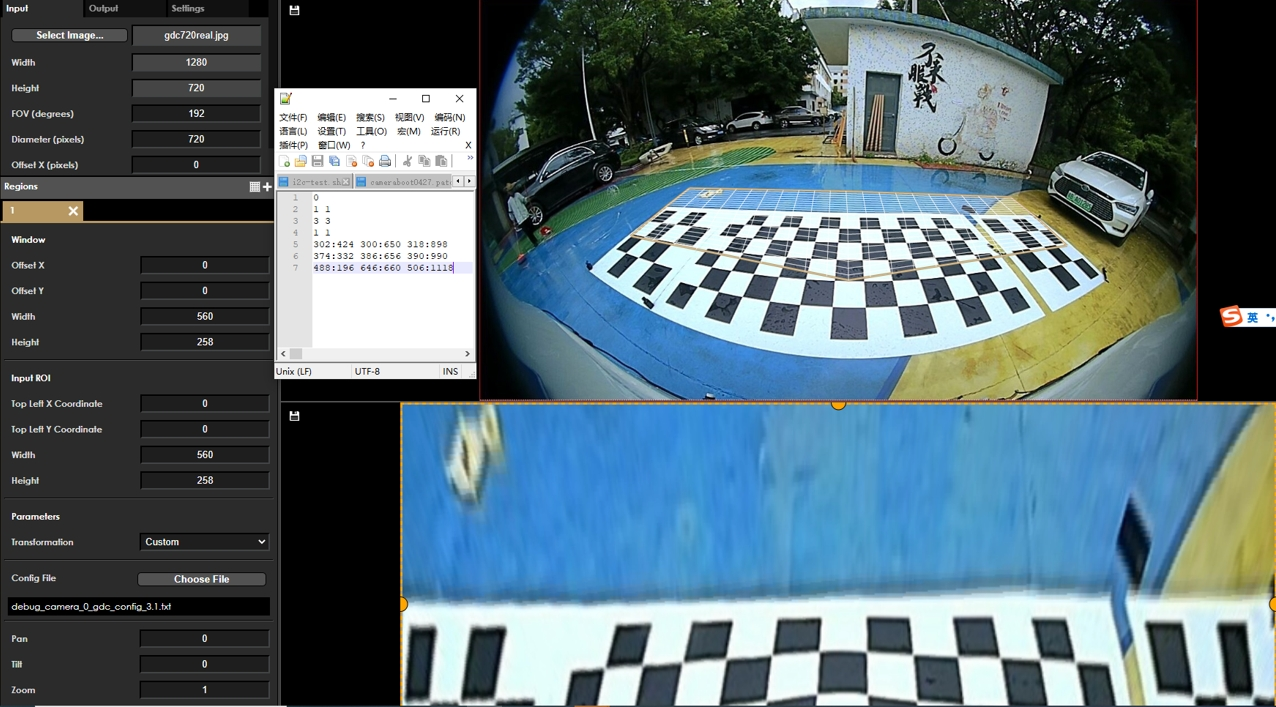
降
skip_point函数
注意
uint32_t skip_point(uint32_t width, uint32_t height, uint32_t x, uint32_t y)
{
    const uint32_t sample_points = 32;
    uint32_t step_x = floor((ceil(((float)width) / (sample_points - 4)) + 1) / 2.) * 2;
    uint32_t step_y = floor((ceil(((float)height) / (sample_points - 4)) + 1) / 2.) * 2;
    uint32_t grid_fit_x = ((x % step_x == step_x / 2) || (x - 1) % step_x == step_x / 2 ||
             (x % step_x == 0) || (x - 1) % step_x == 0 || x == 0 || x == 1);
    uint32_t grid_fit_y = ((y % step_y == step_y / 2) || (y - 1) % step_y == step_y / 2 ||
             (y % step_y == 0) || (y - 1) % step_y == 0 || y == 0 || y == 1);

    return !((grid_fit_x && grid_fit_y) || (x >= width - 2) || (y >= height - 2));
}
使用
int row_start = 0, row_end = 601;
int col_start = 0, col_end = 609;
int necessary_point = 1;

  for (int i = row_start; i < row_end; i++) {
    for (int j = col_start; j < col_end; j++) {
      int x = j - col_start;
      int y = i - row_start;

      necessary_point = skip_point(col_end - col_start, row_end - row_start, x, y);
      if (necessary_point) {
            //idx_x, idx_y为采样点坐标
            file_out << idx_y[i * 609 + j] << ":" << idx_x[i * 609 + j] << " "; //必要点,写到采样点文件中
      } else {
            file_out << 0.0 << ":" << 0.0 << " ";   //非必要点,写0到采样点文件,相当于跳过该点
      }
    }
    file_out << std::endl;
  }
Keystone+dewarping
【功能描述】
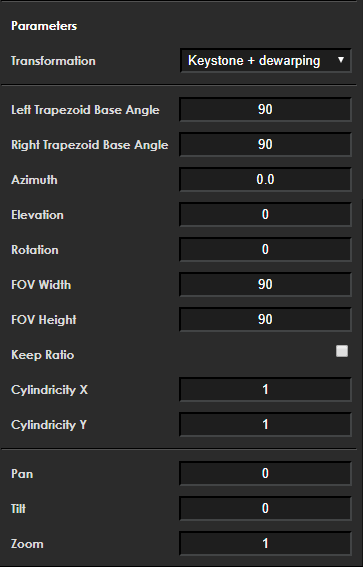
【成员说明】
| 成员 | 含义 |
|---|---|
| int32_t pan | 水平 |
| int32_t tilt | 垂直 |
| zoom | 按 |
| double angle(rotation) | 图像 |
| double elevation | 定义 |
| double azimuth | 定义 |
| int32_t keep_ratio | 当“保持 |
| double FOV_h | 描述 |
| double FOV_w | 描述 |
| double cylindricity_y | 描述 |
| double cylindricity_x | 描述 |
| double trapezoid_left_angle | 默认 90 ;范围 0.1 到 90 。变换 |
| double trapezoid_right_angle | 默认 90 ;范围 0.1 到 90 。变换 |
变换模式参数说明
配置文件
keystone+dewarping 模式
{
  "inputRes": [
    1920, -- 输入图像尺寸的宽
    1080 -- 输入图像尺寸的高
  ],
  "param": {
    "fov": 180, -- 输入图像的视场角
    "diameter": 1080, -- 输入图像的直径,可控制变换网格的整体大小
    "offsetX": 0, -- 变换网格在水平方向的偏移
    "offsetY": 0 -- 变换网格在垂直方向的偏移
  },
  "outputRes": [
    1920, -- 输出图像尺寸的宽
    1080 -- 输出图像尺寸的高
  ],
  "transformations": [
    {
      "transformation": "Dewarp_keystone", -- 变换模式
      "position": [ -- 输出图像的 ROI 区域设定
        0, -- 输出图像的 ROI 水平方向的偏移
        0, -- 输出图像的 ROI 垂直方向的偏移
        1920, -- 输出图像的 ROI 的宽
        1080 -- 输出图像的 ROI 的高
      ],
      "param": {
        "left_base_angle": 90, -- 默认 90 ; 0.1 到 90 ;变换网格中,左边边界相对于底边边界的角度
        "right_base_angle": 90, -- 默认 90 ; 0.1 到 90 ;变换网格中,右边边界相对于底边边界的角度
        "azimuth": 90, -- 定义了投影轴的方位角度。如果仰角参数 elevation 为 0 ,则方位角将没有可见效果
        "elevation": 0, -- 定义了投影轴的仰角,范围 0 到 90
        "rotation": 0, -- 输出图像要旋转的角度
        "fovWidth": 90, -- 描述水平维度中输出视图字段的大小( 以度为单位 )。数值越大,变换网格水平方向越宽,有效值的范围是从 0 到 180
        "fovHeight": 90, -- 描述垂直维度中输出视图字段的大小( 以度为单位 )。数值越大,变换网格垂直方向越宽,有效值的范围是从 0 到 180
        "keepRatio": 0, -- 当“保持比率”参数为 1 时候, fovHeight 参数将被忽略,其值将自动计算,以在水平和垂直方向上保持相同的拉伸强度
        "cylindricityX": 1, -- 描述目标投影沿 X 轴的球面度。此值从 0 到 1 ,其中 1 是球形的。如果此值设置为 1 ,并且“圆柱度 Y”值设置为 0 ,则投影将沿 X 轴形成圆柱体。
        "cylindricityY": 1 -- 描述目标投影沿 Y 轴的球面度。此值从 0 到 1 ,其中 1 是球形的。如果此值设置为 1 ,并且“圆柱度 X”值设置为 0 ,则投影将沿 Y 轴形成圆柱体。
      },
      "ptz": [
        0, --pan 参数
        0, --tile 参数
        1 --zoom 参数
      ],
      "roi": { -- 输入图像 ROI 区域设定
        "x": 0, -- 输入图像 ROI 区域的水平方向偏移
        "y": 0, -- 输入图像 ROI 区域的垂直方向偏移
        "w": 1920, -- 输入图像 ROI 区域的宽
        "h": 1080 -- 输入图像 ROI 区域的高
      }
    }
  ],
  "mode": "semiplanar420", -- 处理的格式设定
  "eccMode": "eccDisabled", -- 处理的 ecc 模式
  "colourspace": "yuv" -- 处理的数据格式
}
custom 模式
{
  "inputRes": [
    1280, -- 输入图像尺寸的宽
    720 -- 输入图像尺寸的高
  ],
  "param": {
    "fov": 192, -- 输入图像的视场角
    "diameter": 720, -- 输入图像的直径,可控制变换网格的整体大小
    "offsetX": 0, -- 变换网格在水平方向的偏移
    "offsetY": 0 -- 变换网格在垂直方向的偏移
  },
  "outputRes": [
    560, -- 输出图像尺寸的宽
    258 -- 输出图像尺寸的高
  ],
  "transformations": [
    {
      "transformation": "Custom", -- 变换模式
      "position": [ -- 输出图像的 ROI 区域设定
        0, -- 输出图像的 ROI 水平方向的偏移
        0, -- 输出图像的 ROI 垂直方向的偏移
        560, -- 输出图像的 ROI 的宽,小于等于 outputRes 的宽
        258 -- 输出图像的 ROI 的高,小于等于 outputRes 的高
      ],
      "ptz": [
        0, --pan 参数
        0, --tile 参数
        1 --zoom 参数
      ],
      "roi": { --custom 模式下无效
        "x": 0, --custom 模式下无效
        "y": 0, --custom 模式下无效
        "w": 0, --custom 模式下无效
        "h": 0 --custom 模式下无效
      },
      "param": {
        "customTransformation": "/path_to/camera_0_gdc.txt" -- 坐标点文件的在板子中的路径
      }
    }
  ],
  "mode": "semiplanar420", -- 处理的格式设定
  "eccMode": "eccDisabled", -- 处理的 ecc 模式
  "colourspace": "yuv" -- 处理的数据格式
}
1. ecc mode 统一
2. 当
3. 用户
4. 非 custom 模式,配置文件
5. 配置文件
Affine
配置文件
{
   "inputRes": [
       1920,
       1080
   ],
   "param": {
       "fov": 160,
       "diameter": 1080,
       "offsetX": 0,
       "offsetY": 0
   },
   "outputRes": [
       1920,
       1080
   ],
   "transformations": [
       {
           "transformation": "Affine",
           "position": [
               0,
               0,
               1920,
               1080
           ],
           "param": {
               "rotation": 0
           },
           "ptz": [
               0,
               0,
               1
           ],
           "roi": {
               "x": 0,
               "y": 0,
               "w": 1920,
               "h": 1080
           }
       }
   ],
   "mode": "semiplanar420",
   "eccMode": "eccDisabled",
   "colourspace": "yuv"
}
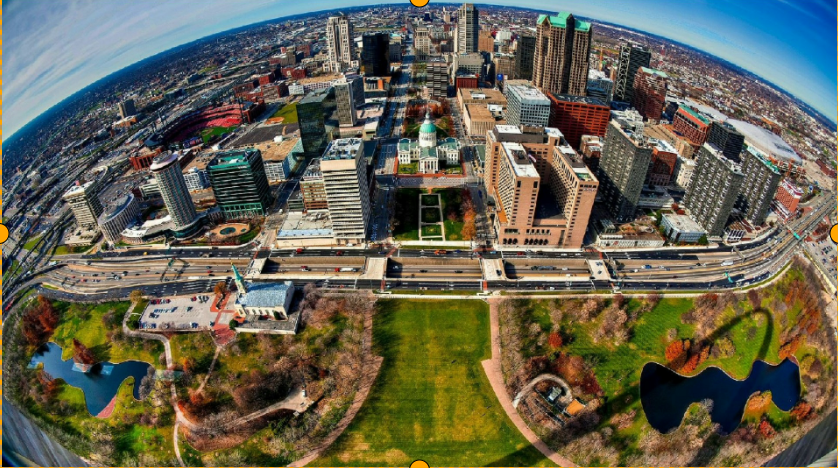
输入
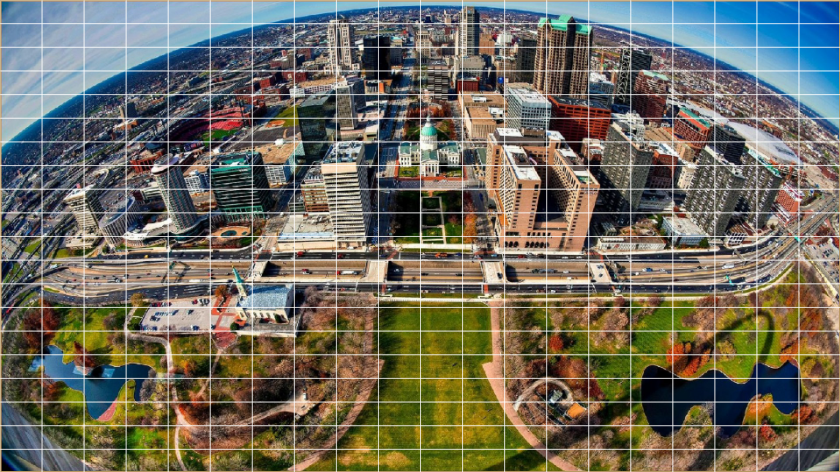
输出
Equisolid
配置文件
{
   "inputRes": [
       1920,
       1080
   ],
   "param": {
       "fov": 160,
       "diameter": 1080,
       "offsetX": 0,
       "offsetY": 0
   },
   "outputRes": [
       1920,
       1080
   ],
   "transformations": [
       {
           "transformation": "Panoramic",
           "position": [
               0,
               0,
               1920,
               1080
           ],
           "param": {
               "strength": 1,
               "strengthY": 1,
               "rotation": 0
           },
           "ptz": [
               0,
               0,
               1
           ],
           "roi": {
               "x": 0,
               "y": 0,
               "w": 1920,
               "h": 1080
           }
       }
   ],
   "mode": "semiplanar420",
   "eccMode": "eccDisabled",
   "colourspace": "yuv"
}
输入
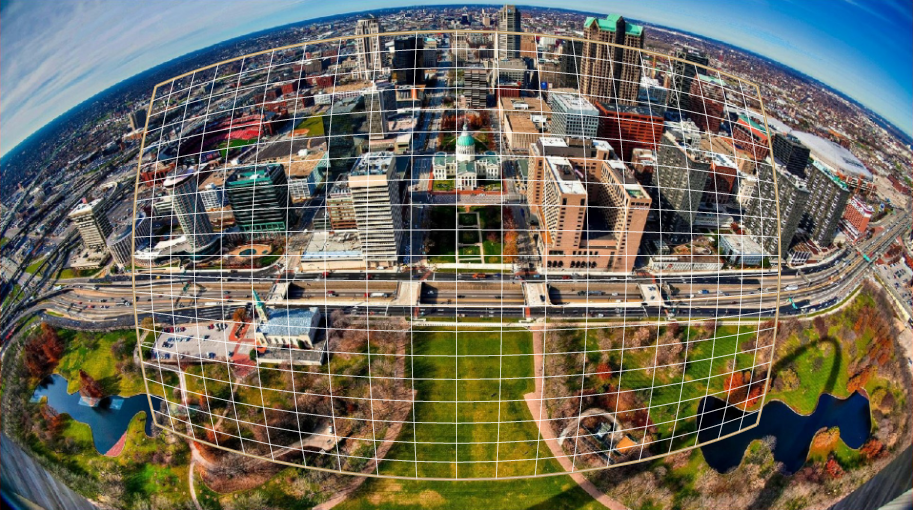
输出
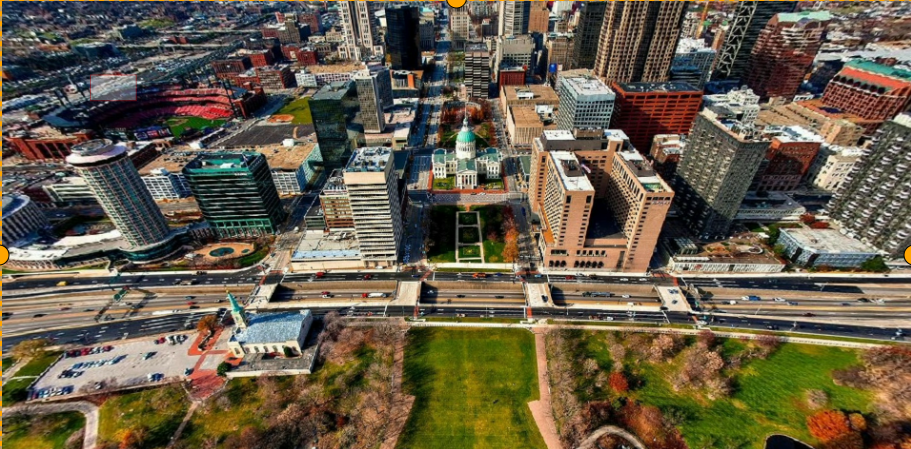
Equisolid(cylinder)
配置文件
{
   "inputRes": [
       1920,
       1080
   ],
   "param": {
       "fov": 160,
       "diameter": 1080,
       "offsetX": 0,
       "offsetY": 0
   },
   "outputRes": [
       1920,
       1080
   ],
   "transformations": [
       {
           "transformation": "Stereographic",
           "position": [
               0,
               0,
               1920,
               1080
           ],
           "param": {
               "strength": 1,
               "rotation": 0
           },
           "ptz": [
               0,
               0,
               1
           ],
           "roi": {
               "x": 0,
               "y": 0,
               "w": 1920,
               "h": 1080
           }
       }
   ],
   "mode": "semiplanar420",
   "eccMode": "eccDisabled",
   "colourspace": "yuv"
}
输入
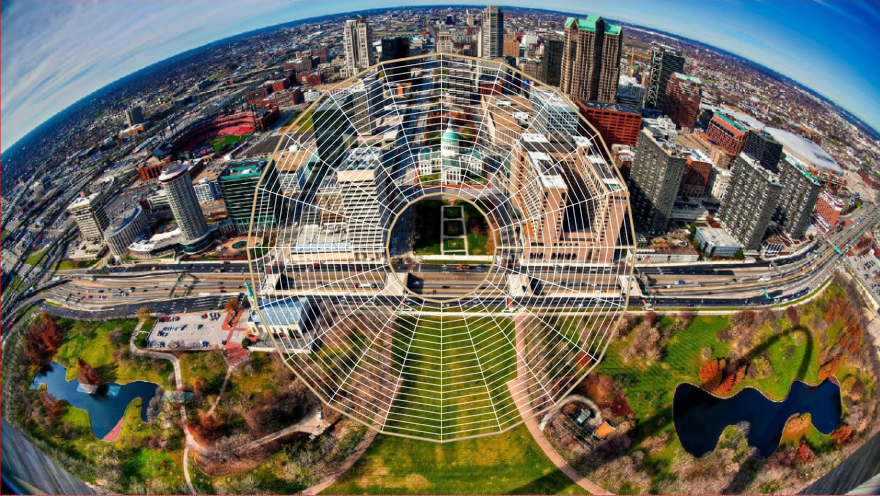
输出
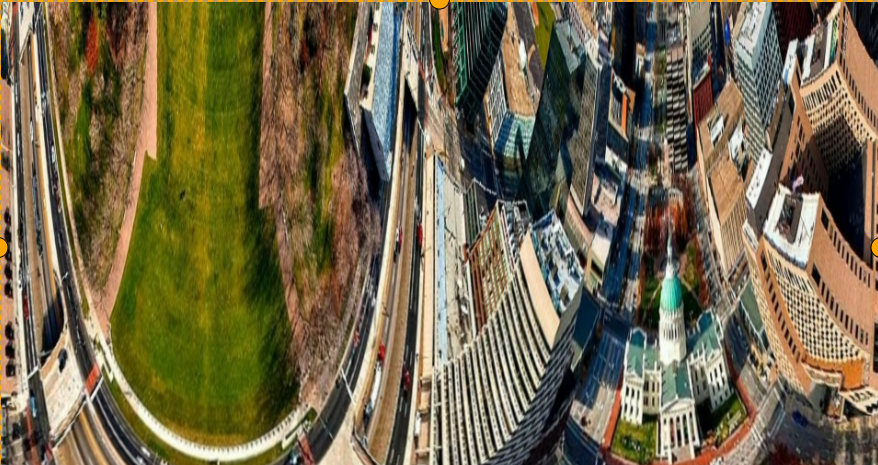
Equidistant
配置文件
{
   "inputRes": [
       1920,
       1080
   ],
   "param": {
       "fov": 160,
       "diameter": 1080,
       "offsetX": 0,
       "offsetY": 0
   },
   "outputRes": [
       1920,
       1080
   ],
   "transformations": [
       {
           "transformation": "Universal",
           "position": [
               0,
               0,
               1920,
               1080
           ],
           "param": {
               "azimuth": 0,
               "elevation": 0,
               "rotation": 0,
               "fovWidth": 90,
               "fovHeight": 90,
               "keepRatio": 0,
               "cylindricityX": 1,
               "cylindricityY": 1
           },
           "ptz": [
               0,
               0,
               1
           ],
           "roi": {
               "x": 0,
               "y": 0,
               "w": 1920,
               "h": 1080
           }
       }
   ],
   "mode": "semiplanar420",
   "eccMode": "eccDisabled",
   "colourspace": "yuv"
}
输入
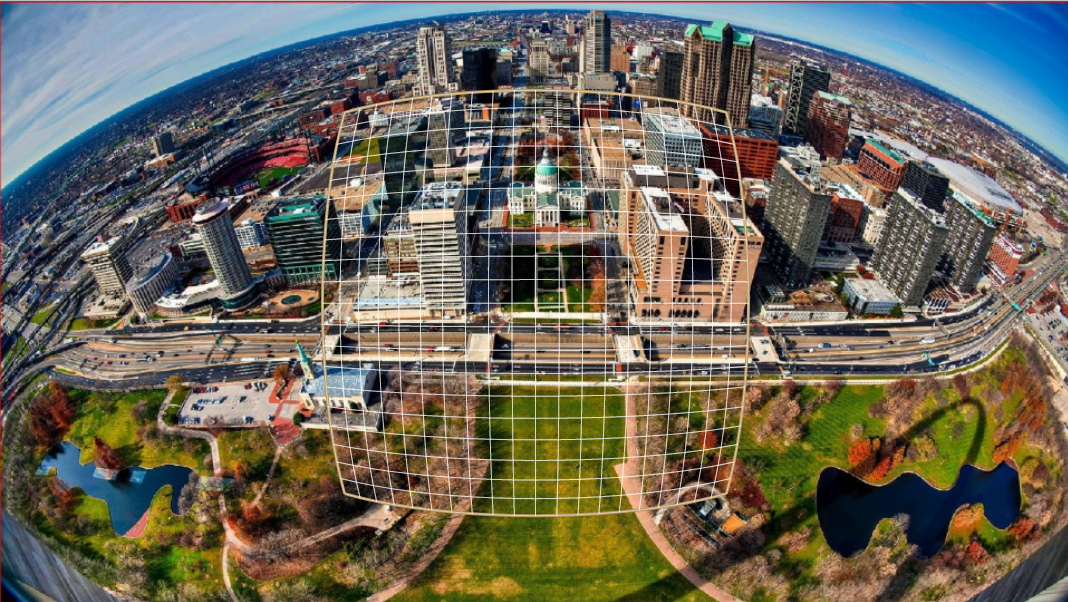
输出
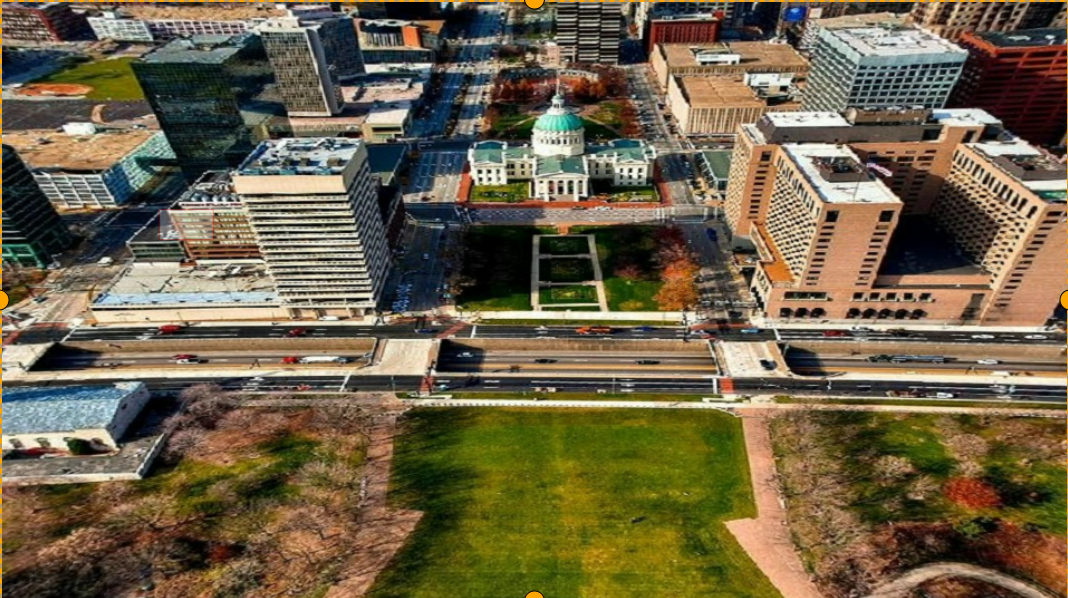
Custom
输入 1280x720 ,输出 560x258 。配置文件
{
   "inputRes": [
       1280,
       720
   ],
   "param": {
       "fov": 192,
       "diameter": 720,
       "offsetX": 0,
       "offsetY": 0
   },
   "outputRes": [
       560,
       258
   ],
   "transformations": [
       {
           "transformation": "Custom",
           "position": [
               0,
               0,
               560,
               258
           ],
           "ptz": [
               0,
               0,
               1
           ],
           "roi": {
               "x": 0,
               "y": 0,
               "w": 1280,
               "h": 720
           },
           "param": {
               "customTransformation": "/path_to/camera_0_gdc_config_3.1.txt"
           }
       }
   ],
   "mode": "semiplanar420",
   "eccMode": "eccDisabled",
   "colourspace": "yuv"
}
输入
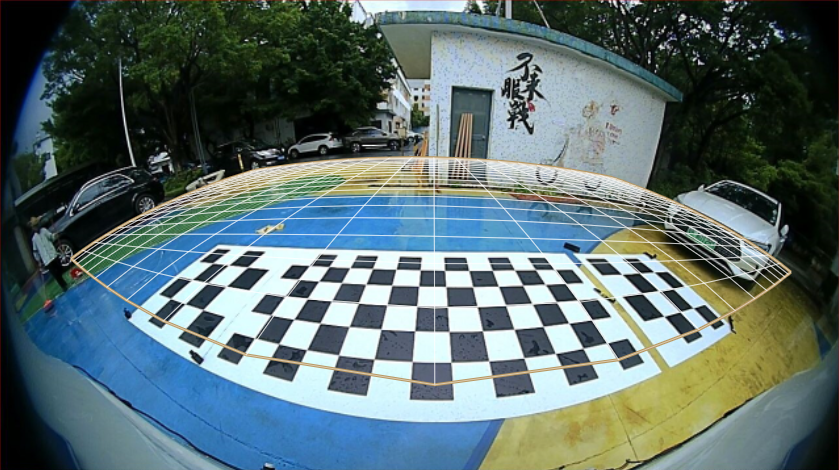
输出
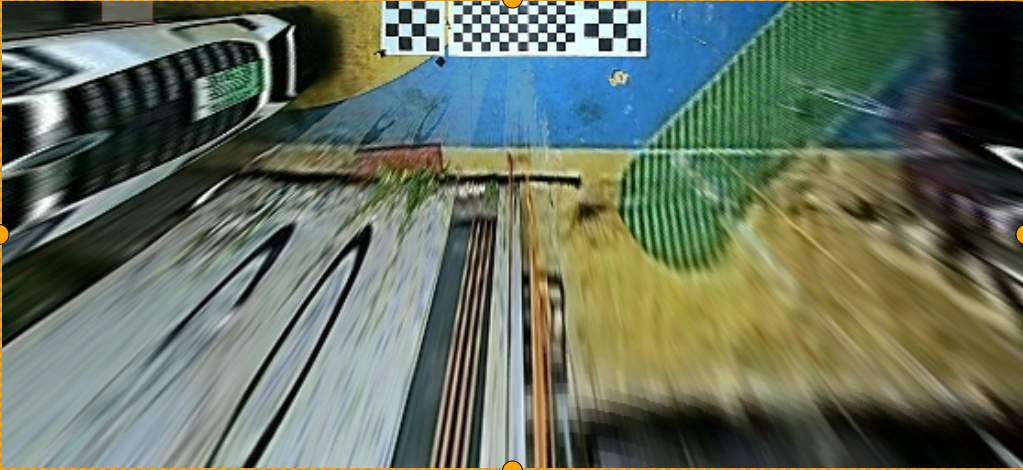
Keystone+dewarping
配置文件
{
   "inputRes": [
       1920,
       1080
   ],
   "param": {
       "fov": 180,
       "diameter": 1080,
       "offsetX": 0,
       "offsetY": 0
   },
   "outputRes": [
       1920,
       1080
   ],
   "transformations": [
       {
           "transformation": "Dewarp_keystone",
           "position": [
               0,
               0,
               1920,
               1080
           ],
           "param": {
               "left_base_angle": 90,
               "right_base_angle": 90,
               "azimuth": 0,
               "elevation": 0,
               "rotation": 0,
               "fovWidth": 90,
               "fovHeight": 90,
               "keepRatio": 0,
               "cylindricityX": 1,
               "cylindricityY": 1
           },
           "ptz": [
               0,
               0,
               1
           ],
           "roi": {
               "x": 0,
               "y": 0,
               "w": 1920,
               "h": 1080
           }
       }
   ],
   "mode": "semiplanar420",
   "eccMode": "eccDisabled",
   "colourspace": "yuv"
}
输入
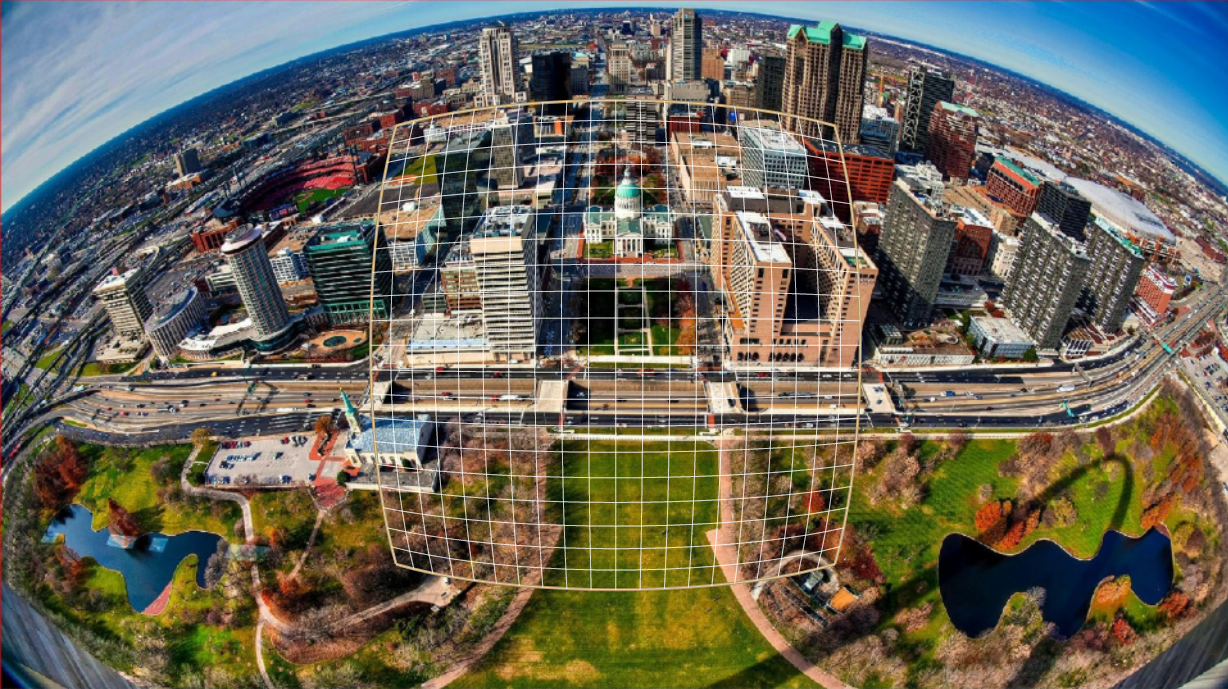
输出