3.2. sample_vin 使用说明
3.2.1. get_vin_data
3.2.1.1. 功能概述
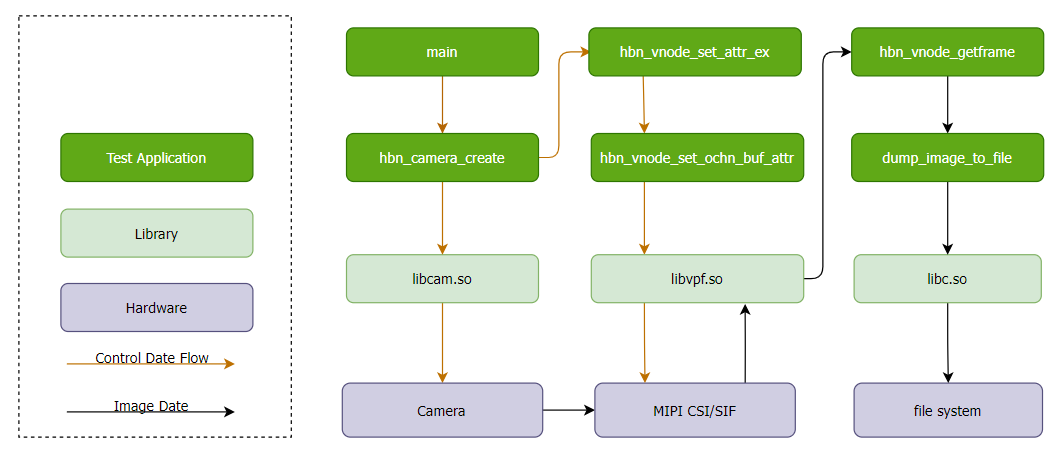
get_vin_data 完成 Camera Sensor 、 MIPI CSI 和 SIF 模块
软件架构说明
代码位置及目录结构
代码
位置 app/samples/platform_samples/sample_vin/get_vin_data目录
结构
sample_vin/
└── get_vin_data
    ├── get_vin_data.c
    └── Makefile
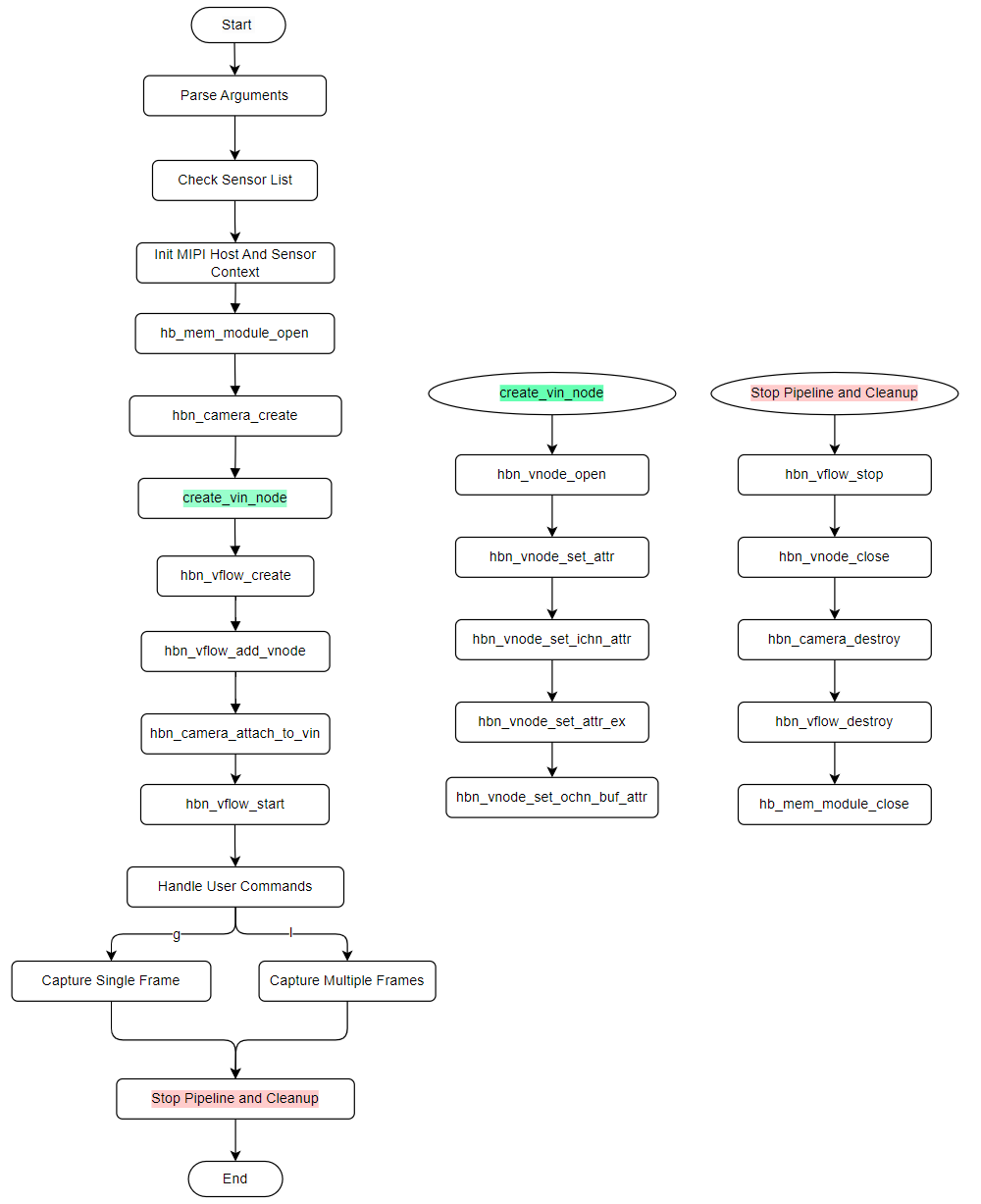
API 流程说明
3.2.1.2. 编译部署
编译
进入 get_vin_data 目录,执行
make编译输出
产物 是 get_vin_data 源码 目录 下 的 get_vin_data详细
程序 编译 方式 请 查阅 编译 方法 章节
程序部署
刷写/app/platform_samples/sample_vin/get_vin_data。
3.2.1.3. 运行
程序运行方法
执行程序
./get_vin_data -h可以获得 帮助 信息; 执行程序
./get_vin_data -s 3,以 sc230ai-30fps 为例;执行程序
./get_vin_data -s 3 -f 15, 指定 Sensor Index 的同时 配置 目标 帧 率 为 15; 执行程序
后 即可 进入 交互 模式,详见3.2.3.3.小节 运行 效果 内容。 注意: 本
示例 通过 SIF 硬件 实现 丢 帧 的 功能(间接 实现 改变 sensor 帧 率),并且 支持 初始化 阶段 和 运行 阶段 配置 丢 帧 参数: 命令行
中 -f参数:展示在 初始化 阶段 设置 丢 帧 的 参数; 交互
模式 中 -s参数:展示在 运行 阶段 动态 的 设置 丢 帧 参数。
程序参数选项说明
Usage: get_vin_data [OPTIONS]
Options:
  -s <sensor_index>      Specify sensor index
  -m <sensor_mode>       Specify sensor mode of camera_config_t, support 'm' and 's'
                m: Master
                s: Slave
                The default value is determined by the configuration in vp_sensor
  -e <extern_param>          Specify extension parameters through a JSON file
  -f <target_fps>        Specify target output FPS (0 = disable, sensor native)
  -h                     Show this help message
index: 0  sensor_name: sc1330t                  config_file:linear_1280x960_raw10_30fps_1lane.c
index: 1  sensor_name: irs2875-tof              config_file:linear_208x1413_raw12_15fps_2lane.c
index: 2  sensor_name: sc230ai-10fps            config_file:linear_1920x1080_raw10_10fps_1lane.c
index: 3  sensor_name: sc230ai-30fps            config_file:linear_1920x1080_raw10_30fps_1lane.c
index: 4  sensor_name: sc230ai-dol2-30fps       config_file:dol2_1920x1080_raw10_30fps_2lane.c
index: 5  sensor_name: sc132gs-1280p            config_file:linear_1088x1280_raw10_60fps_1lane.c
index: 6  sensor_name: sc132gs-hdr-2lane        config_file:hdr_1088x1280_raw10_30fps_2lane.c
index: 7  sensor_name: sc035hgs                 config_file:linear_640x480_raw10_30fps_1lane.c
index: 8  sensor_name: sc035hgs_mono            config_file:linear_mono_640x480_raw10_30fps_1lane.c
index: 9  sensor_name: ov5640                   config_file:linear_1920x1080_raw10_30fps_2lane.c
index: 10  sensor_name: f37                     config_file:linear_1920x1080_raw10_30fps_1lane.c
index: 11  sensor_name: imx415-30fps-2lane      config_file:linear_3840x2160_raw10_30fps_2lane.c
index: 12  sensor_name: imx415-30fps-4lane      config_file:linear_3840x2160_raw10_30fps_4lane.c
index: 13  sensor_name: sc202cs-1600x1200       config_file:linear_1600x1200_raw10_30fps_1lane.c
index: 14  sensor_name: irs2381c-tof            config_file:linear_224x1903_raw12_5fps_2lane.c
index: 15  sensor_name: sc035hgs-vc0            config_file:linear_640x480_raw10_30fps_2lane_vc0.c
index: 16  sensor_name: sc035hgs-vc1            config_file:linear_640x480_raw10_30fps_2lane_vc1.c
index: 17  sensor_name: sc231ai-30fps           config_file:linear_1920x1080_raw10_30fps_2lane.c
index: 18  sensor_name: imx586-30fps-4lane      config_file:linear_3840x2160_raw10_30fps_4lane.c
index: 19  sensor_name: os08c10-30fps-2lane     config_file:linear_3840x2160_raw12_30fps_2lane.c
index: 20  sensor_name: ar0233-30fps            config_file:linear_1920x1080_raw12_30fps_2lane.c
index: 21  sensor_name: ar0820std-30fps         config_file:linear_3840x2160_yuv422_30fps_4lane.c
index: 22  sensor_name: sc1336                  config_file:linear_1280x720_raw10_15fps_2lane.c
index: 23  sensor_name: dummy                   config_file:dummy_sensor.c
index: 24  sensor_name: ar0233-30fps            config_file:ar0233_linear_1920x1080_raw12_30fps_2lane_vc0.c
index: 25  sensor_name: ar0233-30fps            config_file:ar0233_linear_1920x1080_raw12_30fps_2lane_vc1.c
index: 26  sensor_name: ov9782-200fps-2lane     config_file:linear_640x360_raw10_200fps_2lane.c
index: 27  sensor_name: ov9782-120fps-2lane     config_file:linear_1280x720_raw10_120fps_2lane.c
index: 28  sensor_name: imx219-640x480-30fps    config_file:linear_640x480_raw10_30fps_2lane.c
index: 29  sensor_name: imx219-1632x1232-30fps  config_file:linear_1632x1232_raw10_30fps_2lane.c
index: 30  sensor_name: imx219-1920x1080-30fps  config_file:linear_1920x1080_raw10_30fps_2lane.c
index: 31  sensor_name: imx219-3264x2464-15fps  config_file:linear_3264x2464_raw10_15fps_2lane.c
index: 32  sensor_name: imx219-3264x2464-21fps  config_file:linear_3264x2464_raw10_21fps_2lane.c
index: 33  sensor_name: ov5647-640x480-60fps    config_file:linear_640x480_raw10_60fps_2lane.c
index: 34  sensor_name: ov5647-1280x960-30fps   config_file:linear_1280x960_raw10_30fps_2lane.c
index: 35  sensor_name: ov5647-1920x1080-30fps  config_file:linear_1920x1080_raw10_30fps_2lane.c
index: 36  sensor_name: ov5647-2592x1944-15fps  config_file:linear_2592x1944_raw10_15fps_2lane.c
index: 37  sensor_name: imx678-30fps-4lane      config_file:linear_3840x2160_raw12_30fps_4lane.c
index: 38  sensor_name: imx678-30fps-4lane-dol2 config_file:dol2_3840x2160_raw12_30fps_4lane.c
index: 39  sensor_name: imx477-1280x960-120fps  config_file:linear_1280x960_raw10_120fps_2lane.c
index: 40  sensor_name: imx477-1920x1080-50fps  config_file:linear_1920x1080_raw12_50fps_2lane.c
index: 41  sensor_name: imx477-2016x1520-21fps  config_file:linear_2016x1520_raw12_21fps_2lane.c
index: 42  sensor_name: imx477-4000x3000-10fps  config_file:linear_4000x3000_raw12_10fps_2lane.c
index: 43  sensor_name: ov50h40-30fps-4lane     config_file:linear_4096x3072_raw10_30fps_4lane.c
index: 44  sensor_name: ox05b1s                 config_file:linear_2592x1944_raw10_30fps_4lane.c
index: 45  sensor_name: ox05b1s_2lane           config_file:linear_2592x1944_raw10_10fps_2lane.c
index: 46  sensor_name: imx415-60fps-4lane      config_file:linear_3840x2160_raw10_60fps_4lane.c
index: 47  sensor_name: sc850sl-30fps           config_file:linear_3840x2160_raw10_30fps_4lane.c
index: 48  sensor_name: shw3g-30fps             config_file:linear_2064x1552_raw12_30fps_4lane.c
index: 49  sensor_name: shw3g-30fps_vc1         config_file:linear_2064x1552_raw12_30fps_4lane_vc1.c
index: 50  sensor_name: sc235hai-30fps          config_file:linear_1920x1080_raw10_30fps_2lane.c
index: 51  sensor_name: cv4006-60fps-2lane      config_file:linear_1280x720_raw10_60fps_2lane.c
index: 52  sensor_name: ov50h40-30fps-4lane     config_file:linear_3840x2160_raw10_30fps_4lane.c
index: 53  sensor_name: ov50h40-30fps-4lane     config_file:linear_4096x3072_raw14_30fps_4lane.c
index: 54  sensor_name: sc132gs-slave-right     config_file:linear_1088x1280_raw10_30fps_slave_1lane_right.c
index: 55  sensor_name: sc132gs-slave-left      config_file:linear_1088x1280_raw10_30fps_slave_1lane_left.c
index: 56  sensor_name: sc132gsstd_vc0          config_file:linear_1088x1280_raw10_10fps_1lane_vc0.c
index: 57  sensor_name: sc132gsstd_vc1          config_file:linear_1088x1280_raw10_10fps_1lane_vc1.c
index: 58  sensor_name: sc132gsstd_vc2          config_file:linear_1088x1280_raw10_10fps_1lane_vc2.c
index: 59  sensor_name: sc132gsstd_vc3          config_file:linear_1088x1280_raw10_10fps_1lane_vc3.c
index: 60  sensor_name: imx415-30fps-4lane-dol2 config_file:dol2_3840x2160_raw10_30fps_4lane.c
index: 61  sensor_name: isx031-30fps-vc0        config_file:isx031_linear_1920x1536_yuv422_30fps_4lane_vc0.c
index: 62  sensor_name: isx031-30fps-vc1        config_file:isx031_linear_1920x1536_yuv422_30fps_4lane_vc1.c
index: 63  sensor_name: isx031-30fps-vc2        config_file:isx031_linear_1920x1536_yuv422_30fps_4lane_vc2.c
index: 64  sensor_name: isx031-30fps-vc3        config_file:isx031_linear_1920x1536_yuv422_30fps_4lane_vc3.c
选项:
s <sensor_index>: 指定要 使用 的 camera sensor 索引,可 多次 指定(最 多 4 个 sensor)。 m <sensor_mode>: 指定 camera sensor 配置中 的 传感器 模式。 e <extern_param>: 指定 Json 格式的 文件,在 camera sensor 点亮 阶段 用于 快速 更改 参数, 详细 见 get_vin_data源码目录 中 的 如下 文件: sensor_param_sample1.jsonsensor_param_sample2.jsonsensor_param_sample3.jsonf <target_fps>: 指定目标 输出 帧 率,通过 SIF 硬件 实现。不 配置 则 保持 默认 帧 率。可 配置 的 目标 帧 率 范围 是 1 到 默认 帧 率。比如 默认 帧 率 为30fps,则 取值 范围 为 1 至 30。 h: 显示帮助 信息。
当前
| Index | Sensor Name | Configuration File |
|---|---|---|
| 0 | sc1330t | linear_1280x960_raw10_30fps_1lane.c |
| 1 | irs2875-tof | linear_208x1413_raw12_15fps_2lane.c |
| 2 | sc230ai-10fps | linear_1920x1080_raw10_10fps_1lane.c |
| 3 | sc230ai-30fps | linear_1920x1080_raw10_30fps_1lane.c |
| 4 | sc230ai-dol2-30fps | dol2_1920x1080_raw10_30fps_2lane.c |
| 5 | sc132gs-1280p | linear_1088x1280_raw10_60fps_1lane.c |
| 6 | sc132gs-hdr-2lane | hdr_1088x1280_raw10_30fps_2lane.c |
| 7 | sc035hgs | linear_640x480_raw10_30fps_1lane.c |
| 8 | sc035hgs_mono | linear_mono_640x480_raw10_30fps_1lane.c |
| 9 | ov5640 | linear_1920x1080_raw10_30fps_2lane.c |
| 10 | f37 | linear_1920x1080_raw10_30fps_1lane.c |
| 11 | imx415-30fps-2lane | linear_3840x2160_raw10_30fps_2lane.c |
| 12 | imx415-30fps-4lane | linear_3840x2160_raw10_30fps_4lane.c |
| 13 | sc202cs-1600x1200 | linear_1600x1200_raw10_30fps_1lane.c |
| 14 | irs2381c-tof | linear_224x1903_raw12_5fps_2lane.c |
| 15 | sc035hgs-vc0 | linear_640x480_raw10_30fps_2lane_vc0.c |
| 16 | sc035hgs-vc1 | linear_640x480_raw10_30fps_2lane_vc1.c |
| 17 | sc231ai-30fps | linear_1920x1080_raw10_30fps_2lane.c |
| 18 | imx586-30fps-4lane | linear_3840x2160_raw10_30fps_4lane.c |
| 19 | os08c10-30fps-2lane | linear_3840x2160_raw12_30fps_2lane.c |
| 20 | ar0233-30fps | linear_1920x1080_raw12_30fps_2lane.c |
| 21 | ar0820std-30fps | linear_3840x2160_yuv422_30fps_4lane.c |
| 22 | sc1336 | linear_1280x720_raw10_15fps_2lane.c |
| 23 | dummy | dummy_sensor.c |
| 24 | ar0233-30fps | ar0233_linear_1920x1080_raw12_30fps_2lane_vc0.c |
| 25 | ar0233-30fps | ar0233_linear_1920x1080_raw12_30fps_2lane_vc1.c |
| 26 | ov9782-200fps-2lane | linear_640x360_raw10_200fps_2lane.c |
| 27 | ov9782-120fps-2lane | linear_1280x720_raw10_120fps_2lane.c |
| 28 | imx219-640x480-30fps | linear_640x480_raw10_30fps_2lane.c |
| 29 | imx219-1632x1232-30fps | linear_1632x1232_raw10_30fps_2lane.c |
| 30 | imx219-1920x1080-30fps | linear_1920x1080_raw10_30fps_2lane.c |
| 31 | imx219-3264x2464-15fps | linear_3264x2464_raw10_15fps_2lane.c |
| 32 | imx219-3264x2464-21fps | linear_3264x2464_raw10_21fps_2lane.c |
| 33 | ov5647-640x480-60fps | linear_640x480_raw10_60fps_2lane.c |
| 34 | ov5647-1280x960-30fps | linear_1280x960_raw10_30fps_2lane.c |
| 35 | ov5647-1920x1080-30fps | linear_1920x1080_raw10_30fps_2lane.c |
| 36 | ov5647-2592x1944-15fps | linear_2592x1944_raw10_15fps_2lane.c |
| 37 | imx678-30fps-4lane | linear_3840x2160_raw12_30fps_4lane.c |
| 38 | imx678-30fps-4lane-dol2 | dol2_3840x2160_raw12_30fps_4lane.c |
| 39 | imx477-1280x960-120fps | linear_1280x960_raw10_120fps_2lane.c |
| 40 | imx477-1920x1080-50fps | linear_1920x1080_raw12_50fps_2lane.c |
| 41 | imx477-2016x1520-21fps | linear_2016x1520_raw12_21fps_2lane.c |
| 42 | imx477-4000x3000-10fps | linear_4000x3000_raw12_10fps_2lane.c |
| 43 | ov50h40-30fps-4lane | linear_4096x3072_raw10_30fps_4lane.c |
| 44 | ox05b1s | linear_2592x1944_raw10_30fps_4lane.c |
| 45 | ox05b1s_2lane | linear_2592x1944_raw10_10fps_2lane.c |
| 46 | imx415-60fps-4lane | linear_3840x2160_raw10_60fps_4lane.c |
| 47 | sc850sl-30fps | linear_3840x2160_raw10_30fps_4lane.c |
| 48 | shw3g-30fps | linear_2064x1552_raw12_30fps_4lane.c |
| 49 | shw3g-30fps_vc1 | linear_2064x1552_raw12_30fps_4lane_vc1.c |
| 50 | sc235hai-30fps | linear_1920x1080_raw10_30fps_2lane.c |
| 51 | cv4006-60fps-2lane | linear_1280x720_raw10_60fps_2lane.c |
| 52 | ov50h40-30fps-4lane | linear_3840x2160_raw10_30fps_4lane.c |
| 53 | ov50h40-30fps-4lane | linear_4096x3072_raw14_30fps_4lane.c |
| 54 | sc132gs-slave-right | linear_1088x1280_raw10_30fps_slave_1lane_right.c |
| 55 | sc132gs-slave-left | linear_1088x1280_raw10_30fps_slave_1lane_left.c |
| 56 | sc132gsstd_vc0 | linear_1088x1280_raw10_10fps_1lane_vc0.c |
| 57 | sc132gsstd_vc1 | linear_1088x1280_raw10_10fps_1lane_vc1.c |
| 58 | sc132gsstd_vc2 | linear_1088x1280_raw10_10fps_1lane_vc2.c |
| 59 | sc132gsstd_vc3 | linear_1088x1280_raw10_10fps_1lane_vc3.c |
| 60 | imx415-30fps-4lane-dol2 | dol2_3840x2160_raw10_30fps_4lane.c |
| 61 | isx031-30fps-vc0 | isx031_linear_1920x1536_yuv422_30fps_4lane_vc0.c |
| 62 | isx031-30fps-vc1 | isx031_linear_1920x1536_yuv422_30fps_4lane_vc1.c |
| 63 | isx031-30fps-vc2 | isx031_linear_1920x1536_yuv422_30fps_4lane_vc2.c |
| 64 | isx031-30fps-vc3 | isx031_linear_1920x1536_yuv422_30fps_4lane_vc3.c |
运行效果
单 sensor 模式
根据
提示 选择 当前 连接 在 开发板 上 的 Sensor 名,以 sc230ai-30fps 为例,执行 ./get_vin_data -s 3。可
通过 -f <fps>指定目标 输出 帧 率,例如 ./get_vin_data -s 3 -f 15以 15fps 输出。执行命令
后 会 自动 加载 sc230ai-30fps 配置文件 linear_1920x1080_raw10_30fps_1lane.c对 Camera Sensor、MIPI CSI 和 SIF 模块完成 初始化。 初始化
完成 后,系统 进入 用户 交互 模式,提示符 中 显示 各 sensor 的 简称 及 当前 输出 帧 率,例如 Command [sc230ai:30fps]:。
执行命令:
cd sample_vin/get_vin_data
chmod +x get_vin_data
./get_vin_data -s 3
运行日志:
g: 获取
一帧 图像,支持 输入 多个 g 来 连续 获取 图像,例如:输入 gggg 会 获取4张 图像。
Using index:3  sensor_name:sc230ai-30fps  config_file:linear_1920x1080_raw10_30fps_1lane.c
mipi mclk is configed.
Searching camera sensor on device: /proc/device-tree/soc/cam/vcon@0 i2c bus: 4 mipi rx phy: 0
INFO: Found sensor_name:sc230ai-30fps on mipi rx csi 0, i2c addr 0x30, config_file:linear_1920x1080_raw10_30fps_1lane.c
Not config sensor mode, so use default mode.


***************  Command Lists  ***************
 g      -- get single frame
 l      -- get a set frames
 s      -- set target FPS
 f      -- check frame rate and compare with configured fps
 q      -- quit
 h      -- print help message

Command [sc230ai:30fps]: g
Dumping RAW data: handle 34661, resolution: 1920x1080 (stride: 3840), size: 4147200, frame id: 0, timestamp: 320230295485
Dump image to file(handle_34661_chn0_vc0_1920x1080_stride_3840_frameid_0_ts_320230295485.raw), size(4147200) succeeded
l: 连续
获取 12 帧 图像,相当于 输入 12 个 g
Command [sc230ai:30fps]: l
Dumping RAW data: handle 34661, resolution: 1920x1080 (stride: 3840), size: 4147200, frame id: 1, timestamp: 46024435294737
Dump image to file(handle_34661_chn0_vc0_1920x1080_stride_3840_frameid_1_ts_46024435294737.raw), size(4147200) succeeded
... ( 省略,总共 Dump 12 帧 ) ...
Dumping RAW data: handle 34661, resolution: 1920x1080 (stride: 3840), size: 4147200, frame id: 424, timestamp: 46038535296244
Dump image to file(handle_34661_chn0_vc0_1920x1080_stride_3840_frameid_424_ts_46038535296244.raw), size(4147200) succeeded
f: 计算
打印 实际 帧 率,并 判断 配置 的 帧 率 是否 正确
Command [sc230ai:30fps]: f

======================== Frame Rate Check =======================
Sensor sc230ai-30fps: Target FPS = 30fps
Statistics (timestamp): Average FPS = 30.25
First frame_id = 130, Last frame_id = 281, Frame count = 152
First timestamp = 116917846862208, Last timestamp = 116922871251586
Sensor sc230ai-30fps: Frame rate check: Success
=================== Frame Rate Check Complete ===================
q: 退出
程序
Command: q
quit
多 sensor 模式
-s 参数-f 作用-s,每个 sensor 可./get_vin_data -s 2 -f 5 -s 60 -f 15 将 sensor 2 设
以下./get_vin_data -s 2 -s 60 的
Using index:2  sensor_name:sc230ai-10fps  config_file:linear_1920x1080_raw10_10fps_1lane.c
mipi mclk is configed.
Searching camera sensor on device: /proc/device-tree/soc/cam/vcon@2 i2c bus: 2 mipi rx phy: 2
INFO: Found sensor_name:sc230ai-10fps on mipi rx csi 2, i2c addr 0x30, config_file:linear_1920x1080_raw10_10fps_1lane.c
Using index:60  sensor_name:imx415-30fps-4lane-dol2  config_file:dol2_3840x2160_raw10_30fps_4lane.c
mipi mclk is configed.
Searching camera sensor on device: /proc/device-tree/soc/cam/vcon@0 i2c bus: 4 mipi rx phy: 0
INFO: Found sensor_name:imx415-30fps-4lane-dol2 on mipi rx csi 0, i2c addr 0x1a, config_file:dol2_3840x2160_raw10_30fps_4lane.c
Not config sensor mode, so use default mode.

***************  Command Lists  ***************
 g      -- get single frame
 l      -- get a set frames
 f      -- check frame rate and compare with configured fps
 s      -- set target FPS
 q      -- quit
 h      -- print help message
Command [sc230ai:10fps, imx415:30fps]:
g: 对
所有 sensor 各 获取 一帧
Command [sc230ai:10fps, imx415:30fps]: g
Dumping RAW data: handle 34661, resolution: 1920x1080 (stride: 3840), size: 4147200, frame id: 500, timestamp: 36387692251350
Dump image to file(handle_34661_chn0_vc0_1920x1080_stride_3840_frameid_500_ts_36387692251350.raw), size(4147200) succeeded
Dumping RAW data: handle 100197, resolution: 3840x2160 (stride: 7680), size: 16588800, frame id: 1631, timestamp: 36392514268144
Dump image to file(handle_100197_chn0_vc0_3840x2160_stride_7680_frameid_1631_ts_36392514268144.raw), size(16588800) succeeded
l: 对
所有 sensor 各 连续 获取 12 帧
Command [sc230ai:10fps, imx415:30fps]: l
Dumping RAW data: handle 34661, resolution: 1920x1080 (stride: 3840), size: 4147200, frame id: 504, timestamp: 36388092014976
Dump image to file(handle_34661_chn0_vc0_1920x1080_stride_3840_frameid_504_ts_36388092014976.raw), size(4147200) succeeded
Dumping RAW data: handle 100197, resolution: 3840x2160 (stride: 7680), size: 16588800, frame id: 1633, timestamp: 36392580945394
Dump image to file(handle_100197_chn0_vc0_3840x2160_stride_7680_frameid_1633_ts_36392580945394.raw), size(16588800) succeeded
... ( 省略,每个 sensor 各 Dump 12 帧 ) ...
f: 对
所有 sensor 逐帧 率 检查,sensor 之间 用 ---分隔
Command [sc230ai:10fps, imx415:30fps]: f

======================== Frame Rate Check =======================
Sensor sc230ai-10fps: Target FPS = 10fps
Statistics (timestamp): Average FPS = 10.20
First frame_id = 191, Last frame_id = 242, Frame count = 52
First timestamp = 117070885035740, Last timestamp = 117075982024326
Sensor sc230ai-10fps: Frame rate check: Success
=================== Frame Rate Check Complete ===================

======================== Frame Rate Check =======================
Sensor imx415-30fps-4lane-dol2: Target FPS = 30fps
Statistics (timestamp): Average FPS = 30.20
First frame_id = 714, Last frame_id = 864, Frame count = 151
First timestamp = 117076018166701, Last timestamp = 117081018969245
Sensor imx415-30fps-4lane-dol2: Frame rate check: Success
=================== Frame Rate Check Complete ===================
s: 多 sensor 模式
下先 输入 sensor 索引,再 输入 目标 帧 率
Command [sc230ai:10fps, imx415:30fps]: s

Enter sensor index (0..1): 0
Enter target FPS (0 = disable skip, restore native): 7
[FPS] Sensor[sc230ai] 10 -> 7 fps
Use 'f' to check frame rate
Command [sc230ai:7fps, imx415:30fps]: s

Enter sensor index (0..1): 1
Enter target FPS (0 = disable skip, restore native): 15
[FPS] Sensor[imx415] 30 -> 15 fps
Use 'f' to check frame rate
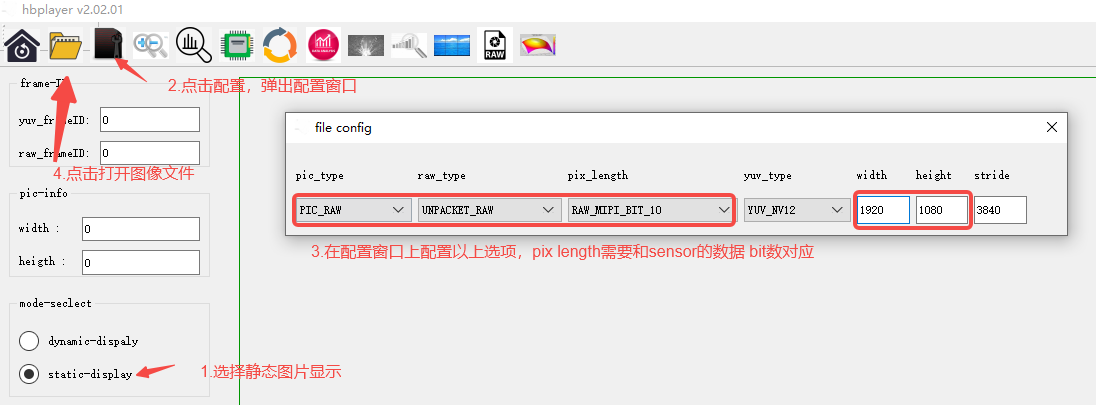
运行效果说明
执行程序
请
浏览 RAW 图
按照
3.2.1.4. 常见问题
1. 显示 No Camera Sensor found
原因
分析: 开发板
实际 连接 camera 型号 和 ./get_vin_data -s时指定 的 camera 不 匹配。 FPC 线缆
接触不良、接口 松动 导致 测试 异常。
解决
方法: 确保
实际 连接 的 camera 和 ./get_vin_data -s时指定 的 camera 匹配。 检查 FPC 线缆
连接,确保 接口 稳定 连接。
3.2.2. time_synchronization
3.2.2.1. 功能概述
time_synchronization ⽤于演⽰ camera 与
camera 的
时间 戳 是 通过 SIF 模块 设置 的,通过 结构 体 hbn_frame_info_t可以拿到 camera的 时间 戳 hbn_frame_info_t中有4个时间 戳,描述 如下:
| 字 |
含义 | 来源 | 受 NTP 影响 |
|---|---|---|---|
timestamps |
SIF frame start 中断 |
ktime_get_raw_ns() |
否 |
sys_timestamps |
SIF frame start 中断 |
ktime_get_real_ns() |
是 |
tv |
SIF frame start 时刻,SIF锁存 |
SIF IPI_TS_VSYNC 寄存器 |
否 |
trig_tv |
LPWM 上升 |
SIF IPI_TS_TRIG 寄存器 |
否 |
时间vin_node_attr.cim_attr.func 的
| 字 |
说明 |
|---|---|
enable_frame_id |
是否frame_id,使能getframe 才能frame_id |
time_stamp_en |
是否trig_tv/tv 才timestamps/sys_timestamps |
time_stamp_mode |
SIF 锁存0x01=VSYNC(锁存 tv)、0x02=TRIGGER(锁存 trig_tv)、0x03=两者 |
ts_src |
触发 SIF 锁存 |
与
其他
传感器 可以 使用 ktime_get_raw_ns 或 ktime_get_real_ns 获取 时间 戳 camera 选择
和 其他 传感器 相同 时间 基准 的 时间 戳 进行 运算
通过 timestamps - (tv - trig_tv) 获取 以 timestamps 为
要点:
timestamps是 从系统启动 计时 的 raw monotonic,不 受 NTP 频率 调整,适合 作为 用户 态 稳定 的 同步 基准。 sys_timestamps是墙上 时间,受 NTP 调整 可能 跳变,不 建议 用作同步 基准,仅 适合 日志/审计 等 跨 设备 对齐 场景。 trig_tv:LPWM 触发脉冲 的 边沿 到达 SIF 时刻 锁存(脉冲 同时 分两路:一路 送 sensor 触发 曝光,一路 送 SIF 做 时间 戳 锁存, trig_tv标记的 是 后者 到达 SIF 的 时刻,不 等于 sensor 实际 开始 曝光 的 时刻)。 tv:MIPI VSYNC(帧起始信号)边沿 到达 SIF 时刻 锁存,SIF frame start 中断 再 从 寄存器 读出。 两者
均 由 AON RTC(Always-On 域 硬件 计数器,24M 晶振 驱动)在 信号 边沿 硬件 锁 存进 寄存器;frame start 中断 里 软件 从 寄存器 读出 原始 tick,再 按 timestamp_clk转换为 tv_sec/tv_usec(精度 1 us)填入 buffer。不受 NTP 影响。 tv - trig_tv即”LPWM 触发脉冲 到达”到”MIPI 帧 起始信号 到达”的 固有 时延(含 sensor 曝光+读出+MIPI 传输)。
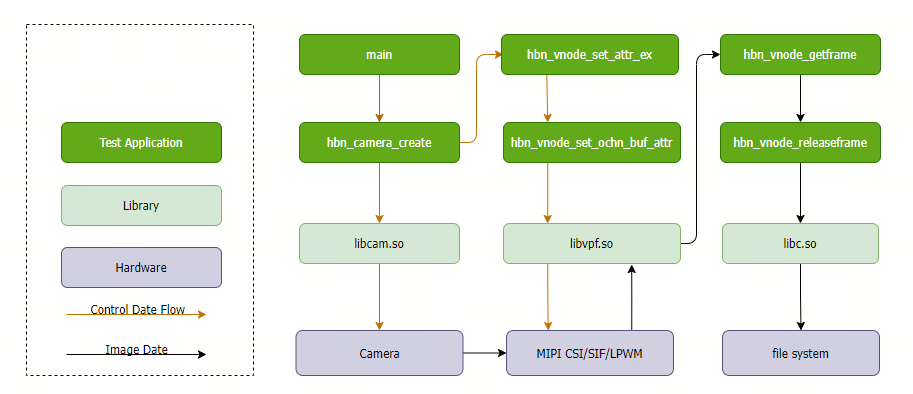
软件架构说明
代码位置及目录结构
代码
位置: app/samples/platform_samples/sample_vin/time_synchronization目录
结构
app/samples/platform_samples/sample_vin/time_synchronization/
└── time_synchronization
    ├── Makefile
    ├── time_synchronization.c
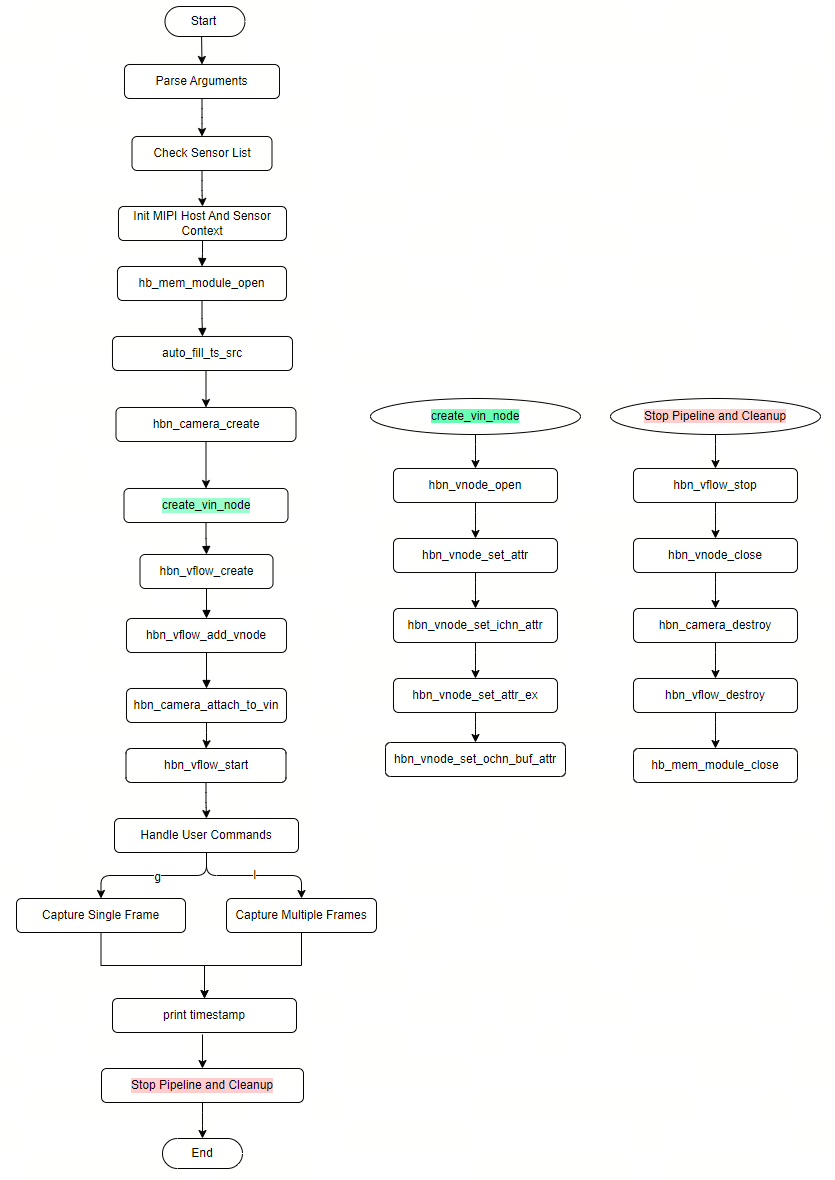
API 流程说明
time_synchronization 基于 VIN pipeline 实现,主要
解析
命令行 参数,校验 sensor 模式(支持 -m指定 master/slave,未指定时用 sensor 配置 默认 模式)。 auto_fill_ts_src从设备树 读取 lpwm_chn,设置ts_src/time_stamp_en/time_stamp_mode(SLAVE 模式锁存 tv+trig_tv,非 SLAVE 仅锁存 tv)。 创建 VIN pipeline(
hbn_camera_create/hbn_vnode_*/hbn_vflow_*),SLAVE 模式开启 LPWM。 hbn_vnode_getframe()取一帧,读取 四个 时间 戳。 打印
四个 时间 戳值、时钟 域 说明 与 曝光→mipi 时延( tv - trig_tv)。hbn_vnode_releaseframe()释放帧;退出 时 释放 VIN 资源。
3.2.2.2. 编译部署
编译
进入
time_synchronization目录,执行make编译输出
产物 是 源码 目录 下 的 time_synchronization详细
程序 编译 方式 请 查阅 编译 方法 章节
程序部署
刷写/app/platform_samples/sample_vin/time_synchronization。
sensor 索引-h 参数sc230ai-10fps 对应
3.2.2.3. 运行
程序运行方法
./time_synchronization -s 2 -m s
程序g 抓单l 连续q 退出、h 显示
程序参数选项说明
./time_synchronization [-s <index> -m <m|s>] [-h]
-s <index>(必填):sensor 索引,通过-h查看可 选 列表 m <m|s>(选填): sensor 模式-h:显示帮助
交互
| 命令 | 说明 |
|---|---|
g |
抓取 |
l |
连续 |
q |
退出 |
h |
显示 |
运行效果
Sensor index=2  name=sc230ai-10fps  config=linear_1920x1080_raw10_10fps_1lane.c
[INFO] RDK board_id is 0x0503, so skip csi test for index 1 and index 3
mipi mclk is not configed.
Searching camera sensor on device: /proc/device-tree/soc/cam/vcon@0 i2c bus: 6 mipi rx phy: 0
INFO: Found sensor_name:sc230ai-10fps on mipi rx csi 0, i2c addr 0x30, config_file:linear_1920x1080_raw10_10fps_1lane.c
Sensor mode: SLAVE_M
vcon@0: lpwm_chn=4 -> ts_src=5, time_stamp_en=1, mode=0x03
csi0: no mclk configured, skip mclk attr.

***************  Command Lists  ***************
 g  -- grab one frame and print four timestamps
 l  -- grab 12 frames and print timestamps
 q  -- quit
 h  -- this help

Command: g
frame_id=0       1920x1080 stride=3840
  timestamps       = 336060994951 ns  (raw monotonic, ktime_get_raw_ns; NOT NTP-adjusted)
  sys_timestamps    = 946705156915582076 ns  (realtime, ktime_get_real_ns; wall clock, NTP-adjusted)
  trig_tv           = 342.216467 s  -> 342216467000 ns  (AON RTC, exposure trigger)
  tv                = 342.216618 s  -> 342216618000 ns  (AON RTC, frame start)
  exposure->mipi duration (tv - trig_tv)    = +151000 ns = +151.000 us
......
字
timestamps:SIF frame start 中断时 的 raw monotonic 时间 戳(ns),从 系统启动 计时,不 受 NTP 调整 sys_timestamps:SIF frame start 中断时 的 realtime 时间 戳(ns),墙上 时间,受 NTP 调整 可能 跳变 trig_tv:LPWM 触发脉冲 到达 SIF 时刻 锁存 的 AON RTC 硬件 时间 戳(ns) tv:MIPI VSYNC(帧起始信号)到达 SIF 时刻 锁存 的 AON RTC 硬件 时间 戳(ns) exposure->mipi duration (tv - trig_tv): 即”LPWM 触发脉冲 到达”到”MIPI 帧 起始信号 到达”的 固有 时延(含 sensor 曝光+读出+MIPI 传输)
3.2.2.4. 常见问题
1. trig_tv 为零
确认
time_stamp_en=1且time_stamp_mode含对应 位( 0x02锁存 trig_tv、0x01锁存 tv、0x03两者都 锁存)。 确认
ts_src与硬件 触发 曝光 的 LPWM 通道 一致(示例 自动 从 设备树 lpwm_chn推导,若为 0 说明 设备树 未 配置)。 确认 sensor 处于 SLAVE 模式(master 模式
无 LPWM 触发, trig_tv恒为 0)。