3.7. sample_codec 使用说明
3.7.1. 功能概述
sample_codec 是codec_config.ini)中
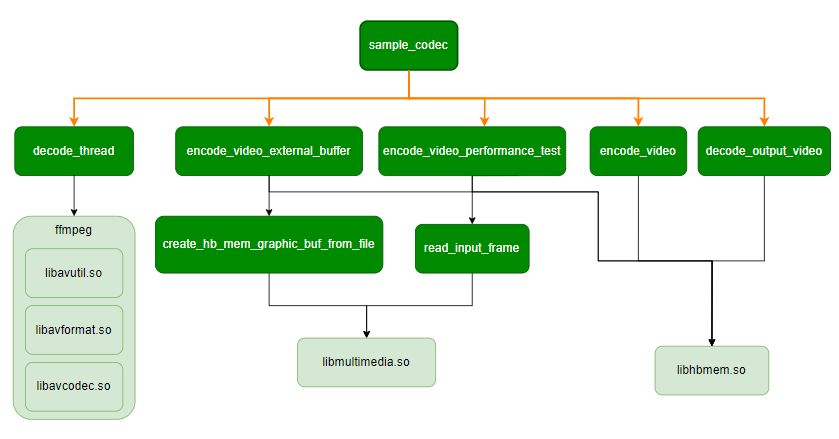
3.7.1.1. 软件架构说明
3.7.1.2. 数据流说明
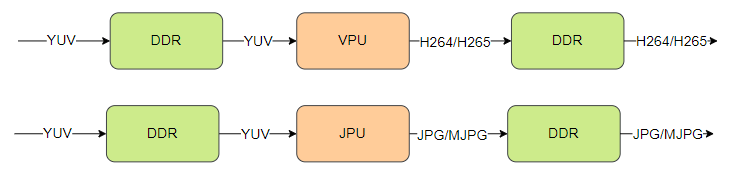
编码数据流
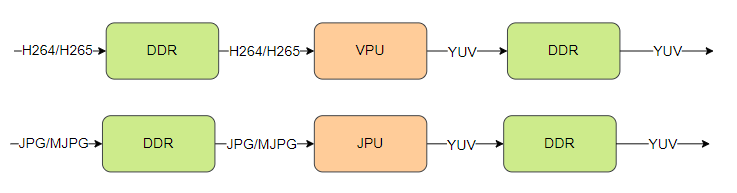
解码数据流
3.7.1.3. 代码位置及目录结构
代码
位置 app/samples/platform_samples/sample_codec目录
结构
sample_codec/
├── 1280x720_NV12.yuv
├── 1920x1080_NV12.yuv
├── 640x480_30fps.h264
├── codec_config.ini
├── Makefile
├── Readme.md
├── sample_codec.c
└── sample_codec.h
3.7.1.4. API 流程说明
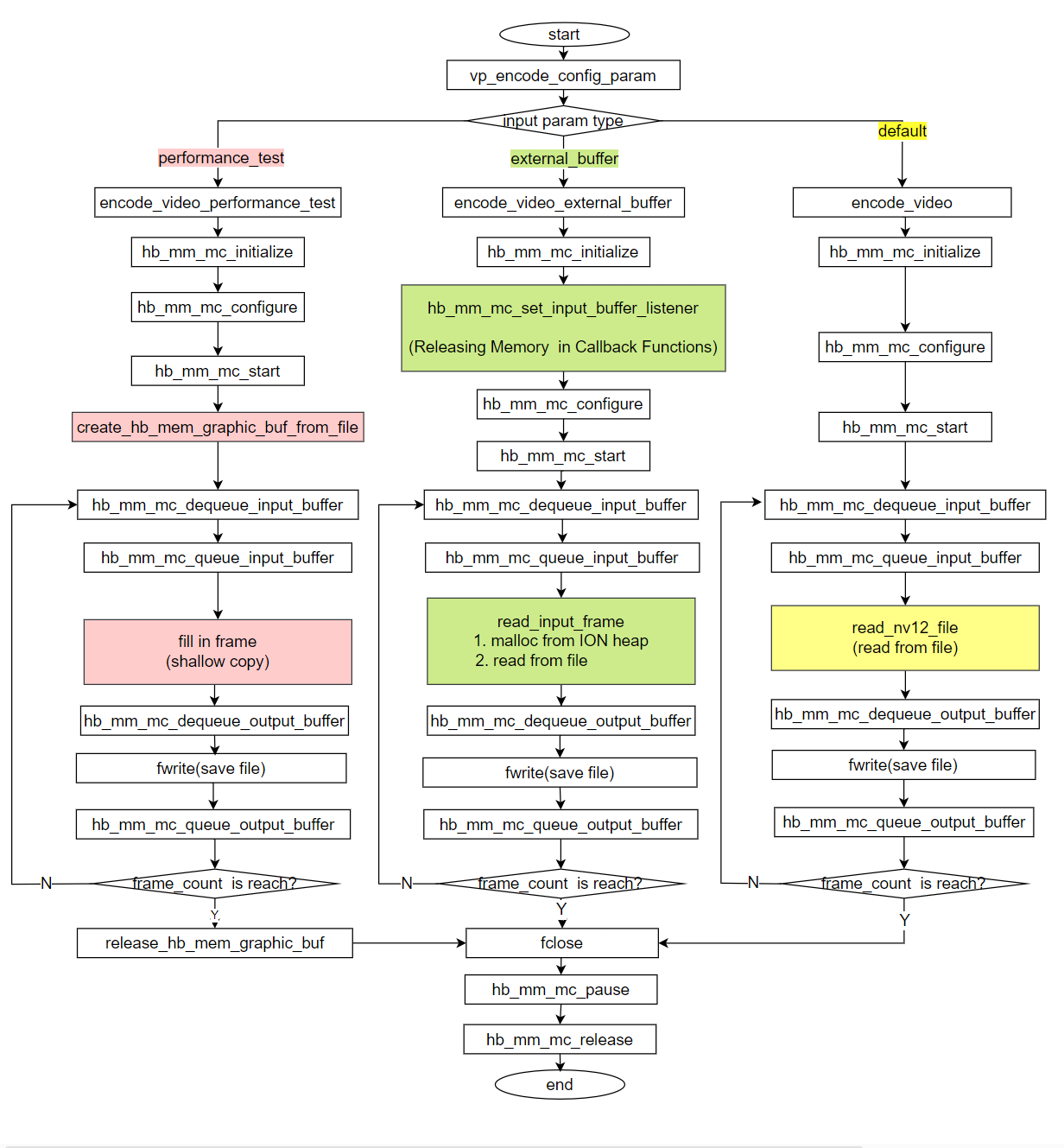
编码流程
根据
| 情况 |
特点 | 不同点,在 |
|---|---|---|
| 性能 |
提前 |
红色 |
| 输入 |
1. 读取 2. 通过 |
绿色 |
| 输入 |
使用 MediaCodec 框架 |
黄色 |
解码流程
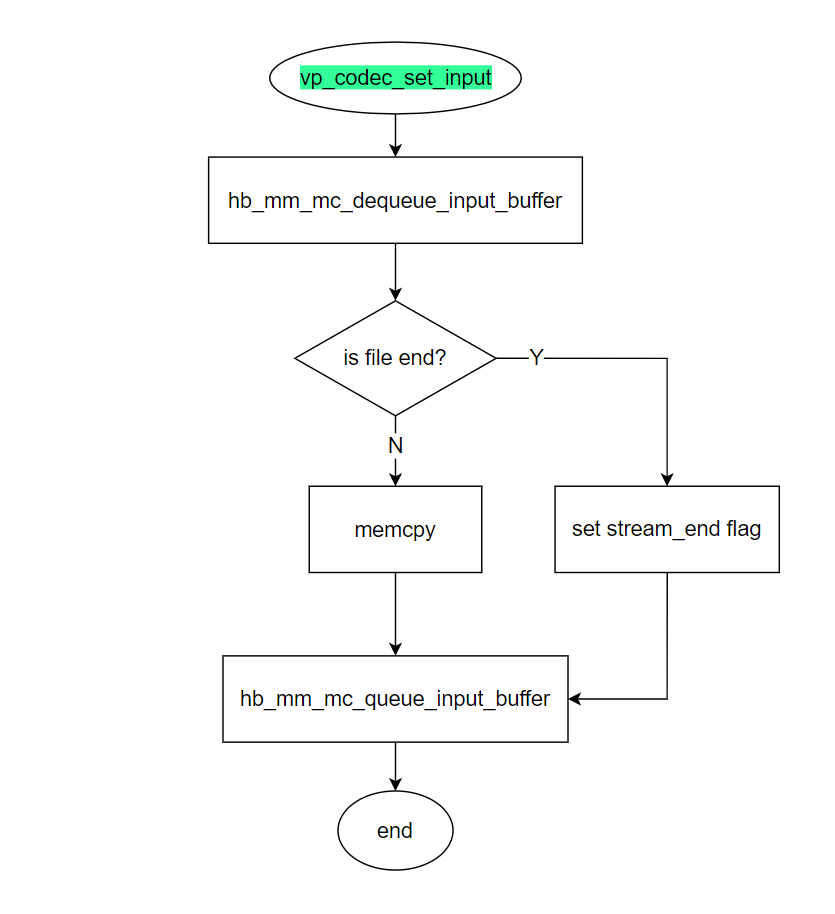
编码文件读取线程
编码
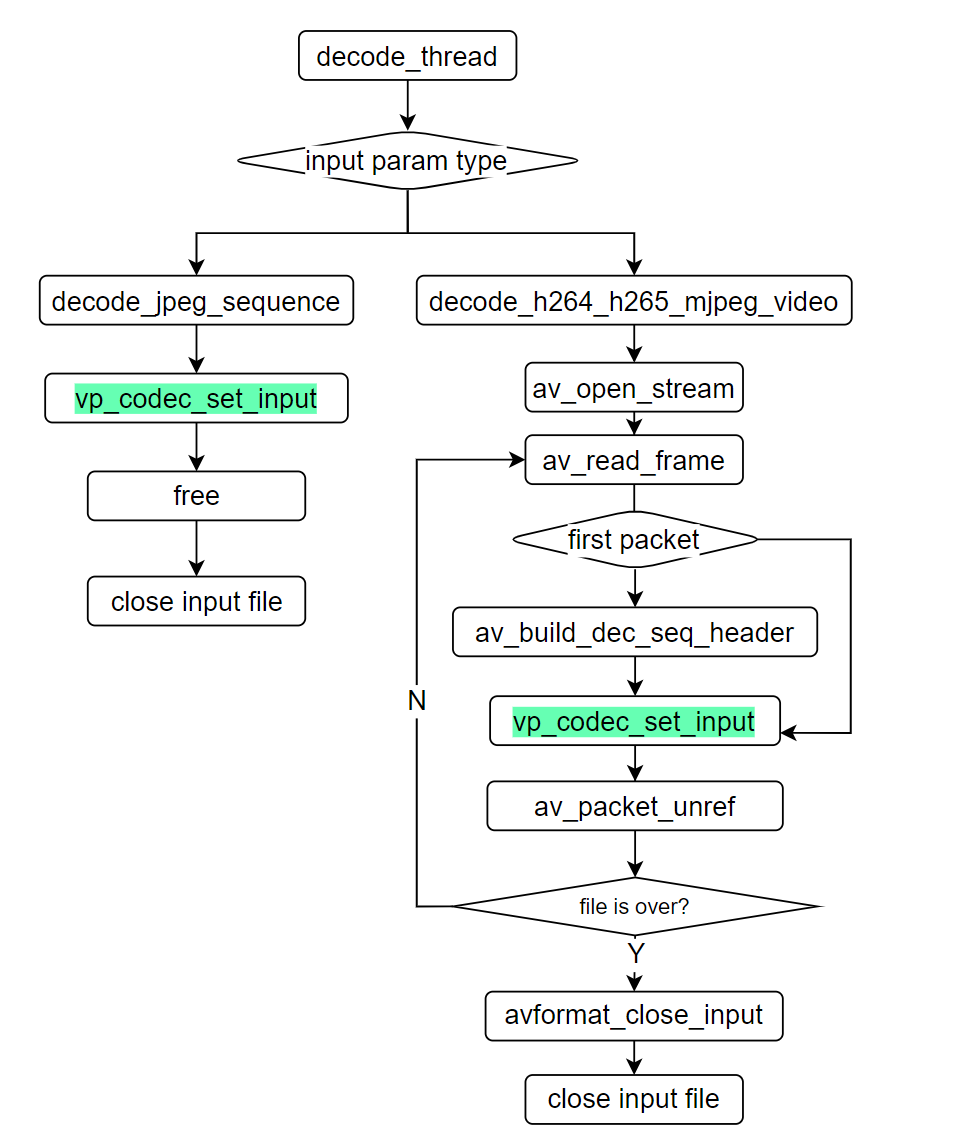
编码vp_codec_set_input( 文字
硬件解码线程
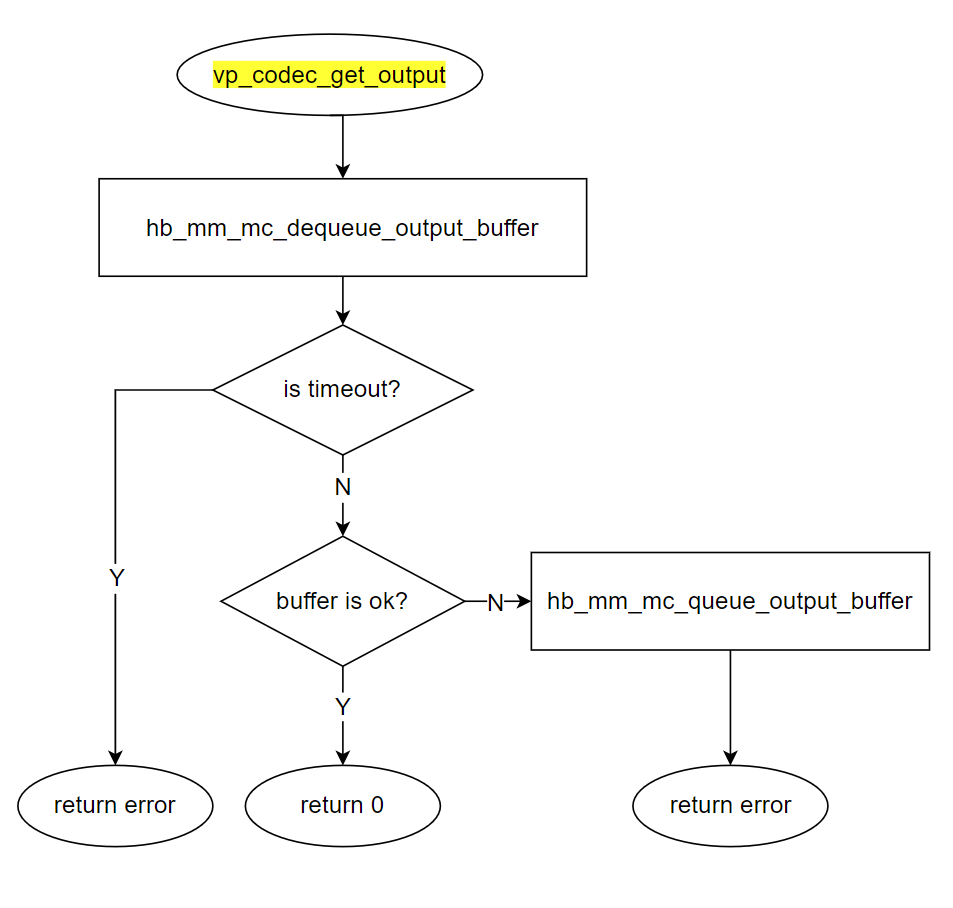
硬件
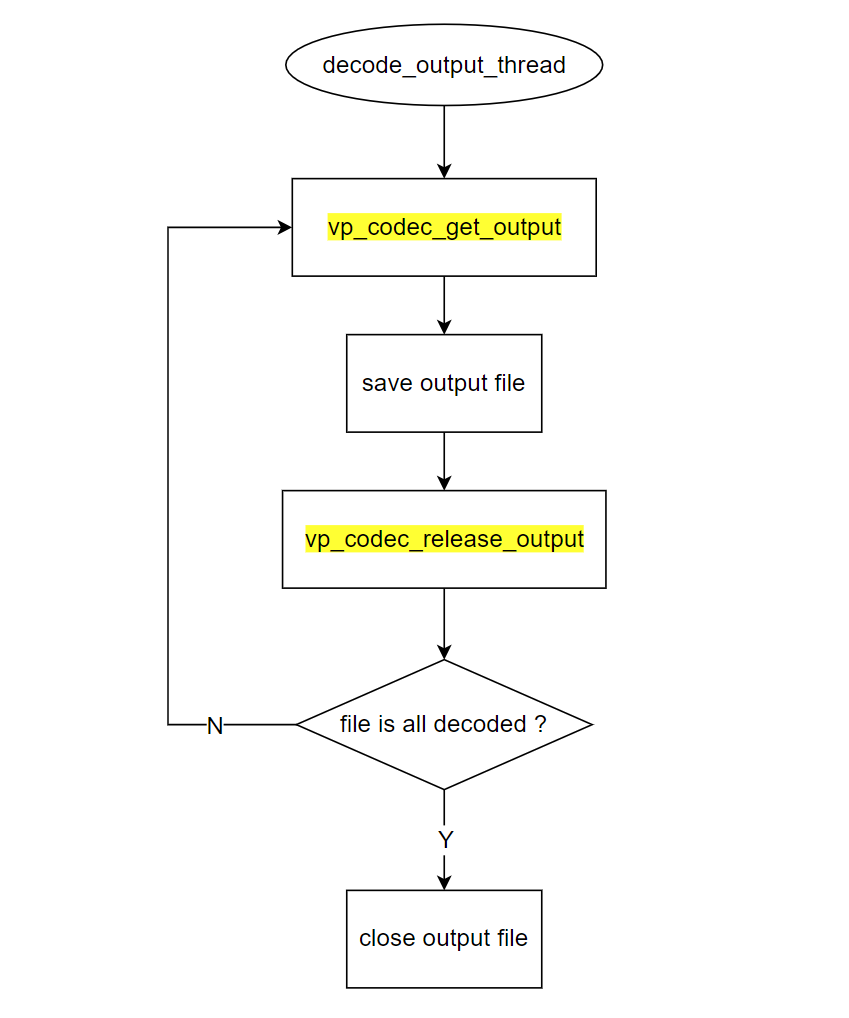
硬件vp_codec_get_output( 文字
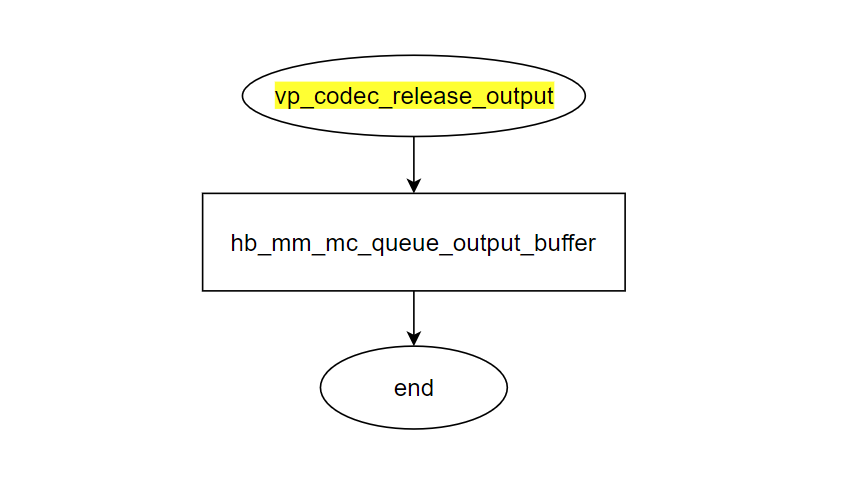
硬件vp_codec_release_output( 文字
3.7.2. 编译部署
3.7.2.1. 编译
进入 sample_codec 目录,执行
make编译输出
成果 物是 sample_codec 源码 目录 下 的 sample_codec详细
程序 编译 方式 请 查阅 编译 方法 章节
3.7.2.2. 程序部署
把 sample_codec/sample_codec 、codec_config.ini 和1920x1080.yuv、 *.264、*.265 等)上chmod +x sample_codec 命令
提示: 在1280x720_NV12.yuv,1920x1080_NV12.yuv 和 640x480_30fps.h264 资源codec_config.ini 的
3.7.3. 运行
3.7.3.1. 程序运行方法
执行程序 ./sample_codec -h 可以
3.7.3.2. 程序参数选项说明
./sample_codec -h
Usage: sample_codec -f config_file [-e encode_option] [-d decode_option] [-v] [-h]
Options:
  -f, --config_file FILE     Set the configuration file
  -e, --encode [OPTION]      Set the encoding option (optional), override encode_streams option
  -d, --decode [OPTION]      Set the decoding option (optional), override decode_streams option
  -v, --verbose              Enable verbose mode
  -h, --help                 Print this help message

Examples:
  Start codec video with codec_config.ini:
    sample_codec

  Start the specified encoding stream in codec_config.ini:
    sample_codec -e 0x1  -- Start the venc_stream1
    sample_codec -e 0x3  -- Start the venc_stream1 and venc_stream2

  Start the specified decoding stream in codec_config.ini:
    sample_codec -d 0x1  -- Start the vdec_stream1
    sample_codec -d 0x3  -- Start the vdec_stream1 and vdec_stream2

  Enable verbose mode for detailed logging:
    sample_codec -v

  Display this help message:
    sample_codec -h
选项:
-f, –config_file FILE:指定
配置文件 的 路径(可 选),默认值 为 codec_config.ini。-e, –encode [OPTION]:设置
编码 选项(可 选)。如果 使用 此 选项,则 会 覆盖 配置文件 中 的 encode_streams选项。-d, –decode [OPTION]:设置
解码 选项(可 选)。如果 使用 此 选项,则 会 覆盖 配置文件 中 的 decode_streams选项。-v, –verbose:启用
详细 模式,显示 更 多 日志 信息。 -h, –help:显示
帮助 信息。
使用示例
默认
使用 codec_config.ini中的 配置 项 启动 编解码(默认 使能 一路 H264 编码: encode_streams = 0x1),执行程序时 不 需要 带 任何 参数:
./sample_codec
启动
指定 的 编码 流(在 codec_config.ini中定义):
./sample_codec -e 0x1  # 启动 venc_stream1
./sample_codec -e 0x3  # 启动 venc_stream1 和 venc_stream2
启动
指定 的 解码 流(在 codec_config.ini中定义):
./sample_codec -e 0 -d 0x1 # 关闭编码,启动 vdec_stream1
./sample_codec -e 0 -d 0x3  # 关闭编码,启动 vdec_stream1 和 vdec_stream2
启用
详细 模式 以 获取 更 多 日志 信息:
./sample_codec -v
显示
帮助 信息:
./sample_codec -h
3.7.3.3. 配置文件说明
在 codec_config.ini 配置
其中
[encode]
; 启用编码 , 按位运算
; 0x0 表示不启用编码
; 0x01 表示只启用 venc_stream1 编码流
; 0x02 表示只启用 venc_stream2 编码流
; 0x03 表示只启用前两路编码流( venc_stream1 和 venc_stream2 ), 0x07 表示启用前三路编码流 , 0x0f 表示启用前三路编码流,以此类推
encode_streams = 0x1

[venc_stream1]
; 编码类型( 0 : H264 , 1 : H265 , 2 : MJPEG, 3 : JPEG)
codec_type = 0
width = 1920
height = 1080
frame_rate = 30
bit_rate = 8192
input = 1920x1080.yuv
output = 1920x1080_30fps.264
frame_num = 100
; buffer 使用类型 ( 未定义 /0: 内部 buffer, 1: 外部 buffer)
external_buffer = 1
; profile, level, tier 配置
; h264 支持常见 baseline/main/high Profiles Level @ L5.2 ( 即最大 high@L5.2)
; h265 支持常见 main/main still picture profile @ L5.1 High Tier
; 详细可参考代码 ...
profile = h264_main@L4

[decode]
; 启用解码,按位运算
; 0x0 表示不启用解码
; 0x01 表示只启用 vdec_stream1 解码流
; 0x02 表示只启用 vdec_stream2 解码流
; 0x03 表示只启用前两路解码流( vdec_stream1 和 vdec_stream2 ), 0x07 表示启用前三路解码流 , 0x0f 表示启动前四路解码流,以此类推
decode_streams = 0x0

[vdec_stream1]
; 编码类型( 0 : H264 , 1 : H265 , 2 : MJPEG, 3 : JPEG)
codec_type = 0
width = 1920
height = 1080
input = 1920x1080_30fps.264
output = 1920x1080.yuv
编码配置
[encode]
encode_streams:此
选项 用于 指定 要 启用 的 编码 流。采用 按位 运算 的 方式 表示。例如, 0x1表示只 启用 venc_stream1编码流, 0x3表示启用 前 两路 编码 流( venc_stream1和venc_stream2)。本选项 的 值会 被 命令行 参数 -e 所 覆盖
[venc_stream]
codec_type:指定
编码 的 类型,可选值 为 0( H264 )、1( H265 )、2( MJPEG)和3( JPEG)。width:视频
帧 的 宽度。 height:视频
帧 的 高度。 frame_rate:视频
的 帧 率。 bit_rate:视频
的 比特率。 input: 输入
图像文件,仅 支持 NV12 格式 的 yuv 图像。一个 文件 中 可以 连续 存放 多 帧 图像,编码 时会 顺序、循环 读取 每 一帧 图像。 output: 输出
编码 后 的 视频文件。 frame_num: 要
编码 的 视频 帧 数。如果 输入 图像文件 中 的 图像 帧 数 少于 本 参数 的 值,编码 时会 循环 读取 图像文件,直到 达到 或 超过 frame_num 指定 的 帧 数。 external_buffer:输入 buffer 的
类型 ( 0: 内部 buffer, 1: 外部 buffer)。 lossless_mode: 0表示
关闭 无损 模式,1表示 开启 无损 模式(只有H265支持) profile: profile, level, tier 配置。
h264 支持 baseline/main/high Profiles Level @ L5.2 ( 即
最大 high@L5.2)。 h265 支持 main/main still picture profile @ L5.1 High Tier。
解码配置
[decode]
decode_streams:此
部分 用于 指定 要 启用 的 解码 流。采用 按位 运算 的 方式 表示。例如, 0x1表示只 启用 vdec_stream1解码流, 0x3表示启用 前 两路 解码 流( vdec_stream1和vdec_stream2)。
[vdec_stream]
codec_type:指定
解码 的 视频 编码 类型,可选值 为 0( H264 )、1( H265 )、2( MJPEG)和3( JPEG)。width:解码
后 视频 帧 的 宽度。 height:解码
后 视频 帧 的 高度。 input:输入
待 解码 的 视频文件 路径,根据 codec_type的设置,可以 使用 码流 文件 和 rtsp 码流。 output:输出
解码 后 的 图像文件 路径,仅 支持 输出 NV12 格式 的 yuv 图像。解码 后 的 图像 会 连续 保存 到 一个 文件 中,因此 请 确保 输出 路径 有 足够 的 磁盘空间。请 注意, YUV 图像 通常 占用 较大 的 磁盘空间,特别 是 对于 高分辨率 和 长 时 长 的 视频文件,可能 会 占用 大量 存储空间。在 选择 输出 路径 时,请 确保 目标 存储设备 有 足够 的 可用 空间。
3.7.3.4. 运行效果
以
./sample_codec
Config file: codec_config.ini
encode_streams: 0x1
decode_streams: 0x0
Encoding video...
Encode params...
 codec_type: 0, width: 1920, height: 1080, frame_rate: 30, bit_rate: 8192, input_file: 1920x1080_NV12.yuv, output_file: 1920x1080_30fps.h264, frame_num: 100
Encode idx: 0, init successful
Encode idx: 0, start successful
Encode idx: 0, frame= 1
Encode idx: 0, frame= 2
Encode idx: 0, frame= 3
... ...
Encode idx: 0, frame= 98
Encode idx: 0, frame= 99
Encode idx: 0, frame= 100
根据 codec_config.ini 中frame_num = 100 ,编码 100 帧