RTC 调试指南
RTC 概述
Linux RTC(Real-Time Clock)实时时钟驱动子系统是内核中管理硬件实时时钟设备的标准化框架,其核心功能在于实现系统在完全断电状态下仍能维持精准的时基同步。Linux 内核提供了一个通用的 RTC 框架,能够支持多种 RTC 芯片,包括通过 I²C、SPI 等总线进行通信的设备。
在 S100 芯片中,内置了一个 RTC 模块,该模块是可配置高精度计数器,能够为系统提供稳定的时间基准。此外,S100 还外置了一个 YSN8130E 模块,该模块支持外部电池供电,从而在系统断电时仍能保持时间的连续性。
在 S600 芯片中,内置了一个 RTC 模块,该模块是可配置高精度计数器,能够为系统提供稳定的时间基准。此外,S600 还外置了一个 YSN8130E 模块,该模块支持外部电池供电,从而在系统断电时仍能保持时间的连续性。
RTC 特点
时间与日期记录
RTC 最基本的功能是提供精确的时间和日期。它通常以秒为单位,从某个特定的时间点开始计数。RTC 可以提供以下时间信息:
- 当前时间(小时、分钟、秒)
- 当前日期(年、月、日)
- 星期信息
闹钟与中断
许多 RTC 设备支持设置一个或多个闹钟。闹钟功能允许用户设置一个特定的时间,当 RTC 达到该时间时,可以触发一个中断,如唤醒系统、发送信号或执行特定的操作。
周期性唤醒
RTC 可以配置为在特定的时间间隔触发中断,这种功能常用于定时任务调度,如每小时或每天执行一次的维护任务。
时间更新
RTC 允许用户更新当前时间,这对于在系统启动时同步时间或手动校正时间非常有用。Linux 提供了多种工具(如 hwclock)来设置和读取 RTC 时间。
低功耗模式
为了延长电池寿命,RTC 通常支持低功耗模式。在这种模式下,RTC 继续跟踪时间,但消耗的电力非常少。
硬件接口
Linux RTC 框架支持多种硬件接口,包括 I²C、SPI、GPIO 等,这使得它可以与各种 RTC 芯片兼容,如 DS1307、DS3231、YSN8130等。
RTC 功能原理
RTC 通过精确的晶振(通常采用 32.768 kHz 石英晶振)信号来持续计算时间,并将该信息以标准格式(如年、月、日、时、分、秒)存储在内部寄存器中。它依靠备用电池在主电源关闭时继续运行,确保时间的连续性,并通过与主控芯片的通信接口进行时间的读取和设置。其主要功能包括精确计时、日期维护和闹钟触发。
以下是 RTC 的工作原理简述:
-
时间计数器:
- RTC 内部集成有一个计时电路,通常由一个高精度晶振提供时钟信号。常见的晶振频率为32.768 kHz,它的频率非常稳定,适合用于长时间的时间计量。
- RTC 的计时电路通过晶振生成稳定的时钟信号,通常是秒脉冲(1Hz),然后将其累加。每秒钟,RTC 会增加计数,直到形成分钟、小时、日期等。
-
日期和时间的维护:
- RTC 将累加的秒、分钟、小时、日期等信息存储在内部的寄存器中。这些寄存器可以通过系统与 RTC 通信来读取和设置当前时间或闹钟。
- 一些 RTC 还具有存储年份、月份和星期几等信息。
-
备用电池:
- 为了在主系统断电时保持时间,RTC 通常配有一个备用电池。当主电源断开时,备用电池为 RTC 提供电力,确保其内部时钟仍然继续工作,而不会丢失时间信息。
- 在这种情况下,RTC 会继续运行,但主控芯片可能处于低功耗或关闭状态。
-
闹钟功能:
- RTC 模块通常内置闹钟功能,允许设置特定的时间点,当计时达到设置的时间时,RTC 会触发一个中断信号或发出警告。
- 主控芯片可以根据这个中断信号执行相应的操作,如唤醒系统、启动某个任务等。
RTC 在 S100 上的应用
RTC 在 S600 上的应用
RTC 时间保持
Linux 的系统时间在系统关机时间就会丢失,而 RTC 可以在系统关闭后,依靠外部电池继续工作,这样就能将时间保存下来,待系统下次启动时候就可以从 RTC 中恢复时间。其流程如下所示:
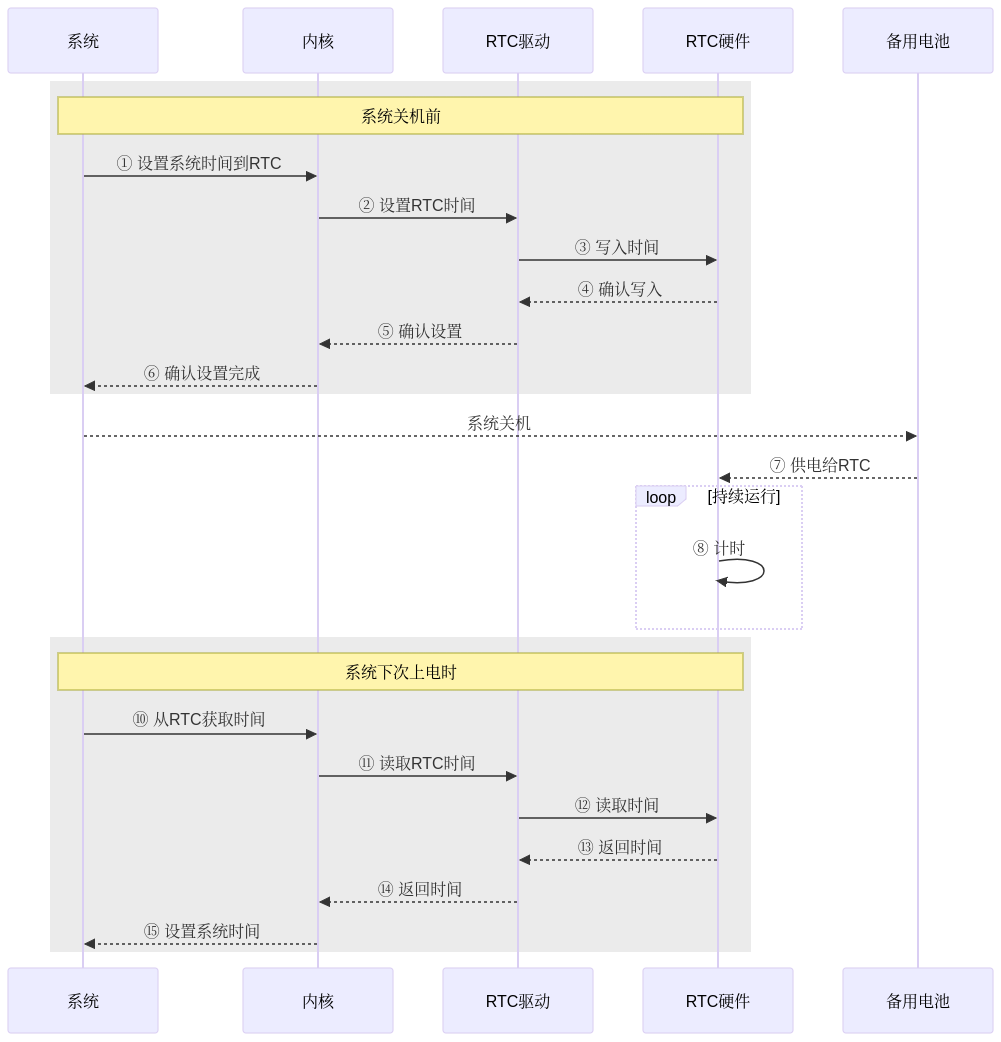
流程详细说明如下:
-
系统关闭时:
- 系统在关闭前将当前的系统时间设置到 RTC 中。
- 内核通过 RTC 驱动将时间写入 RTC 硬件。
- RTC 硬件确认时间写入成功。
- RTC 驱动将确认信息返回给内核。
- 内核将确认信息返回给系统。
-
系统关闭后:
- 系统关闭后,备用电池开始供电给 RTC 硬件。
- RTC 硬件在备用电池供电下继续运行,持续计时。
-
系统下次上电时:
- 系统重新上电后,通过内核从 RTC 硬件获取时间。
- 内核通过 RTC 驱动读取 RTC 硬件中的时间。
- RTC 硬件返回当前时间给 RTC 驱动。
- RTC 驱动将时间返回给内核。
- 内核将时间设置为系统时间。
RTC 定时任务
RTC 的典型应用是通过 RTC 定时执行任务,该功能仅 YSN8130 支持,其流程如下所示:
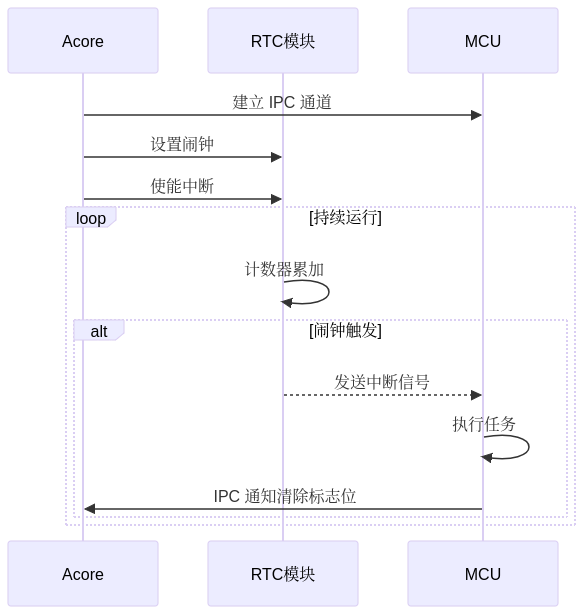
S100 芯片上 RTC 定时任务流程说明如下:
S600 芯片上 RTC 定时任务流程说明如下:
- 初始化阶段: 主控芯片首先与 RTC 模块进行初始化,设置当前时间和闹钟(定时提醒)。其次是建立和 MCU 之间的 IPC 通信,因为 RTC 模块的中断引脚是接在 MCU 上的。
- 持续运行阶段(Loop): RTC 模块进入一个循环模式,持续地进行计时(计数器累加)。该过程是低功耗的,RTC 模块会定期更新其内部计数器。
- 闹钟触发事件: 在特定时间点,RTC 模块的闹钟触发条件被满足时,RTC 模块向 MCU 发送中断信号。MCU 接收到中断信号后,会处理特定任务或执行特定功能。
- 清除标志位:
在执行完任务之后,MCU 通过 IPC 通道通知 Acore,随后 Acore 再通过写寄存器的方式清除相关的中断标志位。
RTC 驱动代码
RTC 模块的驱动代码位于 /hobot-drivers/rtc。
Linux RTC 驱动框架
在 Linux 中,RTC 设备驱动是一个标准的字符设备驱动,Linux 的 RTC 驱动框架可以抽象为以下几个主要部分:
- 用户空间位于最顶层,包含用户工具和内核空间的接口。
- 内核空间位于中间层,分为三个部分:
- 接口层:与用户空间直接交互。
- RTC Core:管理 RTC 设备的核心模块。
- RTC 驱动层:与硬件层直接交互。
- 硬件层位于最底层,表示具体的 RTC 硬件设备。
Linux RTC 驱动框架如下图所示:

下面对各层分别进行介绍。
RTC 用户空间(User Space):
用户空间与 RTC 设备进行交互,主要通过以下几种方式:
- 用户工具:
hwclock:硬件时钟操作工具。date:系统时间操作工具。- 测试工具:如
rtctest.c,用于测试 RTC 驱动的ioctl接口。
- 字符设备接口:
/dev/rtcN:字符设备节点,支持open、read、write和ioctl操作。
- sysfs 接口:
/sys/class/rtc/rtcN:提供只读属性,如时间、闹钟等,允许用户空间访问 RTC 设备的某些属性。
- procfs 接口:
/proc/driver/rtc:提供系统时钟 RTC 的信息,如果系统没有专用的 RTC,则默认使用rtc0。
RTC 内核空间(Kernel Space):
内核空间的各个模块负责 RTC 驱动的管理、设备注册、与用户空间的交互等:
- 接口层(Interface Layer):
- 管理字符设备接口。
- 管理 sysfs 和 procfs 属性。
- RTC Core(核心层):
- 设备管理:
- 设备注册与注销:通过
register和unregister函数进行 RTC 设备的注册和注销。 - 字符设备抽象:通过
dev.c将 RTC 设备抽象为通用的字符设备,提供文件操作函数。 - sysfs 和 procfs 管理:通过
sysfs.c和proc.c管理 RTC 设备的 sysfs 和 procfs 属性。
- 设备注册与注销:通过
- 时间转换:通过
lib.c提供 RTC 时间与系统时间之间的转换。
- 设备管理:
- RTC 驱动层(Driver Layer):
- 硬件抽象:
- 操作函数集:通过
rtc_class_ops结构体定义的函数集,提供对 RTC 硬件的底层操作,如读取时间、设置时间、读取和设置闹钟等。 - 硬件初始化:初始化 RTC 硬件,配置时钟源、中断等。
- 中断处理:处理 RTC 产生的中断,如闹钟中断和周期性中断。
- 操作函数集:通过
- 硬件抽象:
- 数据结构:
struct rtc_device:描述 RTC 设备。struct rtc_class_ops:定义底层操作函数。
RTC 硬件层(Hardware Layer):
- RTC 硬件:
- 硬件时钟芯片(如 YSN8130)
- 晶振
- 外部电池
RTC 驱动代码说明
本节将主要说明 RTC 子系统代码的以下三个部分:
- rtc driver Layer:将 RTC 设备注册到 RTC 子系统,并提供针对 RTC 设备的底层操作函数集。
- rtc core:负责 RTC 设备的注册与注销,向用户空间提供 RTC 字符设备文件,并实现 RTC 类的 sysfs 等接口。
- 用户空间接口:包括
ioctl在内的接口。
RTC driver Layer 代码说明
RTC 驱动层的代码主要负责直接操作 RTC 模块,在 Linux 系统中,内核将 RTC 设备抽象为 rtc_device结构体,RTC 驱动层的主要工作是申请并初始化 rtc_device。
Linux 内核中 RTC 设备抽象如下:
// kernel/include/linux/rtc.h
struct rtc_device {
	struct device dev;
	struct module *owner;

	int id;

	const struct rtc_class_ops *ops;
	struct mutex ops_lock;

	struct cdev char_dev;
	unsigned long flags;

	unsigned long irq_data;
	spinlock_t irq_lock;
	wait_queue_head_t irq_queue;
	struct fasync_struct *async_queue;

	int irq_freq;
	int max_user_freq;

	struct timerqueue_head timerqueue;
	struct rtc_timer aie_timer;
	struct rtc_timer uie_rtctimer;
	struct hrtimer pie_timer; /* sub second exp, so needs hrtimer */
	int pie_enabled;
	struct work_struct irqwork;

	/*
	 * This offset specifies the update timing of the RTC.
	 *
	 * tsched     t1 write(t2.tv_sec - 1sec))  t2 RTC increments seconds
	 *
	 * The offset defines how tsched is computed so that the write to
	 * the RTC (t2.tv_sec - 1sec) is correct versus the time required
	 * for the transport of the write and the time which the RTC needs
	 * to increment seconds the first time after the write (t2).
	 *
	 * For direct accessible RTCs tsched ~= t1 because the write time
	 * is negligible. For RTCs behind slow busses the transport time is
	 * significant and has to be taken into account.
	 *
	 * The time between the write (t1) and the first increment after
	 * the write (t2) is RTC specific. For a MC146818 RTC it's 500ms,
	 * for many others it's exactly 1 second. Consult the datasheet.
	 *
	 * The value of this offset is also used to calculate the to be
	 * written value (t2.tv_sec - 1sec) at tsched.
	 *
	 * The default value for this is NSEC_PER_SEC + 10 msec default
	 * transport time. The offset can be adjusted by drivers so the
	 * calculation for the to be written value at tsched becomes
	 * correct:
	 *
	 *	newval = tsched + set_offset_nsec - NSEC_PER_SEC
	 * and  (tsched + set_offset_nsec) % NSEC_PER_SEC == 0
	 */
	unsigned long set_offset_nsec;

	unsigned long features[BITS_TO_LONGS(RTC_FEATURE_CNT)];

	time64_t range_min;
	timeu64_t range_max;
	time64_t start_secs;
	time64_t offset_secs;
	bool set_start_time;

#ifdef CONFIG_RTC_INTF_DEV_UIE_EMUL
	struct work_struct uie_task;
	struct timer_list uie_timer;
	/* Those fields are protected by rtc->irq_lock */
	unsigned int oldsecs;
	unsigned int uie_irq_active:1;
	unsigned int stop_uie_polling:1;
	unsigned int uie_task_active:1;
	unsigned int uie_timer_active:1;
#endif
};
RTC 硬件层驱动依赖于一系列 ops函数来操作 RTC 模块,内核已经提供了这些函数的统一接口。这些接口在上述 rtc_device结构体中的 struct rtc_class_ops *ops成员变量中,rtc_class_ops是 RTC 设备的最底层操作函数集合,包括读取 RTC 设备时间、设置 RTC 设备时间等操作:
// kernel/include/linux/rtc.h
/*
 * For these RTC methods the device parameter is the physical device
 * on whatever bus holds the hardware (I2C, Platform, SPI, etc), which
 * was passed to rtc_device_register().  Its driver_data normally holds
 * device state, including the rtc_device pointer for the RTC.
 *
 * Most of these methods are called with rtc_device.ops_lock held,
 * through the rtc_*(struct rtc_device *, ...) calls.
 *
 * The (current) exceptions are mostly filesystem hooks:
 *   - the proc() hook for procfs
 */
struct rtc_class_ops {
	int (*ioctl)(struct device *, unsigned int, unsigned long);
	int (*read_time)(struct device *, struct rtc_time *);
	int (*set_time)(struct device *, struct rtc_time *);
	int (*read_alarm)(struct device *, struct rtc_wkalrm *);
	int (*set_alarm)(struct device *, struct rtc_wkalrm *);
	int (*proc)(struct device *, struct seq_file *);
	int (*alarm_irq_enable)(struct device *, unsigned int enabled);
	int (*read_offset)(struct device *, long *offset);
	int (*set_offset)(struct device *, long offset);
	int (*param_get)(struct device *, struct rtc_param *param);
	int (*param_set)(struct device *, struct rtc_param *param);
};
通过函数名,我们可以清晰地理解每个函数的功能,如读取/设置时间、读取/设置闹钟、闹钟中断使能控制等。rtc_class_ops具体的操作集需要根据所使用的 RTC 设备来实现。
以源码中的 YSN8130 驱动为例进行说明:
// hobot-drivers/rtc/rtc-ysn8130.c
static const struct rtc_class_ops ysn8130_rtc_ops = {
	.read_time = ysn8130_rtc_read_time,
	.set_time = ysn8130_rtc_set_time,
	.read_alarm = ysn8130_rtc_read_alarm,
	.set_alarm = ysn8130_rtc_set_alarm,
	.alarm_irq_enable = ysn8130_irq_enable,
	.ioctl = ysn8130_rtc_ioctl,
	.proc = ysn8130_rtc_proc,
};
这些操作函数在 YSN8130 驱动中根据硬件的具体接口实现,这些接口一般会根据实际的硬件直接操作寄存器,并通过 rtc_class_ops结构体指针提供给 RTC 子系统。通过这些函数,内核可以实现对 YSN8130 模块的控制。
注意:rtc_class_ops中的这些函数仅是对 RTC 设备的底层操作函数,并非提供给应用层的 file_operations操作集。Linux 内核提供了一个通用的 RTC 字符设备驱动文件 drivers/rtc/rtc-dev.c,该文件实现了所有 RTC 设备共用的 file_operations操作集。
rtc_init 函数实现了 RTC 子系统的初始化,相关源码如下:
// kernel/drivers/rtc/class.c
static int __init rtc_init(void)
{
    rtc_class = class_create(THIS_MODULE, "rtc");
    if (IS_ERR(rtc_class)) {
        pr_err("couldn't create class\n");
        return PTR_ERR(rtc_class);
    }
    rtc_class->pm = RTC_CLASS_DEV_PM_OPS;
    rtc_dev_init();
    return 0;
}
subsys_initcall(rtc_init);
在 RTC 子系统初始化过程中,主要完成了 rtc_class类的分配以及 RTC 设备的 rtc_devt设备初始化。alloc_chrdev_region函数用于动态分配设备号。调用过程如下:
rtc_init
  ---> class_create(THIS_MODULE, "rtc")         // 创建 rtc_class 类。
    ---> rtc_dev_init()
      ---> alloc_chrdev_region(&rtc_devt, 0, RTC_DEV_MAX, "rtc")    // 为 rtc 设备分配子设备号范围0~15,主设备号随机分配,最终结果存储在 rtc_devt 中。
RTC core 代码说明
RTC core 层在 Linux 内核中负责管理和调度与 RTC 相关的设备资源,并提供对 RTC 设备的统一接口。
RTC 驱动层准备好 rtc_class_ops 结构体后,即可在 RTC core 层通过接口 devm_rtc_device_register 向 Linux 内核注册 rtc 资源。
相关源码:
/**
 * devm_rtc_device_register - resource managed rtc_device_register()
 * @dev: the device to register
 * @name: the name of the device (unused)
 * @ops: the rtc operations structure
 * @owner: the module owner
 *
 * @return a struct rtc on success, or an ERR_PTR on error
 *
 * Managed rtc_device_register(). The rtc_device returned from this function
 * are automatically freed on driver detach.
 * This function is deprecated, use devm_rtc_allocate_device and
 * rtc_register_device instead
 */
struct rtc_device *devm_rtc_device_register(struct device *dev,
					    const char *name,
					    const struct rtc_class_ops *ops,
					    struct module *owner)
{
	struct rtc_device *rtc;
	int err;

	rtc = devm_rtc_allocate_device(dev);
	if (IS_ERR(rtc))
		return rtc;

	rtc->ops = ops;

	err = __devm_rtc_register_device(owner, rtc);
	if (err)
		return ERR_PTR(err);

	return rtc;
}
EXPORT_SYMBOL_GPL(devm_rtc_device_register);
这里的 rtc->ops = ops 即为设置 rtc_class_ops 底层操作集。
下面主要分析下 __devm_rtc_register_device,该函数用于将 RTC 设备注册到系统中:
// kernel/drivers/rtc/class.c
int __devm_rtc_register_device(struct module *owner, struct rtc_device *rtc)
{
	struct rtc_wkalrm alrm;
	int err;

	if (!rtc->ops) {
		dev_dbg(&rtc->dev, "no ops set\n");
		return -EINVAL;
	}

	if (!rtc->ops->set_alarm)
		clear_bit(RTC_FEATURE_ALARM, rtc->features);

	if (rtc->ops->set_offset)
		set_bit(RTC_FEATURE_CORRECTION, rtc->features);

	rtc->owner = owner;
	rtc_device_get_offset(rtc);

	/* Check to see if there is an ALARM already set in hw */
	err = __rtc_read_alarm(rtc, &alrm);
	if (!err && !rtc_valid_tm(&alrm.time))
		rtc_initialize_alarm(rtc, &alrm);

	rtc_dev_prepare(rtc);

	err = cdev_device_add(&rtc->char_dev, &rtc->dev);
	if (err) {
		set_bit(RTC_NO_CDEV, &rtc->flags);
		dev_warn(rtc->dev.parent, "failed to add char device %d:%d\n",
			 MAJOR(rtc->dev.devt), rtc->id);
	} else {
		dev_dbg(rtc->dev.parent, "char device (%d:%d)\n",
			MAJOR(rtc->dev.devt), rtc->id);
	}

	rtc_proc_add_device(rtc);

	dev_info(rtc->dev.parent, "registered as %s\n",
		 dev_name(&rtc->dev));

#ifdef CONFIG_RTC_HCTOSYS_DEVICE
	if (!strcmp(dev_name(&rtc->dev), CONFIG_RTC_HCTOSYS_DEVICE))
		rtc_hctosys(rtc);
#endif

	return devm_add_action_or_reset(rtc->dev.parent,
					devm_rtc_unregister_device, rtc);
}
EXPORT_SYMBOL_GPL(__devm_rtc_register_device);
其中调用 rtc_dev_prepare函数准备 RTC 设备资源,相关代码如下:
  // kernel/drivers/rtc/dev.c
  void rtc_dev_prepare(struct rtc_device *rtc)
  {
    if (!rtc_devt)
      return;

    if (rtc->id >= RTC_DEV_MAX) {
      dev_dbg(&rtc->dev, "too many RTC devices\n");
      return;
    }

    rtc->dev.devt = MKDEV(MAJOR(rtc_devt), rtc->id);

  #ifdef CONFIG_RTC_INTF_DEV_UIE_EMUL
    INIT_WORK(&rtc->uie_task, rtc_uie_task);
    timer_setup(&rtc->uie_timer, rtc_uie_timer, 0);
  #endif

    cdev_init(&rtc->char_dev, &rtc_dev_fops);
    rtc->char_dev.owner = rtc->owner;
  }
rtc_dev_prepare 函数的主要作用是为 RTC 设备准备内核中所需的数据结构和资源,以便设备可以被系统识别并正确地与用户空间通信,它在 Linux 内核的 RTC 驱动框架中起到了一个桥梁的作用,将 RTC 硬件驱动层和用户空间层连接起来。这个过程包括以下几个关键步骤:
-
初始化设备号:
- 为 RTC 设备分配一个唯一的设备号(
devt),这是内核用来识别设备的一个标识符。设备号由主设备号和次设备号组成,其中主设备号通常用于标识设备类型,次设备号用于区分同一类型的多个设备实例。
- 为 RTC 设备分配一个唯一的设备号(
-
初始化字符设备结构:
- 初始化 RTC 设备的字符设备结构(
cdev),这个结构包含了文件操作函数(file_operations),这些函数定义了用户空间如何与设备文件交互。例如,当用户空间程序打开、读取、写入或执行 I/O 控制操作(ioctl)时,内核会调用这些函数。
- 初始化 RTC 设备的字符设备结构(
-
设置文件操作:
- 将
rtc_dev_fops(一个file_operations结构体)与 RTC 设备的字符设备结构关联起来。这样,当用户空间程序对设备文件进行操作时,内核就会调用这些预定义的函数来执行相应的硬件操作。
- 将
-
注册设备:
- 通过调用
cdev_device_add函数将 RTC 设备的字符设备添加到系统中,这样用户空间程序就可以通过设备文件(如/dev/rtcN)来访问 RTC 设备了。
- 通过调用
-
初始化其他功能:
- 根据需要初始化其他功能,如定时器,一般用于处理特定的 RTC 功能。
用户层接口代码说明
-
procfs 接口函数:
调用
rtc_proc_add_device函数将 RTC 设备添加到 proc 文件系统。// kernel/drivers/rtc/proc.c
void rtc_proc_add_device(struct rtc_device *rtc)
{
if (is_rtc_hctosys(rtc))
proc_create_single_data("driver/rtc", 0, NULL, rtc_proc_show,
rtc);
}rtc_proc_add_device函数的主要作用是将 RTC 设备的信息暴露给用户空间,通过/proc文件系统提供一个接口,使得用户空间程序可以方便地读取 RTC 设备的状态和配置信息。这样,用户空间程序就能以一种标准化的方式获取内核中设备的信息,而无需直接访问设备驱动的内部数据结构。rtc_proc_add_device函数执行成功后会在/proc目录下创建一个名为driver/rtc的文件,这个文件是与 rtc 设备关联的,其中内容一般如下:root@ubuntu:~/myworkspace# cat /proc/driver/rtc
rtc_time : 00:39:49
rtc_date : 2000-01-01
alrm_time : 00:00:00
alrm_date : 2000-01-02
alarm_IRQ : no
alrm_pending : no
update IRQ enabled : no
periodic IRQ enabled : no
periodic IRQ frequency : 1
max user IRQ frequency : 1
24hr : yes/proc/driver/rtc文件提供了关于 RTC 设备状态的详细信息,该文件中信息解释如下:-
查看 RTC 时间
- 文件中显示的
rtc_time和rtc_date分别表示 RTC 设备当前的小时、分钟、秒和年、月、日。
- 文件中显示的
-
检查闹钟设置
alrm_time和alrm_date显示了 RTC 设备的闹钟设置。如果这些值不是预期的值,可能需要重新配置闹钟。alarm_IRQ表示是否有中断请求(IRQ)与闹钟相关联。alrm_pending表示是否有待处理的闹钟事件。
-
监控中断状态
update IRQ enabled和periodic IRQ enabled显示了 RTC 设备是否启用了更新中断和周期性中断。这些中断可以用于定时任务或事件触发。periodic IRQ frequency和max user IRQ frequency提供了关于周期性中断频率的信息。
-
时间格式
24hr指示 RTC 设备是否使用24小时制。
/proc/driver/rtc文件的常见使用场景如下:- 系统监控:用户可以使用这个文件来监控 RTC 设备的状态,确保时间同步和闹钟功能正常工作。
- 故障排除:如果 RTC 设备出现问题,如时间不准确或闹钟不触发,这个文件可以提供故障排除的线索。
- 配置验证:用户可以在配置 RTC 设备后检查这个文件,以验证配置是否正确应用。
- 应用开发:用户在开发需要与 RTC 设备交互的应用时,可以参考这个文件来获取设备的状态和能力信息。
-
-
ioctl 接口函数:
调用
cdev_init函数初始化 RTC 设备的字符设备结构(rtc->char_dev),并将其文件操作函数指针设置为rtc_dev_fops,这是一个结构体,包含了 RTC 设备的文件操作函数,当用户态的程序打开、读写或执行其他操作于与设备相关联的文件时,内核会调用这些函数。// kernel/drivers/rtc/dev.c
static const struct file_operations rtc_dev_fops = {
.owner = THIS_MODULE,
.llseek = no_llseek,
.read = rtc_dev_read,
.poll = rtc_dev_poll,
.unlocked_ioctl = rtc_dev_ioctl,
#ifdef CONFIG_COMPAT
.compat_ioctl = rtc_dev_compat_ioctl,
#endif
.open = rtc_dev_open,
.release = rtc_dev_release,
.fasync = rtc_dev_fasync,
};rtc_dev_fops是在用户态下使用的。在 Linux 内核中,struct file_operations(通常通过指向该结构的指针fops引用)定义了一系列文件操作函数,这些函数实现了对设备文件的操作。当用户态的程序通过ioctl函数打开、读写或执行其他操作于与设备相关联的文件时,内核会调用这些函数。rtc_dev_fops结构体定义了一组与 RTC 设备交互的文件操作,包括:-
.owner:指示哪个模块拥有这些文件操作。通常设置为THIS_MODULE,表示当前模块。 -
.llseek:文件定位操作,no_llseek表示该设备不支持常规的文件定位操作。 -
.read:从 RTC 设备读取数据的函数,用户态程序调用read()系统调用时会使用。 -
.poll:轮询函数,用于非阻塞 I/O 操作,例如,当使用select()或poll()系统调用时。 -
.unlocked_ioctl:执行设备特定操作的函数,如获取或设置 RTC 时间。ioctl()系统调用会使用此函数。 -
.compat_ioctl:兼容模式下的ioctl函数,用于支持32位程序在64位系统上的运行。 -
.open:打开 RTC 设备文件时调用的函数。 -
.release:关闭 RTC 设备文件时调用的函数。 -
.fasync:用于异步 I/O 通知的函数。 -
这些操作函数在用户态程序通过文件系统与 RTC 设备交互时被内核调用。例如,当用户程序打开
/dev/rtcN设备文件时,内核会调用rtc_dev_open函数;当用户程序读取该文件时,内核会调用rtc_dev_read函数。 -
这里需要说明
rtc_dev_ioctl函数,它是 RTC 驱动中处理 I/O 控制操作的核心函数,主要负责根据传入的命令和参数执行相应的 RTC 操作:kernel/drivers/rtc/dev.c
static long rtc_dev_ioctl(struct file *file,
unsigned int cmd, unsigned long arg)
{
int err = 0;
struct rtc_device *rtc = file->private_data;
const struct rtc_class_ops *ops = rtc->ops;
struct rtc_time tm;
struct rtc_wkalrm alarm;
struct rtc_param param;
void __user *uarg = (void __user *)arg;
err = mutex_lock_interruptible(&rtc->ops_lock);
if (err)
return err;
/* check that the calling task has appropriate permissions
* for certain ioctls. doing this check here is useful
* to avoid duplicate code in each driver.
*/
switch (cmd) {
case RTC_EPOCH_SET:
case RTC_SET_TIME:
case RTC_PARAM_SET:
if (!capable(CAP_SYS_TIME))
err = -EACCES;
break;
case RTC_IRQP_SET:
if (arg > rtc->max_user_freq && !capable(CAP_SYS_RESOURCE))
err = -EACCES;
break;
case RTC_PIE_ON:
if (rtc->irq_freq > rtc->max_user_freq &&
!capable(CAP_SYS_RESOURCE))
err = -EACCES;
break;
}
……
}当应用程序通过
ioctl函数进行时间设置/读取、闹钟设置/读取等操作时,rtc_dev_ioctl函数将被调用。rtc_dev_ioctl最终会通过调用rtc_class_ops底层操作集中的read_time、set_time等函数,执行对具体 RTC 设备的读写操作。
-
将上述代码串连起来,用户态程序与 RTC 设备交互的时序图如下所示:
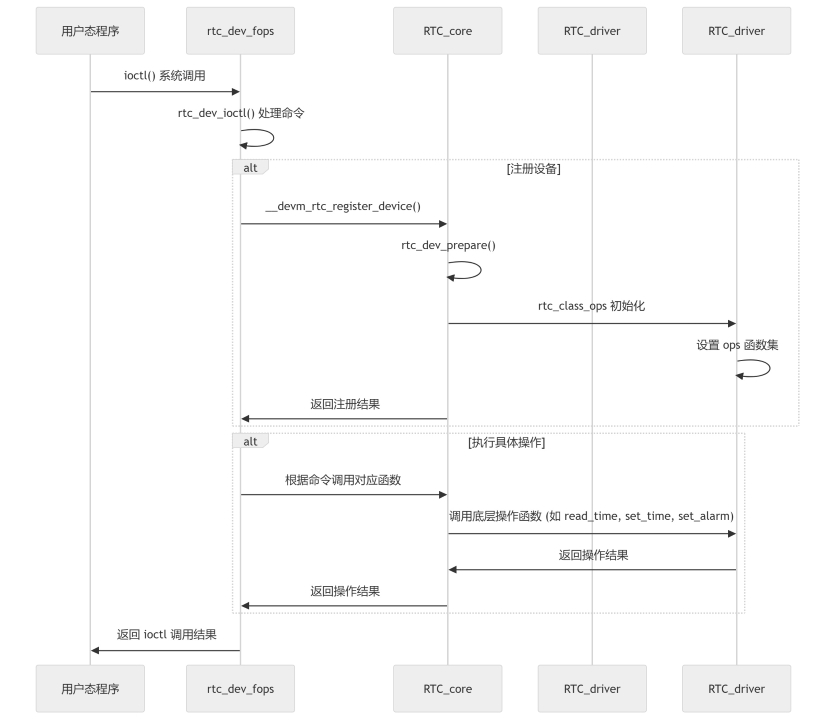
具体说明如下:
-
用户态程序:
- 发起
ioctl()系统调用,请求对 RTC 设备进行操作。
- 发起
-
RTC 用户接口 (
rtc_dev_fops):- 接收到
ioctl()调用后,调用rtc_dev_ioctl()函数处理具体的命令。 - RTC 用户接口是用户态与内核之间的桥梁。
- 接收到
-
RTC core:
- 如果是首次使用 RTC 设备,调用
__devm_rtc_register_device()进行设备注册。 - 调用
rtc_dev_prepare()准备设备资源。 - 初始化
rtc_class_ops,设置底层操作函数集。 - 根据用户态程序的命令,调用对应的底层操作函数(如
read_time、set_time、set_alarm等)。
- 如果是首次使用 RTC 设备,调用
-
RTC 驱动:
- 提供底层操作函数集(
rtc_class_ops),直接与 RTC 硬件交互。 - 执行具体的硬件操作,并将结果返回给 RTC core。
- 提供底层操作函数集(
-
返回结果:
- 操作结果逐层返回到用户态程序,用户态程序根据返回结果继续执行。
RTC 使用简介
RTC 测试方式
驱动加载成功后,会出现 /dev/rtcN 设备节点:
root@ubuntu:~/myworkspace# ls /dev/rtc*
/dev/rtc  /dev/rtc0  /dev/rtc1
可以看到系统当前有两个 RTC 设备, /dev/rtc0 和 /dev/rtc1,分别对应内置 RTC 模块以及外置 RTC-YSN8130,具体的对应关系可以从内核启动日志中获知:
root@ubuntu:/# dmesg | grep rtc
[    0.350706] rtc_super 2a830000.rtc: rtc period = 30518
[    0.350882] rtc_super 2a830000.rtc: registered as rtc0
[    0.350893] rtc_super 2a830000.rtc: setting system clock to 1970-01-01T00:00:05 UTC (5)
[    2.770313] rtc-ysn8130 4-0032: Low voltage detected
[    2.770318] rtc-ysn8130 4-0032: Clearing flags
[    2.770712] rtc-ysn8130 4-0032: hb_ipc_open_instance(ins[5]) success: 0
[    2.770715] rtc-ysn8130 4-0032: hb_ipc_is_remote_ready(ins[5]) success: 0
[    2.776253] rtc-ysn8130 4-0032: registered as rtc1
root@ubuntu:/# dmesg | grep rtc
[    0.397735] rtc_super 3b420000.rtc: S600 rtc.
[    0.397736] rtc_super 3b420000.rtc: rtc period = 30518
[    0.397819] rtc_super 3b420000.rtc: registered as rtc0
[    0.397830] rtc_super 3b420000.rtc: setting system clock to 1970-01-01T00:00:03 UTC (3)
[    3.531490] rtc-ysn8130 7-0032: Alarm was detected
[    3.531495] rtc-ysn8130 7-0032: Clearing flags
[    3.531719] rtc-ysn8130 7-0032: hb_ipc_open_instance(ins[5]) success: 0
[    3.531722] rtc-ysn8130 7-0032: hb_ipc_is_remote_ready(ins[5]) success: 0
[    3.533626] rtc-ysn8130 7-0032: registered as rtc1
所以,/dev/rtc0 即为内置 RTC,而 /dev/rtc1 即为外置 RTC-YSN8130。
系统默认使用的是 /dev/rtc1 作为主 RTC 设备 /dev/rtc,由内核配置 CONFIG_RTC_HCTOSYS_DEVICE="rtc1"、CONFIG_RTC_SYSTOHC_DEVICE="rtc1" 指定(开机从 rtc1 恢复系统时间,关机将系统时间写回 rtc1):
root@ubuntu:~/myworkspace# ls -l /dev/rtc*
lrwxrwxrwx 1 root root      4 Jan  1  2000 /dev/rtc -> rtc1
crw-rw-r-- 1 root misc 252, 0 Jan  1  2000 /dev/rtc0
crw-rw-r-- 1 root misc 252, 1 Jan  1  2000 /dev/rtc1
这里就是对应的外置 RTC(YSN8130),可以使用以下命令进行测试。
注意:
hwclock命令(util-linux)不带--rtc参数时,默认打开的是/dev/rtc0(内置 super-rtc),而不是/dev/rtc(软链接到 rtc1)。因此操作默认 RTC(rtc1)时,必须显式加上--rtc /dev/rtc1,否则读写的是 rtc0。
# 测试命令(默认主 RTC 为 rtc1/YSN8130)
date -s "2024/01/01 17:00:00"       # 设置系统时间(板端 CST = UTC+8,对应 09:00:00 UTC)
hwclock --rtc /dev/rtc1 -w          # 将系统时间写入 rtc1
hwclock --rtc /dev/rtc1 -r          # 读取 rtc1,验证写入是否成功
date                                # 读取系统时间

# 不带 --rtc 时 hwclock 默认读写 /dev/rtc0(内置 super-rtc)
hwclock -r                          # 等价于 hwclock --rtc /dev/rtc0 -r
hwclock --rtc /dev/rtc0 -r          # 读取 rtc0(内置 super-rtc,掉电后回到 1970)
此时可以通过 /proc/driver/rtc(对应默认 RTC rtc1)来验证写入结果。注意该接口打印的是 RTC 芯片内部的原始寄存器值(UTC),不是本地 CST 时间:
root@ubuntu:~# date -s "2024/01/01 17:00:00"
Mon Jan  1 17:00:00 CST 2024
root@ubuntu:~# hwclock --rtc /dev/rtc1 -w
root@ubuntu:~# hwclock --rtc /dev/rtc1 -r
2024-01-01 17:00:01.000220+08:00
root@ubuntu:~# date
Mon Jan  1 17:00:02 CST 2024
root@ubuntu:~# cat /proc/driver/rtc
rtc_time        : 09:00:02
rtc_date        : 2024-01-01
alrm_time       : 00:00:00
alrm_date       : 2000-01-02
alarm_IRQ       : no
alrm_pending    : no
update IRQ enabled      : no
periodic IRQ enabled    : no
periodic IRQ frequency  : 1
max user IRQ frequency  : 1
24hr            : yes

RTC-YSN8130 registers
Extension Register: WADA=1, TE=0, USEL=0
Flag Register: VLF=0, AF=0, TF=0, UF=0
Control Register0: AIE=0, TIE=0, UIE=0, STOP=0, TEST=0
可以看到 rtc_time 已经被成功配置了。
如需测试内置 RTC 模块(rtc0),直接使用 hwclock --rtc /dev/rtc0(或省略 --rtc,默认即 rtc0)即可:
hwclock --rtc /dev/rtc0 -w          # 将系统时间写入 rtc0
hwclock --rtc /dev/rtc0 -r          # 读取 rtc0
RTC 测试接口
下面介绍一些用户空间 APP 中 RTC 的常见接口函数,这些接口函数搭建了基本的框架实现与 RTC 设备的交互,用户可以根据具体的硬件和需求进行调整和完善。
set_rtc_time 函数
-
功能:设置 RTC 的时间。
-
参数:
int fd,文件描述符;struct rtc_time rtc_tm,包含要设置的时间。 -
实现:通过
ioctl系统调用使用RTC_SET_TIME命令将时间写入 RTC。 -
错误处理:如果
ioctl调用失败,输出错误信息并关闭文件描述符。代码示例:
int set_rtc_time(int fd, struct rtc_time rtc_tm)
{
    int ret;
    ret = ioctl(fd, RTC_SET_TIME, &rtc_tm);
    if (ret < 0) {
        printf("<%s %d> ERR: set rtc time failed!\n", __func__, __LINE__);
        close(fd);
        return -1;
    }
    return 0;
}
read_rtc_time 函数
-
功能:读取 RTC 的当前时间。
-
参数:
int fd,文件描述符;struct rtc_time *rtc_tm,存储读取到的时间。 -
实现:通过
ioctl系统调用使用RTC_RD_TIME命令读取 RTC 的时间,并调用print_rtc_time输出该时间。 -
错误处理:如果
ioctl调用失败,输出错误信息并关闭文件描述符。代码示例:
int read_rtc_time(int fd, struct rtc_time *rtc_tm)
{
    int ret;
    ret = ioctl(fd, RTC_RD_TIME, rtc_tm);
    if (ret < 0) {
        printf("<%s %d> ERR: read rtc time failed!\n", __func__, __LINE__);
        close(fd);
        return -1;
    }
    print_rtc_time(rtc_tm);
    return 0;
}
alm_set_rtc 函数
-
功能:设置 RTC 的闹钟时间。
-
参数:
int fd,文件描述符;struct rtc_time rtc_tm,要设置的闹钟时间。 -
实现:通过
ioctl系统调用使用RTC_ALM_SET命令设置闹钟时间。 -
错误处理:如果
ioctl调用失败,输出错误信息并关闭文件描述符。代码示例:
int alm_set_rtc(int fd, struct rtc_time rtc_tm)
{
    int ret;
    ret = ioctl(fd, RTC_ALM_SET, &rtc_tm);
    if (ret < 0) {
        printf("<%s %d> ERR: set alarm failed!\n", __func__, __LINE__);
        close(fd);
        return -1;
    }
    return 0;
}
alm_read_rtc 函数
-
功能:读取 RTC 的闹钟时间。
-
参数:
int fd,文件描述符;struct rtc_time *rtc_tm,存储读取到的闹钟时间。 -
实现:通过
ioctl系统调用使用RTC_ALM_READ命令读取闹钟时间,并调用print_rtc_time输出该时间。 -
错误处理:如果
ioctl调用失败,输出错误信息并关闭文件描述符。代码示例:
int alm_read_rtc(int fd, struct rtc_time *rtc_tm)
{
    int ret;
    ret = ioctl(fd, RTC_ALM_READ, rtc_tm);
    if (ret < 0) {
        printf("<%s %d> ERR: read alarm failed!\n", __func__, __LINE__);
        close(fd);
        return -1;
    }
    print_rtc_time(rtc_tm);
    return 0;
}
alm_rtc_enable 函数
-
功能:启用 RTC 闹钟中断。
-
参数:
int fd,文件描述符。 -
实现:通过
ioctl系统调用使用RTC_AIE_ON命令启用闹钟中断。 -
错误处理:如果
ioctl调用失败,输出错误信息并关闭文件描述符。代码示例:
int alm_rtc_enable(int fd)
{
    int ret;
    ret = ioctl(fd, RTC_AIE_ON, 0);
    if (ret < 0) {
        printf("<%s %d> ERR: enable alarm failed!\n", __func__, __LINE__);
        close(fd);
        return -1;
    }
    return 0;
}
alm_rtc_disable 函数
-
功能:禁用 RTC 闹钟中断。
-
参数:
int fd,文件描述符。 -
实现:通过
ioctl系统调用使用RTC_AIE_OFF命令禁用闹钟中断。 -
错误处理:如果
ioctl调用失败,输出错误信息并关闭文件描述符。代码示例:
int alm_rtc_disable(int fd)
{
    int ret;
    ret = ioctl(fd, RTC_AIE_OFF, 0);
    if (ret < 0) {
        printf("<%s %d> ERR: disable alarm failed!\n", __func__, __LINE__);
        close(fd);
        return -1;
    }
    return 0;
}
上述这些接口函数中的 IOCTL 命令(RTC_SET_TIME、RTC_RD_TIME、RTC_AIE_OFF 等)都是在前文驱动代码章节提及的 rtc_dev_ioctl 函数中定义好的。
RTC 测试用例
下面给出一个简单的 RTC 测试用例。
#include <stdio.h>
#include <fcntl.h>
#include <unistd.h>
#include <sys/ioctl.h>
#include <errno.h>
#include <time.h>
#include <linux/rtc.h>

#define RTC_DEVICE "/dev/rtc1"

int set_rtc_time(int fd, struct rtc_time rtc_tm)
{
    int ret;

    ret = ioctl(fd, RTC_SET_TIME, &rtc_tm);
    if (ret < 0) {
        printf("<%s %d> ERR: set rtc time failed!\n", __func__, __LINE__);
        close(fd);
        return -1;
    }

    return 0;
}

int read_rtc_time(int fd, struct rtc_time *rtc_tm)
{
    int ret;

    ret = ioctl(fd, RTC_RD_TIME, rtc_tm);
    if (ret < 0) {
        printf("<%s %d> ERR: read rtc time failed!\n", __func__, __LINE__);
        close(fd);
        return -1;
    }

    return 0;
}

int alm_set_rtc(int fd, struct rtc_time rtc_tm)
{
    int ret;

    ret = ioctl(fd, RTC_ALM_SET, &rtc_tm);
    if (ret < 0) {
        printf("<%s %d> ERR: set alarm failed!\n", __func__, __LINE__);
        close(fd);
        return -1;
    }

    return 0;
}

int alm_read_rtc(int fd, struct rtc_time *rtc_tm)
{
    int ret;

    ret = ioctl(fd, RTC_ALM_READ, rtc_tm);
    if (ret < 0) {
        printf("<%s %d> ERR: read alarm failed!\n", __func__, __LINE__);
        close(fd);
        return -1;
    }

    return (0);
}

int alm_rtc_enable(int fd)
{
    int ret;

    ret = ioctl(fd, RTC_AIE_ON, 0);
    if (ret < 0) {
        printf("<%s %d> ERR: enable alarm failed!\n", __func__, __LINE__);

        close(fd);
        return -1;
    }

    return 0;
}

int alm_rtc_disable(int fd)
{
    int ret;

    ret = ioctl(fd, RTC_AIE_OFF, 0);
    if (ret < 0) {
        printf("<%s %d> ERR: disable alarm failed!\n", __func__, __LINE__);

        close(fd);
        return -1;
    }

    return (0);
}

int main() {
    int fd;
    struct rtc_time rtc_tm;
    struct rtc_wkalrm alarm_tm;
    int ret;
    int choice;

    // 打开 RTC 设备文件,通常是"/dev/rtc0"
    printf("Opening RTC device...\n");
    fd = open(RTC_DEVICE, O_RDWR);
    if (fd == -1) {
        perror("Failed to open RTC device");
        return -1;
    }
    printf("RTC device opened successfully.\n");

    // 用户选择操作
    while (1) {
        printf("\nPlease choose an option:\n");
        printf("1. Set RTC time\n");
        printf("2. Read RTC time\n");
        printf("3. Set Alarm time\n");
        printf("4. Read Alarm time\n");
        printf("5. Enable Alarm\n");
        printf("6. Disable Alarm\n");
        printf("7. Exit\n");
        printf("Enter your choice: ");
        scanf("%d", &choice);

        switch (choice) {
            case 1:
                // 设置 RTC 时间
                printf("Enter year (e.g., 2025): ");
                scanf("%d", &rtc_tm.tm_year);
                rtc_tm.tm_year -= 1900;  // 年份需要减去1900
                printf("Enter month (1-12): ");
                scanf("%d", &rtc_tm.tm_mon);
                rtc_tm.tm_mon -= 1;  // 月份是0-11的范围
                printf("Enter day (1-31): ");
                scanf("%d", &rtc_tm.tm_mday);
                printf("Enter hour (0-23): ");
                scanf("%d", &rtc_tm.tm_hour);
                printf("Enter minute (0-59): ");
                scanf("%d", &rtc_tm.tm_min);
                printf("Enter second (0-59): ");
                scanf("%d", &rtc_tm.tm_sec);

                printf("Setting RTC time to: %d-%02d-%02d %02d:%02d:%02d\n",
                       rtc_tm.tm_year + 1900, rtc_tm.tm_mon + 1, rtc_tm.tm_mday,
                       rtc_tm.tm_hour, rtc_tm.tm_min, rtc_tm.tm_sec);
                ret = set_rtc_time(fd, rtc_tm);
                if (ret < 0) {
                    printf("Failed to set RTC time.\n");
                } else {
                    printf("RTC time set successfully.\n");
                }
                break;

            case 2:
                // 读取 RTC 时间
                printf("Reading RTC time...\n");
                ret = read_rtc_time(fd, &rtc_tm);
                if (ret < 0) {
                    printf("Failed to read RTC time.\n");
                } else {
                    printf("RTC time is: %d-%02d-%02d %02d:%02d:%02d\n",
                           rtc_tm.tm_year + 1900, rtc_tm.tm_mon + 1, rtc_tm.tm_mday,
                           rtc_tm.tm_hour, rtc_tm.tm_min, rtc_tm.tm_sec);
                }
                break;

            case 3:
                // 设置闹钟时间
                printf("Enter alarm year (e.g., 2025): ");
                scanf("%d", &alarm_tm.time.tm_year);
                alarm_tm.time.tm_year -= 1900;  // 年份需要减去1900
                printf("Enter alarm month (1-12): ");
                scanf("%d", &alarm_tm.time.tm_mon);
                alarm_tm.time.tm_mon -= 1;  // 月份是0-11的范围
                printf("Enter alarm day (1-31): ");
                scanf("%d", &alarm_tm.time.tm_mday);
                printf("Enter alarm hour (0-23): ");
                scanf("%d", &alarm_tm.time.tm_hour);
                printf("Enter alarm minute (0-59): ");
                scanf("%d", &alarm_tm.time.tm_min);
                printf("Enter alarm second (0-59): ");
                scanf("%d", &alarm_tm.time.tm_sec);

                printf("Setting alarm time to: %d-%02d-%02d %02d:%02d:%02d\n",
                       alarm_tm.time.tm_year + 1900, alarm_tm.time.tm_mon + 1, alarm_tm.time.tm_mday,
                       alarm_tm.time.tm_hour, alarm_tm.time.tm_min, alarm_tm.time.tm_sec);
                ret = alm_set_rtc(fd, alarm_tm.time);
                if (ret < 0) {
                    printf("Failed to set alarm time.\n");
                } else {
                    printf("Alarm time set successfully.\n");
                }
                break;

            case 4:
                // 读取闹钟时间
                printf("Reading alarm time...\n");
                ret = alm_read_rtc(fd, &rtc_tm);
                if (ret < 0) {
                    printf("Failed to read alarm time.\n");
                } else {
                    printf("Alarm time is: %d-%02d-%02d %02d:%02d:%02d\n",
                           rtc_tm.tm_year + 1900, rtc_tm.tm_mon + 1, rtc_tm.tm_mday,
                           rtc_tm.tm_hour, rtc_tm.tm_min, rtc_tm.tm_sec);
                }
                break;

            case 5:
                // 启用闹钟
                printf("Enabling RTC alarm...\n");
                ret = alm_rtc_enable(fd);
                if (ret < 0) {
                    printf("Failed to enable RTC alarm.\n");
                } else {
                    printf("RTC alarm enabled successfully.\n");
                }
                break;

            case 6:
                // 禁用闹钟
                printf("Disabling RTC alarm...\n");
                ret = alm_rtc_disable(fd);
                if (ret < 0) {
                    printf("Failed to disable RTC alarm.\n");
                } else {
                    printf("RTC alarm disabled successfully.\n");
                }
                break;

            case 7:
                // 退出程序
                printf("Exiting program...\n");
                close(fd);
                return 0;

            default:
                printf("Invalid choice. Please try again.\n");
                break;
        }
    }

    return 0;
}
以设置 RTC 时间为例,测试日志如下:
root@ubuntu:~/myworkspace# gcc rtc_test.c -o rtc_test
root@ubuntu:~/myworkspace# ./rtc_test
Opening RTC device...
RTC device opened successfully.

Please choose an option:
1. Set RTC time
2. Read RTC time
3. Set Alarm time
4. Read Alarm time
5. Enable Alarm
6. Disable Alarm
7. Exit
# 设置时间
Enter your choice: 1
Enter year (e.g., 2025): 2025
Enter month (1-12): 10
Enter day (1-31): 11
Enter hour (0-23): 17
Enter minute (0-59): 10
Enter second (0-59): 0
Setting RTC time to: 2025-10-11 17:10:00
RTC time set successfully.

Please choose an option:
1. Set RTC time
2. Read RTC time
3. Set Alarm time
4. Read Alarm time
5. Enable Alarm
6. Disable Alarm
7. Exit
# 读取时间
Enter your choice: 2
Reading RTC time...
RTC time is: 2025-10-11 17:10:05

Please choose an option:
1. Set RTC time
2. Read RTC time
3. Set Alarm time
4. Read Alarm time
5. Enable Alarm
6. Disable Alarm
7. Exit
# 设置闹钟
Enter your choice: 3
Enter alarm year (e.g., 2025): 2025
Enter alarm month (1-12): 10
Enter alarm day (1-31): 11
Enter alarm hour (0-23): 17
Enter alarm minute (0-59): 12
Enter alarm second (0-59): 0
Setting alarm time to: 2025-10-11 17:12:00
Alarm time set successfully.

Please choose an option:
1. Set RTC time
2. Read RTC time
3. Set Alarm time
4. Read Alarm time
5. Enable Alarm
6. Disable Alarm
7. Exit
# 使能中断
Enter your choice: 5
Enabling RTC alarm...
RTC alarm enabled successfully.

Please choose an option:
1. Set RTC time
2. Read RTC time
3. Set Alarm time
4. Read Alarm time
5. Enable Alarm
6. Disable Alarm
7. Exit
# 查看闹钟时间
Enter your choice: 4
Reading alarm time...
Alarm time is: 2025-10-11 17:12:00

Please choose an option:
1. Set RTC time
2. Read RTC time
3. Set Alarm time
4. Read Alarm time
5. Enable Alarm
6. Disable Alarm
7. Exit
# 退出
Enter your choice: 7
Exiting program...

root@ubuntu:~/myworkspace# cat /proc/driver/rtc1
rtc_time        : 17:11:17
rtc_date        : 2025-10-11
alrm_time       : 17:12:00
alrm_date       : 2025-10-11
alarm_IRQ       : yes
alrm_pending    : no
update IRQ enabled      : no
periodic IRQ enabled    : no
periodic IRQ frequency  : 1
max user IRQ frequency  : 1
24hr            : yes
可以看出已经成功设置了 RTC 时间和闹钟。
在 MCU 界面可以看到中断的产生
[03384.496355 0]INFO: RTC-YSN8130 interrupt detected
[03384.496770 0]INFO: Instance[5] Ch[0] Send data to Acore, size=2
[03384.497509 0]INFO: Instance 5 Remote Core ready
[03384.498117 0]INFO: Inst 5 chan 0 2 success
常见问题
Q1:为什么无法设置秒级的闹钟
RTC-YSN8130 存在硬件限制,闹钟最细粒度为分钟级,不支持秒级精度。
Q2:如何禁用 RTC 的中断
修改 Isr_Hal.c 中 Interrupt_McuConfigs[] 数组对应中断项的使能字段为 DISABLE:
文件路径: mcu/Target/Target_Sxxx/Target-hobot-lite-freertos/target/FreeRtosOsHal/Isr_Hal.c
各板端对应的中断项:
| 板端 | 中断配置项 |
|---|---|
| S100 | Os_IntChannel_Gpio_Icu3ExtIsr |
| 板端 | 中断配置项 |
|---|---|
| S600 | Os_IntChannel_Aon_GpioIsr |
示例(S100):将 Interrupt_McuConfigs[] 中 Os_IntChannel_Gpio_Icu3ExtIsr 行末尾的 ENABLE 改为 DISABLE 即可,S600 操作同理。
Q3:RTC 和系统时间同步
内核通过 HCTOSYS 机制在启动时把硬件 RTC 时间同步到系统时钟,相关配置:
| 配置项 | 含义 |
|---|---|
CONFIG_RTC_HCTOSYS=y | 开机时自动从 RTC 读时间设到系统时钟(Hardware Clock TO SYStem) |
CONFIG_RTC_HCTOSYS_DEVICE="rtc1" | 指定 rtc1 作为 HCTOSYS 同步源 |
确认 rtc1 对应哪个硬件及同步状态:
ls /sys/class/rtc/
cat /sys/class/rtc/rtc1/name    # rtc1 对应的驱动/设备名
cat /sys/class/rtc/rtc1/time    # rtc1 当前时间
cat /sys/class/rtc/rtc1/hctosys # 1=已同步到系统时间
运行时手动同步:
# RTC(硬件) → 系统时间
hwclock --hctosys -f /dev/rtc1
# 系统时间 → RTC(硬件),把当前 date 写回 rtc1
hwclock --systohc -f /dev/rtc1
需保证同步源 rtc1 在内核启动时已就绪,否则 HCTOSYS 不触发,只能运行时用 hwclock --hctosys 手动补同步。