RTC Debugging Guide
RTC Overview
The Linux RTC (Real-Time Clock) subsystem is a standardized framework within the kernel for managing hardware real-time clock devices. Its core function is to maintain accurate time synchronization even when the system is completely powered off. The Linux kernel provides a generic RTC framework that supports various RTC chips, including devices communicating via buses such as I²C and SPI.
In the S100 chip, an RTC module is built-in. This module is a configurable high-precision counter that provides a stable time base for the system. Additionally, the S100 includes an external YSN8130E module, which supports an external battery to maintain time continuity when the system is powered off.
In the S600 chip, an RTC module is built-in. This module is a configurable high-precision counter that provides a stable time base for the system. Additionally, the S600 includes an external YSN8130E module, which supports an external battery to maintain time continuity when the system is powered off.
RTC Features
Time and Date Recording
The most basic function of an RTC is to provide accurate time and date. It typically counts in seconds starting from a specific point in time. The RTC can provide the following time information:
- Current time (hours, minutes, seconds)
- Current date (year, month, day)
- Day of the week information
Alarm and Interrupt
Many RTC devices support setting one or more alarms. The alarm function allows users to set a specific time. When the RTC reaches that time, it can trigger an interrupt, such as waking the system, sending a signal, or executing a specific operation.
Periodic Wake-up
The RTC can be configured to trigger interrupts at specific time intervals. This function is commonly used for scheduling periodic tasks, such as maintenance tasks executed every hour or every day.
Time Update
The RTC allows users to update the current time, which is very useful for synchronizing time during system startup or manually correcting the time. Linux provides various tools (such as hwclock) to set and read the RTC time.
Low Power Mode
To extend battery life, RTCs typically support a low-power mode. In this mode, the RTC continues to track time but consumes very little power.
Hardware Interface
The Linux RTC framework supports various hardware interfaces, including I²C, SPI, GPIO, etc., making it compatible with various RTC chips, such as DS1307, DS3231, YSN8130, and others.
RTC Functional Principle
The RTC continuously calculates time using a precise crystal oscillator (typically a 32.768 kHz quartz crystal) signal and stores this information in internal registers in a standard format (e.g., year, month, day, hour, minute, second). It relies on a backup battery to continue running when the main power is off, ensuring time continuity, and communicates with the main control chip via an interface to read and set the time. Its main functions include precise timing, date maintenance, and alarm triggering.
Here is a brief description of how the RTC works:
-
Time Counter:
- The RTC integrates a timing circuit internally, usually powered by a high-precision crystal oscillator that provides the clock signal. The common crystal frequency is 32.768 kHz, which is very stable and suitable for long-term time measurement.
- The RTC's timing circuit generates a stable clock signal, typically a 1Hz pulse, and accumulates it. Every second, the RTC increments a counter until it forms minutes, hours, dates, etc.
-
Date and Time Maintenance:
- The RTC stores accumulated seconds, minutes, hours, date, etc., in internal registers. These registers can be accessed via system communication with the RTC to read or set the current time or alarm.
- Some RTCs also store information like the year, month, and day of the week.
-
Backup Battery:
- To keep time when the main system is powered off, the RTC is usually equipped with a backup battery. When the main power is disconnected, the backup battery powers the RTC, ensuring its internal clock continues to work without losing time information.
- In this state, the RTC continues to run, but the main control chip may be in a low-power or off state.
-
Alarm Function:
- RTC modules typically have a built-in alarm function, allowing the user to set a specific time point. When the timer reaches the set time, the RTC triggers an interrupt signal or issues a warning.
- The main control chip can perform corresponding actions based on this interrupt signal, such as waking the system or starting a specific task.
RTC Application on S100
RTC Application on S600
RTC Time Keeping
The Linux system time is lost when the system shuts down. However, the RTC can continue working using an external battery after the system is off, thus preserving the time. When the system starts next time, the time can be restored from the RTC. The process is as follows:
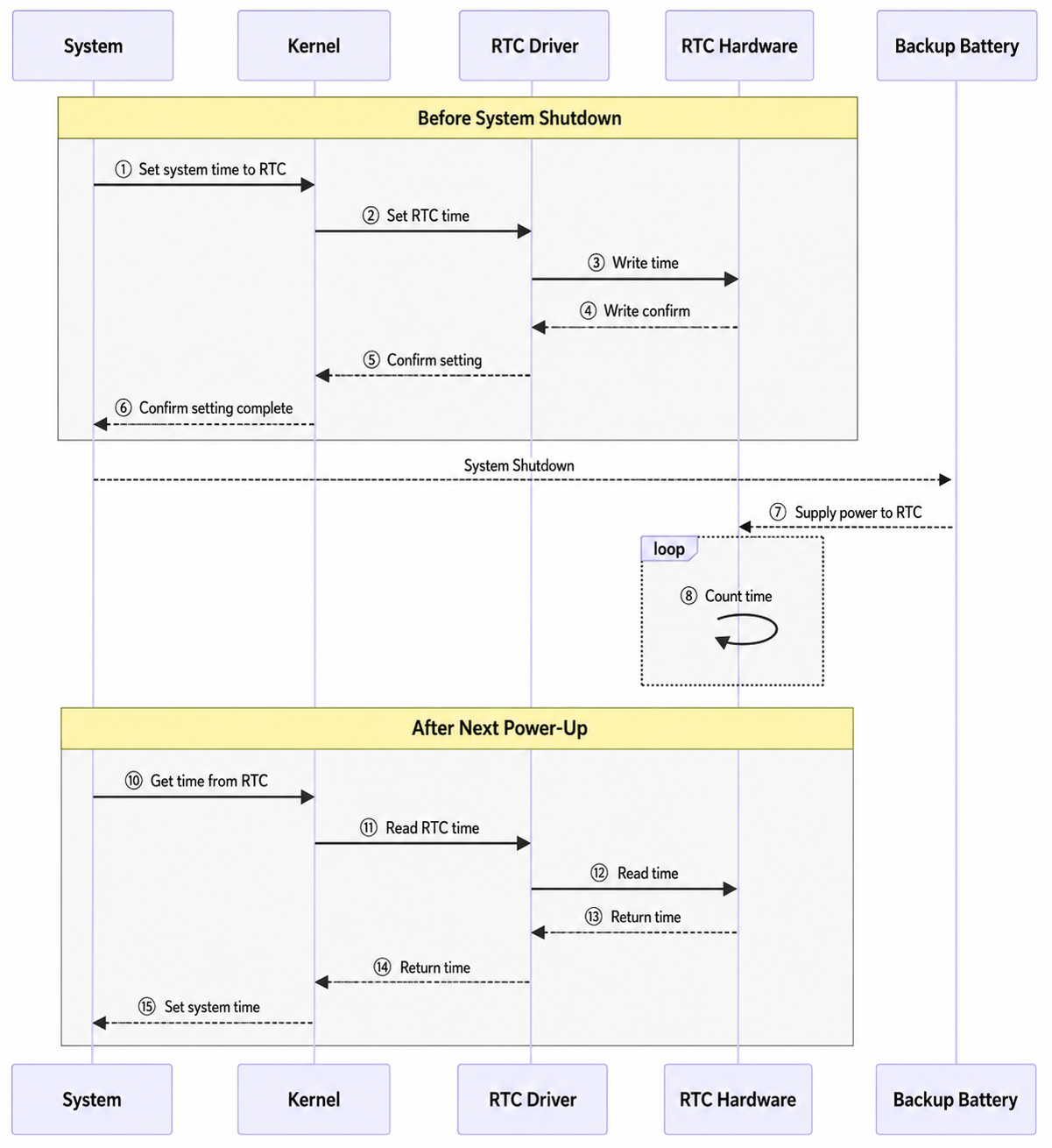
The detailed process description is as follows:
-
When the system shuts down:
- The system sets the current system time into the RTC before shutting down.
- The kernel writes the time to the RTC hardware via the RTC driver.
- The RTC hardware confirms the time was written successfully.
- The RTC driver returns the confirmation to the kernel.
- The kernel returns the confirmation to the system.
-
After the system shuts down:
- After the system shuts down, the backup battery starts powering the RTC hardware.
- The RTC hardware continues running on backup battery power, continuously keeping time.
-
When the system powers on next time:
- After the system powers on, the kernel retrieves the time from the RTC hardware.
- The kernel reads the time from the RTC hardware via the RTC driver.
- The RTC hardware returns the current time to the RTC driver.
- The RTC driver returns the time to the kernel.
- The kernel sets this time as the system time.
RTC Scheduled Tasks
A typical application of the RTC is executing tasks on a schedule. This feature is only supported by the YSN8130. The process is as follows:
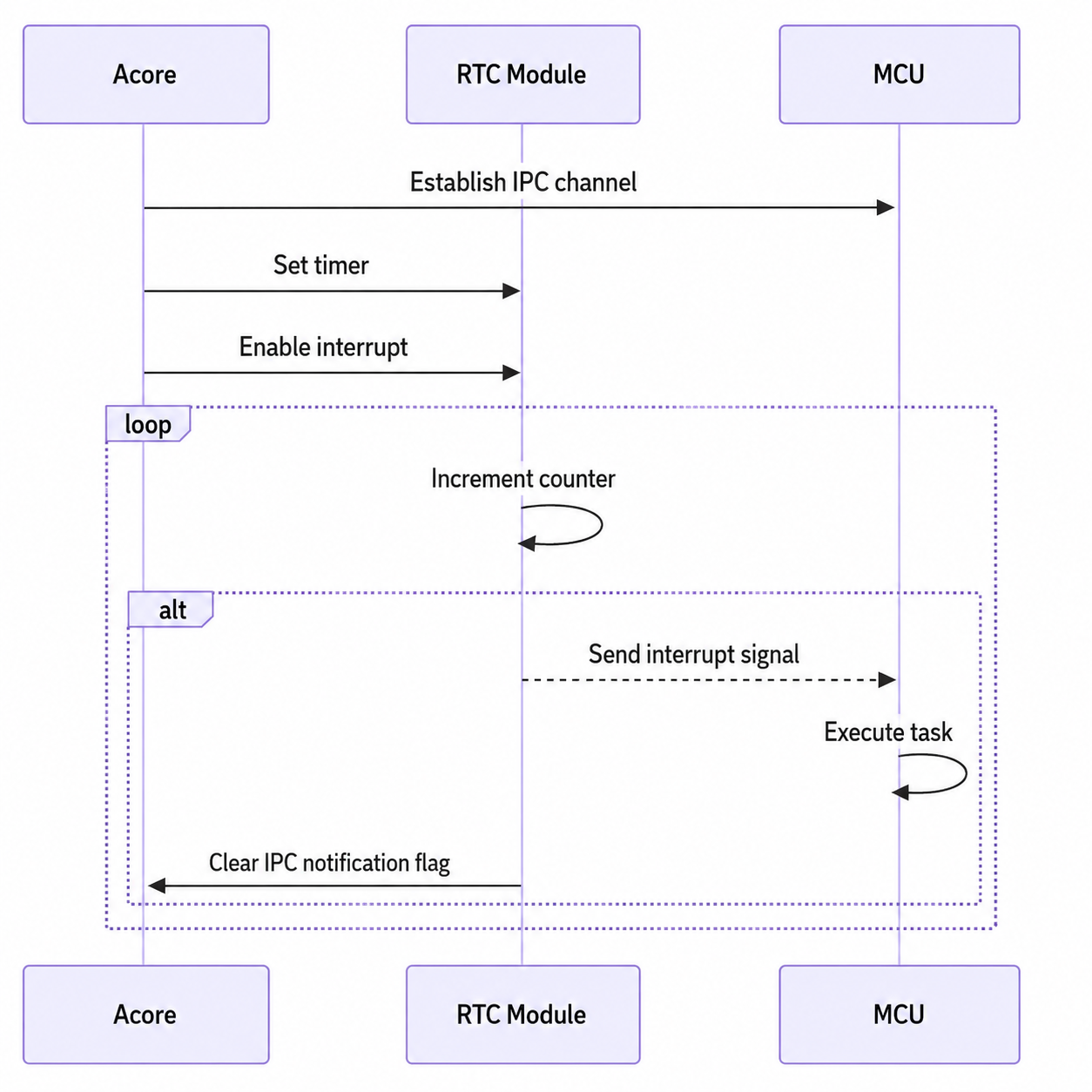
The description of the RTC scheduled task process on the S100 chip is as follows:
The description of the RTC scheduled task process on the S600 chip is as follows:
- Initialization Phase: The main control chip first initializes the RTC module, setting the current time and alarm (scheduled reminder). It also establishes IPC communication with the MCU, because the interrupt pin of the RTC module is connected to the MCU.
- Continuous Operation Phase (Loop): The RTC module enters a loop mode, continuously counting (counter accumulation). This process is low-power; the RTC module periodically updates its internal counter.
- Alarm Trigger Event: At a specific time, when the RTC module's alarm trigger condition is met, the RTC module sends an interrupt signal to the MCU. Upon receiving the interrupt signal, the MCU handles a specific task or executes a specific function.
- Clear Flag Bit:
After executing the task, the MCU notifies the Acore via the IPC channel. Subsequently, the Acore clears the relevant interrupt flag bit by writing to a register.
RTC Driver Code
The driver code for the RTC module is located in /hobot-drivers/rtc.
Linux RTC Driver Framework
In Linux, the RTC device driver is a standard character device driver. The Linux RTC driver framework can be abstracted into the following main parts:
- User Space is at the top level, containing user tools and the interface to kernel space.
- Kernel Space is in the middle layer, divided into three parts:
- Interface Layer: Interacts directly with user space.
- RTC Core: The core module managing RTC devices.
- RTC Driver Layer: Interacts directly with the hardware layer.
- Hardware Layer is at the bottom, representing the specific RTC hardware device.
The Linux RTC driver framework is shown in the following figure:

Each layer is described below.
RTC User Space:
User space interacts with the RTC device primarily through the following methods:
- User Tools:
hwclock: Hardware clock manipulation tool.date: System time manipulation tool.- Test tools: e.g.,
rtctest.c, used to test theioctlinterface of the RTC driver.
- Character Device Interface:
/dev/rtcN: Character device node supportingopen,read,write, andioctloperations.
- sysfs Interface:
/sys/class/rtc/rtcN: Provides read-only attributes, such as time, alarm, etc., allowing user space to access certain properties of the RTC device.
- procfs Interface:
/proc/driver/rtc: Provides information about the system clock RTC. If the system does not have a dedicated RTC,rtc0is used by default.
RTC Kernel Space:
Various modules in kernel space are responsible for RTC driver management, device registration, and interaction with user space:
- Interface Layer:
- Manages the character device interface.
- Manages sysfs and procfs attributes.
- RTC Core:
- Device Management:
- Device Registration/Unregistration: Registers and unregisters RTC devices using
registerandunregisterfunctions. - Character Device Abstraction: Abstracts RTC devices as generic character devices via
dev.c, providing file operation functions. - sysfs and procfs Management: Manages sysfs and procfs attributes of RTC devices via
sysfs.candproc.c.
- Device Registration/Unregistration: Registers and unregisters RTC devices using
- Time Conversion: Provides conversion between RTC time and system time via
lib.c.
- Device Management:
- RTC Driver Layer:
- Hardware Abstraction:
- Operation Function Set: Provides low-level operations on the RTC hardware, such as reading/setting time, reading/setting alarms, etc., defined by the
rtc_class_opsstructure. - Hardware Initialization: Initializes the RTC hardware, configures clock source, interrupts, etc.
- Interrupt Handling: Handles interrupts generated by the RTC, such as alarm interrupts and periodic interrupts.
- Operation Function Set: Provides low-level operations on the RTC hardware, such as reading/setting time, reading/setting alarms, etc., defined by the
- Hardware Abstraction:
- Data Structures:
struct rtc_device: Describes an RTC device.struct rtc_class_ops: Defines the low-level operation functions.
RTC Hardware Layer:
- RTC Hardware:
- Hardware clock chip (e.g., YSN8130)
- Crystal oscillator
- External battery
RTC Driver Code Description
This section primarily describes the following three parts of the RTC subsystem code:
- rtc driver Layer: Registers the RTC device with the RTC subsystem and provides the set of low-level operation functions for the RTC device.
- rtc core: Responsible for registering and unregistering RTC devices, providing RTC character device files to user space, and implementing interfaces like sysfs for the RTC class.
- User Space Interface: Includes interfaces like
ioctl.
RTC driver Layer Code Description
The code in the RTC driver layer is primarily responsible for directly operating the RTC module. In the Linux system, the kernel abstracts an RTC device using the rtc_device structure. The main task of the RTC driver layer is to allocate and initialize rtc_device.
The abstraction of an RTC device in the Linux kernel is as follows:
// kernel/include/linux/rtc.h
struct rtc_device {
	struct device dev;
	struct module *owner;

	int id;

	const struct rtc_class_ops *ops;
	struct mutex ops_lock;

	struct cdev char_dev;
	unsigned long flags;

	unsigned long irq_data;
	spinlock_t irq_lock;
	wait_queue_head_t irq_queue;
	struct fasync_struct *async_queue;

	int irq_freq;
	int max_user_freq;

	struct timerqueue_head timerqueue;
	struct rtc_timer aie_timer;
	struct rtc_timer uie_rtctimer;
	struct hrtimer pie_timer; /* sub second exp, so needs hrtimer */
	int pie_enabled;
	struct work_struct irqwork;

	/*
	 * This offset specifies the update timing of the RTC.
	 *
	 * tsched     t1 write(t2.tv_sec - 1sec))  t2 RTC increments seconds
	 *
	 * The offset defines how tsched is computed so that the write to
	 * the RTC (t2.tv_sec - 1sec) is correct versus the time required
	 * for the transport of the write and the time which the RTC needs
	 * to increment seconds the first time after the write (t2).
	 *
	 * For direct accessible RTCs tsched ~= t1 because the write time
	 * is negligible. For RTCs behind slow busses the transport time is
	 * significant and has to be taken into account.
	 *
	 * The time between the write (t1) and the first increment after
	 * the write (t2) is RTC specific. For a MC146818 RTC it's 500ms,
	 * for many others it's exactly 1 second. Consult the datasheet.
	 *
	 * The value of this offset is also used to calculate the to be
	 * written value (t2.tv_sec - 1sec) at tsched.
	 *
	 * The default value for this is NSEC_PER_SEC + 10 msec default
	 * transport time. The offset can be adjusted by drivers so the
	 * calculation for the to be written value at tsched becomes
	 * correct:
	 *
	 *	newval = tsched + set_offset_nsec - NSEC_PER_SEC
	 * and  (tsched + set_offset_nsec) % NSEC_PER_SEC == 0
	 */
	unsigned long set_offset_nsec;

	unsigned long features[BITS_TO_LONGS(RTC_FEATURE_CNT)];

	time64_t range_min;
	timeu64_t range_max;
	time64_t start_secs;
	time64_t offset_secs;
	bool set_start_time;

#ifdef CONFIG_RTC_INTF_DEV_UIE_EMUL
	struct work_struct uie_task;
	struct timer_list uie_timer;
	/* Those fields are protected by rtc->irq_lock */
	unsigned int oldsecs;
	unsigned int uie_irq_active:1;
	unsigned int stop_uie_polling:1;
	unsigned int uie_task_active:1;
	unsigned int uie_timer_active:1;
#endif
};
The RTC hardware layer driver relies on a set of ops functions to operate the RTC module. The kernel provides a unified interface for these functions. These interfaces are in the struct rtc_class_ops *ops member variable within the rtc_device structure above. rtc_class_ops is the set of lowest-level operation functions for the RTC device, including reading/setting RTC device time, etc.:
// kernel/include/linux/rtc.h
/*
 * For these RTC methods the device parameter is the physical device
 * on whatever bus holds the hardware (I2C, Platform, SPI, etc), which
 * was passed to rtc_device_register().  Its driver_data normally holds
 * device state, including the rtc_device pointer for the RTC.
 *
 * Most of these methods are called with rtc_device.ops_lock held,
 * through the rtc_*(struct rtc_device *, ...) calls.
 *
 * The (current) exceptions are mostly filesystem hooks:
 *   - the proc() hook for procfs
 */
struct rtc_class_ops {
	int (*ioctl)(struct device *, unsigned int, unsigned long);
	int (*read_time)(struct device *, struct rtc_time *);
	int (*set_time)(struct device *, struct rtc_time *);
	int (*read_alarm)(struct device *, struct rtc_wkalrm *);
	int (*set_alarm)(struct device *, struct rtc_wkalrm *);
	int (*proc)(struct device *, struct seq_file *);
	int (*alarm_irq_enable)(struct device *, unsigned int enabled);
	int (*read_offset)(struct device *, long *offset);
	int (*set_offset)(struct device *, long offset);
	int (*param_get)(struct device *, struct rtc_param *param);
	int (*param_set)(struct device *, struct rtc_param *param);
};
From the function names, we can clearly understand the function of each, such as reading/setting time, reading/setting alarms, alarm interrupt enable control, etc. The specific operation set for rtc_class_ops needs to be implemented according to the RTC device used.
Take the YSN8130 driver in the source code as an example:
// hobot-drivers/rtc/rtc-ysn8130.c
static const struct rtc_class_ops ysn8130_rtc_ops = {
	.read_time = ysn8130_rtc_read_time,
	.set_time = ysn8130_rtc_set_time,
	.read_alarm = ysn8130_rtc_read_alarm,
	.set_alarm = ysn8130_rtc_set_alarm,
	.alarm_irq_enable = ysn8130_irq_enable,
	.ioctl = ysn8130_rtc_ioctl,
	.proc = ysn8130_rtc_proc,
};
These operation functions are implemented in the YSN8130 driver according to the specific hardware interface. These interfaces generally operate registers directly based on the actual hardware and are provided to the RTC subsystem via the rtc_class_ops structure pointer. Through these functions, the kernel can control the YSN8130 module.
Note: The functions in rtc_class_ops are only low-level operation functions for the RTC device, not the file_operations set provided to the application layer. The Linux kernel provides a generic RTC character device driver file drivers/rtc/rtc-dev.c, which implements the common file_operations set for all RTC devices.
The rtc_init function initializes the RTC subsystem. The relevant source code is as follows:
// kernel/drivers/rtc/class.c
static int __init rtc_init(void)
{
    rtc_class = class_create(THIS_MODULE, "rtc");
    if (IS_ERR(rtc_class)) {
        pr_err("couldn't create class\n");
        return PTR_ERR(rtc_class);
    }
    rtc_class->pm = RTC_CLASS_DEV_PM_OPS;
    rtc_dev_init();
    return 0;
}
subsys_initcall(rtc_init);
During the RTC subsystem initialization, the main tasks are allocating the rtc_class class and initializing the rtc_devt device for RTC devices. The alloc_chrdev_region function is used to dynamically allocate device numbers. The call sequence is as follows:
rtc_init
  ---> class_create(THIS_MODULE, "rtc")         // Create rtc_class class.
    ---> rtc_dev_init()
      ---> alloc_chrdev_region(&rtc_devt, 0, RTC_DEV_MAX, "rtc")    // Allocate minor device number range 0~15 for rtc device, major number allocated randomly, result stored in rtc_devt.
RTC core Code Description
The RTC core layer in the Linux kernel is responsible for managing and scheduling RTC-related device resources and providing a unified interface for RTC devices.
After the RTC driver layer prepares the rtc_class_ops structure, it can register the RTC resources with the Linux kernel via the devm_rtc_device_register interface in the RTC core layer.
Relevant source code:
/**
 * devm_rtc_device_register - resource managed rtc_device_register()
 * @dev: the device to register
 * @name: the name of the device (unused)
 * @ops: the rtc operations structure
 * @owner: the module owner
 *
 * @return a struct rtc on success, or an ERR_PTR on error
 *
 * Managed rtc_device_register(). The rtc_device returned from this function
 * are automatically freed on driver detach.
 * This function is deprecated, use devm_rtc_allocate_device and
 * rtc_register_device instead
 */
struct rtc_device *devm_rtc_device_register(struct device *dev,
					    const char *name,
					    const struct rtc_class_ops *ops,
					    struct module *owner)
{
	struct rtc_device *rtc;
	int err;

	rtc = devm_rtc_allocate_device(dev);
	if (IS_ERR(rtc))
		return rtc;

	rtc->ops = ops;

	err = __devm_rtc_register_device(owner, rtc);
	if (err)
		return ERR_PTR(err);

	return rtc;
}
EXPORT_SYMBOL_GPL(devm_rtc_device_register);
Here, rtc->ops = ops sets the rtc_class_ops low-level operation set.
Next, let's analyze __devm_rtc_register_device, which registers the RTC device with the system:
// kernel/drivers/rtc/class.c
int __devm_rtc_register_device(struct module *owner, struct rtc_device *rtc)
{
	struct rtc_wkalrm alrm;
	int err;

	if (!rtc->ops) {
		dev_dbg(&rtc->dev, "no ops set\n");
		return -EINVAL;
	}

	if (!rtc->ops->set_alarm)
		clear_bit(RTC_FEATURE_ALARM, rtc->features);

	if (rtc->ops->set_offset)
		set_bit(RTC_FEATURE_CORRECTION, rtc->features);

	rtc->owner = owner;
	rtc_device_get_offset(rtc);

	/* Check to see if there is an ALARM already set in hw */
	err = __rtc_read_alarm(rtc, &alrm);
	if (!err && !rtc_valid_tm(&alrm.time))
		rtc_initialize_alarm(rtc, &alrm);

	rtc_dev_prepare(rtc);

	err = cdev_device_add(&rtc->char_dev, &rtc->dev);
	if (err) {
		set_bit(RTC_NO_CDEV, &rtc->flags);
		dev_warn(rtc->dev.parent, "failed to add char device %d:%d\n",
			 MAJOR(rtc->dev.devt), rtc->id);
	} else {
		dev_dbg(rtc->dev.parent, "char device (%d:%d)\n",
			MAJOR(rtc->dev.devt), rtc->id);
	}

	rtc_proc_add_device(rtc);

	dev_info(rtc->dev.parent, "registered as %s\n",
		 dev_name(&rtc->dev));

#ifdef CONFIG_RTC_HCTOSYS_DEVICE
	if (!strcmp(dev_name(&rtc->dev), CONFIG_RTC_HCTOSYS_DEVICE))
		rtc_hctosys(rtc);
#endif

	return devm_add_action_or_reset(rtc->dev.parent,
					devm_rtc_unregister_device, rtc);
}
EXPORT_SYMBOL_GPL(__devm_rtc_register_device);
Inside, the rtc_dev_prepare function is called to prepare RTC device resources. The relevant code is as follows:
  // kernel/drivers/rtc/dev.c
  void rtc_dev_prepare(struct rtc_device *rtc)
  {
    if (!rtc_devt)
      return;

    if (rtc->id >= RTC_DEV_MAX) {
      dev_dbg(&rtc->dev, "too many RTC devices\n");
      return;
    }

    rtc->dev.devt = MKDEV(MAJOR(rtc_devt), rtc->id);

  #ifdef CONFIG_RTC_INTF_DEV_UIE_EMUL
    INIT_WORK(&rtc->uie_task, rtc_uie_task);
    timer_setup(&rtc->uie_timer, rtc_uie_timer, 0);
  #endif

    cdev_init(&rtc->char_dev, &rtc_dev_fops);
    rtc->char_dev.owner = rtc->owner;
  }
The main purpose of the rtc_dev_prepare function is to prepare the data structures and resources needed by the RTC device in the kernel, so that the device can be recognized by the system and communicate correctly with user space. It acts as a bridge in the Linux kernel's RTC driver framework, connecting the RTC hardware driver layer and the user space layer. This process includes the following key steps:
-
Initialize Device Number:
- Allocates a unique device number (
devt) for the RTC device, which is an identifier used by the kernel to recognize the device. The device number consists of a major number (typically identifying the device type) and a minor number (distinguishing multiple device instances of the same type).
- Allocates a unique device number (
-
Initialize Character Device Structure:
- Initializes the character device structure (
cdev) for the RTC device. This structure contains the file operation functions (file_operations) that define how user space interacts with the device file. For example, when a user-space program opens, reads, writes, or performs an ioctl operation, the kernel calls these functions.
- Initializes the character device structure (
-
Set File Operations:
- Associates
rtc_dev_fops(afile_operationsstructure) with the RTC device's character device structure. Thus, when a user-space program operates on the device file, the kernel calls these predefined functions to perform the corresponding hardware operations.
- Associates
-
Register Device:
- Adds the RTC device's character device to the system by calling the
cdev_device_addfunction, allowing user-space programs to access the RTC device via a device file (e.g.,/dev/rtcN).
- Adds the RTC device's character device to the system by calling the
-
Initialize Other Functions:
- Initializes other functions as needed, such as timers, typically used for handling specific RTC features.
User Layer Interface Code Description
-
procfs Interface Function:
Calls the
rtc_proc_add_devicefunction to add the RTC device to the proc filesystem.// kernel/drivers/rtc/proc.c
void rtc_proc_add_device(struct rtc_device *rtc)
{
if (is_rtc_hctosys(rtc))
proc_create_single_data("driver/rtc", 0, NULL, rtc_proc_show,
rtc);
}The main purpose of the
rtc_proc_add_devicefunction is to expose information about the RTC device to user space, providing an interface via the/procfilesystem so that user-space programs can easily read the status and configuration information of the RTC device. This allows user-space programs to obtain information about kernel devices in a standardized way without directly accessing the internal data structures of the device driver.After the
rtc_proc_add_devicefunction executes successfully, it creates a file nameddriver/rtcin the/procdirectory, associated with the rtc device. The content typically looks like this:root@ubuntu:~/myworkspace# cat /proc/driver/rtc
rtc_time : 00:39:49
rtc_date : 2000-01-01
alrm_time : 00:00:00
alrm_date : 2000-01-02
alarm_IRQ : no
alrm_pending : no
update IRQ enabled : no
periodic IRQ enabled : no
periodic IRQ frequency : 1
max user IRQ frequency : 1
24hr : yesThe
/proc/driver/rtcfile provides detailed information about the state of the RTC device. The explanation of the information in this file is as follows:-
Check RTC Time
rtc_timeandrtc_datedisplayed in the file represent the RTC device's current hour, minute, second, and year, month, day, respectively.
-
Check Alarm Settings
alrm_timeandalrm_dateshow the alarm settings of the RTC device. If these values are not as expected, the alarm may need reconfiguration.alarm_IRQindicates whether an interrupt request (IRQ) is associated with the alarm.alrm_pendingindicates whether there is a pending alarm event.
-
Monitor Interrupt Status
update IRQ enabledandperiodic IRQ enabledshow whether the RTC device has enabled update interrupts and periodic interrupts. These interrupts can be used for scheduled tasks or event triggering.periodic IRQ frequencyandmax user IRQ frequencyprovide information about the periodic interrupt frequency.
-
Time Format
24hrindicates whether the RTC device uses a 24-hour format.
Common use cases for the
/proc/driver/rtcfile:- System Monitoring: Users can use this file to monitor the status of the RTC device, ensuring time synchronization and alarm functions work correctly.
- Troubleshooting: If issues occur with the RTC device, such as inaccurate time or alarm not triggering, this file can provide clues for troubleshooting.
- Configuration Verification: Users can check this file after configuring the RTC device to verify that the configuration was applied correctly.
- Application Development: When developing applications that need to interact with the RTC device, users can refer to this file to get information about the device's status and capabilities.
-
-
ioctl Interface Function:
Calls the
cdev_initfunction to initialize the character device structure (rtc->char_dev) for the RTC device and sets its file operation function pointer tortc_dev_fops. This is a structure containing the file operation functions for the RTC device. When a user-space program opens, reads, writes, or performs other operations on the file associated with the device, the kernel calls these functions.// kernel/drivers/rtc/dev.c
static const struct file_operations rtc_dev_fops = {
.owner = THIS_MODULE,
.llseek = no_llseek,
.read = rtc_dev_read,
.poll = rtc_dev_poll,
.unlocked_ioctl = rtc_dev_ioctl,
#ifdef CONFIG_COMPAT
.compat_ioctl = rtc_dev_compat_ioctl,
#endif
.open = rtc_dev_open,
.release = rtc_dev_release,
.fasync = rtc_dev_fasync,
};rtc_dev_fopsis used in user space. In the Linux kernel, thestruct file_operations(often referenced via pointerfops) defines a set of file operation functions that implement operations on device files. When a user-space program opens, reads, writes, or performs other operations on the file associated with the device via theioctlfunction, the kernel calls these functions.The
rtc_dev_fopsstructure defines a set of file operations for interacting with the RTC device, including:-
.owner: Indicates which module owns these file operations. Typically set toTHIS_MODULE, representing the current module. -
.llseek: File positioning operation.no_llseekindicates the device does not support conventional file positioning operations. -
.read: Function to read data from the RTC device, used when a user-space program calls theread()system call. -
.poll: Polling function for non-blocking I/O operations, e.g., when usingselect()orpoll()system calls. -
.unlocked_ioctl: Function to perform device-specific operations, such as getting or setting RTC time. Used by theioctl()system call. -
.compat_ioctl: Compatibility modeioctlfunction, used to support 32-bit programs running on 64-bit systems. -
.open: Function called when opening the RTC device file. -
.release: Function called when closing the RTC device file. -
.fasync: Function for asynchronous I/O notification. -
These operation functions are called by the kernel when a user-space program interacts with the RTC device via the filesystem. For example, when a user program opens the
/dev/rtcNdevice file, the kernel calls thertc_dev_openfunction; when the user program reads the file, the kernel calls thertc_dev_readfunction. -
It is necessary to explain the
rtc_dev_ioctlfunction. This is the core function in the RTC driver for handling I/O control operations, primarily responsible for executing corresponding RTC actions based on the incoming command and arguments:kernel/drivers/rtc/dev.c
static long rtc_dev_ioctl(struct file *file,
unsigned int cmd, unsigned long arg)
{
int err = 0;
struct rtc_device *rtc = file->private_data;
const struct rtc_class_ops *ops = rtc->ops;
struct rtc_time tm;
struct rtc_wkalrm alarm;
struct rtc_param param;
void __user *uarg = (void __user *)arg;
err = mutex_lock_interruptible(&rtc->ops_lock);
if (err)
return err;
/* check that the calling task has appropriate permissions
* for certain ioctls. doing this check here is useful
* to avoid duplicate code in each driver.
*/
switch (cmd) {
case RTC_EPOCH_SET:
case RTC_SET_TIME:
case RTC_PARAM_SET:
if (!capable(CAP_SYS_TIME))
err = -EACCES;
break;
case RTC_IRQP_SET:
if (arg > rtc->max_user_freq && !capable(CAP_SYS_RESOURCE))
err = -EACCES;
break;
case RTC_PIE_ON:
if (rtc->irq_freq > rtc->max_user_freq &&
!capable(CAP_SYS_RESOURCE))
err = -EACCES;
break;
}
……
}When an application performs operations like setting/reading time or setting/reading alarms via the
ioctlfunction, thertc_dev_ioctlfunction is called.rtc_dev_ioctlultimately calls functions likeread_time,set_time, etc., from thertc_class_opslow-level operation set to perform read/write operations on the specific RTC device.
-
Connecting the code above, the sequence diagram for user-space program interaction with the RTC device is as follows:
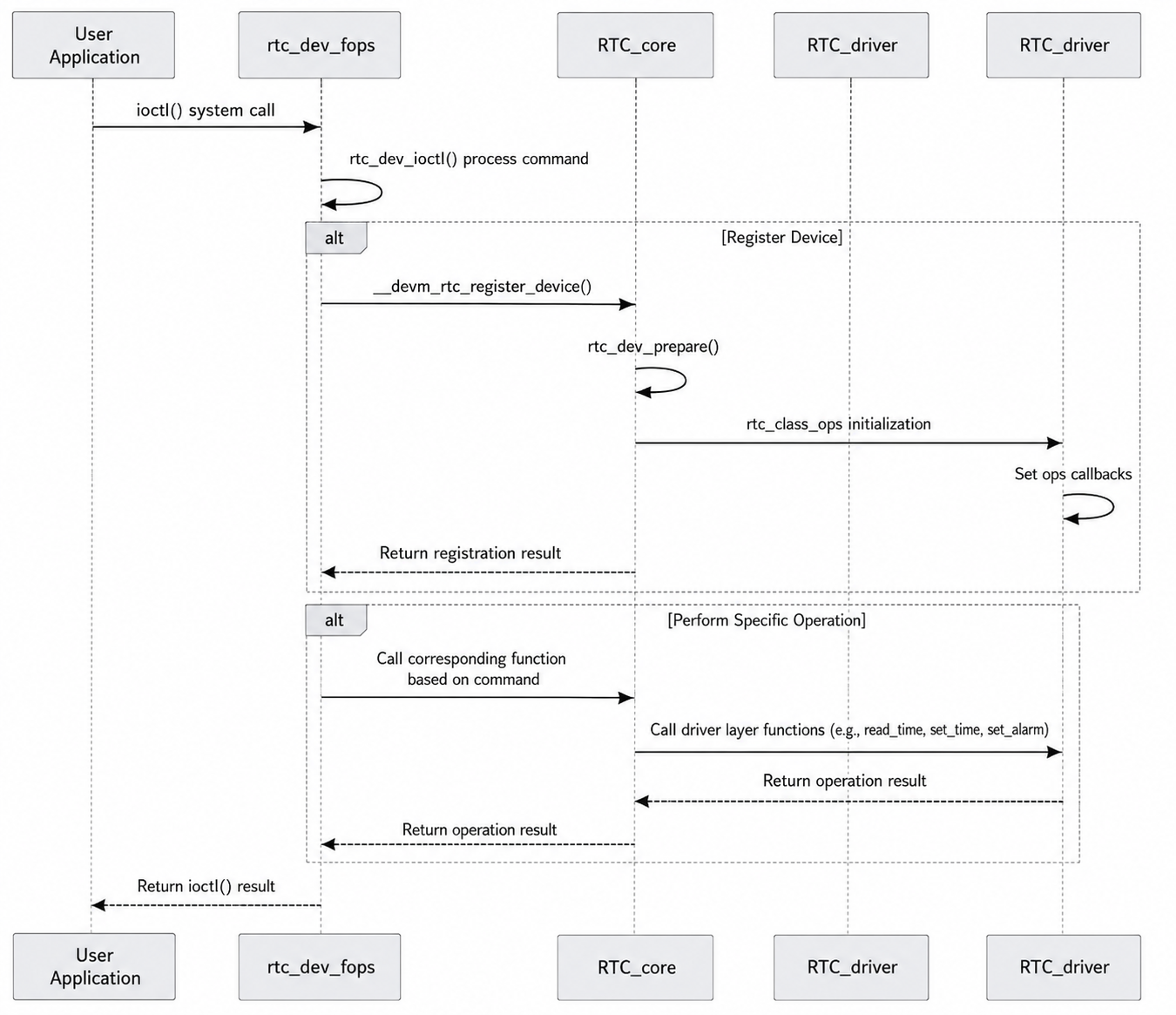
The specific explanation is as follows:
-
User-space Program:
- Initiates an
ioctl()system call, requesting an operation on the RTC device.
- Initiates an
-
RTC User Interface (
rtc_dev_fops):- Upon receiving the
ioctl()call, calls thertc_dev_ioctl()function to handle the specific command. - The RTC user interface acts as a bridge between user space and the kernel.
- Upon receiving the
-
RTC core:
- If the RTC device is being used for the first time, calls
__devm_rtc_register_device()for device registration. - Calls
rtc_dev_prepare()to prepare device resources. - Initializes
rtc_class_ops, setting the low-level operation function set. - Based on the command from the user-space program, calls the corresponding low-level operation functions (e.g.,
read_time,set_time,set_alarm, etc.).
- If the RTC device is being used for the first time, calls
-
RTC Driver:
- Provides the low-level operation function set (
rtc_class_ops), interacting directly with the RTC hardware. - Executes the specific hardware operation and returns the result to the RTC core.
- Provides the low-level operation function set (
-
Return Result:
- The operation result is returned layer by layer to the user-space program, which continues execution based on the returned result.
RTC Usage Overview
RTC Testing Method
After the driver loads successfully, the /dev/rtcN device node will appear:
root@ubuntu:~/myworkspace# ls /dev/rtc*
/dev/rtc  /dev/rtc0  /dev/rtc1
You can see that the system currently has two RTC devices, /dev/rtc0 and /dev/rtc1, corresponding to the built-in RTC module and the external RTC-YSN8130, respectively. The specific mapping can be found in the kernel boot log:
root@ubuntu:/# dmesg | grep rtc
[    0.350706] rtc_super 2a830000.rtc: rtc period = 30518
[    0.350882] rtc_super 2a830000.rtc: registered as rtc0
[    0.350893] rtc_super 2a830000.rtc: setting system clock to 1970-01-01T00:00:05 UTC (5)
[    2.770313] rtc-ysn8130 4-0032: Low voltage detected
[    2.770318] rtc-ysn8130 4-0032: Clearing flags
[    2.770712] rtc-ysn8130 4-0032: hb_ipc_open_instance(ins[5]) success: 0
[    2.770715] rtc-ysn8130 4-0032: hb_ipc_is_remote_ready(ins[5]) success: 0
[    2.776253] rtc-ysn8130 4-0032: registered as rtc1
root@ubuntu:/# dmesg | grep rtc
[    0.397735] rtc_super 3b420000.rtc: S600 rtc.
[    0.397736] rtc_super 3b420000.rtc: rtc period = 30518
[    0.397819] rtc_super 3b420000.rtc: registered as rtc0
[    0.397830] rtc_super 3b420000.rtc: setting system clock to 1970-01-01T00:00:03 UTC (3)
[    3.531490] rtc-ysn8130 7-0032: Alarm was detected
[    3.531495] rtc-ysn8130 7-0032: Clearing flags
[    3.531719] rtc-ysn8130 7-0032: hb_ipc_open_instance(ins[5]) success: 0
[    3.531722] rtc-ysn8130 7-0032: hb_ipc_is_remote_ready(ins[5]) success: 0
[    3.533626] rtc-ysn8130 7-0032: registered as rtc1
Therefore, /dev/rtc0 is the built-in RTC, and /dev/rtc1 is the external RTC-YSN8130.
The system uses /dev/rtc1 as the primary RTC device /dev/rtc by default, specified by the kernel configuration CONFIG_RTC_HCTOSYS_DEVICE="rtc1" and CONFIG_RTC_SYSTOHC_DEVICE="rtc1" (at boot, the system time is restored from rtc1; at shutdown, the system time is written back to rtc1):
root@ubuntu:~/myworkspace# ls -l /dev/rtc*
lrwxrwxrwx 1 root root      4 Jan  1  2000 /dev/rtc -> rtc1
crw-rw-r-- 1 root misc 252, 0 Jan  1  2000 /dev/rtc0
crw-rw-r-- 1 root misc 252, 1 Jan  1  2000 /dev/rtc1
This is the external RTC (YSN8130). You can use the following commands for testing.
Note: when
hwclock(util-linux) is invoked without--rtc, it opens/dev/rtc0(the built-in super-rtc) by default, not/dev/rtc(the symlink to rtc1). Therefore, to operate on the default RTC (rtc1), you must explicitly pass--rtc /dev/rtc1; otherwise it reads/writes rtc0.
# Test commands (default primary RTC is rtc1/YSN8130)
date -s "2024/01/01 17:00:00"       # Set system time (board is CST = UTC+8, i.e. 09:00:00 UTC)
hwclock --rtc /dev/rtc1 -w          # Write system time to rtc1
hwclock --rtc /dev/rtc1 -r          # Read rtc1, confirm the write
date                                # Read system time

# Without --rtc, hwclock reads/writes /dev/rtc0 (the built-in super-rtc) by default
hwclock -r                          # Equivalent to hwclock --rtc /dev/rtc0 -r
hwclock --rtc /dev/rtc0 -r          # Read rtc0 (built-in super-rtc, returns to 1970 after power loss)
You can then verify the write result via /proc/driver/rtc (which corresponds to the default RTC rtc1). Note that this interface prints the raw register values (UTC) inside the RTC chip, not the local CST time:
root@ubuntu:~# date -s "2024/01/01 17:00:00"
Mon Jan  1 17:00:00 CST 2024
root@ubuntu:~# hwclock --rtc /dev/rtc1 -w
root@ubuntu:~# hwclock --rtc /dev/rtc1 -r
2024-01-01 17:00:01.000220+08:00
root@ubuntu:~# date
Mon Jan  1 17:00:02 CST 2024
root@ubuntu:~# cat /proc/driver/rtc
rtc_time        : 09:00:02
rtc_date        : 2024-01-01
alrm_time       : 00:00:00
alrm_date       : 2000-01-02
alarm_IRQ       : no
alrm_pending    : no
update IRQ enabled      : no
periodic IRQ enabled    : no
periodic IRQ frequency  : 1
max user IRQ frequency  : 1
24hr            : yes

RTC-YSN8130 registers
Extension Register: WADA=1, TE=0, USEL=0
Flag Register: VLF=0, AF=0, TF=0, UF=0
Control Register0: AIE=0, TIE=0, UIE=0, STOP=0, TEST=0
You can see that rtc_time has been successfully configured.
To test the built-in RTC module (rtc0), simply use hwclock --rtc /dev/rtc0 (or omit --rtc, which defaults to rtc0):
hwclock --rtc /dev/rtc0 -w          # Write system time to rtc0
hwclock --rtc /dev/rtc0 -r          # Read rtc0
RTC Test Interface
Below are some common interface functions for the RTC in user-space applications. These functions build a basic framework for interacting with the RTC device. Users can adjust and improve them according to specific hardware and requirements.
set_rtc_time Function
-
Function: Sets the RTC time.
-
Parameters:
int fd, file descriptor;struct rtc_time rtc_tm, containing the time to be set. -
Implementation: Uses the
ioctlsystem call with theRTC_SET_TIMEcommand to write the time to the RTC. -
Error Handling: If the
ioctlcall fails, prints an error message and closes the file descriptor.Code Example:
int set_rtc_time(int fd, struct rtc_time rtc_tm)
{
    int ret;
    ret = ioctl(fd, RTC_SET_TIME, &rtc_tm);
    if (ret < 0) {
        printf("<%s %d> ERR: set rtc time failed!\n", __func__, __LINE__);
        close(fd);
        return -1;
    }
    return 0;
}
read_rtc_time Function
-
Function: Reads the current RTC time.
-
Parameters:
int fd, file descriptor;struct rtc_time *rtc_tm, stores the read time. -
Implementation: Uses the
ioctlsystem call with theRTC_RD_TIMEcommand to read the RTC time and callsprint_rtc_timeto output it. -
Error Handling: If the
ioctlcall fails, prints an error message and closes the file descriptor.Code Example:
int read_rtc_time(int fd, struct rtc_time *rtc_tm)
{
    int ret;
    ret = ioctl(fd, RTC_RD_TIME, rtc_tm);
    if (ret < 0) {
        printf("<%s %d> ERR: read rtc time failed!\n", __func__, __LINE__);
        close(fd);
        return -1;
    }
    print_rtc_time(rtc_tm);
    return 0;
}
alm_set_rtc Function
-
Function: Sets the RTC alarm time.
-
Parameters:
int fd, file descriptor;struct rtc_time rtc_tm, the alarm time to be set. -
Implementation: Uses the
ioctlsystem call with theRTC_ALM_SETcommand to set the alarm time. -
Error Handling: If the
ioctlcall fails, prints an error message and closes the file descriptor.Code Example:
int alm_set_rtc(int fd, struct rtc_time rtc_tm)
{
    int ret;
    ret = ioctl(fd, RTC_ALM_SET, &rtc_tm);
    if (ret < 0) {
        printf("<%s %d> ERR: set alarm failed!\n", __func__, __LINE__);
        close(fd);
        return -1;
    }
    return 0;
}
alm_read_rtc Function
-
Function: Reads the RTC alarm time.
-
Parameters:
int fd, file descriptor;struct rtc_time *rtc_tm, stores the read alarm time. -
Implementation: Uses the
ioctlsystem call with theRTC_ALM_READcommand to read the alarm time and callsprint_rtc_timeto output it. -
Error Handling: If the
ioctlcall fails, prints an error message and closes the file descriptor.Code Example:
int alm_read_rtc(int fd, struct rtc_time *rtc_tm)
{
    int ret;
    ret = ioctl(fd, RTC_ALM_READ, rtc_tm);
    if (ret < 0) {
        printf("<%s %d> ERR: read alarm failed!\n", __func__, __LINE__);
        close(fd);
        return -1;
    }
    print_rtc_time(rtc_tm);
    return 0;
}
alm_rtc_enable Function
-
Function: Enables the RTC alarm interrupt.
-
Parameters:
int fd, file descriptor. -
Implementation: Uses the
ioctlsystem call with theRTC_AIE_ONcommand to enable the alarm interrupt. -
Error Handling: If the
ioctlcall fails, prints an error message and closes the file descriptor.Code Example:
int alm_rtc_enable(int fd)
{
    int ret;
    ret = ioctl(fd, RTC_AIE_ON, 0);
    if (ret < 0) {
        printf("<%s %d> ERR: enable alarm failed!\n", __func__, __LINE__);
        close(fd);
        return -1;
    }
    return 0;
}
alm_rtc_disable Function
-
Function: Disables the RTC alarm interrupt.
-
Parameters:
int fd, file descriptor. -
Implementation: Uses the
ioctlsystem call with theRTC_AIE_OFFcommand to disable the alarm interrupt. -
Error Handling: If the
ioctlcall fails, prints an error message and closes the file descriptor.Code Example:
int alm_rtc_disable(int fd)
{
    int ret;
    ret = ioctl(fd, RTC_AIE_OFF, 0);
    if (ret < 0) {
        printf("<%s %d> ERR: disable alarm failed!\n", __func__, __LINE__);
        close(fd);
        return -1;
    }
    return 0;
}
The IOCTL commands (e.g., RTC_SET_TIME, RTC_RD_TIME, RTC_AIE_OFF, etc.) used in these interface functions are defined in the rtc_dev_ioctl function mentioned in the driver code section earlier.
RTC Test Case
Below is a simple RTC test case.
#include <stdio.h>
#include <fcntl.h>
#include <unistd.h>
#include <sys/ioctl.h>
#include <errno.h>
#include <time.h>
#include <linux/rtc.h>

#define RTC_DEVICE "/dev/rtc1"

int set_rtc_time(int fd, struct rtc_time rtc_tm)
{
    int ret;

    ret = ioctl(fd, RTC_SET_TIME, &rtc_tm);
    if (ret < 0) {
        printf("<%s %d> ERR: set rtc time failed!\n", __func__, __LINE__);
        close(fd);
        return -1;
    }

    return 0;
}

int read_rtc_time(int fd, struct rtc_time *rtc_tm)
{
    int ret;

    ret = ioctl(fd, RTC_RD_TIME, rtc_tm);
    if (ret < 0) {
        printf("<%s %d> ERR: read rtc time failed!\n", __func__, __LINE__);
        close(fd);
        return -1;
    }

    return 0;
}

int alm_set_rtc(int fd, struct rtc_time rtc_tm)
{
    int ret;

    ret = ioctl(fd, RTC_ALM_SET, &rtc_tm);
    if (ret < 0) {
        printf("<%s %d> ERR: set alarm failed!\n", __func__, __LINE__);
        close(fd);
        return -1;
    }

    return 0;
}

int alm_read_rtc(int fd, struct rtc_time *rtc_tm)
{
    int ret;

    ret = ioctl(fd, RTC_ALM_READ, rtc_tm);
    if (ret < 0) {
        printf("<%s %d> ERR: read alarm failed!\n", __func__, __LINE__);
        close(fd);
        return -1;
    }

    return (0);
}

int alm_rtc_enable(int fd)
{
    int ret;

    ret = ioctl(fd, RTC_AIE_ON, 0);
    if (ret < 0) {
        printf("<%s %d> ERR: enable alarm failed!\n", __func__, __LINE__);

        close(fd);
        return -1;
    }

    return 0;
}

int alm_rtc_disable(int fd)
{
    int ret;

    ret = ioctl(fd, RTC_AIE_OFF, 0);
    if (ret < 0) {
        printf("<%s %d> ERR: disable alarm failed!\n", __func__, __LINE__);

        close(fd);
        return -1;
    }

    return (0);
}

int main() {
    int fd;
    struct rtc_time rtc_tm;
    struct rtc_wkalrm alarm_tm;
    int ret;
    int choice;

    // Open RTC device file, typically "/dev/rtc0"
    printf("Opening RTC device...\n");
    fd = open(RTC_DEVICE, O_RDWR);
    if (fd == -1) {
        perror("Failed to open RTC device");
        return -1;
    }
    printf("RTC device opened successfully.\n");

    // User selects operation
    while (1) {
        printf("\nPlease choose an option:\n");
        printf("1. Set RTC time\n");
        printf("2. Read RTC time\n");
        printf("3. Set Alarm time\n");
        printf("4. Read Alarm time\n");
        printf("5. Enable Alarm\n");
        printf("6. Disable Alarm\n");
        printf("7. Exit\n");
        printf("Enter your choice: ");
        scanf("%d", &choice);

        switch (choice) {
            case 1:
                // Set RTC time
                printf("Enter year (e.g., 2025): ");
                scanf("%d", &rtc_tm.tm_year);
                rtc_tm.tm_year -= 1900;  // Year needs to subtract 1900
                printf("Enter month (1-12): ");
                scanf("%d", &rtc_tm.tm_mon);
                rtc_tm.tm_mon -= 1;  // Month range is 0-11
                printf("Enter day (1-31): ");
                scanf("%d", &rtc_tm.tm_mday);
                printf("Enter hour (0-23): ");
                scanf("%d", &rtc_tm.tm_hour);
                printf("Enter minute (0-59): ");
                scanf("%d", &rtc_tm.tm_min);
                printf("Enter second (0-59): ");
                scanf("%d", &rtc_tm.tm_sec);

                printf("Setting RTC time to: %d-%02d-%02d %02d:%02d:%02d\n",
                       rtc_tm.tm_year + 1900, rtc_tm.tm_mon + 1, rtc_tm.tm_mday,
                       rtc_tm.tm_hour, rtc_tm.tm_min, rtc_tm.tm_sec);
                ret = set_rtc_time(fd, rtc_tm);
                if (ret < 0) {
                    printf("Failed to set RTC time.\n");
                } else {
                    printf("RTC time set successfully.\n");
                }
                break;

            case 2:
                // Read RTC time
                printf("Reading RTC time...\n");
                ret = read_rtc_time(fd, &rtc_tm);
                if (ret < 0) {
                    printf("Failed to read RTC time.\n");
                } else {
                    printf("RTC time is: %d-%02d-%02d %02d:%02d:%02d\n",
                           rtc_tm.tm_year + 1900, rtc_tm.tm_mon + 1, rtc_tm.tm_mday,
                           rtc_tm.tm_hour, rtc_tm.tm_min, rtc_tm.tm_sec);
                }
                break;

            case 3:
                // Set alarm time
                printf("Enter alarm year (e.g., 2025): ");
                scanf("%d", &alarm_tm.time.tm_year);
                alarm_tm.time.tm_year -= 1900;  // Year needs to subtract 1900
                printf("Enter alarm month (1-12): ");
                scanf("%d", &alarm_tm.time.tm_mon);
                alarm_tm.time.tm_mon -= 1;  // Month range is 0-11
                printf("Enter alarm day (1-31): ");
                scanf("%d", &alarm_tm.time.tm_mday);
                printf("Enter alarm hour (0-23): ");
                scanf("%d", &alarm_tm.time.tm_hour);
                printf("Enter alarm minute (0-59): ");
                scanf("%d", &alarm_tm.time.tm_min);
                printf("Enter alarm second (0-59): ");
                scanf("%d", &alarm_tm.time.tm_sec);

                printf("Setting alarm time to: %d-%02d-%02d %02d:%02d:%02d\n",
                       alarm_tm.time.tm_year + 1900, alarm_tm.time.tm_mon + 1, alarm_tm.time.tm_mday,
                       alarm_tm.time.tm_hour, alarm_tm.time.tm_min, alarm_tm.time.tm_sec);
                ret = alm_set_rtc(fd, alarm_tm.time);
                if (ret < 0) {
                    printf("Failed to set alarm time.\n");
                } else {
                    printf("Alarm time set successfully.\n");
                }
                break;

            case 4:
                // Read alarm time
                printf("Reading alarm time...\n");
                ret = alm_read_rtc(fd, &rtc_tm);
                if (ret < 0) {
                    printf("Failed to read alarm time.\n");
                } else {
                    printf("Alarm time is: %d-%02d-%02d %02d:%02d:%02d\n",
                           rtc_tm.tm_year + 1900, rtc_tm.tm_mon + 1, rtc_tm.tm_mday,
                           rtc_tm.tm_hour, rtc_tm.tm_min, rtc_tm.tm_sec);
                }
                break;

            case 5:
                // Enable alarm
                printf("Enabling RTC alarm...\n");
                ret = alm_rtc_enable(fd);
                if (ret < 0) {
                    printf("Failed to enable RTC alarm.\n");
                } else {
                    printf("RTC alarm enabled successfully.\n");
                }
                break;

            case 6:
                // Disable alarm
                printf("Disabling RTC alarm...\n");
                ret = alm_rtc_disable(fd);
                if (ret < 0) {
                    printf("Failed to disable RTC alarm.\n");
                } else {
                    printf("RTC alarm disabled successfully.\n");
                }
                break;

            case 7:
                // Exit program
                printf("Exiting program...\n");
                close(fd);
                return 0;

            default:
                printf("Invalid choice. Please try again.\n");
                break;
        }
    }

    return 0;
}
Taking setting the RTC time as an example, the test log is as follows:
root@ubuntu:~/myworkspace# gcc rtc_test.c -o rtc_test
root@ubuntu:~/myworkspace# ./rtc_test
Opening RTC device...
RTC device opened successfully.

Please choose an option:
1. Set RTC time
2. Read RTC time
3. Set Alarm time
4. Read Alarm time
5. Enable Alarm
6. Disable Alarm
7. Exit
# Set time
Enter your choice: 1
Enter year (e.g., 2025): 2025
Enter month (1-12): 10
Enter day (1-31): 11
Enter hour (0-23): 17
Enter minute (0-59): 10
Enter second (0-59): 0
Setting RTC time to: 2025-10-11 17:10:00
RTC time set successfully.

Please choose an option:
1. Set RTC time
2. Read RTC time
3. Set Alarm time
4. Read Alarm time
5. Enable Alarm
6. Disable Alarm
7. Exit
# Read time
Enter your choice: 2
Reading RTC time...
RTC time is: 2025-10-11 17:10:05

Please choose an option:
1. Set RTC time
2. Read RTC time
3. Set Alarm time
4. Read Alarm time
5. Enable Alarm
6. Disable Alarm
7. Exit
# Set alarm
Enter your choice: 3
Enter alarm year (e.g., 2025): 2025
Enter alarm month (1-12): 10
Enter alarm day (1-31): 11
Enter alarm hour (0-23): 17
Enter alarm minute (0-59): 12
Enter alarm second (0-59): 0
Setting alarm time to: 2025-10-11 17:12:00
Alarm time set successfully.

Please choose an option:
1. Set RTC time
2. Read RTC time
3. Set Alarm time
4. Read Alarm time
5. Enable Alarm
6. Disable Alarm
7. Exit
# Enable interrupt
Enter your choice: 5
Enabling RTC alarm...
RTC alarm enabled successfully.

Please choose an option:
1. Set RTC time
2. Read RTC time
3. Set Alarm time
4. Read Alarm time
5. Enable Alarm
6. Disable Alarm
7. Exit
# Read alarm time
Enter your choice: 4
Reading alarm time...
Alarm time is: 2025-10-11 17:12:00

Please choose an option:
1. Set RTC time
2. Read RTC time
3. Set Alarm time
4. Read Alarm time
5. Enable Alarm
6. Disable Alarm
7. Exit
# Exit
Enter your choice: 7
Exiting program...

root@ubuntu:~/myworkspace# cat /proc/driver/rtc1
rtc_time        : 17:11:17
rtc_date        : 2025-10-11
alrm_time       : 17:12:00
alrm_date       : 2025-10-11
alarm_IRQ       : yes
alrm_pending    : no
update IRQ enabled      : no
periodic IRQ enabled    : no
periodic IRQ frequency  : 1
max user IRQ frequency  : 1
24hr            : yes
It can be seen that the RTC time and alarm have been successfully set.
On the MCU interface, you can see the interrupt generation
[03384.496355 0]INFO: RTC-YSN8130 interrupt detected
[03384.496770 0]INFO: Instance[5] Ch[0] Send data to Acore, size=2
[03384.497509 0]INFO: Instance 5 Remote Core ready
[03384.498117 0]INFO: Inst 5 chan 0 2 success
Frequently Asked Questions
Q1: Why can't I set a second-level alarm?
The RTC-YSN8130 has a hardware limitation where the finest granularity for alarms is at the minute level, and second-level precision is not supported.
Q2: How to disable RTC interrupts?
Modify the enable field of the corresponding interrupt entry in the Interrupt_McuConfigs[] array in Isr_Hal.c to DISABLE:
File path: mcu/Target/Target_Sxxx/Target-hobot-lite-freertos/target/FreeRtosOsHal/Isr_Hal.c
Corresponding interrupt entries for each board:
| Board | Interrupt Configuration Item |
|---|---|
| S100 | Os_IntChannel_Gpio_Icu3ExtIsr |
| Board | Interrupt Configuration Item |
|---|---|
| S600 | Os_IntChannel_Aon_GpioIsr |
Example (S100): Change
ENABLEtoDISABLEat the end of theOs_IntChannel_Gpio_Icu3ExtIsrline inInterrupt_McuConfigs[]. The same applies to S600.
Q3: RTC and system time synchronization
The kernel uses the HCTOSYS mechanism to synchronize the hardware RTC time to the system clock at boot. The relevant configurations are:
| Configuration Item | Meaning |
|---|---|
CONFIG_RTC_HCTOSYS=y | Automatically reads the time from the RTC and sets the system clock at boot (Hardware Clock TO SYStem) |
CONFIG_RTC_HCTOSYS_DEVICE="rtc1" | Specifies rtc1 as the HCTOSYS synchronization source |
To check which hardware rtc1 maps to and its synchronization status:
ls /sys/class/rtc/
cat /sys/class/rtc/rtc1/name    # Driver/device name corresponding to rtc1
cat /sys/class/rtc/rtc1/time    # Current time of rtc1
cat /sys/class/rtc/rtc1/hctosys # 1 = already synchronized to the system time
To synchronize manually at runtime:
# RTC (hardware) → system time
hwclock --hctosys -f /dev/rtc1
# System time → RTC (hardware), writes the current date back to rtc1
hwclock --systohc -f /dev/rtc1
Make sure the synchronization source rtc1 is ready at kernel boot; otherwise HCTOSYS does not trigger and you can only catch up manually at runtime with hwclock --hctosys.