IPC Module Introduction
The IPC (Inter-Processor Communication) module is used for communication between multiple cores, supporting communication between homogeneous and heterogeneous cores. It is based on a buffer-ring for shared memory management in software, and hardware interrupts between cores are implemented via MailBox. IPCF features multiple channels, large data transmission, and is suitable for various platforms. RPMSG is based on an open-source protocol framework and supports inter-core communication between Acore and VDSP.
IPCF Software and Hardware Component Diagram
For inter-core communication between Acore and MCU, IPCFHAL is mainly used on the Acore side, and IPCF is used on the MCU side. IPCFHAL wraps an interface based on IPCF for data transfer between user space and kernel space.
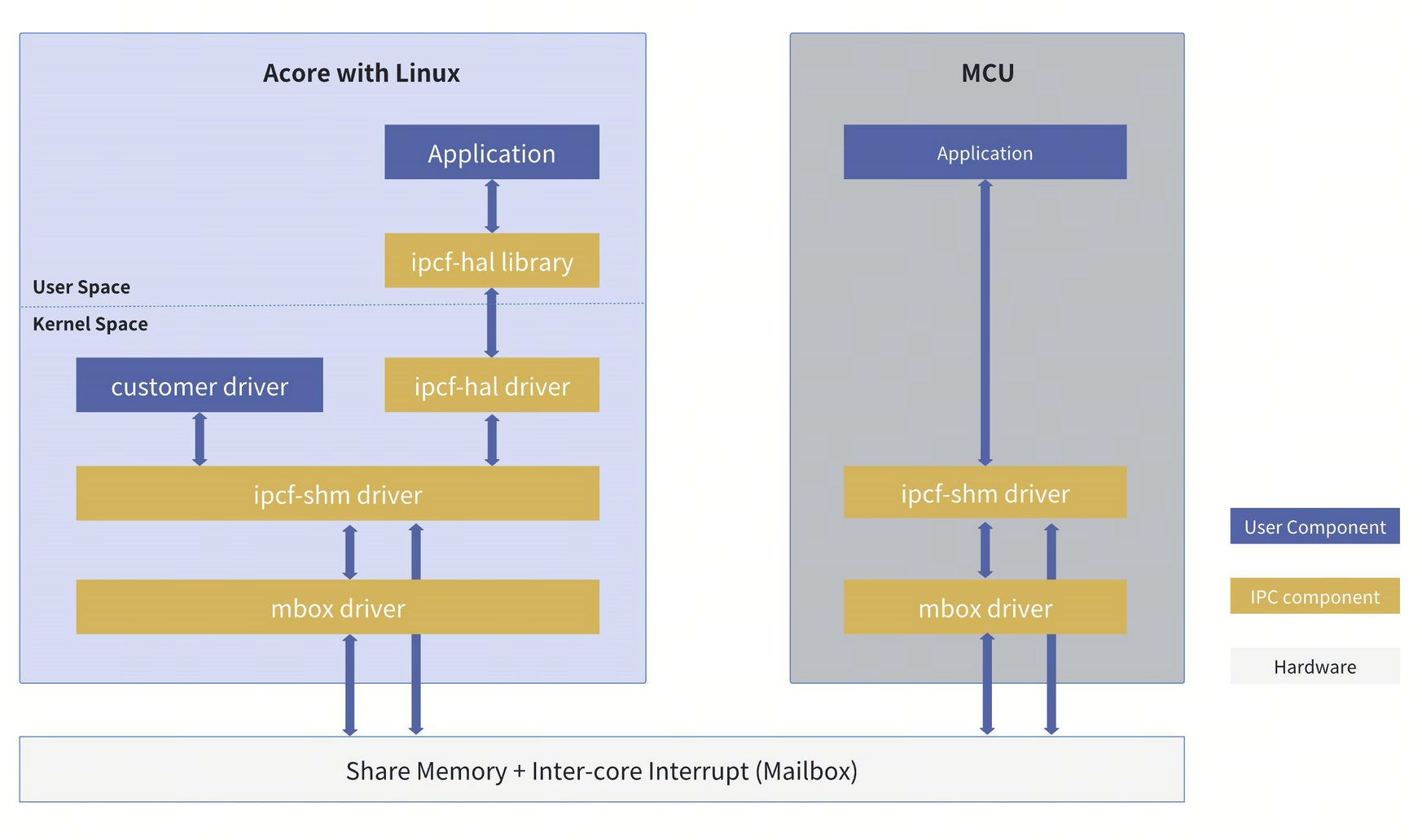
Typical IPC Usage Scenarios
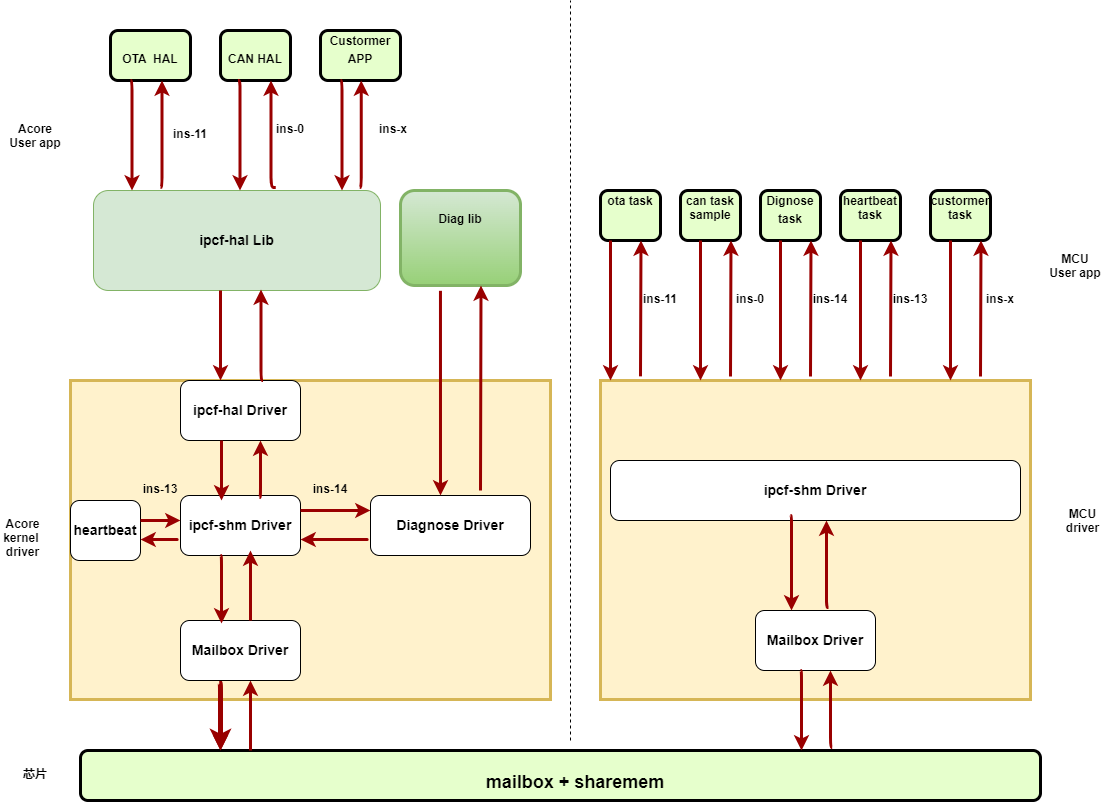
Typical IPC application scenarios include the OTA module, planning and control, CANHAL, etc.
IPC Instance Allocation Scheme
The instance number range on the IPC Acore side is [0-34], used for Acore-MCU communication instances [0-14], Acore-VDSP communication instances [22-24], Acore-BPU communication instances [32-34], with the remaining instances for other private purposes. Instances [0-8] can be used for Acore-MCU communication, instances [4-6] are reserved for customers by default. If users do not need CANHAL, planning and control, etc., they can modify the configuration file themselves. For IPC communication status between AOCRE and MCU in S100, please refer to the IPC Usage section in MCU IPC User Guide.
The instance number range on the IPC Acore side is [0-63], used for Acore-MCU communication instances [0-15] and [50-53], Acore-VDSP communication instances [22-24] and [42-44], Acore-BPU communication instances [32-39], with the remaining instances for other private purposes. Customers can use instances [0-15] for Acore-MCU communication, while the other instances are for internal use.
The instance number range on the IPC VDSP side is [0-6], used for VDSP-Acore communication instances [0-2] (VDSP0 corresponds to Acore instances [22-24], VDSP1 corresponds to Acore instances [42-44]), with the remaining instances for private purposes.
Method for Configuring Instances on the Acore Side
Instances on the Acore side can be configured via the device tree file. The configuration paths are:
source/hobot-drivers/kernel-dts/drobot-s100-ipc.dtsi
source/hobot-drivers/kernel-dts/include/drobot_s100_ipc.h
The device tree configuration information is as follows (for reference only):
ipcfhal_cfg: ipcfhal_cfg {
    status = "okay"; #Node status, no need to change
    compatible = "hobot,hobot-ipcfhal";  #Node property, do not change

    /****************instance--num_chans--num_bufs--buf_size****************/
    ipc-ins = <&ipc_instance0	8	8	0x2000>, #(Acore&MCU) for CANHAL
            <&ipc_instance1	8	8	0x1000>, #(Acore&MCU) idle
            <&ipc_instance2	2	8	0x800>, #(Acore&MCU) idle
            <&ipc_instance3	8	8	0x1000>, #(Acore&MCU) idle
            <&ipc_instance4	8	8	0x1000>, #(Acore&MCU) for CANHAL
            <&ipc_instance5	8	8	0x1000>, #(Acore&MCU) for external RTC
            <&ipc_instance6	8	8	0x1000>, #(Acore&MCU) idle, user configurable
            <&ipc_instance7	8	8	0x1000>, #(Acore&MCU) transparent uart, spi, i2c and other peripherals, run mcu-side cmd apps
            <&ipc_instance8	8	8	0x1000>, #(Acore&MCU) partially idle, user configurable
            <&ipc_instance9	2	5	0x400>,  #(Acore&MCU) private instance, internal reservation
            <&ipc_instance10	1	5	0x200>, #(Acore&MCU) private instance, internal reservation
            <&ipc_instance22	8	8	0x1000>, #(Acore&VDSP) VDSP reserved, not yet open to customers
            <&ipc_instance23	8	8	0x1000>, #(Acore&VDSP) VDSP reserved, not yet open to customers
            <&ipc_instance24	8	8	0x1000>; #(Acore&VDSP) VDSP reserved, not yet open to customers
};
Instances on the Acore side can be configured via the device tree file. The configuration paths are:
source/hobot-drivers/kernel-dts/drobot-s600-ipc.dtsi
source/hobot-drivers/kernel-dts/include/drobot_s600_ipc.h
The device tree configuration information is as follows (for reference only):
ipcfhal_cfg: ipcfhal_cfg {
    status = "okay"; #Node status, no need to change
    compatible = "hobot,hobot-ipcfhal";  #Node property, do not change

    /****************instance--num_chans--num_bufs--buf_size****************/
        ipc-ins = <&ipc_instance0         8       8       0x2000>, #Acore&MCU, canhal
                <&ipc_instance1         8       8       0x1000>, #Acore&MCU, user configurable
                <&ipc_instance2         2       8       0x800>, #Acore&MCU, user configurable
                <&ipc_instance3         8       8       0x1000>, #Acore&MCU, user configurable
                <&ipc_instance4         8       8       0x1000>, #Acore&MCU, canhal
                <&ipc_instance5         8       8       0x1000>, #Acore&MCU, external RTC
                <&ipc_instance6         8       8       0x1000>, #Acore&MCU, user configurable
                <&ipc_instance7         8       8       0x1000>, #Acore&MCU, ipcbox
                <&ipc_instance8         8       8       0x1000>, #Acore&MCU, start mcu1
                <&ipc_instance9         2       5       0x400>, #Acore&MCU, user configurable
                <&ipc_instance10        1       5       0x200>, #Acore&MCU, timesync
                <&ipc_instance11        8       8       0x1000>, #Acore&MCU, user configurable
                <&ipc_instance12        8       8       0x1000>, #Acore&MCU, user configurable
                <&ipc_instance13        8       8       0x1000>, #Acore&MCU, user configurable
                <&ipc_instance14        8       8       0x1000>, #Acore&MCU, user configurable
                <&ipc_instance15        8       8       0x1000>, #Acore&MCU, user configurable
                <&ipc_instance22        8       8       0x1000>, #Acore&VDSP0, not yet open to customers
                <&ipc_instance23        8       8       0x1000>, #Acore&VDSP0, not yet open to customers
                <&ipc_instance24        8       8       0x1000>, #Acore&VDSP0, not yet open to customers
                <&ipc_instance42        8       8       0x1000>, #Acore&VDSP1, not yet open to customers
                <&ipc_instance43        8       8       0x1000>, #Acore&VDSP1, not yet open to customers
                <&ipc_instance44        8       8       0x1000>; #Acore&VDSP1, not yet open to customers
};
Device Tree Configuration Description
The device tree ipcfhal_cfg node configures some instance properties by default:
- The first column in the property indicates the instance number, which must be unique and within the valid range.
- The second column indicates the number of channels allocated to this instance, user-configurable, with a maximum of 32.
- The third column indicates the number of buffer bufs per channel, user-configurable, with a maximum of 1024, limited by control space size. The fourth column indicates the buffer buf size in Bytes, user-configurable.
number of channels * number of buffer bufs * buf sizemust be less than or equal to 0.5MB (currently, each instance is pre-allocated 1MB of data space, which will not be expanded for now).
The device tree node for a single instance is as follows:
#Not used, User can apply for it
ipc_instance3: ipc_instance3 {
        status = "okay"; #Node status, no need to change
        compatible = "hobot,hobot-ipc"; #Node property, do not change
        mbox-names = "mbox-chan"; #Mailbox name property, do not change
        mboxes = <&mailbox0 3 19 3>; #Mailbox communication direction, instances 5 and 6 need changes, others do not
        instance = <3>; #Instance id, no need to change
        data_local_addr = /bits/ 64 <IPC_INS3_DATA_LOCAL>; #Acore data segment, instances 5 and 6 need changes, others do not
        data_remote_addr = /bits/ 64 <IPC_INS3_DATA_REMOTE>; #MCU data segment, instances 5 and 6 need changes, others do not
        data_size = <IPC_SINGLE_DATA_SIZE>; #Data segment size, do not change, unit Bytes
        ctrl_local_addr = /bits/ 64 <IPC_INS3_CTRL_LOCAL>; #Acore control segment, instances 5 and 6 need changes, others do not
        ctrl_remote_addr = /bits/ 64 <IPC_INS3_CTRL_REMOTE>; #MCU control segment, instances 5 and 6 need changes, others do not
        ctrl_size = <IPC_SINGLE_CTRL_SIZE>; #Data segment size, do not change, unit Bytes
};
Instances 5 and 6 are used internally for testing. If external customers need to use them, they must configure them themselves. The configuration information is as follows, no changes needed.
ipc_instance5: ipc_instance5 {
        status = "okay";
        compatible = "hobot,hobot-ipc";
        mbox-names = "mbox-chan";
        mboxes = <&mailbox0 5 21 5>;
        instance = <5>;
        data_local_addr = /bits/ 64 <IPC_INS5_DATA_LOCAL>;
        data_remote_addr = /bits/ 64 <IPC_INS5_DATA_REMOTE>;
        data_size = <IPC_SINGLE_DATA_SIZE>;
        ctrl_local_addr = /bits/ 64 <IPC_INS5_CTRL_LOCAL>;
        ctrl_remote_addr = /bits/ 64 <IPC_INS5_CTRL_REMOTE>;
        ctrl_size = <IPC_SINGLE_CTRL_SIZE>;
};

ipc_instance6: ipc_instance6 {
        status = "okay";
        compatible = "hobot,hobot-ipc";
        mbox-names = "mbox-chan";
        mboxes = <&mailbox0 6 22 6>;
        instance = <6>;
        data_local_addr = /bits/ 64 <IPC_INS6_DATA_LOCAL>;
        data_remote_addr = /bits/ 64 <IPC_INS6_DATA_REMOTE>;
        data_size = <IPC_SINGLE_DATA_SIZE>;
        ctrl_local_addr = /bits/ 64 <IPC_INS6_CTRL_LOCAL>;
        ctrl_remote_addr = /bits/ 64 <IPC_INS6_CTRL_REMOTE>;
        ctrl_size = <IPC_SINGLE_CTRL_SIZE>;
};
Device Tree Configuration Precautions:
- Data segments for instances 3~8 are pre-allocated 1MB of space by default, with 0.5MB used on the Acore side and 0.5MB on the MCU side. Therefore,
number of channels * number of buffer bufs * buf sizemust be ≤ 0.5MB. - Control segments for instances 3~8 are pre-allocated 5KB of space by default, with 2.5KB used on the Acore side and 2.5KB on the MCU side, used to store ring buf control info and status info. Therefore,
(number of buffer bufs + 2) * 16 * number of channels + 8must be ≤ 2.5KB. - Instances 5~6 are used for D-Robotics internal testing. Users can modify the device tree nodes according to the configuration above. // TODO: Can be fully opened to customers
- The number of channels per instance must be ≤ 32, and the number of buffer bufs must be ≤ 1024, while also satisfying the inequalities in the first two points.
- Using different channels of the same instance or different instances for multiple services has little impact on transmission; the main considerations are whether
buf_size/buf_numis suitable and whether service development and maintenance are convenient. - The underlying Mailbox interrupt allocation cannot be modified.
- The number of channels, buffer bufs count, and size must be consistent between Acore and MCU. The local and remote addresses for data and control segments must be opposite.
- The first address of the instance's control segment stores the instance initialization status, which can be used to determine if the instance is initialized. Acore completes initialization when the kernel starts by default.
- If users need to allocate data segments and address segments themselves, they need to modify the Acore device tree file, Uboot device tree file, and MCU configuration file.
- In the same channel, sending (push) and receiving (pop) use independent ring buffers and interrupt mechanisms, so send and receive operations are independent and do not affect each other.
The device tree ipcfhal_cfg node configures some instance properties by default:
- The first column in the property indicates the instance number, which must be unique and within the valid range.
- The second column indicates the number of channels allocated to this instance, user-configurable, with a maximum of 32.
- The third column indicates the number of buffer bufs per channel, user-configurable, with a maximum of 1024, limited by control space size. The fourth column indicates the buffer buf size in Bytes, user-configurable.
number of channels * number of buffer bufs * buf sizemust be less than or equal to 0.5MB (currently, each instance is pre-allocated 1MB of data space, which will not be expanded for now).
The device tree node for a single instance is as follows:
#Not used, User can apply for it
ipc_instance3: ipc_instance3 {
        status = "okay"; #Node status, no need to change
        compatible = "hobot,hobot-ipc"; #Node property, do not change
        mbox-names = "mbox-chan"; #Mailbox name property, do not change
        mboxes = <&mailbox0 3 19 3>; #Mailbox communication direction
        instance = <3>; #Instance id, no need to change
        data_local_addr = /bits/ 64 <IPC_INS3_DATA_LOCAL>; #Acore data segment
        data_remote_addr = /bits/ 64 <IPC_INS3_DATA_REMOTE>; #MCU data segment
        data_size = <IPC_SINGLE_DATA_SIZE>; #Data segment size, do not change, unit Bytes
        ctrl_local_addr = /bits/ 64 <IPC_INS3_CTRL_LOCAL>; #Acore control segment
        ctrl_remote_addr = /bits/ 64 <IPC_INS3_CTRL_REMOTE>; #MCU control segment
        ctrl_size = <IPC_SINGLE_CTRL_SIZE>; #Data segment size, do not change, unit Bytes
};
Device Tree Configuration Precautions:
- Data segments for instances 0~15 are pre-allocated 1MB of space by default, with 0.5MB used on the Acore side and 0.5MB on the MCU side. Therefore,
number of channels * number of buffer bufs * buf sizemust be ≤ 0.5MB. - Control segments for instances 0~15 are pre-allocated 8KB of space by default, with 4KB used on the Acore side and 4KB on the MCU side, used to store ring buf control info and status info. Therefore,
(number of buffer bufs + 2) * 16 * number of channels + 8must be ≤ 4KB. - The number of channels per instance must be ≤ 32, and the number of buffer bufs must be ≤ 1024, while also satisfying the inequalities in the first two points.
- Using different channels of the same instance or different instances for multiple services has little impact on transmission; the main considerations are whether
buf_size/buf_numis suitable and whether service development and maintenance are convenient. - The underlying Mailbox interrupt allocation cannot be modified.
- The number of channels, buffer bufs count, and size must be consistent between Acore and MCU. The local and remote addresses for data and control segments must be opposite.
- The first address of the instance's control segment stores the instance initialization status, which can be used to determine if the instance is initialized. Acore completes initialization when the kernel starts by default.
- If users need to allocate data segments and address segments themselves, they need to modify the Acore device tree file, Uboot device tree file, and MCU configuration file.
User-Space IPC Application and Configuration File Usage
The IPC Sample implements IPC send/receive communication between Acore and MCU, demonstrating an example of using IPC with multiple instances, multiple channels, and multiple threads.
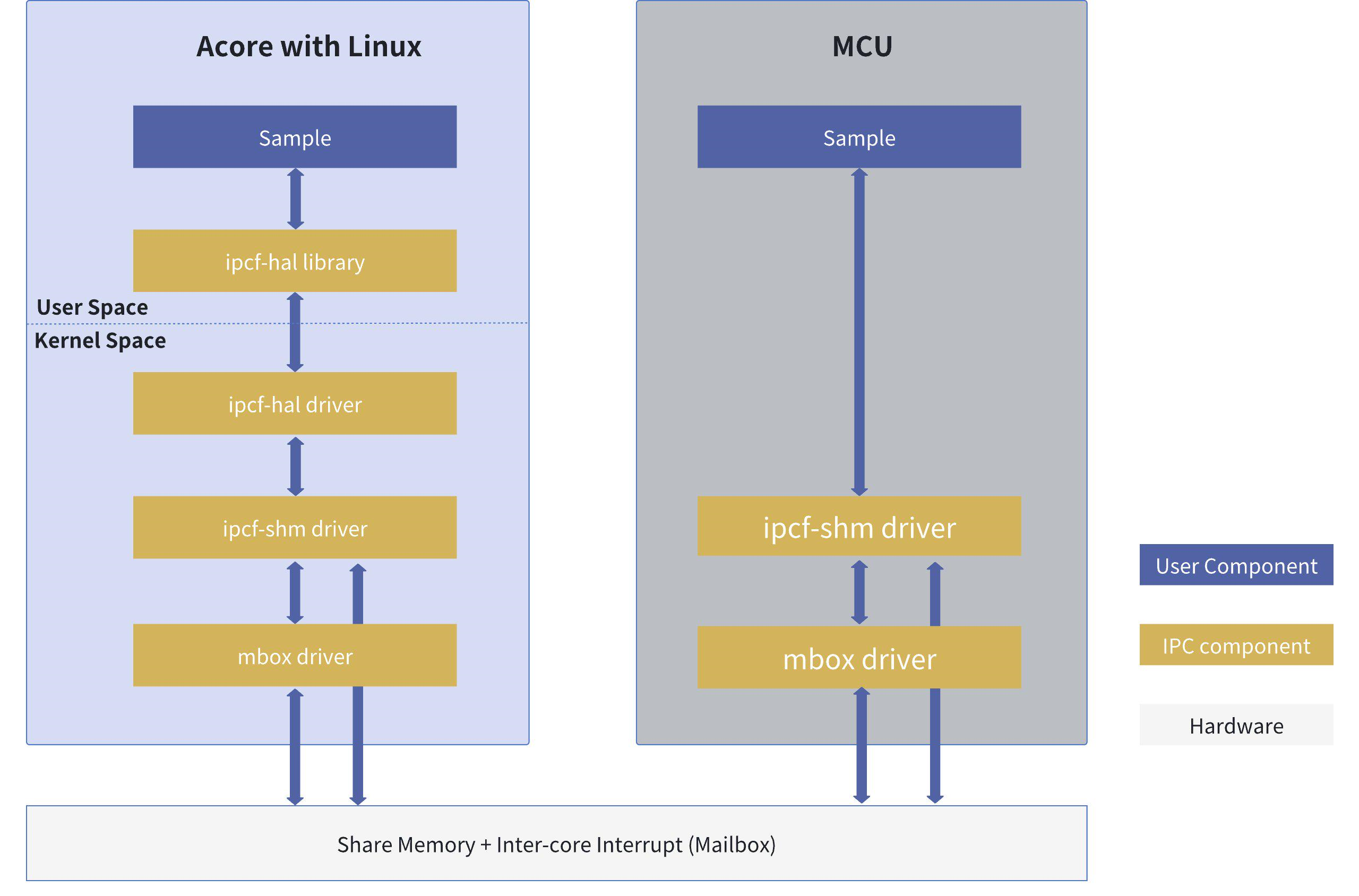
In the Sample software architecture diagram, Acore uses the libipcfhal interface for data transmission, based on the ipcf driver at the lower level. MCU directly uses the ipcf interface for transmission. Since there are multiple sets of IPC interfaces on the Acore side, they are described separately as IPCFHAL, RPMSG, and IPCF for distinction. MCU has only one set of IPC interfaces, so IPCF is uniformly described as IPC in the MCU-side documentation.
Hardware Data Flow Description
Sample shared memory data flow and interrupt signal flow
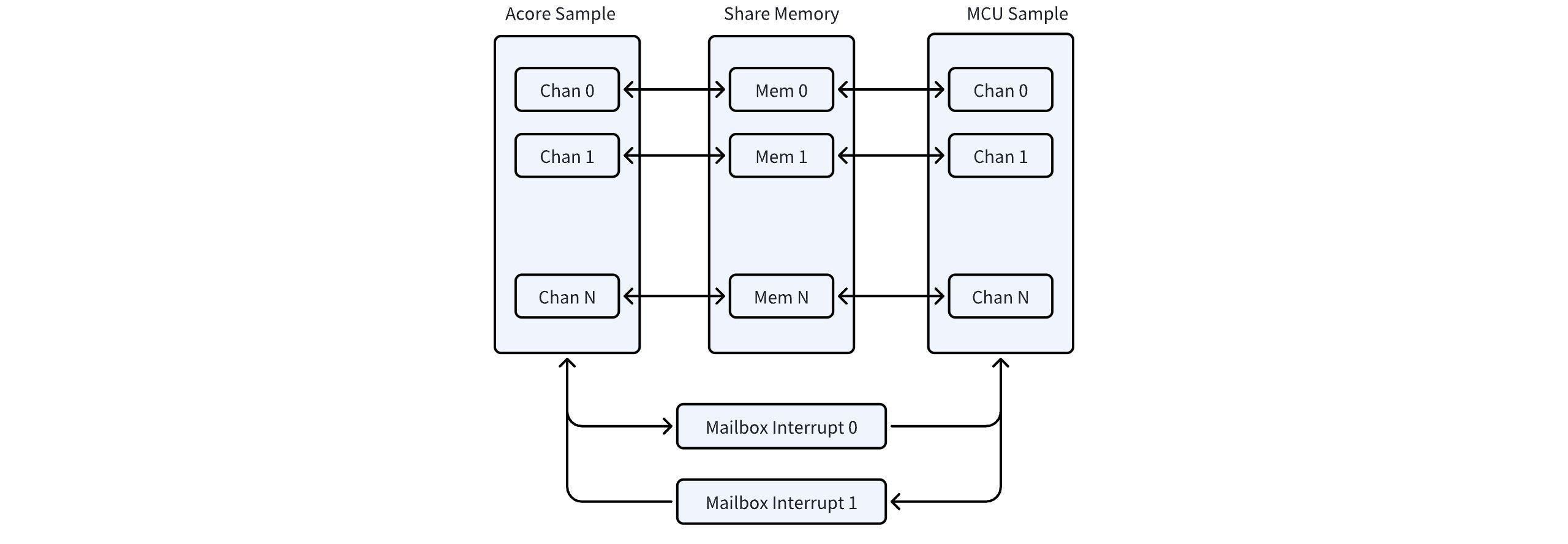
In the Sample, Acore and MCU transmit data via shared memory and notify each other via mailbox interrupts.
Acore Side Sample Code Location and Directory Structure
Code Path:
# Sample source code path
${SDK}/source/hobot-io-samples/debian/app/ipcbox_sample  # ipc C++ Sample
${SDK}/source/hobot-io-samples/debian/app/pyhbipchal_sample # ipc python Sample
${SDK}/source/hobot-io/debian/app/pyhbipchal # ipc C++ library source for converting to python library

# The source code is packaged with the firmware and can be compiled on S100. The path is as follows
${S100}/app/ipcbox_sample
${S100}/app/pyhbipchal_sample
Directory Structure:
root@ubuntu:/app/ipcbox_sample# tree .
.
├── ipcbox_runcmd # Sample for running mcu-side cmd commands
│   ├── Makefile # Sample build framework
│   ├── ipcbox_runcmd.cpp # Sample code
│   └── ipcfhal_sample_config.json # Sample configuration file
└── ipcbox_uart # ipc transparent uart Sample
    ├── Makefile # Sample build framework
    ├── ipcbox_uart.cpp # Sample code
    └── ipcfhal_sample_config.json # Sample configuration file
IPC Real-time Performance Optimization Settings
If specific scenarios require improved real-time performance of IPC communication, follow these steps to configure, using ipc_instance5 as an example.
- First, find the interrupt number and interrupt thread PID corresponding to ipc_instance5
#Interrupt number lookup:
root@ubuntu:~# cat /proc/interrupts | grep "mailbox"
 14:          0          0          0          0          0          0     GICv3 293 Level     29f00000.mailbox0
 15:          0          0          0          0          0          0     GICv3 294 Level     29f00000.mailbox0
 16:          0          0          0          0          0          0     GICv3 295 Level     29f00000.mailbox0
 17:          0          0          0          0          0          0     GICv3 296 Level     29f00000.mailbox0
 18:          0          0          0          0          0          0     GICv3 297 Level     29f00000.mailbox0
 19:          0          0          0          0          0          0     GICv3 298 Level     29f00000.mailbox0
 20:          0          0          0          0          0          0     GICv3 299 Level     29f00000.mailbox0
 21:          0          0          0          0          0          0     GICv3 300 Level     29f00000.mailbox0
 22:          0          0          0          0          0          0     GICv3 301 Level     29f00000.mailbox0
 23:          0          0          0          0          0          0     GICv3 302 Level     29f00000.mailbox0
 24:          0          0          0          0          0          0     GICv3 303 Level     29f00000.mailbox0
 25:          1          0          1          0          1          1     GICv3 304 Level     29f00000.mailbox0
 26:          0          0          0          0          0          0     GICv3 305 Level     29f00000.mailbox0
 27:          0          0          0          0          0          0     GICv3 306 Level     29f00000.mailbox0
 28:          0          0          0          0          0          0     GICv3 307 Level     29f00000.mailbox0
 29:          0          0          0          0          0          0     GICv3 280 Level     29f01000.mailbox1
 30:          0          0          0          0          0          0     GICv3 281 Level     29f01000.mailbox1
 31:          0          0          0          0          0          0     GICv3 282 Level     29f01000.mailbox1
 32:          0          0          0          0          0          0     GICv3 283 Level     29f01000.mailbox1
 33:          0          0          0          0          0          0     GICv3 284 Level     29f01000.mailbox1
 34:          0          0          0          0          0          0     GICv3 285 Level     29f01000.mailbox1
 35:          0          0          0          0          0          0     GICv3 286 Level     29f01000.mailbox1
 36:          0          0          0          0          0          0     GICv3 287 Level     29f01000.mailbox1
 37:          0          0          0          0          0          0     GICv3 288 Level     29f01000.mailbox1
 38:          0          0          0          0          0          0     GICv3 289 Level     29f01000.mailbox1
 39:          0          0          0          0          0          0     GICv3 290 Level     29f01000.mailbox1
 40:          0          0          0          0          0          0     GICv3 291 Level     29f01000.mailbox1
 41:          0          0          0          0          0          0     GICv3 292 Level     29f01000.mailbox1
 42:          0          0          0          0          0          0     GICv3  50 Level     28109000.mailbox2
 43:          0          0          0          0          0          0     GICv3  52 Level     2810d000.mailbox3
 44:          0          0          0          0          0          0     GICv3  54 Level     28105000.mailbox4
#Interrupt thread PID lookup
root@ubuntu:~# ps aux | grep "mailbox"
root          70  0.0  0.0      0     0 ?        S    22:17   0:00 [irq/14-29f00000.mailbox0]
root          71  0.0  0.0      0     0 ?        S    22:17   0:00 [irq/15-29f00000.mailbox0]
root          72  0.0  0.0      0     0 ?        S    22:17   0:00 [irq/16-29f00000.mailbox0]
root          73  0.0  0.0      0     0 ?        S    22:17   0:00 [irq/17-29f00000.mailbox0]
root          74  0.0  0.0      0     0 ?        S    22:17   0:00 [irq/18-29f00000.mailbox0]
root          75  0.0  0.0      0     0 ?        S    22:17   0:00 [irq/19-29f00000.mailbox0]
root          76  0.0  0.0      0     0 ?        S    22:17   0:00 [irq/20-29f00000.mailbox0]
root          77  0.0  0.0      0     0 ?        S    22:17   0:00 [irq/21-29f00000.mailbox0]
root          78  0.0  0.0      0     0 ?        S    22:17   0:00 [irq/22-29f00000.mailbox0]
root          79  0.0  0.0      0     0 ?        S    22:17   0:00 [irq/23-29f00000.mailbox0]
root          80  0.0  0.0      0     0 ?        S    22:17   0:00 [irq/24-29f00000.mailbox0]
root          81  0.0  0.0      0     0 ?        S    22:17   0:00 [irq/25-29f00000.mailbox0]
root          82  0.0  0.0      0     0 ?        S    22:17   0:00 [irq/26-29f00000.mailbox0]
root          83  0.0  0.0      0     0 ?        S    22:17   0:00 [irq/27-29f00000.mailbox0]
root          84  0.0  0.0      0     0 ?        S    22:17   0:00 [irq/28-29f00000.mailbox0]
root          85  0.0  0.0      0     0 ?        S    22:17   0:00 [irq/29-29f01000.mailbox1]
root          86  0.0  0.0      0     0 ?        S    22:17   0:00 [irq/30-29f01000.mailbox1]
root          87  0.0  0.0      0     0 ?        S    22:17   0:00 [irq/31-29f01000.mailbox1]
root          88  0.0  0.0      0     0 ?        S    22:17   0:00 [irq/32-29f01000.mailbox1]
root          89  0.0  0.0      0     0 ?        S    22:17   0:00 [irq/33-29f01000.mailbox1]
root          90  0.0  0.0      0     0 ?        S    22:17   0:00 [irq/34-29f01000.mailbox1]
root          91  0.0  0.0      0     0 ?        S    22:17   0:00 [irq/35-29f01000.mailbox1]
root          92  0.0  0.0      0     0 ?        S    22:17   0:00 [irq/36-29f01000.mailbox1]
root          93  0.0  0.0      0     0 ?        S    22:17   0:00 [irq/37-29f01000.mailbox1]
root          94  0.0  0.0      0     0 ?        S    22:17   0:00 [irq/38-29f01000.mailbox1]
root          95  0.0  0.0      0     0 ?        S    22:17   0:00 [irq/39-29f01000.mailbox1]
root          96  0.0  0.0      0     0 ?        S    22:17   0:00 [irq/40-29f01000.mailbox1]
root          97  0.0  0.0      0     0 ?        S    22:17   0:00 [irq/41-29f01000.mailbox1]
root          98  0.0  0.0      0     0 ?        S    22:17   0:00 [irq/42-28109000.mailbox2]
root          99  0.0  0.0      0     0 ?        S    22:17   0:00 [irq/43-2810d000.mailbox3]
root         100  0.0  0.0      0     0 ?        S    22:17   0:00 [irq/44-28105000.mailbox4]
#According to the device tree ipc_instance5, the corresponding mailbox is mboxes = <&mailbox0 5 21 5>; therefore the interrupt number is 19, and the interrupt thread PID is 75.
- Bind the interrupt to a CPU core to reduce migration overhead
#Bind IRQ 19 to CPU2:
root@ubuntu:/# echo 4 > /proc/irq/19/smp_affinity
- Bind the interrupt thread to a CPU core to reduce migration overhead
#Bind PID 75 to CPU2:
root@ubuntu:/# taskset -p 0x04 75
pid 75's current affinity mask: 3f
pid 75's new affinity mask: 4
- Set the interrupt thread priority to prevent interruption by high-priority tasks
#Increase the priority of PID 75 to 99
root@ubuntu:/# chrt -f -p 99 75
root@ubuntu:/# chrt -p 75
pid 75's current scheduling policy: SCHED_FIFO
pid 75's current scheduling priority: 99
- Isolate the interrupt CPU to ensure the corresponding CPU is dedicated to real-time tasks
#Isolate CPU2, needs to be set in uboot mode
Hobot$ printenv bootargs
bootargs=earlycon=uart8250,mmio32,0x394B0000 no_console_suspend root=/dev/ram0 rdinit=/init  rootwait net.ifnames=0
Hobot$ setenv bootargs "${bootargs} isolcpus=2 nohz_full=2 rcu_nocbs=2"
Hobot$ saveenv
Saving Environment to MMC... Writing to MMC(0)... OK
Hobot$ reset
#Check if it took effect after system boot
root@ubuntu:/# cat /sys/devices/system/cpu/isolated
2
- Set the RT kernel scheduler state to prevent RT tasks from being forcefully yielded
root@ubuntu:/# echo -1 > /proc/sys/kernel/sched_rt_runtime_us
This setting allows all RT tasks to occupy the CPU without limits, thereby improving system real-time performance, but it may also cause normal tasks to be starved of scheduling opportunities. Therefore, use -1 with caution. For debugging RT thread scheduling, please refer to the kernel official documentation
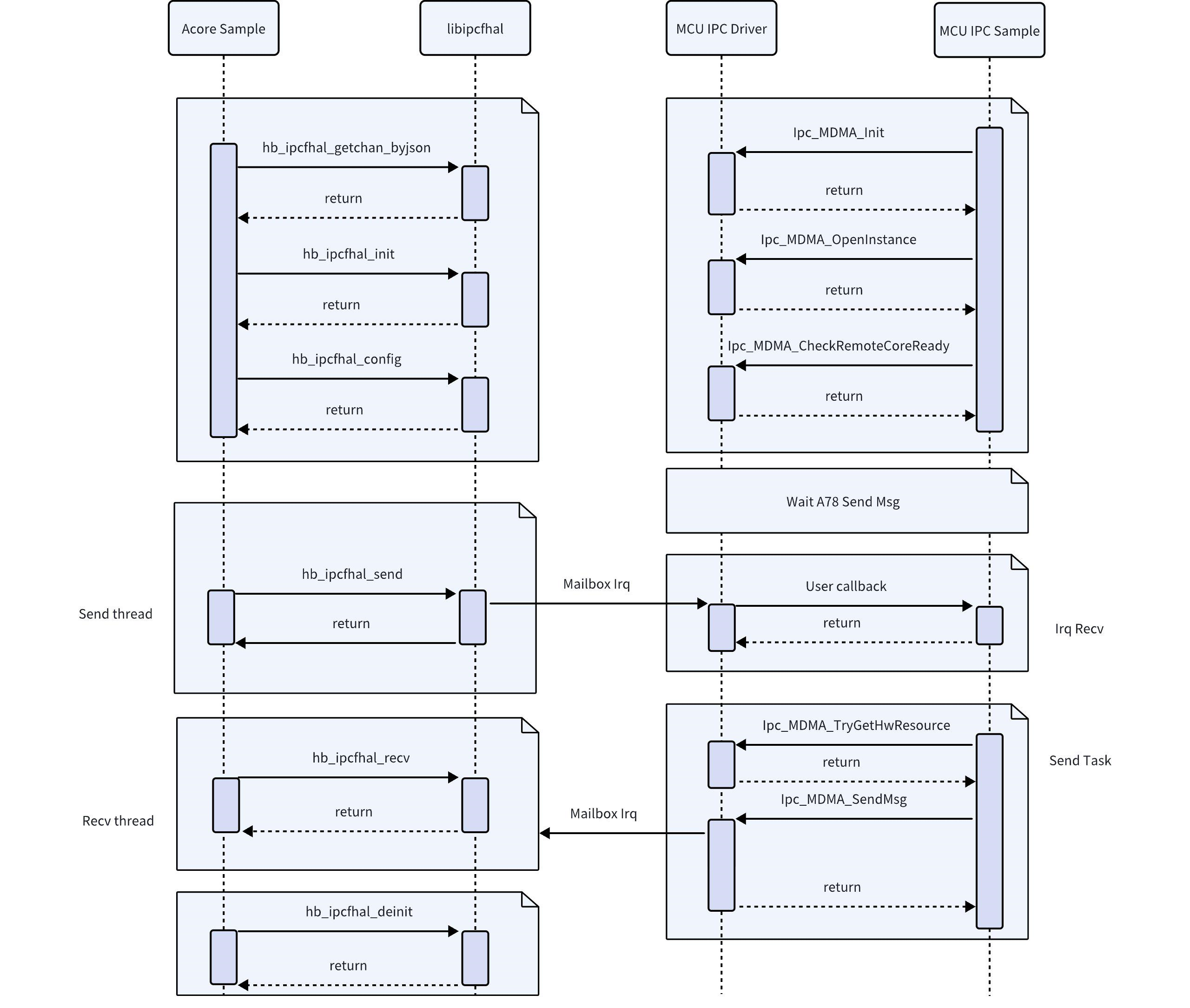
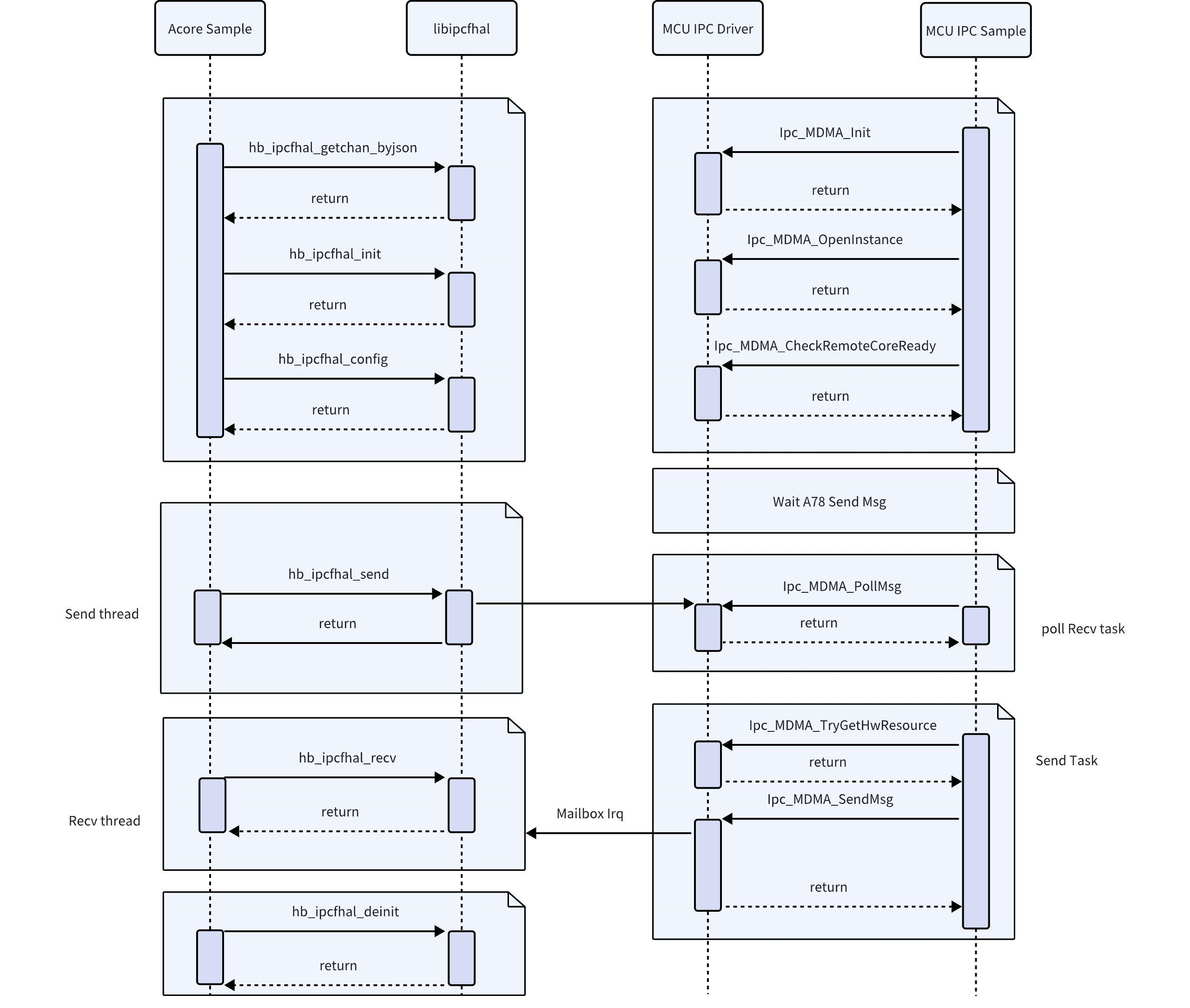
API Flow Description
API Sample operation flow between Acore and MCU (IRQ mode)
API Sample operation flow between Acore and MCU (POLL mode)
Path Configuration
You can increase the number of channels config_num in the Json file and add channel information. This Sample does not support adding channels. To add channels, you need to modify the configuration files on both the Acore and MCU sides.
{
        "log_level": 0, # Log level, can be omitted
        "config_num": 4, # Number of configured channels
        "config_num_max":256, # Maximum number of configured channels
        "config_0": { # Configure channel
                "name": "cpu2mcu_ins7ch0", # Channel name
                "instance": 7, # Instance id
                "channel": 0, # Channel id
                "pkg_size_max": 4096, # Maximum packet size in bytes, recommended ≤ 4096 Bytes
                "fifo_size": 64000, # Size of buffer fifo, depends on required buffer count
                "fifo_type": 0, # Type of buffer fifo, only 0 is supported
                "ipcf_dev_path":"/dev/ipcdrv", # Character device driver path, only /dev/ipcdrv is supported
                "ipcf_dev_name":"ipcdrv" # Character device driver name, only ipcdrv is supported
        },
        "config_1": {
                "name": "cpu2mcu_ins7ch1",
                "instance": 7,
                "channel": 1,
                "pkg_size_max": 4096,
                "fifo_size": 64000,
                "fifo_type": 0,
                "ipcf_dev_path":"/dev/ipcdrv",
                "ipcf_dev_name":"ipcdrv"
        },
        "config_2": {
                "name": "cpu2mcu_ins8ch0",
                "instance": 8,
                "channel": 0,
                "pkg_size_max": 4096,
                "fifo_size": 64000,
                "fifo_type": 0,
                "ipcf_dev_path":"/dev/ipcdrv",
                "ipcf_dev_name":"ipcdrv"
        },
        "config_3": {
                "name": "cpu2mcu_ins8ch1",
                "instance": 8,
                "channel": 1,
                "pkg_size_max": 4096,
                "fifo_size": 64000,
                "fifo_type": 0,
                "ipcf_dev_path":"/dev/ipcdrv",
                "ipcf_dev_name":"ipcdrv"
        }
}
Instance Description
Error Code Definition
| Error Code Macro | Error Code Value | Description |
|---|---|---|
IPCF_HAL_E_OK | 0 | Operation successful |
IPCF_HAL_E_NOK | 1 | Operation failed |
IPCF_HAL_E_CONFIG_FAIL | 2 | Configuration failed |
IPCF_HAL_E_WRONG_CONFIGURATION | 3 | Wrong configuration |
IPCF_HAL_E_NULL_POINTER | 4 | A null pointer was passed as an argument |
IPCF_HAL_E_PARAM_INVALID | 5 | Parameter invalid |
IPCF_HAL_E_LENGTH_TOO_SMALL | 6 | Length too small |
IPCF_HAL_E_INIT_FAILED | 7 | Initialization failed |
IPCF_HAL_E_UNINIT | 8 | Called before initialization |
IPCF_HAL_E_BUFFER_OVERFLOW | 9 | Source or destination address buffer overflow |
IPCF_HAL_E_ALLOC_FAIL | 10 | Resource allocation failed |
IPCF_HAL_E_TIMEOUT | 11 | Operation timeout |
IPCF_HAL_E_REINIT | 12 | Repeated initialization |
IPCF_HAL_E_BUSY | 13 | System busy |
IPCF_HAL_E_CHANNEL_INVALID | 14 | Data write channel status abnormal: Kernel RingBuffer reached capacity limit, causing data write operation failure. Suggested to wait 1~2ms and retry. Data read channel status abnormal: Kernel RingBuffer is empty, causing data read operation failure. Suggested to wait 1~2ms and retry. |
C++ Application
Multiple applications have been implemented on the Acore side to operate peripherals on the MCU side. These applications are located in the /app/ipcbox_sample directory:
root@ubuntu:/app/ipcbox_sample# tree -L 1
.
├── common  # Common files, implementing data packing/unpacking, data verification, etc.
├── ipcbox_i2c # Sample for operating I2C peripherals on the MCU side
├── ipcbox_runcmd # Sample for running cmd commands on the MCU side
├── ipcbox_spi # Sample for operating SPI peripherals on the MCU side
└── ipcbox_uart # Sample for operating UART peripherals on the MCU side
- The applications actually operate MCU-side peripherals. Before use, confirm whether MCU1 has started. For starting MCU1, refer to MCU1 Startup
- When operating these peripherals, confirm whether the MCU side has configured them for transparent transmission. Refer to MCU-side IPCBOX Configuration
RunCmd Application
This sample implements reading the voltage of an ADC channel.
- After booting into S100, navigate to the application directory
/app/ipcbox_sample/ipcbox_runcmd
- After booting into S600, navigate to the application directory
/app/ipcbox_sample/ipcbox_runcmd
- Compile:
make - Run:
./ipcbox_runcmd - If the output
Extracted adc data:{"adc_ch":1,"adc_result":628,"adc_mv":276}appears, the test passes, where it indicates the ADC corresponding pin, and adc_mv indicates the read voltage value.
root@ubuntu:/app/ipcbox_sample/ipcbox_runcmd# ./ipcbox_runcmd
[INFO][hb_ipcf_hal.cpp:282] [channel] cpu2mcu_ins7ch0 [ins] 7 [id] 0 init success.
[INFO][hb_ipcf_hal.cpp:333] [channel] cpu2mcu_ins7ch0 [ins] 7 [id] 0 config success.
Extracted adc data:{"adc_ch":1,"adc_result":628,"adc_mv":276}
[INFO][hb_ipcf_hal.cpp:553] [channel] cpu2mcu_ins7ch0 [ins] 7 [id] 0 deinit success.
Uart Transparent Transmission
Test Prerequisites
Before testing, short the TX and RX of the Uart to be used. The default Uarts used by S100 and S600 are as follows:
| Platform | Uart id |
|---|---|
| S100 | Uart5 |
| S600 | Uart11 |
To modify the Uart used, edit the mcu/Config/McalCdd/gen_xxx/Uart/inc/Uart_Board.h file on the MCU side. For example, for S600, define UART_IPCBOX_HW_CHANNEL as the corresponding Uart hardware:
#define UART_IPCBOX_HW_CHANNEL (UART11_HW_CHANNEL)
Also, check the IpcBox_InstanceMap configuration in mcu/Service/HouseKeeping/ipc_box/src/ipc_box.c on the MCU side to ensure the uart entry is enabled. By default, uart is DISABLE in the configuration below, change it to ENABLE:
{ IPCBOX_COM_ID_UART, "uart", IpcConf_IpcInstance_IpcInstance_7,
#if ((SOC_TYPE_S100 == SOC_TYPE) || (SOC_TYPE_S100P == SOC_TYPE))
  IpcConf_IpcInstance_7_IpcChannel_1, ENABLE, UART5_CHANNEL,
#else
  IpcConf_IpcInstance_7_IpcChannel_1, ENABLE, UART_IPCBOX_HW_CHANNEL,
#endif
  IpcBox_UartInit, IpcBox_UartDeinit },
The test sample implements transparent transmission of Uart. The operation steps are as follows:
- After booting into S100, navigate to the application directory
cd /app/ipcbox_sample/ipcbox_uart
- After booting into S600, navigate to the application directory
cd /app/ipcbox_sample/ipcbox_uart
- Compile:
make - Run:
./ipcbox_uart - If the output
tx_data and rx_data are identical.appears, the test passes. Reference log:
root@ubuntu:/app/ipcbox_sample/ipcbox_uart# ./ipcbox_uart
[INFO][hb_ipcf_hal.cpp:282] [channel] cpu2mcu_ins7ch1 [ins] 7 [id] 1 init success.
[INFO][hb_ipcf_hal.cpp:333] [channel] cpu2mcu_ins7ch1 [ins] 7 [id] 1 config success.
tx_data(32)
31 32 33 34 35 36 37 38 39 61 62 63 64 65 66 67
68 69 6A 6B 00 00 00 00 00 00 00 00 00 00 00 00

rx_packet(32)
31 32 33 34 35 36 37 38 39 61 62 63 64 65 66 67
68 69 6A 6B 00 00 00 00 00 00 00 00 00 00 00 00

[SUCCESS]: tx_data and rx_packet are identical.
[INFO][hb_ipcf_hal.cpp:553] [channel] cpu2mcu_ins7ch1 [ins] 7 [id] 1 deinit success.
SPI Read/Write Test
Test Prerequisites
Before testing, short the MOSI and MISO of the SPI to be used. The default SPIs used by S100 and S600 are as follows:
| Platform | SPI id |
|---|---|
| S100 | SPI3 |
| S600 | SPI6 |
To modify the SPI used, edit the mcu/Config/McalCdd/gen_xxxx/Spi/inc/Spi_Board.h file on the MCU side. For example, for S600, define SPI_IPCBOXUSEBUS as the corresponding SPI hardware:
#define SPI_IPCBOXUSEBUS (SPI_BUS6)
Also, check the IpcBox_InstanceMap configuration in mcu/Service/HouseKeeping/ipc_box/src/ipc_box.c on the MCU side to ensure the spi entry is enabled. By default, spi is DISABLE in the configuration below, change it to ENABLE:
{ IPCBOX_COM_ID_SPI, "spi", IpcConf_IpcInstance_IpcInstance_7,
  IpcConf_IpcInstance_7_IpcChannel_2, ENABLE, IPCBOX_PERIID_INVALID,
  IpcBox_SpiInit, IpcBox_SpiDeinit },
The test sample implements a loopback test for SPI. S100 uses SPI3 and S600 uses SPI6 by default; the SPI bus number is passed at runtime through the -b option.
- After booting into S100, navigate to the application directory
cd /app/ipcbox_sample/ipcbox_spi - Compile:
make - Run:
./ipcbox_spi -b 3 - If the output
SPI write successful, 128 bytesappears, the test passes. Reference log:
root@ubuntu:/app/ipcbox_sample/ipcbox_spi# ./ipcbox_spi -b 3
[INFO][hb_ipcf_hal.cpp:282] [channel] cpu2mcu_ins7ch2 [ins] 7 [id] 2 init success.
[INFO][hb_ipcf_hal.cpp:333] [channel] cpu2mcu_ins7ch2 [ins] 7 [id] 2 config success.
SPI write successful, 128 bytes
tx_data(128)
00 01 02 03 04 05 06 07 08 09 0A 0B 0C 0D 0E 0F
10 11 12 13 14 15 16 17 18 19 1A 1B 1C 1D 1E 1F
20 21 22 23 24 25 26 27 28 29 2A 2B 2C 2D 2E 2F
30 31 32 33 34 35 36 37 38 39 3A 3B 3C 3D 3E 3F
40 41 42 43 44 45 46 47 48 49 4A 4B 4C 4D 4E 4F
50 51 52 53 54 55 56 57 58 59 5A 5B 5C 5D 5E 5F
60 61 62 63 64 65 66 67 68 69 6A 6B 6C 6D 6E 6F
70 71 72 73 74 75 76 77 78 79 7A 7B 7C 7D 7E 7F

rx_packet(128)
00 01 02 03 04 05 06 07 08 09 0A 0B 0C 0D 0E 0F
10 11 12 13 14 15 16 17 18 19 1A 1B 1C 1D 1E 1F
20 21 22 23 24 25 26 27 28 29 2A 2B 2C 2D 2E 2F
30 31 32 33 34 35 36 37 38 39 3A 3B 3C 3D 3E 3F
40 41 42 43 44 45 46 47 48 49 4A 4B 4C 4D 4E 4F
50 51 52 53 54 55 56 57 58 59 5A 5B 5C 5D 5E 5F
60 61 62 63 64 65 66 67 68 69 6A 6B 6C 6D 6E 6F
70 71 72 73 74 75 76 77 78 79 7A 7B 7C 7D 7E 7F

[INFO][hb_ipcf_hal.cpp:553] [channel] cpu2mcu_ins7ch2 [ins] 7 [id] 2 deinit success.
- After booting into S600, navigate to the application directory
cd /app/ipcbox_sample/ipcbox_spi - Compile:
make - Run:
./ipcbox_spi -b 6 - If the output
SPI write successful, 128 bytesappears, the test passes. Reference log:
root@ubuntu:/app/ipcbox_sample/ipcbox_spi# ./ipcbox_spi -b 6
[INFO][hb_ipcf_hal.cpp:282] [channel] cpu2mcu_ins7ch2 [ins] 7 [id] 2 init success.
[INFO][hb_ipcf_hal.cpp:333] [channel] cpu2mcu_ins7ch2 [ins] 7 [id] 2 config success.
SPI write successful, 128 bytes
tx_data(128)
00 01 02 03 04 05 06 07 08 09 0A 0B 0C 0D 0E 0F
10 11 12 13 14 15 16 17 18 19 1A 1B 1C 1D 1E 1F
20 21 22 23 24 25 26 27 28 29 2A 2B 2C 2D 2E 2F
30 31 32 33 34 35 36 37 38 39 3A 3B 3C 3D 3E 3F
40 41 42 43 44 45 46 47 48 49 4A 4B 4C 4D 4E 4F
50 51 52 53 54 55 56 57 58 59 5A 5B 5C 5D 5E 5F
60 61 62 63 64 65 66 67 68 69 6A 6B 6C 6D 6E 6F
70 71 72 73 74 75 76 77 78 79 7A 7B 7C 7D 7E 7F

rx_packet(128)
00 01 02 03 04 05 06 07 08 09 0A 0B 0C 0D 0E 0F
10 11 12 13 14 15 16 17 18 19 1A 1B 1C 1D 1E 1F
20 21 22 23 24 25 26 27 28 29 2A 2B 2C 2D 2E 2F
30 31 32 33 34 35 36 37 38 39 3A 3B 3C 3D 3E 3F
40 41 42 43 44 45 46 47 48 49 4A 4B 4C 4D 4E 4F
50 51 52 53 54 55 56 57 58 59 5A 5B 5C 5D 5E 5F
60 61 62 63 64 65 66 67 68 69 6A 6B 6C 6D 6E 6F
70 71 72 73 74 75 76 77 78 79 7A 7B 7C 7D 7E 7F

[INFO][hb_ipcf_hal.cpp:553] [channel] cpu2mcu_ins7ch2 [ins] 7 [id] 2 deinit success.
IpcBox only implements control of SPI Master with the following limitations:
- Slave mode is not supported
- The MCU-side low-level layer uses interrupt + asynchronous mode by default, supporting synchronous mode
- Application-layer control of frame length is not supported
I2C Test
The test sample implements I2C detection. S100 uses I2C6 and S600 uses I2C13 by default; the I2C bus number is passed through the i2c_channel argument of the detect/get/set commands.
Also, check the IpcBox_InstanceMap configuration in mcu/Service/HouseKeeping/ipc_box/src/ipc_box.c on the MCU side to ensure the i2c entry is enabled. By default, i2c is DISABLE in the configuration below, change it to ENABLE:
{ IPCBOX_COM_ID_I2C, "i2c", IpcConf_IpcInstance_IpcInstance_7,
  IpcConf_IpcInstance_7_IpcChannel_3, ENABLE, IPCBOX_PERIID_INVALID,
  IpcBox_I2cInit, IpcBox_I2cDeinit },
- After booting into S100, navigate to the application directory
cd /app/ipcbox_sample/ipcbox_i2c - Compile:
make - Run:
./ipcbox_i2cto see the following reference commands:
root@ubuntu:/app/ipcbox_sample/ipcbox_i2c# ./ipcbox_i2c
Usage: ./ipcbox_i2c detect [i2c_channel]
./ipcbox_i2c get [i2c_channel] [slave_addr] [reg_addr]
./ipcbox_i2c set [i2c_channel] [slave_addr] [reg_addr] [val]
Examples:
./ipcbox_i2c detect 0
./ipcbox_i2c set 0 0x50 0x01 0xAA
./ipcbox_i2c get 0 0x50 0x01
- Enter
./ipcbox_i2c detect 6to detect devices onI2C6:
root@ubuntu:/app/ipcbox_sample/ipcbox_i2c# ./ipcbox_i2c detect 6
Parsed arguments: operation=detect, channel=6
[INFO][hb_ipcf_hal.cpp:282] [channel] cpu2mcu_ins7ch3 [ins] 7 [id] 3 init success.
[INFO][hb_ipcf_hal.cpp:333] [channel] cpu2mcu_ins7ch3 [ins] 7 [id] 3 config success.
0  1  2  3  4  5  6  7  8  9  a  b  c  d  e  f
00:    -- -- -- -- -- -- -- -- -- -- -- -- -- -- --
10: -- -- -- 13 -- -- -- -- -- -- -- -- -- -- -- --
20: -- -- -- -- -- -- -- -- -- -- -- -- -- -- -- --
30: -- -- 32 -- -- -- -- -- -- -- -- -- -- -- -- --
40: -- -- -- -- 44 45 -- 47 48 49 4a 4b 4c 4d 4e 4f
50: -- -- -- -- -- -- -- -- -- -- -- -- -- -- -- --
60: -- -- -- -- -- -- -- -- -- -- -- -- -- -- -- --
70: -- -- -- -- -- -- -- --
[INFO][hb_ipcf_hal.cpp:553] [channel] cpu2mcu_ins7ch3 [ins] 7 [id] 3 deinit success.
- Read from
I2C6, with slave address0x13and register address0x2:
root@ubuntu:/app/ipcbox_sample/ipcbox_i2c# ./ipcbox_i2c get 6 0x13 0x2
Parsed arguments: operation=get, channel=6, slave_addr=0x13, reg_addr=0x2
[INFO][hb_ipcf_hal.cpp:282] [channel] cpu2mcu_ins7ch3 [ins] 7 [id] 3 init success.
[INFO][hb_ipcf_hal.cpp:333] [channel] cpu2mcu_ins7ch3 [ins] 7 [id] 3 config success.
Read data[0]: 0x3C
[INFO][hb_ipcf_hal.cpp:553] [channel] cpu2mcu_ins7ch3 [ins] 7 [id] 3 deinit success.
- After booting into S600, navigate to the application directory
cd /app/ipcbox_sample/ipcbox_i2c - Compile:
make - Run:
./ipcbox_i2cto see the following reference commands:
root@ubuntu:/app/ipcbox_sample/ipcbox_i2c# ./ipcbox_i2c
Usage: ./ipcbox_i2c detect [i2c_channel]
./ipcbox_i2c get [i2c_channel] [slave_addr] [reg_addr]
./ipcbox_i2c set [i2c_channel] [slave_addr] [reg_addr] [val]
Examples:
./ipcbox_i2c detect 0
./ipcbox_i2c set 0 0x50 0x01 0xAA
./ipcbox_i2c get 0 0x50 0x01
- Enter
./ipcbox_i2c detect 13to detect devices onI2C13 - Enter
./ipcbox_i2c get 13 0x13 0x2to read fromI2C13, with slave address0x13and register address0x2
The output is a standard I2C scan table and read result. The device addresses detected and the Read data value depend on what is actually connected to I2C13.
ipcbox only implements simple transfers for I2C Master and does not support Slave.
The read/write operations in the test cases are for slaves with 8-bit addresses. You may need to modify the MCU's IpcBox_I2cGetValue/IpcBox_I2cSetValue functions based on the actual slave conditions. These functions are located in Service/HouseKeeping/ipc_box/src/ipc_i2c.c in the MCU SDK.
Python Application
Test Prerequisites
Since the Python application calls Uart in IpcBox, similar to the C++ use case, short the TX and RX of the Uart to be used before testing. The default Uarts used by S100 and S600 are as follows:
| Platform | Uart id |
|---|---|
| S100 | Uart5 |
| S600 | Uart11 |
To modify the Uart used, edit the mcu/Config/McalCdd/gen_xxx/Uart/inc/Uart_Board.h file on the MCU side. For example, for S600, define UART_TEST_HW_CHANNEL as the corresponding Uart hardware:
#define UART_IPCBOX_HW_CHANNEL (UART11_HW_CHANNEL)
- The applications actually operate MCU-side peripherals. Before use, confirm whether MCU1 has started. For starting MCU1, refer to MCU1 Startup
- When operating these peripherals, confirm whether the MCU side has configured them for transparent transmission. Refer to MCU-side IPCBOX Configuration
S100 provides Python library files for using IPC, which work by calling C++ interfaces through pybind11. Function names and macro definitions are consistent on both ends.
S600 provides Python library files for using IPC, which work by calling C++ interfaces through pybind11. Function names and macro definitions are consistent on both ends.
- Importing the package:
import pyhbipchal as pyipc
import pyhbipchal_utils as ipc_utils
from ipcbox_packet import ipcbox_packet
from ipcbox_packet import ipcbox_packet
- Source code path:
├── ipcbox_packet.py // ipcbox_packet object encapsulation
├── ipcfhal_sample_config.json // Configuration file for ipc initialization
├── pyhbipchal_test.py // Basic python application test cases using pyhbipchal library
├── pyhbipchal_utils.py // pyhbipchal_utils object source code, secondary encapsulation of pyhbipchal, more aligned with python programming habits
└── pyhbipchal_utils_test.py // pyhbipchal_utils test cases
- Example
Test whether the Python library behavior matches the interfaces provided by C++:
root@ubuntu:/app/pyhbipchal_sample# python pyhbipchal_test.py
Library version: 1.0.0
====================test error code==================

IPCF_HAL_E_OK (0): General OK

IPCF_HAL_E_NOK (-1): General Not OK

IPCF_HAL_E_CONFIG_FAIL (-2): Config fail

IPCF_HAL_E_WRONG_CONFIGURATION (-3): Wrong configuration

IPCF_HAL_E_NULL_POINTER (-4): A null pointer was passed as an argument

IPCF_HAL_E_PARAM_INVALID (-5): A parameter was invalid

IPCF_HAL_E_LENGTH_TOO_SMALL (-6): Length too small

IPCF_HAL_E_INIT_FAILED (-7): Initialization failed

IPCF_HAL_E_UNINIT (-8): Called before initialization

IPCF_HAL_E_BUFFER_OVERFLOW (-9): Source address or destination address Buffer overflow

IPCF_HAL_E_ALLOC_FAIL (-10): Source alloc fail

IPCF_HAL_E_TIMEOUT (-11): Expired the time out

IPCF_HAL_E_REINIT (-12): Re initilize

IPCF_HAL_E_BUSY (-13): Busy

IPCF_HAL_E_CHANNEL_INVALID (-14): Channel is invalid

=====================test OK=======================

[INFO][hb_ipcf_hal.cpp:282] [channel] cpu2mcu_ins7ch1 [ins] 7 [id] 1 init success.
[INFO][hb_ipcf_hal.cpp:333] [channel] cpu2mcu_ins7ch1 [ins] 7 [id] 1 config success.
=== Sending Packet ===
Original message: This is the PYIPC UART test
Original data length: 27 bytes
Fixed data length: 32 bytes
Fixed data content (hex):
54 68 69 73 20 69 73 20 74 68 65 20 50 59 49 50
43 20 55 41 52 54 20 74 65 73 74 00 00 00 00 00

IPCBox packet length: 160
Full packet content (hex):
44 49 50 43 01 00 00 00 97 0A 00 00 A0 00 00 00
[INFO][hb_ipcf_hal.cpp:282] [channel] cpu2mcu_ins7ch1 [ins] 7 [id] 1 init success.
[INFO][hb_ipcf_hal.cpp:333] [channel] cpu2mcu_ins7ch1 [ins] 7 [id] 1 config success.
=== Sending Packet ===
Original message: This is the PYIPC UART test
Original data length: 27 bytes
Fixed data length: 32 bytes
Fixed data content (hex):
54 68 69 73 20 69 73 20 74 68 65 20 50 59 49 50
43 20 55 41 52 54 20 74 65 73 74 00 00 00 00 00

IPCBox packet length: 160
Full packet content (hex):
44 49 50 43 01 00 00 00 97 0A 00 00 A0 00 00 00
00 00 00 00 00 00 00 00 00 00 00 00 00 00 00 00
00 00 00 00 00 00 00 00 00 00 00 00 00 00 00 00
00 00 00 00 00 00 00 00 00 00 00 00 00 00 00 00
00 00 00 00 00 00 00 00 00 00 00 00 00 00 00 00
00 00 00 00 00 00 00 00 00 00 00 00 00 00 00 00
00 00 00 00 00 00 00 00 00 00 00 00 00 00 00 00
00 00 00 00 00 00 00 00 00 00 00 00 00 00 00 00
54 68 69 73 20 69 73 20 74 68 65 20 50 59 49 50
43 20 55 41 52 54 20 74 65 73 74 00 00 00 00 00

=== Received Packet ===
Raw received data length: 160
Raw received data (hex):
44 49 50 43 01 00 00 00 97 0A 00 00 A0 00 00 00
00 00 00 00 00 00 00 00 00 00 00 00 00 00 00 00
00 00 00 00 00 00 00 00 00 00 00 00 00 00 00 00
00 00 00 00 00 00 00 00 00 00 00 00 00 00 00 00
00 00 00 00 00 00 00 00 00 00 00 00 00 00 00 00
00 00 00 00 00 00 00 00 00 00 00 00 00 00 00 00
54 68 69 73 20 69 73 20 74 68 65 20 50 59 49 50
43 20 55 41 52 54 20 74 65 73 74 00 00 00 00 00

=== Received Packet ===
Raw received data length: 160
Raw received data (hex):
44 49 50 43 01 00 00 00 97 0A 00 00 A0 00 00 00
00 00 00 00 00 00 00 00 00 00 00 00 00 00 00 00
00 00 00 00 00 00 00 00 00 00 00 00 00 00 00 00
00 00 00 00 00 00 00 00 00 00 00 00 00 00 00 00
00 00 00 00 00 00 00 00 00 00 00 00 00 00 00 00
00 00 00 00 00 00 00 00 00 00 00 00 00 00 00 00
00 00 00 00 00 00 00 00 00 00 00 00 00 00 00 00
00 00 00 00 00 00 00 00 00 00 00 00 00 00 00 00
54 68 69 73 20 69 73 20 74 68 65 20 50 59 49 50
43 20 55 41 52 54 20 74 65 73 74 00 00 00 00 00

tx_data(32)
54 68 69 73 20 69 73 20 74 68 65 20 50 59 49 50
43 20 55 41 52 54 20 74 65 73 74 00 00 00 00 00

rx_data(32)
54 68 69 73 20 69 73 20 74 68 65 20 50 59 49 50
43 20 55 41 52 54 20 74 65 73 74 00 00 00 00 00

[SUCCESS]: tx_data and rx_data are identical.
[INFO][hb_ipcf_hal.cpp:553] [channel] cpu2mcu_ins7ch1 [ins] 7 [id] 1 deinit success.
00 00 00 00 00 00 00 00 00 00 00 00 00 00 00 00
00 00 00 00 00 00 00 00 00 00 00 00 00 00 00 00
00 00 00 00 00 00 00 00 00 00 00 00 00 00 00 00
00 00 00 00 00 00 00 00 00 00 00 00 00 00 00 00
00 00 00 00 00 00 00 00 00 00 00 00 00 00 00 00
54 68 69 73 20 69 73 20 74 68 65 20 50 59 49 50
43 20 55 41 52 54 20 74 65 73 74 00 00 00 00 00

tx_data(32)
54 68 69 73 20 69 73 20 74 68 65 20 50 59 49 50
43 20 55 41 52 54 20 74 65 73 74 00 00 00 00 00

rx_data(32)
54 68 69 73 20 69 73 20 74 68 65 20 50 59 49 50
43 20 55 41 52 54 20 74 65 73 74 00 00 00 00 00

[SUCCESS]: tx_data and rx_data are identical.
[INFO][hb_ipcf_hal.cpp:553] [channel] cpu2mcu_ins7ch1 [ins] 7 [id] 1 deinit success.
Test whether the IPC communication functionality of the pyhbipchal_utils package is normal.
root@ubuntu:/app/pyhbipchal_sample# python pyhbipchal_utils_test.py
[INFO][hb_ipcf_hal.cpp:282] [channel] cpu2mcu_ins7ch1 [ins] 7 [id] 1 init success.
[INFO][hb_ipcf_hal.cpp:333] [channel] cpu2mcu_ins7ch1 [ins] 7 [id] 1 config success.
Sending IPCBox packet:
Original message: ipc_runcmd_send 7 0 123456789 10
Fixed data length: 32 bytes
IPCBox packet length: 160 bytes
IPCBox packet content (hex):
44 49 50 43 01 00 00 00 13 0B 00 00 A0 00 00 00
00 00 00 00 00 00 00 00 00 00 00 00 00 00 00 00
00 00 00 00 00 00 00 00 00 00 00 00 00 00 00 00
00 00 00 00 00 00 00 00 00 00 00 00 00 00 00 00
00 00 00 00 00 00 00 00 00 00 00 00 00 00 00 00
00 00 00 00 00 00 00 00 00 00 00 00 00 00 00 00
00 00 00 00 00 00 00 00 00 00 00 00 00 00 00 00
00 00 00 00 00 00 00 00 00 00 00 00 00 00 00 00
69 70 63 5F 72 75 6E 63 6D 64 5F 73 65 6E 64 20
37 20 30 20 31 32 33 34 35 36 37 38 39 20 31 30

Received data (hex):
44 49 50 43 01 00 00 00 13 0B 00 00 A0 00 00 00
00 00 00 00 00 00 00 00 00 00 00 00 00 00 00 00
00 00 00 00 00 00 00 00 00 00 00 00 00 00 00 00
00 00 00 00 00 00 00 00 00 00 00 00 00 00 00 00
00 00 00 00 00 00 00 00 00 00 00 00 00 00 00 00
00 00 00 00 00 00 00 00 00 00 00 00 00 00 00 00
00 00 00 00 00 00 00 00 00 00 00 00 00 00 00 00
00 00 00 00 00 00 00 00 00 00 00 00 00 00 00 00
69 70 63 5F 72 75 6E 63 6D 64 5F 73 65 6E 64 20
37 20 30 20 31 32 33 34 35 36 37 38 39 20 31 30

Extracted data length: 32 bytes
Extracted data content (hex):
69 70 63 5F 72 75 6E 63 6D 64 5F 73 65 6E 64 20
37 20 30 20 31 32 33 34 35 36 37 38 39 20 31 30
[INFO][hb_ipcf_hal.cpp:282] [channel] cpu2mcu_ins7ch1 [ins] 7 [id] 1 init success.
[INFO][hb_ipcf_hal.cpp:333] [channel] cpu2mcu_ins7ch1 [ins] 7 [id] 1 config success.
Sending IPCBox packet:
Original message: ipc_runcmd_send 7 0 123456789 10
Fixed data length: 32 bytes
IPCBox packet length: 160 bytes
IPCBox packet content (hex):
44 49 50 43 01 00 00 00 13 0B 00 00 A0 00 00 00
00 00 00 00 00 00 00 00 00 00 00 00 00 00 00 00
00 00 00 00 00 00 00 00 00 00 00 00 00 00 00 00
00 00 00 00 00 00 00 00 00 00 00 00 00 00 00 00
00 00 00 00 00 00 00 00 00 00 00 00 00 00 00 00
00 00 00 00 00 00 00 00 00 00 00 00 00 00 00 00
00 00 00 00 00 00 00 00 00 00 00 00 00 00 00 00
00 00 00 00 00 00 00 00 00 00 00 00 00 00 00 00
69 70 63 5F 72 75 6E 63 6D 64 5F 73 65 6E 64 20
37 20 30 20 31 32 33 34 35 36 37 38 39 20 31 30

Received data (hex):
44 49 50 43 01 00 00 00 13 0B 00 00 A0 00 00 00
00 00 00 00 00 00 00 00 00 00 00 00 00 00 00 00
00 00 00 00 00 00 00 00 00 00 00 00 00 00 00 00
00 00 00 00 00 00 00 00 00 00 00 00 00 00 00 00
00 00 00 00 00 00 00 00 00 00 00 00 00 00 00 00
00 00 00 00 00 00 00 00 00 00 00 00 00 00 00 00
00 00 00 00 00 00 00 00 00 00 00 00 00 00 00 00
00 00 00 00 00 00 00 00 00 00 00 00 00 00 00 00
69 70 63 5F 72 75 6E 63 6D 64 5F 73 65 6E 64 20
37 20 30 20 31 32 33 34 35 36 37 38 39 20 31 30

Extracted data length: 32 bytes
Extracted data content (hex):
69 70 63 5F 72 75 6E 63 6D 64 5F 73 65 6E 64 20
37 20 30 20 31 32 33 34 35 36 37 38 39 20 31 30
Acore to MCU Transmission Process
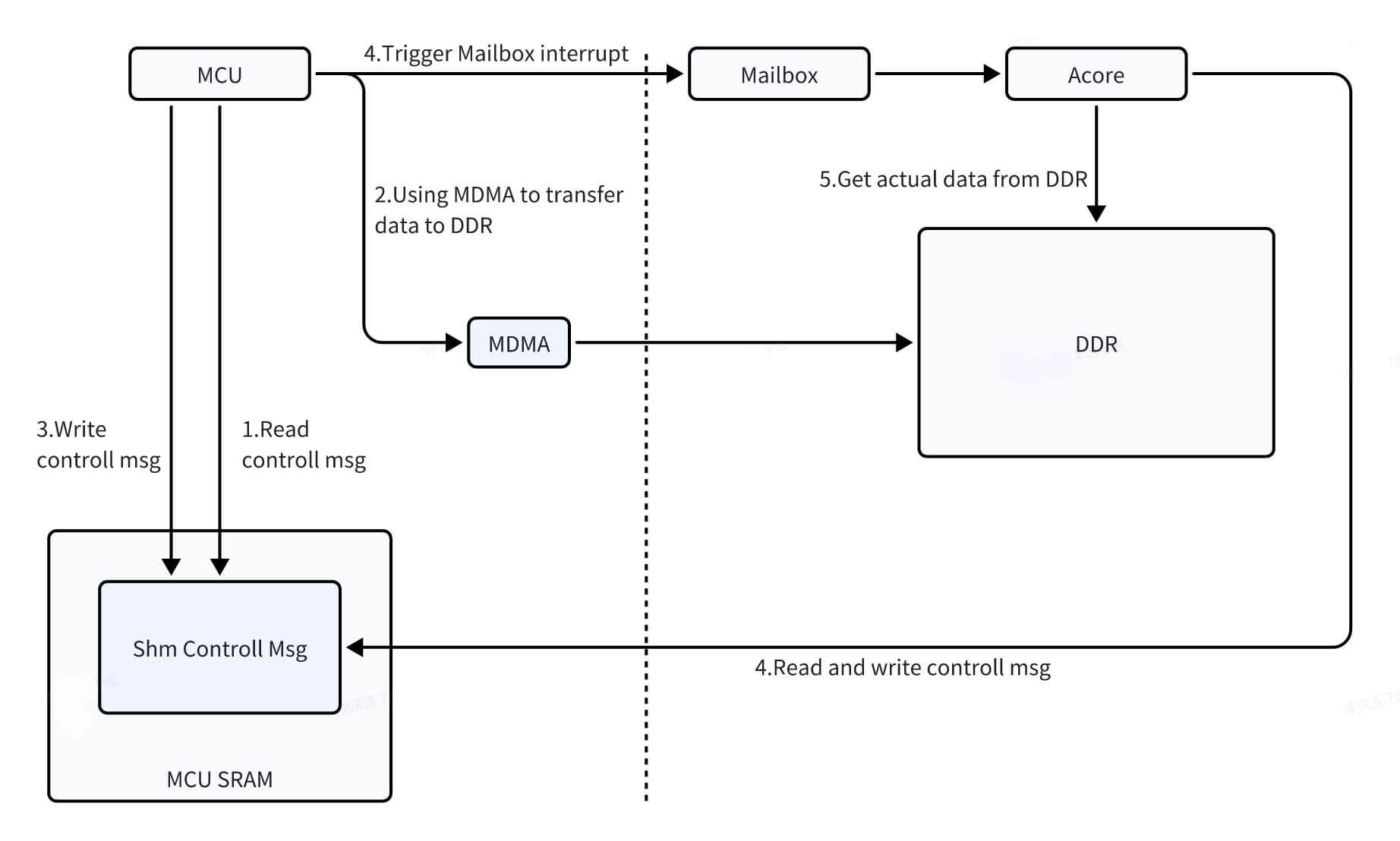
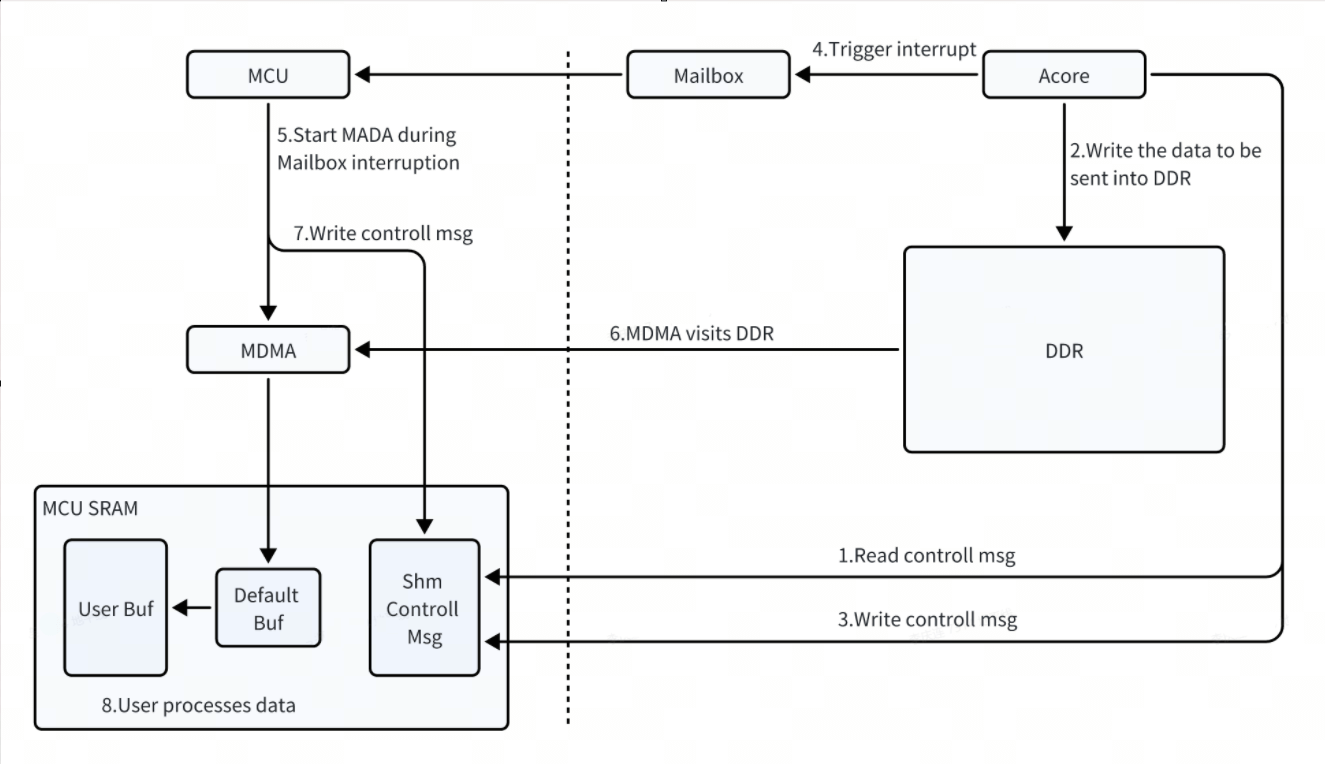
Acore-MCU IPC communication uses MCU MDMA to move data between DDR and MCU SRAM. In the process where MCU sends data to Acore, MCU first uses MDMA to move data from SRAM to DDR, then sends an interrupt notification. In the process where Acore sends data to MCU, MCU receives the interrupt notification and uses MDMA to move data from DDR to SRAM.
MCU Sending Data to Acore
Acore Sending Data to MCU
IPCFHAL Interface Usage Sequence
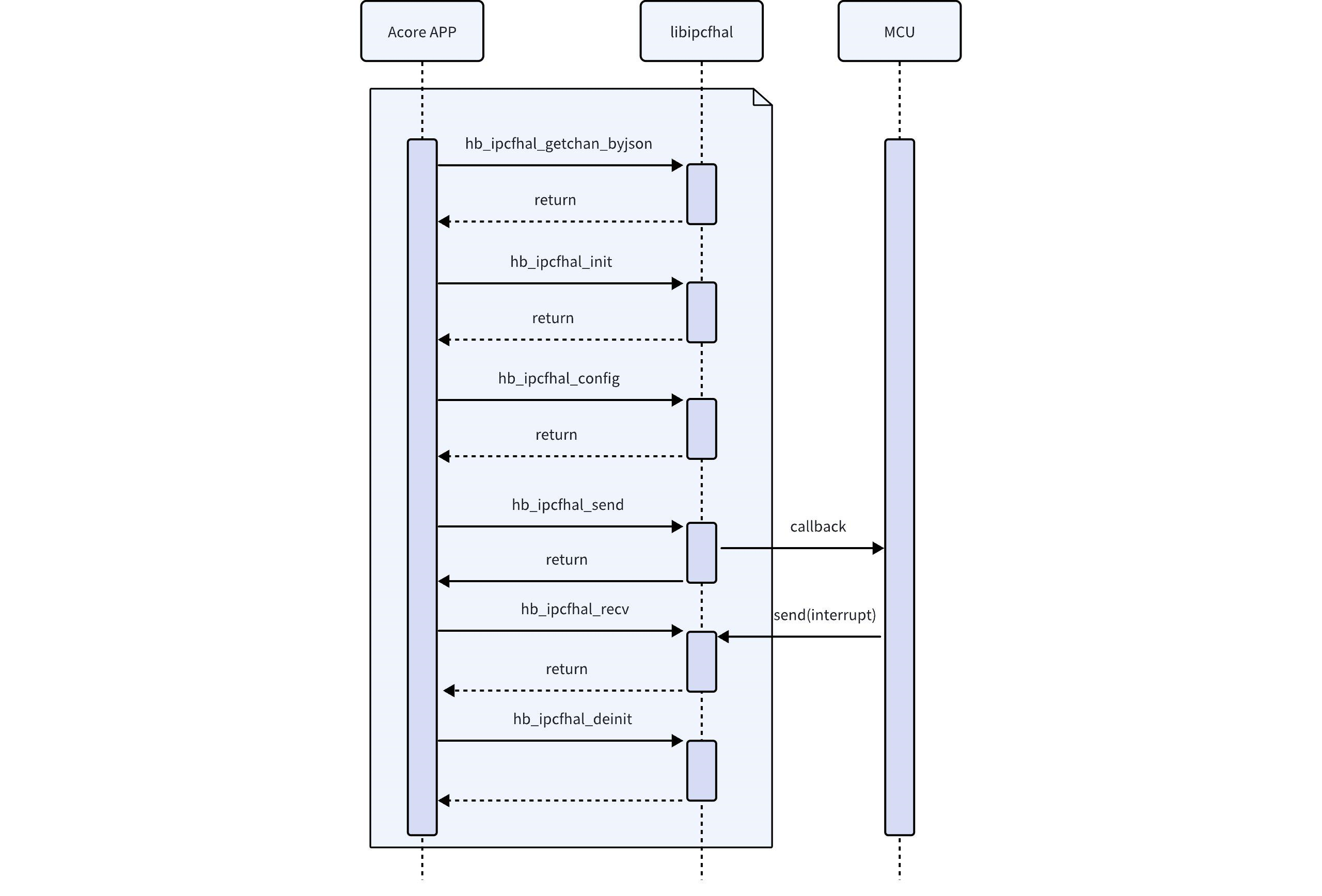
During Acore-MCU communication, IPCFHAL users on the MCU side use the IPCF interface.
IPCFHAL Usage Precautions
- The same channel of ipcfhal does not support multiple processes. If using multiple threads for sending and receiving, the timing and logic need to be guaranteed by the user.
- The MCU-side SRAM fifo is too small and is for internal use only. For SRAM savings, customers can use the DDR solution.
- The interrupt priority for each instance on the Acore side cannot be configured, but it can be configured on the MCU side.
- If the application is sensitive to fluctuations in system scheduling latency, adjust the application's scheduling policy to SCHED_FIFO.
IPCFHAL Debugging Methods
Debug Logs
IPCFHAL and the underlying IPCF and Mailbox drivers provide relatively complete log information. If you encounter debugging issues, check the log output to help locate the problem.
Error Code (API Return Values)
IPCFHAL defines several error codes covering common error types. Use the interface hb_ipcfhal_trans_err to convert error codes to error descriptions.
sysfs Debug Nodes (Acore Side)
statistic Debug Node
Prints statistics about communication, including pkg, pkg_len, err_acq, err_shm_tx, err_cb.
Node Path
//ins-X represents insid, e.g., ins-5 if insid is 5
/sys/kernel/debug/ipcdrv-ins-5/statistic
Node Function
//Per instance, counts all channel receive & send counts
struct ipc_statistic_t {
        uint32_t acq_cnt;/**< tx: acquire buf count*/
        uint32_t shm_tx_cnt;/**< tx: send count*/
        uint32_t cb_cnt;/**< rx: callback count*/
        uint32_t err_acq;/**< tx: error acquire buf count*/
        uint32_t err_shm_tx;/**< tx: error send count*/
        uint32_t err_cb;/**< rx: error callback count*/

        uint32_t packages;/**< tx/rx: packages count*/
        uint64_t datalen;/**< tx/rx: datalen*/
};
Node Usage
//Method 1: Directly operate the sys node
//After channel initialization and before data transmission/reception, enable
echo 0 > /sys/kernel/debug/ipcdrv-ins-5/statistic
//After data transmission/reception and before channel deinitialization, get
cat /sys/kernel/debug/ipcdrv-ins-5/statistic


//Method 2: Use open/write/read/close operations
fd= open(/sys/kernel/debug/ipcdrv-ins-5/statistic, O_RDWR);
write(fd, buf, 1024);
//tx/rx, send/receive data
read(fd, buf, 1024);
close(fd);
Log
DataLink:
                                pkg              pkg_len    err_acq err_shm_tx     err_cb
        INS5CH0 TX:              1                   32          0          0          0
        INS5CH0 RX:              1                   32          0          0          0
        INS5CH1 TX:              0                    0          0          0          0
        INS5CH1 RX:              0                    0          0          0          0
        INS5CH2 TX:              0                    0          0          0          0
        INS5CH2 RX:              0                    0          0          0          0
        INS5CH3 TX:              0                    0          0          0          0
        INS5CH3 RX:              0                    0          0          0          0
        INS5CH4 TX:              0                    0          0          0          0
        INS5CH4 RX:              0                    0          0          0          0
        INS5CH5 TX:              0                    0          0          0          0
        INS5CH5 RX:              0                    0          0          0          0
        INS5CH6 TX:              0                    0          0          0          0
        INS5CH6 RX:              0                    0          0          0          0
        INS5CH7 TX:              0                    0          0          0          0
        INS5CH7 RX:              0                    0          0          0          0
tsdump Debug Node
Per channel, prints timestamps when sending/receiving data.
Node Path
//ins-X represents insid, e.g., ins-5 if insid is 5
/sys/kernel/debug/ipcdrv-ins-5/tsdump
Node Function
//Per channel, enables timestamp logging when sending/receiving data
int32_t tsdump;/**< >=0, enables timestamp logging for specified channel, <0, disables timestamp logging*/
Node Usage
//Method 1: Directly operate the sys node
//After channel initialization and before data transmission/reception, enable
echo 0 > /sys/kernel/debug/ipcdrv-ins-5/tsdump
//During data transmission/reception, timestamp logs will be printed
//After data transmission/reception and before channel deinitialization, get
cat /sys/kernel/debug/ipcdrv-ins-5/tsdump


//Method 2: Use open/write/read/close operations
fd= open(/sys/kernel/debug/ipcdrv-ins-5/tsdump, O_RDWR);
write(fd, buf, 1024);
//tx/rx, timestamp logs will be printed
read(fd, buf, 1024);
close(fd);
Log
[ 1173.246630] ipc-shm-hal: dev_print_timestamp()[515]: [5][0] tx wt sta: 1717558158.887241446
[ 1173.246642] ipc-shm-hal: dev_print_timestamp()[515]: [5][0] tx wt end: 1717558158.887253646
[ 1173.246717] ipc-shm-hal: dev_print_timestamp()[515]: [5][0] rx cb sta: 1717558158.887327971
[ 1173.246723] ipc-shm-hal: dev_print_timestamp()[515]: [5][0] rx cb end: 1717558158.887334796
[ 1173.246725] ipc-shm-hal: dev_print_timestamp()[515]: [5][0] rx rd sta: 1717558158.887336446
[ 1173.246727] ipc-shm-hal: dev_print_timestamp()[515]: [5][0] rx sm sta: 1717558158.887338496
[ 1173.246729] ipc-shm-hal: dev_print_timestamp()[515]: [5][0] rx sm end: 1717558158.887340121
[ 1173.246730] ipc-shm-hal: dev_print_timestamp()[515]: [5][0] rx rd end: 1717558158.887341646
libipcfhal-test: TestBody() [2328] info :
tsdump: 0

libipcfhal-test: TestBody() [2329] info :
tsdump: 0
wdump Debug Node
Per channel, prints sent data.
Node Path
//ins-X represents insid, e.g., ins-5 if insid is 5
/sys/kernel/debug/ipcdrv-ins-5/wdump
Node Function
//Per channel, enables sent data dump, prints sent data
//The printed length depends on dumplen; if dumplen is not set, all data is printed by default
int32_t wdump;/**< =chan_id, enables send dump, otherwise, disables send dump*/
Node Usage
//Method 1: Directly operate the sys node
//After channel initialization and before data transmission, enable
echo 0 > /sys/kernel/debug/ipcdrv-ins-5/wdump
//During data transmission, sent data will be printed
//After data transmission/reception and before channel deinitialization, get
cat /sys/kernel/debug/ipcdrv-ins-5/wdump


//Method 2: Use open/write/read/close operations
fd= open(/sys/kernel/debug/ipcdrv-ins-5/wdump, O_RDWR);
write(fd, buf, 1024);
//tx/rx, prints sent data
read(fd, buf, 1024);
close(fd);
Log
[ 1022.271650] ipc-shm-hal: hal_ipc_shm_write()[926]: [5][0] tx size 32
[ 1022.271666] ipc-shm-hal: ipcf_dump_data()[519]: dump info: tx data len[32] mul[1] remain[0]
[ 1022.271700] ipc-shm-hal: ipcf_dump_data()[522]: 0x0000: 00 01 02 03 04 05 06 07 00 00 00 00 00 00 00 00 00 00 00 00 00 00 00 00 00 00 00 00 00 00 00 00
[ 1022.273489] ipc-shm-hal: hal_ipc_shm_write()[926]: [6][0] tx size 32
[ 1022.273505] ipc-shm-hal: ipcf_dump_data()[519]: dump info: tx data len[32] mul[1] remain[0]
[ 1022.273733] ipc-shm-hal: ipcf_dump_data()[522]: 0x0000: 00 01 02 03 04 05 06 07 00 00 00 00 00 00 00 00 00 00 00 00 00 00 00 00 00 00 00 00 00 00 00 00
libipcfhal-test: TestBody() [2403] info :
wdump: 0

libipcfhal-test: TestBody() [2404] info :
wdump: 0
rdump Debug Node
Per channel, prints received data.
Node Path
//ins-X represents insid, e.g., ins-5 if insid is 5
/sys/kernel/debug/ipcdrv-ins-5/rdump
Node Function
//Per channel, enables received data dump, prints received data
//The printed length depends on dumplen; if dumplen is not set, all data is printed by default
uint32_t rdump;/**< =chan_id, enables receive dump, otherwise, disables receive dump*/
Node Usage
//Method 1: Directly operate the sys node
//After channel initialization and before data transmission/reception, enable
echo 0 > /sys/kernel/debug/ipcdrv-ins-5/rdump
//During data transmission, received data will be printed
//After data transmission/reception and before channel deinitialization, get
cat /sys/kernel/debug/ipcdrv-ins-5/rdump


//Method 2: Use open/write/read/close operations
fd= open(/sys/kernel/debug/ipcdrv-ins-5/rdump, O_RDWR);
write(fd, buf, DEV_README_BUFSIZE);
//tx/rx, prints received data
read(fd, buf, DEV_README_BUFSIZE);
close(fd);
Log
[  983.730497] ipc-shm-hal: data_callback()[803]: [6][0] callback size 32
[  983.730524] ipc-shm-hal: ipcf_dump_data()[519]: dump info: callback rx len[32] mul[1] remain[0]
[  983.730540] ipc-shm-hal: ipcf_dump_data()[522]: 0x0000: 00 01 02 03 04 05 06 07 00 00 00 00 00 00 00 00 00 00 00 00 00 00 00 00 00 00 00 00 00 00 00 00
[  983.731415] ipc-shm-hal: data_callback()[803]: [5][0] callback size 32
[  983.731431] ipc-shm-hal: ipcf_dump_data()[519]: dump info: callback rx len[32] mul[1] remain[0]
[  983.731443] ipc-shm-hal: ipcf_dump_data()[522]: 0x0000: 00 01 02 03 04 05 06 07 00 00 00 00 00 00 00 00 00 00 00 00 00 00 00 00 00 00 00 00 00 00 00 00
libipcfhal-test: TestBody() [2478] info :
rdump: 0

libipcfhal-test: TestBody() [2479] info :
rdump: 0
dumplen Debug Node
Per channel, configures the length of data to dump.
Node Path
//ins-X represents insid, e.g., ins-5 if insid is 5
/sys/kernel/debug/ipcdrv-ins-5/dumplen
Node Function
//Per channel, configures the length of data to dump
//Valid when dumplen>0 and dumplen<data_len
//Prerequisite: wdump or rdump is enabled
uint32_t dumplen;/**< Number of bytes to print when dumping data*/
Node Usage
//Method 1: Directly operate the sys node
//After channel initialization and before data transmission, enable
echo 0 > /sys/kernel/debug/ipcdrv-ins-5/dumplen
//During data transmission, sent data will be printed
//After data transmission/reception and before channel deinitialization, get
cat /sys/kernel/debug/ipcdrv-ins-5/dumplen


//Method 2: Use open/write/read/close operations
fd= open(/sys/kernel/debug/ipcdrv-ins-5/dumplen, O_RDWR);
write(fd, buf, DEV_README_BUFSIZE);
//tx/rx, prints sent data
read(fd, buf, DEV_README_BUFSIZE);
close(fd);
Log
[  852.898250] ipc-shm-hal: hal_ipc_shm_write()[926]: [5][0] tx size 32
[  852.898283] ipc-shm-hal: ipcf_dump_data()[519]: dump info: tx data len[16] mul[0] remain[16]
[  852.898315] ipc-shm-hal: ipcf_dump_data()[539]: 0x0000: 00 01 02 03 04 05 06 07 00 00 00 00 00 00 00 00
[  852.898519] ipc-shm-hal: data_callback()[803]: [6][0] callback size 32
[  852.898542] ipc-shm-hal: ipcf_dump_data()[519]: dump info: callback rx len[16] mul[0] remain[16]
[  852.898571] ipc-shm-hal: ipcf_dump_data()[539]: 0x0000: 00 01 02 03 04 05 06 07 00 00 00 00 00 00 00 00
[  853.900076] ipc-shm-hal: hal_ipc_shm_write()[926]: [6][0] tx size 32
[  853.900112] ipc-shm-hal: ipcf_dump_data()[519]: dump info: tx data len[16] mul[0] remain[16]
[  853.900143] ipc-shm-hal: ipcf_dump_data()[539]: 0x0000: 00 01 02 03 04 05 06 07 00 00 00 00 00 00 00 00
[  853.900359] ipc-shm-hal: data_callback()[803]: [5][0] callback size 32
[  853.900373] ipc-shm-hal: ipcf_dump_data()[519]: dump info: callback rx len[16] mul[0] remain[16]
[  853.900401] ipc-shm-hal: ipcf_dump_data()[539]: 0x0000: 00 01 02 03 04 05 06 07 00 00 00 00 00 00 00 00
libipcfhal-test: TestBody() [2576] info :
dumplen: 16

libipcfhal-test: TestBody() [2577] info :
dumplen: 16

libipcfhal-test: TestBody() [2584] info :
rdump: 0

libipcfhal-test: TestBody() [2585] info :
rdump: 0

libipcfhal-test: TestBody() [2592] info :
wdump: 0

libipcfhal-test: TestBody() [2593] info :
wdump: 0