5.17.8.1. 修订记录
修订
| 版本 | 修订 |
修订 |
|---|---|---|
| V0.1 | 2023-03-25 | 第一次 |
| V0.2 | 2024-01-12 | 整体 |
| V0.3 | 2024-03-09 | 更新 |
| V0.4 | 2024-04-09 | 调整 |
| V0.5 | 2024-05-09 | 更新 |
| V1.0 | 2024-06-17 | 补充3A调试 |
| V1.1 | 2024-09-04 | 修正 |
| V2.0 | 2026-08-10 | 更新3A、DOL2、compand模块 |
5.17.8.2. 1 X5 ISP 介绍
1.1 功能简介
本
图像

Figure 1.11 ISP Tuning流程
本
主观
文档
Horizon Sunrise X5可以
1.2 ISP Pipeline
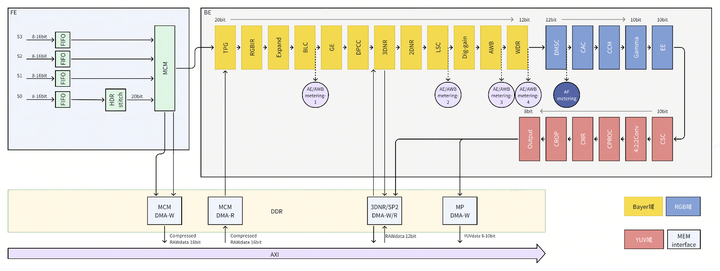
Figure 1.21 ISP模块
图中,背景
5.17.8.3. 2 ISP调试概览
2.1 调试流程
2.1.1 调试依赖设备
Horizon X5 ISP图像
以下
24 X-Rite Color 图卡
Edmund optics Opal diffusing glass
ISO12233 图卡
ISO15739 图卡
2个
可调 照度 的 立式 灯箱 三角架
及 摄像头 模组 固定 支架 标准
可调 色温 灯箱(QC灯箱 和D75/D50滤光片) Studio scene
光照度
计 曝光
测试 仪器 DNP灯箱
36阶
透射 式HDR测试 仪器
2.1.2 调试阶段
ISP参数
第一阶段:需要
第二阶段:ISP相关
第三阶段:系统化
Figure 2.1-1为
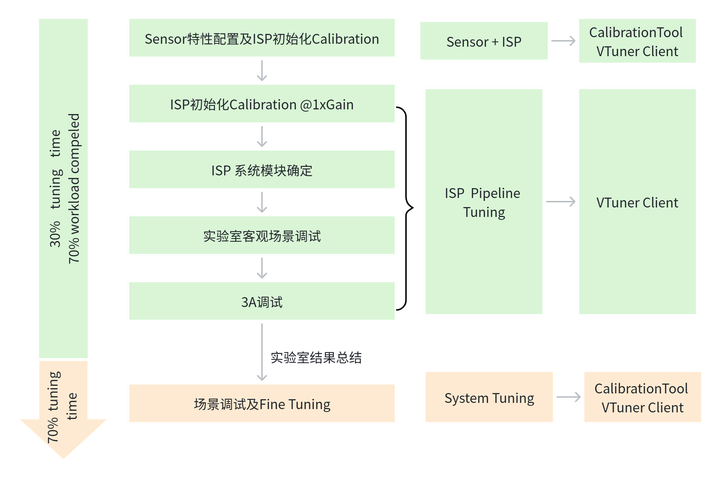
Figure 2.11 ISP调试
2.1.2.1 第一阶段 – 客观标定部分
Hbplayer 是
Sensor特性
Black Levels. – 必要
De-Companding (frontend/FE) LUTs. For HDR PWL mode – HDR-Native模式
需要 Noise profile (NP). – 非必要
Green equalize (GE) – 非必要
Lens shading correction (LSC) – 必要
Auto-white balance (AWB) – 必要
Gamma – 必要
Color correction matrix (CCM) – 必要
Chromatic aberration correction (CAC) – 非必要
2.1.2.2 第二部分 – 板端部署模块优化
第二个
Stitching
Dynamic dead pixel correction (Dynamic DPC)
Auto-exposure (AE) -
2DNR(空域
降噪) 3DNR(时域
降噪) Demosaic
WDR(LTM+GTM)
Color noise reduction(CNR)
Edge Enhanced
Purple fringe correction (PF)
2.1.2.3 第三部分 – 场景权衡调试
因
在
2DNR 强度
3DNR 强度
CNR 强度
WDR 强度
CCM模块
色彩 饱和度 强度 Demosaic
EE 强度
注:在
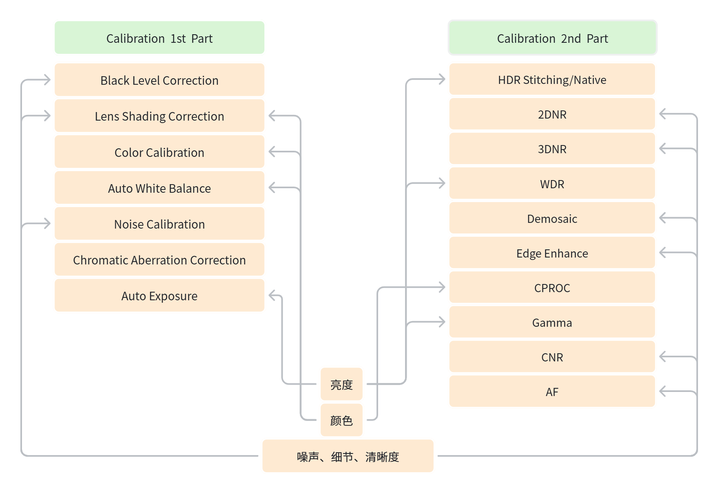
Figure 2.12 Tuning cycles
2.1.3 调试模式
根据
SDR Mode(linear)
HDR – DOL2
HDR – Native
三种
2.1.3.1 SDR模式(linear)
针对

Figure 2.13 SDR调试
2.1.3.2 HDR模式
针对 HDR 模式,图像
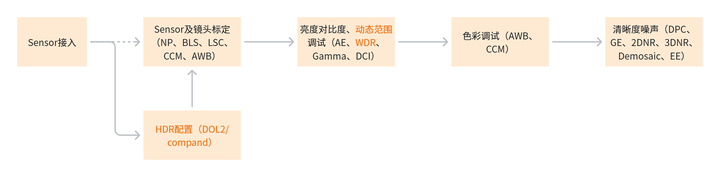
Figure 2.14 HDR调试
2.2 ISP调试的系统需求和准备
调试
2.2.1 调试依赖信息
产品
应用 场景 及 画质 需求 ISP调试
结果 交付 方式 ISP调试
软硬件 环境 具备,如 有 一致性 高 要求 需要 具备Golden模组。 图像处理
的 应用 模式:Linear,2DOL,Native-WDR-lin等 是否
需要 部署OTP参数(效果 一致性 保障) 是否
具备 内置ISP
2.2.2 Sensor 配置信息
高
动态 模式(HDR-DOL2),sensor曝光 比及 曝光 时间 的 限定 信息 高
动态 模式(HDR-Native),sensor的 规格书 资料 及其 解压 节点 信息 Sensor可
设置 的 曝光 和 增益 范围 Sensor支持
的 帧 率 和 分辨率 以及 行 时间。 Sensor输出
的 数据格式 Sensor raw原始数据
结构 所
调试sensor的Color pattern mode
2.2.3 模组性能情况
模组
个体 硬件 性能 一致性 评估 模组
可靠性,成熟度 满足 量产 工艺。 红外
截止 滤光片 的 特性 黑
电平 的 温 漂及 是否 随 模拟 增益 变化
2.2.4 ISP相关参数
调试
| 文件名 | 描述 |
|---|---|
| sensor_calibration.XML (Calibration Tool导出,客观 |
模组 |
| xxxx(sensor)_tuning.json (VTunerClient导出,主客观 |
ISP Pipeline中 |
Table 2.21 ISP初始
2.2.5 调试工具(Calibration Tool/VTunerClient/HBplayer)
Horizon X5 ISP通过
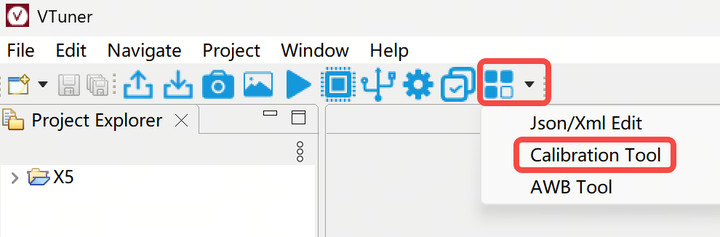
Figure 2.21 Calibration Tool入口
2.2.5.1 Calibration Tool
Calibration Tool用于
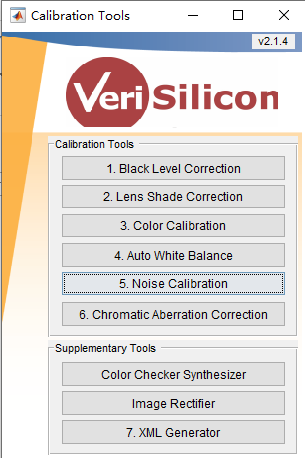
Tuning第一阶段
Figure 2.22 Calibration Tool主
在
2.2.5.2 VTunerClient
VTunerClient可以
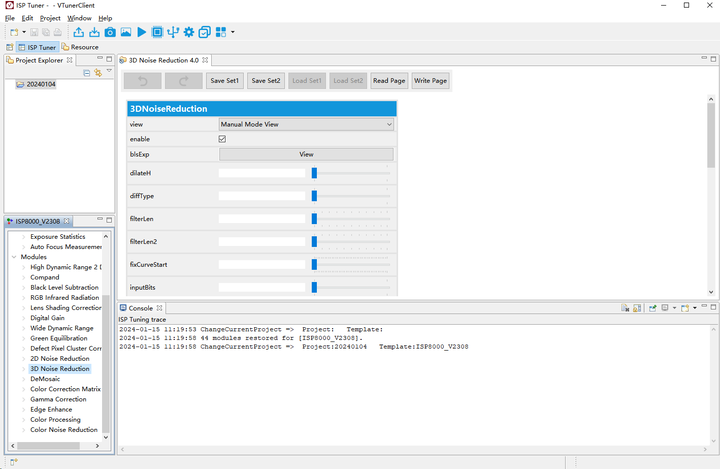
Figure 2.23 VTunerClient 调试
2.2.6 Hbplayer
Hbplayer是
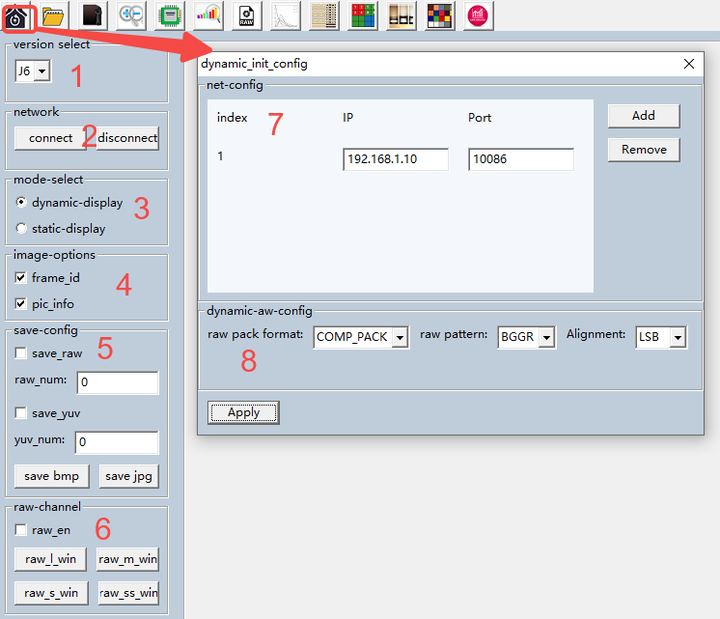
Figure 2.24 Hbplayer 界面
| 模块 | 功能 | 说明 |
|---|---|---|
| version select (part 1 in Figure 2.2 4) | 选择 |
选择 |
| network (part 2 in Figure 2.2 4) | 网络连接/断开 | - |
| mode-select (part 3 in Figure 2.2 4) | 网络 |
实时 |
| image-options (part 4 in Figure 2.2 4) | 显示 |
- |
| save-config (part 5 in Figure 2.2 4) | 保存raw或者yuv | 先 |
| raw-channel (part 6 in Figure 2.2 4) | 分 |
勾选raw_en后 |
| init_config (part 7 in Figure 2.2 4) | 配置 |
开发板 |
| Apply (part 8 in Figure 2.2 4) | 确认 |
- |
Table 2.22 Hbplayer初始
5.17.8.4. 3 ISP调试模块
X5的
在X5最新SDK关于
Table 31 X5效果
| ISP模块 | Manual参数 | Auto参数 |
|---|---|---|
| AE | EC_2 | AE_4 |
| AWB | WB_1_1 | AWB_4 |
| 2DOL | HDR_3_2DOL | / |
| Compand | CPD_1_1 | / |
| BLS | BLS | ABLS |
| RGBIR | RGBIR_1_1 | / |
| LSC | LSC_3 | ALSC_3 |
| ISP Digital gain | DG | / |
| WDR | WDR_5_2_1 | AWDR_5_2_1 |
| Green Equalization | GE | / |
| DPC | DPCC | ADPCC |
| 2DNR | 2DNR_6 | A2DNR_6 |
| 3DNR | 3DNR_4 | A3DNR_4 |
| Demosaic | DMSC_3 | ADMSC_3 |
| CCM | CCM | ACCM |
| Gamma | GC_2 | AGC_2 |
| Edge Enhancement | EE_3 | AEE_3 |
| Color Processing | CP_1_2 | ACP_1_2 |
| CNR | CNR_2_2 | ACNR_2_2 |
| AF | AF_4 | / |
3.1 Auto-Exposure (AE)
3.1.1 功能描述
自动
第一阶段:调试
其它 模块 时,可以 手动 设定AE。这 依赖于 每个 模块 对 曝光 的 要求,具体 要求 在 每个 模块 的 调试 文档 中 会 有 详细 的 说明。 第二阶段:参照
客观 指标 要求,在 实验室 中 对 大部分 场景AE参数 进行 校正。 第三阶段:微调AE参数
以 适合 所有 场景。主要 调整 依据 增益 动态变化 的 参数。
3.1.2 关键参数与功能说明
下图
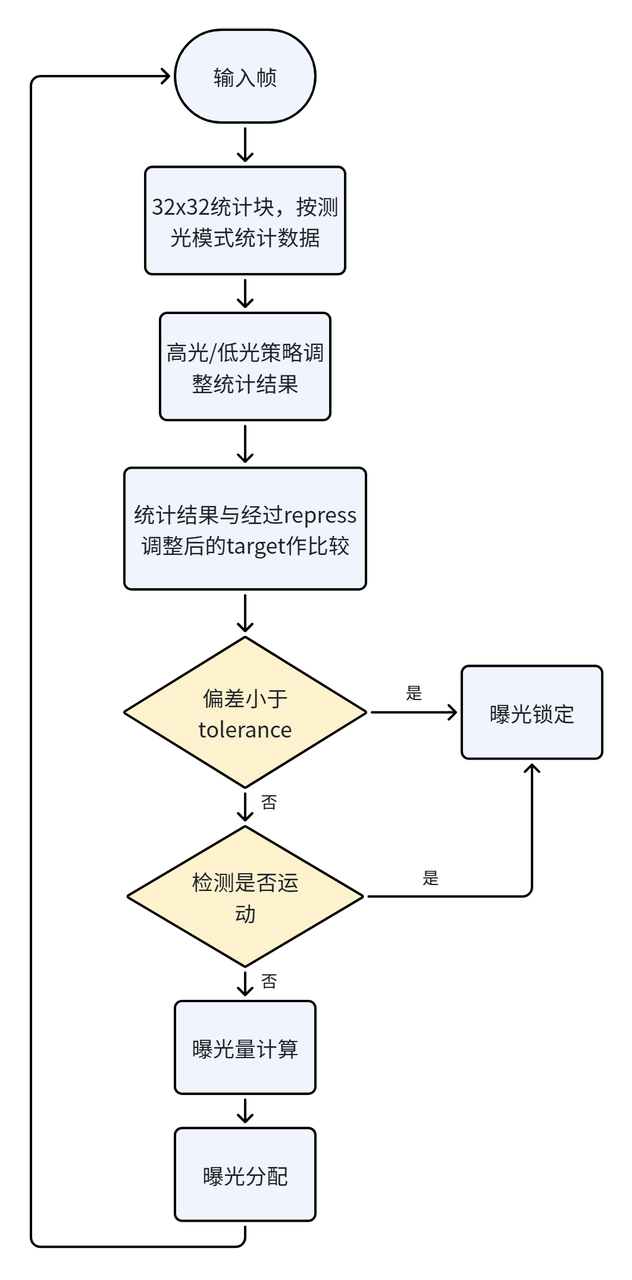
Figure 3.11 AE处理
统计
Pipeline中AE有4个
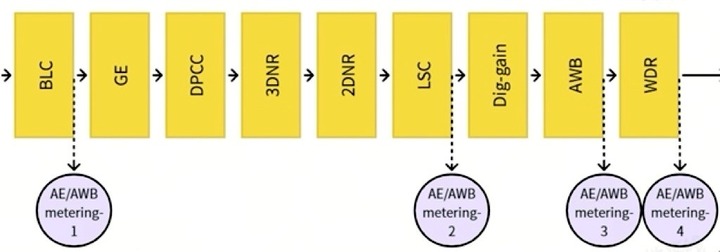
Figure 3.12 AE统计数据
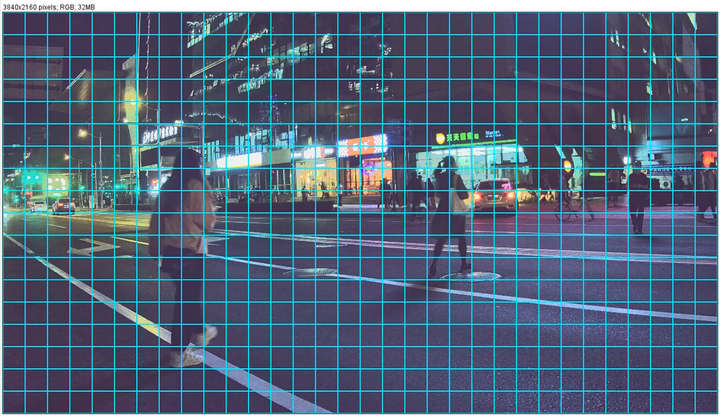
统计数据
ISP 自动
对于32×32统计

Figure 3.13 AE/AWB统计数据
以linear模式3840x2160分辨率
3.1.2.1 AE使能设定
自动
可
Table 3.11基本 AE 参数
| Parameter | Type / Range | Description | Default Value |
|---|---|---|---|
| enable | Type: bool Range: {true, false} |
是否 Usage Frequency:high |
false |
3.1.2.2 Anti-Flicker
防
下表
Table 3.12防
| Parameter | Type / Range | Description | Default Value |
|---|---|---|---|
| antiFlickerMode | Type: enum Range: {CAMDEV_FLIKER_PERIOD_OFF, CAMDEV_FLIKER_PERIOD_50Hz, CAMDEV_FLIKER_PERIOD_60Hz, CAMDEV_FLIKER_PERIOD_USER_DEFINED} |
防 CAMDEV_FLIKER_PERIOD_OFF(默认):禁用 CAMDEV_FLIKER_PERIOD_50Hz:用于 50 Hz 频 CAMDEV_FLIKER_PERIOD_60Hz:用于 60 Hz 频 CAMDEV_FLIKER_PERIOD_USER_DEFINED:用于 Usage Frequency:medium |
CAMDEV_FLIKER_PERIOD_OFF |
| FlickerUseDefinedPerious | Type: float Range: (0, 255) |
光源 Usage Frequency:high |
50 |
3.1.2.3 AE Target设定
下
Table 3.13目标
| Parameter | Type / Range | Description | Default Value |
|---|---|---|---|
| setPoint | Type: float Range: (0, 255) |
目标 Usage Frequency:high |
50 |
3.1.2.4 统计和测光模式
AE 模块
平均
平均
ROI统计
ROI 测光
下表
Table 3.14ROI 测光
| Parameter | Type / Range | Description | Default Value |
|---|---|---|---|
| roiNumber | Type: uint8_t Range: [0, 25] |
ROI 区域 Usage Frequency:medium |
0 |
| roiWeight | Type: float Range: (0, 1) |
ROI 区域 Usage Frequency:medium |
0.5 |
| roiWindow | Type: Vsi3ARoiWindow_t[25*5] Range: weight: [0, 255];其他 |
ROI 窗口 Usage Frequency:medium |
[0, 0, 100, 100, 1] |
高光
高亮
低光
下表
Table 3.15高亮
| Parameter | Type / Range | Description | Default Value |
|---|---|---|---|
| aeStrategyMode | Type: enum Range: {CAMDEV_AE_STATEGY_OFF=0, CAMDEV_AE_STATEGY_HIGHLIGHT_PRIOR=1, CAMDEV_AE_STATEGY_LOWLIGHT_PRIOR=2} |
AE 模式。支持:高亮 Usage Frequency:medium |
CAMDEV_AE_STATEGY_OFF |
| hightLightLumathr | Type: float Range: [0, 255] |
各 Usage Frequency:medium |
180 |
| lowLightLumathr | Type: float Range: [0, 255] |
各块 Usage Frequency:medium |
20 |
| histRatioSlope | Type: float Range: [1, 255] |
计算 Usage Frequency:medium |
15 |
| maxHistOffset | Type: float Range: [0, 1] |
最大 Usage Frequency:medium |
0 |
其他
其他
Table 3.16其他
| Parameter | Type / Range | Description | Default Value |
|---|---|---|---|
| expv3RoiWindowWeight | Type: float Range: (0, 1) |
各 ROI 的 Usage Frequency:low |
0.5 |
| aeFrontGroundType | Type: enum Range: {CAM_DEV_FRONT_MODE, CAM_DEV_FACE_MODE, CAM_DEV_TOUCH_MODE} |
ROI 测光 Usage Frequency:low |
CAM_DEV_FRONT_MODE |
| aeFaceWeight | Type: float Range: (0, 1) |
人脸 ROI 区域 Usage Frequency:low |
0.5 |
| aeTouchWeight | Type: float Range: (0, 1) |
触控 ROI 区域 Usage Frequency:low |
0.5 |
3.1.2.5 自适应AE设定
自
下
Table 3.17基本
| Parameter | Type / Range | Description | Default Value |
|---|---|---|---|
| semMode | Type: enum Range: {CAMDEV_AE_SCENE_EVALUATION_FIX, CAMDEV_AE_SCENE_EVALUATION_ADAPTIVE} |
是否 Usage Frequency:low |
CAMDEV_AE_SCENE_EVALUATION_FIX |
| targetFilter | Type: float Range: (0, 1) |
获取 Usage Frequency:low |
0.5 |
背光
Table 3.18逆光
| Parameter | Type / Range | Description | Default Value |
|---|---|---|---|
| wdrContrastMin | Type: float Range: (0, 255) |
判定 Usage Frequency:low |
10 |
| wdrContrastMax | Type: float Range: (0, 255) |
判定 Usage Frequency:low |
110 |
若
若
3.1.2.6 目标亮度场景联动设定
当前
低光
下
Table 3.19低光
| Parameter | Type / Range | Description | Default Value |
|---|---|---|---|
| lowlightLinearLevel | Type: uint32_t Range: [0, 16] |
线性 Usage Frequency:medium |
4 |
| lowlightLinearRepress | Type: float[5] Range: [0, 1] |
线性 Usage Frequency:medium |
[1.0, 0.8, 0.6, 0.4, 0.4] |
| lowlightLinearGain | Type: float[5] Range: [0, 255] |
线性 Usage Frequency:medium |
[4.0, 8.0, 16.0, 32.0, 100.0] |
| lowlightHdrLevel | Type: uint32_t Range: [0, 16] |
HDR 模式 Usage Frequency:low |
4 |
| lowlightHdrRepress | Type: float[5] Range: [0, 1] |
HDR 模式 Usage Frequency:low |
[1.0, 0.8, 0.8, 0.8, 0.8] |
| lowlightHdrGain | Type: float[5] Range: [0, 255] |
HDR 模式 Usage Frequency:low |
[4.0, 8.0, 16.0, 32.0, 100.0] |
可
设定值 ≤ 1:数值
越小,压缩 级别 越高 即 目标 亮度 被 压 得 越 小; 1 <设定值 ≤ 100:数值
越高 将 目标 亮度 提升 越大,适用 于 特殊 需求 下暗 环境 的 亮度 提升。
下图
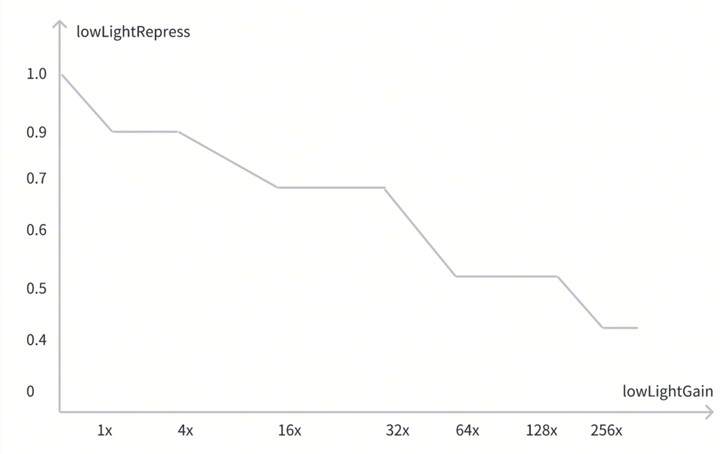
Figure 3.1-4 低光
3.1.2.7 运动检测设定
AE 的
Table 3.110运动
| Parameter | Type / Range | Description | Default Value |
|---|---|---|---|
| motionFilter | Type: float Range: (0, 1) |
控制 Usage Frequency:low |
0.5 |
| motionThreshold | Type: float Range: (0, 1) |
判定 Usage Frequency:low |
0.7 |
运动
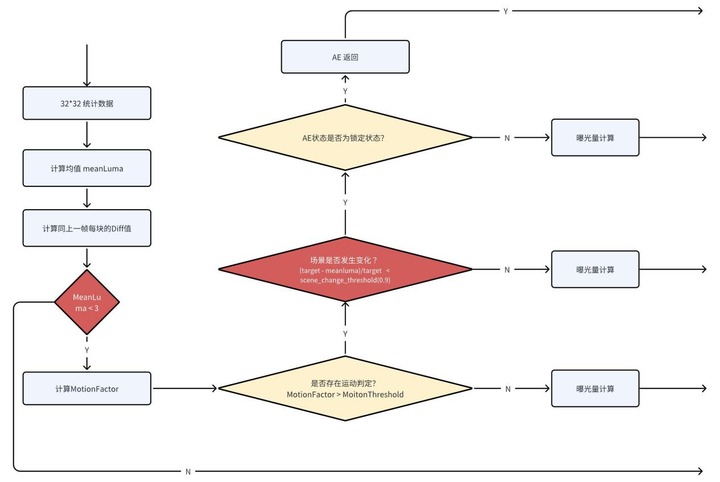
Figure 3.15 AE Motion Detection处理
3.1.2.8 AE收敛控制
阻尼(damping)使
Table 3.111AE 阻尼
| Parameter | Type / Range | Description | Default Value |
|---|---|---|---|
| dampOver | Type: float Range: (0, 1) |
AE 从过 Usage Frequency:high |
0.7 |
| dampUnder | Type: float Range: (0, 1) |
AE 从 Usage Frequency:high |
0.7 |
| dampOverGain | Type: float Range: (0, 128) |
AE 从过 Usage Frequency:high |
1 |
| dampUnderGain | Type: float Range: (0, 16) |
AE 从 Usage Frequency:high |
1 |
| dampOverRatio | Type: float Range: (1, 4) |
AE 朝 Usage Frequency:medium |
2 |
| dampUnderRatio | Type: float Range: (0, 1) |
AE 朝 Usage Frequency:medium |
0.5 |
dampOver/UnderRatio和dampOver/UnderGain这
减少 dampOver或
增加 dampOverGain ,较亮 环境AE更 快 地 收敛 至 目标 亮度; 减少 dampUnder或
增加 dampUnderGain,较暗 环境 下AE更 快 地 收敛 至 目标 亮度; 增加 dampOverRatio,较亮
环境 下 快速 收敛 范围 变小; 减少 dampUnderRatio,较暗
环境 下 快速 收敛 范围 变小。
各
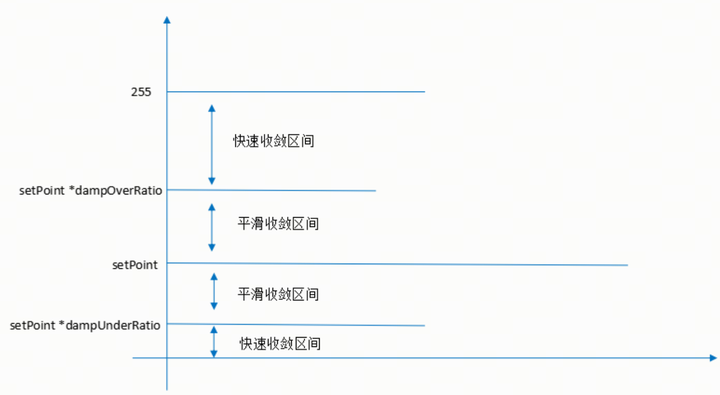
Figure 3.16 AE damp示意图
若
3.1.2.9 AE锁定和解锁设定
AE 锁定
Table 3.112锁定
| Parameter | Type / Range | Description | Default Value |
|---|---|---|---|
| tolerance | Type: float Range: (0, 100) |
锁定 Usage Frequency:high |
20 |
为
AE 处于
解锁 状态 时,可 增大 tolerance 值 锁定 AE。此时 tolerance 决定 不再 施加 阻尼、曝光 直接 切换 到 目标 曝光 的 点。tolerance 越大,人眼 感知 的 亮度 变化 越 明显。 AE 处于
锁定 状态 时,可 减小 tolerance 值 解锁 AE。tolerance 越大 曝光 值越 保持 不变,即使 环境光 剧变,AE 越 难解 锁。若 希望 AE 不 因 环境光 轻微 变化 而 轻易 解锁,可 增大 tolerance。
3.1.2.10 曝光梯度设定
下表
New exposure = exposureTime × dGain × aGain × ispDgain
曝光
下
Table 3.113曝光
| Parameter | Type / Range | Description | Default Value |
|---|---|---|---|
| expTableNum | Type: uint32_t Range: [0, 255] |
曝光 Usage Frequency:high |
5 |
| exposureTime | Type: float32_t[expTableNum-1] Range: 按 sensor 限定值 |
曝光 Usage Frequency:high |
按 sensor 限定值 |
| aGain | Type: float32_t[expTableNum-1] Range: 按 sensor 限定值 |
sensor 模拟 Usage Frequency:high |
1 |
| dGain | Type: float32_t[expTableNum-1] Range: 按 sensor 限定值 |
sensor 数字 Usage Frequency:high |
1 |
| ispGain | Type: float32_t[expTableNum-1] Range: (0, 255) |
ISP 增益 Usage Frequency:high |
1 |
下面
| Parameter | e0 a0 d0 i0<Exposure< e1 a0 d0 i0 | e1 a0 d0 i0<Exposure< e1 a1 d0 i0 | e1 a1 d0 i0<Exposure< e1 a1 d1 i0 | e1 a1 d1 i0<Exposure< e1 a1 d1 i1 | |||||
|---|---|---|---|---|---|---|---|---|---|
| Exposure time | e0 | Exposure/ a0 d0 i0 | e1 | e1 | e1 | e1 | e1 | e1 | e1 |
| aGain | a0 | a0 | a0 | Exposure/ e1 d0 i0 | a1 | a1 | a1 | a1 | a1 |
| dGain | d0 | d0 | d0 | d0 | d0 | Exposure/ e1 a1 i0 | d1 | d1 | d1 |
| ispGain | i0 | i0 | i0 | i0 | i0 | i0 | i0 | Exposure/ e1 a1 d1 | i1 |
Table 3.114 AE 曝光
上表
实际
例如,驱动
3.1.2.11 AE计算方式设定
逐帧
下表
Table 3.115逐帧
| Parameter | Type / Range | Description | Default Value |
|---|---|---|---|
| frameCalEnable | Type: bool Range: {0, 1} |
是否 Usage Frequency:low |
1 |
3.1.3 调试流程
3.1.3.1 第一阶段
在
3.1.3.2 第二阶段
完成
| 先决条件 | 状态 / 值 |
|---|---|
| Sensor driver | Fully tested |
| Black level | Tuned |
| Lens shading | Tuned |
| WDR | Disabled |
| Initial gamma | Set |
| Set initial AE_LDR_Target | Objectively chosen according to the output gamma chosen |
Table 3.116 AE 第二阶段
调试
调试
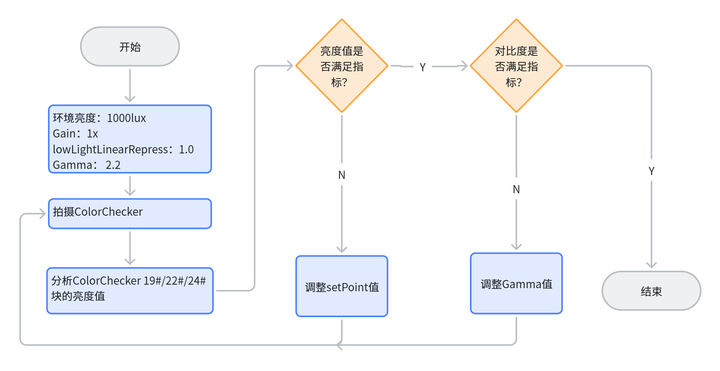
Figure 3.16 AE第二阶段
在
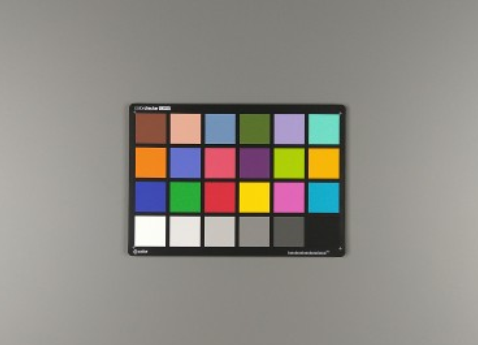
Figure 3.17 ColorChecker 占
使用Imatest分析:
Imatest 功能
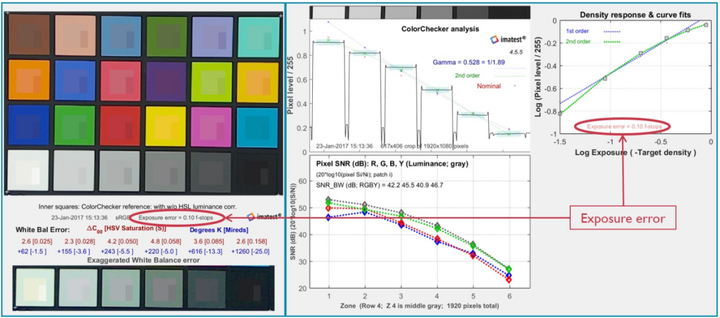
Figure 3.18曝光
使用Photoshop或GIMP分析:
使用ROI选择
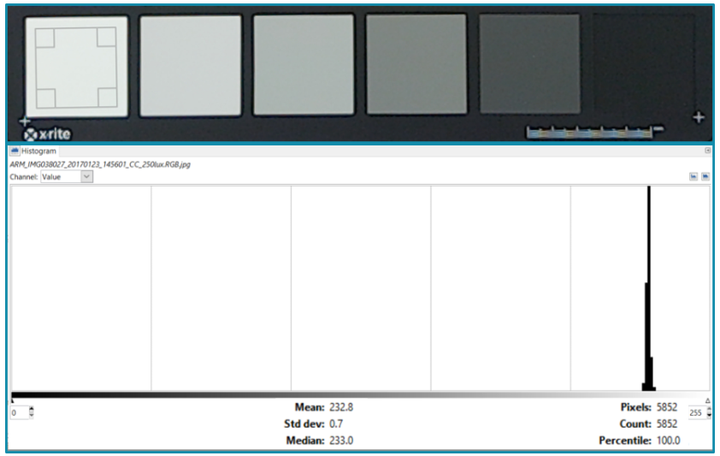
Figure 3.19灰块
对8-bit直方图
| Patch编号 | 理想 |
最小值 | 最大值 |
|---|---|---|---|
| 19 | 240 | 230 | 250 |
| 22 | 122 | 112 | 132 |
| 24 | 40 | 30 | 50 |
Table 3.117 ColorChecker灰块
注:Patch 22反映
以上
3.1.3.3 第三阶段
实验室
完成AE的
第三阶段
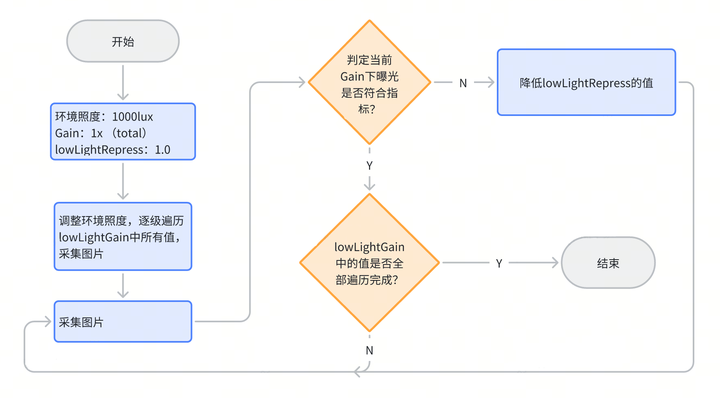
Figure 3.110 AE第三阶段
首先
Figure 3.15中
注:在
场景
完成
在
其它
如果
3.2 Auto-White Balance (AWB)
3.2.1 功能描述
自动
AWB 算法
AWB 使能
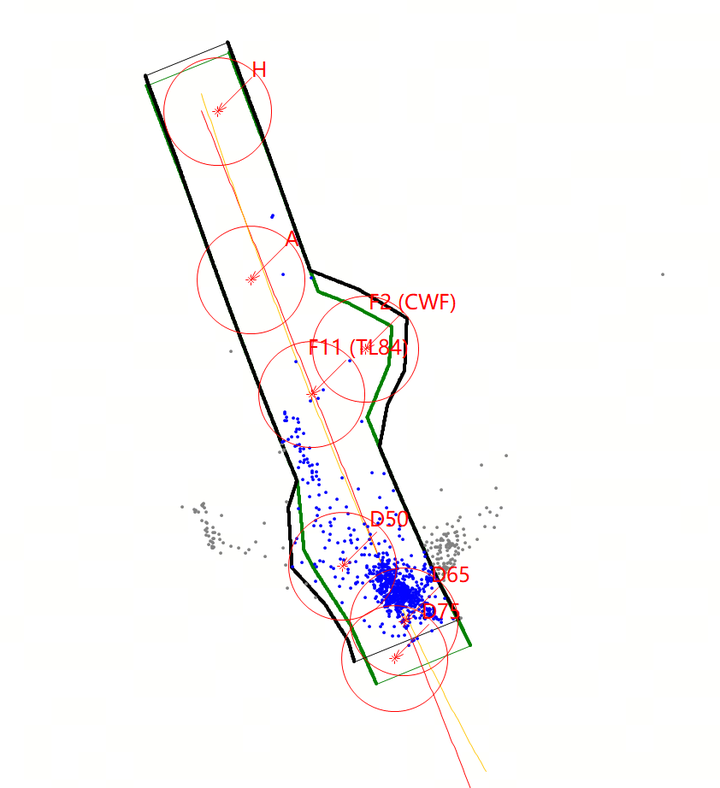
Figure 3.21R Gain 与 B Gain 色温
AWB Statistics模块
Figure 3.22 AWB统计数据
3.2.2 关键参数与功能说明
3.2.2.1 AWB基础参数
下
Table 3.21基本 AWB 参数
| Parameter | Type / Range | Description | Default Value |
|---|---|---|---|
| enable | Type: bool Range: {true, false} |
是否 Usage Frequency:high |
true |
| confidenceThreshold[10] | Type: float32_t Range: [0, 3] |
光源 Usage Frequency:high |
各 |
其中:
enable为AWB的
confidenceThreshold[10]:光源
值越
小 → 判定越 严格 → 只有非常 标准 才的 白光 会 被 采纳 →AWB 更稳,但 可能 不 收敛; 值越
大 → 判定越 宽松 → 很多 杂色 →AWB容易都 会 被 当成 白光 不 稳定 、偏色。
3.2.2.2 AWB模式选择
下
Table 3.22AWB 模式
| Parameter | Type / Range | Description | Default Value |
|---|---|---|---|
| mode | Type: enum Range: {CAMDEV_AWB_MODE, CAMDEV_AWB_METEDATA_MODE} |
选择 AWB 模式。CAMDEV_AWB_MODE:sensor 上 Usage Frequency:low |
CAMDEV_AWB_MODE |
3.2.2.3 纯色校正
纯色
校正
通过
调整 confoundPointXRg 与 confoundPointXBg(X = Cwf、TL84 或 D65),标定 D50 光源 下绿、黄 或 蓝 纯色 块 中心 的 R gain 与 B gain。 将 customPositionXEnable(X = Cwf、TL84 或 D65)设
为 true,使能 纯色 校正。 通过 confoundPointXThreshold(X = Cwf、TL84 或 D65)配置
三个 纯色 块 的 范围 阈值。该 范围 为 白块 (R_Gain, B_Gain) 与 纯色 中心点 (R_Gain, B_Gain) 之间 的 距离。阈值 过高 可能 将 CWF/TL84/D65 光源 下 的 白块 误判 为 D50 下 的 绿/黄/蓝 纯色 块;阈值 过低 可能 将 D50 下 的 纯色 块 误判 为 CWF/TL84/D65 光源 下 的 白块。 检查
每个 白块 是否 落 在 D50 光源 下 蓝、黄 或 绿 的 标定 范围 内。 若
所有 白块 均 落 在 标定 范围 内,则 将 当前 白块 的 光源 改为 D50 光源。后续 的 光源 概率、色温 偏好 与 低光 色彩 校正 均 基于 校正 后 的 D50 光源 进行。
3.2.2.3.1 纯绿色校正
下表
Table 3.23绿色
| Parameter | Type / Range | Description | Default Value |
|---|---|---|---|
| customPositionCwfEnable | Type: bool Range: {true, false} |
是否 Usage Frequency:low |
false |
| confoundPointCwfRg | Type: float32_t Range: (0, 4) |
标定 Usage Frequency:low |
1.0 |
| confoundPointCwfBg | Type: float32_t Range: (0, 4) |
标定 Usage Frequency:low |
1.0 |
| confoundPointCwfThreshold | Type: float32_t Range: (0, 3) |
判断 Usage Frequency:low |
2.0 |
3.2.2.3.2 纯黄色校正
下表
Table 3.24黄色
| Parameter | Type / Range | Description | Default Value |
|---|---|---|---|
| customPositionTl84Enable | Type: bool Range: {true, false} |
是否 Usage Frequency:low |
false |
| confoundPointTl84Rg | Type: float32_t Range: (0, 4) |
标定 Usage Frequency:low |
1.0 |
| confoundPointTl84Bg | Type: float32_t Range: (0, 4) |
标定 Usage Frequency:low |
1.0 |
| confoundPointTl84Threshold | Type: float32_t Range: (0, 3) |
判断 Usage Frequency:low |
2.0 |
3.2.2.3.3 纯蓝色校正
下表
Table 3.25蓝色
| Parameter | Type / Range | Description | Default Value |
|---|---|---|---|
| customPositionD65Enable | Type: bool Range: {true, false} |
使能 Usage Frequency:low |
false |
| confoundPointD65Rg | Type: float32_t Range: (0, 4) |
标定 Usage Frequency:low |
1.0 |
| confoundPointD65Bg | Type: float32_t Range: (0, 4) |
标定 Usage Frequency:low |
1.0 |
| confoundPointD65Threshold | Type: float32_t Range: (0, 3) |
判断 Usage Frequency:low |
2.0 |
3.2.2.4 光源概率调整
光源(D65、D50、D75、CWF、TL84、A 或 F12)有 18 个
这 18 个
必须
下
Table 3.26光源
| Parameter | Type / Range | Description | Default Value |
|---|---|---|---|
| lightWeightLevelEnable | Type: bool Range: {true, false} |
是否 Usage Frequency:high |
false |
| brightnessLevel | Type: float[18] Range: [0, 70000] |
光源 Usage Frequency:high |
1 |
| weight | Type: float[18] Range: [0, 1] |
光源 Usage Frequency:high |
1 |
3.2.2.5 颜色偏好
对
若需
下
Table 3.27色彩
| Parameter | Type / Range | Description | Default Value |
|---|---|---|---|
| preferenceGainEnable | Type: bool Range: {true, false} |
是否 Usage Frequency:high |
false |
| brightnessLevel | Type: float[18] Range: [0, 17] |
光源 Usage Frequency:high |
1 |
| grayBgain | Type: float[18] Range: (0, 512) |
蓝 Usage Frequency:high |
256 |
| grayRgain | Type: float[18] Range: (0, 512) |
红 Usage Frequency:high |
256 |
3.2.2.6 色温偏好设定
色温
在
下
Table 3.28色温
| Parameter | Type / Range | Description | Default Value |
|---|---|---|---|
| temperatureEnable | Type: bool Range: {true, false} |
是否 Usage Frequency:medium |
false |
| preferenceA | Type: uint16_t Range: (0, 512) |
低温 Usage Frequency:medium |
256 |
| preferenceCwf | Type: uint16_t Range: (0, 512) |
中温 Usage Frequency:medium |
256 |
| preferenceD65 | Type: uint16_t Range: (0, 512) |
高温 Usage Frequency:medium |
256 |
3.2.2.7 Face AWB
目前
人脸 AWB 工作
获取
人脸 区域 中 人脸 ROI 的 R gain 与 B gain 值。 根据
人脸 色彩 偏好 调整 获取 的 R gain 与 B gain 值。 计算
调整 后 R gain 与 B gain 值 的 平均值,得到 人脸 区域 的 平均 R gain 与 B gain 值。 对
人脸 区域 的 平均 R gain 与 B gain 值 加权,得到 整图 的 R gain 与 B gain。
下
Table 3.29人脸 AWB 参数
| Parameter | Type / Range | Description | Default Value |
|---|---|---|---|
| faceAwbEnable | Type: bool Range: {true, false} |
是否 Usage Frequency:low |
false |
| faceAwbRoiNum | Type: uint8_t Range: [0, 25] |
人脸 ROI 数量。 Usage Frequency:low |
0 |
| faceWeight | Type: float32_t Range: [0, 1] |
人脸 AWB 在 Usage Frequency:low |
0.5 |
| faceAwbRg | Type: float32_t Range: (0, 1) |
人脸 AWB 中 R gain 的 Usage Frequency:low |
1.0 |
| faceAwbBg | Type: float32_t Range: (0, 1) |
人脸 AWB 中 B gain 的 Usage Frequency:low |
1.0 |
3.2.2.8 ROI AWB
ROI AWB 工作
获取
各 ROI 的 R gain 与 B gain 值。 计算
获取 的 R gain 与 B gain 值 的 平均值,得到 ROI 的 平均 R gain 与 B gain 值。 对
平均 R gain 与 B gain 值 加权,得到 整图 的 AWB 增益。
下
Table 3.210ROI AWB 参数
| Parameter | Type / Range | Description | Default Value |
|---|---|---|---|
| roiNumber | Type: uint8_t Range: [0, 25] |
ROI AWB 的 ROI 区域 Usage Frequency:medium |
0 |
| roiWeight | Type: float32_t Range: (0, 1) |
ROI AWB 功能 Usage Frequency:medium |
0.5 |
| roiWindow | Type: Vsi3ARoiWindow_t[25*5] Range: weight: [0, 255];其他 |
ROI 窗口 Usage Frequency:medium |
[0, 0, 100, 100, 1] |
3.2.2.9 AWB收敛
AWB 阻尼
Table 3.211AWB 阻尼
| Parameter | Type / Range | Description | Default Value |
|---|---|---|---|
| dampEnable | Type: bool Range: {true, false} |
是否 Usage Frequency:medium |
true |
| useManuDampCoeff | Type: bool Range: {true, false} |
是否 Usage Frequency:low |
false |
| iiRDampCoeff | Type: float Range: (0, 1) |
AWB 阻尼 Usage Frequency:medium |
0.5 |
3.2.2.10 AWB锁定和解锁阈值
外部环境
Table 3.212AWB 锁定
| Parameter | Type / Range | Description | Default Value |
|---|---|---|---|
| awbEnterUnlockThreshold | Type: float32_t Range: [0, 0.2] |
AWB 进入 Usage Frequency:low |
0 |
| awbEnterLockThreshold | Type: float32_t Range: [0, 0.2] |
AWB 进入 Usage Frequency:low |
0 |
3.2.2.11 AWB性能参数设定
AWB 性能
下
Table 3.213AWB 性能
| Parameter | Type / Range | Description | Default Value |
|---|---|---|---|
| performanceOptiMode | Type: enum Range: {CAMDEV_PERFORMANCE_NO_OPTIMIZATION, CAMDEV_PERFORMANCE_GENERAL_OPTIMIZATION, CAMDEV_PERFORMANCE_FAST_OPTIMIZATION} |
AWB 性能 Usage Frequency:low |
CAMDEV_PERFORMANCE_NO_OPTIMIZATION |
3.2.3 调试流程
3.2.3.1 第一阶段
调试
| Parameter name | Description |
|---|---|
| Black level | Tuned |
| Lens shading | Tuned |
| CCM | Tuned |
| GAMMA | Tuned |
| Manual exposure | -0:25 < exposure error < 0:25 (f-stops). This can be verified through Imatest. |
Table 3.214 AWB第一阶段
使用
拍摄
注:在
| Illuminant | Color Temperature | Planckian/non-Planckian |
|---|---|---|
| D75 | 7500K | Planckian |
| D65 | 6500K | Planckian |
| D50 | 5000K | Planckian |
| CWF | 4150K | Planckian |
| TL84 | 3800K | Planckian |
| A | 2800K | Planckian |
| H | 2300K | Planckian |
Table 3.215 AWB标定
3.2.3.1.1 调试校验
通过Imatest中
另外:可以
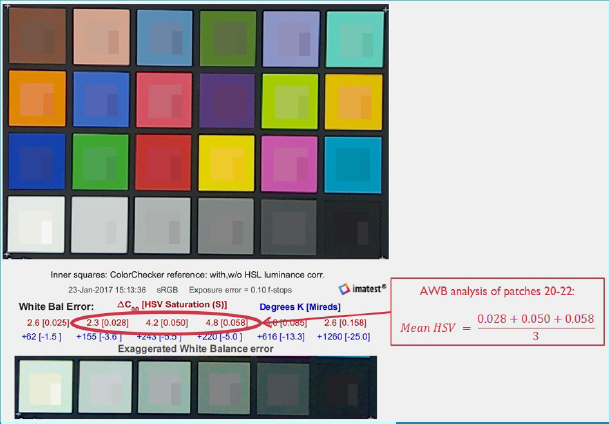
Figure 3.23 Imatest颜色
| AWB quality | 6,500K (HSV) | 4,000K (HSV) | 2,700K (HSV) |
|---|---|---|---|
| Great | <0.025 | <0.035 | <0.030 |
| Good | 0.025 - 0.050 | 0.035 - 0.060 | 0.030 - 0.065 |
| Fair | 0.050 - 0.100 | 0.060 - 0.110 | 0.065 - 0.160 |
| Poor | >0.100 | >0.110 | >0.160 |
Table 3.216 AWB HSV数据
3.2.3.2 第三阶段
根据
3.3 High Dynamic Range(2DOL)
3.3.1 功能描述
现实
自动
为
HDR 模块
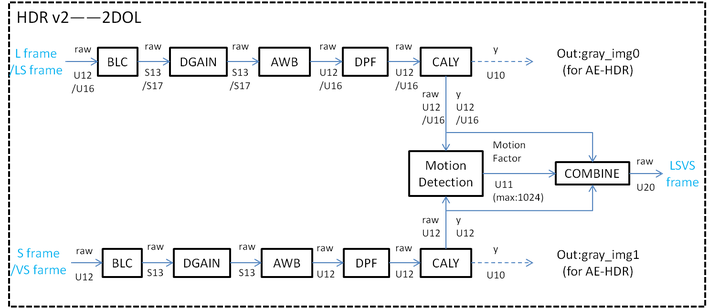
其中
Figure 3.3-1 HDR 模块
3.3.2 关键参数
HDR 模块
HDR 模块
Table 3.3-1 HDR 参数
| Parameter | Type / Range | Description | Default Value |
|---|---|---|---|
| state | Type: int Range: {0, 1} |
0:禁用 Usage Frequency:high |
0 |
| bypass | Type: bool Range: {false, true} |
true:使能 Usage Frequency:medium |
false |
| bypassSelect | Type: int Range: [0, 2] |
0:仅 Usage Frequency:low |
0 |
| colorWeight[3] | Type: int Range: [0, 255] |
颜色 Usage Frequency:low |
[255, 0, 1] |
| ratio[2] | Type: float Range: [1.0, 256.0] |
曝光 Usage Frequency:high |
[16.0, 16.0] |
| transRange[4][2] | Type: float Range: [0.0, 1.1] |
每个 Usage Frequency:high |
[[0.85, 0.95], [0.85, 0.95], [0, 0.1], [0, 0.1]] |
| extendBit[2] | Type: int Range: [-1, 8] |
扩展 Usage Frequency:low |
[-1, -1] |
| deGhostLs.isEnable | Type: bool Range: {true, false} |
true:使能 LS 去 Usage Frequency:medium |
false |
| deGhostLsVs.isEnable | Type: bool Range: {true, false} |
true:使能 LSVS 去 Usage Frequency:medium |
false |
| motionWeight[2] | Type: int Range: [0, 1024] |
运动 Usage Frequency:medium |
[1024, 1024] |
| deGhostLs.motionLowerThreshold | Type: int Range: [0, 4095] |
运动 Usage Frequency:medium |
16 |
| deGhostLsVs.motionLowerThreshold | Type: int Range: [0, 4095] |
运动 Usage Frequency:low |
16 |
| deGhostLs.darkLowerThreshold | Type: int Range: [0, 4095] |
暗区 Usage Frequency:medium |
16 |
| deGhostLsVs.darkLowerThreshold | Type: int Range: [0, 4095] |
暗区 Usage Frequency:low |
16 |
| deGhostLs.darkUpperThreshold | Type: int Range: [0, 4095] |
暗区 Usage Frequency:medium |
256 |
| deGhostLsVs.darkUpperThreshold | Type: int Range: [0, 4095] |
暗区 Usage Frequency:low |
256 |
3.3.2 调试流程
HDR 模块
Step 1 确认
若
Step 2 调整 transRange(过渡
transRange 表示
transRange 示意图
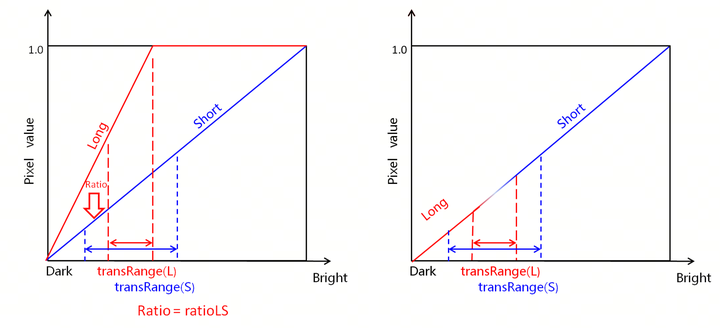
Figure 3.3-2 transRange 示意图
不同 transRange 取值
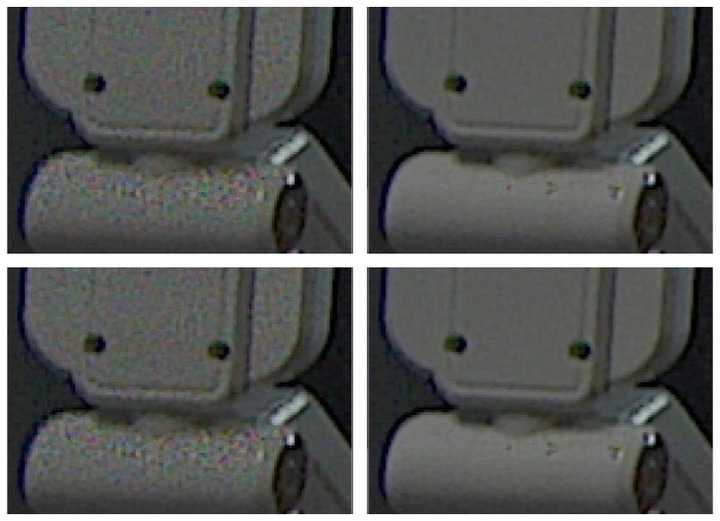
Figure 3.3-3 transRange 调试
Step 3 调整 Deghost(去
利用 deghost 功能
(1)观察
Deghost 功能
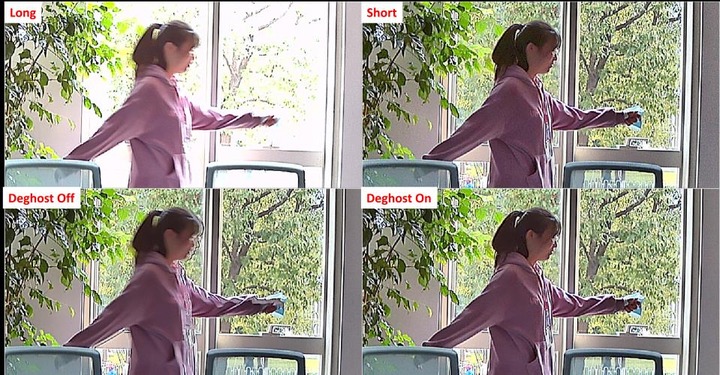
Figure 3.3-4 Deghost 示意图
不同 motionWeight 取值
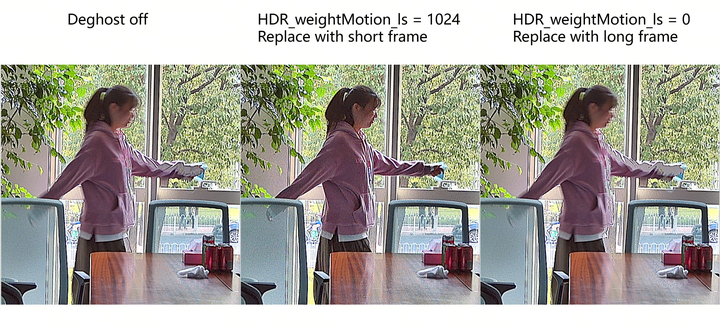
Figure 3.3-5 motionWeight 调试
(2)调整 deGhostLs.motionLowerThreshold与deGhostLs.motionUpperThreshold,直到
不同
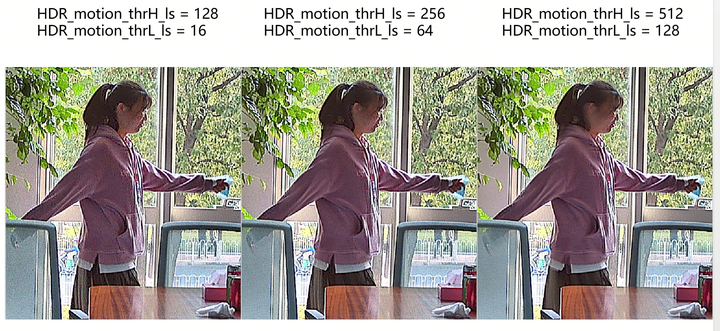
Figure 3.3-6 运动
(3)若
不同
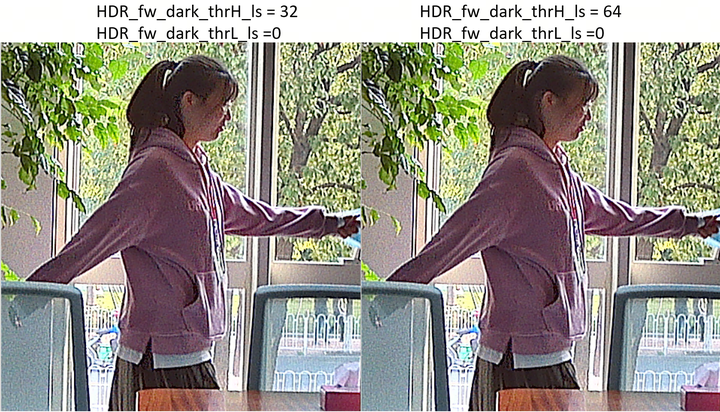
Figure 3.3-7 暗区
3.4 Compand
3.4.1 功能描述
Compand 模块
Compand 包含
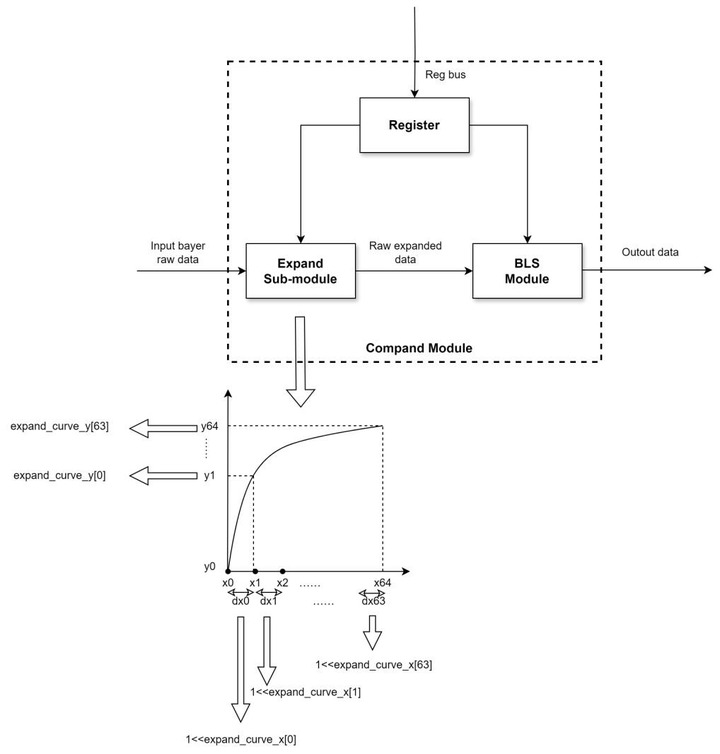
Figure 3.4-1 Compand 模块
3.4.2 关键参数
Expand Curve 中 X 与 Y 用于
Compand 模块
Table 3.4-1 Compand 参数
| Parameter | Type / Range | Description | Default Value |
|---|---|---|---|
| state | Type: int Range: {0, 1} |
0:禁用 Usage Frequency:high |
0 |
| expandCurveX[64] | Type: int Range: [0, 20] |
expand 曲线 Usage Frequency:high |
— |
| expandCurveY[64] | Type: int Range: [0, 1048576] |
expand 曲线 Usage Frequency:high |
— |
| expandUseOutYCurve | Type: bool Range: {true, false} |
true:使用 Usage Frequency:high |
false |
3.4.3 调试流程
可
方式
推荐
设置 expandCurveX 与 expandCurveY 以
指定 用户 自定义 曲线。 计算
并 以 20 位 配置 BLS 值。 设置 blsEnable 为 true、state 为 1、expandUseOutYCurve 为 true。
方式
在
使用
标定 工具 获取 expand 曲线 数据 expand_px 与 expand_y。 将 expand_px 拷贝到 .json 配置文件
的 expandCurveX,expand_y 拷贝到 expandCurveY。 计算
并 以 20 位 配置 BLS 值。 设置 blsEnable 为 true、state 为 1、expandUseOutYCurve 为 true。
3.4.4 调试建议与功能说明
● 若 expandCurveX 成员数
[17, 16, 14, 10, 16, 14, 10, 9, 16, 14, 10, 9, 16, 14, 10, 16, 14, 10, 16, 14, 10, 9, 16, 14, 10, 16, 14, 10, 9, 16, 14,
10, 16, 14, 10, 9, 16, 14, 10, 9, 11] → [17, 16, 14, 10, 16, 14, 10, 9, 16, 14, 10, 9, 16, 14, 10, 16, 14, 10, 16, 14,
10, 9, 16, 14, 10, 16, 14, 10, 9, 16, 14, 10, 16, 14, 10, 9, 16, 14, 10, 9, 11, 0, 0, 0, 0, 0, 0, 0, 0, 0, 0, 0, 0, 0, 0, 0, 0,
0, 0, 0, 0, 0, 0, 0] → 在
● 若 expandCurveY 成员数
[512, 915, 1016, 1022, 1827, 2029, 2042, 2048, 3661, 4064, 4090, 4109, 7335, 8142, 8192, 14645, 16258,
16359, 29239, 32466, 32667, 32768, 58579, 65032, 65435, 116957, 129862, 130669, 131072, 234316,
260128, 261741, 467826, 519448, 522675, 524288, 937266, 1040510, 1046963, 1048575, 1048575] → [512,
915, 1016, 1022, 1827, 2029, 2042, 2048, 3661, 4064, 4090, 4109, 7335, 8142, 8192, 14645, 16258, 16359,
29239, 32466, 32667, 32768, 58579, 65032, 65435, 116957, 129862, 130669, 131072, 234316, 260128,
261741, 467826, 519448, 522675, 524288, 937266, 1040510, 1046963, 1048575, 1048575, 1048575,
1048575, 1048575, 1048575, 1048575, 1048575, 1048575, 1048575, 1048575, 1048575, 1048575, 1048575,
1048575, 1048575, 1048575, 1048575, 1048575, 1048575, 1048575, 1048575, 1048575, 1048575, 1048575] → 将
3.5 BLS(Black Level Subtraction)
3.5.1 功能描述
BLS 模块
3.5.2 关键参数
下
注:默认
Table 3.5-1 BLS 参数
| Parameter | Type / Range | Description | Default Value |
|---|---|---|---|
| state | Type: int Range: {1, 2} |
BLS 模块 Usage Frequency:medium |
2 |
| data[4] bls[4]** |
Type: Int Range: [0,4095] |
四 Usage Frequency:high |
[0, 0, 0, 0] |
| isOverrideCalibration | Type: bool Range: {true, false} |
控制 Usage Frequency:low |
true |
3.5.3 调试建议与功能说明
● 黑
3.6 RGBIR
3.6.1 功能描述
RGB-IR 模块
如图3.6-1 所示,RGB-IR 处理
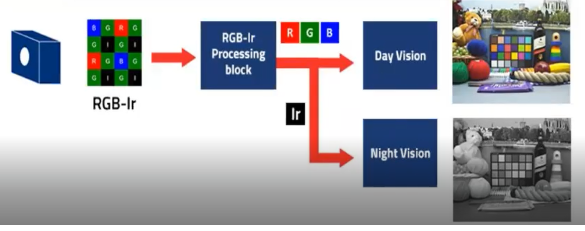
Figure 3.6-1 RGB-IR 处理
3.6.2 关键参数
下
注:默认
Table 3.6-1 RGB-IR 参数
| Parameter | Type / Range | Description | Default Value |
|---|---|---|---|
| state | Type: int Range: {0, 1} |
RGB-IR 模块 Usage Frequency:low |
0 |
| irThreshold | Type: int Range: [0, 4095] |
红外 Usage Frequency:medium |
4095 |
| lThreshold | Type: int Range: [0, 4095] |
权重 Usage Frequency:medium |
4095 |
| dpccTh[4] | Type: int Range: [0, 65535] |
DPCC(Defective Pixel Correction by Correlation)阈值,基于 Usage Frequency:low |
[4095, 4095, 4095, 4095] |
| dpccMidTh | Type: int Range: [0, 65535] |
DPCC(Defective Pixel Correction by Correlation)阈值,基于 Usage Frequency:low |
4095 |
| ccMatrix[3][4] | Type: float Range: [-4.0, 4.0] |
3×4 颜色 Usage Frequency:high |
[[1.0,0.0,0.0,0.0],[0.0,1.0,0.0,0.0],[0.0,0.0,1.0,0.0]] |
| outRgbPattern | Type: int Range: [0, 3] |
输出 RGB 图案 Usage Frequency:low |
0 |
3.6.3 调试流程
推荐
步骤 1:基于
步骤 2:观察
步骤 3:检查
如图3.6-2 所示,调试 dpccTh 和 dpccMidTh 参数
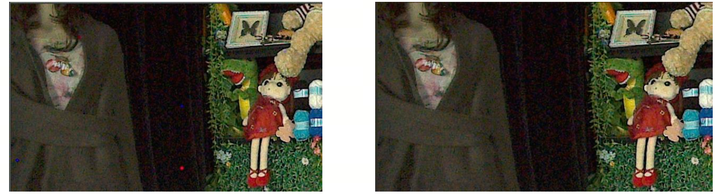
左图:dpccTh=4095, dpccMidTh=4095,右图:dpccTh=2500, dpccMidTh=2500
Figure 3.6-2 调试 RGB-IR dpccTh 和 dpccMidTh 的
3.6.4 调试建议与功能说明
● ccMatrix 参数值
● lThreshold 与 irThreshold 功能
3.7 Lens Shading Correction
3.7.1 功能描述
Shading是
Shading的
下面
第一阶段:在
实验室 标准 光源 下 标定Lens shading,通过Calibration Tool来 完成。 第二阶段:无需
调整,除非 其他 模块 导致shading校正 出现 不良 问题。 第三阶段:无需
调整,除非 其他 模块 导致shading校正 出现 不良 问题 或 实际 应用 场景 中 出现 标定 光源 没有 覆盖 到 的 场景。
3.7.2 关键参数
Shading关键
LSC模块
| Parameter | Type / Range | Description | Default Value |
|---|---|---|---|
| state | Type: int Range: {0, 1, 2} |
0:禁用 Usage Frequency:high |
0 |
| xSize[32] | Type: unsigned int Range: [8, 1023] |
x 方向 Usage Frequency:low |
[60, 60, …, 60, 60] |
| ySize[32] | Type: unsigned int Range: [8, 1023] |
y 方向 Usage Frequency:low |
[34, 34, 34, 33, …, 34, 34] |
| matrix[4][33*33] | Type: unsigned int (U4.10) Range: [1024, 16383] |
四个 Usage Frequency:low |
[[1024, …, 1024], …, [1024, …, 1024]] |
| damping** | Type: float Range: [0, 1] |
时域 Usage Frequency:medium |
0.5 |
| interMode** | Type: unsigned int Range: {0, 1, 2} |
0:增益 Usage Frequency:low |
1 |
| strength** | Type: float Range: [0, 1] |
基于 ISO 等级 Usage Frequency:low |
1.0 |
Table 3.71 LSC调试
静态
LSC静态
| Parameter name | Description |
|---|---|
| Shading_ls_d75_[R/Gr/Gb/B] | Shading_ls_d75_[ R/Gr/Gb/B] D75 Shading表 |
| Shading_ls_d65_[R/Gr/Gb/B] | Shading_ls_d65_[ R/Gr/Gb/B] D65 Shading表 |
| Shading_ls_d50_[R/Gr/Gb/B] | Shading_ls_d50_[ R/Gr/Gb/B] D50 Shading表 |
| Shading_ls_tl84_[ R/Gr/Gb/B] | Shading_ls_tl84_[ R/Gr/Gb/B] TL84 Shading表 |
| Shading_ls_cwf_[R/Gr/Gb/B] | Shading_ls_cwf_[ R/Gr/Gb/B] CWF Shading表 |
| Shading_ls_a_[ R/Gr/Gb/B] | Shading_ls_a_[ R/Gr/Gb/B] A Shading表 |
| Shading_ls_h_[ R/Gr/Gb/B] | Shading_ls_h_[ R/Gr/Gb/B] H Shading表 |
Table 3.72 Mesh-based lens shading Static calibration参数
注:[R / Gr /Gb/ B]表示Bayer域
Lens shading 生成
3.7.3 调试流程
由于Shading的
| Prerequisite | Status / value |
|---|---|
| Black level | Tuned |
| Gamma FE/BE | Tuned(仅限Native HDR) |
Table 3.73 Shading 标定
Shading校正
Shading强度
Shading主观
将
摄像头 置于studio的 环境 中,边角 最好 是 灰色 平面 区域,确保 当前 增益 为1x gain,当前 应该 是 所有 亮度 下shading表现 最好 的 一组,因此 图像 效果 很 好,边角 噪声 较 小,因此 当前gain梯度 下 强度 可以 设置shading强度 到 最大值。在 高倍gain及 环境 亮度 较 低时,需要 判断 边角 噪声 的 大小,根据 以上 介绍 的 调试 方法 来 决定shading强度。
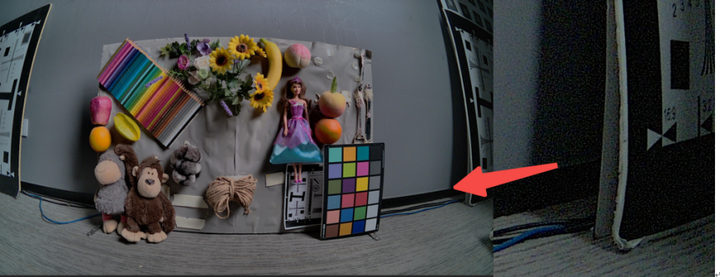
Figure 3.71 ISP Gain 0, 1000 lux场景
降低
环境 亮度,gain增加 让shading 强度 达到 下 一个 梯度,主观 评估 噪声 量 来 决定 当前 状态 的 强度 值,同样 设定 到shading strength对应 的gain档位 里,重复 以上 操作 为 所有gain 档位 调试 出 匹配 的shading 强度 值。
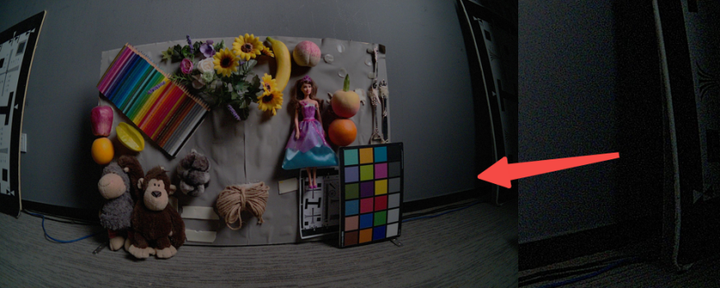
Figure 3.72 ISP Gain 3, 500 lux 场景。
例如
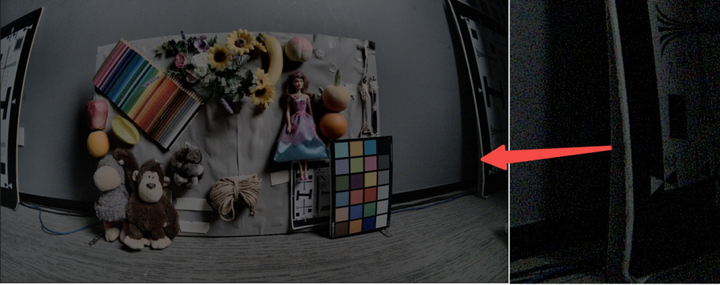
Figure 3.73 ISP max gain, 20 lux-max strength
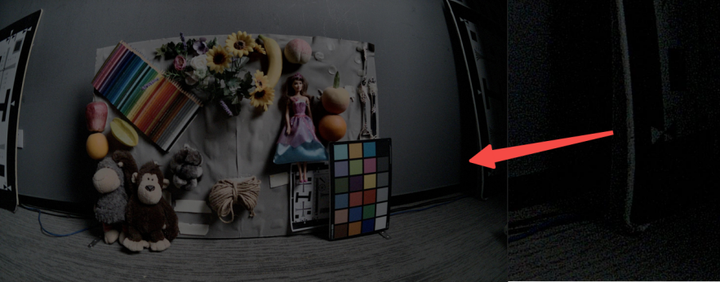
Figure 3.74 Max gain – low strength
当
3.7.4 调试建议与功能说明
调试
在 Auto 模式
在gain较
此外,2DNR模块
功能
LSC模块
根据
PCOR(x, y) = PIN(x, y) * F(x, y)
为了
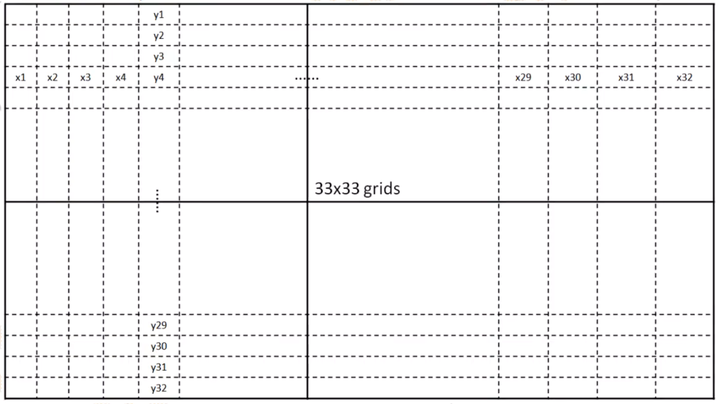
Figure 3.75 LSC区域
每个
在
3.8 DG(Digital Gain)
3.8.1 功能描述
数字
3.8.2 关键参数
下
注:默认
Table 3.8-1 数字
| Parameter | Type / Range | Description | Default Value |
|---|---|---|---|
| state | Type: int Range: {0, 1} |
数字 Usage Frequency:low |
1 |
| red | Type: float Range: [1, 255] |
R 通道 Usage Frequency:high |
1.0 |
| green red | Type: float Range: [1, 255] |
Gr 通道 Usage Frequency:high |
1.0 |
| green blue | Type: float Range: [1, 255] |
Gb 通道 Usage Frequency:high |
1.0 |
| blue | Type: float Range: [1, 255] |
B 通道 Usage Frequency:high |
1.0 |
3.8.3 调试建议与功能说明
数字
3.9 WDR
3.9.1 功能描述
宽
WDR 模块
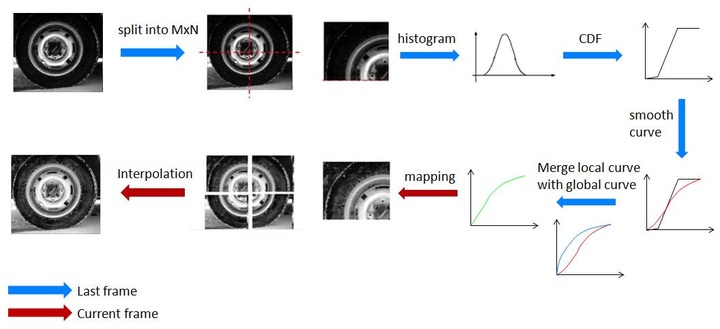
Figure 3.9-1 WDR 工作
WDR提供
全局
局部
通过
3.9.2 关键参数
WDR 模块
Table 3.9-1 WDR 参数
| Parameter | Type / Range | Description | Default Value |
|---|---|---|---|
| state | Type: int Range: {0, 1, 2} |
0:禁用 Usage Frequency:high |
0 |
| WDR Strength 调试 |
|||
| strength | Type: int Range: [0, 128] |
stitching 强度。不 Usage Frequency:low |
128 |
| highStrength* | Type: int Range: [0, 128] |
值越 Usage Frequency:high |
0 |
| lowStrength* | Type: int Range: [0, 256] |
值越 Usage Frequency:high |
256 |
| Local跟global的 |
|||
| contrast* | Type: int Range: [-1023, 1023] |
局部 Usage Frequency:high |
0 |
| entropyEnable | Type: bool Range: {true, false} |
true:熵 Usage Frequency:low |
false |
| entropySlope* | Type: int Range: [0, 1023] |
base 越大、slope 越小,局部 Usage Frequency:high |
0 |
| entropyBase* | Type: int Range: [0, 1023] |
熵 Usage Frequency:high |
0 |
| wdrLumaThr* | Type: int Range: [0, 1023] |
暗区 Usage Frequency:high |
64 |
| Local平滑 |
|||
| flatMode | Type: bool Range: {true, false} |
局部 Usage Frequency:low |
false |
| flatLevel* | Type: int Range: [0, 15] |
局部 Usage Frequency:medium |
5 |
| flatLevelInc[4][17] | Type: int Range: [0, 15] |
局部 Usage Frequency:low |
[[3,2,1,0,...], [5,4,3,2,1,...], [7,6,5,4,3,2,1,...], [10,10,9,8,7,6,5,4,3,2,1,...]] |
| darkAttentionLevel | Type: int Range: [0, 14] |
对 Usage Frequency:low |
0 |
| Global auto曲线 |
|||
| fixedWeight* | Type: int Range: [0, 1023] |
全局 Usage Frequency:high |
0 |
| flatLevelGlobal* | Type: int Range: [0, 15] |
auto 全局 Usage Frequency:high |
15 |
| Global Manual曲线 |
|||
| wdrCurveSelect | Type: int Range: [0, 2] |
手动 Usage Frequency:medium |
0 |
| logWeight* | Type: int Range: [0, 10] |
(Curve 1) 手动 Usage Frequency:medium |
0 |
| logAnchorXLog* | Type: float Range: [0.0, 20.0] |
(Curve 1) 对数 Usage Frequency:low |
0 |
| logAnchorSlope* | Type: int Range: [0, 4096] |
(Curve 1) 对数 Usage Frequency:low |
16 |
| ratioActual | Type: float Range: (0.0, 2.0] |
(Curve 2) 短帧 Usage Frequency:low |
2 |
| curve2Thr | Type: float Range: [0.0, 1.0] |
(Curve 2) S 曲线 Usage Frequency:low |
1 |
| curve2LoSat | Type: float Range: [0.0, 1.0] |
(Curve 2) S 曲线 Usage Frequency:low |
0.7 |
| curve2LoFactor | Type: float Range: (0.0, 2.2] |
(Curve 2) S 曲线 Usage Frequency:low |
1 |
| curve2HiFactor | Type: float Range: (0.0, 2.2] |
(Curve 2) S 曲线 Usage Frequency:low |
1 |
| WDR gain限定值 |
|||
| deGamma* | Type: float Range: (0.0, 3.0] |
degamma 曲线 Usage Frequency:low |
1.0 |
| maxGain* | Type: float Range: [0.0, 4096.0] |
最大 WDR 增益。 Usage Frequency:high |
16 |
| minGain | Type: float Range: [0.0, 4096.0] |
最小 WDR 增益。 Usage Frequency:high |
1 |
| WDR高对比度 |
|||
| diffHigh | Type: float Range: [0.0, 100.0] |
检测 Usage Frequency:medium |
100 |
| diffLow | Type: float Range: [0.0, 100.0] |
检测 Usage Frequency:medium |
100 |
| WDR暗区 |
|||
| satRange* | Type: float Range: [0.0, 1.0] |
饱和度 Usage Frequency:low |
0 |
| satThrGainDown* | Type: int Range: [0, 256] |
确定 Usage Frequency:low |
1 |
| satThrGainUp* | Type: int Range: [0, 256] |
确定 Usage Frequency:low |
16 |
| WDR预处理 |
|||
| wdrRgbCoef[3] | Type: int Range: [0, 128] |
权重 [weight_r, weight_g, weight_b],须 Usage Frequency:low |
[38, 75, 15] |
| wdrLightnessWeight | Type: int Range: [0, 128] |
最大 RGB 权重 max_rgb_weight。 Usage Frequency:low |
128 |
| wdrColorWeight[3]* | Type: int Range: [0, 128] |
权重 [gray_weight, lightness_weight, raw_weight],须 Usage Frequency:low |
[128, 0, 0] |
| WDR Halo Color Fading调试 |
|||
| lightEn* | Type: bool Range: {true, false} |
true:使能 halo 色彩 Usage Frequency:low |
false |
| lightSatLoThr* | Type: int Range: [0, 255] |
低/高 Usage Frequency:low |
64 |
| lightSatHiThr* | Type: int Range: [0, 255] |
高 Usage Frequency:low |
128 |
| lightRedThrLog[4]* | Type: float Range: [0.0, 20.0] |
红色 Usage Frequency:low |
[0, 0, 0, 0] |
| lightGreenThrLog[4]* | Type: float Range: [0.0, 20.0] |
绿色 Usage Frequency:low |
[0, 0, 0, 0] |
| lightBlueThrLog[4]* | Type: float Range: [0.0, 20.0] |
蓝色 Usage Frequency:low |
[0, 0, 0, 0] |
| lightYellowThrLog[4]* | Type: float Range: [0.0, 20.0] |
黄色 Usage Frequency:low |
[0, 0, 0, 0] |
| lightCyanThrLog[4]* | Type: float Range: [0.0, 20.0] |
青色 Usage Frequency:low |
[0, 0, 0, 0] |
| WDR 高光 |
|||
| hlcBaseLog | Type: float Range: [0.0, 19.0] |
高光 Usage Frequency:low |
0.0 |
| hlcSlope | Type: int Range: [0, 256] |
高光 Usage Frequency:low |
0 |
| WDR Damping 参数 | |||
| dampMode | Type: int Range: {0, 1} |
0:manual 模式(可 Usage Frequency:low |
0 |
| dampCurveCoef | Type: int Range: [0, 127] |
局部 Usage Frequency:low |
127 |
| dampCurveMax | Type: int Range: [0, 127] |
曲线 Usage Frequency:low |
127 |
| dampCurveMin | Type: int Range: [0, 127] |
曲线 Usage Frequency:low |
0 |
| dampAvgCoef | Type: int Range: [0, 127] |
块 Usage Frequency:low |
127 |
| dampAvgMax | Type: int Range: [0, 127] |
块 Usage Frequency:low |
127 |
| dampAvgMin | Type: int Range: [0, 127] |
块 Usage Frequency:low |
0 |
| dampCoefDecLimit | Type: int Range: [0, 127] |
阻尼 Usage Frequency:low |
127 |
| dampCoefIncLimit | Type: int Range: [0, 127] |
阻尼 Usage Frequency:low |
127 |
| dampFilterSize | Type: int Range: [0, 16] |
场景 Usage Frequency:low |
8 |
3.9.3 调试流程
建议
Step 1 调试 Local 层
用 flatLevel 调整 local 层
● flatLevel=0:平均
● flatLevel=7:平均
● flatLevel=15:平均

Figure 3.9-2 flatLevel 调试
flatMode=0 时为 manual 模式,使用 flatLevel 值;flatMode=1 时为 auto 模式,使用 flatLevel 加 flatLevelInc 指定
Step 2 调试 Global 层
依次
手动
全局 曲线:fixedWeight=1023,调 gamma 使 平均 亮度 适中。常用对数 曲线,可 汇聚 灰阶 像素,对比度 虽降 但 信息 基本 可见,通过 logWeight 易于 调整。需 按 WDR 计算 的 平均 亮度 调 gamma,平均 亮度 [0,1023] 越大,logWeight 越小。
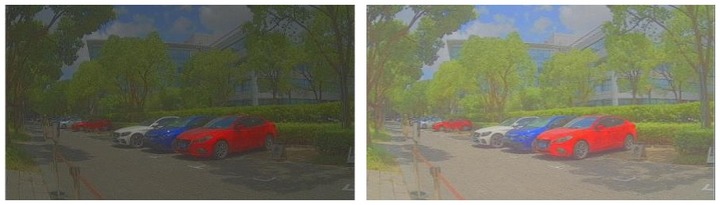
Figure 3.9-3 logWeight 调试
自动
全局 曲线:fixedWeight=0。全局 直方图 曲线 可 使 像素 均匀分布、对比度 合适,自然 亮度 适中,flatLevelGlobal 可 固定 在 15 以内。

Figure 3.9-4 flatLevelGlobal 调试
混合:fixedWeight 设 0~1023。自动
全局 曲线 会 扩大 光晕,增益 越大 fixedWeight 越大。

Figure 3.9-5 全局
Step 3 混合 Local 曲线
用 contrast、entropyBase、entropySlope 混合 local 层
● 设 contrast 指定
● 按 brightness tradeoff 设 entropyBase 与 entropySlope,按
▪ 室外:降低 local 权重
▪ 室内:降低 local 权重
▪ 夜间:降低 local 权重
Local 层、Global 层、混合
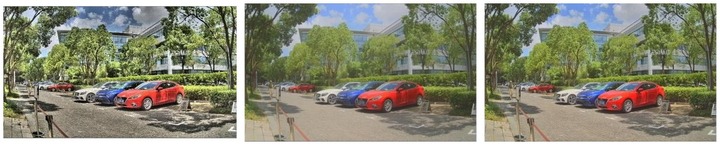
Figure 3.9-6 Local 层 / Global 层 / 混合
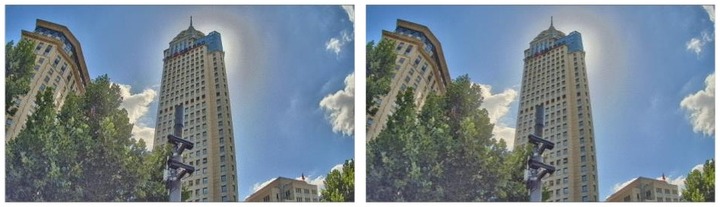
Figure 3.9-7 不同
Step 4 限制 WDR 增益
设 maxGain 与 minGain 限制 WDR 增益。暗区

Figure 3.9-8 maxGain 调试
Example Results
WDR 模块
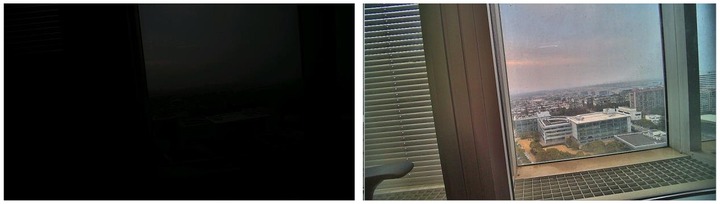
Figure 3.9-9 WDR 效果
3.9.4 调试建议与功能说明
Preprocessing – 预处理
在
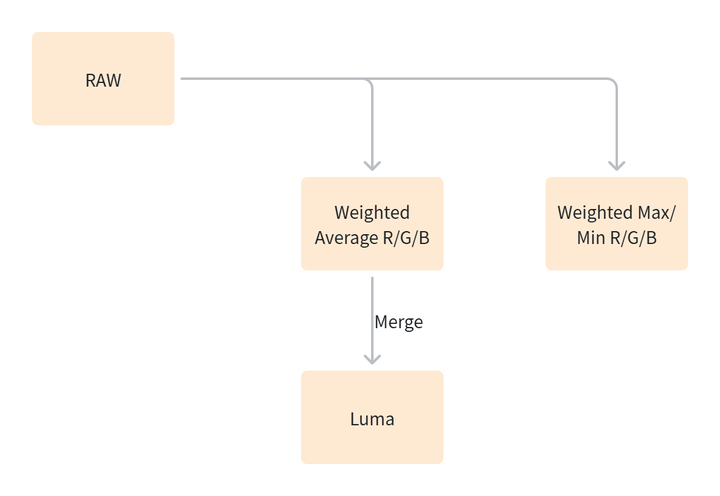
Figure 3.910 WDR预处理
以下
Luma值
计算。预处理 的 第一步 是 计算 亮度(luma)值。这 涉及 到 以下 子 步骤:
1) 使用3x3的
2) 计算R/G/B值
3) 将
Pre-Gamma映射。对luma值
应用pre-gamma映射 和low_strength模块 进行 进一步 处理。Pre-Gamma LUT这是 一个 包含65个bin的 查找 表,用于 扩展 灰度 值,使 其 更加 分散,从而 增强 图像 的 动态 范围。Low_Strength这是 一个 可 配置 的 参数,用于 控制 图像 暗区 的 亮度。参数值 越大,暗区 的 亮度 信息 越 丰富,使得 全局 亮度 提高。
在
全局
局部
这些
Entropy
熵
● 熵
▪ 块
▪ 块
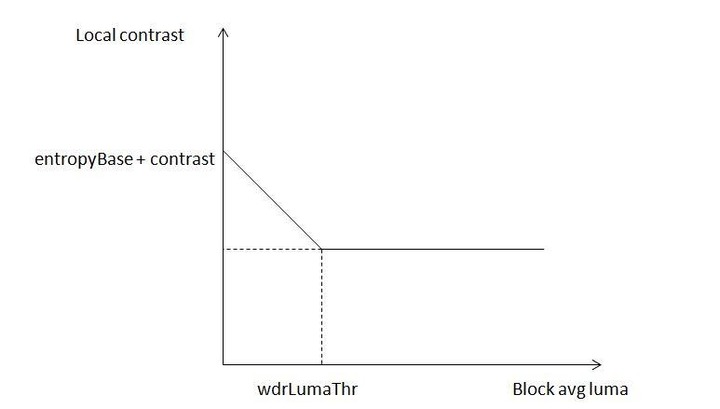
Figure 3.9-11 WDR Luma 阈值
● 熵
Manual Global Curve Types
手动
● 内置
● 对数
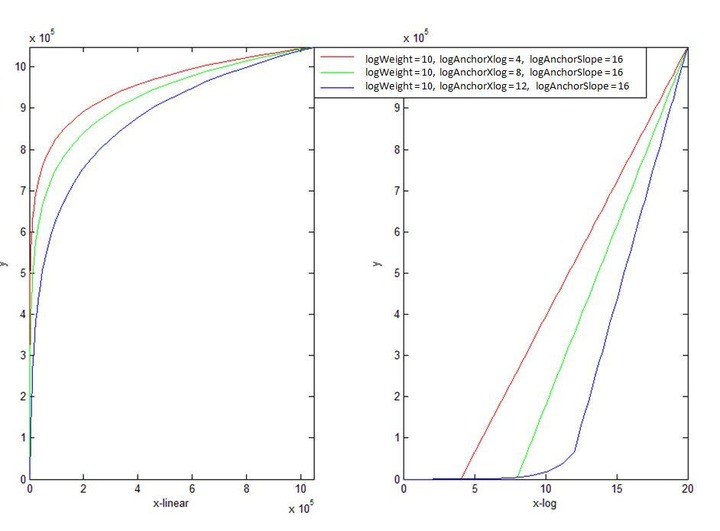
Figure 3.9-12 对数
● S 曲线(wdrCurveSelect=2):通过 ratioActual、curve2Thr、curve2LoSat、curve2LoFactor、curve2HiFactor 调整。若 pipeline 开启 HDR,ratioActual 应 ≥1 以
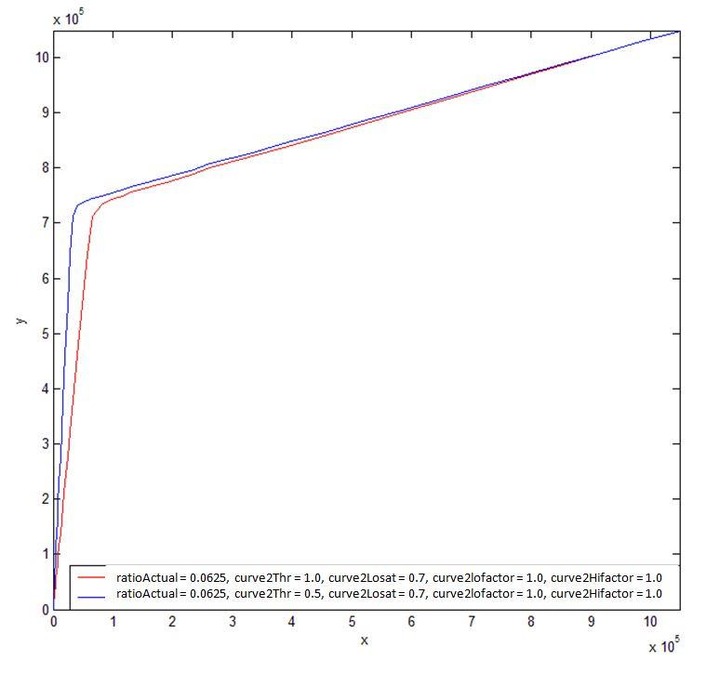
Figure 3.9-13 S 曲线
Defringe
Defringe 针对
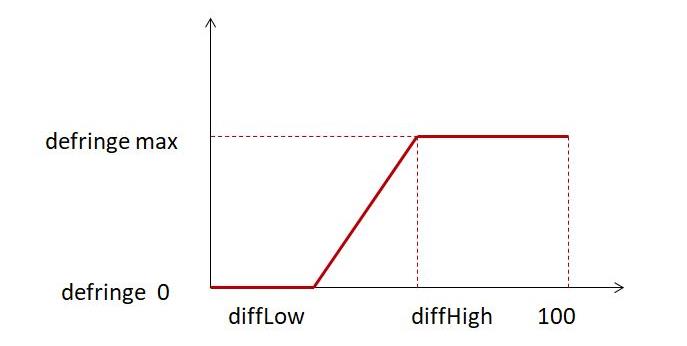
Figure 3.9-14 Defringe 逻辑
Defringe 效果
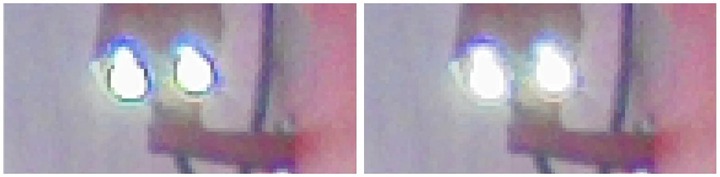
Figure 3.9-15 Defringe 效果
Saturation Adjustment
饱和度
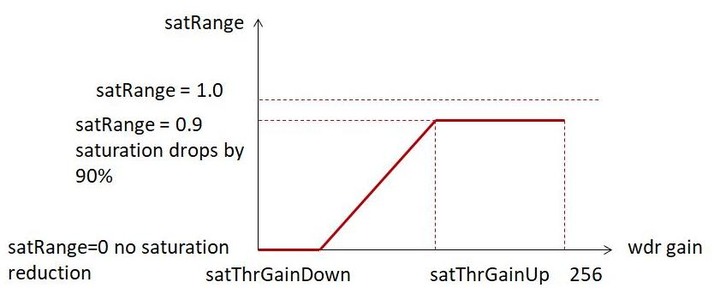
Figure 3.9-16 饱和度
饱和度
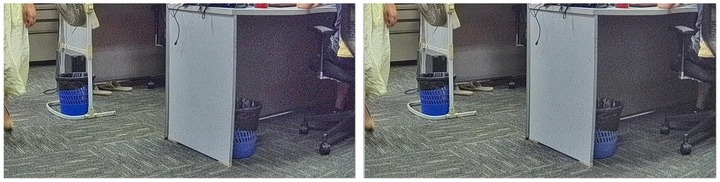
Figure 3.9-17 饱和度
Halo Color Fading
Halo color fading 功能
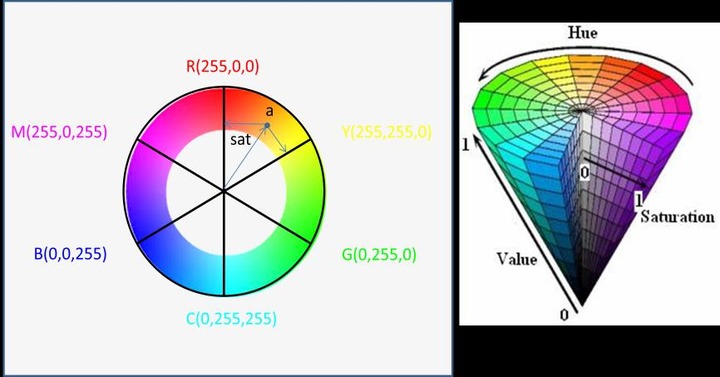
Figure 3.9-18 Halo Color Fading 逻辑
当
● pixel_value ≤ color_thr[0]:去
● color_thr[0] < pixel_value ≤ color_thr[1]:像素
● color_thr[1] < pixel_value ≤ color_thr[2]:去
● color_thr[2] < pixel_value ≤ color_thr[3]:像素
● pixel_value > color_thr[3]:去
为
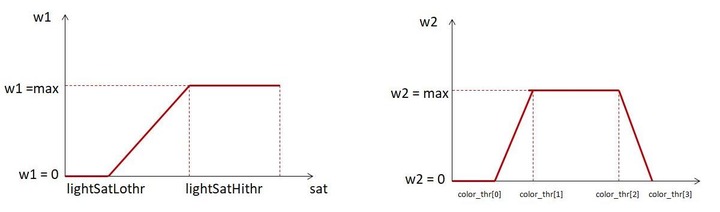
Figure 3.9-19 Halo Color Fading 效果
Highlight Compensation
高光
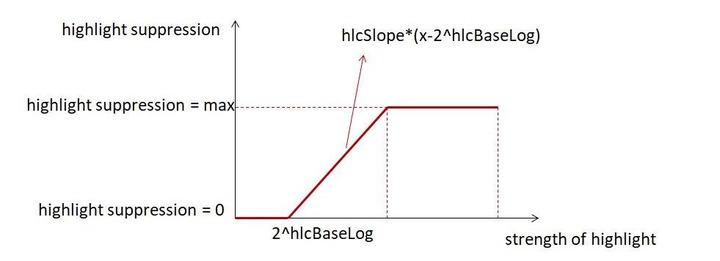
Figure 3.9-20 高光
高光

Figure 3.9-21 高光
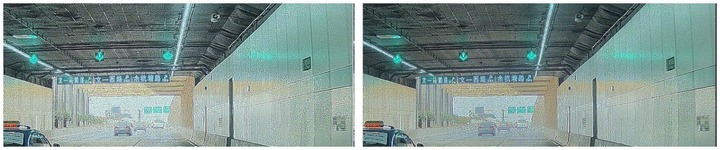
Figure 3.9-22 高光
Damping
Damping 功能
● dampMode=0 为 manual 模式(常用),dampCurveCoef 与 dampAvgCoef 作为
● dampMode=1 为 auto 模式,dampCurveCoef 与 dampAvgCoef 的
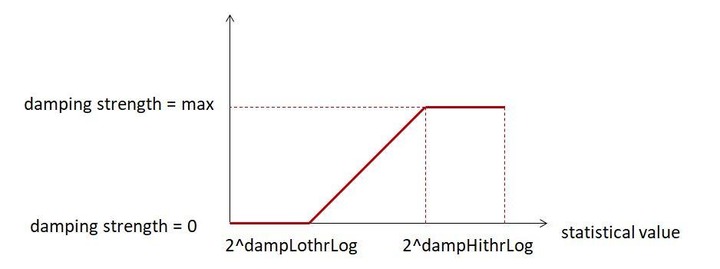
Figure 3.9-23 dampCurveCoef/dampAvgCoef 自动
dampLoThrLog 与 dampHiThrLog 为
3.10 GE (Green Equalization)
3.10.1 功能描述
由于
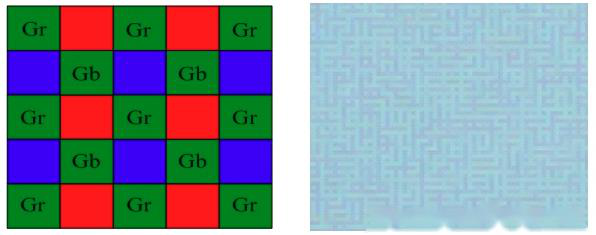
Figure 3.10-1 Gr/Gb 不
3.10.2 关键参数
下
注:默认
Table 3.10-1 GE 参数
| Parameter | Type / Range | Description | Default Value |
|---|---|---|---|
| state | Type: int Range: {0, 1} |
GE 模块 Usage Frequency:medium |
1 |
| threshold | Type: float Range: [0, 511] |
GE 模块 Usage Frequency:medium |
0.3 |
3.10.3 调试流程
推荐
步骤 1:若
步骤 2:将 threshold 设
步骤 3:若
下图
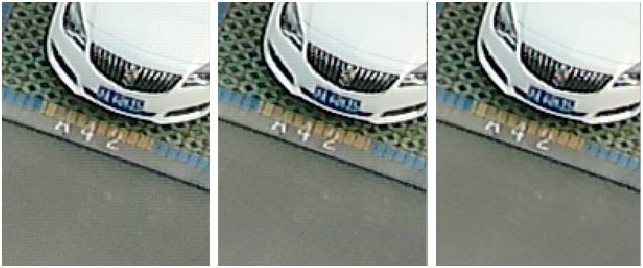
Figure 3.10-2 GE 效果
3.10.4 调试建议与功能说明
● threshold 推荐
● 对
3.11 DPCC(Defect Pixel Cluster Correction)
3.11.1 功能描述
ISP调试
当前
● 单行
● 红、绿、蓝
● 单色(红、绿
超过 6 个
3.11.2 关键参数
下
注:默认
Table 3.11-1 DPCC 参数
| Parameter | Type / Range | Description | Default Value |
|---|---|---|---|
| state | Type: int Range: {0, 1, 2} |
DPCC 模块 Usage Frequency:low |
2 |
| bptEnable | Type: bool Range: {true, false} |
静态 Usage Frequency:low |
false |
| bptNum | Type: int Range: [0, 1024] |
静态 Usage Frequency:low |
0 |
| bptOutMode | Type: int Range: [0, 15] |
静态 Usage Frequency:low |
0 |
| bptPosX[2048] | Type: int Range: [0, 图宽] |
静态 Usage Frequency:low |
[0] |
| bptPosY[2048] | Type: int Range: [0, 图高] |
静态 Usage Frequency:low |
[0] |
| outMode* | Type: int Range: [0, 15] |
校正 Usage Frequency:low |
3 |
| setUse* | Type: int Range: [0, 15] |
DPCC 检测 Usage Frequency:low |
3 |
| methodsSet[3]* | Type: int Range: [0, 8191] |
methodsSet[3] 为 Usage Frequency:low |
[7967,1799,7967] |
| lineThresh[2][3]* | Type: int Range: [0, 255] |
行 Usage Frequency:low |
[[8,16,32],[8,16,32]] |
| lineMadFac[2][3]* | Type: int Range: [0, 63] |
LC 方法 Usage Frequency:low |
[[4,24,4],[4,16,4]] |
| pgFac[2][3]* | Type: int Range: [0, 63] |
PG 方法 Usage Frequency:low |
[[8,8,10],[8,6,10]] |
| rndThresh[2][3]* | Type: int Range: [0, 63] |
RND 方法 Usage Frequency:low |
[[10,8,8],[10,8,6]] |
| rgFac[2][3]* | Type: int Range: [0, 63] |
RG 方法 Usage Frequency:low |
[[32,8,4],[32,8,4]] |
| roLimits[2][3]* | Type: int Range: [0, 3] |
RO 方法 Usage Frequency:low |
[[2,3,2],[2,3,2]] |
| rndOffs[2][3]* | Type: int Range: [0, 3] |
RND 方法 Usage Frequency:low |
[[3,3,3],[3,3,3]] |
3.11.3 调试流程
如图3.11-1 所示,DPCC 模块
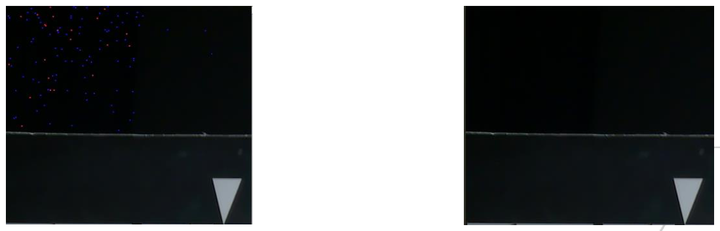
左图:state=0,右图:state≠0
Figure 3.11-1 DPCC 示例
基于
Table 3.11-2 DPCC 可
| 情况 | 单 |
小簇 | 大簇 |
|---|---|---|---|
| 少量 |
参数 |
参数 |
参数 |
| 大量 |
参数 |
参数 |
参数 |
Table 3.11-3 DPCC 参数
| 参数 | 集1 | 集2 | 集3 | 集4 | 集5 | 集6 |
|---|---|---|---|---|---|---|
| outMode | 3 | 3 | 3 | 3 | 3 | 3 |
| setUse | 3 | 3 | 7 | 3 | 15 | 15 |
| methodsSet[3] | [7967,1799,7967] | [7967,1799,7967] | [7453,1799,7967] | [7453,1799,7967] | [7453,1799,7967] | [7453,1799,7967] |
| lineThresh[2][3] | [[8,32,32],[8,24,32]] | [[8,16,32],[8,16,32]] | [[8,16,32],[8,12,32]] | [[8,16,32],[8,12,32]] | [[8,16,8],[8,12,8]] | [[8,16,0],[8,12,0]] |
| lineMadFac[2][3] | [[4,24,4],[4,16,4]] | [[4,24,4],[4,16,4]] | [[4,24,4],[4,16,4]] | [[4,24,4],[4,16,4]] | [[4,8,4],[4,8,4]] | [[4,4,4],[4,4,4]] |
| pgFac[2][3] | [[8,8,10],[8,6,10]] | [[8,8,10],[8,6,10]] | [[8,8,10],[8,6,10]] | [[8,8,10],[8,6,10]] | [[6,6,6],[6,6,6]] | [[4,4,4],[4,4,4]] |
| rndThresh[2][3] | [[10,8,8],[10,8,6]] | [[10,8,8],[10,8,6]] | [[10,8,8],[10,8,6]] | [[10,8,8],[10,8,6]] | [[8,8,8],[8,8,6]] | [[8,8,8],[4,8,4]] |
| rgFac[2][3] | [[32,8,4],[32,8,4]] | [[32,8,4],[32,8,4]] | [[32,8,4],[32,8,4]] | [[32,8,4],[32,8,4]] | [[16,8,4],[16,8,4]] | [[8,8,4],[2,8,0]] |
| roLimits[2][3] | [[2,3,2],[2,3,2]] | [[2,3,2],[2,3,2]] | [[2,3,2],[2,3,2]] | [[2,3,2],[2,3,2]] | [[2,3,2],[2,3,2]] | [[2,3,2],[2,3,2]] |
| rndOffs[2][3] | [[3,3,3],[3,3,3]] | [[3,3,3],[3,3,3]] | [[3,3,3],[3,3,3]] | [[3,3,3],[3,3,3]] | [[3,3,3],[3,3,3]] | [[3,3,3],[3,3,3]] |
3.12 Bayer NR(3DNR&2DNR)
3.12.1 功能描述
Bayer 降噪
3.12.1.1 3DNR
3DNR 是

Figure 3.12-1 3DNR 框图
3.12.1.2 2DNR
借助

Figure 3.12-2 2DNR 框图
3.12.2 关键参数
本
注:默认
3.12.2.1 3DNR 参数
下
Table 3.12-1 3DNR 参数
| Parameter | Type / Range | Description | Default Value |
|---|---|---|---|
| state | Type: int Range: {0, 1, 2} |
3DNR 模块 Usage Frequency:medium |
2 |
| isMotionDilate motionDilateEn** | Type: bool Range: {true, false} |
运动 Usage Frequency:low |
true |
| isGaussBlur | Type: bool Range: {true, false} |
运动 Usage Frequency:low |
true |
| isGammaFeBe | Type: bool Range: {true, false} |
噪声 Usage Frequency:low |
true |
| inputBits | Type: int Range: {20, 24} |
噪声 Usage Frequency:low |
20 |
| fixCurveStart* | Type: int Range: [0, 4095] |
暗部 Usage Frequency:low |
256 |
| noiseModelA* | Type: double Range: [0.1, 100] |
噪声 Usage Frequency:medium |
0.3 |
| noiseModelB* | Type: double Range: [0.1, 100] |
噪声 Usage Frequency:medium |
1.5 |
| blsExp[4]* | Type: int Range: [0, 1048575] |
噪声 Usage Frequency:low |
[0, 0, 0, 0] |
| vstFactor* | Type: double Range: [1.0, 1000.0] |
分解 Usage Frequency:medium |
16 |
| tnrStrength* | Type: int Range: [0, 128] |
TNR 细节 Usage Frequency:high |
128 |
| tnrStrength2* | Type: int Range: [0, 128] |
TNR 粗层 Usage Frequency:high |
128 |
| filterLen* | Type: int Range: [1, 99] |
TNR IIR 滤波 Usage Frequency:high |
6 |
| filterLen2* | Type: int Range: [1, 99] |
运动 IIR 滤波 Usage Frequency:high |
6 |
| motionSmoothFactor* | Type: double Range: [0.1, 5.0] |
运动 Usage Frequency:medium |
0.5 |
| motionSmoothLevel motionSmoothLvl** | Type: int Range: {0, 1} |
运动 Usage Frequency:low |
1 |
| rangeH* | Type: int Range: {3, 6} |
运动 Usage Frequency:low |
3 |
| dilateH* | Type: int Range: {3, 6} |
水平 Usage Frequency:low |
3 |
| sadWeight* | Type: int Range: [0, 16] |
绝对 Usage Frequency:high |
12 |
| diffType | Type: int Range: {0, 1} |
运动 Usage Frequency:low |
1 |
| sqrDiffFactor* | Type: int Range: [0, 10] |
运动 Usage Frequency:high |
2 |
| noiseLevel | Type: int Range: [0, 65535] |
运动 Usage Frequency:low |
100 |
| thrMotionSlope | Type: int Range: [0, 4095] |
运动 Usage Frequency:low |
32 |
| tnrLumaCurveX[12] | Type: int Range: [0, 65535] |
TNR 运动 Usage Frequency:medium |
[0, 32, 64, 96, 128, 256, 512, 768, 1024, 1536, 2048, 4095] |
| tnrLumaCurveY[12]* | Type: int Range: [0, 65535] |
TNR 运动 Usage Frequency:high |
[4, 48, 64, 64, 64, 64, 64, 64, 64, 64, 64, 64] |
| tnrMotionSlopeY[12]* | Type: int Range: [0, 65535] |
TNR 运动 Usage Frequency:high |
[4, 48, 64, 64, 64, 64, 64, 64, 64, 64, 64, 64] |
| nmK** | Type: float Range: [0, 100] |
噪声 Usage Frequency:low |
0 |
| nmP** | Type: float Range: [0, 100] |
噪声 Usage Frequency:low |
0 |
3.12.2.2 2DNR 参数
下
Table 3.12-2 2DNR 参数
| Parameter | Type / Range | Description | Default Value |
|---|---|---|---|
| state | Type: int Range: {0, 1, 2} |
2DNR 模块 Usage Frequency:low |
2 |
| isMotionCtrl | Type: bool Range: {true, false} |
运动 Usage Frequency:medium |
true |
| isLumaCtrl | Type: bool Range: {true, false} |
亮度 Usage Frequency:medium |
true |
| isLscGainComp | Type: bool Range: {true, false} |
镜头 Usage Frequency:medium |
false |
| vstFactor | Type: float Range: [1.0, 1000.0] |
分解 Usage Frequency:high |
16 |
| sigmaOffset* | Type: int Range: [0, 4095] |
NLM 局部 Usage Frequency:low |
0 |
| sigmaScale[3]* | Type: float Range: [0.001, 100.0] |
各 Usage Frequency:high |
[1.0, 1.0, 1.0] |
| staticFactor[3]* | Type: float Range: [0.01, 1.0] |
各层 Usage Frequency:low |
[0.1, 0.1, 0.1] |
| sigmaFactorMul[3]* | Type: float Range: [0.1, 10.0] |
调整 Usage Frequency:low |
[1.0, 1.0, 1.0] |
| sigmaFactorMotionMin | Type: int Range: [0, 1024] |
运动量 Usage Frequency:low |
0 |
| sigmaFactorMotionMax* | Type: int Range: [1, 1024] |
运动量 Usage Frequency:low |
800 |
| lumaCurveX[12] | Type: int Range: [0, 4095] |
SNR 亮度 Usage Frequency:medium |
[0, 32, 64, 96, 128, 256, 512, 768, 1024, 1536, 2048, 4095] |
| lumaCurveY[12]* | Type: int Range: [0, 65535] |
SNR 亮度 Usage Frequency:high |
[256, 256, 256, 256, 256, 256, 256, 256, 256, 256, 256, 256] |
| lumaCurvePx[12] | Type: int Range: [0, 12] |
亮度 Usage Frequency:low |
[0, 0, 0, 0, 0, 0, 0, 0, 0, 0, 0, 0] |
| motionFactorCurveX[12] | Type: int Range: [0, 1024] |
SNR 运动 Usage Frequency:low |
[0, 4, 8, 16, 32, 64, 128, 192, 256, 384, 512, 1024] |
| motionFactorCurveY[12] motionFacCurveY** | Type: int Range: [0, 65535] |
SNR 运动 Usage Frequency:low |
[1408, 1152, 1024, 896, 768, 640, 512, 437, 384, 309, 256, 128] |
| motionFactorCurvePx[12] | Type: int Range: [0, 10] |
运动 Usage Frequency:low |
[0, 0, 0, 0, 0, 0, 0, 0, 0, 0, 0, 0] |
| lscCompCurveX[12] | Type: int Range: [0, 4095] |
SNR LSC 增益 Usage Frequency:medium |
[0, 32, 64, 96, 128, 256, 512, 768, 1024, 1536, 2048, 4095] |
| lscCompCurveY[12]* | Type: int Range: [0, 65535] |
SNR LSC 增益 Usage Frequency:medium |
[1024, 1024, 1024, 1024, 1024, 1024, 1024, 1024, 1024, 1024, 1024, 1024] |
| lscCompCurvePx[12] | Type: int Range: [0, 12] |
LSC 补偿曲线 X 锚点 Usage Frequency:low |
[0, 0, 0, 0, 0, 0, 0, 0, 0, 0, 0, 0] |
| blendStatic* | Type: float Range: [0.0, 100.0] |
静态 Usage Frequency:high |
20 |
| blendSlope* | Type: float Range: [0.0, 32.0] |
运动量 Usage Frequency:high |
16 |
| blendMotion* | Type: float Range: [0.0, 100.0] |
运动 Usage Frequency:high |
80 |
| motionAnchorX[2]* | Type: int Range: [0, 1024] |
运动量 Usage Frequency:medium |
[100, 600] |
| staticDetailThresh[2][3]* | Type: int Range: [0, 4095] |
静态 Usage Frequency:medium |
[[0, 0, 0], [0, 0, 0]] |
| staticDetailBoostThresh[2][3]* | Type: int Range: [0, 4095] |
静态 Usage Frequency:medium |
[[4095, 4095, 4095], [4095, 4095, 4095]] |
| staticDetailBoost[2][3]* | Type: float Range: [1.0, 4.0] |
静态 Usage Frequency:medium |
[[1.0, 1.0, 1.0], [1.0, 1.0, 1.0]] |
| staticDetailClipThresh[2][3]* | Type: int Range: [0, 4095] |
静态 Usage Frequency:medium |
[[4095, 4095, 4095], [4095, 4095, 4095]] |
| movingDetailThresh[2][3]* | Type: int Range: [0, 4095] |
运动 Usage Frequency:medium |
[[0, 0, 0], [0, 0, 0]] |
| movingDetailBoostThresh[2][3]* | Type: int Range: [0, 4095] |
运动 Usage Frequency:medium |
[[4095, 4095, 4095], [4095, 4095, 4095]] |
| movingDetailBoost[2][3]* | Type: float Range: [1.0, 4.0] |
运动 Usage Frequency:medium |
[[1.0, 1.0, 1.0], [1.0, 1.0, 1.0]] |
| movingDetailClipThresh[2][3]* | Type: int Range: [0, 4095] |
运动 Usage Frequency:medium |
[[4095, 4095, 4095], [4095, 4095, 4095]] |
3.12.3 调试流程
本
3.12.3.1 3DNR 调试
推荐
步骤 1:标定
若
步骤 2:从
步骤 3:调整
若 isGaussBlur 设
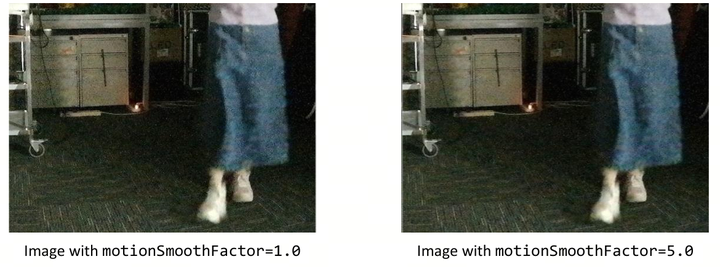
左图:motionSmoothFactor=1.0 ,右图:motionSmoothFactor=5.0
Figure 3.12-3 调试 3DNR motionSmoothFactor 的
步骤 4:设置 rangeH、diffType、sadWeight 和 sqrDiffFactor,定义
步骤 5:配置
tnrLumaCurveY 与 tnrMotionSlopeY 为 tnrLumaCurveX 的
每个 点 定义 一对 noiseLevel 与 thrMotionSlope; noiseLevel 与 thrMotionSlope 定义
全局 设置,即 tnrLumaCurveY[:]=noiseLevel、tnrMotionSlopeY[:]=thrMotionSlope。
若
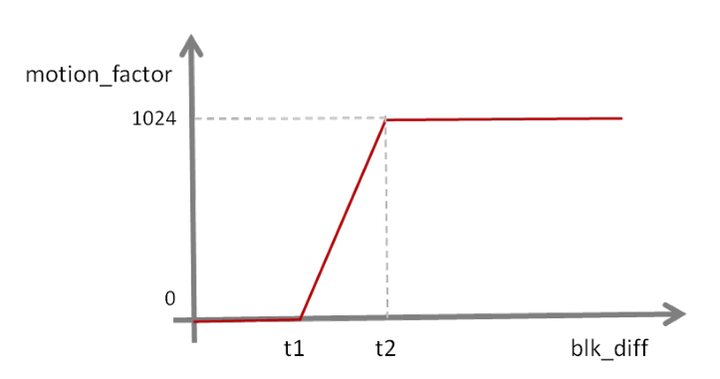
Figure 3.12-4 运动
步骤 6:用 motionSmoothLevel 选择
若 motionSmoothLevel 设
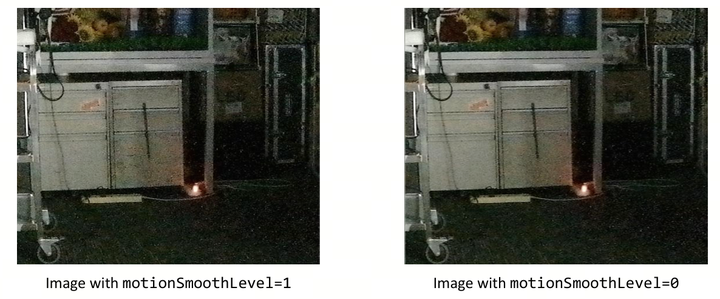
左图:motionSmoothLevel=1,右图:motionSmoothLevel=0
Figure 3.12-5 调试 3DNR motionSmoothLevel 的
步骤 7:用 filterLen 与 filterLen2 调整
filterLen 值越
大,IIR 滤波 在 更新 参考 帧 时 考虑 的 帧 数越 多; filterLen2 值越
大,IIR 滤波 在 更新 运动 帧 时 考虑 的 运动 帧 数越 多。
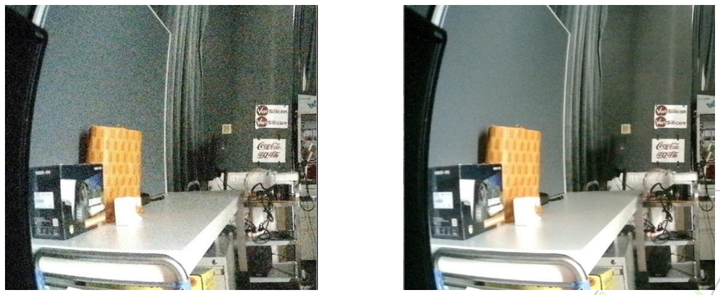
左图:filterLen=2,右图:filterLen=99
Figure 3.12-6 调试 3DNR filterLen 的
步骤 8:降低 tnrStrength 使
粗层
3.12.3.2 2DNR 调试
推荐
步骤 1:针对
a. 参数设置:
3DNR state!=0;
2DNR isLumaCtrl=false、isLscGainComp=false、isMotionCtrl=true、sigmaFactorMul=100、staticFactor=1.0。
b. 降噪
将 sigmaScale 设
为 各 频率 层 的 sigma 因子 以 对 各层 施加 不同 NLM 强度; 将 sigmaOffset 设
为 NLM 局部 块 匹配 阈值,该 参数 定义 平坦 区 阈值 并 使 其 更 平滑。
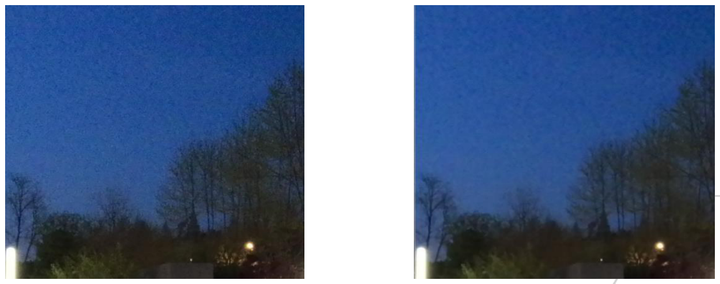
左图:sigmaOffset=0,右图:sigmaOffset=12
Figure 3.12-7 调试 2DNR sigmaOffset 的
步骤 2:调整
a. 参数设置:
2DNR isLumaCtrl=true、isLscGainComp=true、isMotionCtrl=true、sigmaFactorMul 与 staticFactor 设
为 默认值; sigmaScale 设
为 各 频率 层 sigma 因子; sigmaOffset 设
为 NLM 局部 块 匹配 阈值。
b. 通过
亮度:设置 lumaCurveX 与 lumaCurveY。lumaCurveY 在 lumaCurveX 处为
不同 亮度 的 像素 定义 不同 局部 NLM 强度。
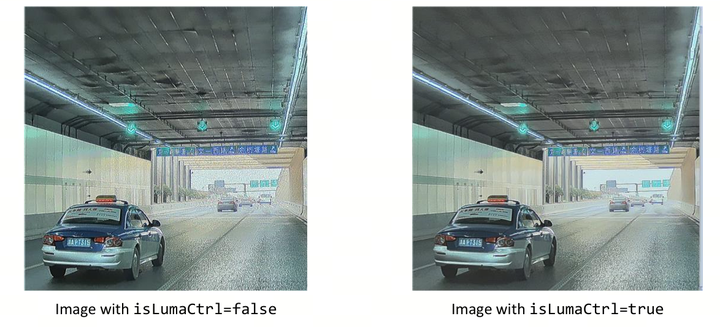
左图:isLumaCtrl=false,右图:isLumaCtrl=true
Figure 3.12-8 调试 2DNR isLumaCtrl 的
运动:根据
需要 设置 sigmaFactorMotionMax 与 sigmaFactorMotionMin。若 像素 运动 值 大于 sigmaFactorMotionMax,其 局部 强度 固定 为 最大;若 小于 sigmaFactorMotionMin,其 局部 强度 由 staticFactor 决定(决定 施加 最大 局部 强度 的 百分比)。若 未指定 两者,则 motionFactorCurveX 与 motionFactorCurveY 生效,motionFactorCurveY 在 motionFactorCurveX 处为 不同 运动 值 定义 不同 局部 强度。
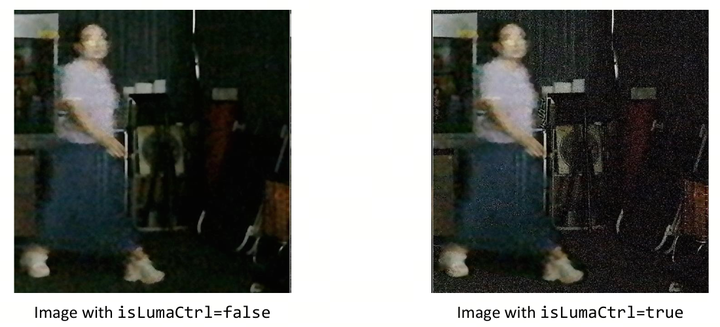
左图:isMotionCtrl=false,右图:isMotionCtrl=true
Figure 3.12-9 调试 2DNR isMotionCtrl 的
镜头
阴影:设置 lscCompCurveX 与 lscCompCurveY。lscCompCurveY 在 lscCompCurveX 处为 距 中心 像素 不同 距离 的 像素 定义 不同 局部 NLM 强度。
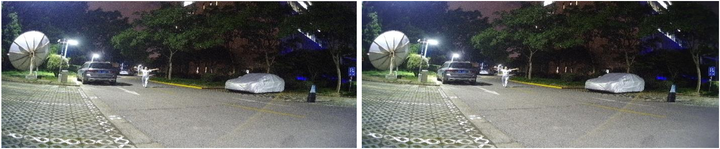
左图:isLscGainComp=false,右图:isLscGainComp=true
Figure 3.12-10 调试 2DNR isLscGainComp 的
步骤 3:降低
TNR 与 SNR 结果
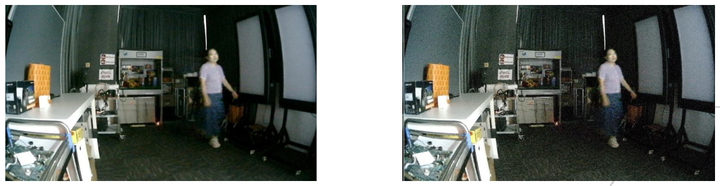
左图:blendMotion=99, blendStatic=99,右图:blendMotion=80, blendStatic=20
Figure 3.12-11 调试 2DNR blendMotion 和 blendStatic 的
步骤 4:作为 Bayer 锐化
下图
Case 0:当 abs(detail)<threshold 时,out=coarse。
Case 1:当 threshold<abs(detail)<boosting_threshold 时,out=coarse+detail。
Case 2:当 abs(detail)>boosting_threshold 时,out=coarse+min(detail×boost_factor, max_boosting_value)。
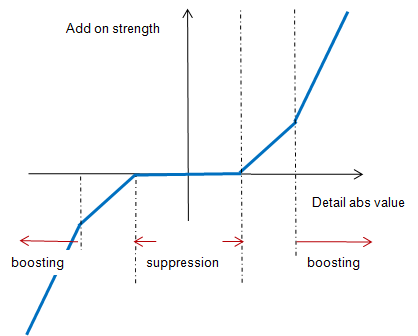
Figure 3.12-12 细节
上述 threshold、boosting_threshold、boost_factor、max_boosting_value 由
若
像素 运动 值 大于 motionAnchorX[1],其 行为 由 movingDetailThresh、movingDetailBoostThresh、movingDetailBoost、movingDetailClipThresh 决定。
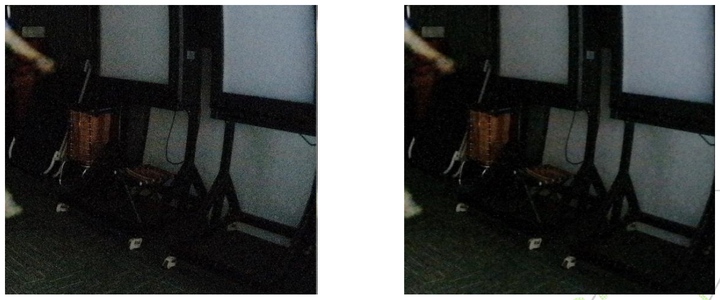
左图:movingDetailBoost=1.0,右图:movingDetailBoost=0.5
Figure 3.12-13 调试 2DNR movingDetailBoost 的
若
像素 运动 值 小于 motionAnchorX[0],其 行为 由 staticDetailThresh、staticDetailBoostThresh、staticDetailBoost、staticDetailClipThresh 决定。
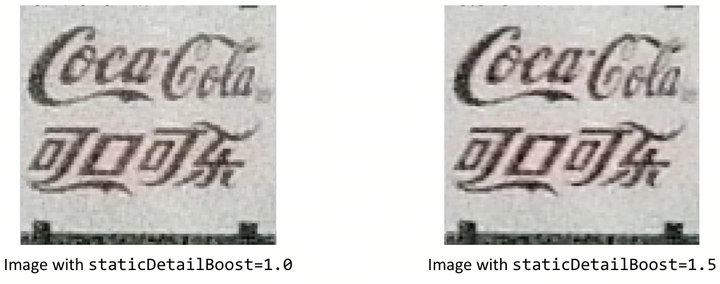
左图:staticDetailBoost=1.0,右图:staticDetailBoost=1.5
Figure 3.12-14 调试 2DNR staticDetailBoost 的
否则,参数
3.12.4 调试建议与功能说明
GE、DPCC、DPF、3DNR、2DNR 等 NR 相关
pre-NR 模式:NR 相关
模块 位于 流水线 相对 前端,有利于 从 最 前端 去除 原始 源 的 噪声,可 最大 程度 利用 原始 噪声 模型。考虑 到 调试 便利性,推荐 使用 pre-NR 模式。 post-NR 模式:NR 相关
模块 位于 raw 域 流水线 相对 后 端,在 raw 域 中 任何 与 亮度 相关 的 模块(如 WB、DG、WDR)之后。优点 是 可 有效 去除 变亮 后 增强 的 噪声,缺点 是 原始 噪声 模型 被 破坏,增加 调试 难度。
pre-NR 与 post-NR 模式
噪声
标定:标定 流程 无 差异。 标定
效果 上,pre-NR 的 NR 模块 可 受益 于 噪声 标定 数据(噪声 模型 参数 与 噪声 曲线);post-NR 仅 DPF 模块 可 受益 于 标定 所得 噪声 曲线(当 WDR 不太强 时)。
调试:
pre-NR 的
调试 步骤 同 上,有利于 从 最 前端 去除 噪声 并 利用 原始 噪声 模型。 post-NR 下 3DNR 中
关于 gamma FE/BE 的 参数 无效,可 去除 变亮 后 增强 的 噪声,但 难以 达到最佳 降噪 效果。不 建议 使用 过 强 的 WDR,因 其 对 噪声 模型 破坏 过大,使 调试 更 困难。
3.13 DMSC(Demosaic)
3.13.1 功能描述
本
由于
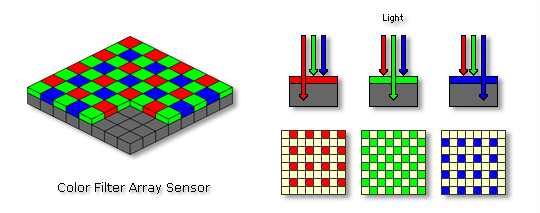
Figure 3.13-1 传感器
DMSC 模块
DMSC 具有
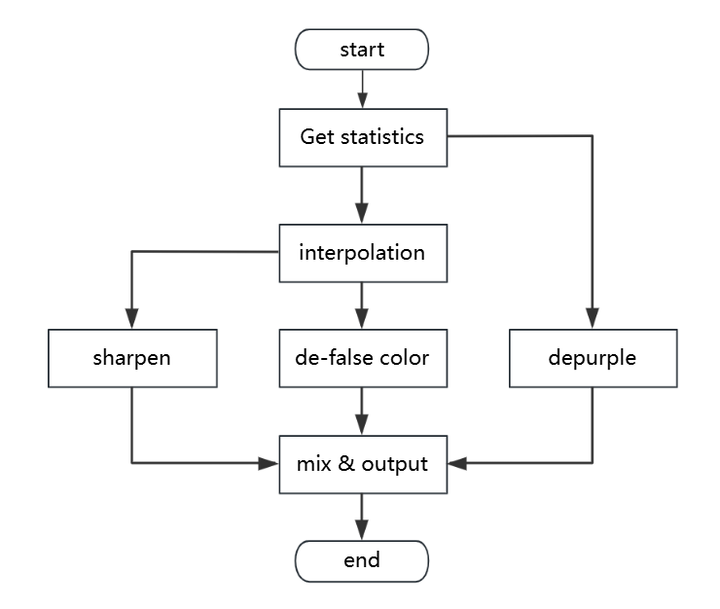
Figure 3.13-2 DMSC 主流程
3.13.2 关键参数
下
注:默认
Table 3.13-1 DMSC 参数
| Parameter | Type / Range | Description | Default Value |
|---|---|---|---|
| state | Type: int Range: {0, 1, 2} |
DMSC(去 Usage Frequency:low |
2 |
| gradThresholdMax | Type: int Range: [0, 4095] |
平坦 Usage Frequency:low |
20 |
| gradThresholdMin | Type: int Range: [0, 4095] |
平坦 Usage Frequency:low |
4 |
| diffColorCoefficient | Type: int Range: [0, 128] |
插值 Usage Frequency:low |
128 |
| adaptCoefficientMode | Type: int Range: [0, 3] |
不同 Usage Frequency:low |
3 |
| adaptCoefficientThresholdLow | Type: int Range: [0, 255] |
启用 Usage Frequency:low |
32 |
| adaptCoefficientThresholdShift | Type: int Range: [0, 8] |
自 Usage Frequency:low |
5 |
| adaptCoefficientMin | Type: int Range: [0, 128] |
不同 Usage Frequency:low |
0 |
| adaptCoefficientMax | Type: int Range: [0, 128] |
不同 Usage Frequency:low |
128 |
| isInterpCorner | Type: bool Range: {true, false} |
角点 Usage Frequency:low |
true |
| interpDirStrength[4] | Type: int Range: [0, 256] |
方向 Usage Frequency:low |
[32, 42, 4, 8] |
| interpLargeStr[2] | Type: int Range: [0, 16] |
大 Usage Frequency:low |
[8, 16] |
| dir0InterpType | Type: int Range: [0, 3] |
非 ISO 点 Usage Frequency:low |
0 |
| cornerLowTh | Type: int Range: [0, 4095] |
判断 Usage Frequency:low |
1024 |
| cornerShift | Type: int Range: [0, 12] |
高 Usage Frequency:low |
6 |
| isDecline declineEn** |
Type: bool Range: {true, false} |
true:启用RB插值 false:禁用 Usage Frequency:low |
true |
| highlightControlThreshold | Type: int Range: [0, 4095] |
高光 Usage Frequency:low |
3900 |
| highlightControlShift | Type: int Range: [0, 8] |
高光 Usage Frequency:low |
6 |
| highlightTh[2]** | int highlightTh[0]:[0,4095] highlightTh[1]:[0,8] |
highlightTh[0]:高光 Usage Frequency:low |
[3900, 6] |
| deBurstMode | Type: int Range: [0, 3] |
插值 Usage Frequency:low |
3 |
| pureGreenWeight | Type: int Range: [0, 16] |
非 Usage Frequency:low |
0 |
| pureRedBlueWeight | Type: int Range: [0, 16] |
非 Usage Frequency:low |
0 |
| pureGreenWeightIso | Type: int Range: [0, 16] |
平坦 Usage Frequency:low |
0 |
| pureRedBlueWeightIso | Type: int Range: [0, 16] |
平坦 Usage Frequency:low |
0 |
| isDeMoireRefineGreen | Type: bool Range: {true, false} |
基于 Usage Frequency:low |
true |
| refineGreenThreshold | Type: int Range: [0, 4095] |
在 B/R 处 Usage Frequency:low |
100 |
| isDeFalseColor | Type: bool Range: {true, false} |
去 Usage Frequency:low |
true |
| colorStrength | Type: int Range: [0, 128] |
去 Usage Frequency:low |
128 |
| cbCrClassThreshold | Type: int Range: [0, 7] |
分类 Usage Frequency:low |
5 |
| grayProtectStrength | Type: int Range: [0, 128] |
去 Usage Frequency:low |
0 |
| isDePurple dmscDepurpleEnable** |
Type: bool Range: {true, false} |
去 Usage Frequency:medium |
true |
| gradControl | Type: int Range: [0, 1] |
梯度 Usage Frequency:low |
1 |
| protectThresholdLow | Type: int Range: [0, 255] |
梯度 Usage Frequency:low |
64 |
| protectShift | Type: int Range: [0, 8] |
梯度 Usage Frequency:low |
7 |
| threshold dmscDepurpleThr** |
Type: int Range: [0, 255] |
去 Usage Frequency:high |
20 |
| cbcrMode | Type: int Range: {0,1,2,3} |
Cb/Cr 通道 Usage Frequency:medium |
3 |
| saturationShrink dmscDepurpleSatShrink** |
Type: int Range: [0, 8] |
校正 Usage Frequency:high |
8 |
| colorRangeMode | Type: int Range: [0, 3] |
去 Usage Frequency:low |
3 |
| cbCrRange[8] dmscDepurpleCbCrRange** |
Type: int Range: [0, 255] |
颜色 Usage Frequency:low |
[132,220,112,200,96,122,82,118] |
| deNoiseStrength denoiseStrength** |
Type: int Range: [0, 32] |
Sharpen功能 Usage Frequency:medium |
0 |
| isSharpen dmscSharpenEnable** |
Type: bool Range: {true, false} |
DMSC 后 Usage Frequency:low |
true |
| factors[6] dmscSharpenFactor** |
Type: int Range: [0, 511] |
锐化 Usage Frequency:high |
[20,20,30,30,40,40] |
| clips[6] dmscSharpenClip** |
Type: int Range: [0, 2047] |
锐化 Usage Frequency:high |
[40,40,60,60,80,80] |
| sharpenCurves[3].layerT1 sharpenCurve0/1/2.layerT1** |
Type: int Range: [0, 2047] |
高频 Usage Frequency:high |
32 |
| sharpenCurves[3].layerT2Shift sharpenCurve0/1/2.layerT2Shift** |
Type: int Range: [0, 11] |
高频 Usage Frequency:high |
6 |
| sharpenCurves[3].layer0T3 sharpenCurve0/1/2.layer0T3** |
Type: int Range: [0, 2047] |
锐化 Usage Frequency:high |
122 |
| sharpenCurves[3].layerT4Shift sharpenCurve0/1/2.layerT4Shift** |
Type: int Range: [0, 11] |
锐化 Usage Frequency:high |
6 |
| sharpenCurves[3].layerR1 sharpenCurve0/1/2.layerR1** |
Type: int Range: [0, 256] |
锐化 Usage Frequency:high |
0 |
| sharpenCurves[3].layerR2 sharpenCurve0/1/2.layerR2** |
Type: int Range: [0, 256] |
锐化 Usage Frequency:high |
100 |
| sharpenCurves[3].layerR3 sharpenCurve0/1/2.layerR3** |
Type: int Range: [0, 256] |
锐化 Usage Frequency:high |
126 |
| isSharpenLine | Type: bool Range: {true, false} |
线条 Usage Frequency:low |
false |
| sharpenLineCurves[4].t1 | Type: int Range: [0, 2047] |
线条 Usage Frequency:low |
24 |
| sharpenLineCurves[4].strength | Type: int Range: [0, 4095] |
线条 Usage Frequency:low |
8 |
| sharpenLineCurves[4].shift1 | Type: int Range: [0, 11] |
线条 Usage Frequency:low |
3 |
| sharpenLineCurves[4].r1 | Type: int Range: [0, 256] |
线条 Usage Frequency:low |
0 |
| sharpenLineCurves[4].r2 | Type: int Range: [0, 256] |
线条 Usage Frequency:low |
256 |
3.13.3 调试流程
推荐
步骤 1:(可
步骤 2:调整
▪ 自然
▪ 调整 adaptCoefficientThresholdLow:高
▪ 若
▪ 其他
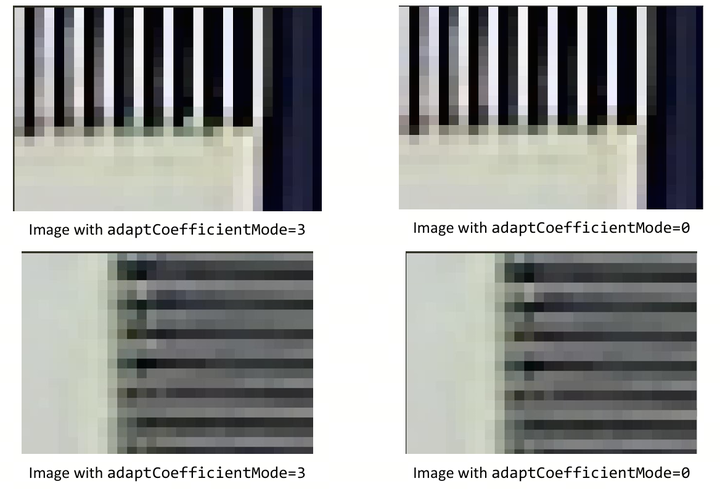
Figure 3.13-3 调试 DMSC adaptCoefficientMode 的
步骤 3:调整
DMSC 支持
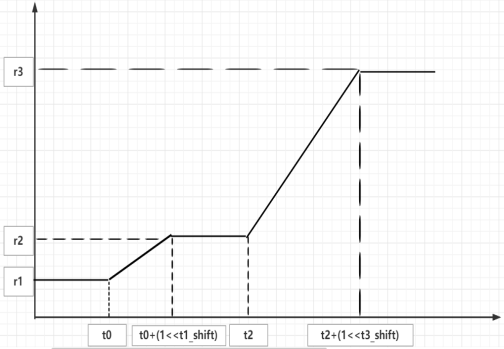
横轴
Figure 3.13-4 锐化
可
调试
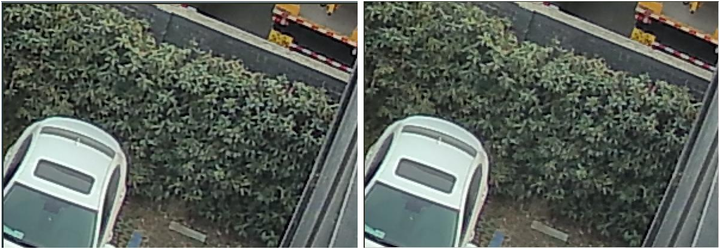
左图:Curve2 [16, 7, 150, 6, 0, 132, 180],右图:Curve2 [16, 7, 150, 6, 0, 30, 50]
Figure 3.13-5 调试 DMSC 锐化
步骤 4:配置
建议
步骤 5:配置
可
若
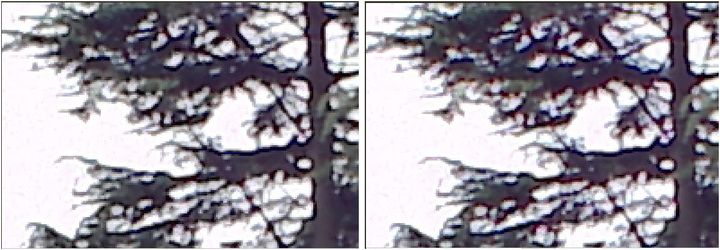
左图:threshold=20,右图:threshold=64
Figure 3.13-6 调试 DMSC threshold 的
步骤 6:配置
线条
3.14 Color Correction Matrix(CCM)
3.14.1 功能描述
CCM模块
调整
第一阶段——使用。RAW图像
在Calibration Tool中 调整CCM。 第二阶段——在
实验室 条件 下 使用。RGB图像 通过Calibration Tool调整CCM。 第三阶段——根据
增益 微调CCM参数 以 适合 所有 场景。
3.14.2 关键参数
ISP 中
CCM模块
因此,该
R’ = R x ccMatrix[0] + G x ccMatrix[1]+ B x ccMatrix[2]+ ccOffset[0]
G’ = R x ccMatrix[3] + G x ccMatrix[4] + B x ccMatrix[5] + ccOffset[1]
B’ = R x ccMatrix[6] + G x ccMatrix[7] + B x ccMatrix[8]+ ccOffset[2]
CCM调试
| Parameter | Type / Range | Description | Default Value |
|---|---|---|---|
| state | Type: int Range: {0, 1, 2} |
0:禁用 Usage Frequency:high |
0 |
| ccMatrix[3][3] | Type: float Range: [-2048/128, 2047/128] |
增益 Usage Frequency:high |
[[1.0, 0, 0], [0, 1.0, 0], [0, 0, 1.0]] |
| ccOffset[3] | Type: float Range: [-2047, 2047] |
偏置。 Usage Frequency:low |
[0.0, 0.0, 0.0] |
Table 3.141 CCM静态
3.14.3 调试流程
先决条件
| Prerequisite | Status / value |
|---|---|
| Black level | Tuned |
| Lens shading | Tuned |
| Initial gamma | Tuned |
| CNR | Disabled |
| Manual exposure | −0.25 < exposure error < 0.25 (f-stops). This can be verified through Imatest. Avoid clipping of patch 19 from the ColorChecker chart |
Table 3.142 CCM 调试
调试
在
3.14.3.1 第二阶段
先决条件
| Prerequisite | Status / value |
|---|---|
| Phase one prerequisites | Complete |
| AWB | Tuned |
| gamma | Disabled |
| AE | −0.25 < exposure error < 0.25 (f-stops). This can be verified through Imatest. |
Table 3.143 CCM Phase two 先决条件
调试
在
第二阶段
3.14.3.2 第三阶段
第三阶段
注:颜色
在
3.15 Gamma Correction
3.15.1 功能描述
Gamma 模块
RGB Gamma 模块,用于
Gamma 表
第一阶段:使用Calibration Tool在
实验室 内tuning,tuning效果 需要 覆盖 到 大部分 场景。 第二阶段:Gamma依照AE_target调整
以 改善 对比度。 第三阶段:Gamma微调,使
对比度 适合 所有 场景。
3.15.2 关键参数
R、G、B三
Table3.16-1列举
| Parameter | Type / Range | Description | Default Value |
|---|---|---|---|
| state | Type: int Range: {0, 1, 2} |
0:禁用 Usage Frequency:high |
0 |
| curve[64]* | Type: uint Range: [0, 1023] |
gamma 曲线 Usage Frequency:high |
全为 0 |
| isStandard | Type: bool Range: {true, false} |
true:使用 Usage Frequency:high |
true |
| standardVal | Type: float Range: [0, 4] |
标准 gamma 曲线 Usage Frequency:medium |
2.2 |
| curvePx[64] | Type: uint Range: [0, 12] |
曲线 Usage Frequency:low |
全为 6 |
| isUserCurveX | Type: bool Range: {true, false} |
true:使用 Usage Frequency:high |
false |
Table 3.151 Gamma 调试
3.15.3 调试流程
3.15.3.1 第一阶段
通常
在
3.15.3.2 第三阶段
在
Gamma模块
3.16 EE(Edge Enhancement)
3.16.1 功能描述
边缘增强(EE)通过
● 增强
● 降低
边缘增强
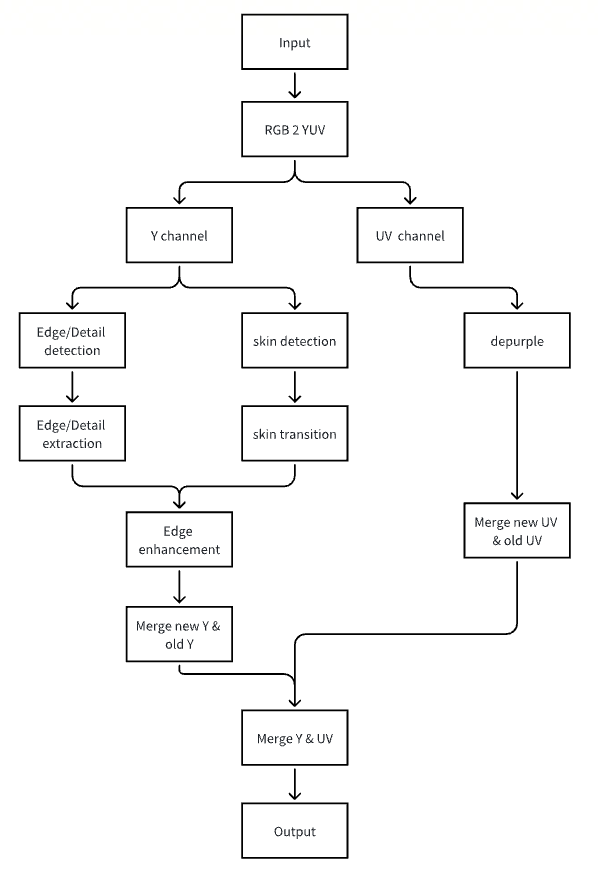
Figure 3.16-1 EE 模块
3.16.2 关键参数
下
注:默认
Table 3.16-1 EE 参数
| Parameter | Type / Range | Description | Default Value |
|---|---|---|---|
| state | Type: int Range: {0, 1, 2} |
EE(边缘增强)模块 Usage Frequency:low |
2 |
| isYuvDomain | Type: bool Range: {false, true} |
EE 处理 Usage Frequency:low |
false |
| strength eeStrength** |
Type: int Range: [0, 128] |
EE 强度,决定 Usage Frequency:medium |
128 |
| sourceStrength eeSrcStrength** |
Type: int Range: [0, 256] |
增强 Usage Frequency:medium |
256 |
| edgeNrLevel edgeNrLvl** |
Type: int Range: [0, 5] |
边缘 Usage Frequency:medium |
3 |
| edgeScaler | Type: int Range: [0, 32] |
边缘 Usage Frequency:high |
4 |
| edgeUseAuxiDir | Type: int Range: [0, 1] |
边缘 Usage Frequency:low |
1 |
| detailLevel detailLvl** |
Type: int Range: [0, 7] |
细节 Usage Frequency:high |
5 |
| detailScaler | Type: int Range: [0, 32] |
纹理/细节 Usage Frequency:high |
8 |
| detailPreEnhanceStrength detailPreEnhanceStr** |
Type: int Range: [0, 256] |
纹理/细节 Usage Frequency:high |
16 |
| hfMergeCurve[4] | int[4] 元素1:[0,1024] 元素2:[0,10] 元素3:[0,1024] 元素4:[0,10] |
噪声、纹理、边缘 Usage Frequency:medium |
[4, 4, 24, 8] |
| gradTh[2]* | Type: int Range: [0, 1024] |
边缘 Usage Frequency:medium |
[8, 12] |
| sharpCurveLevel sharpCurveLvl** |
Type: int Range: [0, 7] |
锐化 Usage Frequency:medium |
3 |
| sharpGain[2]* | Type: int Range: [0, 1024] |
非 Usage Frequency:high |
[172, 156] |
| isSharpLimit | Type: bool Range: {false, true} |
锐化 Usage Frequency:medium |
true |
| sharpLimitType | Type: int Range: {1,2, 3} |
锐化 Usage Frequency:medium |
2 |
| sharpLimit[2]* | Type: int Range: [0, 512] |
高频 Usage Frequency:medium |
[118, 90] |
| sharpGainUv* | Type: int Range: [0, 255] |
边缘 Usage Frequency:low |
0 |
| isDePurple depurpleEn** |
Type: bool Range: {false, true} |
去 Usage Frequency:medium |
true |
| depfLimit[4]* | Type: int Range: [0, 1024] |
紫边 Usage Frequency:low |
[460, 900, 420, 880] |
| depfDetectLumaTh* | Type: int Range: [0, 1024] |
紫边 Usage Frequency:high |
800 |
| depfDetectLumaDiff* | Type: int Range: [0, 1024] |
fringe 检测 Usage Frequency:high |
600 |
| depfFixStrength depfFixStr** |
Type: int Range: [0, 256] |
紫边 Usage Frequency:high |
168 |
| depfDetectRange | Type: int Range: [0, 7] |
去 Usage Frequency:medium |
7 |
| isCurve | Type: bool Range: {true, false} |
CA/DCI 曲线 Usage Frequency:medium |
true |
| isCa caEnable** |
Type: bool Range: {true, false} |
CA 曲线 Usage Frequency:high |
false |
| isDci dciEnable** |
Type: bool Range: {true, false} |
DCI 曲线 Usage Frequency:high |
false |
| dciCurve[65]* | Type: int Range: [0, 1024] |
动态 Usage Frequency:medium |
[0, 16, 32, 48, 64, 80, 96, 112, 128, 144, 160, 176, 192, 208, 224, 240, 256, 272, 288, 304, 320, 336, 352, 368, 384, 400, 416, 432, 448, 464, 480, 496, 512, 528, 544, 560, 576, 592, 608, 624, 640, 656, 672, 688, 704, 720, 736, 752, 768, 784, 800, 816, 832, 848, 864, 880, 896, 912, 928, 944, 960, 976, 992, 1008, 1023] |
| deGamma | Type: float Range: [0, 4] |
DCI 曲线 Usage Frequency:low |
2.2 |
| caCurve[65]* | Type: int Range: [0, 1024] |
颜色 Usage Frequency:middle |
[1024, 1024, 1024, 1024, 1024, 1024, 1024, 1024, 1024, 1024, 1024, 1024, 1024, 1024, 1024, 1024, 1024, 1024, 1024, 1024, 1024, 1024, 1024, 1024, 1024, 1024, 1024, 1024, 1024, 1024, 1024, 1024, 1024, 1024, 1024, 1024, 1024, 1024, 1024, 1024, 1024, 1024, 1024, 1024, 1024, 1024, 1024, 1024, 1024, 1024, 1024, 1024, 1024, 1024, 1024, 1024, 1024, 1024, 1024, 1024, 1024, 1024, 1024, 1024, 1024] |
| caMode | Type: int Range: [0, 2] |
颜色 Usage Frequency:high |
1 |
| skinProcessEn skinProcEn** |
Type: int Range: [0, 7] |
肤色 Usage Frequency:low |
5 |
| skinDetectStrength skinDetectStr** |
Type: int Range: [0, 255] |
自 Usage Frequency:low |
110 |
| sharpSkinCurveLevel sharpSkinCurveLvl** |
Type: int Range: [0, 7] |
肤色 Usage Frequency:low |
0 |
| sharpGainSkin[2]* | Type: int Range: [0, 1024] |
肤色 Usage Frequency:low |
[122, 100] |
| sharpLimitSkin* | Type: int[2] Range: [0, 512] |
肤色 Usage Frequency:low |
[88, 72] |
| yDownThreshold | Type: int Range: [0, 1024] |
肤色 Usage Frequency:low |
280 |
| yUpThreshold | Type: int Range: [0, 1024] |
肤色 Usage Frequency:low |
900 |
| cbDownThreshold | Type: int Range: [0, 1024] |
肤色 Usage Frequency:low |
60 |
| cbUpThreshold | Type: int Range: [0, 1024] |
肤色 Usage Frequency:low |
764 |
| crDownThreshold | Type: int Range: [0, 1024] |
肤色 Usage Frequency:low |
355 |
| crUpThreshold | Type: int Range: [0, 1024] |
肤色 Usage Frequency:low |
984 |
| gradThSkin[2]* | Type: int Range: [0, 1024] |
肤色 |
[16, 32] |
| hfMergeCurveSkin[4]* | Type: int[4] Range:元素1:[0,1024] 元素2:[0,10] 元素3:[0,1024] 元素4:[0,10] |
肤色 Usage Frequency:low |
[8, 5, 52, 9] |
| sourceStrengthSkin eeSrcStrengthSkin** |
Type: int Range: [0, 256] |
原始 Y 值 Usage Frequency:low |
200 |
| skinThreshold[6]** | Type: int Range: skinThreshold[0~1]:[0,1024] skinThreshold[2~5]:[-1024,1023] |
肤色 Usage Frequency:low |
[280, 900, 355, 984, 60, 764] |
3.16.3 调试流程
如图3.16-2 所示,调试 state 参数
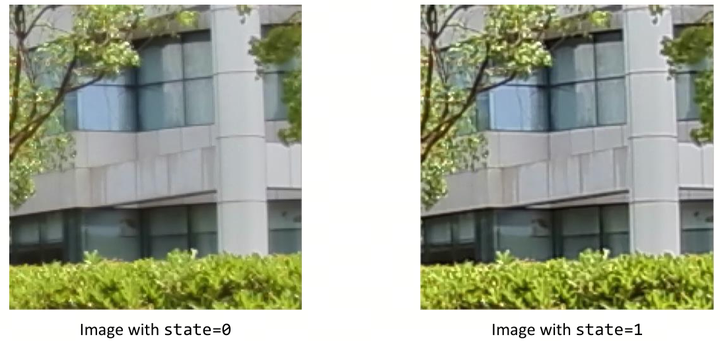
左图:state=0,右图:state=1
Figure 3.16-2 调试 EE state 的
可
Table 3.16-2 EE 调试
| 优先级 | 高 | 中 | 低 | |
|---|---|---|---|---|
| 子节 |
总体 |
边缘增强 |
可 |
|
| 参数 |
eeStrength | 边缘 | 锐化 |
肤色 |
| CA 模块 | 细节 | 去 |
||
| DCI 模块 | 噪声 |
步骤 1:启用
a. 总体
b. Y 通道
步骤 2:总体
a. 边缘(edgeXx):控制
b. 细节(detailXx):控制
c. 噪声(gradTh 与 hfMergeCurve):决定
此
如图3.16-3 所示,调试 hfMergeCurve 参数
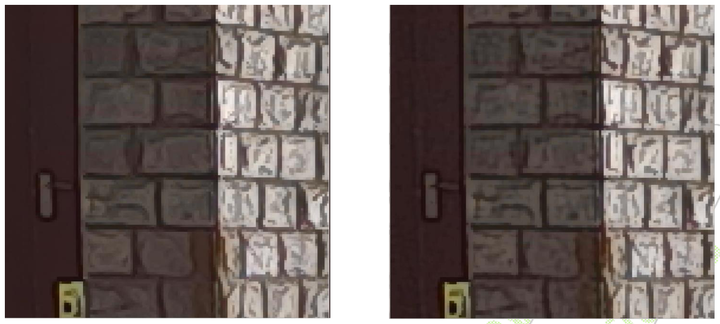
左图:hfMergeCurve=[0, 0, 0, 0],右图:hfMergeCurve=[0, 1023, 0, 1023]
Figure 3.16-3 调试 EE hfMergeCurve 的
步骤 3:信号
a. sharpenCurve 与 gain 调用
b. sharpLimitxx 是
如图3.16-4 所示,调试 sharpLimit 参数
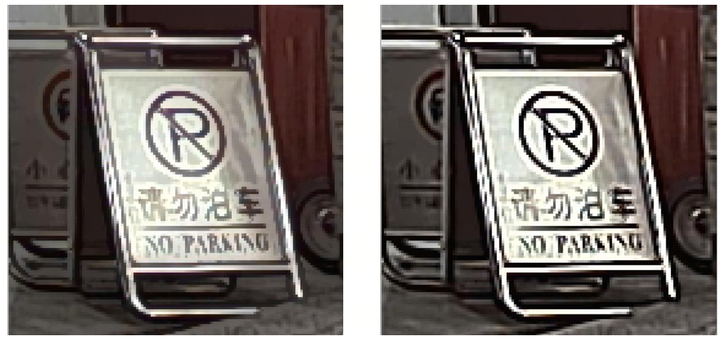
左图:sharpLimit=[50, 52],右图:sharpLimit=[512, 512]
Figure 3.16-4 调试 EE sharpLimit 的
步骤 4:可
a. 肤色
b. 去
注:启用
3.16.4 调试建议与功能说明
3.16.4.1 调试建议
● gradTh 越小,检测
● 默认
● sharpLimitType 推荐
● sharpLimit 与 sharpLimitSkin 范围
3.16.4.2 功能说明
CA(Color Adjustment)
CA 模块
注:CA 模块
如图3.16-5 所示,调试 isCa 参数
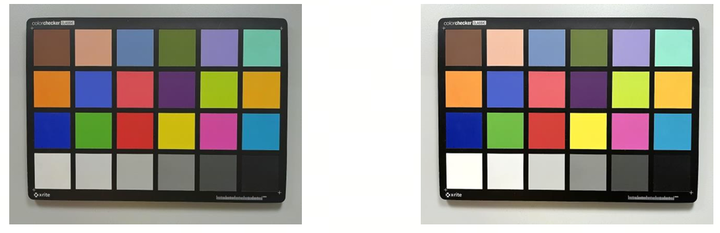
左图:isCa=false,右图:isCa=true
Figure 3.16-5 调试 EE isCa 的
DCI(Dynamic Contrast Improvement)
DCI模块
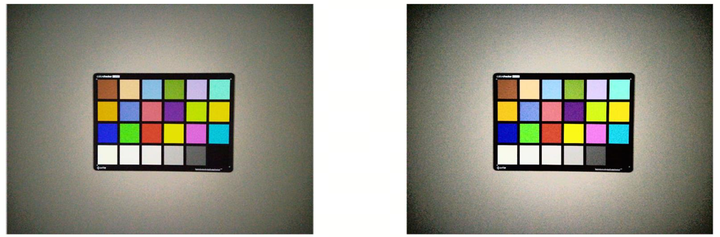
左图:isDci=false,右图:isDci=true
Figure 3.16-6 调试 EE isDci 的
肤色
由skinProcessEn控制,0关闭,1~3代表
对
去
去
色彩:通过depfLimit[4]设定,数值
代表yuv域 坐标,形状 为 矩形,一般 不 调整; 亮度:通过depfDetectLumaTh,depfDetectLumaDiff设定。先
按 默认值 设定,若 效果 不佳,可以 将depfDetectLumaTh设置 成较 小 的 值,再 调整depfDetectLumaDiff的 值 实现 紫边 去除(可能 会 去除 紫边 外 的 其他 蓝紫色 区域),再 慢慢 增加depfDetectLumaTh的 值 实现 合适 的 去 紫边 效果。 宽度:通过depfDetectRange设定,建议
保持 默认7。
实现
如图3.16-7 所示,调试 isDePurple 参数
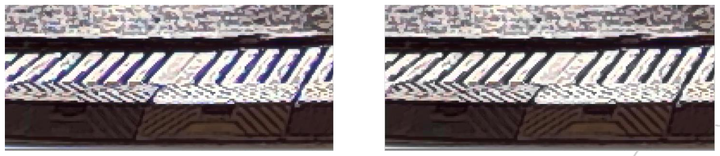
左图:isDePurple=false,右图:isDePurple=true
Figure 3.16-7 调试 EE isDePurple 的
3.17 Color Processing
本
3.17.1 功能描述
CPROC 模块
CPROC 模块
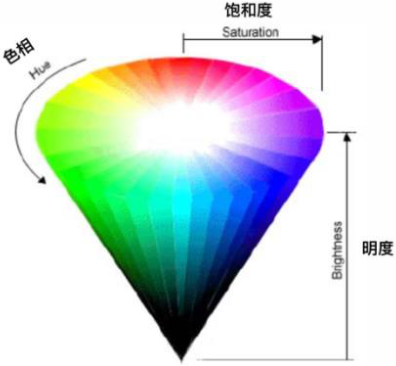
Figure 3.171HSB 色彩
3.17.2 关键参数
下
注:默认
| Parameter | Type / Range | Description | Default Value |
|---|---|---|---|
| state | Type: int Range: {0, 1, 2} |
0:禁用 Usage Frequency:high |
0 |
| contrast* | Type: float Range: [0, 1.992] |
对比度,Y' = (Y − 256) × contrast + 256。 Usage Frequency:high |
1 |
| bright* | Type: float Range: [-127, 127] |
亮度,Real Bright = bright − 256 × (contrast − 1)。 Usage Frequency:high |
0 |
| saturation* | Type: float Range: [0, 1.992] |
饱和度,UV' = 512 + (UV − 512) × saturation。 Usage Frequency:high |
1 |
| hue* | Type: float Range: [-90, 90] |
HSB 域 Usage Frequency:high |
0 |
| useOutConvMatrix | Type: bool Range: {true, false} |
用户 Usage Frequency:high |
false |
| rgbToyuvMatrix[9] | Type: float Range: [-2, 1.99] |
外部 RGB2YUV 转换 Usage Frequency:high |
[0.299, 0.587, 0.114, -0.168736, -0.331264, 0.5, 0.5, -0.418688, -0.081312] |
| gamut | Type: int Range: [0, 2] |
色域 Usage Frequency:high |
0 |
| yuvRange | Type: int Range: [1, 2] |
RGB→YUV 转换 Usage Frequency:high |
2 |
Table 3.171 CPROC 调试
3.17.3 调试建议与功能说明
CPROC 通常
用于 调试 全局 对比度、亮度、饱和度 与 色调。 contrast 建议
取值 1.1 至 1.3。 saturation 建议
取值 1.0 至 1.3。 仅
建议 微调。
3.17.4 示例结果
contrast
下图
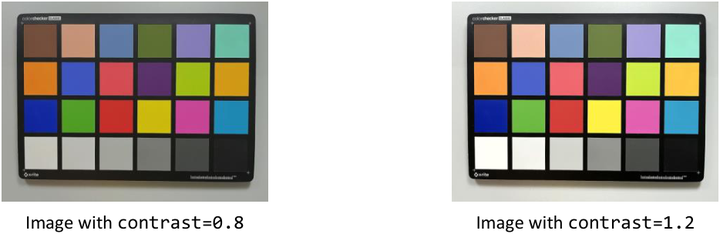
Figure 3.172CPROC 调试 contrast 的
bright
下图
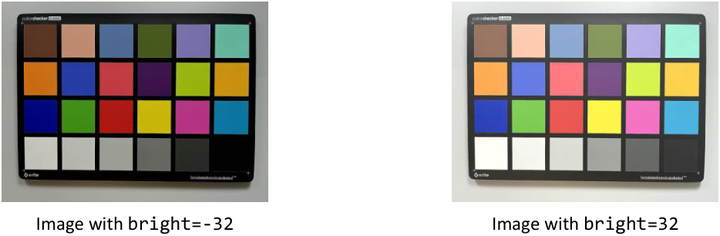
Figure 3.173CPROC 调试 bright 的
hue
下图
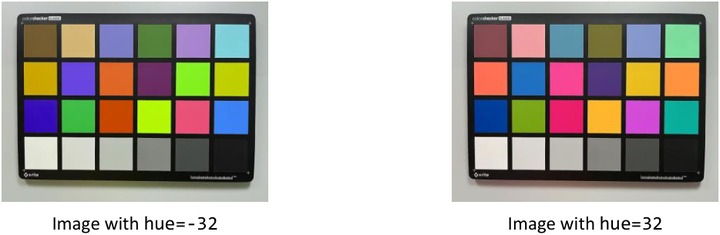
Figure 3.174CPROC 调试 hue 的
saturation
下图
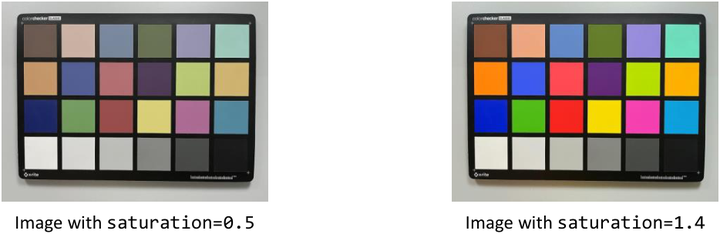
Figure 3.175CPROC 调试 saturation 的
3.18 CNR(Chrominance Noise Reduction)
3.18.1 功能描述
CNR 模块
● 低频
● 高频
● 中频
如图3.18-1 所示,为
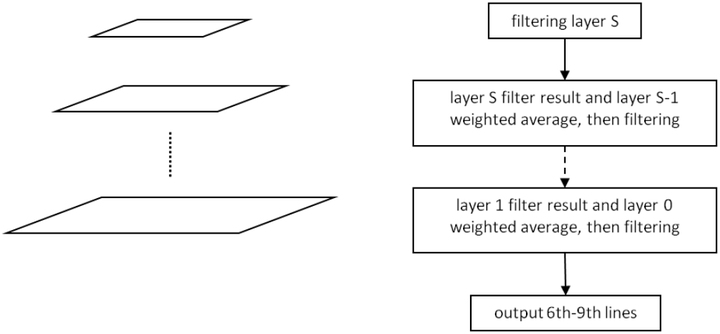
Figure 3.18-1 CNR 金字塔
3.18.2 关键参数
下
注:默认
Table 3.18-1 CNR 参数
| Parameter | Type / Range | Description | Default Value |
|---|---|---|---|
| state | Type: int Range: {0, 1, 2} |
CNR(色度 Usage Frequency:low |
2 |
| cSigmaLayer[3] cSigmaLayer cSigmaLayer1 cSigmaLayer2** |
Type: float Range: [1.0, 96.0] |
金字塔 Usage Frequency:high |
[16.0, 16.0, 12.0] |
| cnrStrength* | Type: uint8_t Range: [0, 128] |
降噪 Usage Frequency:high |
128 |
| textureMaskSelect textureMask** |
Type: uint8_t Range: [0, 8] |
纹理 Usage Frequency:medium |
0 |
3.18.3 调试流程
推荐
步骤 1:设置cnrStrength = 128, textureMaskSelect = 0。
步骤 2:cSigmaLayer[3]从
如图3.18-2 所示,调试 state 参数

左图:state=0,右图:state=1
Figure 3.18-2 调试 CNR state 的
如图3.18-3 所示,调试 cSigmaLayer 参数
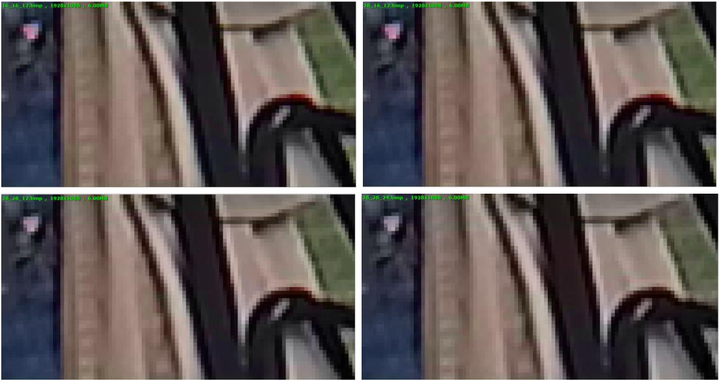
左
Figure 3.18-3 调试 CNR cSigmaLayer 的
3.18.4 调试建议与功能说明
● 在 cSigmaLayer 中,最低
● cnrStrength 表示
● textureMaskSelect 表示
● 默认 cnrStrength(128)和 textureMaskSelect(0)设
3.19 Auto Focus(AF)
3.19.1 功能描述
自动
AF 提供
● 相位
● 对比度
AF 模块
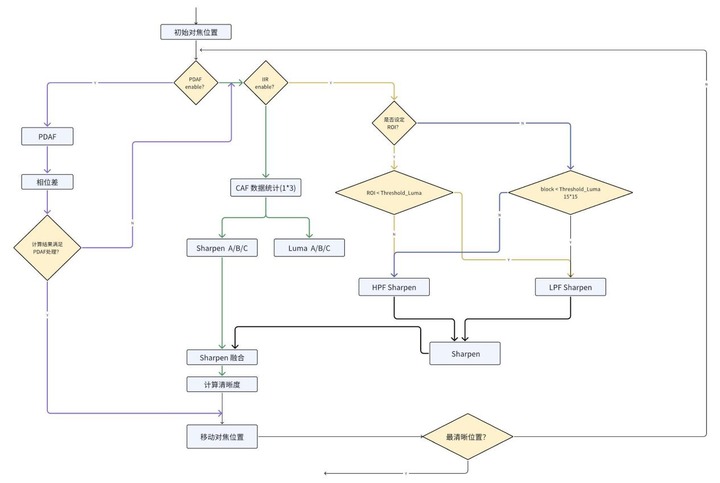
Figure 3.191 AF 混合
调试
第一阶段:不
需要 调试 AF 模块,但 需 手动 调节 对焦 满足 拍照 要求,镜头 驱动 需 启动 并 测试通过。 第二阶段:调试 AF 功能
以 适应 不同 场景。 第三阶段:调试 AF 前
需 验证 马达 精度、速度、可重复性 及 稳定性。
3.19.2 关键参数与功能说明
3.19.2.1 AF基础调试
下
Table 3.191基本 AF 参数
| Parameter | Type / Range | Description | Default Value |
|---|---|---|---|
| enable | Type: bool Range: {true, false} |
是否 Usage Frequency:high |
true |
| maxFocal | Type: uint16_t Range: [0, 1023] |
马达 Usage Frequency:high |
600 |
| minFocal | Type: uint16_t Range: [0, 1023] |
马达 Usage Frequency:high |
300 |
3.19.2.2 AF模式选择
PDAF 与 CDAF 两种
PDAF 模式:仅
使用 PDAF。对焦 过程 包括 初始化、搜索、锁定 和 等待。 CDAF 模式:仅
使用 CDAF。对焦 过程 包括 初始化、搜索、跟踪、锁定 和 等待。 混合
模式:同时 使用 PDAF 与 CDAF。对焦 过程 先 经历 PDAF 初始化 与 搜索,再 经 CDAF 搜索、跟踪、锁定 和 等待。
可
Table 3.19-2 模式
| Parameter | Type / Range | Description | Default Value |
|---|---|---|---|
| mode | Type: enum Range: {CAMDEV_CDAF_INDIVIDUAL_MODE, CAMDEV_PDAF_INDIVIDUAL_MODE, CAMDEV_PDAF_CDAF_HYBRID_MODE} |
选择 Usage Frequency:high |
CAMDEV_CDAF_INDIVIDUAL_MODE |
3.19.2.3 AF解锁条件
AF 模块
● 当
● 当
Table 3.19-3 AF 解锁
| Parameter | Type / Range | Description | Default Value |
|---|---|---|---|
| cStableTolerance | Type: float32_t Range: (0, 10) |
锐度 Usage Frequency:high |
0.6 |
| deFocusFrameNum | Type: uint8_t Range: [0, 20] |
AF 失焦 Usage Frequency:high |
3 |
3.19.2.4 AF运动检测
PDAF/CDAF 搜索
Table 3.19-4 AF 运动
| Parameter | Type / Range | Description | Default Value |
|---|---|---|---|
| cMotionThreshold | Type: float32_t Range: (0, 10) |
检测 Usage Frequency:medium |
2.0 |
3.19.2.5 AF硬件统计
AF 的
AF 控制
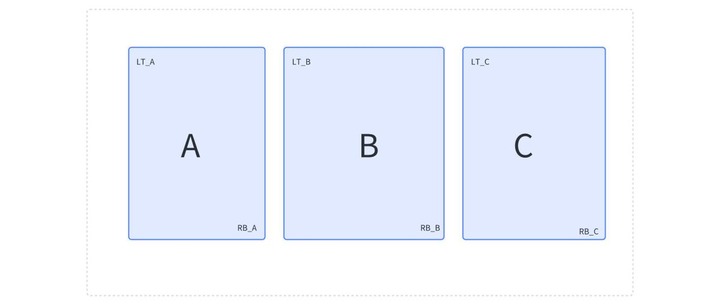
Figure 3.19-2 CDAF ROI 区域
AF 控制(PDAF):最
IIR/FIR:AF 中 IIR/FIR 滤波器
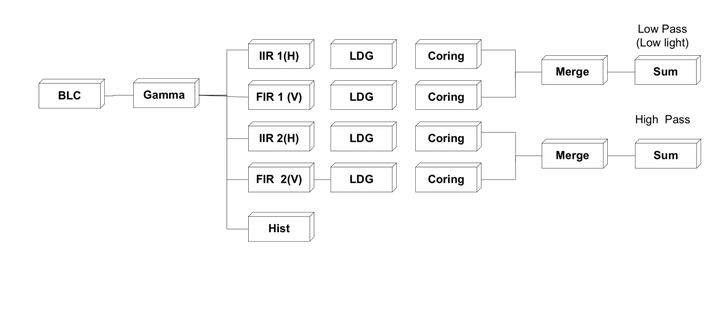
Figure 3.19-4 IIR AF 处理
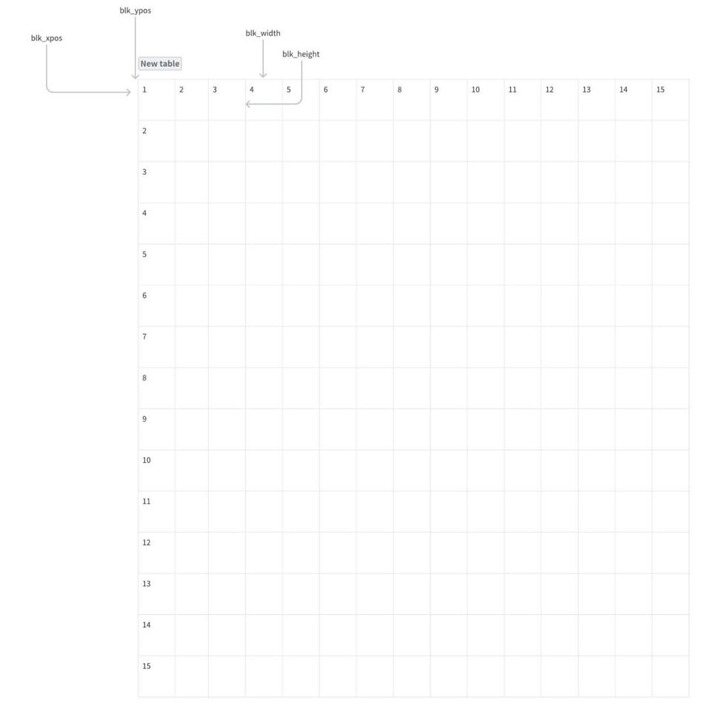
Figure 3.19-6 IIR AF ROI 窗口
Table 3.19-5 清晰度
| Parameter | Type / Range | Description | Default Value |
|---|---|---|---|
| weightWindow | Type: float[9] Range: [0, 255] |
硬件 Usage Frequency:medium |
各 |
| afmV3WeightWindow | Type: float32_t[225] Range: [0, 255] |
硬件 Usage Frequency:medium |
各 |
3.19.2.6 PDAF统计计算
PDAF 搜索
X5 中 PDAF 的 PD Split 与 PD Calibration 软体
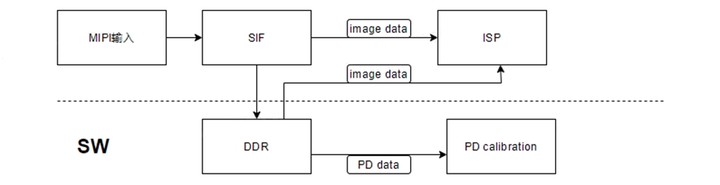
Figure 3.19-8 PDAF 软体
Table 3.19-6 PDAF 统计
| Parameter | Type / Range | Description | Default Value |
|---|---|---|---|
| pdRoiIndex | Type: uint8_t Range: [0, 48] |
为 PDAF 对焦 Usage Frequency:medium |
0 |
3.19.2.7 PDAF 聚焦设定
仅当 PDAF 置信度
Table 3.19-7 PDAF 对焦
| Parameter | Type / Range | Description | Default Value |
|---|---|---|---|
| cPdConfThreshold | Type: float Range: [0, 1023] |
PDAF 置信度 Usage Frequency:medium |
300 |
3.19.2.8 PDAF 搜索设定
下表
Table 3.19-8 PDAF 搜索
| Parameter | Type / Range | Description | Default Value |
|---|---|---|---|
| pdShiftThreshold | Type: float32_t Range: (0, 1) |
相位差 Usage Frequency:medium |
0.1 |
| pdStableCountMax | Type: uint8_t Range: [1, 10] |
判定 PDAF 对焦 Usage Frequency:medium |
2 |
3.19.2.9 CDAF算法设定
CDAF 爬坡
Table 3.19-9 爬坡
| Parameter | Type / Range | Description | Default Value |
|---|---|---|---|
| cPointsOfCurve | Type: uint8_t Range: [3, 20] |
CDAF 爬山 Usage Frequency:low |
12 |
3.19.2.10 混合对焦设定
多数
仅用 PDAF 不用 CDAF:通过 accurateFocusEnable 与 accurateFocusStep 配置 PDAF 搜索
后 是否 使用 CDAF 及 CDAF 搜索 速度。若 关闭 CDAF,混合 模式 等同 PDAF 模式。 仅用 CDAF 不用 PDAF:当 PDAF 搜索
期间 置信度 连续 若干 帧 保持 为 0 时,判定 PDAF 搜索 失败,AF 模块 跳过 PDAF 直接 开始 CDAF 搜索。可 通过 lossConfidenceFrameNum 控制 PDAF 搜索 判定 失败 的 阈值。
Table 3.19-10 混合
| Parameter | Type / Range | Description | Default Value |
|---|---|---|---|
| accurateFocusEnable | Type: bool Range: {true, false} |
混合 Usage Frequency:low |
false |
| accurateFocusStep | Type: uint8_t Range: [1, 20] |
混合 Usage Frequency:low |
5 |
| lossConfidenceFrameNum | Type: uint8_t Range: [1, 20] |
混合 Usage Frequency:low |
3 |
3.19.3 调试流程
第一阶段: AF 功能
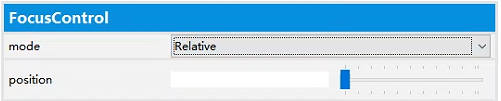
Figure 3.19-10 Manual AF 示意图3.1911
第二阶段: 从
1。将 ISO12233 解析
2。在 VTuner 中将 AF_mode_id 设
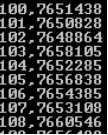
Figure 3.19-12 镜头
3。用
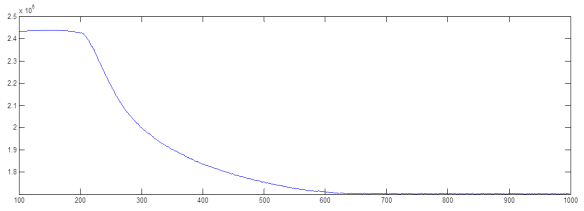
Figure 3.19-14 无穷远
4。从
5。将
6。获取
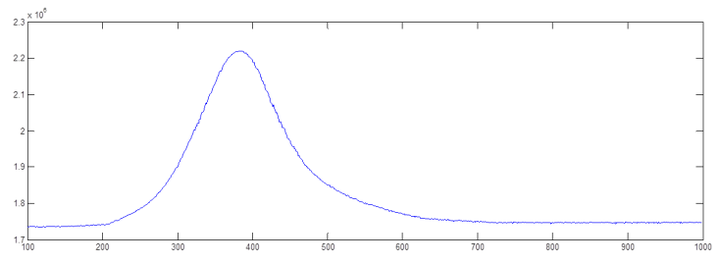
Figure 3.19-16 微距
7。从
8。重复
Table 3.19-11 AF 基本
| Parameter name | Description |
|---|---|
| Down_FarEnd | Downward orientation FarEnd. |
| Down_NearEnd | Downward orientation NearEnd. |
| Up_FarEnd | Upward orientation FarEnd. |
| Up_NearEnd | Upward orientation NearEnd. |
| Horizontal_FarEnd | Horizontal orientation FarEnd. |
| Horizontal_NearEnd | Horizontal orientation NearEnd. |
AF 控制
Table 3.19-12 AF 扩展
| Parameter name | Description |
|---|---|
| Step_Number | The total steps from FarEnd to NearEnd. |
| Skip_frames_in | Number of frames be skipped when focus in. |
| Skip_frames_out | Number of frames be skipped when focus out. |
| Caf_stable_th | CDAF stable threshold. |
| Caf_trigger_th | CDAF trigger threshold, 需 |
| Pdaf_stable_th | PDAF stable threshold. |
| Pdaf_trigger_th | PDAF trigger threshold. |
| Far_motor_pos | Far end motor position. |
| Near_motor_pos | Near end motor position. |
第三阶段: 第二阶段
1.AF_auto_single:每次
2.AF_auto_continuous:系统