5.10.1. GDC_Overview
5.10.1.1. Overview
The GDC API is part of the HBN framework and functions as a vnode, which can be connected with other vnodes to form a vflow. For more information about the HBN framework, refer to HBN Framework.
The GDC module supports only offline mode, reading data from DDR, processing it, and then writing the results back to DDR.
To use the GDC module, you must prepare a configuration parameter file (bin file) in advance. This file can be directly generated and saved by the GDC Tool through simulation, or saved as a JSON file and then converted into a GDC bin file using the GDC bin API.
Using the GDC module mainly involves the following three components:
| Module | Function Description |
|---|---|
| GDC Tool | Used for effect simulation and generating GDC configuration parameter files (layout.json or config.bin). |
| GDC bin API | Used to generate GDC bin files. |
| GDC API | Complies with the HBN framework, used to open/close GDC nodes and configure GDC attributes. |
GDC Tool
The GDC Tool is used for effect simulation. After simulation, it can save the GDC configuration parameter file (layout.json or config.bin).
The GDC Tool provides six transformation modes: Affine, Equisolid, Equisolid(cylinder), Equidistant, Custom, and Keystone+dewarping.
For instructions on using the GDC Tool, please refer to GDC Tool Introduction.
GDC bin API
The GDC bin API is used to generate GDC bin files.
Supports generating GDC bin files via the
hbn_gen_gdc_bin_jsonorhbn_gen_gdc_bininterfaces.The GDC bin API is often used together with the GDC Tool: after using the GDC Tool to generate the
layout.jsonfile, the GDC bin API is required to generate the GDC bin file.For more information on using the GDC bin API, please refer to GDC bin API.
GDC API
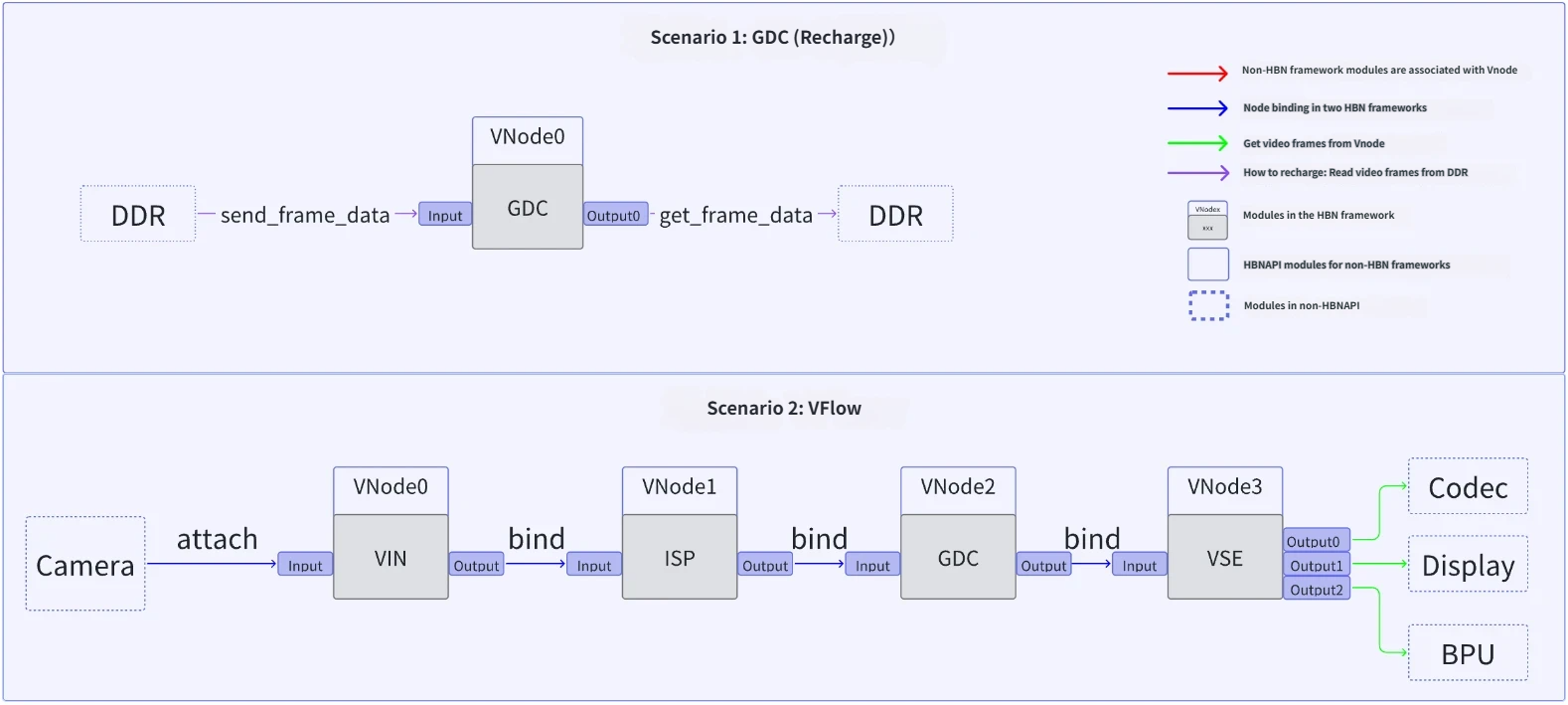
The GDC API is used to open and configure GDC nodes, create vflows, and process GDC data.
The figure below shows two example vflows for different GDC scenarios (in Scenario 1, “loopback” refers to the case where the data source comes from DDR):
For more information on using the GDC API, please refer to GDC API.
5.10.1.2. Usage Methods
When using GDC, the GDC Tool, GDC bin API, and GDC API are complementary tools. Below are four common methods for generating and using GDC bin files:
Method 1:
Use the GDC Tool to generate a
layout.jsonfile.Use the
hbn_gen_gdc_bin_jsoninterface to parse the JSON file, generate, and save it as a GDC bin file.At runtime, load the GDC bin file into memory allocated by hbmem, and apply it to the GDC node via the
hbn_vnode_set_attrinterface.
Method 2:
Use the GDC Tool to generate a
layout.jsonfile.Use the
hbn_gen_gdc_bin_jsoninterface to parse the JSON file, generate the GDC bin, and save it to an external buffer (buf).Use the
hbn_vnode_set_attrinterface to configure and apply it to the GDC node.
Method 3:
Use the GDC Tool to generate a
layout.jsonfile.Use the
hbn_gen_gdc_bininterface to directly read parameters from the JSON file, generate the GDC bin, and save it to an external buffer (buf), without parsing the JSON file.Use the
hbn_vnode_set_attrinterface to configure and apply it to the GDC node.
Method 4:
Use the GDC Tool to directly generate
config.bin(i.e., the GDC bin file).Load the
config.binfile into memory allocated by hbmem and apply it to the GDC node via thehbn_vnode_set_attrinterface. This method does not require using the GDC bin API.
Scenario Recommendations
Fixed Effect Scenarios: If the scene effect is relatively simple and fixed (e.g., fisheye correction), it is recommended to use Method 4 — pre-generate the GDC bin file using the GDC Tool, then load it into hbmem-allocated memory and apply it to the GDC node.
Dynamic Effect Scenarios: If the scene requires per-frame dynamic adjustment of effects, it is recommended to use the GDC bin API to generate configuration files in real time.