5.5. Video Input - Camera
5.5.1. Module Description
Camera Access Methods
X5 supports MIPI CSI video input or converting it to MIPI CSI signal access through a deserializer (deserial).
When using either method, the camera or deserializer must be bound and unbound to/from the VIN Node via
attachanddetachinterfaces, to initialize and deinitialize the sensor.When accessing MIPI CSI directly, use
hbn_camera_attach_to_vinandhbn_camera_detach_from_vinto bind and unbind the camera with the VIN Node.When using the deserializer access, use
hbn_deserial_attach_to_vinandhbn_deserial_detach_from_vinto bind and unbind the deserializer with the VIN Node.
For more information about VIN Node, refer to Video Input - VIN.
5.5.1.1. Hardware block diagram
Main components
MIPI D-PHY (RX): As the physical layer of the MIPI protocol receiver, it supports high-speed serial data transmission.
MIPI HOST controller: implements the CSI-2 protocol on the host side and is responsible for receiving data from D-PHY and performing protocol analysis. X5 contains 4 independent HOST instances.
IPI (Image Pixel Interface): Image pixel interface. The effective image data parsed by the CSI HOST controller is output to the SIF (Sensor Interface) module through this parallel interface for subsequent processing.
IDI (Image Data Interface): Image data interface.
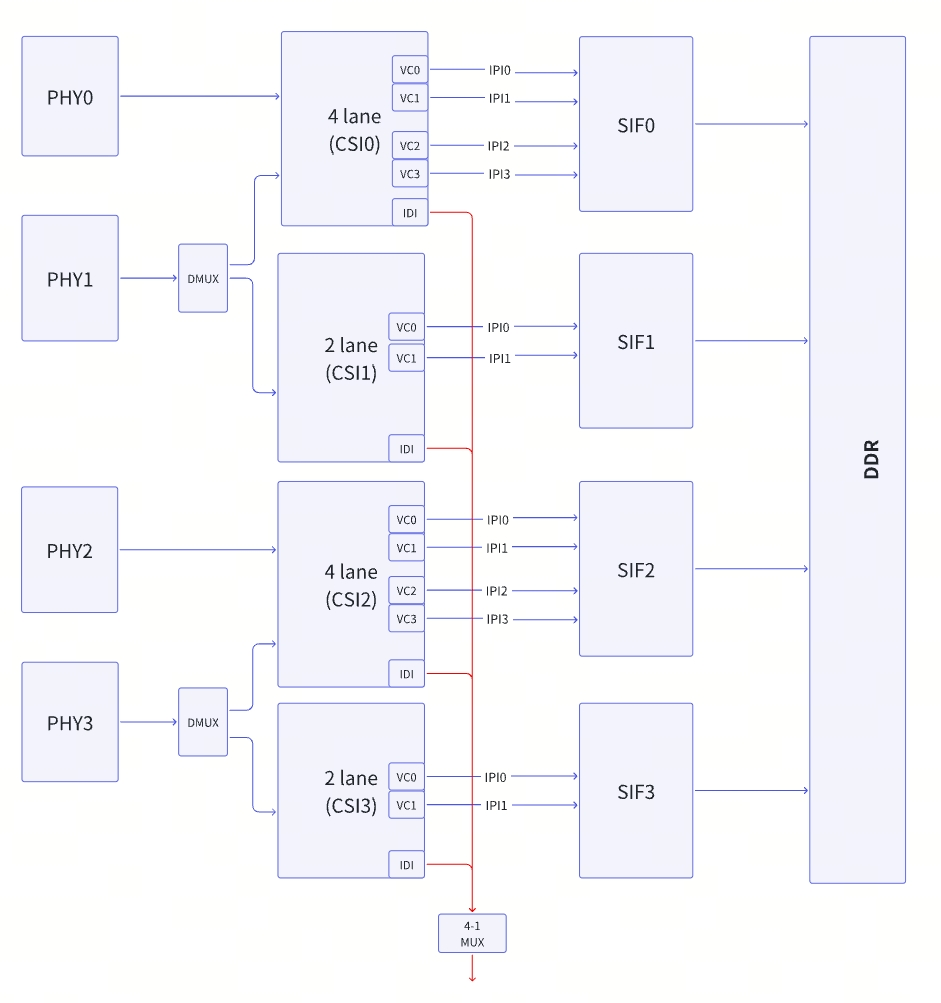
Key Features
The chip supports up to 4 independent MIPI HOSTs (CSI0~CSI3), each independently supports up to 2 Lanes
MIPI HOST and IPI distribution:
HOST0 /HOST2: Each can bind up to 4 IPIs.
HOST1 /HOST3: Each can bind up to 2 IPIs.
When the Lane splicing function is enabled through DMUX, HOST0 and HOST2 can be configured to use 4 Lanes respectively to obtain higher single-channel bandwidth. Note: Under this configuration, HOST1 and HOST3 will not be able to receive data.
The MIPI module connects data to the SIF through the 12-channel IPI interface. Each IPI channel can be bound to an independent virtual channel and used in combination with SerDes. In theory, up to 12 cameras can be connected.
5.5.1.2. MIPI Basic Specifications
Supports MIPI CSI video input:
Complies with MIPI Alliance interface specification v2.1
Supports up to 8 data lanes, each with a maximum data rate of 2.5 Gbps
Supports MIPI-HS and MIPI-LP modes
Hardware resources: 4 x 2-lane PHY + 4 x CSI-2 controllers
Supports up to 12 virtual channels
Supports maximum resolution of 5472 x 3076 pixels @30fps video input
Supports multiple video formats:
RAW 8-/10-/12-/14-/16-bit formats
YUV 422 format (8-/10-bit)
Supports video input-to-output pass-through mode:
Supports direct pass-through (back-to-back) mode from MIPI CSI RX to MIPI CSI TX
5.5.2. Reference Examples
Example code for camera accessing can be found in the sample_vin section.
5.5.3. API Reference
| API Interface | Interface Functionality |
|---|---|
| hbn_camera_create | Creates a camera handle based on the configuration passed in camera_config_t. |
| hbn_camera_destroy | Destroys the corresponding software resources based on the camera handle. |
| hbn_camera_attach_to_vin | Binds the camera and VIN node within the VPF framework using their handles, and initializes the camera hardware. |
| hbn_camera_detach_from_vin | Unbinds the camera from the VIN node and performs deinitialization. |
| hbn_camera_attach_to_deserial | Binds the camera and deserializer using their handles, and initializes both deserializer and camera hardware. |
| hbn_camera_detach_from_deserial | Unbinds the camera from the deserializer and performs deinitialization. |
| hbn_camera_start | Configures camera registers to start streaming. |
| hbn_camera_stop | Configures camera registers to stop streaming. |
| hbn_camera_reset | Resets the camera by reinitializing the sensor. |
| hbn_camera_change_fps | Dynamically switches the sensor frame rate. |
| hbn_camera_read_register | Reads the value of a camera register. |
| hbn_camera_get_handle | Retrieves the corresponding camera handle via VIN node handle or camera port index. |
| hbn_camera_init_cfg | Creates camera and deserializer handles and binds them based on the provided configuration. |
| hbn_deserial_create | Creates a deserializer handle based on the provided configuration. |
| hbn_deserial_destroy | Destroys the corresponding software resources based on the deserializer handle. |
| hbn_deserial_attach_to_vin | Binds the deserializer to the VIN node. |
| hbn_deserial_detach_from_vin | Unbinds the deserializer from the VIN node. |
| hbn_txser_create | Creates a serializer handle (tx serial handle) based on the provided configuration. |
| hbn_txser_destroy | Destroys the corresponding software resources based on the tx serial handle. |
| hbn_txser_attach_to_vin | Binds the tx serial to the VIN node. |
| hbn_txser_detach_from_vin | Unbinds the tx serial from the VIN node. |
| hbn_camera_switch_scence | Dynamically switches the camera ISP tuning effect file. |
5.5.3.1. hbn_camera_create
【Function Declaration】
int32_t hbn_camera_create(camera_config_t *cam_config, camera_handle_t *cam_fd)
【Parameter Description】
[IN] camera_config_t *cam_config: Pointer to the parameter structure for the camera to be configured;
[OUT] camera_handle_t *cam_fd: File descriptor returned based on configuration, used as the camera operation handle;
【Return Value】
Success: RET_OK 0
Failure: Negative error code
【Function Description】
Creates a camera handle based on the configuration passed in camera_config_t.
【Notes】
The API checks the sensor library; if the sensor driver code does not comply with the HBN framework specification, an error will be reported.
The API checks cam_config; if the configuration exceeds hardware capabilities, an error will be reported.
5.5.3.2. hbn_camera_destroy
【Function Declaration】
int32_t hbn_camera_destroy(camera_handle_t cam_fd)
【Parameter Description】
[IN] camera_handle_t cam_fd: Camera operation handle created by hbn_camera_create;
【Return Value】
Success: RET_OK 0
Failure: Negative error code
【Function Description】
Destroys the corresponding software resources based on the camera handle.
【Notes】
hbn_camera_destroy must be used in pair with hbn_camera_create.
hbn_camera_destroy releases the sensor library; after execution, the sensor will no longer be accessible.
hbn_camera_destroy internally calls hbn_camera_detach_from_vin, which triggers a sensor stream stop. Therefore, hbn_camera_destroy must be called before hbn_vflow_destroy.
5.5.3.3. hbn_camera_attach_to_vin
【Function Declaration】
int32_t hbn_camera_attach_to_vin(camera_handle_t cam_fd, vpf_handle_t vin_fd)
【Parameter Description】
[IN] camera_handle_t cam_fd: Camera handle created by hbn_camera_create;
[IN] vpf_handle_t vin_fd: VIN node handle created by hbn_vnode_open.
【Return Value】
Success: RET_OK 0
Failure: Negative error code
【Function Description】
Binds the camera and VIN node within the VPF framework using their handles, and initializes the camera hardware.
【Notes】
The same camera must not call hbn_camera_attach_to_vin repeatedly; otherwise, an “attach error” will occur.
5.5.3.4. hbn_camera_detach_from_vin
【Function Declaration】
int32_t hbn_camera_detach_from_vin(camera_handle_t cam_fd)
【Parameter Description】
[IN] camera_handle_t cam_fd: Camera handle created by hbn_camera_create;
【Return Value】
Success: RET_OK 0
Failure: Negative error code
【Function Description】
Unbinds the camera from the VIN node and performs deinitialization.
【Notes】
hbn_camera_detach_from_vin must be used in pair with hbn_camera_attach_to_vin.
hbn_camera_destroy internally calls hbn_camera_detach_from_vin, so after calling hbn_camera_destroy, there is no need to call hbn_camera_detach_from_vin again.
5.5.3.5. hbn_camera_attach_to_deserial
【Function Declaration】
int32_t hbn_camera_attach_to_deserial(camera_handle_t cam_fd, deserial_handle_t des_fd, camera_des_link_t link)
【Parameter Description】
[IN] camera_handle_t cam_fd: Camera handle created by hbn_camera_create;
[IN] deserial_handle_t des_fd: Deserializer handle created by hbn_deserial_create;
[IN] camera_des_link_t link: Link configuration between camera and deserializer, determined by which link the camera is connected to.
【Return Value】
Success: RET_OK 0
Failure: Negative error code
【Function Description】
Binds the camera and deserializer using their handles, and initializes both deserializer and camera hardware.
【Notes】
This interface is only needed when a deserializer is present in hardware.
After calling hbn_camera_attach_to_deserial, hbn_camera_attach_to_vin should not be called; instead, the deserializer will be bound to the VIN node.
5.5.3.6. hbn_camera_detach_from_deserial
【Function Declaration】
int32_t hbn_camera_detach_from_deserial(camera_handle_t cam_fd)
【Parameter Description】
[IN] camera_handle_t cam_fd: Camera handle created by hbn_camera_create;
【Return Value】
Success: RET_OK 0
Failure: Negative error code
【Function Description】
Unbinds the camera from the deserializer and performs deinitialization.
【Notes】
hbn_camera_detach_from_deserial must be used in pair with hbn_camera_attach_to_deserial.
5.5.3.7. hbn_camera_start
【Function Declaration】
int32_t hbn_camera_start(camera_handle_t cam_fd)
【Parameter Description】
[IN] camera_handle_t cam_fd: Camera handle created by hbn_camera_create;
【Return Value】
Success: RET_OK 0
Failure: Negative error code
【Function Description】
Configures camera registers to start streaming.
【Notes】
After the camera handle is attached to vflow, this interface may not need to be called. If called, hbn_vflow_start must be called first, followed by hbn_camera_start.
5.5.3.8. hbn_camera_stop
【Function Declaration】
int32_t hbn_camera_stop(camera_handle_t cam_fd)
【Parameter Description】
[IN] camera_handle_t cam_fd: Camera handle created by hbn_camera_create;
【Return Value】
Success: RET_OK 0
Failure: Negative error code
【Function Description】
Configures camera registers to stop streaming.
【Notes】
Must be used in pair with hbn_camera_start.
5.5.3.9. hbn_camera_reset
【Function Declaration】
int32_t hbn_camera_reset(camera_handle_t cam_fd)
【Parameter Description】
[IN] camera_handle_t cam_fd: Camera handle created by hbn_camera_create;
【Return Value】
Success: RET_OK 0
Failure: Negative error code
【Function Description】
Resets the camera by reinitializing the sensor.
【Notes】
If this interface is called before the camera is attached to VIN, it will initialize the sensor via camera_attach_to_vin to achieve reset. If called after attachment, it will stop and deinitialize the sensor, then reinitialize and restart it.
5.5.3.10. hbn_camera_change_fps
【Function Declaration】
int32_t hbn_camera_change_fps(camera_handle_t cam_fd, int32_t fps)
【Parameter Description】
[IN] camera_handle_t cam_fd: Camera handle created by hbn_camera_create;
[IN] int32_t fps: Sensor output frame rate;
【Return Value】
Success: RET_OK 0
Failure: Negative error code
【Function Description】
Dynamically switches the sensor frame rate.
【Notes】
This function requires the implementation of the callback function
dynamic_switch_fpsin the sensor library.
5.5.3.11. hbn_camera_read_register
【Function Declaration】
int32_t hbn_camera_read_register(camera_handle_t cam_fd, camera_reg_type_t type, uint32_t reg_addr)
【Parameter Description】
[IN] camera_handle_t cam_fd: Camera handle created by hbn_camera_create;
[IN] camera_reg_type_t type: Type of sensor register to read;
[IN] uint32_t reg_addr: Register address;
【Return Value】
Success: RET_OK 0
Failure: Negative error code
【Function Description】
Reads the value of a camera register.
【Notes】
None
5.5.3.12. hbn_camera_get_handle
【Function Declaration】
camera_handle_t hbn_camera_get_handle(vpf_handle_t vin_fd, int32_t camera_index)
【Parameter Description】
[IN] vpf_handle_t vin_fd: File descriptor of the VIN node;
[IN] int32_t camera_index: Port index of the camera;
【Return Value】
Success: RET_OK 0
Failure: Negative error code
【Function Description】
Retrieves the corresponding camera handle via VIN node handle or camera port index.
【Notes】
None
5.5.3.13. hbn_camera_init_cfg
【Function Declaration】
int32_t hbn_camera_init_cfg(const char *cfg_file)
【Parameter Description】
[IN] const char *cfg_file: Path to the camera configuration file (JSON);
【Return Value】
Success: RET_OK 0
Failure: Negative error code
【Function Description】
Creates camera and deserializer handles and binds them based on the provided configuration.
【Notes】
This API creates the camera by parsing a JSON file, differing from non-JSON methods used in samples. For details, please consult FAE.
5.5.3.14. hbn_deserial_create
【Function Declaration】
int32_t hbn_deserial_create(deserial_config_t *des_config, deserial_handle_t *des_fd)
【Parameter Description】
[IN] deserial_config_t *des_config: Pointer to the deserializer configuration structure;
[OUT] deserial_handle_t *des_fd: Deserializer handle created based on configuration;
【Return Value】
Success: RET_OK 0
Failure: Negative error code
【Function Description】
Creates a deserializer handle based on the provided configuration.
【Notes】
This interface is only needed when a deserializer is present in hardware.
This interface validates the deserializer configuration; if out of range, an error will be reported.
This interface checks the deserializer library; if it does not comply with HBN architecture specifications, an error will be reported.
5.5.3.15. hbn_deserial_destroy
【Function Declaration】
int32_t hbn_deserial_destroy(deserial_handle_t des_fd)
【Parameter Description】
[IN] deserial_handle_t des_fd: Deserializer handle created by hbn_deserial_create;
【Return Value】
Success: RET_OK 0
Failure: Negative error code
【Function Description】
Destroy corresponding software resources based on the deserial handle.
【Notes】
hbn_deserial_destroymust be used in pair withhbn_deserial_create.
5.5.3.16. hbn_deserial_attach_to_vin
【Function Declaration】
int32_t hbn_deserial_attach_to_vin(deserial_handle_t des_fd, camera_des_link_t link, vpf_handle_t vin_fd)
【Parameter Description】
[IN] deserial_handle_t des_fd: deserial handle, created by
hbn_deserial_create;[IN] camera_des_link_t link: link index of the deserial;
[IN] vpf_handle_t vin_fd: vin node handle to be bound;
【Return Value】
Success: RET_OK 0
Failure: Error code is a negative value
【Function Description】
Bind the deserial with the vin node.
【Notes】
If the hardware includes a deserializer, bind the camera with the deserial, and then bind the deserial with the vin node.
5.5.3.17. hbn_deserial_detach_from_vin
【Function Declaration】
int32_t hbn_deserial_detach_from_vin(deserial_handle_t des_fd, camera_des_link_t link)
【Parameter Description】
[IN] deserial_handle_t des_fd: deserial handle, created by
hbn_deserial_create;[IN] camera_des_link_t link: link index of the deserial;
【Return Value】
Success: RET_OK 0
Failure: Error code is a negative value
【Function Description】
Unbind the deserial from the vin node.
【Notes】
hbn_deserial_detach_from_vinmust be used in pair withhbn_deserial_attach_to_vin.
5.5.3.18. hbn_txser_create
【Function Declaration】
int32_t hbn_txser_create(txser_config_t *txs_config, txser_handle_t *txs_fd)
【Parameter Description】
[IN] txser_config_t *txs_config: pointer to the tx serial configuration structure;
[OUT] txser_handle_t *txs_fd: tx serial handle created according to the configuration;
【Return Value】
Success: RET_OK 0
Failure: Error code is a negative value
【Function Description】
Create a serializer handle (tx serial handle) based on the provided configuration.
【Notes】
This interface should only be called if the hardware includes a serializer.
This interface checks the txser configuration; an error will be reported if the configuration exceeds valid ranges.
This interface checks the txser library; an error will be reported if it does not comply with the HBN architecture specification.
5.5.3.19. hbn_txser_destroy
【Function Declaration】
int32_t hbn_txser_destroy(txser_handle_t txs_fd)
【Parameter Description】
[IN] txser_handle_t txs_fd: tx serial handle, created by
hbn_txser_create;
【Return Value】
Success: RET_OK 0
Failure: Error code is a negative value
【Function Description】
Destroy corresponding software resources based on the tx serial handle.
【Notes】
This interface should only be called if the hardware includes a serializer.
hbn_txser_destroymust be used in pair withhbn_txser_create.
5.5.3.20. hbn_txser_attach_to_vin
【Function Declaration】
int32_t hbn_txser_attach_to_vin(txser_handle_t txs_fd, camera_txs_csi_t csi, vpf_handle_t vin_fd)
【Parameter Description】
[IN] txser_handle_t txs_fd: tx serial handle, created by
hbn_txser_create;[IN] camera_txs_csi_t csi: tx csi index;
[IN] vpf_handle_t vin_fd: vin node handle to be bound;
【Return Value】
Success: RET_OK 0
Failure: Error code is a negative value
【Function Description】
Bind the tx serial with the vin node.
【Notes】
This interface should only be called if the hardware includes a serializer.
This interface initializes the txser hardware.
If the hardware includes a serializer, bind the camera with the txser, and then bind the txser with the vin node.
5.5.3.21. hbn_txser_detach_from_vin
【Function Declaration】
int32_t hbn_txser_detach_from_vin(txser_handle_t txs_fd, camera_txs_csi_t csi)
【Parameter Description】
[IN] txser_handle_t txs_fd: tx serial handle, created by
hbn_txser_create;[IN] camera_txs_csi_t csi: tx csi index;
【Return Value】
Success: RET_OK 0
Failure: Error code is a negative value
【Function Description】
Unbind the tx serial from the vin node.
【Notes】
hbn_txser_detach_from_vinmust be used in pair withhbn_txser_attach_to_vin.
5.5.3.22. hbn_camera_switch_scence
【Function Declaration】
int32_t hbn_camera_switch_scence(int64_t vflow_fd, int64_t isp_vnode_fd, const char *cname)
【Parameter Description】
[IN] int64_t vflow_fd: camera flow handle, created by
hbn_vflow_create;[IN] int64_t isp_vnode_fd: isp node handle, obtained by
hbn_vflow_get_vnode_handle;[IN] const char *cname: ISP tuning JSON string. By default, the system looks for the specified tuning file in the
/usr/hobot/lib/sensordirectory. If the tuning file is not located there, specify the absolute path to the file;
【Return Value】
Success: RET_OK 0
Failure: Error code is a negative value
【Function Description】
Dynamically switch the camera ISP tuning effect file.
【Notes】
This API stops the vflow first, switches the ISP tuning file, and then restarts the vflow.
5.5.4. Data Structures
Camera Parameters
typedef struct camera_config_s
| Name | Type | Min | Max | Default | Description | Required |
|---|---|---|---|---|---|---|
| name[CAMERA_MODULE_NAME_LEN] | char | - | CAMERA_MODULE_NAME_LEN(108) | - | Camera module name, must correspond to the sensor library name. For example, if the sensor driver name is libsc1330t.so, then the name should be sc1330t. |
Yes |
| addr | uint32_t | 0x00 | 0x7f | 0x00 | Sensor device address, typically the 7-bit I2C address. | Yes |
| isp_addr | uint32_t | 0x00 | 0x7f | 0x00 | ISP device address (if exists), default is none. | No |
| eeprom_addr | uint32_t | 0x00 | 0x7f | 0x00 | EEPROM device address (if exists), default is none. | No |
| serial_addr | uint32_t | 0x00 | 0x7f | 0x00 | SerDes device address (if exists), default is none. | No |
| sensor_mode | uint32_t | 1 | 6 | 1 | Sensor operating mode, can use enum sensor_mode_e: 1: NORMAL_M, linear mode; 2: DOL2_M, HDR 2-frame merge; 3: DOL3_M, HDR 3-frame merge; 4: DOL4_M, HDR 4-frame merge; 5: PWL_M, HDR mode internal sensor merge; 6: SLAVE_M, slave mode, requires external trigger signal to output stream. |
Yes |
| sensor_clk | uint32_t | - | - | 0x00 | Clock configuration for sensor, currently not active, reserved. | No |
| gpio_enable_bit | uint32_t | 0 | 0xFFFFFFFF | 0 | Whether to use X5 GPIO to control camera sensor pins to meet power sequence requirements. e.g., control sensor XSHUTDN pin via GPIO. Note: corresponding GPIO number must be configured in DTS. 0: do not use GPIO; non-zero: use GPIO to control sensor, enable GPIO by bit. e.g., 0x07 enables [gpio_a, gpio_b, gpio_c]. |
Yes |
| gpio_level_bit | uint32_t | 0 | 1 | 0 | If gpio_enable_bit is set, configure gpio_level_bit to control sensor pin high/low levels. The relationship between each GPIO bit and sensor pin level: 0: output low first, sleep 1s, then output high; 1: output high first, sleep 1s, then output low. e.g., 0x05 = 101, from bit0 to bit2: gpio_a high→low, gpio_b low→high, gpio_c high→low. Customize according to sensor power-up sequence. |
Yes |
| bus_select | uint32_t | 0 | 6 | 0 | Sensor I2C number selection. Usually fixed by hardware, so recommended to configure in DTS, can be omitted here. For binding sensor I2C in DTS, see: camera bring-up documentation. |
No |
| bus_timeout | uint32_t | 0 | - | 0 | I2C timeout configuration. Required only if bus_select is set. |
No |
| fps | uint32_t | 0 | 120 | 0 | Sensor frame rate configuration. | Yes |
| width | uint32_t | 0 | 8192 | 0 | Sensor output image width (in pixels). | Yes |
| height | uint32_t | 0 | 4096 | 0 | Sensor output image height (in pixels). | Yes |
| format | uint32_t | - | - | - | Sensor data type, common values: RAW8: 0x2A; RAW10: 0x2B; RAW12: 0x2C; YUV422 8-bit: 0x1E. |
Yes |
| flags | uint32_t | 0 | - | 0 | Optional features: diagnostics, recovery, debug, etc. | No |
| extra_mode | uint32_t | 0 | - | 0 | Custom configuration inside each sensor library: often used to distinguish modules and function switches. | Yes |
| config_index | uint32_t | 0 | - | 0 | Custom configuration inside each sensor library: often used to distinguish modules and function switches. | Yes |
| ts_compensate | uint32_t | 0 | - | 0 | Reserved parameter, for future use. | No |
| mipi_cfg | mipi_config_t | - | - | - | MIPI configuration, set to NULL to automatically fetch from sensor driver (get_csi_attr). |
Yes |
| calib_lname | char | - | - | - | Sensor tuning library path, default is /usr/hobot/lib/sensor, supports custom path, total length ≤ 100 bytes. e.g., calib_lname="/userdata/test_tuning.json". Current software version: if set to "disable", defaults to using sensor_name_tuning.json in code. |
Yes |
| sensor_param | char | - | - | - | Sensor custom data. | No |
| iparam_mode | uint32_t | - | - | - | Reserved parameter, for future use. | No |
| end_flag | uint32_t | - | - | - | Reserved parameter, for future use. | No |
typedef struct deserial_config_s
| Name | Type | Min | Max | Default | Description | Required |
|---|---|---|---|---|---|---|
| name | char[CAMERA_MODULE_NAME_LEN] | - | - | - | Deserial name, e.g., max9296. | Yes |
| addr | uint32_t | 0 | - | - | Deserial device address. | Yes |
| gpio_enable_bit | uint32_t | 0 | - | - | GPIO operation enable bit, indexed from VCON. | Yes |
| gpio_level_bit | uint32_t | 0 | - | - | GPIO working state bit, indicating current GPIO status. | Yes |
| gpio_mfp | uint8_t[CAMERA_DES_GPIO_MAX] | 0 | CAMERA_DES_GPIO_MAX | 0x0 | MFP GPIO function selection, used to specify multi-function configuration. | Yes |
| bus_select | uint32_t | 0 | - | - | I2C bus selection, indexed from VCON. | Yes |
| bus_timeout | uint32_t | 0 | - | - | I2C timeout setting, in milliseconds. | Yes |
| lane_mode | uint32_t | 0 | - | - | PHY lane mode configuration selection. | Yes |
| lane_speed | uint32_t | 0 | - | - | PHY lane speed configuration. | Yes |
| link_map | uint32_t | 0 | - | - | Link to CSI/VC mapping configuration. | Yes |
| link_desp | char[CAMERA_DES_LINKMAX][CAMERA_DES_PORTDESP_LEN] | - | - | - | Configuration description for each link connected module, used for multi-process usage. | Yes |
| reset_delay | uint32_t | 0 | - | - | Delay time for reset operation, in milliseconds. | Yes |
| flags | uint32_t | 0 | - | - | Optional feature flags, e.g., diagnostics, debugging, etc. | No |
| poc_cfg | poc_config_t* | - | - | NULL | POC configuration pointer, NULL means no POC function. | No |
| mipi_cfg | mipi_config_t* | - | - | NULL | MIPI configuration pointer, NULL means auto-fetch configuration. | No |
| deserial_param | char* | - | - | NULL | Pointer to deserial custom data. | No |
| end_flag | uint32_t | 0 | 0xFFFFFFFF | - | End flag for structure configuration, used for integrity check. | Yes |
typedef struct poc_config_s
| Name | Type | Min | Max | Default | Description | Required |
|---|---|---|---|---|---|---|
| name | char[CAMERA_MODULE_NAME_LEN] | - | - | - | POC name, e.g., max20087. | Yes |
| addr | uint32_t | 0 | - | - | POC device address. | Yes |
| gpio_enable_bit | uint32_t | 0 | - | - | GPIO operation enable bit, indexed from VCON. | Yes |
| gpio_level_bit | uint32_t | 0 | - | - | GPIO working state bit, indicating current GPIO status. | Yes |
| poc_map | uint32_t | 0 | - | - | Mapping between POC and Link. | Yes |
| power_delay | uint32_t | 0 | - | - | Delay time for POC on/off operation, in milliseconds. | Yes |
| end_flag | uint32_t | 0 | 0xFFFFFFFF | - | End flag for structure configuration, used for integrity verification. | Yes |
5.5.5. Return Code Description
| Error Code | Macro Definition | Description | Common Causes and Solutions |
|---|---|---|---|
| 0 | HBN_STATUS_SUCCESS | Success | |
| 1 | HBN_STATUS_INVALID_NODE | Invalid vnode, corresponding vnode not found | |
| 2 | HBN_STATUS_INVALID_NODETYPE | Invalid vnode type, corresponding vnode not found | For VIN, vnode type is HB_VIN |
| 3 | HBN_STATUS_INVALID_HWID | Invalid hardware module ID | For VIN, hw_id value is 0 |
| 4 | HBN_STATUS_INVALID_CTXID | Invalid context ID | Can be set to AUTO_ALLOC_ID, automatically assigned by HBN framework |
| 5 | HBN_STATUS_INVALID_OCHNID | Invalid output channel ID | VIN output channel is 0 |
| 6 | HBN_STATUS_INVALID_ICHNID | Invalid input channel ID | VIN supports only one input channel |
| 7 | HBN_STATUS_INVALID_FORMAT | Invalid format | |
| 8 | HBN_STATUS_INVALID_NULL_PTR | Null pointer | |
| 9 | HBN_STATUS_INVALID_PARAMETER | Invalid parameter, version check failed | |
| 10 | HBN_STATUS_ILLEGAL_ATTR | Invalid parameter | |
| 11 | HBN_STATUS_INVALID_FLOW | Invalid flow, corresponding flow not found | |
| 12 | HBN_STATUS_FLOW_EXIST | Flow already exists | |
| 13 | HBN_STATUS_FLOW_UNEXIST | Flow does not exist | |
| 14 | HBN_STATUS_NODE_EXIST | Node already exists | |
| 15 | HBN_STATUS_NODE_UNEXIST | Node does not exist | |
| 16 | HBN_STATUS_NOT_CONFIG | Reserved | |
| 17 | HBN_STATUS_CHN_NOT_ENABLED | Channel not enabled | |
| 18 | HBN_STATUS_CHN_ALREADY_ENABLED | Channel already enabled | |
| 19 | HBN_STATUS_ALREADY_BINDED | Node already bound | |
| 20 | HBN_STATUS_NOT_BINDED | Node not bound | |
| 21 | HBN_STATUS_TIMEOUT | Timeout | |
| 22 | HBN_STATUS_NOT_INITIALIZED | Not initialized | |
| 23 | HBN_STATUS_NOT_SUPPORT | Channel not supported or not activated | |
| 24 | HBN_STATUS_NOT_PERM | Operation not allowed | |
| 25 | HBN_STATUS_NOMEM | Insufficient memory | |
| 26 | HBN_STATUS_INVALID_VNODE_FD | Invalid node file descriptor | |
| 27 | HBN_STATUS_INVALID_ICHNID_FD | Invalid input channel file descriptor | |
| 28 | HBN_STATUS_INVALID_OCHNID_FD | Invalid output channel file descriptor | |
| 29 | HBN_STATUS_OPEN_OCHN_FAIL | Failed to open output channel | |
| 30 | HBN_STATUS_OPEN_ICHN_FAIL | Failed to open input channel | |
| 31 | HBN_STATUS_JSON_PARSE_FAIL | JSON parsing failed | |
| 32 | HBN_STATUS_REQ_BUF_FAIL | Failed to request buffer | |
| 33 | HBN_STATUS_QUERY_BUF_FAIL | Failed to query buffer information | |
| 34 | HBN_STATUS_SET_CONTROL_FAIL | Module control or tuning parameter (e.g., ISP effect parameter) setting failed | |
| 35 | HBN_STATUS_GET_CONTROL_FAIL | Module control or tuning parameter (e.g., ISP effect parameter) getting failed | |
| 36 | HBN_STATUS_NODE_START_FAIL | Failed to start node | |
| 37 | HBN_STATUS_NODE_STOP_FAIL | Failed to stop node | |
| 38 | HBN_STATUS_NODE_POLL_ERROR | Node channel poll error | |
| 39 | HBN_STATUS_NODE_POLL_TIMEOUT | Node channel poll timeout | |
| 40 | HBN_STATUS_NODE_POLL_FRAME_DROP | Frame drop during node channel poll | |
| 41 | HBN_STATUS_NODE_POLL_HUP | Node channel descriptor hang-up during poll | |
| 42 | HBN_STATUS_NODE_ILLEGAL_EVENT | Illegal event during node channel poll | |
| 43 | HBN_STATUS_NODE_DEQUE_ERROR | Node channel dequeue buffer error | |
| 44 | HBN_STATUS_ILLEGAL_BUF_INDEX | Invalid buffer index | |
| 45 | HBN_STATUS_NODE_QUE_ERROR | Node channel queue buffer error | |
| 46 | HBN_STATUS_FLUSH_FRAME_ERROR | Node channel frame flush error | |
| 47 | HBN_STATUS_INIT_BIND_ERROR | Error occurred during JSON parsing and binding | |
| 48 | HBN_STATUS_ADD_NODE_FAIL | Failed to add node to flow | |
| 49 | HBN_STATUS_WRONG_CONFIG_ID | System does not support the node ID | |
| 50 | HBN_STATUS_BIND_NODE_FAIL | Error occurred when binding node to flow | |
| 51 | HBN_STATUS_INVALID_VERSION | Version mismatch between low-level driver and upper-layer library | |
| 52 | HBN_STATUS_GET_VERSION_ERROR | Failed to get low-level driver module version | |
| 53 | HBN_STATUS_MEM_INIT_FAIL | hbmem memory initialization failed | |
| 54 | HBN_STATUS_MEM_IMPORT_FAIL | hbmem memory import failed | |
| 55 | HBN_STATUS_MEM_FREE_FAIL | hbmem memory release failed | |
| 56 | HBN_STATUS_SYSFS_OPEN_FAIL | Failed to open system file | |
| 57 | HBN_STATUS_STRUCT_SIZE_NOT_MATCH | Structure size mismatch between HAL layer and kernel layer | |
| 58 | HBN_STATUS_RGN_UNEXIST | Unable to retrieve corresponding rgn data | |
| 59 | HBN_STATUS_RGN_INVALID_OPERATION | Invalid rgn operation | |
| 60 | HBN_STATUS_RGN_OPEN_FILE_FAIL | Failed to open file in rgn module | |
| 128 | HBN_STATUS_ERR_UNKNOW | Unknown error |