5.13. 3D Graphics Processing - 3D GPU
5.13.1. Module Description
The 3D GPU is a core component in modern graphics and computing fields. It not only supports efficient 3D rendering but is also widely used in scientific computing, artificial intelligence, data visualization, and other domains. Its hardware acceleration capabilities and highly parallel architecture provide robust support for various complex tasks.
5.13.1.1. Framework Description
The 3D GPU framework is illustrated in the figure below:
Note: The X5 BSP does not default to porting a desktop system. GPU rendering effects can be implemented using DRM and GBM (as shown by the yellow section in the Framework layer).
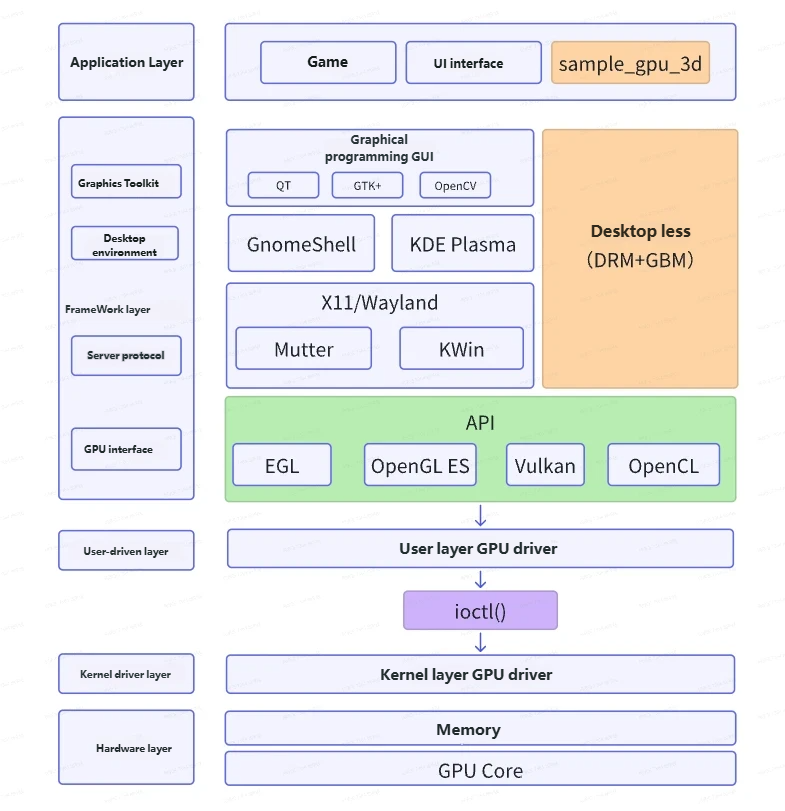
The following describes each layer individually (from bottom to top):
Hardware Layer: The GPU Core is the actual GPU hardware, responsible for accelerating 3D image processing. The rendered output can be stored in DDR.
Kernel Driver Layer: In X5, the GPU driver is not integrated with DRM but instead provides interfaces upward through the
ioctlinterface of a character device driver.User-Space Driver Layer: By encapsulating the
ioctlinterface, this layer enables interaction between the GPU interface layer and the driver layer.Framework Layer: Contains four sub-layers:
GPU Interface Layer (green background): Includes four standard APIs: EGL, OpenGL ES, Vulkan, and OpenCL. Detailed explanations will be provided later.
Server Protocol Layer: Common display server protocols include Wayland and X11. Wayland is a successor to X11. Common implementations of the Wayland protocol include Mutter and KWin.
Desktop Environment: GnomeShell and KDE are both modern desktop environments based on the Wayland protocol, responsible for user interaction interfaces.
GnomeShell is based on Mutter (a specific implementation of the Wayland protocol).
KDE is based on KWin (a specific implementation of the Wayland protocol).
Graphics Toolkit: GTK and Qt are two different GUI toolkits that provide developers with graphical controls and interface construction tools.
Application Layer: There are two scenarios for application layer implementation:
Case 1: With a desktop environment, the application layer can use various graphics libraries to develop complex games and UI interfaces.
Case 2: Without a desktop environment (yellow background in the diagram: sample_gpu_3d), the application layer directly calls GPU interfaces and uses DRM and GBM to display GPU-rendered images.
5.13.1.2. Common Function Descriptions
| Function | Description | Common Use Cases |
|---|---|---|
| Vertex Processing | Processes vertex coordinates of 3D models, including coordinate transformations (e.g., model, view, and projection) and related calculations for normals, texture coordinates, etc. | Projecting 3D models onto a 2D screen plane; implementing animations (skeletal animation, vertex deformation, etc.). |
| Rasterization | Converts geometric primitives such as triangles into pixels (or fragments). | Rendering 3D geometry onto a 2D display; implementing edge detection and anti-aliasing techniques. |
| Fragment Processing | Computes color and other attributes (e.g., depth, transparency) for each pixel. | Achieving complex material effects (e.g., metal, glass); computing lighting, shadows, reflections, etc. |
| Texture Mapping | Applies 2D texture images onto the surface of 3D models. | Adding surface details such as wood grain, skin, walls; using normal maps to achieve fine bump effects. |
| Rendering Pipeline | Full process from geometric data to final image, including vertex shading, geometry shading, rasterization, fragment shading, etc. | Efficiently completing real-time rendering tasks, such as in-game real-time visuals. |
| Shading | Uses shader programs to compute visual effects of light interacting with objects. | Achieving lighting effects (e.g., diffuse, specular reflection); implementing advanced rendering effects like ambient occlusion and global illumination. |
| Framebuffer Operations | Manages rendering targets and intermediate data (e.g., color buffer, depth buffer). | Implementing post-processing effects (e.g., blur, tone mapping); saving rendered results for multi-sampling or off-screen rendering. |
| Geometry Processing | Processes geometric primitives (e.g., triangles, points, lines) to generate complex shapes. | Implementing dynamic mesh deformation, particle systems; using geometry shaders to add detail. |
| Compute Shader | Provides general-purpose computing capabilities, breaking the limitations of traditional graphics rendering pipelines. | Implementing physics simulations (e.g., fluids, cloth); performing large-scale parallel computing tasks (e.g., AI inference, ray tracing acceleration). |
| Ray Tracing | Generates more realistic images by simulating the interaction of light rays with scene objects. | Achieving realistic reflections, refractions, shadows, and global illumination; used in high-quality and real-time rendering. |
5.13.1.3. Application Scenarios
| Application Scenario | Detailed Description |
|---|---|
| Game Development | Renders complex game scenes with real-time shadows and dynamic lighting, suitable for open-world games, high-frame-rate competitive games, and VR games. |
| Film and Animation | Offline rendering of high-quality images with support for advanced lighting techniques (e.g., global illumination), used in animated films and visual effects production. |
| Virtual Reality and Augmented Reality | High-frame-rate rendering to reduce latency, used in VR games, AR navigation, and medical training. |
| Industrial Design and Modeling | Real-time rendering of complex models for automotive design, architectural visualization, and product simulation. |
| Scientific Computing and Data Visualization | Accelerates scientific simulations and 3D data rendering, applied in climate modeling, medical imaging, and genetic research. |
| Artificial Intelligence and Deep Learning | Provides parallel computing power to accelerate model training and inference, used in image recognition, NLP, and autonomous driving. |
| Architecture and Engineering | Enables high-fidelity visualization and real-time walkthroughs for architectural design reviews and smart city planning. |
| Medical and Simulation | Generates real-time 3D visualization for surgical simulation and disease modeling. |
| Cloud Gaming and Remote Rendering | Performs rendering on remote GPUs and streams the results to clients, suitable for cloud gaming and remote computing services. |
5.13.1.4. Basic Specifications
Peak computing performance: 32 GFLOPS
5.13.2. Reference Examples
Example code for the 3D GPU interface can be found in the sample_gpu_3d section.
5.13.3. API Reference
The X5 3D GPU supports four standard APIs: EGL, OpenGL ES, Vulkan, and OpenCL. Details are as follows:
| API | Primary Use | Dependencies | Main Application Scenarios | Official API Link | Supported Versions |
|---|---|---|---|---|---|
| EGL | Context and window surface management | Used by OpenGL ES and Vulkan | Graphics context management | EGL | EGL 1.5 |
| OpenGL ES | Embedded graphics rendering | Depends on EGL | Games, UI rendering | OpenGL ES | OpenGL ES 3.1 / 3.0 / 2.0 / 1.1 |
| Vulkan | High-performance graphics and compute rendering | Optional dependency on EGL | Games, UI rendering | Vulkan | Vulkan |
| OpenCL | General-purpose parallel computing | - | Image processing, machine learning, scientific computing | OpenCL | OpenCL 1.1 / 1.2 / 3.0 |
5.13.3.1. Header File Description
When developing applications using OpenGL ES, Vulkan, or OpenCL, header files from the respective standard specifications are required. The directories containing these headers and their descriptions are listed below:
| Standard | Header File Directory | Directory Description |
|---|---|---|
| EGL | EGL | Contains header files for all EGL versions |
| GBM | - | Contains GBM header files |
| OpenGL ES | GLES GLES2 GLES3 | Contains header files for OpenGL ES 2.x and related extensions Contains header files for OpenGL ES 3.x |
| Vulkan | vulkan | Contains Vulkan header files |
| OpenCL | CL | Contains OpenCL C-style header files Contains OpenCL C++-style header files |
5.13.3.2. Dynamic Library Description
When developing applications using OpenGL ES, Vulkan, or OpenCL, corresponding standard dynamic libraries are required. The names and descriptions of these libraries are listed below:
| Standard | Dynamic Library Name | Library Description |
|---|---|---|
| EGL | libEGL.so | EGL dynamic library |
| GBM | libgbm.so | GBM dynamic library |
| OpenGL ES | libGLESv2.so libGLESv1.so | OpenGL ES 2.x and 3.x dynamic library OpenGL ES 1.x dynamic library |
| Vulkan | libvulkan.so | Vulkan ICD Loader dynamic library |
| OpenCL | libOpenCL.so | OpenCL dynamic library |