4.5.5. QSPI NAND Flash Stress Test
4.5.5.1. Test Principle
The NAND Flash test uses the IOzone tool to perform file system performance testing. By executing various file operations such as sequential reads, sequential writes, random read/writes, etc., the performance of the disk or storage device is evaluated.
Test Content
1. Test Process:
When using the iozone command to test the performance of a NAND Flash storage device, its performance can be more accurately assessed by appropriately selecting test file size, block size, test mode, and output format.
Create test file: IOzone first creates one or more files on the specified path and performs read/write operations using a specific block size. For example, in the script, IOzone will create a 32MB test file under the path
$output_dir/iozone_data.Execute multiple I/O operations: Using the
-aoption, IOzone automatically evaluates various test modes and configurations, including different block sizes, file sizes, operation modes, etc.Sequential Write: Continuously write data to the storage device to test its maximum write bandwidth.
Sequential Read: Continuously read data to test the device’s read bandwidth.
Random Write: Perform random writes to test the device’s random write capability.
Random Read: Perform random reads to test the device’s random read capability.
Test with different block sizes: Evaluate the storage device’s performance under various data block sizes.
Overwrite vs Append: Modify or overwrite existing files to test the device’s performance when updating files.
Overwrite: Replace existing data; this method is used to test the device’s performance during repeated writes, especially regarding impact on NAND Flash storage.
Append: Append new data without affecting existing data.
Data recording and analysis: IOzone records execution time for each operation and calculates key metrics such as throughput and latency to generate data reports.
2. Command Explanation:
Test command:
iozone -e -+r -o -a -q 1M -s 32M -f "$output_dir/iozone_data" -Rb "$output_dir/test_iozone_qspi_nand_flash_${loop_num}.xls"Parameter explanation:
-e: Include flush (fsync, fflush) time in timing calculations.
-+r: Enable random mode testing, including not only sequential but also random read/write operations.
-o: Enable overwrite testing; the test will overwrite data in the file system instead of appending.
-a: Enable automatic test mode. This means iozone will automatically run a series of tests under different operation modes, such as sequential read/write, random read/write, different file sizes, etc.
-q 1M: Set the file block size used by Iozone to 1MB during testing.
-s 32M: Set the test file size to 32MB. That is, iozone will perform performance tests on a 32MB file.
-f $output_dir/iozone_data: Specify the file path where test results are stored.
-Rb $output_dir/test_iozone_emmc_ext4_stability_${loop_num}.xls: Output test result file in Excel format (.xls).
4.5.5.2. Preparation
1. The default boot method for X5_EVB is eMMC. The DIP switch must be changed to NAND Flash boot mode, as shown in the figure:
The DIP switches determine the development board’s boot mode configuration and debug serial port baud rate, allowing users to configure different modes. The internal structure and physical appearance of the DIP switches are shown below. Switching to the ON position indicates a high-level signal 1.
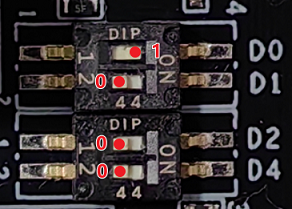
The three DIP switches
D0, D1, D2correspond to the2NDBOOT_SELpins of the X5 chip and are used to determine the board’s boot mode.The DIP switch
D4corresponds to theUART_BPSpin of the X5 chip and determines the debug serial port baud rate of the development board.
The corresponding DIP switch truth table is as follows:
| 2NDBOOT_SEL | Value | Option | Boot Mode Description |
|---|---|---|---|
| D2, D1, D0 | 000 | 2NDBOOT UART | Boot from UART interface |
| 001 | 2NDBOOT eMMC | Boot from eMMC storage device | |
| 010 | 2NDBOOT USB2.0 DFU | Boot from USB2.0 DFU (Device Firmware Upgrade) interface, via Dp/Dm | |
| 011 | 2NDBOOT SD Card | Boot from SD card | |
| 100 | 2NDBOOT QSPI NOR Flash | Boot from QSPI NOR Flash storage device | |
| 101 | 2NDBOOT QSPI NAND Flash | Boot from QSPI NAND Flash storage device | |
| 110 | 2NDBOOT USB3.0 DFU | Boot from USB3.0 DFU (Device Firmware Upgrade) interface, via Dp/Dm | |
| 111 | 2NDBOOT QSPI NAND Flash (disable mmu) | Boot from QSPI NAND Flash storage device with MMU disabled at startup |
Note: X5 burning only supports the USB 2.0 protocol. Regardless of whether the USB 2.0 or USB 3.0 interface is used, it is burned according to the USB 2.0 protocol, and the maximum speed is 480Mbps.
| UART_BPS | Value | Option | Description |
|---|---|---|---|
| D4 | 0 | 115200bps | Debug serial port baud rate set to 115200bps at boot |
| 1 | 921600bps | Debug serial port baud rate set to 921600bps at boot |
2. Prepare the compiled image for NAND Flash boot. After running ./bd.sh lunch and selecting option 4, compile and flash using ./bd.sh.
(base) root@DESKTOP-BD9DR0J:/home/gegugu/x5_sdk_default# ./bd.sh lunch

You're building on #1 SMP Fri Apr 2 22:23:49 UTC 2021
Lunch menu... pick a combo:
      0. horizon/x5/board_x5_evb_debug_config.mk
      1. horizon/x5/board_x5_evb_jammy_debug_config.mk
      2. horizon/x5/board_x5_evb_jammy_release_config.mk
      3. horizon/x5/board_x5_evb_nand_debug_config.mk
      4. horizon/x5/board_x5_evb_nand_release_config.mk
      5. horizon/x5/board_x5_evb_release_config.mk
      6. horizon/x5/board_x5_soc_debug_config.mk
      7. horizon/x5/board_x5_soc_release_config.mk
Which would you like? [0] : 4
3. Note that the NAND Flash boot image does not contain the /app partition; the nand_test.sh script must be copied to the /userdata path.
You can use the
dmesgcommand to verify that the/userdatapath is mounted on the NAND Flash partition.
[    4.930583] ubi1: volume 0 ("userdata") re-sized from 13 to 842 LEBs
[    4.932256] ubi1: attached mtd9 (name "userdata", size 221 MiB)
[    4.941166] mtdblock: MTD device 'userdata' is NAND, please consider using UBI block devices instead.
[   11.830340] UBIFS (ubi1:0): UBIFS: mounted UBI device 1, volume 0, name "userdata"
Use the command
cat /proc/mtdto view all partitions, their sizes, and types.
dev:    size   erasesize  name
mtd0: 00040000 00040000 "mbr"
mtd1: 00240000 00040000 "miniboot"
mtd2: 00240000 00040000 "miniboot_bak1"
mtd3: 00040000 00040000 "misc"
mtd4: 00200000 00040000 "uboot"
mtd5: 00180000 00040000 "ubootenv"
mtd6: 02000000 00040000 "boot"
mtd7: 09600000 00040000 "system"
mtd8: 06400000 00040000 "hbre"
mtd9: 0dd80000 00040000 "userdata"
4.5.5.3. Test Method
The stress test script supports the -h suffix to display command parameter descriptions, for example:
root@buildroot:/userdata/flash_test# ./nand_test.sh -h
Usage: ./nand_test.sh [options]

Options:
  -t <time>       Set the test duration ( 2h for hours, 30m for minutes; default: 48h).
  -d <seconds>     Set the sleep time between loops in seconds (default: 30).
  -o <directory>   Set the output directory for logs (default: ../log).
  -h             Show this help message and exit.
Parameter explanations:
-t <time>: Set test duration, e.g., 2h for 2 hours, 30m for 30 minutes; default is 48 hours.-d <seconds>: Set sleep time between loops in seconds; default is 30 seconds.-o <directory>: Set log output directory; default is the../logfolder relative to the script location.-h: Show help message and exit the script.
Example:
For instance, the command: ./nand_test.sh -t 2h -d 10 -o /userdata sets a custom test duration of 2 hours, loop interval of 10 seconds, and output directory /userdata.
After completing the preparation steps, run the test command:
 chmod +x nand_test.sh

./nand_test.sh
After running for some time, output appears as follows:
        Iozone: Performance Test of File I/O
                Version $Revision: 3.493 $
                Compiled for 64 bit mode.
                Build: linux

        Contributors:William Norcott, Don Capps, Isom Crawford, Kirby Collins
                     Al Slater, Scott Rhine, Mike Wisner, Ken Goss
                     Steve Landherr, Brad Smith, Mark Kelly, Dr. Alain CYR,
                     Randy Dunlap, Mark Montague, Dan Million, Gavin Brebner,
                     Jean-Marc Zucconi, Jeff Blomberg, Benny Halevy, Dave Boone,
                     Erik Habbinga, Kris Strecker, Walter Wong, Joshua Root,
                     Fabrice Bacchella, Zhenghua Xue, Qin Li, Darren Sawyer,
                     Vangel Bojaxhi, Ben England, Vikentsi Lapa,
                     Alexey Skidanov, Sudhir Kumar.

        Run began: Thu Jan  1 00:31:26 1970

        Include fsync in write timing
        Read & Write sync mode active.
        SYNC Mode.
        Auto Mode
        Using Maximum Record Size 1024 kB
        File size set to 32768 kB
        Excel chart generation enabled
        Command line used: iozone -e -+r -o -a -q 1M -s 32M -f /userdata/log/iozone_data -Rb /userdata/log/test_iozone_qspi_nand_flash_2.xls
        Output is in kBytes/sec
        Time Resolution = 0.000001 seconds.
        Processor cache size set to 1024 kBytes.
        Processor cache line size set to 32 bytes.
        File stride size set to 17 * record size.
                                                              random    random     bkwd    record    stride
              kB  reclen    write  rewrite    read    reread    read     write     read   rewrite      read   fwrite frewrite    fread  freread
           32768       4     2780     4956  1584143  1296151  1103931     4301  1112514      4776   1110629   104392   105451  1532503  1542531
           32768       8     5079     9559  1977788  1561719  1547485    10511  1607456     10708   1561273   108863   109577  1927416  1935041
           32768      16     9850    20046  2440637  1723633  1978982    19502  2007597     18954   1985097   111847   110092  2271139  2314614
           32768      32    17544    36329  2638750  1879761  2318381    31511  2218551     33214   2336732   112556   114307  2599809  2617043
           32768      64    33968    70865  2698065  1881812  2456371    64672  2498703     71972   2527419   111349   114829  2679313  2676249
           32768     128    58082   109002  2758249  1920300  2571652   108248  2636839    111033   2637900   115383   110742  2732260  2727484
           32768     256    71359   104816  2685461  1911116  2609332   105044  2626272    108726   2640876   111676   112701  2705862  2710787
           32768     512    79572   103659  2581783  1857701  2562602   106720  2558400    105179   2547857   114214   114433  2466355  2549245
           32768    1024    89865   113358  2075237  1701968  2137647   113756  2116385    114655   2128068   113836   111487  1997318  2002811
Key Information Explanation:
fsync: Indicates that data is synchronized to disk during write operations, ensuring data persistence.Read & Write sync mode active: Both read and write operations are synchronous.Record Size: Maximum record size used is 1024 kB.File size: Test file size is 32768 kB.Excel chart generation enabled: Excel chart generation is enabled for result visualization.Command line used: The actual command executed isiozone -e -+r -o -a -q 1M -s 32M -f /userdata/log/iozone_data -Rb /userdata/log/test_iozone_qspi_nand_flash_2.xls.Main performance metrics:kB: Represents file size (unit: KB).reclen: Represents record size (unit: bytes), i.e., the block size per read/write operation.random write / rewrite / read / reread: Throughput during random write, rewrite, random read, and re-read operations.record write / record read: Throughput for sequential write and sequential read operations.stride read / stride write: Throughput for stride (jumping) read and write operations.fwrite / frewrite / fread / freread: Throughput for direct I/O operations using the O_DIRECT flag.
4.5.5.4. Test Metrics
After the test program starts, the following files are generated under the /userdata/log directory:
test_iozone_qspi_nand_flash.log: Records status information during stress testing.
test_iozone_qspi_nand_flash_*.xls: Records data results during stress testing.
The test objective is to ensure the system runs stably for 48 hours without rebooting or hanging. To verify stability during testing, use the following command to check log files for abnormal messages such as fail, error, timeout:
cd "/userdata/log/" && grep -iE 'error|fail|timeout' test_iozone_qspi_nand_flash*.log
QSPI NAND Flash Test Results
After running the 48-hour test and checking the log files, no abnormal status messages were found, indicating that the NAND Flash stress test passed.
Test loop 1 succeeded!
Test loop 2 succeeded!
Test loop 3 succeeded!
.....