4.5.15. GPIO IRQ Test
4.5.15.1. Test Principle
The GPIO IRQ (interrupt) function allows the system to immediately trigger an interrupt handler when the state of a GPIO pin changes (e.g., level transition), enabling rapid response to external events. Typical application scenarios include:
Button input detection.
External signal triggering (e.g., rising/falling edge).
Peripheral status feedback detection (e.g., sensor triggers).
4.5.15.2. Test Preparation
Confirm Hardware Connection
Refer to the schematic to locate the GPIO pin, as highlighted in the yellow box in the figure below:
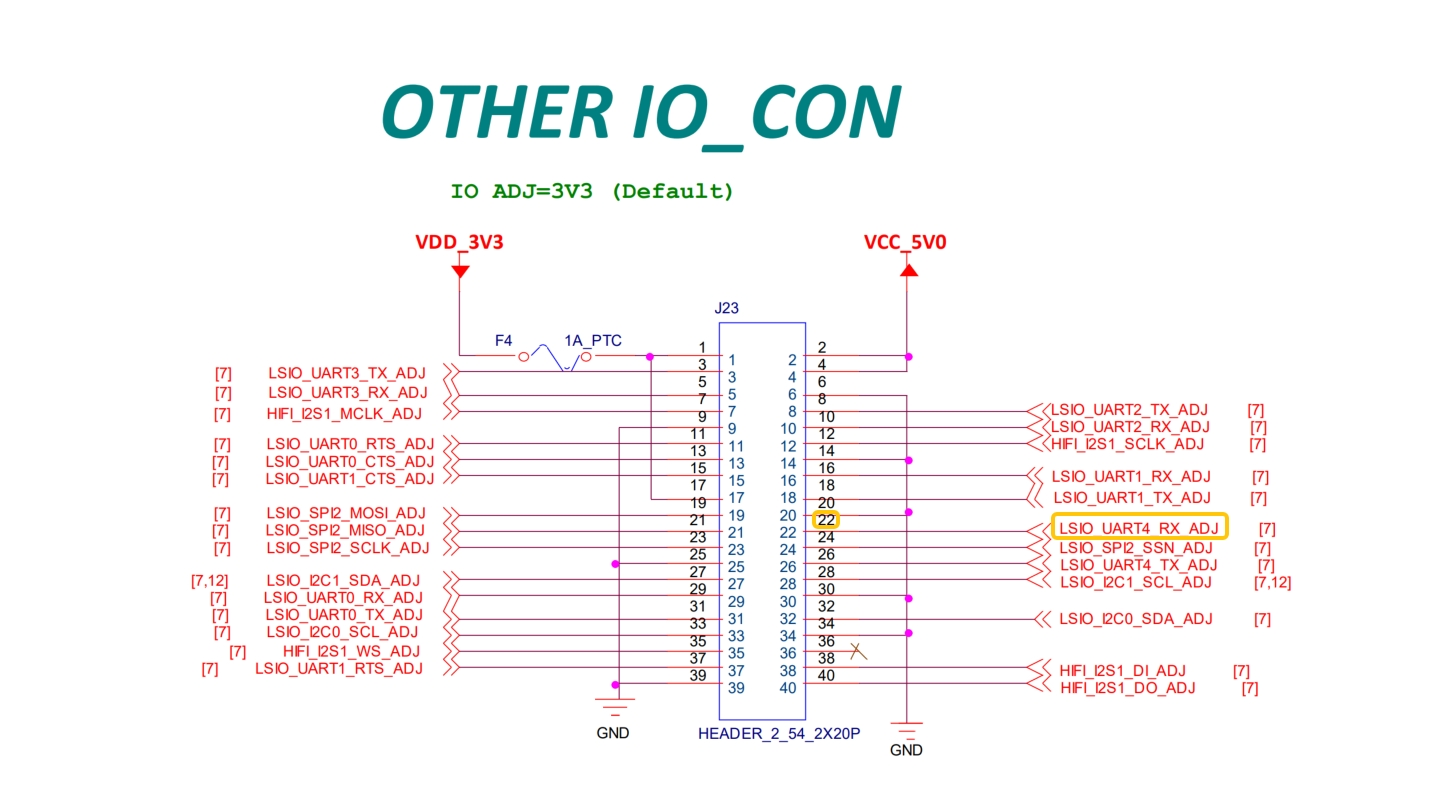
Device Tree Configuration
Add the
gpio_keys_hobotnode in the device tree and configure its properties:
 /dts-v1/;
 #include "x5.dtsi"
 #include "x5-memory.dtsi"
 #include "pinmux-func.dtsi"
 #include "pinmux-gpio.dtsi"
 #include <dt-bindings/input/linux-event-codes.h>
 #include <autoconf.h>
 / {
 	#address-cells = <2>;
 	#size-cells = <2>;

 	gpio-keys {
 		compatible = "gpio-keys";
 		autorepeat;
 		pinctrl-names = "default";
 		pinctrl-0 = <&aon_gpio_2>;

 		key-power {
 			debounce-interval = <100>;
 			gpios = <&aon_gpio_porta 2 GPIO_ACTIVE_LOW>;
 			label = "GPIO Key Power";
 			linux,code = <KEY_WAKEUP>;
 			wakeup-source;
 		};
 	};

 	gpio_keys_hobot {
 		compatible = "hobot,gpio_key";
 		debounce-interval = <200>;
 		gpios = <&ls_gpio0_porta 12 GPIO_ACTIVE_LOW>;
 		pinctrl-names = "default";
 	};

 	gua_audio_rpc_wrapper:audio-rpc-wrapper {
 		compatible = "gua,audio-rpc-wrapper";
 		rpmsg-enable;
 		status = "okay";
 	};
Debugging Tools Preparation
cat /proc/interrupts: View the number of interrupt triggers;dmesg: Check driver logs and GPIO level changes;Dupont wires: Used to short the GPIO pin to GND for interrupt triggering tests.
4.5.15.3. Test Method
Load the Driver
Upload the compiled gpio_key_drv.ko to the board’s /userdata directory. This module is used to test GPIO IRQ functionality. For detailed usage, refer to the IRQ usage section in the document: GPIO Debug Guide.
Load the module with the following command:
root@buildroot:/userdata/gpio_irq_test# insmod gpio_key_drv.ko
Expected normal output:
[64581.388130] gpio_key_init: init
[64581.391774] gpio_key_probe: probe start
Verify that the module has been loaded:
lsmod
The output should include:
gpio_key_drv 16384 0
Test with the Driver
Use a Dupont wire to connect the target GPIO pin to GND and observe the interrupt triggering.
Check whether the interrupt count changes:
watch -n 1 "cat /proc/interrupts | grep gpio_keys_hobot"
Example output:
Every 1.0s: cat /proc/interrupts | grep gpio_keys_hobot                                                                                                                                                                                                    buildroot: Thu Jan  1 18:34:38 1970

 77:        528          0          0          0          0          0          0          0  gpio-dwapb  12 Edge      gpio_keys_hobot
Check the level change logs:
dmesg | tail
Example output:
[  217.715873] gpio_key: IRQ GPIO 391 value=0
[  218.152797] gpio_key: IRQ GPIO 391 value=1
4.5.15.4. Test Metrics
After the driver is installed, monitor the GPIO interrupt triggering via /proc/interrupts and dmesg logs, ensuring the following requirements are met:
The driver runs stably for 48 hours without kernel crashes, deadlocks, or system reboots.
The interrupt count for the relevant entry in
/proc/interruptsincreases normally;dmesgprints real-time logs of GPIO level changes;No abnormal keywords such as
fail,error, ortimeoutappear in the logs:dmesg | grep -iE 'error|fail|timeout'
4.5.15.5. Test Results
Check for abnormal keywords:
dmesg | grep -iE 'error|fail|timeout'
Empty output indicates normal operation with no errors.
Check interrupt count:
cat /proc/interrupts | grep gpio_keys_hobot
Example output:
77: 28 0 0 0 0 0 0 0 gpio-dwapb 12 Edge gpio_keys_hobot
The increasing count on interrupt number 77 indicates normal interrupt response.
Check GPIO level changes:
dmesg | tail
Partial output:
[  217.715873] gpio_key: IRQ GPIO 391 value=0
[  218.152797] gpio_key: IRQ GPIO 391 value=1
[  219.355553] gpio_key: IRQ GPIO 391 value=0
[  220.439865] gpio_key: IRQ GPIO 391 value=1
...
The continuous logging of level changes indicates timely and accurate interrupt triggering and response.