3.11.4 Create skills
Skill Workshop can mint skills via blank templates with AI drafting, or by importing URLs (GitHub, NodeHub, general web pages). Both paths produce standard SKILL.md notebooks for your playbook.
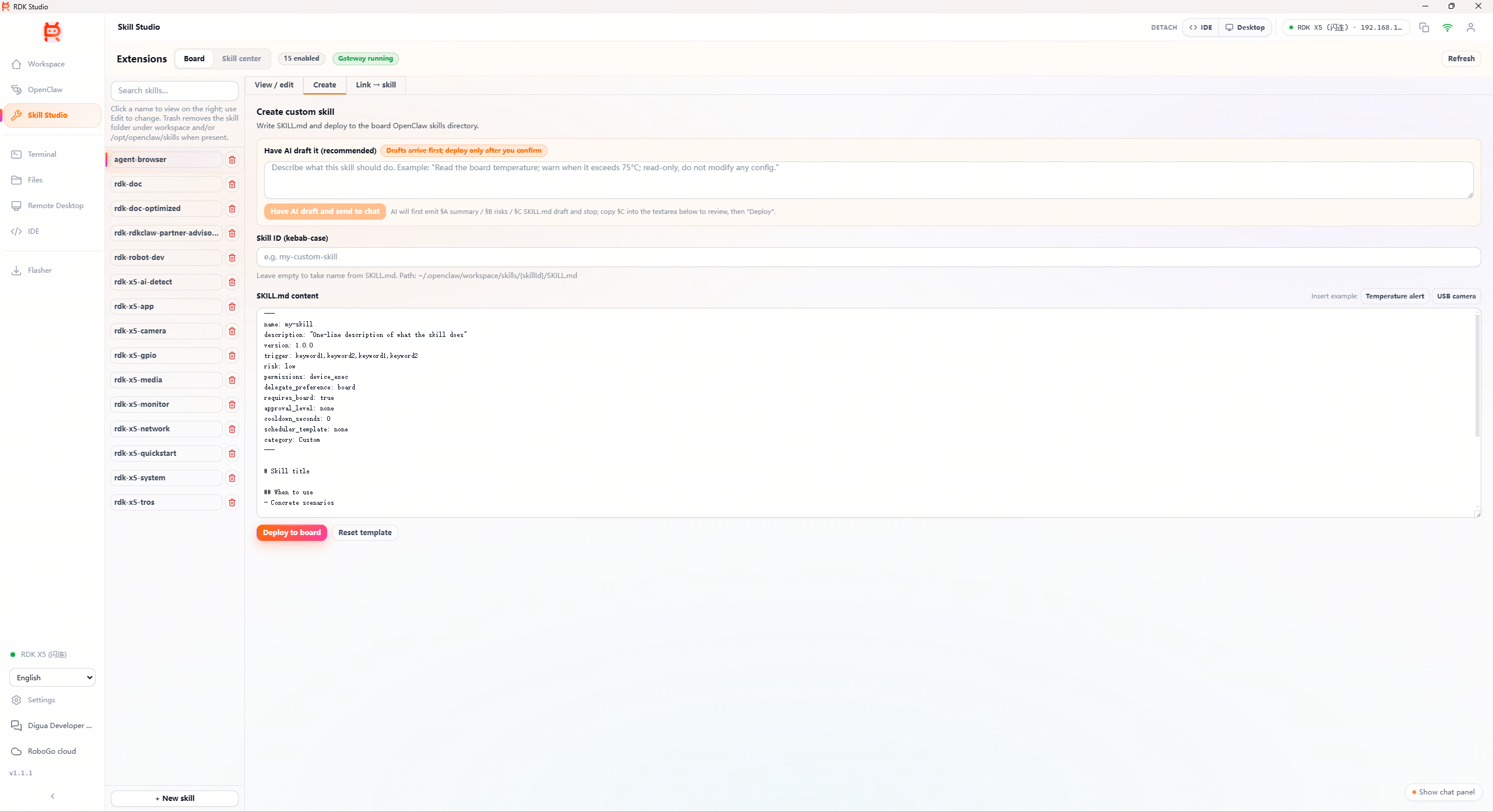
Template workflow (plus AI drafting)
| Step | Action |
|---|---|
| 1 | Skill Workshop → Skill center → Create Choose the empty template—frontmatter scaffolding is prefilled |
| 2 | Describe intent, for example “Teach AI how to steer RDK X5 Wi‑Fi toward 2.4 GHz during instability.” |
| 3 | AI outputs a draft SKILL.md covering trigger, risk, and numbered steps |
| 4 | Edit real commands, refine triggers and risk tiers |
| 5 | Simulate triggers with sample phrases—“Wi‑Fi flapping”; Studio previews keyword hits |
| 6 | Install locally or deploy on-board |
AI drafts are decent but demand review:
- Triggers shouldn’t be too broad (conversation collisions) nor too niche (never match)
- Destructive shell flows need at least
mediumrisk - Validate commands—models may hallucinate plausible flags
URL import flow
Turn arbitrary web content into a skill:
| Step | Action |
|---|---|
| 1 | Skill Workshop → Skill center → From link |
| 2 | Paste URL; Studio classifies provider |
| 3 | Target prompt: “I want the AI to learn X” |
| 4 | Select applicable hardware (X3 / X5 / S100 / Any) |
| 5 | AI fetches the page → SKILL.md scaffold |
| 6 | Tune in-editor |
| 7 | Install locally or deploy |
Provider detection
| Source | Detection | Handling |
|---|---|---|
| GitHub repos | URLs containing github.com/... | README plus layout; commands & sequencing |
| NodeHub examples | Contains developer.d-robotics.cc/nodehub | Case notes + startup guidance |
| General sites | Default fallback | Parses HTML prose for technical excerpts |
Dedicated parsers beat generic blogs—but blog quality hinges on headings and structure.
URL import limits
| Limit | Impact |
|---|---|
| Oversized pages | Content past ~50 KB may truncate or fail |
| SPA / JS-required UI | Scripted regions may disappear |
| Access controls | Scraping denied by firewall or headers |
| Media-heavy pages | Extracts textual blurbs only—not video/audio semantics |
Retries failing? Copy text locally, rework manually, submit via Skill Workshop → Create.
Authoring tips
| Tip | Why |
|---|---|
Nail description before steps | Scenario clarity drives tooling choices |
| Avoid mushy triggers | Not trigger: camera alone—prefer trigger: USB camera blackout,hobot_usb_cam,code -6 |
| Use numbered prose | Parses better than sprawling paragraphs |
| Paste exact commands | Replace vague “inspect the process tree” text with runnable snippets |
| Add anti-patterns | “Never do…” guidance anchors safety |