4.4.4. System Miniaturization and Trimming
4.4.4.1. Overview
In the process of embedded system development, system trimming aims to remove unnecessary functions and files in order to reduce resource consumption (such as storage, memory, and CPU) and improve overall performance. By optimizing and adjusting each component of the system, the trimming process eliminates redundant components while preserving essential functionality, ensuring the system better adapts to specific hardware platforms and application requirements.
4.4.4.2. Introduction to System Trimming
The primary goal of system trimming is to optimize storage usage, reduce power consumption, improve performance, and minimize memory footprint. This not only effectively saves storage space—critical for resource-constrained embedded devices—but also enhances system boot speed and response efficiency while reducing resource waste.
Reduce storage footprint: By trimming unnecessary features and modules, reduce the storage space occupied by the file system, kernel, bootloader, etc., to suit hardware environments with limited resources.
Improve boot speed: A trimmed system loads fewer modules during startup, resulting in a more efficient boot process.
Enhance system performance: Removing unnecessary functions and drivers reduces memory usage, improving system responsiveness and stability.
Customize the system: Tailor system components according to actual needs, enabling fine-grained control and enhancing maintainability and scalability.
The main system images currently include uboot, kernel, and rootfs. Their sizes can be obtained from the System Partition Table:
| Image | Size |
|---|---|
| uboot | 2M |
| kernel | 12M |
| rootfs | 250M |
As can be seen, the sizes of the system images—uboot, kernel, and rootfs—show an increasing trend. Compared to smaller components, larger components offer more significant size reduction potential through trimming. For example, trimming 1MB from rootfs may be relatively easy, whereas achieving the same reduction on uboot would be much more difficult.
Therefore, the focus of system trimming should be on kernel and rootfs, as optimization in these two areas will have a decisive impact on the overall system size.
4.4.4.3. System Trimming Methods
U-Boot Trimming
U-Boot is the bootloader in embedded devices, primarily responsible for device initialization, kernel loading, and hardware initialization. The main objective of U-Boot trimming is to streamline its codebase by removing modules and functionalities unrelated to the target hardware platform.
In this platform, the U-Boot configuration file is uboot/configs/hobot_x5_soc_defconfig. Use the following command to configure U-Boot options:
./bd.sh uboot menuconfig
This command automatically uses the U-Boot configuration file defined in the board-level configuration. After configuration, it automatically performs savedefconfig and saves the changes. For detailed instructions, refer to the Configuring U-Boot Option Parameters section.
Upon successful execution, this command opens the U-Boot graphical configuration interface, where you can interactively configure options:
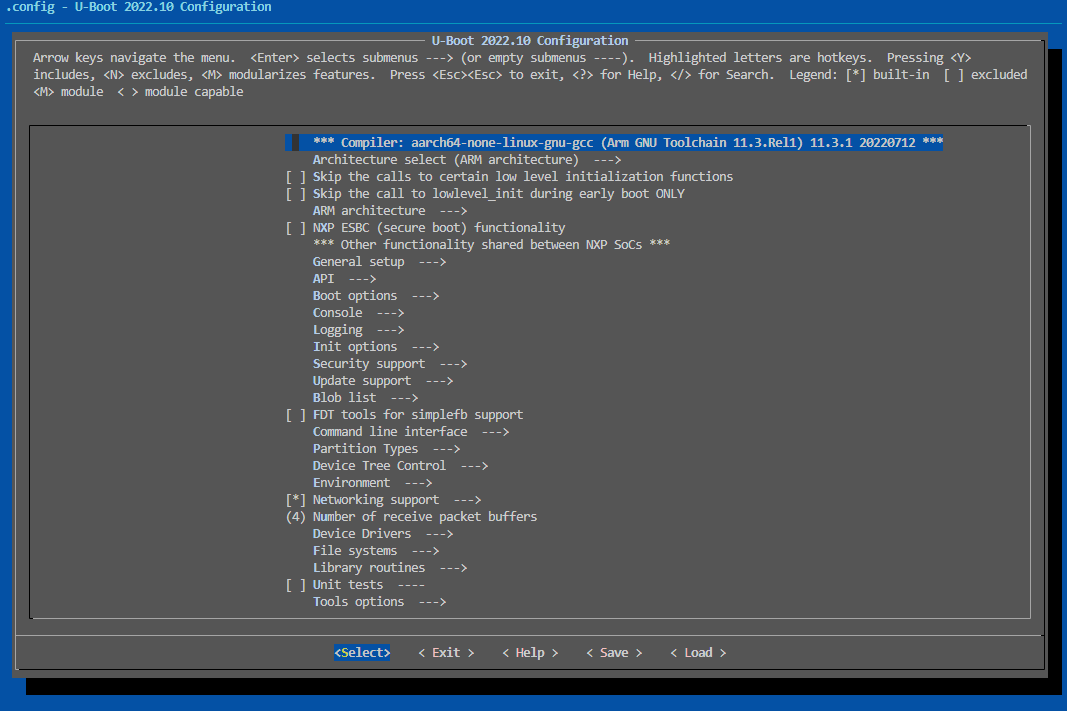
In this interface, you can disable unnecessary features or commands based on requirements to reduce the U-Boot image size.
Disable unnecessary commands
For example, if the
memtestcommand is not needed, it can be disabled by unchecking it in the menuconfig interface: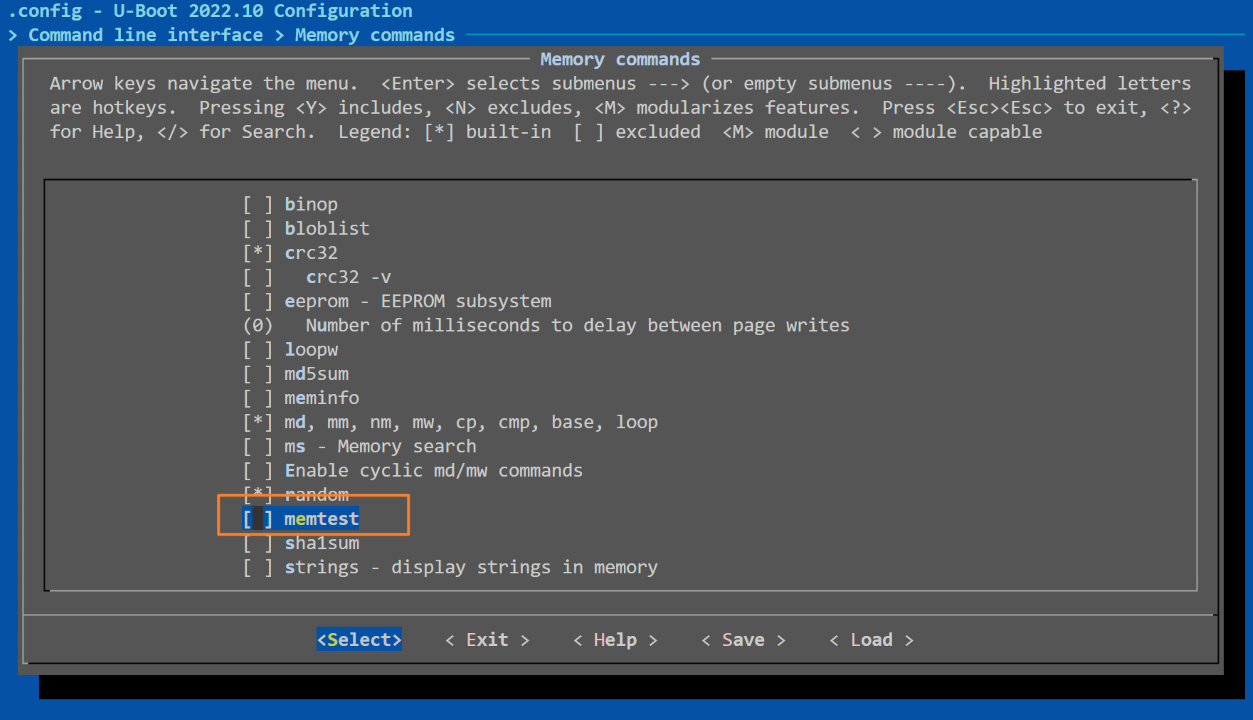
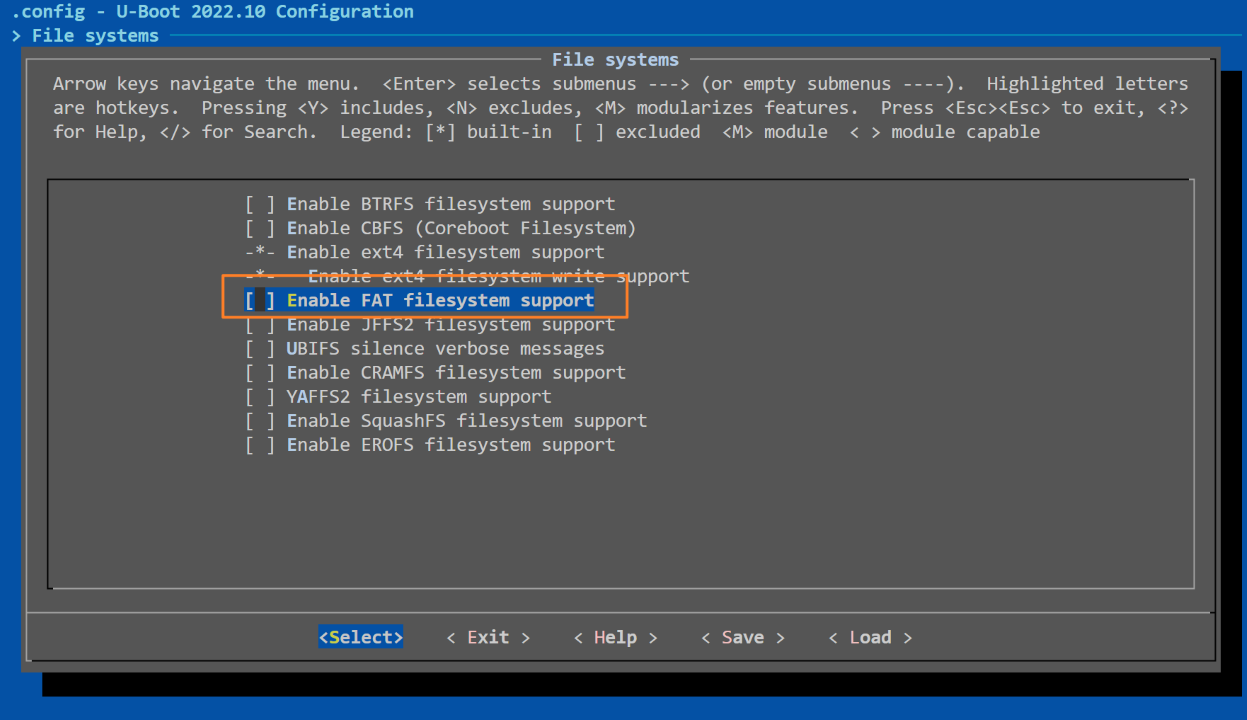
Disable filesystem support
If certain filesystems (e.g., FAT, ext4) are not required, their support can be disabled by unselecting related options. For example, to disable FAT filesystem support:
Disable unnecessary hardware drivers
If I2C device support is not needed, disable the I2C driver by unchecking
I2C supportin the menuconfig interface: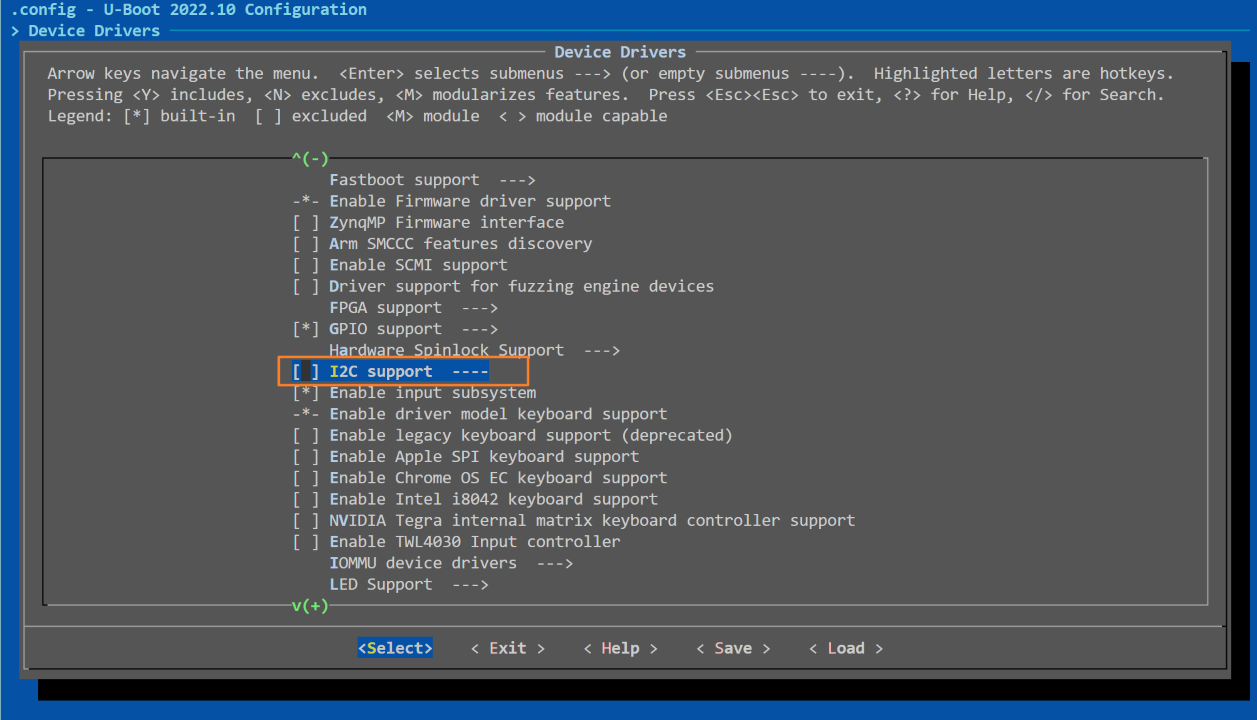
After completing the configuration in the menuconfig interface, select Exit, and choose Yes when prompted to save changes to the .config file (on this platform, it will be saved to uboot/configs/hobot_x5_auto_defconfig).
After modifying the configuration, clean the previous build files and recompile the U-Boot image:
# Clean old build files
./bd.sh uboot clean
# Rebuild
./bd.sh uboot
Linux Kernel Trimming
The Linux kernel is the core of an embedded system. The goal of kernel trimming is to remove unnecessary drivers, features, and filesystem support based on requirements, thereby reducing kernel size and resource consumption to achieve a compact and efficient Linux system.
Common methods for Linux kernel trimming include:
Removing unused features such as symbol tables, print functions, and debugging features.
Removing unused drivers.
Modifying kernel source code.
Disable Kernel Features and Drivers
Similar to the U-Boot configuration process, this platform provides a command for configuring kernel options:
./bd.sh boot menuconfig
For detailed explanation of this command, refer to the Configuring Kernel Option Parameters section. Upon successful execution, the command opens the kernel’s graphical configuration interface, allowing interactive configuration and removal of unnecessary modules:
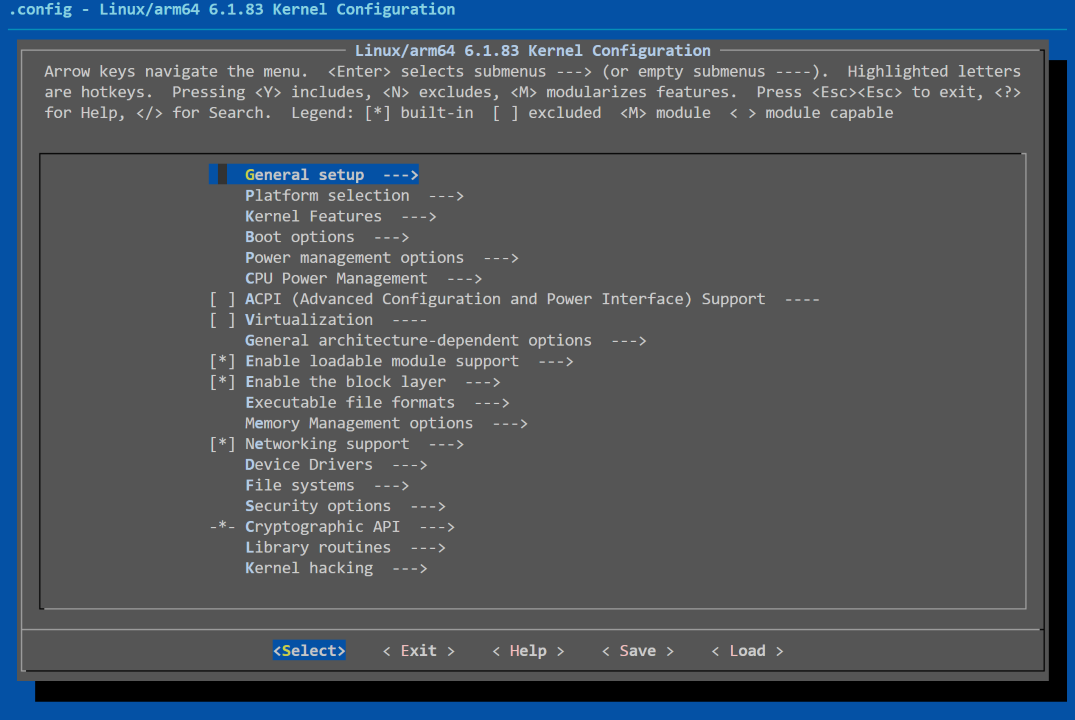
The process of removing unnecessary features or drivers in the Linux kernel menuconfig interface is similar to that of U-Boot. The key to kernel trimming lies in accurately identifying removable components without affecting system functionality. After completing the settings in the menuconfig interface, select Exit, and choose Yes when prompted to save changes to the .config file (on this platform, typically kernel/arch/arm64/configs/hobot_x5_soc_defconfig).
Modify Kernel Source Code
The kernel source code is vast, and direct modification is often challenging. Tools can be used to evaluate the size of modules and symbols for targeted trimming.
The following command can be used to display symbol information in the vmlinux file, which is located in out/build/kernel:
nm --size vmlinux | sort -k 2 -n -r
Command explanation:
nm --size vmlinux: Lists symbol information in thevmlinuxfile and displays the size (in bytes) of each symbol.sort -k 2 -n -r:-k 2: Sort by the second column (symbol size).-n: Sort numerically rather than lexicographically.-r: Sort in descending order (largest to smallest).
A partial log output is shown below:
out/build/kernel$ nm --size vmlinux | sort -k 2 -n -r
0000000000200000 b _buf_log_main
0000000000058000 d _printk_rb_static_infos
0000000000040000 b _buf_log_system
0000000000040000 b _buf_log_radio
0000000000040000 b _buf_log_events
0000000000020000 b __log_buf
0000000000018000 d _printk_rb_static_descs
00000000000082f8 b ipc_shm_data
0000000000006000 b memblock_memory_init_regions
0000000000004020 B hstates
0000000000003e14 T hidinput_connect
0000000000003b88 r edid_cea_modes_1
00000000000039c0 R v4l2_dv_timings_presets
0000000000003740 r alg_test_descs
00000000000035c0 r orientation_data
0000000000003480 r wm8962_dapm_widgets
00000000000033b4 T ZSTD_compressBlock_doubleFast_dictMatchState
0000000000002fa8 t allowlist
Log Interpretation:
Each line contains the following information:
Address (e.g.,
0000000000200000): The address of the symbol invmlinux.Size (numerical value following symbol types like
b,d,t,T,r): Size in bytes occupied by the symbol.Symbol Type (e.g.,
T,b,d): Indicates the type of symbol.Symbol Name (e.g.,
_buf_log_main,_printk_rb_static_infos): Name of the symbol.
For example:
0000000000200000 b _buf_log_main
0000000000058000 d _printk_rb_static_infos
In this output:
_buf_log_mainhas a size of0x200000(i.e., 2MB) and is a BSS segment symbol (bindicates BSS)._printk_rb_static_infoshas a size of0x58000(i.e., 348KB) and is a data segment symbol (dindicates data).
Symbol Type Reference:
T: Symbol is a function located in the text (code) section.t: Local function in the text section.D: Initialized data variable in the data section.d: Local initialized data variable.b: Uninitialized static variable (BSS section).r: Read-only data.R: Read-only data with address resolved at link/load time.W: Weak symbol.
Based on symbol types, we can preliminarily determine what can be removed:
BSS (
b): These symbols represent uninitialized static variables. They may occupy space but are often trimmable if unused.Data (
d): Initialized global variables—verify necessity; unused ones can be trimmed.Read-only data (
rorR): Constants (e.g., library constants); unused portions can be optimized.Text (
Tort): Function code. Unused or conditionally used functions are candidates for removal. Local functions (t) can be analyzed and possibly disabled via config.Weak symbols (
W): Optional or less critical; potential candidates for trimming.
Focus first on large symbols—especially those consuming tens of KB or more—and verify whether they are truly needed. If not, removing them can save significant space.
Other Trimming Directions
Remove debugging information For production environments, disable debug symbols and information to reduce kernel image size. Disable the following options in menuconfig:
CONFIG_DEBUG_INFO=n  # Disable debug info
CONFIG_DEBUG_KERNEL=n  # Disable kernel debugging
Root Filesystem Trimming
The root filesystem on this platform is built using Buildroot. For detailed steps, refer to the Using Buildroot to Create Root Filesystem section.
The main strategies for filesystem trimming are: remove, replace, and compress:
Remove: Delete unnecessary content such as documentation, unused libraries, and debugging tools.
Replace: Substitute large implementations with smaller ones (e.g., replace glibc with musl libc).
Compress: Use efficient compression algorithms.
Trimming Applications and Redundant Files:
Some applications or redundant files can often be removed without affecting functionality:
Debugging tools: e.g., tcpdump, mpstat, strace, etc.
Performance testing tools: e.g., lmbench, sysstat, tiobench, etc.
Redundant files: Documentation, auxiliary programs, configuration files, and data modules. When multiple apps provide similar functions, keep only one.
Use functionally equivalent but smaller packages: Many Linux packages offer similar functionality; choose the one with the smallest footprint and port it to the embedded device.
Resource files: Audio, video, and UI assets often consume large space; delete them if unused.
Library Trimming:
Use smaller C libraries such as musl libc or uclibc instead of glibc.
Remove unused libraries.
Run the following command in the system/buildroot/source directory to remove unnecessary applications and libraries:
./build.sh menuconfig x5_system_defconfig
Enter the menuconfig interface for configuration:
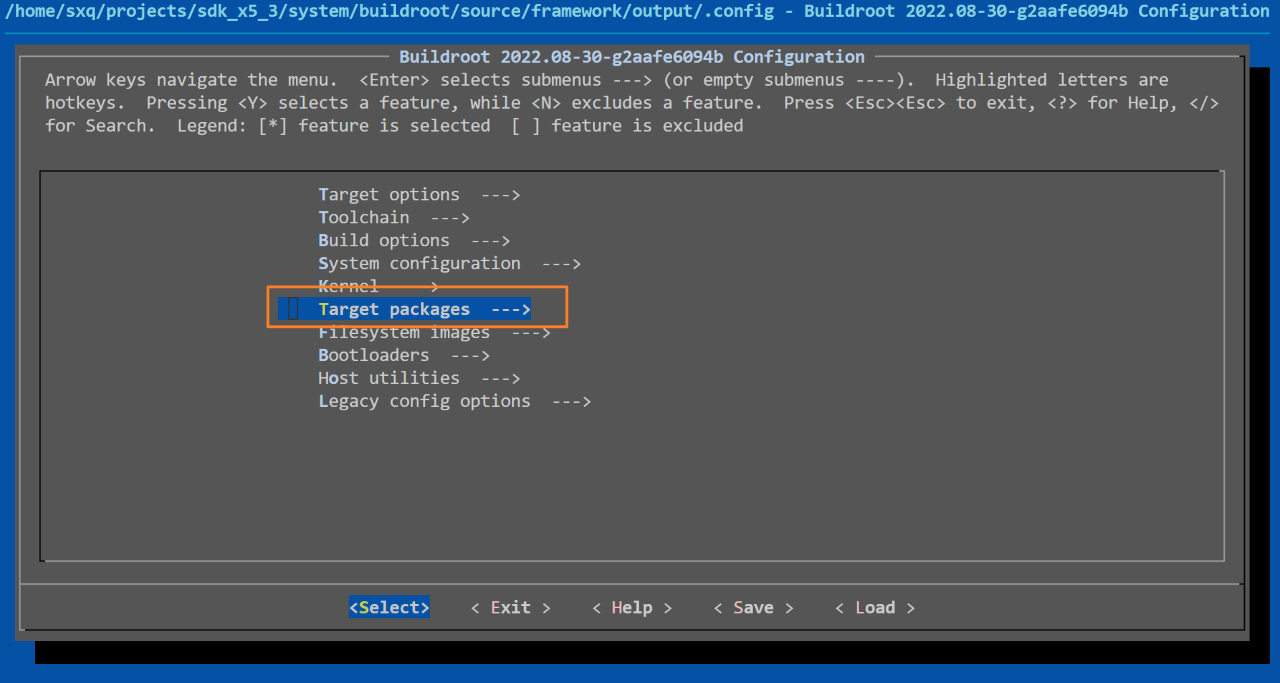
All application packages in the root filesystem are located under the target packages directory and can be modified as needed. For example, to disable the ffmpeg package, simply uncheck the ffmpeg option in this menu:
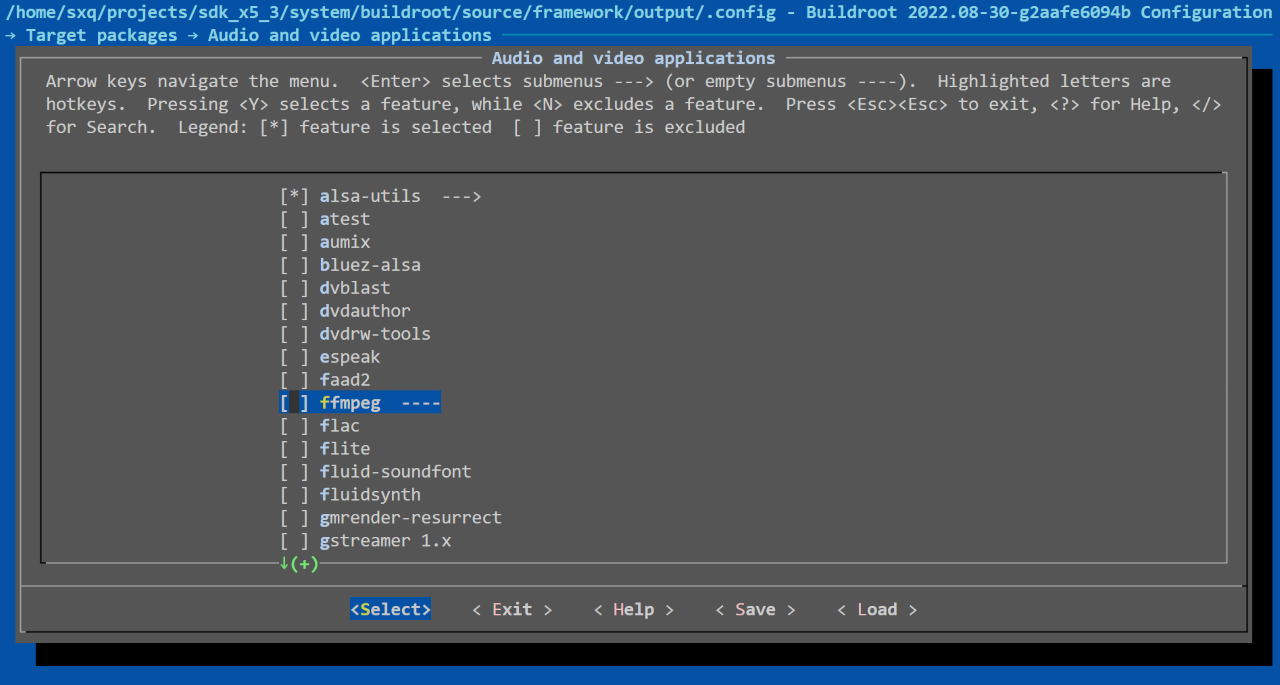
After completing configuration in the menuconfig interface, select Exit and choose Yes to save changes to the .config file (on this platform: system/buildroot/source/configs/x5_system_defconfig).
Then, clean previous builds and recompile:
cd system/buildroot/source
./build.sh clean x5_system_defconfig
./build.sh build x5_system_defconfig 0.0.1
Additionally, strip removes symbol and debug information from binaries and libraries, significantly reducing space usage. This platform enables the Buildroot strip option by default:
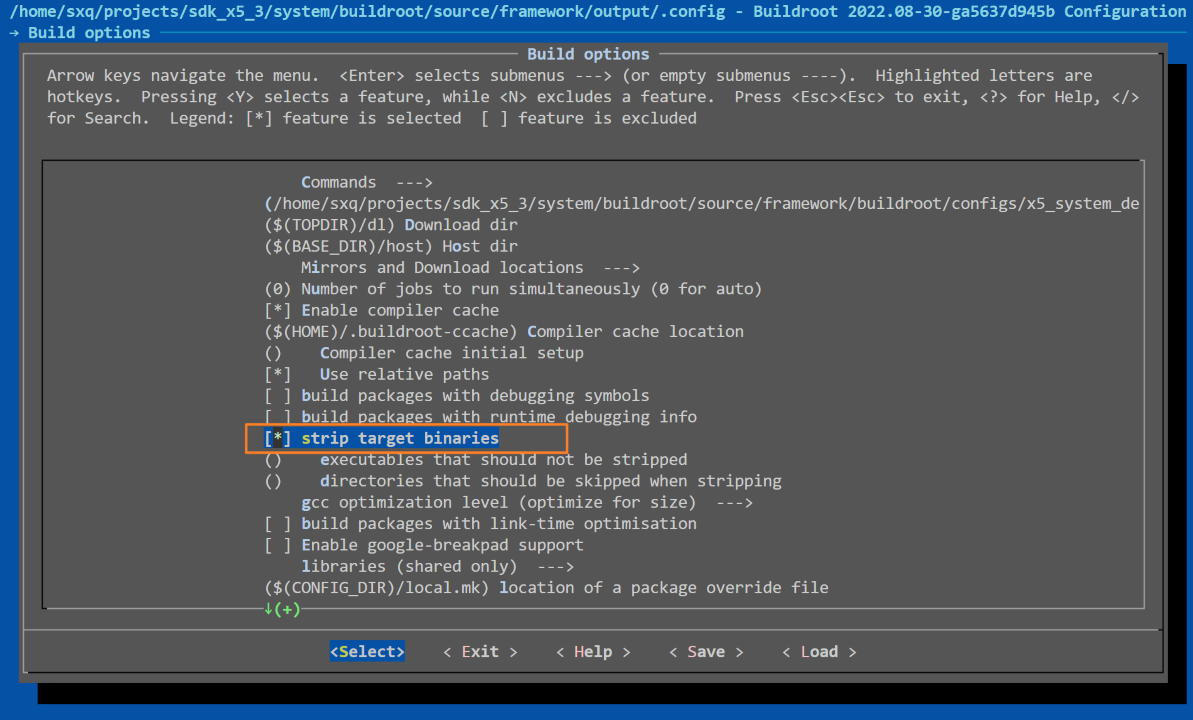
This setting uses the strip command to remove debug symbols from binaries and libraries in the target filesystem, saving space. Debug symbols are needed for local debugging but not for remote debugging.
4.4.4.4. Basic Principles of System Trimming
To ensure the trimmed system functions correctly and meets performance and resource requirements, the following principles should be followed during the trimming process:
Trim Based on Requirements
Clear Objectives: Trimming should align with actual application needs. Avoid blind trimming; clearly understand which functions, modules, and hardware the system must support. The goal is to adapt to specific hardware and use cases—not merely reduce system size.
Minimal Feature Set: Retain only necessary features and services based on use cases, avoiding over-trimming that compromises expected functionality.
Gradual Trimming
Phased Approach: Perform trimming in stages, starting with the least critical modules and progressively removing unnecessary components. Test and validate after each stage to ensure system stability and functional integrity.
Preserve Core Functions: Always ensure basic system functions remain intact. For kernel trimming, retain essential hardware support, especially device drivers and filesystems.
Prioritize Security and Stability
Avoid Destructive Trimming: Do not remove or disable core system functions such as kernel scheduling, memory management, or HAL. Excessive trimming may lead to instability or boot failure.
Thorough Testing: After each trimming step, conduct comprehensive functional verification, especially for critical modules like hardware and networking, to prevent security vulnerabilities or crashes.
Minimize Dependencies
Eliminate Redundant Dependencies: Reduce reliance on unnecessary libraries and tools, especially in Buildroot and root filesystem trimming. Remove unused dependencies to avoid bloating.
Use Lightweight Alternatives: Replace multiple standard tools with BusyBox; choose smaller, lower-resource libraries and tools to reduce rootfs size.
Manage Kernel Configuration Efficiently
Streamline Kernel Config: Tailor kernel configuration to the target hardware. Remove unnecessary drivers, filesystem support, and debugging features.
Modular Management: Load kernel modules only when needed. Avoid loading unnecessary modules to reduce kernel size and improve performance.
Efficient Storage and Memory Management
Optimize Storage Usage: Focus on storage optimization, especially in storage-limited embedded devices. Minimize the size of filesystems, kernel images, and U-Boot files.
Optimize Memory Usage: Reduce unnecessary memory consumption, particularly on devices with limited RAM. Improve memory utilization by removing unneeded services, programs, and drivers.
Modularity and Scalability
Maintain Modularity: Preserve modular design even after trimming. Ensure the system can flexibly load modules when needed, rather than integrating all features statically.
Ensure Scalability: Avoid limiting future expansion. Ensure trimmed components can be easily reintegrated for future feature additions.
Follow Toolchain and Standards
Use Standard Toolchains: Use consistent toolchains and configuration tools (e.g., U-Boot’s
make menuconfig, Kernel’smake menuconfig, or Buildroot’s configurator). These are well-optimized and help ensure compatibility.Document the Process: Record every trimming decision and step in detail. This aids understanding, maintenance, and future modifications.
Balance Performance and Power Consumption
Optimize Performance: Trimming should not only reduce size but also enhance performance by removing unnecessary functions and configurations.
Consider Power Efficiency: In embedded systems, power consumption is critical. Prioritize low-power hardware support and software features during trimming.
Maintain Backward Compatibility
Avoid Breaking Compatibility: Especially during kernel and U-Boot trimming, ensure compatibility with the original system. Avoid removing modules that affect existing hardware support or system interfaces, preventing issues in updates and maintenance.
4.4.4.5. System Trimming Examples
Due to limited NAND capacity, in practical use, Kernel, system, and hbre partitions on NAND can be trimmed based on scenarios. Below are minimal configuration examples for Kernel and System suitable for the BSP package. Simply replace these configurations into the corresponding config files, complete the system trimming, recompile, and generate the minimal system image.
Minimal System Configuration
Below is the minimal configuration for the system:
BR2_aarch64=y
BR2_cortex_a55=y
BR2_TOOLCHAIN_EXTERNAL=y
BR2_TOOLCHAIN_EXTERNAL_CUSTOM=y
BR2_TOOLCHAIN_EXTERNAL_CUSTOM_PREFIX="aarch64-none-linux-gnu"
BR2_TOOLCHAIN_EXTERNAL_GCC_11=y
BR2_TOOLCHAIN_EXTERNAL_HEADERS_4_20=y
BR2_TOOLCHAIN_EXTERNAL_CUSTOM_GLIBC=y
# BR2_TOOLCHAIN_EXTERNAL_INET_RPC is not set
BR2_TOOLCHAIN_EXTERNAL_CXX=y
BR2_CCACHE=y
# BR2_PIC_PIE is not set
BR2_SSP_NONE=y
BR2_RELRO_NONE=y
BR2_FORTIFY_SOURCE_NONE=y
BR2_INIT_SYSV=y
BR2_ROOTFS_DEVICE_CREATION_DYNAMIC_EUDEV=y
BR2_ROOTFS_MERGED_USR=y
BR2_TARGET_GENERIC_ROOT_PASSWD="root"
BR2_SYSTEM_BIN_SH_BASH=y
BR2_SYSTEM_DEFAULT_PATH="/bin:/sbin:/usr/bin:/usr/sbin"
BR2_PACKAGE_FFMPEG=y
BR2_PACKAGE_FFMPEG_ENCODERS=""
BR2_PACKAGE_FFMPEG_DECODERS=""
BR2_PACKAGE_FFMPEG_MUXERS=""
BR2_PACKAGE_FFMPEG_DEMUXERS=""
BR2_PACKAGE_FFMPEG_PARSERS=""
BR2_PACKAGE_FFMPEG_BSFS=""
BR2_PACKAGE_FFMPEG_PROTOCOLS=""
BR2_PACKAGE_FFMPEG_FILTERS=""
# BR2_PACKAGE_FFMPEG_INDEVS is not set
# BR2_PACKAGE_FFMPEG_OUTDEVS is not set
BR2_PACKAGE_FFMPEG_EXTRACONF=" --disable-everything --enable-gray --enable-safe-bitstream-reader --enable-encoder=adpcm_g726le --enable-encoder=flac  --enable-encoder=pcm_alaw --enable-encoder=pcm_mulaw --enable-encoder=adpcm_ima_wav --enable-encoder=srt --enable-encoder=subrip  --enable-encoder=text  --enable-encoder=movtext --enable-encoder=ass    --enable-decoder=adpcm_g726le   --enable-decoder=flac           --enable-decoder=pcm_alaw      --enable-decoder=pcm_mulaw       --enable-decoder=adpcm_ima_wav  --enable-decoder=h264   --enable-decoder=hevc   --enable-decoder=mjpeg  --enable-muxer=adts     --enable-muxer=mpegts   --enable-muxer=rtsp     --enable-muxer=rtp      --enable-muxer=avi      --enable-muxer=flv      --enable-muxer=hls      --enable-muxer=mp4      --enable-muxer=flac --enable-demuxer=flac --enable-demuxer=aac --enable-demuxer=mpegts  --enable-demuxer=h264 --enable-demuxer=hevc --enable-demuxer=mjpeg --enable-demuxer=image2  --enable-demuxer=mov --enable-demuxer=rtsp --enable-demuxer=hls  --enable-demuxer=rtp --enable-demuxer=flv --enable-demuxer=mpegps --enable-demuxer=mpegtsraw --enable-demuxer=mpegvideo --enable-parser=h264 --enable-parser=hevc --enable-parser=aac --enable-parser=flac --enable-parser=mjpeg --enable-parser=mpeg4video --enable-parser=mpegvideo --enable-parser=mpegaudio --enable-bsf=h264_mp4toannexb --enable-bsf=aac_adtstoasc --enable-bsf=null --enable-bsf=extract_extradata --enable-protocol=file --enable-protocol=http --enable-protocol=rtp --enable-protocol=rtmpts --enable-protocol=https --enable-protocol=hls --enable-protocol=data --disable-armv5te --disable-armv6 --disable-mmx --disable-optimizations --disable-asm "
BR2_PACKAGE_BZIP2=y
BR2_PACKAGE_MEMSTAT=y
BR2_PACKAGE_MTD=y
BR2_PACKAGE_EUDEV_RULES_GEN=y
# BR2_PACKAGE_EUDEV_ENABLE_HWDB is not set
BR2_PACKAGE_I2C_TOOLS=y
BR2_PACKAGE_TINYALSA=y
BR2_PACKAGE_MINIZIP_ZLIB=y
BR2_PACKAGE_LIBKCAPI=y
BR2_PACKAGE_LIBKCAPI_ENCAPP=y
BR2_PACKAGE_LIBKCAPI_HASHER=y
BR2_PACKAGE_LIBKCAPI_RNGAPP=y
BR2_PACKAGE_LIBOPENSSL_BIN=y
BR2_PACKAGE_LIBOPENSSL_ENGINES=y
BR2_PACKAGE_LIBGPIOD=y
BR2_PACKAGE_LIBGPIOD_TOOLS=y
BR2_PACKAGE_CJSON=y
BR2_PACKAGE_JSONCPP=y
BR2_PACKAGE_LIBEVENT=y
BR2_PACKAGE_LRZSZ=y
BR2_PACKAGE_NET_TOOLS=y
BR2_PACKAGE_OPENSSH=y
BR2_PACKAGE_OPTEE_CLIENT=y
# BR2_PACKAGE_OPTEE_CLIENT_RPMB_EMU is not set
BR2_PACKAGE_SYSKLOGD=y
BR2_PACKAGE_TAR=y
BR2_PACKAGE_UTIL_LINUX_LIBUUID=y
Replace the content of the BSP package’s system/buildroot/source/configs/x5_system_defconfig file with the above.
Minimal Kernel Configuration
Below is the minimal kernel configuration:
CONFIG_WERROR=y
# CONFIG_LOCALVERSION_AUTO is not set
CONFIG_SYSVIPC=y
CONFIG_POSIX_MQUEUE=y
CONFIG_AUDIT=y
CONFIG_NO_HZ_IDLE=y
CONFIG_HIGH_RES_TIMERS=y
CONFIG_PREEMPT=y
CONFIG_IRQ_TIME_ACCOUNTING=y
CONFIG_BSD_PROCESS_ACCT=y
CONFIG_BSD_PROCESS_ACCT_V3=y
CONFIG_TASKSTATS=y
CONFIG_TASK_XACCT=y
CONFIG_TASK_IO_ACCOUNTING=y
CONFIG_IKCONFIG=y
CONFIG_IKCONFIG_PROC=y
CONFIG_MEMCG=y
CONFIG_BLK_CGROUP=y
CONFIG_CGROUP_PIDS=y
CONFIG_CGROUP_HUGETLB=y
CONFIG_CPUSETS=y
CONFIG_CGROUP_DEVICE=y
CONFIG_CGROUP_CPUACCT=y
CONFIG_CGROUP_PERF=y
CONFIG_NAMESPACES=y
CONFIG_USER_NS=y
CONFIG_SCHED_AUTOGROUP=y
CONFIG_BLK_DEV_INITRD=y
# CONFIG_RD_BZIP2 is not set
# CONFIG_RD_LZMA is not set
# CONFIG_RD_XZ is not set
# CONFIG_RD_LZO is not set
# CONFIG_RD_ZSTD is not set
CONFIG_KALLSYMS_ALL=y
CONFIG_EMBEDDED=y
CONFIG_PROFILING=y
CONFIG_ARCH_HOBOT=y
CONFIG_ARCH_HOBOT_X5=y
CONFIG_ARM64_VA_BITS_48=y
CONFIG_SCHED_MC=y
CONFIG_SCHED_SMT=y
CONFIG_NR_CPUS=8
CONFIG_HZ_100=y
CONFIG_PARAVIRT=y
CONFIG_KEXEC_FILE=y
CONFIG_CRASH_DUMP=y
CONFIG_COMPAT=y
CONFIG_RANDOMIZE_BASE=y
CONFIG_HOBOT_BOOT_LZ4=y
CONFIG_PM_DEBUG=y
CONFIG_PM_ADVANCED_DEBUG=y
CONFIG_PM_TEST_SUSPEND=y
CONFIG_CPU_IDLE=y
CONFIG_CPU_FREQ=y
CONFIG_CPU_FREQ_STAT=y
CONFIG_CPU_FREQ_GOV_POWERSAVE=y
CONFIG_CPU_FREQ_GOV_USERSPACE=y
CONFIG_CPU_FREQ_GOV_ONDEMAND=y
CONFIG_CPUFREQ_DT=y
CONFIG_JUMP_LABEL=y
CONFIG_MODULES=y
CONFIG_MODULE_UNLOAD=y
CONFIG_PARTITION_ADVANCED=y
# CONFIG_CORE_DUMP_DEFAULT_ELF_HEADERS is not set
# CONFIG_COMPAT_BRK is not set
CONFIG_PAGE_REPORTING=y
CONFIG_KSM=y
CONFIG_MEMORY_FAILURE=y
CONFIG_CMA=y
CONFIG_NET=y
CONFIG_PACKET=y
CONFIG_PACKET_DIAG=y
CONFIG_UNIX=y
CONFIG_UNIX_DIAG=y
CONFIG_NET_KEY=y
CONFIG_INET=y
CONFIG_IP_MULTICAST=y
CONFIG_IP_PNP=y
CONFIG_IP_PNP_DHCP=y
CONFIG_IP_PNP_BOOTP=y
CONFIG_IP_MROUTE=y
CONFIG_NET_FOU=y
CONFIG_INET_AH=y
CONFIG_INET_ESP=y
CONFIG_INET_IPCOMP=y
CONFIG_INET_UDP_DIAG=y
CONFIG_INET_RAW_DIAG=y
# CONFIG_IPV6 is not set
CONFIG_NETWORK_PHY_TIMESTAMPING=y
CONFIG_NETFILTER=y
CONFIG_VLAN_8021Q=y
CONFIG_NET_SCHED=y
CONFIG_NET_SCH_HTB=y
CONFIG_NET_SCH_HFSC=y
CONFIG_NET_SCH_PRIO=y
CONFIG_NET_SCH_MULTIQ=y
CONFIG_NET_SCH_TBF=y
CONFIG_NET_SCH_CBS=y
CONFIG_NET_SCH_ETF=y
CONFIG_NET_SCH_TAPRIO=y
CONFIG_NET_SCH_MQPRIO=y
CONFIG_NET_SCH_SKBPRIO=y
CONFIG_NET_SCH_INGRESS=y
CONFIG_NET_CLS_U32=y
CONFIG_CLS_U32_MARK=y
CONFIG_NET_CLS_ACT=y
CONFIG_NET_ACT_POLICE=y
CONFIG_NET_ACT_GACT=y
CONFIG_NET_ACT_SKBEDIT=y
CONFIG_DCB=y
CONFIG_NETLINK_DIAG=y
CONFIG_CGROUP_NET_PRIO=y
CONFIG_CGROUP_NET_CLASSID=y
CONFIG_DEVTMPFS=y
CONFIG_DEVTMPFS_MOUNT=y
CONFIG_FW_LOADER_USER_HELPER=y
CONFIG_FW_LOADER_USER_HELPER_FALLBACK=y
# CONFIG_DMIID is not set
CONFIG_EFI_CAPSULE_LOADER=y
CONFIG_EFI_DISABLE_RUNTIME=y
# CONFIG_ARM_SMCCC_SOC_ID is not set
CONFIG_MTD=y
CONFIG_MTD_CMDLINE_PARTS=y
CONFIG_MTD_BLOCK=y
CONFIG_MTD_CFI=y
CONFIG_MTD_CFI_ADV_OPTIONS=y
CONFIG_MTD_CFI_INTELEXT=y
CONFIG_MTD_CFI_AMDSTD=y
CONFIG_MTD_CFI_STAA=y
CONFIG_MTD_PHYSMAP=y
```CONFIG_MTD_PHYSMAP_OF=y
CONFIG_MTD_RAW_NAND=y
CONFIG_MTD_NAND_DENALI_DT=y
CONFIG_MTD_SPI_NAND=y
CONFIG_MTD_UBI=y
CONFIG_MTD_UBI_BLOCK=y
CONFIG_BLK_DEV_LOOP=y
CONFIG_BLK_DEV_RAM=y
CONFIG_BLK_DEV_RAM_SIZE=409600
CONFIG_EEPROM_AT24=y
CONFIG_HOBOT_VIO_N2D=m
CONFIG_SCSI=y
CONFIG_BLK_DEV_SD=y
CONFIG_CHR_DEV_SG=y
CONFIG_SCSI_SCAN_ASYNC=y
CONFIG_NETDEVICES=y
# CONFIG_NET_VENDOR_ALACRITECH is not set
# CONFIG_NET_VENDOR_AMAZON is not set
# CONFIG_NET_VENDOR_AMD is not set
# CONFIG_NET_VENDOR_AQUANTIA is not set
# CONFIG_NET_VENDOR_ARC is not set
# CONFIG_NET_VENDOR_ASIX is not set
# CONFIG_NET_VENDOR_BROADCOM is not set
# CONFIG_NET_VENDOR_CADENCE is not set
# CONFIG_NET_VENDOR_CAVIUM is not set
# CONFIG_NET_VENDOR_CORTINA is not set
# CONFIG_NET_VENDOR_DAVICOM is not set
# CONFIG_NET_VENDOR_ENGLEDER is not set
# CONFIG_NET_VENDOR_EZCHIP is not set
# CONFIG_NET_VENDOR_FUNGIBLE is not set
# CONFIG_NET_VENDOR_GOOGLE is not set
# CONFIG_NET_VENDOR_HISILICON is not set
# CONFIG_NET_VENDOR_HUAWEI is not set
# CONFIG_NET_VENDOR_INTEL is not set
# CONFIG_NET_VENDOR_ADI is not set
# CONFIG_NET_VENDOR_LITEX is not set
# CONFIG_NET_VENDOR_MARVELL is not set
# CONFIG_NET_VENDOR_MELLANOX is not set
# CONFIG_NET_VENDOR_MICREL is not set
# CONFIG_NET_VENDOR_MICROCHIP is not set
# CONFIG_NET_VENDOR_MICROSEMI is not set
# CONFIG_NET_VENDOR_MICROSOFT is not set
# CONFIG_NET_VENDOR_NI is not set
# CONFIG_NET_VENDOR_NATSEMI is not set
# CONFIG_NET_VENDOR_NETRONOME is not set
# CONFIG_NET_VENDOR_PENSANDO is not set
# CONFIG_NET_VENDOR_QUALCOMM is not set
# CONFIG_NET_VENDOR_RENESAS is not set
# CONFIG_NET_VENDOR_ROCKER is not set
# CONFIG_NET_VENDOR_SAMSUNG is not set
# CONFIG_NET_VENDOR_SEEQ is not set
# CONFIG_NET_VENDOR_SOLARFLARE is not set
# CONFIG_NET_VENDOR_SMSC is not set
# CONFIG_NET_VENDOR_SOCIONEXT is not set
CONFIG_STMMAC_ETH=y
CONFIG_STMMAC_SELFTESTS=y
CONFIG_DWMAC_DWC_QOS_ETH=y
# CONFIG_NET_VENDOR_SYNOPSYS is not set
# CONFIG_NET_VENDOR_VERTEXCOM is not set
# CONFIG_NET_VENDOR_VIA is not set
# CONFIG_NET_VENDOR_WANGXUN is not set
# CONFIG_NET_VENDOR_WIZNET is not set
# CONFIG_NET_VENDOR_XILINX is not set
CONFIG_X5_ETH=y
CONFIG_JPLUS_ETH=y
CONFIG_REALTEK_PHY=y
CONFIG_USB_NET_DRIVERS=m
CONFIG_KEYBOARD_GPIO=y
# CONFIG_INPUT_MOUSE is not set
# CONFIG_SERIO_SERPORT is not set
CONFIG_SERIO_AMBAKMI=y
CONFIG_VT_HW_CONSOLE_BINDING=y
CONFIG_LEGACY_PTY_COUNT=16
CONFIG_SERIAL_8250=y
CONFIG_SERIAL_8250_CONSOLE=y
CONFIG_SERIAL_8250_NR_UARTS=8
CONFIG_SERIAL_8250_RUNTIME_UARTS=8
CONFIG_SERIAL_8250_DW=y
CONFIG_SERIAL_OF_PLATFORM=y
CONFIG_SERIAL_DEV_BUS=y
CONFIG_HW_RANDOM=y
CONFIG_I2C_CHARDEV=y
CONFIG_I2C_DESIGNWARE_PLATFORM=y
CONFIG_SPI=y
CONFIG_SPI_DESIGNWARE=y
CONFIG_SPI_DW_DMA=y
CONFIG_SPI_DW_MMIO=y
CONFIG_SPI_SPIDEV=m
CONFIG_SPI_SLAVE=y
CONFIG_PPS_CLIENT_HOBOT_PPS=y
CONFIG_PINCTRL=y
CONFIG_PINCTRL_HORIZON=y
CONFIG_GPIOLIB=y
CONFIG_GPIO_SYSFS=y
CONFIG_GPIO_DWAPB=y
CONFIG_POWER_RESET_SYSCON=y
CONFIG_SYSCON_REBOOT_MODE=y
CONFIG_SENSORS_MR75203=y
CONFIG_THERMAL=y
CONFIG_THERMAL_WRITABLE_TRIPS=y
CONFIG_THERMAL_GOV_USER_SPACE=y
CONFIG_CPU_THERMAL=y
CONFIG_DEVFREQ_THERMAL=y
CONFIG_WATCHDOG=y
CONFIG_DW_WATCHDOG=y
CONFIG_MFD_HI6421_PMIC=y
CONFIG_MFD_HPU3501=y
CONFIG_REGULATOR=y
CONFIG_REGULATOR_DEBUG=y
CONFIG_REGULATOR_FIXED_VOLTAGE=y
CONFIG_REGULATOR_GPIO=y
CONFIG_REGULATOR_HPU3501=y
CONFIG_MEDIA_SUPPORT=y
# CONFIG_DVB_NET is not set
# CONFIG_DVB_DYNAMIC_MINORS is not set
CONFIG_MEDIA_USB_SUPPORT=y
CONFIG_USB_VIDEO_CLASS=m
# CONFIG_RADIO_ADAPTERS is not set
CONFIG_V4L_PLATFORM_DRIVERS=y
CONFIG_HOBOT_VIO=m
CONFIG_HOBOT_VIO_JPLUS=y
CONFIG_HOBOT_VIO_COMMON=m
CONFIG_HOBOT_VIN_NODE=m
CONFIG_HOBOT_VCON=m
CONFIG_HOBOT_CAMSYS=m
CONFIG_HOBOT_GDC_JPLUS=m
CONFIG_HOBOT_SENSOR=m
CONFIG_HOBOT_DESERIAL=m
CONFIG_HOBOT_LPWM=m
CONFIG_HOBOT_OSD=m
CONFIG_HOBOT_VSI_CAM=m
CONFIG_HOBOT_MIPI_CSI=y
CONFIG_HOBOT_CODEC_NODE=m
CONFIG_HOBOT_MIPI_CSI_DRV=m
CONFIG_HOBOT_MIPI_HOST_MAX_NUM=6
CONFIG_HOBOT_MIPI_HOST_SNRCLK=y
CONFIG_HOBOT_MIPI_DEV_MAX_NUM=2
CONFIG_HOBOT_MIPI_PHY=m
CONFIG_HOBOT_MIPI_DEBUG=m
CONFIG_VIDEO_VS_ISP_NAT=m
CONFIG_VIDEO_VS_VSE_NAT=m
CONFIG_VIDEO_VS_SIF_NAT=m
CONFIG_VIDEO_VS_CAM_PULSE=m
CONFIG_VIDEO_VS_ISP_V4L=m
CONFIG_VIDEO_VS_VSE_V4L=m
CONFIG_VIDEO_VS_SIF_V4L=m
CONFIG_VIDEO_VS_GDC_ARM_V4L=m
CONFIG_VIDEO_HOBOTC_JPU=m
CONFIG_VIDEO_HOBOTC_VPU=m
# CONFIG_CXD2880_SPI_DRV is not set
# CONFIG_MEDIA_TUNER_E4000 is not set
# CONFIG_MEDIA_TUNER_FC0011 is not set
# CONFIG_MEDIA_TUNER_FC0012 is not set
# CONFIG_MEDIA_TUNER_FC0013 is not set
# CONFIG_MEDIA_TUNER_FC2580 is not set
# CONFIG_MEDIA_TUNER_IT913X is not set
# CONFIG_MEDIA_TUNER_M88RS6000T is not set
# CONFIG_MEDIA_TUNER_MAX2165 is not set
# CONFIG_MEDIA_TUNER_MC44S803 is not set
# CONFIG_MEDIA_TUNER_MSI001 is not set
# CONFIG_MEDIA_TUNER_MT2060 is not set
# CONFIG_MEDIA_TUNER_MT2063 is not set
# CONFIG_MEDIA_TUNER_MT20XX is not set
# CONFIG_MEDIA_TUNER_MT2131 is not set
# CONFIG_MEDIA_TUNER_MT2266 is not set
# CONFIG_MEDIA_TUNER_MXL301RF is not set
# CONFIG_MEDIA_TUNER_MXL5005S is not set
# CONFIG_MEDIA_TUNER_MXL5007T is not set
# CONFIG_MEDIA_TUNER_QM1D1B0004 is not set
# CONFIG_MEDIA_TUNER_QM1D1C0042 is not set
# CONFIG_MEDIA_TUNER_QT1010 is not set
# CONFIG_MEDIA_TUNER_R820T is not set
# CONFIG_MEDIA_TUNER_SI2157 is not set
# CONFIG_MEDIA_TUNER_SIMPLE is not set
# CONFIG_MEDIA_TUNER_TDA18212 is not set
# CONFIG_MEDIA_TUNER_TDA18218 is not set
# CONFIG_MEDIA_TUNER_TDA18250 is not set
# CONFIG_MEDIA_TUNER_TDA18271 is not set
# CONFIG_MEDIA_TUNER_TDA827X is not set
# CONFIG_MEDIA_TUNER_TDA8290 is not set
# CONFIG_MEDIA_TUNER_TDA9887 is not set
# CONFIG_MEDIA_TUNER_TEA5761 is not set
# CONFIG_MEDIA_TUNER_TEA5767 is not set
# CONFIG_MEDIA_TUNER_TUA9001 is not set
# CONFIG_MEDIA_TUNER_XC2028 is not set
# CONFIG_MEDIA_TUNER_XC4000 is not set
# CONFIG_MEDIA_TUNER_XC5000 is not set
# CONFIG_DVB_M88DS3103 is not set
# CONFIG_DVB_MXL5XX is not set
# CONFIG_DVB_STB0899 is not set
# CONFIG_DVB_STB6100 is not set
# CONFIG_DVB_STV090x is not set
# CONFIG_DVB_STV0910 is not set
# CONFIG_DVB_STV6110x is not set
# CONFIG_DVB_STV6111 is not set
# CONFIG_DVB_DRXK is not set
# CONFIG_DVB_MN88472 is not set
# CONFIG_DVB_MN88473 is not set
# CONFIG_DVB_SI2165 is not set
# CONFIG_DVB_TDA18271C2DD is not set
# CONFIG_DVB_CX24110 is not set
# CONFIG_DVB_CX24116 is not set
# CONFIG_DVB_CX24117 is not set
# CONFIG_DVB_CX24120 is not set
# CONFIG_DVB_CX24123 is not set
# CONFIG_DVB_DS3000 is not set
# CONFIG_DVB_MB86A16 is not set
# CONFIG_DVB_MT312 is not set
# CONFIG_DVB_S5H1420 is not set
# CONFIG_DVB_SI21XX is not set
# CONFIG_DVB_STB6000 is not set
# CONFIG_DVB_STV0288 is not set
# CONFIG_DVB_STV0299 is not set
# CONFIG_DVB_STV0900 is not set
# CONFIG_DVB_STV6110 is not set
# CONFIG_DVB_TDA10071 is not set
# CONFIG_DVB_TDA10086 is not set
# CONFIG_DVB_TDA8083 is not set
# CONFIG_DVB_TDA8261 is not set
# CONFIG_DVB_TDA826X is not set
# CONFIG_DVB_TS2020 is not set
# CONFIG_DVB_TUA6100 is not set
# CONFIG_DVB_TUNER_CX24113 is not set
# CONFIG_DVB_TUNER_ITD1000 is not set
# CONFIG_DVB_VES1X93 is not set
# CONFIG_DVB_ZL10036 is not set
# CONFIG_DVB_ZL10039 is not set
# CONFIG_DVB_AF9013 is not set
# CONFIG_DVB_CX22700 is not set
# CONFIG_DVB_CX22702 is not set
# CONFIG_DVB_CXD2820R is not set
# CONFIG_DVB_CXD2841ER is not set
# CONFIG_DVB_DIB3000MB is not set
# CONFIG_DVB_DIB3000MC is not set
# CONFIG_DVB_DIB7000M is not set
# CONFIG_DVB_DIB7000P is not set
# CONFIG_DVB_DIB9000 is not set
# CONFIG_DVB_DRXD is not set
# CONFIG_DVB_EC100 is not set
# CONFIG_DVB_L64781 is not set
# CONFIG_DVB_MT352 is not set
# CONFIG_DVB_NXT6000 is not set
# CONFIG_DVB_RTL2830 is not set
# CONFIG_DVB_RTL2832 is not set
# CONFIG_DVB_RTL2832_SDR is not set
# CONFIG_DVB_S5H1432 is not set
# CONFIG_DVB_SI2168 is not set
# CONFIG_DVB_SP887X is not set
# CONFIG_DVB_STV0367 is not set
# CONFIG_DVB_TDA10048 is not set
# CONFIG_DVB_TDA1004X is not set
# CONFIG_DVB_ZD1301_DEMOD is not set
# CONFIG_DVB_ZL10353 is not set
# CONFIG_DVB_CXD2880 is not set
# CONFIG_DVB_STV0297 is not set
# CONFIG_DVB_TDA10021 is not set
# CONFIG_DVB_TDA10023 is not set
# CONFIG_DVB_VES1820 is not set
# CONFIG_DVB_AU8522_DTV is not set
# CONFIG_DVB_AU8522_V4L is not set
# CONFIG_DVB_BCM3510 is not set
# CONFIG_DVB_LG2160 is not set
# CONFIG_DVB_LGDT3305 is not set
# CONFIG_DVB_LGDT3306A is not set
# CONFIG_DVB_LGDT330X is not set
# CONFIG_DVB_MXL692 is not set
# CONFIG_DVB_NXT200X is not set
# CONFIG_DVB_OR51132 is not set
# CONFIG_DVB_OR51211 is not set
# CONFIG_DVB_S5H1409 is not set
# CONFIG_DVB_S5H1411 is not set
# CONFIG_DVB_DIB8000 is not set
# CONFIG_DVB_MB86A20S is not set
# CONFIG_DVB_S921 is not set
# CONFIG_DVB_MN88443X is not set
# CONFIG_DVB_TC90522 is not set
# CONFIG_DVB_PLL is not set
# CONFIG_DVB_TUNER_DIB0070 is not set
# CONFIG_DVB_TUNER_DIB0090 is not set
# CONFIG_DVB_A8293 is not set
# CONFIG_DVB_AF9033 is not set
# CONFIG_DVB_ASCOT2E is not set
# CONFIG_DVB_ATBM8830 is not set
# CONFIG_DVB_HELENE is not set
# CONFIG_DVB_HORUS3A is not set
# CONFIG_DVB_ISL6405 is not set
# CONFIG_DVB_ISL6421 is not set
# CONFIG_DVB_ISL6423 is not set
# CONFIG_DVB_IX2505V is not set
# CONFIG_DVB_LGS8GL5 is not set
# CONFIG_DVB_LGS8GXX is not set
# CONFIG_DVB_LNBH25 is not set
# CONFIG_DVB_LNBH29 is not set
# CONFIG_DVB_LNBP21 is not set
# CONFIG_DVB_LNBP22 is not set
# CONFIG_DVB_M88RS2000 is not set
# CONFIG_DVB_TDA665x is not set
# CONFIG_DVB_DRX39XYJ is not set
# CONFIG_DVB_CXD2099 is not set
# CONFIG_DVB_SP2 is not set
CONFIG_DRM=y
CONFIG_DRM_PANEL_ATK_MD0550=y
CONFIG_DRM_SII902X=y
CONFIG_VERISILICON_X5_SYSCON_BRIDGE=m
CONFIG_DRM_VERISILICON=m
CONFIG_VERISILICON_DC8000_NANO=y
CONFIG_VERISILICON_BT1120=y
CONFIG_VERISILICON_DW_MIPI_DSI=y
CONFIG_VERISILICON_WRITEBACK_SIF=y
CONFIG_VERISILICON_GEM_ION=y
CONFIG_VERISILICON_GC_PROC_SUPPORT=y
CONFIG_FB=y
CONFIG_BACKLIGHT_CLASS_DEVICE=y
CONFIG_BACKLIGHT_PWM=y
CONFIG_SOUND=y
CONFIG_SND=y
CONFIG_SND_SOC=y
CONFIG_SND_DESIGNWARE_I2S=m
CONFIG_SND_DESIGNWARE_PCM=y
CONFIG_SND_ARCHBAND_PDM=y
CONFIG_SND_VIRT_CODEC=y
CONFIG_SND_SOC_WM8962=y
CONFIG_SND_DUPLEX_CARD=m
CONFIG_SND_HOBOT_SOUND_MACHINE=m
CONFIG_SND_SIMPLE_CARD=m
CONFIG_USB=y
CONFIG_USB_XHCI_HCD=y
CONFIG_USB_STORAGE=y
CONFIG_USB_UAS=y
CONFIG_USB_DWC3=y
CONFIG_USB_GADGET=y
CONFIG_USB_CONFIGFS=m
CONFIG_USB_CONFIGFS_SERIAL=y
CONFIG_USB_CONFIGFS_ACM=y
CONFIG_USB_CONFIGFS_OBEX=y
CONFIG_USB_CONFIGFS_NCM=y
CONFIG_USB_CONFIGFS_ECM=y
CONFIG_USB_CONFIGFS_ECM_SUBSET=y
CONFIG_USB_CONFIGFS_RNDIS=y
CONFIG_USB_CONFIGFS_EEM=y
CONFIG_USB_CONFIGFS_MASS_STORAGE=y
CONFIG_USB_CONFIGFS_F_LB_SS=y
CONFIG_USB_CONFIGFS_F_FS=y
CONFIG_USB_CONFIGFS_F_HID=y
CONFIG_USB_CONFIGFS_F_UVC=y
CONFIG_USB_ZERO=m
CONFIG_USB_ETH=m
CONFIG_USB_FUNCTIONFS=m
CONFIG_USB_FUNCTIONFS_ETH=y
CONFIG_USB_FUNCTIONFS_RNDIS=y
CONFIG_USB_MASS_STORAGE=m
CONFIG_USB_G_SERIAL=m
CONFIG_USB_G_MULTI=m
CONFIG_USB_G_MULTI_CDC=y
CONFIG_USB_G_WEBCAM=m
CONFIG_USB_RAW_GADGET=m
CONFIG_MMC=y
CONFIG_MMC_SDHCI=y
CONFIG_MMC_SDHCI_PLTFM=y
CONFIG_MMC_SDHCI_OF_DWCMSHC=y
CONFIG_RTC_CLASS=y
CONFIG_RTC_DEBUG=y
CONFIG_RTC_DRV_DWAPB=y
CONFIG_DMADEVICES=y
CONFIG_DW_AXI_DMAC=y
CONFIG_UIO=y
# CONFIG_VIRTIO_MENU is not set
# CONFIG_VHOST_MENU is not set
CONFIG_STAGING=y
CONFIG_ANDROID_LOGGER=y
CONFIG_BOOTLOADER_LOG=y
CONFIG_ION=y
CONFIG_ION_SYSTEM_HEAP=y
CONFIG_ION_CARVEOUT_HEAP=y
CONFIG_ION_CHUNK_HEAP=y
CONFIG_ION_CMA_HEAP=y
CONFIG_ION_HOBOT=y
# CONFIG_FSL_ERRATUM_A008585 is not set
# CONFIG_HISILICON_ERRATUM_161010101 is not set
# CONFIG_ARM64_ERRATUM_858921 is not set
CONFIG_MAILBOX=y
CONFIG_DROBOT_LITE_MMU=y
CONFIG_REMOTEPROC=y
CONFIG_HOBOT_BPU=y
CONFIG_BPU=m
CONFIG_BPU_CORE=m
CONFIG_PM_DEVFREQ=y
CONFIG_DEVFREQ_GOV_PERFORMANCE=y
CONFIG_DEVFREQ_GOV_POWERSAVE=y
CONFIG_ARM_X5_DDRC_DEVFREQ=y
CONFIG_PM_DEVFREQ_EVENT=y
CONFIG_DEVFREQ_EVENT_X5_DFI=y
CONFIG_EXTCON=y
CONFIG_EXTCON_USB_GPIO=y
CONFIG_IIO=y
CONFIG_IIO_SW_TRIGGER=y
CONFIG_GUC_ADC=y
CONFIG_PWM=y
CONFIG_PWM_DROBOT=y
CONFIG_PHY_SNPS_MIPI_DPHY=y
CONFIG_ARM_DSU_PMU=y
CONFIG_NVMEM_HORIZON_EFUSE=y
CONFIG_TEE=y
CONFIG_OPTEE=y
CONFIG_EXT2_FS=y
CONFIG_EXT3_FS=y
CONFIG_EXT4_FS_POSIX_ACL=y
CONFIG_FANOTIFY=y
CONFIG_VFAT_FS=y
CONFIG_EXFAT_FS=y
CONFIG_TMPFS=y
CONFIG_HUGETLBFS=y
CONFIG_EFIVAR_FS=y
CONFIG_UBIFS_FS=y
CONFIG_PSTORE=y
CONFIG_PSTORE_CONSOLE=y
CONFIG_PSTORE_PMSG=y
CONFIG_PSTORE_RAM=y
CONFIG_SCHED_LOGGER=y
CONFIG_NFS_FS=y
CONFIG_SUNRPC_DEBUG=y
CONFIG_NLS_CODEPAGE_437=y
CONFIG_NLS_ISO8859_1=y
CONFIG_CRYPTO_USER=y
CONFIG_CRYPTO_DH=y
CONFIG_CRYPTO_ECDH=y
CONFIG_CRYPTO_DES=y
CONFIG_CRYPTO_CMAC=y
CONFIG_CRYPTO_DRBG_HASH=y
CONFIG_CRYPTO_USER_API_HASH=y
CONFIG_CRYPTO_USER_API_SKCIPHER=y
CONFIG_CRYPTO_USER_API_RNG=y
CONFIG_CRYPTO_USER_API_AEAD=y
CONFIG_CRYPTO_DEV_TE=y
CONFIG_CRC_ITU_T=y
CONFIG_CRC7=y
CONFIG_LIBCRC32C=m
CONFIG_XZ_DEC=y
CONFIG_DMA_CMA=y
CONFIG_CMA_SIZE_MBYTES=32
CONFIG_PRINTK_TIME=y
CONFIG_DYNAMIC_DEBUG=y
CONFIG_DEBUG_INFO_DWARF4=y
CONFIG_GDB_SCRIPTS=y
CONFIG_VMLINUX_MAP=y
CONFIG_MAGIC_SYSRQ=y
CONFIG_PANIC_ON_OOPS=y
CONFIG_PANIC_TIMEOUT=5
CONFIG_SOFTLOCKUP_DETECTOR=y
CONFIG_BOOTPARAM_SOFTLOCKUP_PANIC=y
CONFIG_BOOTPARAM_HUNG_TASK_PANIC=y
# CONFIG_SCHED_DEBUG is not set
# CONFIG_FTRACE is not set
# CONFIG_STRICT_DEVMEM is not set
CONFIG_CORESIGHT=y
CONFIG_CORESIGHT_LINK_AND_SINK_TMC=y
CONFIG_CORESIGHT_CATU=y
CONFIG_CORESIGHT_SINK_TPIU=y
CONFIG_CORESIGHT_SINK_ETBV10=y
CONFIG_CORESIGHT_SOURCE_ETM4X=y
CONFIG_CORESIGHT_CTI=y
CONFIG_CORESIGHT_CTI_INTEGRATION_REGS=y
CONFIG_MEMTEST=y
Replace the content above into the kernel/arch/arm64/configs/hobot_x5_soc_defconfig file in the BSP package.
Build and Test
Build New Image
1) Build Root Filesystem:
Rebuild the root filesystem using the following commands:
cd system/ubuntu/source
./build.sh clean
./build.sh menuconfig x5_system_defconfig
./build.sh build x5_system_defconfig 0.0.1
For detailed instructions on building the root filesystem with Buildroot, refer to the section Using Buildroot to Create a Root Filesystem.
The generated root filesystem image will be located in the system/buildroot/source/framework/output/images directory:
$ cd system/buildroot/source/framework/output/images
$ ls
deb_make  dr-system_0.0.1~gcc11.3.1_all.deb  rootfs.tar  rtl_bt  rtlwifi
2) Copy Root Filesystem Image to Prebuilt Directory:
You need to copy the generated image to the system/buildroot/prebuilt directory, and update the filename in the system/buildroot/prebuilt/series file to “dr-system_0.0.1~gcc11.3.1_all.deb” (or use the specific version number used during the build), as shown below:
# system/buildroot/prebuilt/series
dr-system_0.0.1~gcc11.3.1_all.deb
dr-libgtest_1.14.0~gcc11.3.rel1_arm64.deb
dr-libgdcbin_1.0.0~gcc11.3.rel1_arm64.deb
dr-perf_6.1.12~gcc11.3.rel1_arm64.deb
dr-libdnn_1.24.5~gcc11.3.rel1_arm64.deb
dr-libhpatchz_3.1.1~gcc11.3.rel1_arm64.deb
3) Rebuild the BSP Package Image:
Note: First execute the command ./bd.sh distclean to clean up previous build artifacts, then run ./bd.sh to rebuild the image. At this point, select the configuration option for NAND flash, which is option 3:
$ ./bd.sh distclean
$ ./bd.sh

You're building on #236-Ubuntu SMP Fri Apr 11 19:53:21 UTC 2025
Lunch menu... pick a combo:
      0. horizon/x5/board_x5_evb_debug_config.mk
      1. horizon/x5/board_x5_evb_jammy_debug_config.mk
      2. horizon/x5/board_x5_evb_jammy_release_config.mk
      3. horizon/x5/board_x5_evb_nand_debug_config.mk
      4. horizon/x5/board_x5_evb_nand_release_config.mk
      5. horizon/x5/board_x5_evb_release_config.mk
      6. horizon/x5/board_x5_soc_debug_config.mk
      7. horizon/x5/board_x5_soc_release_config.mk
Which would you like? [0] : 3
Test the New Image
Check the size of the root filesystem image generated after trimming:
$ cd system/buildroot/source/framework/output/images
$ ls -lh dr-system_0.0.1~gcc11.3.1_all.deb
-rw-r--r-- 1 sxq sxq 7.0M Jan  8 20:14 dr-system_0.0.1~gcc11.3.1_all.deb
The root filesystem image is now 7MB (previously 25MB).
Check the size of the vmlinux image after trimming:
$ cd out/build/kernel
$ ls -lh vmlinux
-rwxr-xr-x 1 sxq sxq 252M Jan  9 11:23 vmlinux
The vmlinux size is now 252MB (previously 257MB).
Check the size of kernel modules:
$ cd out/deploy/boot/modules/lib/modules
$ du -h --max-depth=1
5.3M    ./6.1.83-DR-PL5.1_V1.0.16
5.3M    .
The kernel modules directory is now 5.3MB (previously 20MB).
After the build completes, you can flash and test the new image.
Note: During flashing, the DIP switch must be set to “[D0:D2] 000” to configure the board in NAND mode for flashing. After flashing, set the DIP switch to “[D0:D2] 101” to boot the board in NAND mode. For detailed DIP switch configuration, refer to the DIP Switch section (using EVB 1_b as an example).
For detailed flashing procedures, refer to the System Image Flashing section.
After flashing the image, check the boot log:
SNOTICE:  Welcome to Horizon X5 ASIC BOOTROM - V4.1
NOTICE:                 OTP config:
NOTICE:                         otp exist: true
NOTICE:                         test region size: 304
NOTICE:                         secure region size: 120
NOTICE:                         none secure region size: 56
NOTICE:   Enable MMU
NOTICE:  Booting Trusted Firmware
NOTICE:  BL1: v2.8(release):
NOTICE:  BL1: Built : 17:42:12, Oct 19 2023
NOTICE:  Enter SPI NAND-FLASH Mode......
NOTICE:   Nand PAGE_SIZE_4K
NOTICE:   Nand is_dummy = true
NOTICE:   Nand CLK_12M
NOTICE:  SPI baudrate is set to 12000000Hz
NOTICE:   Nand reset
NOTICE:  reg_status should = 0x18
NOTICE:  SPI Nand flash buffer mode set PASS
NOTICE:  Manufacturer ID 0x2c  Device ID 0x352c
NOTICE:  Enter media_source_select process(5).
NOTICE:  SPI Nand flash set quad PASS
The above U-Boot log confirms that the system is now using NAND flash.
In the kernel, the partition layout appears as follows:
root@buildroot:~# cat /proc/mtd
dev:    size   erasesize  name
mtd0: 00040000 00040000 "mbr"
mtd1: 00240000 00040000 "miniboot"
mtd2: 00240000 00040000 "miniboot_bak1"
mtd3: 00040000 00040000 "misc"
mtd4: 00200000 00040000 "uboot"
mtd5: 00180000 00040000 "ubootenv"
mtd6: 02000000 00040000 "boot"
mtd7: 09600000 00040000 "system"
mtd8: 06400000 00040000 "hbre"
mtd9: 0dd80000 00040000 "userdata"
The log displays the MTD (Memory Technology Devices) partition information of the device. The fields are explained as follows:
dev: Device name identifier.
size: Size of the partition in bytes.
erasesize: Size of each erase operation in bytes. This typically defines the minimum unit for flash erasure.
name: Name of the partition, usually assigned for specific purposes or functions.
Detailed information for each partition:
| dev | size | erasesize | name | Description |
|---|---|---|---|---|
| mtd0 | 0x00040000 (256 KB) | 0x00040000 (256 KB) | "mbr" | Master Boot Record (MBR), typically used for partition information during boot. |
| mtd1 | 0x00240000 (2.25 MB) | 0x00040000 (256 KB) | "miniboot" | Small bootloader used to initialize the device and load larger programs. |
| mtd2 | 0x00240000 (2.25 MB) | 0x00040000 (256 KB) | "miniboot_bak1" | Backup of miniboot, typically used for system recovery. |
| mtd3 | 0x00040000 (256 KB) | 0x00040000 (256 KB) | "misc" | Miscellaneous configuration or undifferentiated data area. |
| mtd4 | 0x00200000 (2 MB) | 0x00040000 (256 KB) | "uboot" | uBoot, a common bootloader used to start the system. |
| mtd5 | 0x00180000 (1.5 MB) | 0x00040000 (256 KB) | "ubootenv" | Stores uBoot environment variables, such as boot settings. |
| mtd6 | 0x02000000 (32 MB) | 0x00040000 (256 KB) | "boot" | Partition for storing boot images. |
| mtd7 | 0x09600000 (150 MB) | 0x00040000 (256 KB) | "system" | Stores system files and core components, typically the root filesystem. |
| mtd8 | 0x06400000 (100 MB) | 0x00040000 (256 KB) | "hbre" | Custom partition, possibly related to hardware or applications. |
| mtd9 | 0x0dd80000 (223 MB) | 0x00040000 (256 KB) | "userdata" | Partition for storing user data, typically used for application data or user configurations. |
The log output matches the partition table configuration in the BSP package file device/horizon/x5/board_cfg/soc/x5-soc-debug-nand-gpt.json:
{
	"mbr": {
		"size": "256k",
		"medium": "nand"
	},
	"miniboot": "sub_config/miniboot_nand.json",
	"misc": {
		"size": "256k",
		"medium": "nand"
	},
	"uboot": {
		"part_type": "GOLDEN",
		"size": "2m",
		"medium": "nand"
	},
	"ubootenv": {
		"size": "1536k",
		"medium": "nand"
	},
	"boot": {
		"part_type": "GOLDEN",
		"size": "32m",
		"medium": "nand"
	},
	"system": {
		"fs_type": "ubifs",
		"part_type": "GOLDEN",
		"size": "150m",
		"medium": "nand"
	},
	"hbre": {
		"fs_type": "ubifs",
		"part_type": "GOLDEN",
		"size": "100m",
		"medium": "nand"
	},
	"userdata": {
		"fs_type": "ubifs",
		"part_type": "GOLDEN",
		"size": "32m",
		"medium": "nand"
	}
}
You can adjust the size values in the partition table based on the final trimmed image size to reasonably allocate capacity across partitions.
4.4.4.6. Common Issues
Common issues during system trimming include loss of functionality, system instability, dependency problems, performance degradation, and compatibility issues. Below are detailed explanations and corresponding solutions for these problems.
System Instability or Crashes
Problem Description: Excessive trimming or removal of core modules (e.g., kernel scheduler, memory management) can cause system crashes or failure to boot.
Solutions:
Protect Core Functions: Ensure critical components such as memory management, Hardware Abstraction Layer (HAL), and interrupt management are not removed during trimming.
Thorough Testing: Conduct comprehensive testing after each trimming step, especially on hardware and network modules, to ensure system stability under various conditions.
Example:
Removing drivers for specific hardware during kernel trimming may prevent the system from recognizing devices. Retain basic hardware support and drivers to avoid such issues.
Dependency Issues
Problem Description: While trimming unnecessary libraries or tools, improper removal may leave the system missing required runtime dependencies, leading to program crashes or boot failures.
Solutions:
Minimize Dependencies: Identify essential libraries and tools before trimming, and remove unnecessary ones. Using static linking instead of dynamic linking can sometimes reduce dependency issues.
Use Lightweight Alternatives: For example, replace multiple standard tools with BusyBox to reduce library and tool dependencies.
Example:
Removing certain development libraries during trimming may cause programs to fail to start or run abnormally. Use static linking or retain necessary dependencies to ensure system stability.
Performance Degradation
Problem Description: Some features, though seemingly unnecessary, may significantly impact system performance.
Solutions:
Balance Trimming and Performance Optimization: When trimming, consider not only feature removal but also performance optimization. For example, retain drivers supporting hardware acceleration and use efficient algorithms and data structures.
Optimize Kernel Configuration: When streamlining the kernel, remove unnecessary drivers and modules based on target hardware to minimize resource usage.
Example:
Removing support for memory page swapping (swap) during trimming may degrade system performance when memory is tight. Ensure memory management mechanisms are complete to avoid performance drops due to over-trimming.
Compatibility Issues
Problem Description: Trimming may cause incompatibility with existing hardware or software, especially when modifying the kernel or bootloader (e.g., U-Boot). Improper removal may prevent the system from booting or cause hardware incompatibility.
Solutions:
Maintain Backward Compatibility: Ensure trimming does not affect basic hardware support and interfaces, particularly in the kernel and bootloader.
Document the Trimming Process: Record each trimming decision and change to allow rollback or adjustments later, ensuring compatibility with hardware.
Example:
Removing support for certain boot devices (e.g., SD card boot) during U-Boot trimming may prevent the system from booting. Retain necessary hardware support and boot functions during trimming.
4.4.4.7. References
The U-Boot Documentation
Kernel Size Tuning Guide
Buildroot User Manual