4.4.5. Quickstart Guide
4.4.5.1. Overview
This chapter guides users to quickly become familiar with the X5 Quickstart development environment, understand how the source code is organized, and learn how to develop on the Quickstart system.
Prerequisites
| Item | Specification |
|---|---|
| Storage media | 【eMMC only】 |
| Rootfs image | 【Buildroot】 |
4.4.5.2. Image Preparation and Flashing
1) Build the root filesystem:
cd system/buildroot/source
./build.sh clean
./build.sh build x5_system_quickstart_defconfig  0.0.1
After the build completes, obtain the quick-start root filesystem image dr-system-quickstart_0.0.1~gcc11.3.1_all.deb from the system/buildroot/source/framework/output/images directory.
$ ls  system/buildroot/source/framework/output/images
deb_make  dr-system-quickstart_0.0.1~gcc11.3.1_all.deb  rootfs.tar  rtl_bt  rtlwifi
2) Copy the generated root filesystem image to the prebuilt directory:
Copy the generated image to the system/buildroot/prebuilt directory, and update the root filesystem image name in system/buildroot/prebuilt/series_quickstart to dr-system-quickstart_0.0.1~gcc11.3.1_all.deb (that is, keep the name configured in series_quickstart consistent with the actual root filesystem image name).
dr-system-quickstart_0.0.1~gcc11.3.1_all.deb
dr-libgtest_1.14.0~gcc11.3.rel1_arm64.deb
dr-libgdcbin_1.0.0~gcc11.3.rel1_arm64.deb
dr-perf_6.1.12~gcc11.3.rel1_arm64.deb
dr-libdnn_1.24.5~gcc11.3.rel1_arm64.deb
dr-libhpatchz_3.1.1~gcc11.3.rel1_arm64.deb
3) Build the Quickstart BSP image:
Note: Run ./bd.sh distclean first to remove previous build artifacts, then run ./bd.sh to rebuild the image. Select the configuration board_x5_evb_quickstart_debug_config.mk (option 5).
$ ./bd.sh distclean
$ ./bd.sh lunch

You're building on #1 SMP PREEMPT_DYNAMIC Thu Jun  5 18:30:46 UTC 2025
Lunch menu... pick a combo:
      0. horizon/x5/board_x5_evb_debug_config.mk
      1. horizon/x5/board_x5_evb_jammy_debug_config.mk
      2. horizon/x5/board_x5_evb_jammy_release_config.mk
      3. horizon/x5/board_x5_evb_nand_debug_config.mk
      4. horizon/x5/board_x5_evb_nand_release_config.mk
      5. horizon/x5/board_x5_evb_quickstart_debug_config.mk
      6. horizon/x5/board_x5_evb_quickstart_release_config.mk
      7. horizon/x5/board_x5_evb_release_config.mk
      8. horizon/x5/board_x5_soc_debug_config.mk
      9. horizon/x5/board_x5_soc_release_config.mk
Which would you like? [0] : 5
You are selected board config: horizon/x5/board_x5_evb_quickstart_debug_config.mk

$ ./bd.sh
Note: Quickstart provides both release and debug configurations. The debug configuration enables ADB, SSH, and Telnet by default to support development and debugging.
4) Image flashing:
Quickstart supports flashing via Xmodem + Fastboot, Xmodem + DFU, Fastboot, and DFU. Network flashing is not supported.
4.4.5.3. Boot Time Comparison Before and After Optimization
| EVB_V2P0 | BLX stage | U-Boot | kernel | rootfs | Kernel boot time (serial console) | Time to first frame |
|---|---|---|---|---|---|---|
| Before optimization | 0.962s | 1.612s | 0.730s | 4.862s | 8.167s | 10.345s |
| After optimization | 0.956s | 0.964s | 0.749s | 0.225s | 2.931s | 4.251s |
Note: The benefits of kernel optimization are reflected in the U-Boot stage.
| Boot-stage timing marker | Log message |
|---|---|
| End of BLX stage | I/TC: Primary CPU switching to normal world boot |
| End of U-Boot | Starting kernel ... |
| Kernel initialization complete | Run /sbin/init as init process |
| Rootfs startup complete | Please press Enter to activate this console. or Welcome to Buildroot |
Measurement Tools
1) grabserial
Install grabserial in the virtual machine to measure the time from power-on to the kernel command line.
sudo apt install grabserial
sudo grabserial -v -d "/dev/ttyUSB0" -b 921600 -w 8 -p N -s 1 -e 100 -t
Parameter description:
-v— verbose: print runtime status messages.-d "/dev/ttyUSB0"— serial port device node.-b 921600— baud rate 921600; must match the board settings.-w 8— 8 data bits.-p N— parity N = No parity.-s 1— 1 stop bit.-e 100— exit after 100 seconds.-t— time: print relative timestamps at the beginning of each log line.
2) Measuring time to first frame after power-on
Use a camera or smartphone to record at a high frame rate (e.g., 60 fps or higher; higher fps reduces error). Point it at the screen and a synchronizable reference (online time display, board indicator LED, etc.) and record continuously. Later, step through frames or play back in slow motion in a video player. Use the moment the first stable frame appears, relative to power-on (e.g., when the board indicator turns on), to calculate time to first frame.
4.4.5.4. Integrating User Software into the Quickstart Image
Built-in User Software
Copy your prepared files to either system/buildroot/prebuilt/boot-utils-runtime-quickstart/debug or system/buildroot/prebuilt/boot-utils-runtime-quickstart/release,Then rebuild the system image to package your custom content into the system partition.
Adding Boot-Time Startup Scripts
Because scripts under /etc/init.d/S??* (?? denotes digits) are executed in parallel, conditional checks must be added when you add a boot startup script, based on your actual use case.
1) Display scenario:
For scenarios that require display on power-up, refer to boot-utils-runtime-quickstart/release/etc/init.d/S01display.
#!/bin/bash

while [ ! -d /sys/class/vps/mipi_host3 ]; do
        sleep 0.01
done

while [ ! -d /dev/dri ]; do
        sleep 0.01
done

source /etc/profile.d/environment.sh
/app/platform_samples/sample_pipeline/single_pipe_vin_isp_vse_quickstart_display/single_pipe_vin_isp_vse_quickstart_display -s 3
`while [ ! -d /sys/class/vps/mipi_host3 ]; do` wait until the MIPI CSI link has finished loading;`while [ ! -d /dev/dri ]; do` wait until the DRM display path has finished loading. Because boot scripts are executed in parallel, both checks are required for display scenarios.
2) Non-display scenario:
If your application depends on the hbre or userdata partition, add the following conditional checks:
#!/bin/bash
while ! grep -q "/usr/hobot" /proc/mounts; do
        sleep 0.01
done
...
#!/bin/bash
while ! grep -q "/userdata" /proc/mounts; do
        sleep 0.01
done
...
Some users may use WiFi. During boot auto-start, applications may fail to start, so you can add the following conditional checks:
#!/bin/bash
while [ ! -d /sys/class/net/wlan0 ]; do
        sleep 0.01
done
...
4.4.5.5. Quickstart Boot Chain Optimization
In embedded system development, common ways to reduce boot time include trimming unnecessary features and files, shortening the boot path, and enabling parallel startup, all aimed at reducing overall boot time.
U-Boot Optimization
Overview
U-Boot is a bootloader that runs after the CPU powers on and before the operating system kernel starts. It performs required hardware initialization and image loading, then hands control to the Linux kernel. This optimization focuses on shortening the boot chain and removing components and features that are not required on the target platform, improving boot efficiency while maintaining reliability.
U-Boot Quickstart Boot Flow Diagram
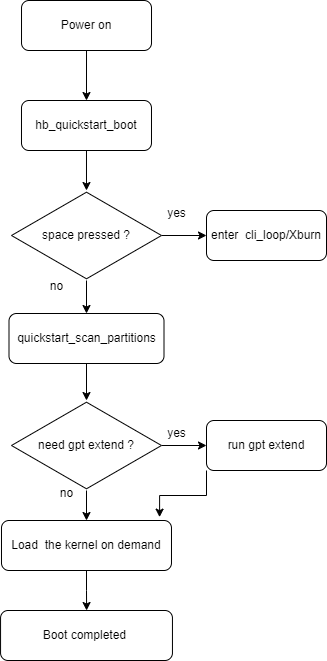
Key Boot Chain Changes
Default Quickstart boot path: board stage-2 initialization is completed in
hb_quickstart_board_init_r.Flashing and serial port: flashing tools rely on serial interaction. U-Boot keeps an interruptible wait window, configurable via
CONFIG_QUICKSTART_ABORT_DELAY_MS.Environment variable policy:
env_get/env_settake effect in memory only and are not written back to eMMC, reducing storage writes and access.
Quickstart Parameter Configuration
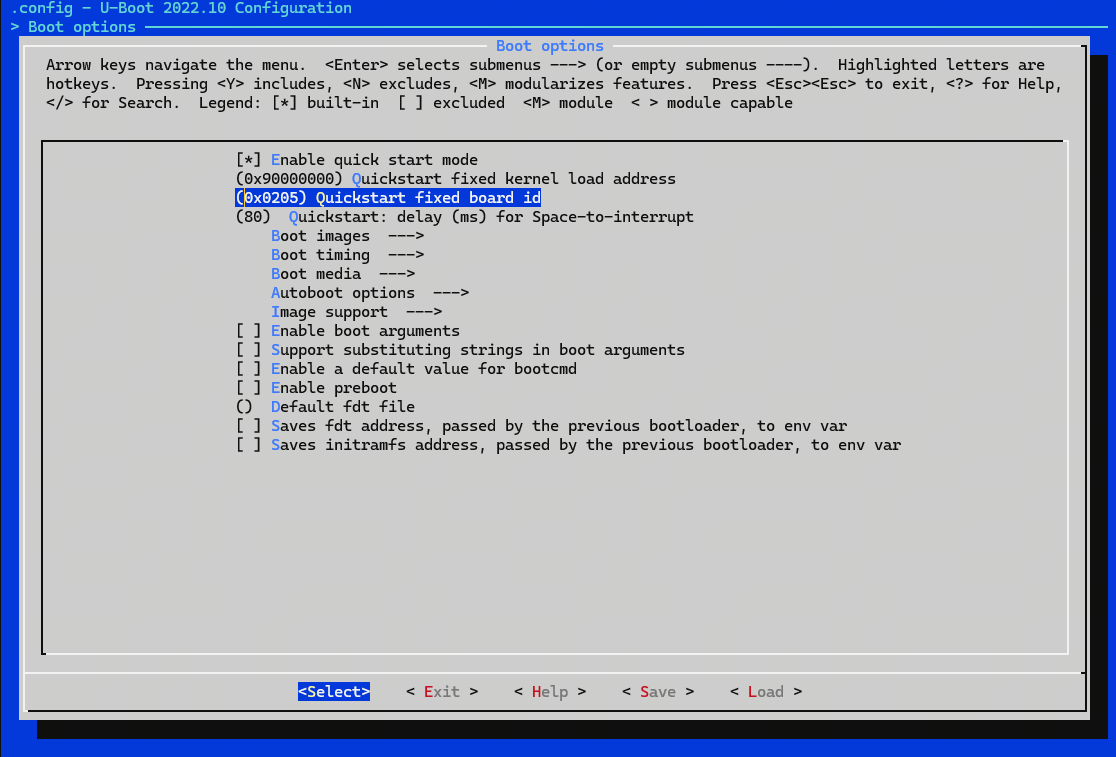
| Configuration | Example | Description |
|---|---|---|
CONFIG_QUICKSTART |
y |
Enable Quickstart |
CONFIG_QUICKSTART_KERNEL_ADDR |
0x90000000 |
Load address of the FIT image in memory |
CONFIG_QUICKSTART_BOARD_ID |
0x0205 |
Hardware board ID |
CONFIG_QUICKSTART_ABORT_DELAY_MS |
80 |
Interruptible wait time retained in the U-Boot stage |
Redundant Feature and Boot Path Trimming
1) Redundant feature trimming
| Category | Purpose | Related configuration |
|---|---|---|
| Multi-OS boot | Remove support for non-Linux systems and redundant image formats | CONFIG_BOOTM_NETBSD, CONFIG_BOOTM_PLAN9, CONFIG_BOOTM_RTEMS, CONFIG_BOOTM_VXWORKS |
| Boot debug and logging | Disable boot-stage performance stats, console logging, preboot environment, and other debug features to avoid extra memory operations and log output latency | CONFIG_BOOTSTAGE, CONFIG_CONSOLE_RECORD, CONFIG_USE_PREBOOT |
| Command set | Remove debug, test, and hardware commands not needed during boot to reduce command parsing overhead, shorten initialization time, and shrink the image | CONFIG_CMD_BDI, CONFIG_CMD_CONSOLE, CONFIG_CMD_BOOTD, CONFIG_CMD_BOOTFLOW, CONFIG_CMD_BOOTI, CONFIG_CMD_ELF, CONFIG_CMD_XIMG, CONFIG_CMD_RANDOM, CONFIG_CMD_MEMTEST, CONFIG_CMD_ADC, CONFIG_CMD_GPIO, CONFIG_CMD_I2C, CONFIG_CMD_MTD, CONFIG_CMD_SF, CONFIG_CMD_SF_TEST, CONFIG_CMD_USB_MASS_STORAGE, CONFIG_CMD_WDT, CONFIG_CMD_DHCP, CONFIG_CMD_MII, CONFIG_CMD_PING, CONFIG_CMD_BOOTSTAGE, CONFIG_CMD_MTDPARTS, CONFIG_FASTBOOT_FLASH_SPINAND, CONFIG_CMD_LOG, CONFIG_CMD_MEMDUMP, CONFIG_CMD_UBI, CONFIG_CMD_UBI_RENAME |
| Networking | Disable the U-Boot network stack, network commands, and network-related Fastboot features to avoid NIC, PHY, and network protocol initialization time | CONFIG_NET, CONFIG_UDP_FUNCTION_FASTBOOT |
| Storage and Flash | Disable non-essential storage drivers, tests, and partition-related configuration | CONFIG_FASTBOOT_FLASH_SPINAND (depends on CONFIG_CMD_MTDPARTS), CONFIG_MTD, CONFIG_AVB_VERIFY_MTD, CONFIG_SPI_FLASH |
| Peripheral drivers and hardware | Remove peripheral drivers that do not need to be initialized in U-Boot to reduce clock and bus setup overhead | CONFIG_GUC_ADC, CONFIG_I2C, CONFIG_PINCTRL, CONFIG_USB_STORAGE, CONFIG_USB_KEYBOARD, CONFIG_USB_HOST_ETHER, CONFIG_HOBOT_BOARD_TYPE |
2) Boot path trimming
Board initialization via hb_quickstart_board_init_r:
init_fnc_t hb_quickstart_init_sequence_r[] = {
     initr_trace,    // Initialize debug trace (Trace)
     initr_reloc,    // Post-relocation cleanup
     event_init,   // Initialize event framework (U-Boot driver matching)
     initr_caches,   // Initialize CPU caches
     initr_reloc_global_data,    // Relocate global data (gd)
     initr_malloc,   // Initialize heap (malloc)
     initr_dm,   // Initialize Driver Model (DM)
     initr_mmc,    // Initialize MMC (SD card/eMMC)
     hb_quickstart_boot,    // Platform-specific boot
}
ft_board_setup after trimming:
int ft_board_setup(void *blob, struct bd_info *bd)
{
  (void)bd;
#ifdef CONFIG_CMD_SEND_ID
    hb_fdt_set_board_info(blob);
#endif
    hb_setup_ion_size(blob);
    fdt_rm_by_env(blob);
    return 0;
}
Kernel Optimization
Overview
Kernel optimization touches many modules, and the upstream kernel boot path is already fairly lean. This effort mainly shortens overall boot time by optimizing kernel image compression.
Compression Algorithm and Compiler Optimization
Use the LZO compression algorithm:
CONFIG_KERNEL_LZO=y
CONFIG_EFI_ZBOOT=y
| Configuration | Purpose | Boot benefit |
|---|---|---|
CONFIG_KERNEL_LZO=y |
Use LZO kernel compression | Faster kernel decompression |
CONFIG_EFI_ZBOOT=y |
Dependency required for CONFIG_KERNEL_LZO |
Dependency configuration |
System Optimization
Overview
While keeping multimedia functionality intact, reduce system boot time in Quickstart scenarios by streamlining the boot path, running services in parallel, and trimming redundant features.
Main Changes
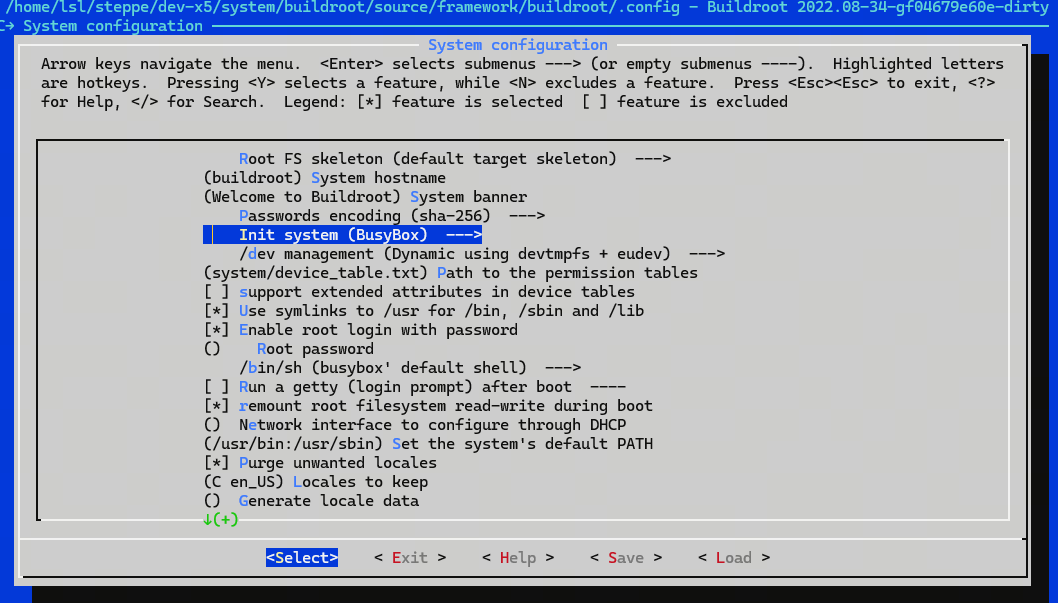
Lightweight init
Enable BusyBox init to reduce the resource and time overhead of the init framework. Configure it in the menuconfig UI:
Parallel boot service startup
Modify /etc/init.d/rcS to start /etc/init.d/S??* scripts (?? denotes digits) in parallel:
#!/bin/sh


# Start all init scripts in /etc/init.d
# executing them in numerical order.
#
for i in /etc/init.d/S??* ;do

     # Ignore dangling symlinks (if any).
     [ ! -f "$i" ] && continue

     case "$i" in
    *.sh)
        # Source shell script for speed.
        (
        trap - INT QUIT TSTP
        set start
        . $i
        ) &
        ;;
    *)
        # No sh extension, so fork subprocess.
        $i start &
        ;;
    esac
done
/etc/init.d/rcS iterates over all scripts named S + digits and loads them in numeric order. Both .sh and non-.sh script types are started in the background via ") &" and "$i start &", which greatly reduces wait time during program execution.
Driver module load script optimization
S70loadko loads drivers in batches in the background to avoid delaying display pipeline bring-up.
#!/bin/sh
...
start() {
  BOARD_ID=$(cat /sys/class/socinfo/board_id)
  echo "<6>Starting load kernel driver..." > /dev/kmsg

  WAIT_TRIES=200
  # camsys driver
  for m in vs_isc vs_cam_ctrl vs_cam_pulse vs_csi_wrapper; do
    start_bg "$m"
  done
  for m in hobot_osd hobot_vin_vnode hobot_vin_vcon vs_sif_nat; do
    start_bg "$m"
  done
  wait_pids || exit 1

  for m in \
    hobot_sensor hobot_mipiphy hobot_mipicsi hobot_mipidbg \
    vs_isp_nat vs_vse_nat \
    hobot_deserial hobot_gdc hobot_isi_sensor \
    panel-jc-050hd134 vio_n2d lontium_lt8618 \
    vs-x5-syscon-bridge \
    hobot_lpwm panel-drobot-csi vs_drm; do
    start_bg "$m"
  done
...
Kernel modules are grouped into batches by dependency; within each batch, modprobe runs in parallel via background tasks.
Root filesystem trimming
Remove non-essential debug, benchmark, network, and serial tools and services to reduce root filesystem size.
| Category | Purpose | Related configuration |
|---|---|---|
| Debug tools | Remove gdbserver, minicom, lrzsz, sudo, and other debug tools | BR2_PACKAGE_GDB_SERVER, BR2_PACKAGE_MINICOM, BR2_PACKAGE_LRZSZ, BR2_PACKAGE_SUDO |
| Performance monitoring and testing | Remove iozone, memstat, cpuload, htop, and similar tools | BR2_PACKAGE_IOZONE, BR2_PACKAGE_MEMSTAT, BR2_PACKAGE_CPULOAD, BR2_PACKAGE_HTOP |
| Storage partitioning and formatting | Remove mtd-utils, mkfs.ubifs, mtdpart, and other MTD user-space tools | BR2_PACKAGE_MTD, BR2_PACKAGE_MTD_MKFSUBIFS, BR2_PACKAGE_MTD_MTDPART |
| Audio, logging, and network services | Remove tinyalsa, zlog, dnsmasq, gesftpserver, and similar components | BR2_PACKAGE_TINYALSA, BR2_PACKAGE_ZLOG, BR2_PACKAGE_DNSMASQ, BR2_PACKAGE_GESFTPSERVER |
| Toolset | Disable GNU coreutils (ls, cp, mv, etc., overlapping with BusyBox) | BR2_PACKAGE_COREUTILS |
Display Application Optimization
Overview
single_pipe_vin_isp_vse_quickstart_display is a quick display sample for validating single-pipeline video capture and display.
Caution: This sample is validated only with the SC230AI sensor module. Other sensor models have not been verified. Do not use this program with sensors other than SC230AI.
Code Location and Directory Structure
Code location:
app/samples/platform_samples/sample_pipeline/single_pipe_vin_isp_vse_quickstart_display.cDirectory structure:
├── Makefile
├── single_pipe_vin_isp_vse_quickstart_display
├── single_pipe_vin_isp_vse_quickstart_display.c
├── vp_display.c
└── vp_display.h
Display Application Startup Flow
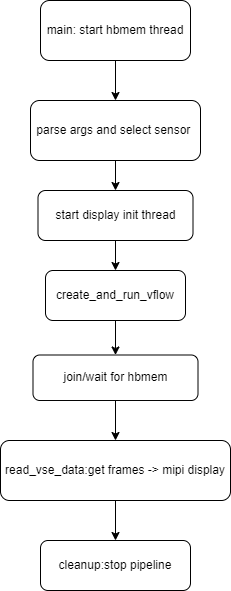
Overall, display application optimization focuses on parallel threads (hbmem_open_worker / display_init_worker) and reducing preparation time before the cached probe path create_and_run_vflow, to accelerate startup.
Running the Application
source /etc/profile.d/environment.sh
/app/platform_samples/sample_pipeline/single_pipe_vin_isp_vse_quickstart_display/single_pipe_vin_isp_vse_quickstart_display -s 3
Parameter description: The sensor uses the sc230ai-30fps configuration.
4.4.5.6. FAQ
How to load custom kernel modules
Solution: In the script responsible for loading kernel modules (for example, S70loadko), find modprobe bpu_hw_io_x5 and add your module after it.
How to enable OTA (A/B partition) configuration
Solution: In one of the following configuration files, choose the file that matches your build type (Debug / Release per product release notes):
device/horizon/x5/board_x5_evb_quickstart_debug_config.mkdevice/horizon/x5/board_x5_evb_quickstart_release_config.mk
Set or update HR_PART_CONF_FILENAME to:
export HR_PART_CONF_FILENAME=${HR_BOARD_CONF_DIR}/x5-soc-debug-ab-gpt.json