Earphone 音频口
接口介绍
Earphone 音频口是一种用于音频信号输出的接口,通过模拟音频信号传输实现设备与耳机、扬声器等音频外设之间的声音播放。该接口通常采用标准 3.5mm 音频接口,支持立体声音频输出,具有连接方便、兼容性强、实时性高等特点,可满足语音播报、音频播放、人机交互等应用需求。广泛应用于智能终端、机器人、嵌入式设备、车载系统及多媒体设备等场景。
案例目标
通过 Earphone 音频口记录声音,播放声音。
设备清单
- RDK X5 开发板
- 有线耳机(4 段式)
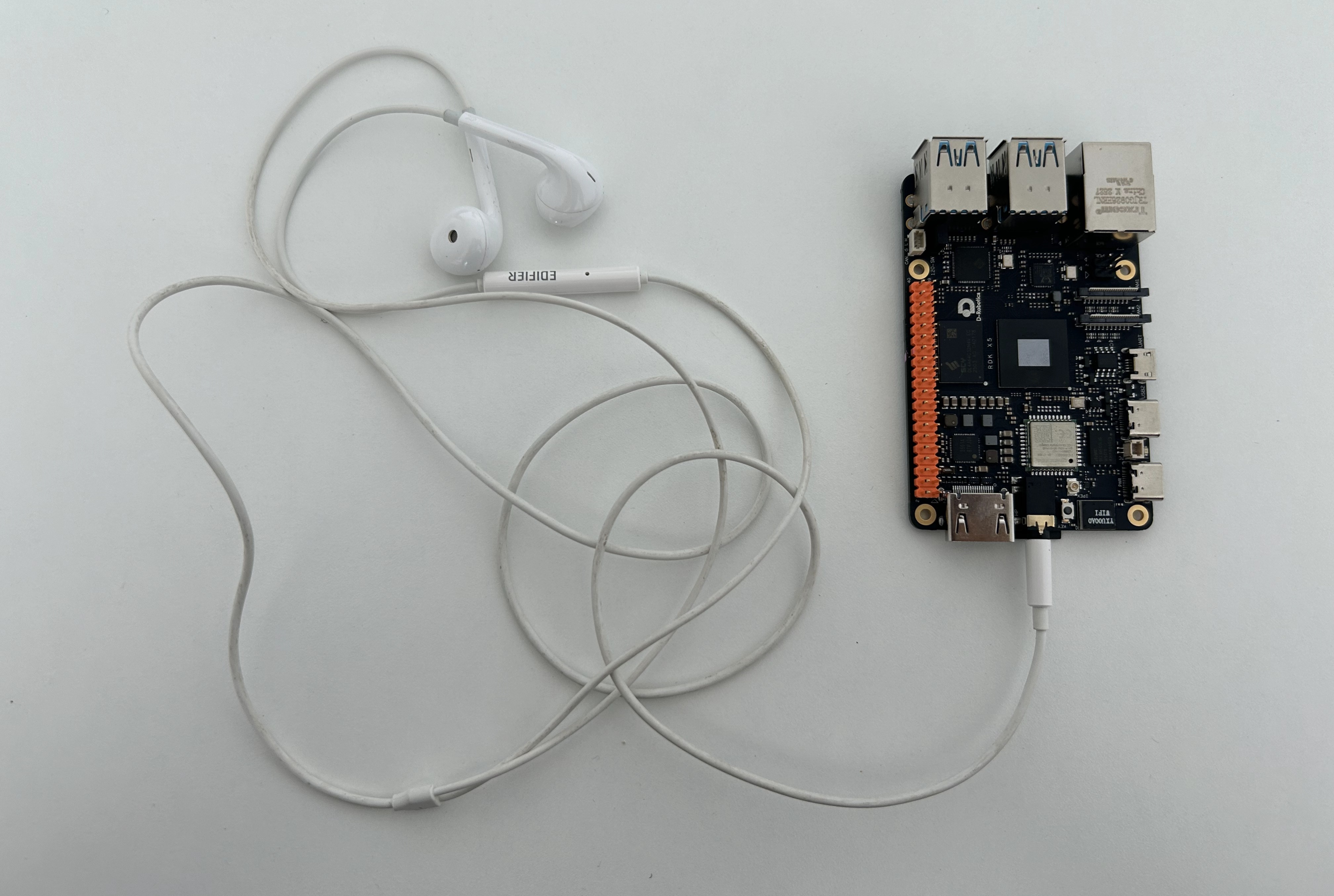
硬件连接
案例代码
安装依赖
pip install pyalsaaudio
创建 usb_audio.py 文件
创建 usb_audio.py 文件,在 usb_audio.py 文件中粘贴以下代码:
提示
此脚本同样适用于 USB 音频设备。
#!/usr/bin/env python3

import alsaaudio
import wave
import argparse

def record(device):
    RATE = 16000
    CHANNELS = 1
    FORMAT = alsaaudio.PCM_FORMAT_S16_LE
    SECONDS = 5
    OUTPUT = "record.wav"
    inp = alsaaudio.PCM(
        type=alsaaudio.PCM_CAPTURE,
        mode=alsaaudio.PCM_NORMAL,
        device=device,

        channels=CHANNELS,
        rate=RATE,
        format=FORMAT,
        periodsize=1024
    )
    print("Start recording...")
    frames = []
    for i in range(
        int(RATE / 1024 * SECONDS)
    ):

        length, data = inp.read()

        if length > 0:
            frames.append(data)
    print("Finish")
    wf = wave.open(
        OUTPUT,
        "wb"
    )
    wf.setnchannels(CHANNELS)
    wf.setsampwidth(2)
    wf.setframerate(RATE)
    wf.writeframes(
        b''.join(frames)
    )
    wf.close()
    print("saved:", OUTPUT)

def play_wav(filename, device):

    wav = wave.open(filename, "rb")

    channels = wav.getnchannels()
    rate = wav.getframerate()
    width = wav.getsampwidth()

    if width == 2:
        fmt = alsaaudio.PCM_FORMAT_S16_LE
    elif width == 1:
        fmt = alsaaudio.PCM_FORMAT_U8
    else:
        raise RuntimeError("Unsupported wav format")

    out = alsaaudio.PCM(
        type=alsaaudio.PCM_PLAYBACK,
        mode=alsaaudio.PCM_NORMAL,
        device=device,
        channels=channels,
        rate=rate,
        format=fmt,
        periodsize=1024
    )

    print("Playing:", filename)
    print("Device:", device)
    print(
        "channels:",
        channels,
        "rate:",
        rate
    )

    while True:
        data = wav.readframes(1024)

        if not data:
            break

        out.write(data)

    wav.close()

    print("Finished")

def parse_args() -> argparse.Namespace:
    parser = argparse.ArgumentParser(
        description="RDK X5 ALSA microphone recorder"
    )

    parser.add_argument(
        "--device",
        type=str,
        default="plughw:1,0",
        help="ALSA input device, example: plughw:1,0"
    )

    parser.add_argument(
        "--file",
        type=str,
        default=None,
        help="wav file path"
    )

    return parser.parse_args()

if __name__ == "__main__":
    args = parse_args()
    if args.file == None:
        record(args.device)
    else:
        play_wav(args.file, args.device)
运行案例
查看设备
提示
- 通过以下指令确认实际设备,连接多设备时可通过插拔设备确认具体设备号。
- 以下查看命令同样适用于 USB 音频设备。
#关注 card x 和 device y,此处 card 1,device 0,则设备号为 plughw:1,0

root@ubuntu:~/rdk_x5_demo# arecord -l
**** List of CAPTURE Hardware Devices ****
card 1: duplexaudio [duplex-audio], device 0: i2s0-(null) ES8326 HiFi-0 [i2s0-(null) ES8326 HiFi-0]
  Subdevices: 1/1
  Subdevice #0: subdevice #0
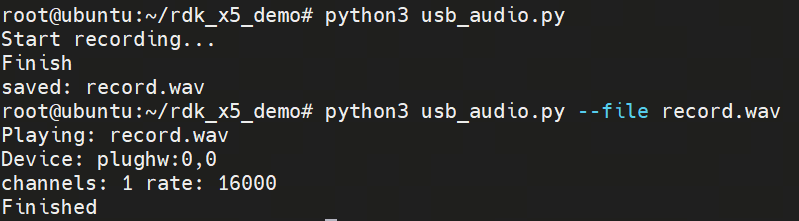
运行指令
# 录音并保存为 wav文件
python3 usb_audio.py

# 播放指定 wav文件
python3 usb_audio.py --file xxx.wav

# 指定设备录音并保存为 wav文件
python3 usb_audio.py --device plughw:1,0

# 指定设备播放指定 wav文件
python3 usb_audio.py --file xxx.wav --device plughw:1,0