Earphone Audio Jack
Interface Overview
The earphone audio jack outputs analog audio to headphones, speakers, and other audio peripherals. It typically uses a standard 3.5 mm connector and supports stereo playback. It is easy to connect, widely compatible, and suitable for real-time voice prompts, audio playback, and human-machine interaction on smart terminals, robots, embedded devices, in-vehicle systems, and multimedia products.
Case Objective
Record and play audio through the earphone audio jack.
Required Hardware
- RDK X5 development board
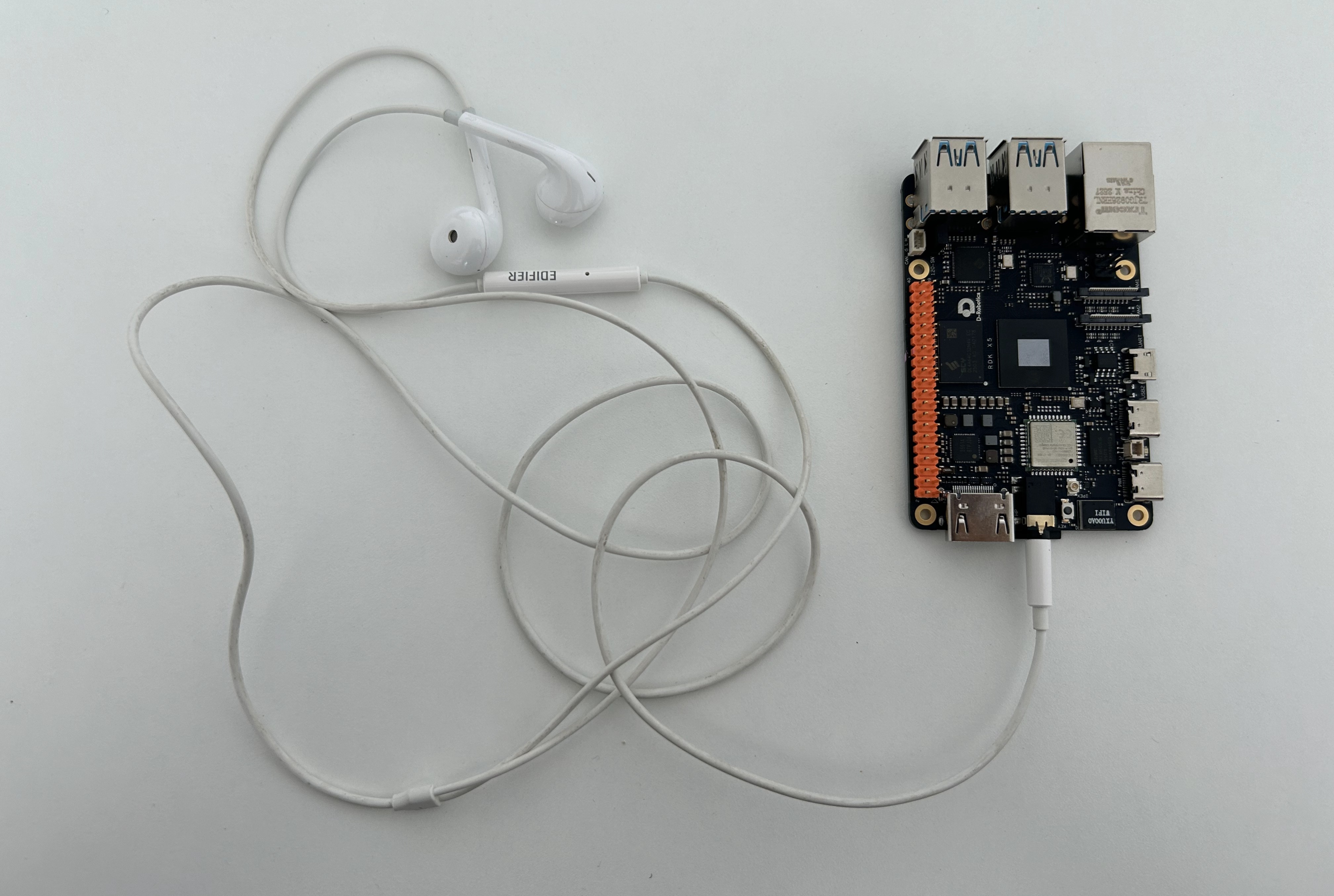
- Wired headset (4-pole / TRRS)
Hardware Connection
Sample Code
Install Dependencies
pip install pyalsaaudio
Create usb_audio.py
Create a usb_audio.py file and paste the following code:
Tip
This script also works with USB audio devices.
#!/usr/bin/env python3

import alsaaudio
import wave
import argparse

def record(device):
    RATE = 16000
    CHANNELS = 1
    FORMAT = alsaaudio.PCM_FORMAT_S16_LE
    SECONDS = 5
    OUTPUT = "record.wav"
    inp = alsaaudio.PCM(
        type=alsaaudio.PCM_CAPTURE,
        mode=alsaaudio.PCM_NORMAL,
        device=device,

        channels=CHANNELS,
        rate=RATE,
        format=FORMAT,
        periodsize=1024
    )
    print("Start recording...")
    frames = []
    for i in range(
        int(RATE / 1024 * SECONDS)
    ):

        length, data = inp.read()

        if length > 0:
            frames.append(data)
    print("Finish")
    wf = wave.open(
        OUTPUT,
        "wb"
    )
    wf.setnchannels(CHANNELS)
    wf.setsampwidth(2)
    wf.setframerate(RATE)
    wf.writeframes(
        b''.join(frames)
    )
    wf.close()
    print("saved:", OUTPUT)

def play_wav(filename, device):

    wav = wave.open(filename, "rb")

    channels = wav.getnchannels()
    rate = wav.getframerate()
    width = wav.getsampwidth()

    if width == 2:
        fmt = alsaaudio.PCM_FORMAT_S16_LE
    elif width == 1:
        fmt = alsaaudio.PCM_FORMAT_U8
    else:
        raise RuntimeError("Unsupported wav format")

    out = alsaaudio.PCM(
        type=alsaaudio.PCM_PLAYBACK,
        mode=alsaaudio.PCM_NORMAL,
        device=device,
        channels=channels,
        rate=rate,
        format=fmt,
        periodsize=1024
    )

    print("Playing:", filename)
    print("Device:", device)
    print(
        "channels:",
        channels,
        "rate:",
        rate
    )

    while True:
        data = wav.readframes(1024)

        if not data:
            break

        out.write(data)

    wav.close()

    print("Finished")

def parse_args() -> argparse.Namespace:
    parser = argparse.ArgumentParser(
        description="RDK X5 ALSA microphone recorder"
    )

    parser.add_argument(
        "--device",
        type=str,
        default="plughw:1,0",
        help="ALSA input device, example: plughw:1,0"
    )

    parser.add_argument(
        "--file",
        type=str,
        default=None,
        help="wav file path"
    )

    return parser.parse_args()

if __name__ == "__main__":
    args = parse_args()
    if args.file == None:
        record(args.device)
    else:
        play_wav(args.file, args.device)
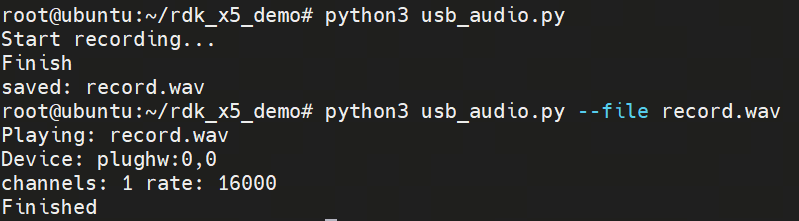
Run the Sample
Check the Device
Tip
- Use the following command to confirm the actual device. If multiple devices are connected, plug and unplug them to identify the device number.
- The same command also applies to USB audio devices.
# Note card x and device y. Here card 1, device 0 means the device is plughw:1,0

root@ubuntu:~/rdk_x5_demo# arecord -l
**** List of CAPTURE Hardware Devices ****
card 1: duplexaudio [duplex-audio], device 0: i2s0-(null) ES8326 HiFi-0 [i2s0-(null) ES8326 HiFi-0]
  Subdevices: 1/1
  Subdevice #0: subdevice #0
Run Commands
# Record and save as a wav file
python3 usb_audio.py

# Play the specified wav file
python3 usb_audio.py --file xxx.wav

# Record on the specified device and save as a wav file
python3 usb_audio.py --device plughw:1,0

# Play the specified wav file on the specified device
python3 usb_audio.py --file xxx.wav --device plughw:1,0