PWM Interface
Interface Overview
The PWM (Pulse Width Modulation) interface provides programmable pulse output. By adjusting the duty cycle, it can precisely control external devices such as servos, motors, LEDs, and buzzers for speed, position, and brightness control. It is a flexible control method for robot motion, smart hardware, and embedded applications.
Case Objective
Control a servo to a specified angle through the PWM interface.
Required Hardware
-
RDK X5 development board
-
Male-to-female jumper wires
-
PWM servo (180°): a PWM servo is an actuator that uses pulse-width modulation for position control. Different pulse widths drive it to a specified angle. Servos come in 180° and 360° types. The control mapping is:
Servo type 0.5 ms 1.0 ms 1.5 ms 2.0 ms 2.5 ms 180° 0° 45° 90° 135° 180° 360° Clockwise (fast) Clockwise (slow) Counterclockwise (slow) Counterclockwise (fast) Stop
Hardware Connection
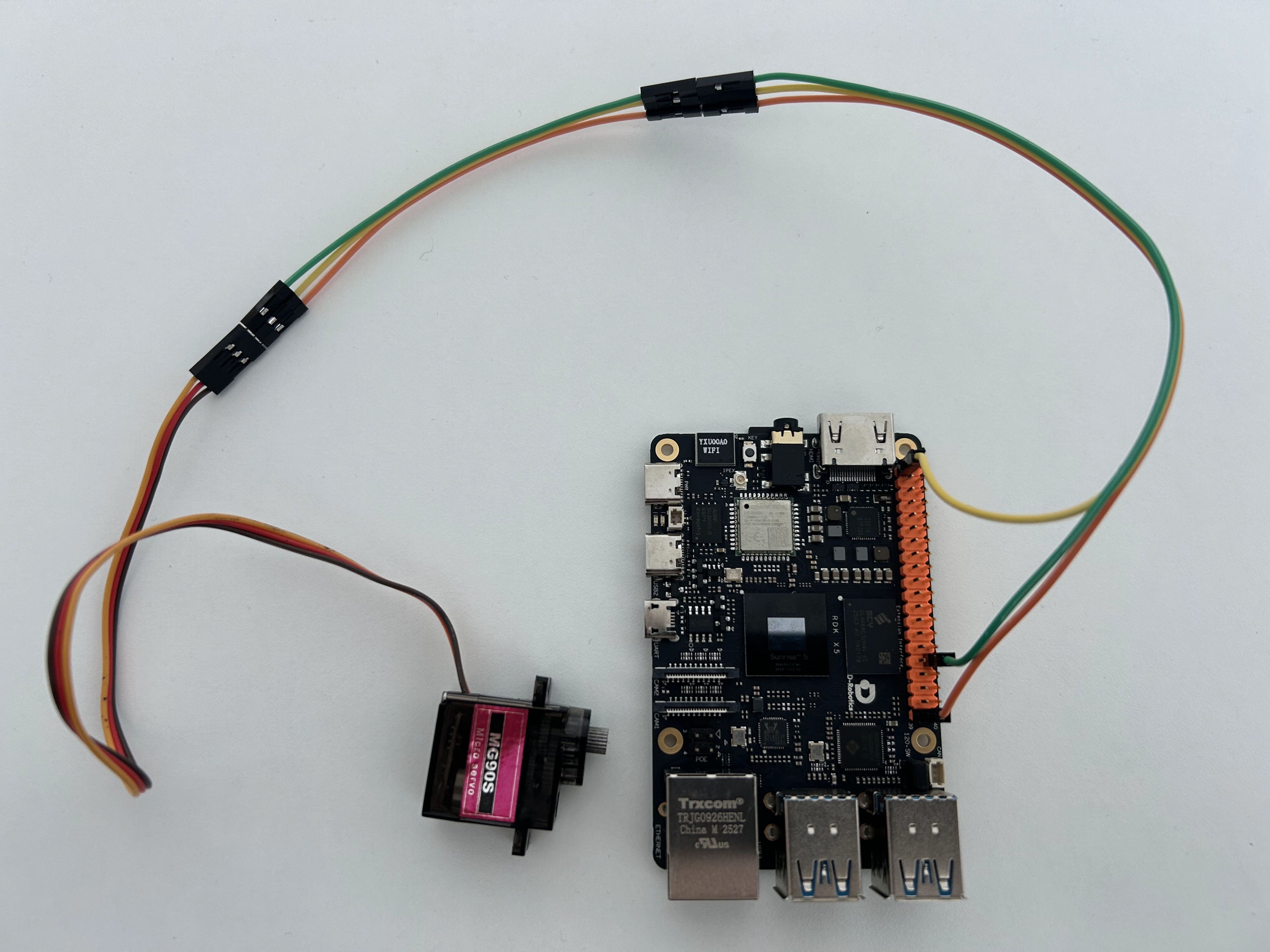
This case uses an MG90S servo. Yellow is the signal wire, red is positive, and brown is negative.
Pin Mapping
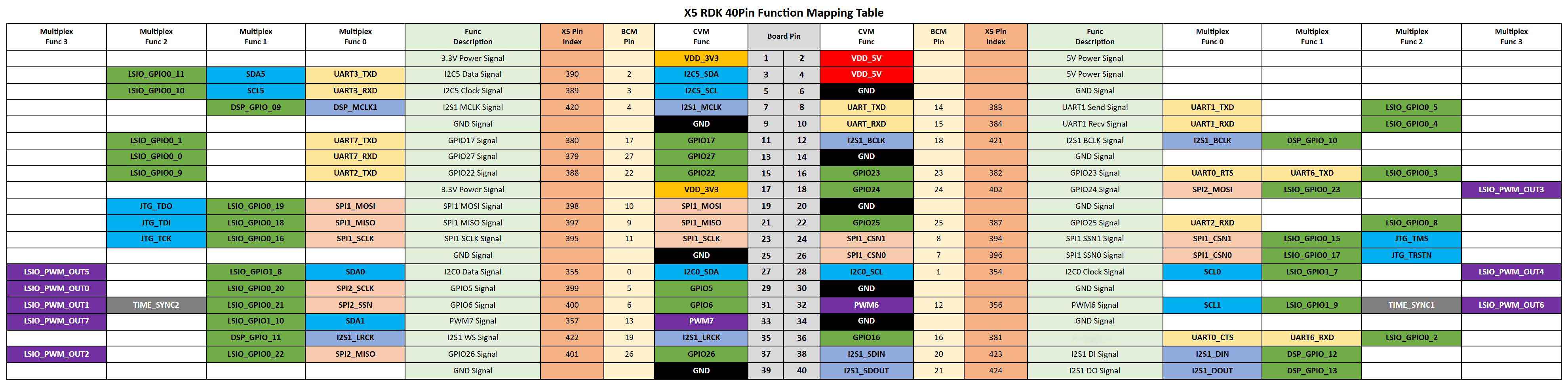
The mapping between servo pins and board pins is shown below. Board pin numbers follow the BOARD numbering in the 40-pin header definition.
| Pin name | Board pin | Function |
|---|---|---|
| DATA | 32 | PWM input |
| VCC | 1 | Power |
| GND | 39 | Ground |
40-Pin Header Definition
Sample Code
Create a pwm_servo.py file and paste the following code:
#!/usr/bin/env python3
import sys
import signal
import Hobot.GPIO as GPIO
import time

def signal_handler(signal, frame):
    sys.exit(0)

output_pin = 32

GPIO.setwarnings(False)

def main():
    GPIO.setmode(GPIO.BOARD)
    p = GPIO.PWM(output_pin, 50)
    incr = 0.5
    val = 12.5
    p.start(val)
    print("PWM running. Press CTRL+C to exit.")
    try:
        while True:
            time.sleep(0.25)
            if val >= 12.5:
                incr = -incr
            if val <= 2.5:
                incr = -incr
            val += incr
            print("Duty Cycle: {}".format(val))
            p.ChangeDutyCycle(val)
            p.start(val)
    finally:
        p.stop()
        GPIO.cleanup()

if __name__ == '__main__':
    signal.signal(signal.SIGINT, signal_handler)
    main()
Run the Sample
Run the sample with the following command:
python3 pwm_servo.py
After it starts, the servo rotates back and forth between 0° and 180°.