SPI Interface
Interface Overview
The SPI (Serial Peripheral Interface) provides high-speed synchronous serial communication. It uses a clock line (SCK), data input (MISO), data output (MOSI), and chip select (CS) to transfer data between a host and external devices. SPI is fast, efficient, and simple in hardware. Typical uses include memory chips, display modules, sensors, and other high-speed peripherals.
Case Objective
Control a display through the SPI interface.
Required Hardware
- RDK X5 development board
- SPI display
Hardware Connection
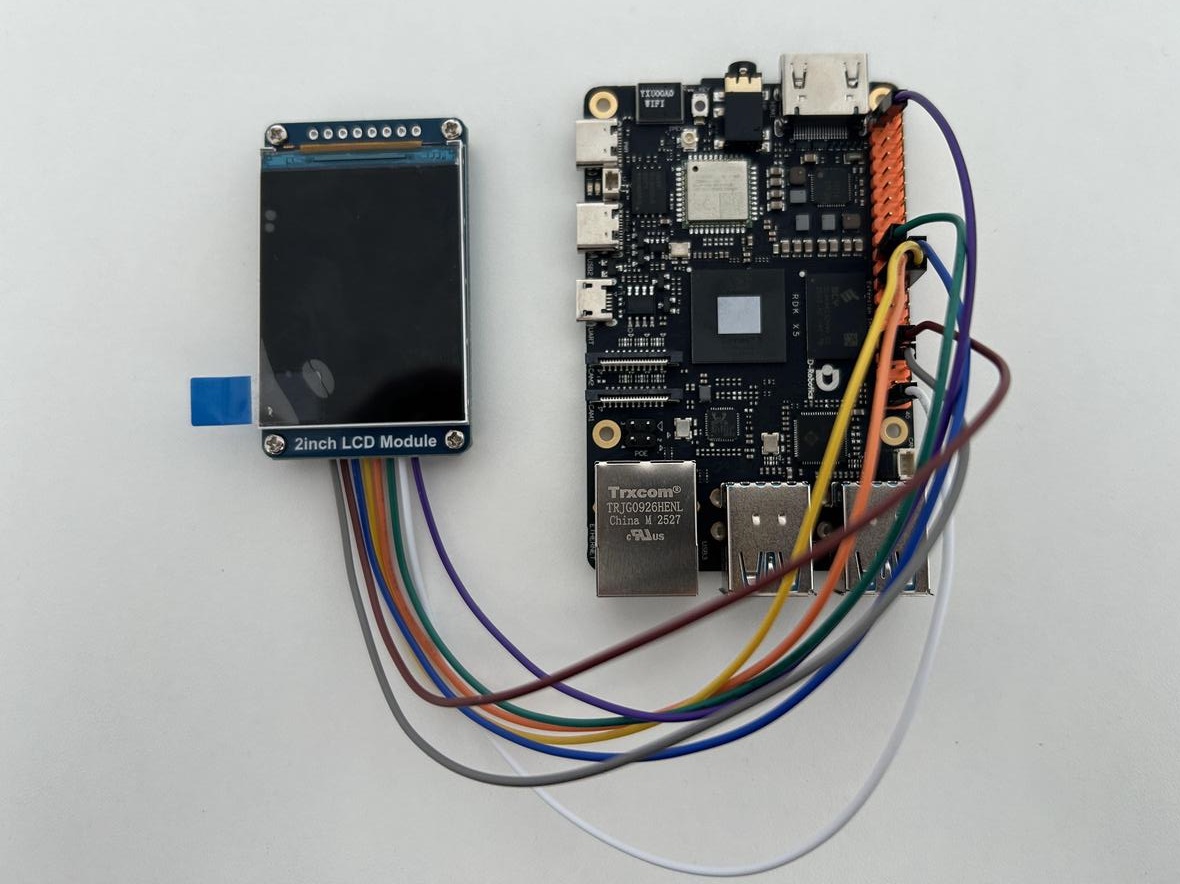
Pin Mapping
| Pin name | VCC | GND | DIN/MOSI | CLK/SCLK | CS | DC | RST | BL |
|---|---|---|---|---|---|---|---|---|
| Function | Power | Ground | SPI data | SPI clock | Chip select | Command | Reset | Backlight |
| Board pin | 1 | 39 | 19 | 23 | 24 | 22 | 31 | 33 |
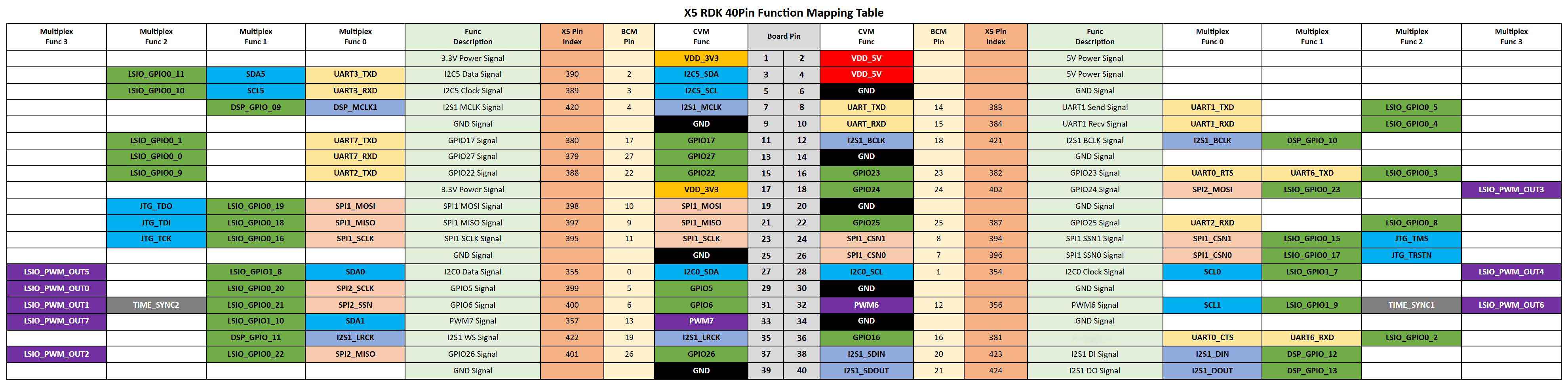
40-Pin Header Definition
Sample Code
Create a spi_display.py file and paste the following code:
#!/usr/bin/env python3
"""Light up a 2.0-inch 240x320 SPI LCD on the RDK X5 40-pin header.

Default wiring:
  DIN -> BOARD 19 / SPI1_MOSI
  CLK -> BOARD 23 / SPI1_SCLK
  CS  -> BOARD 24 / SPI1_CSN1 (/dev/spidev1.1)
  DC  -> BOARD 22
  RST -> BOARD 31
  BL  -> BOARD 33
"""

from __future__ import annotations

import argparse
import math
import time
from typing import Iterable

import Hobot.GPIO as GPIO
import spidev
from PIL import Image, ImageDraw, ImageFont

RGB565_BLACK = b"\x00\x00"

class ST7789:
    def __init__(
        self,
        *,
        bus: int,
        device: int,
        width: int,
        height: int,
        dc_pin: int,
        rst_pin: int,
        bl_pin: int | None,
        x_offset: int,
        y_offset: int,
        speed_hz: int,
        spi_mode: int,
        rotation: int,
        bgr: bool,
        invert: bool,
    ) -> None:
        self.width = width
        self.height = height
        self.x_offset = x_offset
        self.y_offset = y_offset
        self.dc_pin = dc_pin
        self.rst_pin = rst_pin
        self.bl_pin = bl_pin
        self.rotation = rotation % 360
        self.bgr = bgr
        self.invert = invert

        GPIO.setwarnings(False)
        GPIO.setmode(GPIO.BOARD)
        GPIO.setup(self.dc_pin, GPIO.OUT, initial=GPIO.LOW)
        GPIO.setup(self.rst_pin, GPIO.OUT, initial=GPIO.HIGH)
        if self.bl_pin is not None:
            GPIO.setup(self.bl_pin, GPIO.OUT, initial=GPIO.HIGH)

        self.spi = spidev.SpiDev()
        self.spi.open(bus, device)
        self.spi.mode = spi_mode
        self.spi.bits_per_word = 8
        self.spi.max_speed_hz = speed_hz

    def close(self) -> None:
        self.spi.close()

    def hard_reset(self) -> None:
        GPIO.output(self.rst_pin, GPIO.HIGH)
        time.sleep(0.02)
        GPIO.output(self.rst_pin, GPIO.LOW)
        time.sleep(0.05)
        GPIO.output(self.rst_pin, GPIO.HIGH)
        time.sleep(0.12)

    def command(self, cmd: int, data: Iterable[int] | bytes = b"", delay: float = 0) -> None:
        GPIO.output(self.dc_pin, GPIO.LOW)
        self.spi.xfer2([cmd & 0xFF])
        if data:
            GPIO.output(self.dc_pin, GPIO.HIGH)
            payload = bytes(data)
            for start in range(0, len(payload), 4096):
                self.spi.writebytes2(payload[start : start + 4096])
        if delay:
            time.sleep(delay)

    def init(self) -> None:
        self.hard_reset()
        self.command(0x36, [self._madctl()])
        self.command(0x3A, [0x05])  # 16-bit RGB565 (Waveshare 2inch)
        # Display inversion: 0x21 enables, 0x20 disables. Different panel models have different requirements; toggle --invert when colors look off.
        self.command(0x21 if self.invert else 0x20)
        self.command(0x2A, [0x00, 0x00, 0x01, 0x3F])
        self.command(0x2B, [0x00, 0x00, 0x00, 0xEF])
        self.command(0xB2, [0x0C, 0x0C, 0x00, 0x33, 0x33])
        self.command(0xB7, [0x35])
        self.command(0xBB, [0x1F])
        self.command(0xC0, [0x2C])
        self.command(0xC2, [0x01])
        self.command(0xC3, [0x12])
        self.command(0xC4, [0x20])
        self.command(0xC6, [0x0F])
        self.command(0xD0, [0xA4, 0xA1])
        self.command(0xE0, [0xD0, 0x08, 0x11, 0x08, 0x0C, 0x15, 0x39, 0x33, 0x50, 0x36, 0x13, 0x14, 0x29, 0x2D])
        self.command(0xE1, [0xD0, 0x08, 0x10, 0x08, 0x06, 0x06, 0x39, 0x44, 0x51, 0x0B, 0x16, 0x14, 0x2F, 0x31])
        self.command(0x11, delay=0.12)  # Sleep out
        self.command(0x29, delay=0.02)  # Display on
        self.clear()

    def _madctl(self) -> int:
        # MY MX MV ML BGR MH 0 0
        value = 0x08 if self.bgr else 0x00
        if self.rotation == 0:
            value |= 0x00
        elif self.rotation == 90:
            value |= 0x60
        elif self.rotation == 180:
            value |= 0xC0
        elif self.rotation == 270:
            value |= 0xA0
        else:
            raise ValueError("rotation must be one of 0, 90, 180, 270")
        return value

    def set_window(self, x0: int, y0: int, x1: int, y1: int) -> None:
        x0 += self.x_offset
        x1 += self.x_offset
        y0 += self.y_offset
        y1 += self.y_offset
        self.command(0x2A, [(x0 >> 8) & 0xFF, x0 & 0xFF, (x1 >> 8) & 0xFF, x1 & 0xFF])
        self.command(0x2B, [(y0 >> 8) & 0xFF, y0 & 0xFF, (y1 >> 8) & 0xFF, y1 & 0xFF])
        self.command(0x2C)

    def clear(self, color: bytes = RGB565_BLACK) -> None:
        self.set_window(0, 0, self.width - 1, self.height - 1)
        GPIO.output(self.dc_pin, GPIO.HIGH)
        line = color * self.width
        for _ in range(self.height):
            self.spi.writebytes2(line)

    def show(self, image: Image.Image) -> None:
        if image.size != (self.width, self.height):
            image = image.resize((self.width, self.height), Image.Resampling.LANCZOS)
        payload = rgb888_to_rgb565(image.convert("RGB"))
        self.set_window(0, 0, self.width - 1, self.height - 1)
        GPIO.output(self.dc_pin, GPIO.HIGH)
        for start in range(0, len(payload), 4096):
            self.spi.writebytes2(payload[start : start + 4096])

def rgb888_to_rgb565(image: Image.Image) -> bytes:
    out = bytearray(image.width * image.height * 2)
    i = 0
    for r, g, b in image.getdata():
        value = ((r & 0xF8) << 8) | ((g & 0xFC) << 3) | (b >> 3)
        out[i] = (value >> 8) & 0xFF
        out[i + 1] = value & 0xFF
        i += 2
    return bytes(out)

def load_image(path, width, height):
    image = Image.open(path)

    # Convert to RGB
    image = image.convert("RGB")

    # Resize to the LCD size
    image = image.resize(
        (width, height),
        Image.Resampling.LANCZOS
    )

    return image

def load_font(size: int) -> ImageFont.ImageFont:
    for path in (
        "/usr/share/fonts/truetype/dejavu/DejaVuSans-Bold.ttf",
        "/usr/share/fonts/truetype/dejavu/DejaVuSans.ttf",
    ):
        try:
            return ImageFont.truetype(path, size)
        except OSError:
            pass
    return ImageFont.load_default()

def parse_args() -> argparse.Namespace:
    parser = argparse.ArgumentParser(description="RDK X5 ST7789 bouncing-ball animation")
    parser.add_argument("--fps", type=float, default=30.0)
    parser.add_argument("--bus", type=int, default=1)
    parser.add_argument("--device", type=int, default=1)
    parser.add_argument("--width", type=int, default=240)
    parser.add_argument("--height", type=int, default=320)
    parser.add_argument("--dc", type=int, default=22)
    parser.add_argument("--rst", type=int, default=31)
    parser.add_argument("--bl", type=int, default=33)
    parser.add_argument("--no-bl", action="store_true")
    parser.add_argument("--x-offset", type=int, default=0)
    parser.add_argument("--y-offset", type=int, default=0)
    parser.add_argument("--speed", type=int, default=24_000_000)
    parser.add_argument("--spi-mode", type=int, default=0, choices=(0, 1, 2, 3), help="SPI mode. Try 3 if the screen shows tearing/garbled output.")
    parser.add_argument("--rotation", type=int, default=0, choices=(0, 90, 180, 270))
    parser.add_argument("--bgr", action="store_true", help="Clear BGR bit if red/blue appear swapped.")
    parser.add_argument("--invert", action="store_true", help="Enable display color inversion (0x21). Toggle if colors appear inverted.")
    parser.add_argument("--image",type=str,default=None,help="image path")
    return parser.parse_args()

def make_frame(
    width: int,
    height: int,
    *,
    ball_x: float,
    ball_y: float,
    ball_r: int,
    hue: float,
    frame_idx: int,
) -> Image.Image:
    image = Image.new("RGB", (width, height), (12, 16, 24))
    draw = ImageDraw.Draw(image)

    for y in range(height):
        t = y / max(1, height - 1)
        shade = int(18 + 20 * t)
        draw.line([(0, y), (width - 1, y)], fill=(shade, shade + 4, shade + 10))

    ground_y = height - 36
    draw.rectangle((0, ground_y, width - 1, height - 1), fill=(28, 32, 40))
    draw.line((0, ground_y, width - 1, ground_y), fill=(70, 78, 92), width=1)

    title_font = load_font(22)
    small_font = load_font(14)
    pulse = 0.5 + 0.5 * math.sin(frame_idx * 0.12)
    title_color = (int(80 + 120 * pulse), int(180 + 60 * pulse), 255)
    draw.text((14, 12), "RDK X5 LCD", font=title_font, fill=title_color)
    draw.text((14, 40), "SPI Animation Demo", font=small_font, fill=(150, 170, 200))
    draw.text((14, height - 22), time.strftime("%H:%M:%S"), font=small_font, fill=(120, 140, 170))

    r = int(127 + 127 * math.sin(hue))
    g = int(127 + 127 * math.sin(hue + 2.1))
    b = int(127 + 127 * math.sin(hue + 4.2))
    shadow_w = int(ball_r * 1.6)
    shadow_h = max(6, ball_r // 3)
    shadow_x = int(ball_x - shadow_w / 2)
    shadow_y = ground_y - shadow_h // 2
    draw.ellipse(
        (shadow_x, shadow_y, shadow_x + shadow_w, shadow_y + shadow_h),
        fill=(10, 12, 16),
    )

    x0, y0 = int(ball_x - ball_r), int(ball_y - ball_r)
    x1, y1 = int(ball_x + ball_r), int(ball_y + ball_r)
    draw.ellipse((x0, y0, x1, y1), fill=(r, g, b), outline=(255, 255, 255), width=2)
    return image

def main() -> int:
    args = parse_args()
    lcd = ST7789(
        bus=args.bus,
        device=args.device,
        width=args.width,
        height=args.height,
        dc_pin=args.dc,
        rst_pin=args.rst,
        bl_pin=None if args.no_bl else args.bl,
        x_offset=args.x_offset,
        y_offset=args.y_offset,
        speed_hz=args.speed,
        spi_mode=args.spi_mode,
        rotation=args.rotation,
        bgr=args.bgr,
        invert=args.invert,
    )

    margin = 24
    ball_r = 18
    x = float(args.width // 2)
    y = float(margin + ball_r)
    vx = 2.6
    vy = 0.0
    gravity = 0.35
    ground = args.height - 36 - ball_r
    delay = 1.0 / max(1.0, args.fps)
    frame_idx = 0

    try:
        lcd.init()
        print("Animation running. Press Ctrl+C to stop.")
        # ==== Color self-test (commented out by default; uncomment only when troubleshooting color issues) ====
        # Shows solid red, green, and blue in turn to verify each color channel.
        # for color in ((255, 0, 0), (0, 255, 0), (0, 0, 255)):
        #     solid = Image.new("RGB", (args.width, args.height), color)
        #     lcd.show(solid)
        #     time.sleep(2)
        # ====================================================
        if(args.image == None):
            while True:
                t0 = time.time()
                vy += gravity
                x += vx
                y += vy

                if x - ball_r < margin:
                    x = margin + ball_r
                    vx = abs(vx)
                elif x + ball_r > args.width - margin:
                    x = args.width - margin - ball_r
                    vx = -abs(vx)

                if y + ball_r >= ground:
                    y = ground
                    vy = -abs(vy) * 0.82
                    if abs(vy) < 1.2:
                        vy = -6.0

                frame = make_frame(
                    args.width,
                    args.height,
                    ball_x=x,
                    ball_y=y,
                    ball_r=ball_r,
                    hue=frame_idx * 0.08,
                    frame_idx=frame_idx,
                )
                lcd.show(frame)
                frame_idx += 1

                elapsed = time.time() - t0
                sleep_time = delay - elapsed
                if sleep_time > 0:
                    time.sleep(sleep_time)
        else:
            image = load_image(
                args.image,
                args.width,
                args.height
            )
            lcd.show(image)
            time.sleep(5)
    except KeyboardInterrupt:
        print("Stopped.")
    finally:
        lcd.close()
    return 0

if __name__ == "__main__":
    raise SystemExit(main())
Run the Sample
Run the sample with the following command:
# After it starts, the screen shows an animation of a bouncing ball
python3 spi_display.py

# After it starts, the screen shows the provided image
python3 spi_display.py --image xxxx.jpg
Troubleshooting Color Display Issues
Different SPI panel models may have different requirements for color inversion, SPI mode, and clock frequency. Using the default configuration from this sample as-is may cause the displayed colors to differ from the original image or produce a garbled screen. If the display looks abnormal, troubleshoot as follows.
Color Self-Test
A normal image contains many colors, making it hard to tell at a glance whether each color channel is working correctly. It is recommended to display solid red, green, and blue in turn to clearly verify each channel. This sample includes a built-in solid-color self-test right after lcd.init() (commented out by default); uncomment it when troubleshooting color issues:
# Display solid red, green, and blue in turn
for color in ((255, 0, 0), (0, 255, 0), (0, 0, 255)):
    solid = Image.new("RGB", (args.width, args.height), color)
    lcd.show(solid)
    time.sleep(2)
Troubleshooting Order
- Colors are off (e.g. red shows as cyan): the color inversion setting is wrong. Use the
--invertflag to toggle inversion and compare the solid-color results with it on and off, then choose the configuration that matches your panel. If red and blue are swapped (rather than inverted), use the--bgrflag. - Garbled screen or partially corrupted image: troubleshoot in the following order.
- Switch SPI mode:
--spi-modesupports 0/1/2/3 (default 0). If the screen is garbled, try--spi-mode 3. - Lower the SPI clock frequency:
--speeddefaults to 24 MHz. If the screen is still garbled, reduce it and retry. - Check the wiring , see Pin Mapping and Hardware Connection above.
- Switch SPI mode:
Different panel models may require different configurations. Do not treat a single set of parameters as a fixed setting for all panels.