Overview
Introduction
FDE (Full Disk Encryption) refers to the process of using encryption technology to encrypt an entire hard drive or storage device on a Linux operating system. By encrypting the entire disk, FDE protects all data stored on the disk. Even if the disk is physically stolen or accessed illegally, unauthorized users cannot read the data.
FDE Principle
The core idea of FDE encryption is to use encryption algorithms to encrypt all data on the hard drive, typically encrypting and decrypting data before the operating system layer. This means that every time data is read from or written to the disk, it is transparently encrypted and decrypted, and users are hardly aware of this process.
FDE data flow is as follows:
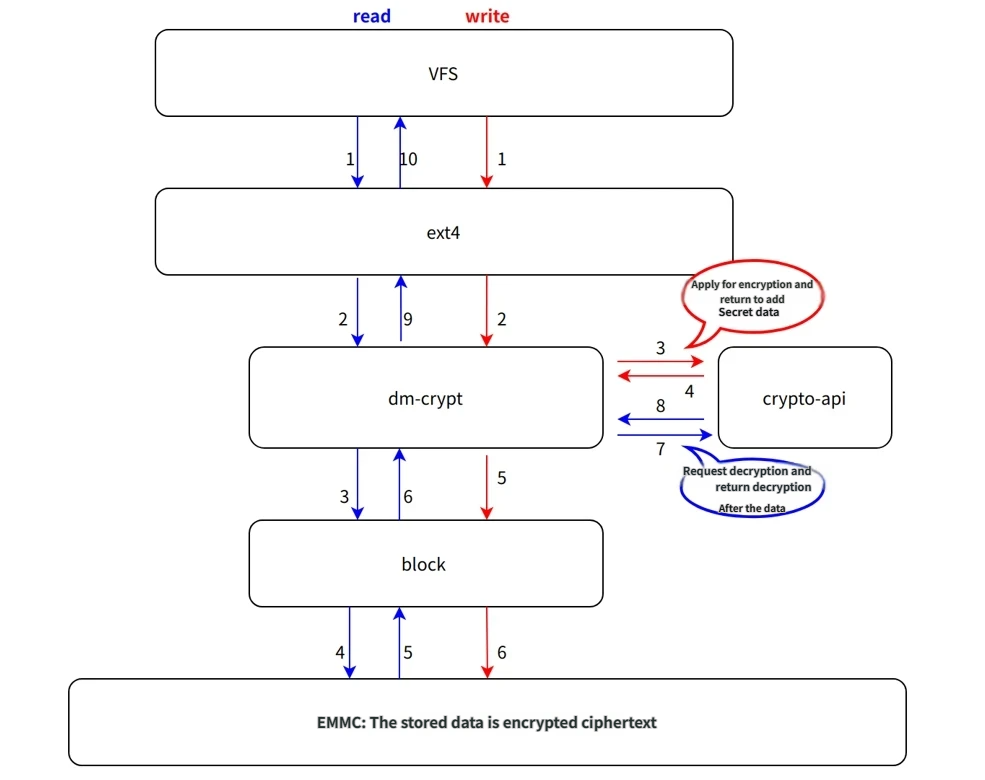
FDE implementation relies on the following two components:
Terminology
| Abbreviation | Full Name/Explanation |
|---|---|
| FDE | Full Disk Encryption |
| LUKS | Linux Unified Key Setup |
| TEE | Trusted Execution Environment |
| AVB | Android Verified Boot |
| Superblock | Superblock, used to store filesystem metadata and control information |
| salt | Salt, a piece of random data; salting passwords effectively prevents brute-force attacks |
FDE Tools
cryptsetup
Cryptsetup is a tool used for managing disk encryption, specifically designed for encrypting disk partitions and managing LUKS encrypted volumes. It provides various encryption algorithms and flexible key management features, widely used to protect sensitive data. With Cryptsetup, users can securely create and manage encrypted disks, preventing unauthorized access to data, especially in cases where physical devices are stolen or lost.
Working Principle
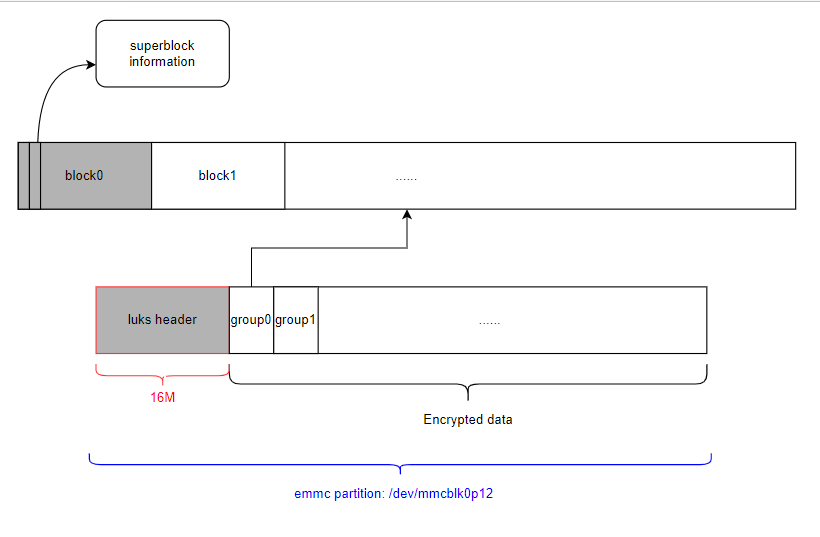
When creating a LUKS encrypted volume, a LUKS header is generated for the target partition to store keys, salts, etc., and the remaining portion (excluding the LUKS header) is reformatted to generate a new encrypted superblock.
dm-crypt
dm-crypt is an encryption module in the Linux system based on Device Mapper technology, running in kernel space. It is used to encrypt storage devices (such as hard drives, partitions, LVM volumes, etc.). It provides a transparent encryption mechanism, allowing the operating system to securely handle data without exposing encryption details. In short, dm-crypt allows users to encrypt data on storage devices, ensuring data confidentiality so that even if the device is stolen or lost, the data cannot be easily accessed.
Working Principle
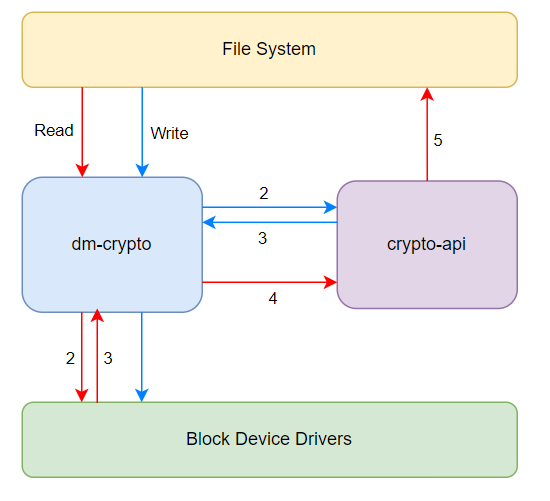
dm-crypt is implemented based on Device Mapper technology. It separates the encryption layer from the storage layer by creating a new virtual device. The operating system performs all read/write operations through this virtual device, while the encryption and decryption processes are automatically completed in the background.
When you read from or write to an encrypted device, dm-crypt automatically encrypts (on write) or decrypts (on read) the data. This encryption/decryption process is transparent, and applications or users do not need to understand the encryption details.
X5 FDE User Password Management
In full-disk encryption schemes, users must set a password or key for the encrypted disk; only with the correct password can data be accessed. The security of these passwords and key management directly determines the strength of the entire encryption system. X5 provides the following two solutions for FDE key management:
Official cryptsetup solution: using a user password as external input, for example, storing the user password file in the filesystem.
The solution introduced in this document: user password derived from TEE, not stored on any storage medium.
The main difference between the two lies in the source of the user password.
Note: X5 recommends using Solution 2
Solution 1: Official cryptsetup solution
cryptsetup -c aes-xts-plain64 -s 256 -h sha256 -q luksFormat /dev/mmcblk0p1 -d /etc/fde_default.bin
cryptsetup -c aes-xts-plain64 -s 256 luksOpen /dev/mmcblk0p1 luksdata -d /etc/fde_default.bin
Solution 2: Derive user password via TEE
X5 modifies the cryptsetup source code, with the following characteristics:
The user password is derived from TEE
The user password is not saved on any storage medium; it is only used during cryptsetup initialization
getdmkey --km | cryptsetup -c aes-xts-plain64 -s 256 -h sha256 -q luksFormat /dev/mmcblk0p1
getdmkey --km | cryptsetup -c aes-xts-plain64 -s 256 -h sha256 luksOpen /dev/mmcblk0p1 luksdata
cryptsetup parameter explanation:
-c, --cipher: Specifies the encryption algorithm. For example,aes-xts-plain64is a commonly used encryption algorithm configuration in dm-crypt, specifying the following:aes: Use the AES symmetric encryption algorithmxts: Use the XTS encryption mode, suitable for scenarios like disk encryptionplain: Indicates no additional encryption or wrapping layers
-s, --key-size: Specifies the key size (unit: bits), such as 128-bit or 256-bit. A 256-bit key size is generally recommended--hash: Specifies the hash algorithm, such as sha256 or sha512, used to generate the hash value of the encryption key-d, --key-file: Specifies the path to the key file-q, --batch-mode: Runs cryptsetup commands in batch mode, skipping any interactive prompts and automatically bypassing all confirmations and user inputsluksFormat: Formats a disk partition or device into LUKS encrypted formatluksOpen: Unlocks a LUKS encrypted volume and maps it to a deviceluksdata: Specifies the device mapper mapped node name. Users can specify any name; hereluksdatais used only for demonstration
X5 FDE Usage
Currently, X5 supports encryption for both system and user partitions:
System partition encryption can refer to the following solution:
User partition encryption supports key-hobot and key-file solutions:
System Partition Encryption
Solution Principle
This solution refers to the implementation flow of dm-verity for the system:
Build phase: When building the system FDE image, FDE-related configuration information is saved into the vbmeta partition
U-Boot phase: U-Boot retrieves the system FDE information from the vbmeta partition and passes this information to the kernel via bootargs
Kernel phase: The dm-crypt framework in the kernel parses the bootargs and completes decryption of the system partition
An example of FDE information in bootargs is shown below:
dm-mod.create="dm-crypt,,0,ro,0 510976 crypt aes-cbc-essiv:sha256 bf05fb0da6bc94f6b550e23a093d5fd2 0 $(SYSTEM_PART) 0 1 allow_discards
Usage Method
Change the system partition verification method to crypt
Modify the configuration file according to the project. For example, device/horizon/x5/board_x5_evb_debug_config.mk:
# system configuration
# Specify root filesystem type and prebuilt filesystem path
export HR_SYSTEM_TYPE="buildroot"
export HR_SYSTEM_DIR=${HR_TOP_DIR}/system/buildroot/prebuilt
# Root filesystem partition name, must match partition table configuration
export HR_SYSTEM_PART_NAME="system"
# system verify method: dm-verity, crypt
export HR_SYSTEM_VERIFY="crypt"
Note: After modifying the configuration, re-run ./bd.sh lunch to select this configuration file for changes to take effect
Create system FDE image
Currently, the FDE key is randomly generated at compile time, not written to disk, and has a length of 128 bits.
Note: How to prevent system FDE information leakage
On development boards, system FDE information is passed via bootargs, so it can be viewed in boot logs by checking cmdline.
To prevent FDE key leakage, the key in bootargs is the FDE key encrypted by the user root key from efuse (using AES-128-ECB, nopad).
In the kernel’s dm-crypt framework, a decryption process for the bootargs key has been added, and the decryption process is completed on the TEE side.
To trigger key decryption, the key in bootargs must be prefixed with dr-fde:, as shown below:
dm-mod.create="dm-crypt,,0,ro,0 510976 crypt aes-cbc-essiv:sha256 dr-fde:bf05fb0da6bc94f6b550e23a093d5fd2 0 $(SYSTEM_PART) 0 1 allow_discards
User root key
The user root key is located at device/horizon/x5/board_cfg/soc/bl2_cfg/user_root.key, 16 bytes long.
Generate user key
Users can replace the user root key, for example: generate a new random key, as follows:
cd device/horizon/x5/board_cfg/soc/bl2_cfg/
dd if=/dev/random of=./user_root.key bs=1 count=16
Burn key
Refer to Burning efuse for burning user root key
Note: If the user root key is not burned, it defaults to 16 bytes of 0x0
Build and Boot
Run ./bd.sh to recompile the disk image and flash it onto the board for booting.
The script for creating the system FDE image is build/tools/partition_tools/pack_avb_img.sh
Note:
Creating the system FDE image requires sudo privileges
Secure boot must be enabled with AVB verification; otherwise, system partition decryption will not be triggered, leading to root filesystem mount failure
System encryption information is stored in the vbmeta partition, so during OTA upgrade or flashing, vbmeta/boot/system partitions must be upgraded simultaneously, and these three partition images must be generated from the same build
User Partition Encryption: key-hobot Solution
Implement FDE for regular partitions. Taking the data partition as an example, the steps are as follows:
Add New Partition
Add a data partition in the partition table. For example, device/horizon/x5/board_cfg/soc/x5-soc-debug-gpt.json (users should refer to actual partition table files):
diff --git a/board_cfg/soc/x5-soc-debug-gpt.json b/board_cfg/soc/x5-soc-debug-gpt.json
index 10500f3..22a3421 100644
--- a/board_cfg/soc/x5-soc-debug-gpt.json
+++ b/board_cfg/soc/x5-soc-debug-gpt.json
@@ -39,6 +39,10 @@
                "part_type": "GOLDEN",
                "size": "700m"
        },
+       "data": {
+               "size": "50m"
+       },
        "userdata": {
                "fs_type": "ext4",
                "size": "50m"
Note:
If adding a partition containing content, the previous partition in the partition table must be non-empty (i.e., an actual .img image file will be generated). Adding empty partitions is not subject to this restriction.
The name of the added partition must not contain underscores
_, otherwise the partition name will be truncated in the build script, causing anomalies.If converting an existing partition to FDE, delete the corresponding mount rule in
system/buildroot/prebuilt/boot-utils-runtime/etc/hb-fstab, otherwise mounting will fail.
Add FDE Configuration in hb-crypttab
Add FDE configuration for the data partition in system/buildroot/prebuilt/boot-utils-runtime/etc/hb-crypttab:
# <target name>	<source device>		<key file>	<options>
data /dev/block/platform/by-name/data --key-hobot cipher=aes-xts-plain64,size=512,ext4=y
The configuration format is <target name> <source device> <key file> <options>. Parameter descriptions:
target name: Encrypted partition name, also the name under/dev/mapper/source device: Device path. Currently, symbolic links named byby-nameare automatically created for partition devices. Paths are under/dev/block/platform/by-name, e.g., EMMC partition devices are linked to/dev/mmcblk*p*key file:--key-hobotindicates using a user password derived from TEE; alternatively, specify a key path, e.g.,/etc/fde_default.binoptions: Other parameter settings.cipher=aes-xts-plain64: Specifies the encryption algorithm, must match cryptsetup’s-cparametersize=512: Indicates key size, must match cryptsetup’s-sparameterhash=sha512: Hash applied to the key, corresponds to cryptsetup’s-hparameterext4=y: Filesystem format of the encrypted partition; after initialization, the partition needs formatting before mounting
Note: To replace the default FDE key, replace system/buildroot/prebuilt/boot-utils-runtime/etc/fde_default.bin at compile time
Create Mount Point Directory in Root Filesystem
Modify the system build script build/mk_system.sh, add mount point directory for data partition:
function build_unpack()
{
	...(omitted)...

    # Create partition mount directories
    mkdir -p ${SYSTEM_BUILD_DIR}/{app,log,userdata,usr/hobot,data,private}

    ...(omitted)...
}
Rebuild.
Build and Boot
Run ./bd.sh to recompile the disk image and flash it onto the board for booting.
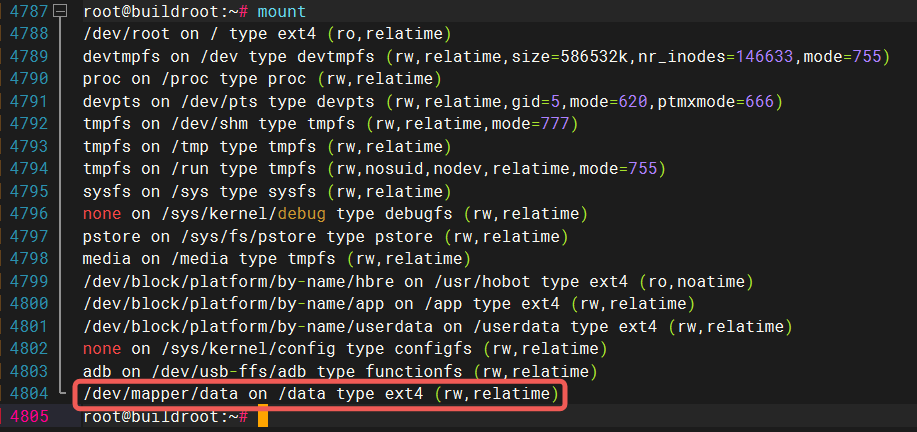
As shown below, after successful enablement, “data” will appear under /dev/mapper:
Check boot log:
[   27.455427] CRYPTSETUP: cipher value: aes-xts-plain64
[   27.460926] CRYPTSETUP: /dev/block/platform/by-name/data
[   27.485172] INFO: fde luksFormat /dev/block/platform/by-name/data starting
[   27.505462] CRYPTSETUP: key:--key-hobot src:/dev/block/platform/by-name/data dst:data
[   40.135874] CRYPTSETUP: data
[   40.142366] mount -t ext4 /dev/mapper/data /data
[   40.235217] ext2fs_open2:
[   40.235270] Bad magic number in super-block

[   40.243783] fsck.ext4: Superblock invalid, trying backup blocks...
[   40.267239]
               The
[   40.267259] super
[   40.271303] block
[   40.273973] udevd[1265]: conflicting device node '/dev/mapper/data' found, link to '/dev/dm-0' will not be created
[   40.278746]  could not be read or does not describe a valid ext2/ext3/ext4
[   40.298703] filesystem
[   40.298709] .  If the
[   40.302940] printk: fsck.ext4: 14 output lines suppressed due to ratelimiting
[   40.332572] Creating filesystem with 34816 1k blocks and 8720 inodes
[   40.338968] Filesystem UUID: e57ae31f-6f33-4c02-a2c0-6d714aeebb57
[   40.345097] Superblock backups stored on blocks:
[   40.345105]

[   40.349845] 8193
[   40.352905] ,
[   40.354750] 24577


[   40.361360] Allocating group tables:
[   41.841061] printk: mkfs.ext4: 22 output lines suppressed due to ratelimiting
[   41.885513] Pass 1: Checking
[   41.885533] inode
[   41.888517] s,
[   41.890479] block
[   41.892236] s, and sizes
[   41.904447] Pass 2: Checking
[   41.904464] directory
[   41.907447]  structure
[   41.914925] Pass 3: Checking
[   41.914939] directory
[   41.949896] printk: fsck.ext4: 6 output lines suppressed due to ratelimiting
[   41.966145] EXT4-fs (dm-0): mounted filesystem with ordered data mode. Quota mode: disabled.
User Partition Encryption: key-file Solution
Solution Principle
This solution implements encrypting user-specified partitions with a key file at compile time and decrypting and mounting the user partition with the same key file at boot time.
Below, using the addition of a user partition fdedata as an example, we introduce its usage method.
Compile phase: Use a specified key file to encrypt the user partition image
Boot phase: The boot script decrypts the user partition according to the configuration file and mounts it to the specified directory
Usage Method
1. Add Partition and Build Script
Add an fdedata partition in the partition table. For example, device/horizon/x5/board_cfg/soc/x5-soc-debug-gpt.json (users should refer to actual partition table files):
"fdedata": {
  "fs_type": "ext4",
  "part_type": "GOLDEN",
  "size": "32m",
  "fde_type": "key-file"
},
Parameter explanation:
fs_type: Filesystem format, currently only supports encrypting ext4 formatted partitionssize: Partition sizefde_type: Used at compile time to specify partition encryption type, currently only supportskey-filemethod
Note: If the mount point does not exist, the boot script will automatically create it. Note that if the mount point is /, since rootfs is read-only by default, the directory must be created in advance at compile time to avoid creation failure
2. Encryption/Decryption Key File
Default key file path used for encryption/decryption: system/buildroot/prebuilt/boot-utils-runtime/etc/fde_default.bin, users can replace it with their actual key file.
Example: Generate key file using random numbers
Note: Key file size must match the encryption algorithm’s key length. Currently, user partition encryption key length supports 256/512
Taking AES-128 with key length 16 bytes as an example:
dd if=/dev/urandom of=system/buildroot/prebuilt/boot-utils-runtime/etc/fde_default.bin bs=1 count=16
Add decryption and mount configuration for the fdedata partition in system/buildroot/prebuilt/boot-utils-runtime/etc/hb-crypttab:
# <target name>	<source device>		<key file>	<options>
fdedata  /dev/block/platform/by-name/fdedata /etc/fde_default.bin dm_crypt,cipher=aes-xts-plain,size=256,mntext4=/userdata/test
Configuration format: [partition name] [partition path] [key file path] [parameters]
Multiple options are supported, separated by commas. Option descriptions:
dm_crypt: Indicates using dm-crypt to encrypt the user partitioncipher: Encryption algorithm mode, should be consistent with the build script. X5 SDK defaults toaes-xts-plainsize: Key length, supports 256/512mntext4: Mount point path using ext4 format
3. Add Encryption Partition Build Script
To allow better control over the build logic, X5 SDK uses independent build scripts for each partition. For user encryption partition builds, X5 SDK provides a script template build/mk_fde.sh. Users need to copy and modify it to the user partition name, formatted as mk_[partition name].sh. For the new partition fdedata, copy and rename the script to mk_fdedata.sh.
Note: The script filename must be renamed strictly according to the above format, otherwise compilation errors will occur
Users can add custom operations in the build script, as follows:
#...(omitted code)...
function build_all()
{
	echo -e "\033[33m[INFO]: Starting Build User FDE Part [${PART_NAME}].\033[0m"
	echo "Part Name: ${PART_NAME}"
	echo "SRC Folder: ${user_part_dir}"
	echo "Fs Type: ${user_fs_type}"
	echo "FDE Type: ${fde_type}"

  # The user adds custom actions here. Begin

  # User adds custom operations here

  # End

	# Build EXT4 image
	if [ "${user_fs_type}" = "ext4" ]; then
		[ ! -d $user_part_dir ] && mkdir -p ${user_part_dir}
		${HR_PARTITION_TOOL_PATH}/mk_avb_fs.sh ${PART_NAME} ${user_part_dir}
	fi
#...(omitted code)...
Add fdedata build entry in xbuild.sh:
+++ b/xbuild.sh
@@ -126,6 +126,11 @@ function build_app
        build_component "app" "${HR_LOCAL_DIR}/mk_app.sh" "$@"
 }

+function build_fdedata
+{
+       build_component "fdedata" "${HR_LOCAL_DIR}/mk_fdedata.sh" "$@"
+}
+
 function truncate_fill_image
 {
        part_size=$(get_part_attr "${1}" "size")
@@ -408,7 +413,7 @@ function build_all
        build_pack "$opt"
 }

-avail_func=("all" "lunch" "miniboot" "uboot" "factory" "boot" "hbre" "system" "app" "pack" "otapackage")
+avail_func=("all" "lunch" "miniboot" "uboot" "factory" "boot" "hbre" "system" "app" "pack" "otapackage" "fdedata")

 if [ $# -eq 0 ];then
        build_all all
4. Source Files for User Encrypted Partition
User partition source directory is located at custom/[partition name] in the SDK root directory.
Note: X5 SDK does not include this directory by default; users must create it manually
For the new partition fdedata, users need to create the directory custom/fdedata and store user data files:
custom/
└── fdedata
    ├── a.txt
    ├── b.txt
    ├── c.txt
    ├── d.txt
    └── f.txt
5. Build
Full Build
Run sudo ./bd.sh in the SDK root directory to automatically compile and generate the encrypted partition image. The process is as follows:
Pack the
custom/fdedatadirectory into an ext4 format imageEncrypt the ext4 image using the key file to generate
out/product/fdedata.imgPackage
out/product/fdedata.imginto the firmware imageemmc_disk.simg
Partial Build
Users can also compile the encrypted partition image separately, using the command format sudo ./bd.sh [partition name]
Note: Compiling encrypted partitions requires root privileges
Boot Verification
The system boot script /etc/init.d/S95forcefde.sh reads the configuration /etc/hb-crypttab, uses its parameter options to decrypt the partition. Taking partition fdedata as an example:
Its configuration is:
# <target name> <source device>         <key file>      <options>
fdedata  /dev/block/platform/by-name/fdedata /etc/fde_default.bin dm_crypt,cipher=aes-xts-plain,size=256,mntext4=/userdata/test
Boot log is as follows:
[    4.799535] udevd[302]: conflicting device node '/dev/mapper/fdedata' found, link to '/dev/dm-1' will not be created
[    4.857102] INSECURE MODE FOR /etc/fde_default.bin
[    4.863015] CRYPTSETUP: cipher value: aes-xts-plain
[    4.863393] Mount Point: /userdata/test
[    4.866874] CRYPTSETUP: /dev/block/platform/by-name/fdedata
[    4.914790] CRYPTSETUP: dm_crypt params  --type plain -c aes-xts-plain -s 256
[    4.914908] CRYPTSETUP: dm_crypt key -d /etc/fde_default.bin
[    4.976727] CRYPTSETUP: fdedata
The system decrypts the fdedata partition and generates the node /dev/mapper/fdedata. Finally, the decrypted partition is automatically mounted to /userdata/test
root@buildroot:~# mount | grep fdedata
/dev/mapper/fdedata on /userdata/test type ext4 (rw,relatime)