4.7.5. devmem
devmem is a command-line utility in Linux systems used for direct access to physical memory, supporting read and write operations on memory-mapped I/O (MMIO), commonly used in development, debugging, and low-level system configuration.
4.7.5.1. Syntax Description
Below is the Usage output from running devmem --help:
Usage: devmem ADDRESS [WIDTH [VALUE]]

Read/write from physical address

        ADDRESS Address to act upon
        WIDTH   Width (8/16/...)
        VALUE   Data to be written
4.7.5.2. Parameter Options Description
ADDRESS: Physical address, the memory location to be read from or written to, can be in decimal or hexadecimal format.
WIDTH: Optional parameter specifying the data width for read or write operations. Valid values include:
8 : 8-bit (byte)
16 : 16-bit (byte)
32 : 32-bit (byte)
64 : 64-bit (byte)
Default is 32-bit (byte)
VALUE: Optional parameter; when performing a write operation, specifies the data value to be written.
4.7.5.3. Command Options and Their Functional Descriptions
Reading Data from Physical Address
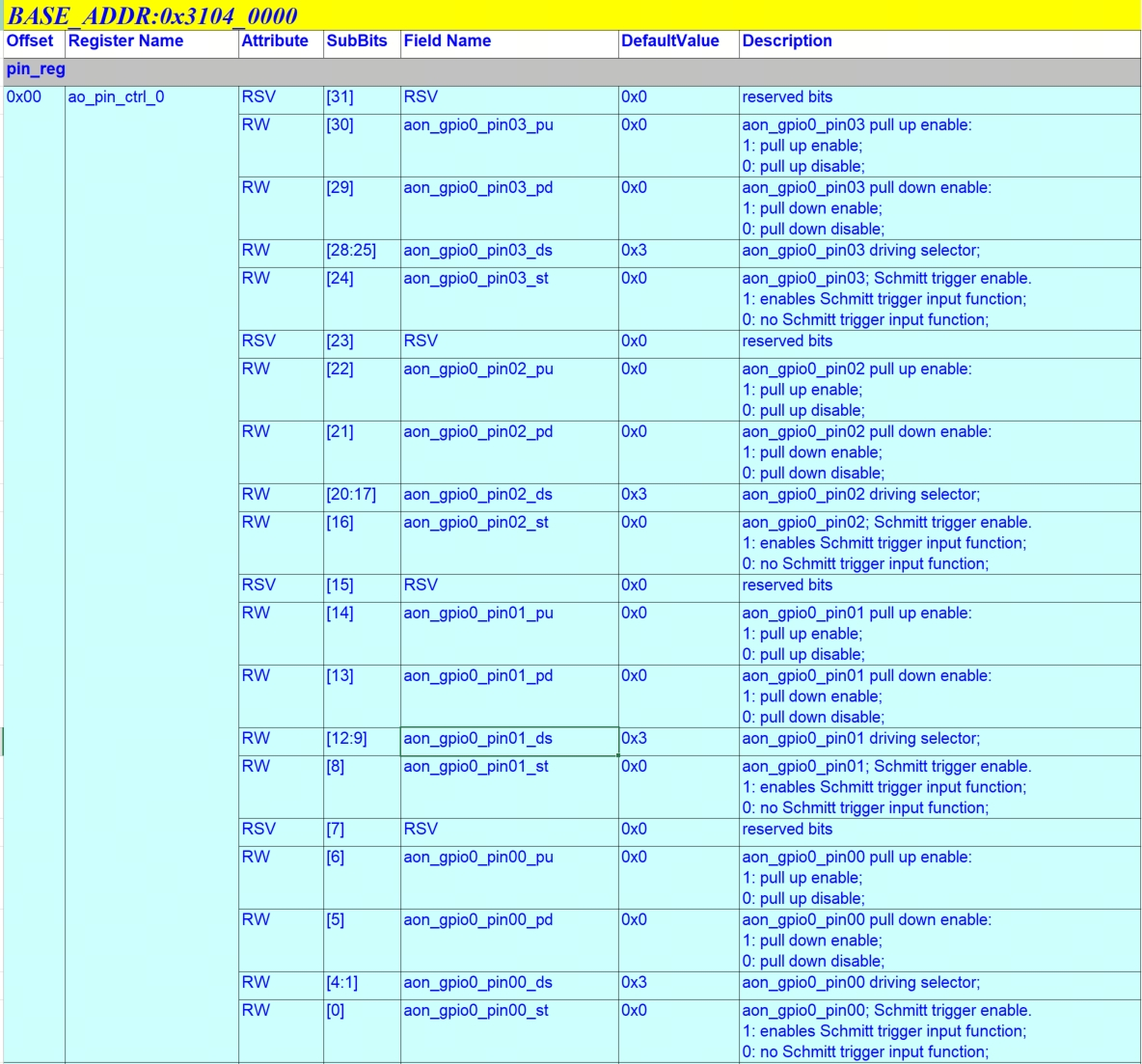
Take the aon_gpio_0 pin as an example, its base address and drive strength corresponding address are shown in the figure:
Command:
root@buildroot:~# devmem 0x31040000 32
Function:
Reads 32-bit data from physical address 0x31040000.
Output:
root@buildroot:/userdata/gmsl# devmem 0x31040000 32
0x06060606
Field Interpretation:
Bits [12:9] of the read data match the default drive strength value of 3 as specified in the documentation.
Writing Data to Physical Address
Command:
devmem 0x31040000 32 0x06060806
Function:
Writes the specified value 0x06060806 to physical address 0x31040000, corresponding to a drive strength level of 4, with a data width of 32 bits.
Output:
Verify the write operation by reading back from address 0x31040000:
root@buildroot:/userdata/gmsl# devmem 0x31040000 32
0x06060806
Note:
This modification is for illustrative purposes only. The GPIO pin’s drive strength level must match the hardware design and should not be adjusted arbitrarily.