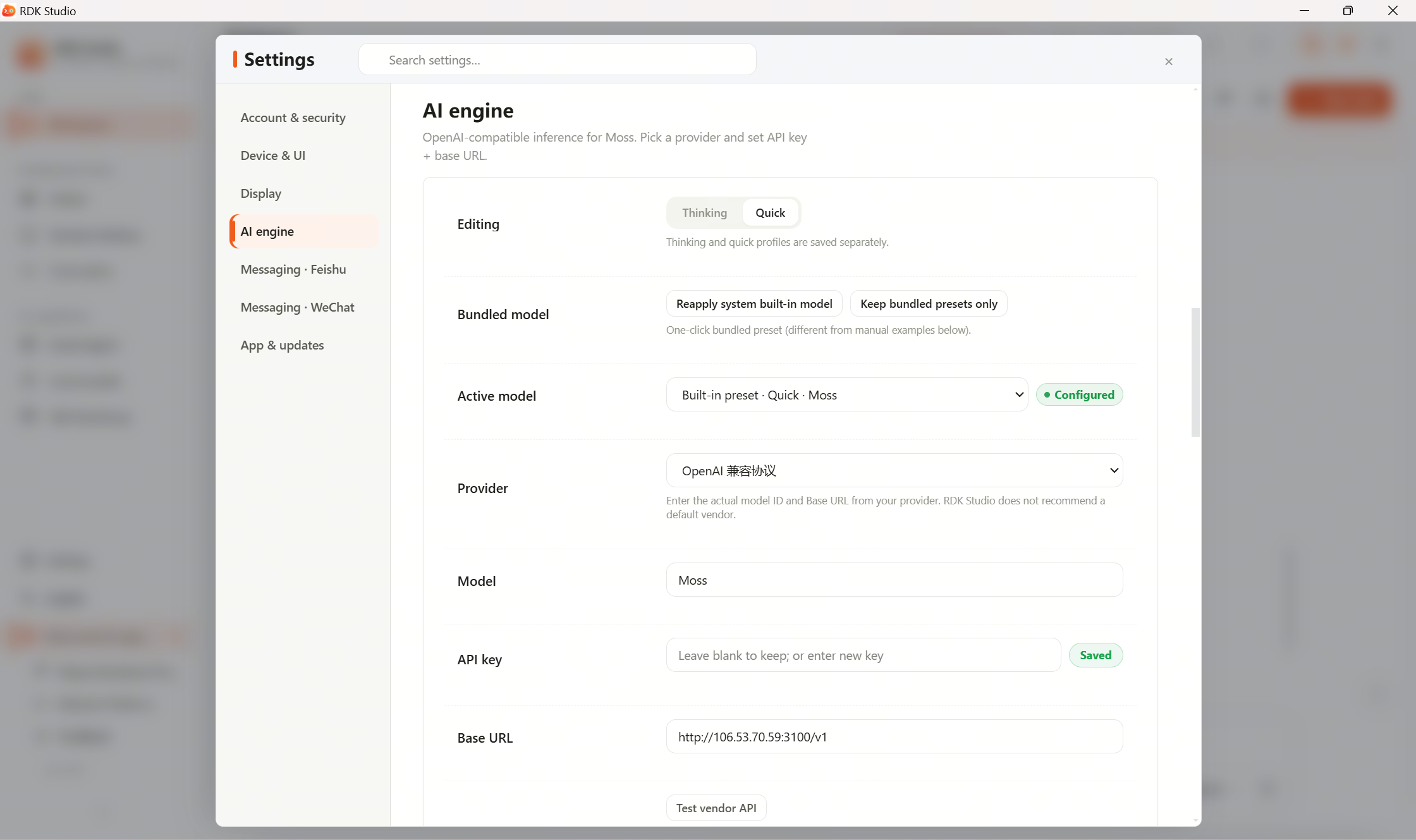
3.12.3 AI Engine Configuration

AI Engine Configuration Page: Top shows lane switch for "Current Model / Thinking / Quick"; below are built-in models, provider, Model, API Key, Base URL, and a Test button arranged sequentially

The AI Engine section is the core of model management in RDK Studio. This section provides a complete reference for model entry fields, dual-lane routing, and protocol determination rules. The quick setup process described in Section 2.5: Connecting AI Models is expanded here into detailed documentation.

Built-in Default Model

RDK Studio provides all logged-in users with an officially recommended model. After logging in with a D-Robotics account, you can use this model immediately without configuring an API Key. Requests to this model are routed through D-Robotics' official gateway, which has been optimized specifically for RDK development scenarios and treats internal company accounts and external developer accounts equally.

If developers only need an "out-of-the-box" experience, they can simply use the default model without creating any custom model entries.

Custom Model Entries

External developers or teams who wish to use specific models can create custom model entries. Each entry supports the following fields:

FieldRequiredDescription
LabelYesDisplay name of the entry, used for identification in dropdown menus
ProviderYesVendor identifier that determines the API protocol used (see "Protocol Determination" below)
ModelYesVendor's model ID (must be exact and case-sensitive)
API KeyYesKey obtained from the vendor’s console
Base URLNoEndpoint URL; leave blank to use the vendor’s default
TemperatureNoSampling temperature: 0 = deterministic, 1+ = more creative; default is 0.7
Top-PNoNucleus sampling threshold; default is 1.0
Reasoning visibilityNoWhether to show reasoning steps to the user: inline / hidden

Protocol Determination Rules

Studio determines which API protocol to use based on the Provider field (not the URL):

Provider Field ValueProtocol UsedAuthentication Method
openai / qwen / doubao / gemini / deepseek / moonshot / siliconflow / ollama / openai-compatibleOpenAI CompletionsAuthorization: Bearer <key>
anthropic / anthropic-compatibleAnthropic Messagesx-api-key: <key>

Protocol determination does not depend on whether the URL path contains the word anthropic. If you use a reverse proxy to wrap an Anthropic service under a path that doesn’t include "anthropic," you must still set the Provider to anthropic-compatible; otherwise, Studio will send requests using the OpenAI protocol and receive a 401 error.

This logic is implemented in the resolveProtocol() function in server/agent/provider-setup.ts.

Dual-Lane Routing

RDK Studio implements two dedicated model lanes: Thinking and Quick:

LaneTrigger ScenarioRecommended Models
ThinkingMain conversations, complex reasoning, hardware awareness, and tool invocationClaude Sonnet, qwen-plus, doubao-seed-pro, etc.
QuickSummarizing tool results, file browsing summaries, short Q&Agpt-4o-mini, qwen-turbo, doubao-seed-lite, etc.

At the top of the AI Engine section, there are two separate dropdown menus to assign model entries to the Thinking and Quick lanes, respectively. The two lanes can use models from different vendors.

If only the Thinking lane is configured and the Quick lane remains empty, all tasks will be routed through the Thinking lane, significantly increasing token costs (5–10× higher). It is strongly recommended to configure both lanes, using a cost-effective small model for the Quick lane.

Connectivity Testing

Each model entry can be tested independently for connectivity:

ActionPath
Test EntryClick the Test Connectivity button on the right side of the model entry
Success ResponseDisplays a list of available models, confirming that Provider, Model, API Key, and Base URL are correctly configured
Failure ResponseShows specific error codes (e.g., 401, 403, 404, timeout); troubleshoot based on the error code

Advanced Parameters

ParameterFunctionDefault Value
TemperatureSampling temperature: 0 = fully deterministic, higher values = more creative0.7
Top-PNucleus sampling threshold controlling output diversity1.0
Thinking Default OnWhether this model defaults to deep-thinking modeFollow system setting
Reasoning visibilityWhether to display reasoning stepsinline

Adjusting these parameters affects the model’s response style and quality. It is recommended to keep the default values unless specific adjustments are truly needed.

Configuration Import and Export

Model entries can be imported and exported in bulk. See Section 3.12.5: Configuration Import and Export for details.