7.5.14 MCU Ramdump
Currently, MCU0 and MCU1 share the same memory for crash information. If MCU0 and MCU1 simultaneously encounter exceptions, the information saved by the MCU ramdump feature is unavailable.
Overview
The MCU ramdump feature is designed so that when the MCU crashes or enters an exception, it can print exception information and save it for analysis to help locate where the exception occurred.
Exception Handling Flow
When the MCU enters an exception, it preserves the context information in a global variable that can be read by the A-core or through the MCU shell.
If MCU0 encounters an exception, the system will restart. During the restart flow, the system checks the reboot reason. If the reboot reason is determined to be mpainc, the system ensures that the memory region corresponding to the global variable that stores the MCU exception context is not zeroed out. After the system restarts, you can read the ramdump data and use it to analyze the cause of the exception.
The exception handling flow is shown below:
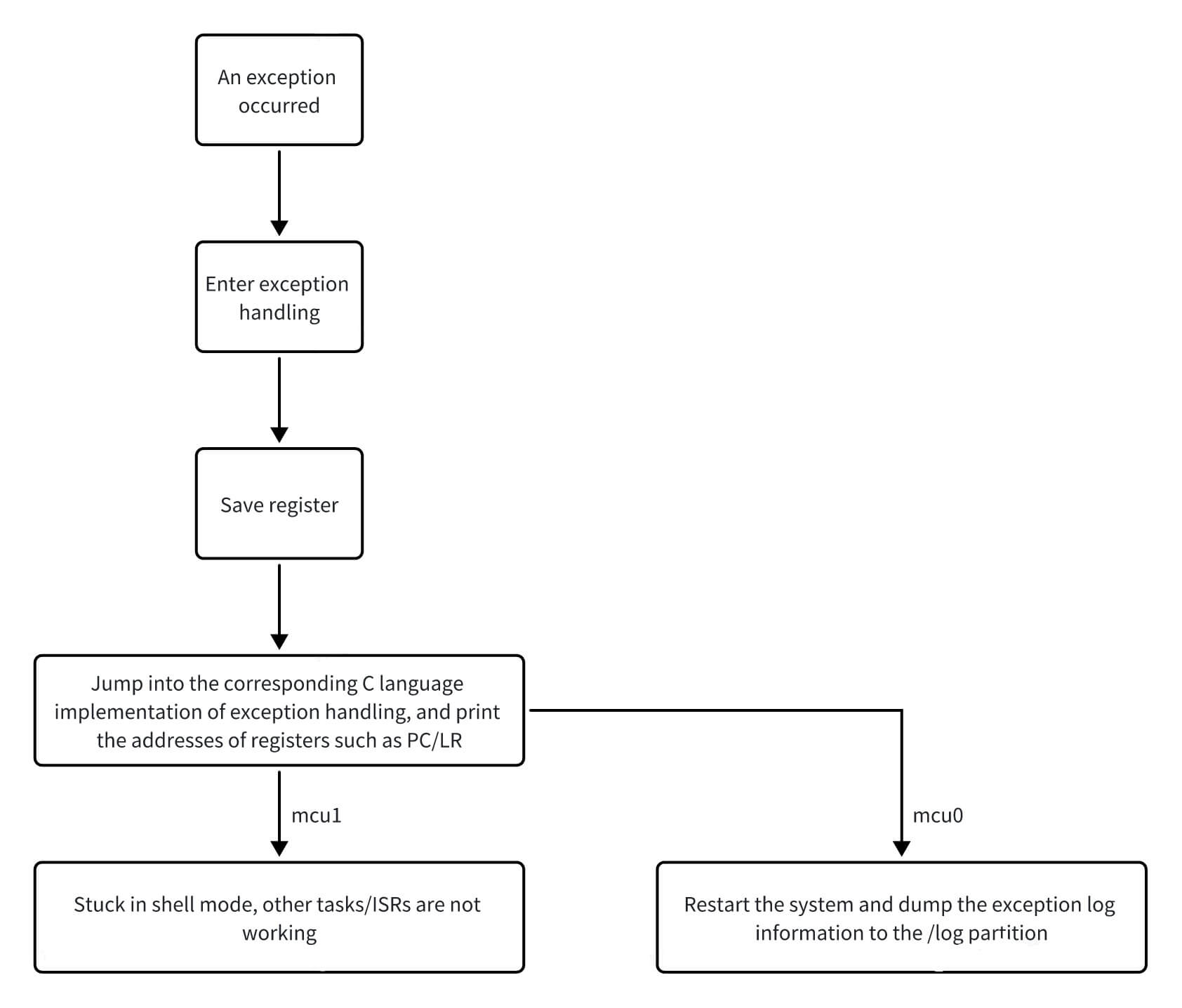
The exception handling flows for MCU0 and MCU1 are largely similar; the only difference is that MCU0 restarts the system after handling the exception.
Restarting MCU1 After an Exception
When MCU1 encounters an exception, it enters the shell. At this point, you can stop and restart MCU1 through the A-core remoteproc control mechanism. Example commands:
  # Stop
  echo stop > /sys/class/remoteproc/remoteproc_mcu0/state
  # Start
  echo start > /sys/class/remoteproc/remoteproc_mcu0/state
Obtaining MCU Exception Information
-
On the A-core, you can read the context information recorded when MCU1 encounters an exception through the sysfs node. The corresponding sysfs node is:
cat /sys/devices/platform/soc/soc:mcu_crash/crash -
When MCU0 encounters an exception and the system restarts, if the reboot reason is
mpainc, the context information is dumped to the/logpartition for historical log tracking and analysis. Log dump directories are named in the formatSuperSoC_Mdump-<count>-<time>.
Here,<count>indicates the number of system reboots, and<time>is the timestamp in the formatyear_month_day_hour_minute_second, for example:SuperSoC_Mdump-0010-2025_08_13_20_25_11 -
When the MCU encounters data abort, undefined, or prefetch exceptions, the context information can be dumped for analysis.
Exception Dump Analysis
The following uses a recorded data abort exception as an example:
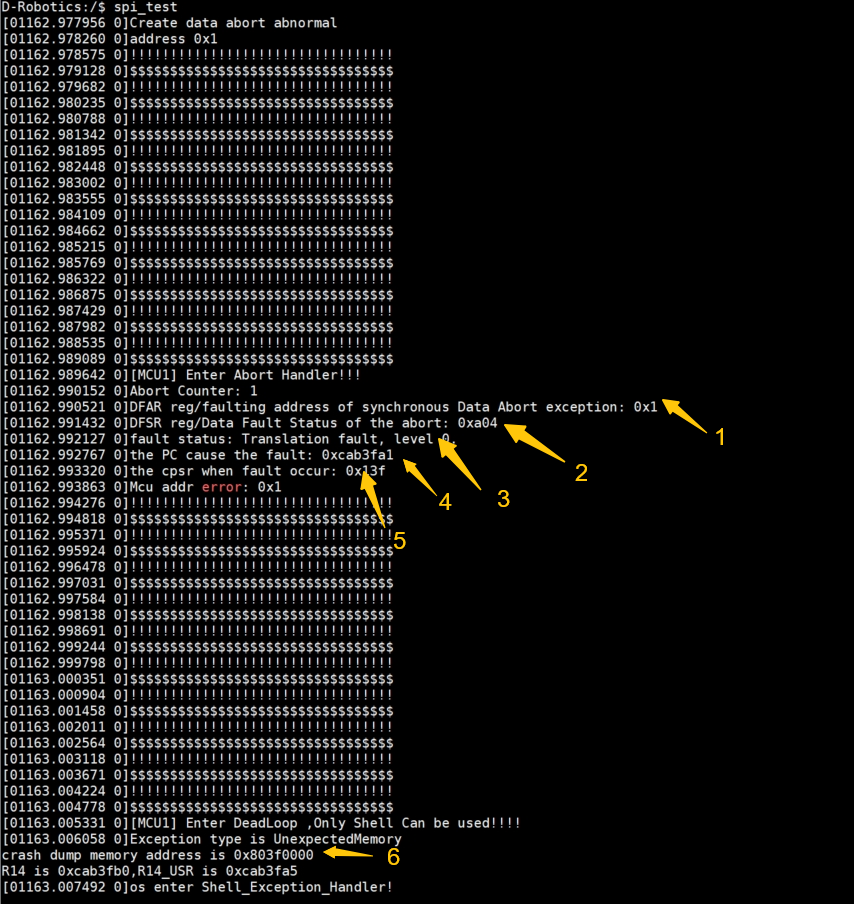
The meaning of each field is as follows:
-
Arrow 1 indicates the access address when a data access exception occurs. As shown above, the exception occurred when attempting to access data at address
0x1. -
Arrow 2 shows the exception status data, which can generally be ignored.
-
Arrow 3 indicates the type of exception that occurred.
-
Arrow 4 indicates the location of the instruction that caused the exception. Using this address together with ELF parsing, you can locate the exact code location where the exception occurred. Example:
addr2line -e S100_MCU_DEBUG.elf 0xcab3fa1If
addr2lineis not installed on the system, install it with the following commands:sudo apt update
sudo apt install binutils -y -
Arrow 5 indicates the value of the CPU CPSR register when the exception occurred.
-
Arrow 6 indicates the address information where the crash dump was recorded when the exception occurred. You can enter
dumpmem [addr] 4 64in the MCU shell to read the register and stack information saved at the crash site, or obtain the register and stack information from the A-core via sysfs.