4.5.6. 串口压力测试
4.5.6.1. 测试原理
串口
数据
发送 与 接收:串口 压测 的 核心 原理 是 通过 将 大量 的 数据 发送到 串口 设备,然后 再 从 串口 设备 接收数据。 发送数据:通过
脚本 或 程序 生成 大规模 的 数据包,通过 串口 发送到 目标 设备。 接收数据:目标
设备 将 接收 到 的 数据 返回(例如 通过 串口 的 回环 测试 或 外部设备 响应),压测 程序 会 接收 这些 数据 并 进行 比 对 和 验证。
波特率
和 数据 帧 设置:波特率( Baud Rate)是 串口 通信 的 传输速率,通常 以 每秒 传输 的 比特 数( bps)表示,串口 通信 还 包括 其他 参数,如: 数据位( Data bits):每个
数据 帧 中 的 数据 位数(常见 有 8 位、 7 位 等)。 停止
位( Stop bits):指示 数据传输 结束 的 位(通常 为 1 或 2 位)。 校验位( Parity bits):用于
检查 数据传输 中 的 错误(奇偶校验)。
测试内容
1. 测试uartstress.sh 脚本uart_test.c 中, perform_single_loopback_test() 函数
打开
串口 并 设置 相关 参数 open_uart()。初始化
信号量 sem_init(),确保线程 在 合适 的 时机 进行 同步。 创建
发送 线程 uart_send_thread,接收线程 uart_recv_thread,和数据 检查 线程 check_recv_thread。发送
线程 负责 发送数据。 接收
线程 负责 接收数据 并 存储 到 缓冲区。 数据
检查 线程 负责 比较 接收 到 的 数据 与 发送 的 数据 是否 一致。
当
所有 线程 都 完成 工作 时, pthread_join()等待所有 线程 结束,然后 结束 测试。
2. 命令
测试
命令: uart_test" -l -s 1024 -c "$StressCount" -b "$Baudrate" -d "$Device" > "$uart_test_log_file"参数
解析: -l:执行回环 测试( Loopback Test )。 -s 1024:指定每次 测试 的 数据 大小 为 1024 字节。 -c "$StressCount":指定压力 测试 的 次数,即 测试 重复 的 次数。 -b "$Baudrate":设置串口 通信 的 波特率,变量 $Baudrate 会 根据 实际 传入 的 值 设置。 -d "$Device":指定串口 设备,变量 $Device 是 串口 设备 路径。 -> "$uart_test_log_file":将测试 结果 输出 到 指定 的 日志 文件 “$uart_test_log_file”。
4.5.6.2. 准备工作
压测脚本使用说明
串口
root@buildroot:/app/platform_samples/chip_base_test/04_uart_test# ./uartstress.sh -h
Usage: ./uartstress.sh [options]

Options:
  -b <baudrate>    Set the UART baud rate (default: 115200).
  -d <device>      Set the UART device (default: /dev/ttyS1).
  -c <count>       Set the stress count (default: 100).
  -o <directory>   Set the output directory for logs (default: ../log).
  -h               Show this help message and exit.
各
-b <baudrate>:设置波特率,默认值 是 115200 。。 -d <device>:该选项 用于 指定 测试 的 串口 设备,默认值 为 /dev/ttyS2 。 -c <count>:指定了 测试 的 压力 次数,默认值 是 100 。 -o <directory>:设置日志 输出 目录,默认值 为 ../log。
示例:
例如,使用./uartstress.sh -b 115200 -d /dev/ttyS2 -c 50 -o /app/platform_samples/chip_base_test 自定义
执行程序使用说明
uart_test 支持
Usage: uart_test [OPTIONS]
Options:
  -s, --size      : 指定测试数据大小( KB),默认为 1024KB,最大为 20480KB( 20MB)
  -b, --baudrate  : 指定 UART 的波特率,默认为 115200
  -c, --count     : 指定测试迭代次数,默认为无限循环
  -d, --device    : 指定 UART 设备路径
  -l, --loopback  : 启用 UART 回环测试(串口回环)
  -r, --read-only : 启用 UART 只读模式测试
  -w, --write-only: 启用 UART 只写模式测试
  -D, --dual-loopback : 启用 UART 双路双通回环测试(需要使用 --uart2 参数)
  -u, --uart2     : 指定第二个 UART 设备路径(双路回环测试必须)
  -V, --verbose   : 设置日志输出模式,按照对 bit 位的与运算输出不同模块的调试日志,目前支持 1: 输出发送模块的日志; 2 :输出接收模块的日志; 4 :输出数据校验模块的日志。数字相加后可以输出多个模块的日志,例如设置 3 则会输出发送与接收两个模块的日志
  -h, --help      : 显示帮助信息
如uartstress.sh 中 -l 改成 其他
"${script_dir}/uart_test" -w -s 1024 -c "$StressCount" -b "$Baudrate" -d "$Device" > "$uart_test_log_file"
之后
Test uart device:/dev/ttyS1
Test size: 2 KBytes, baudrate: 115200
Performing uart send...
Starting send thread
This is uart send test 1 times
This is uart send test 2 times
This is uart send test 3 times
注意事项
1. 查看 x5_evb 原理图
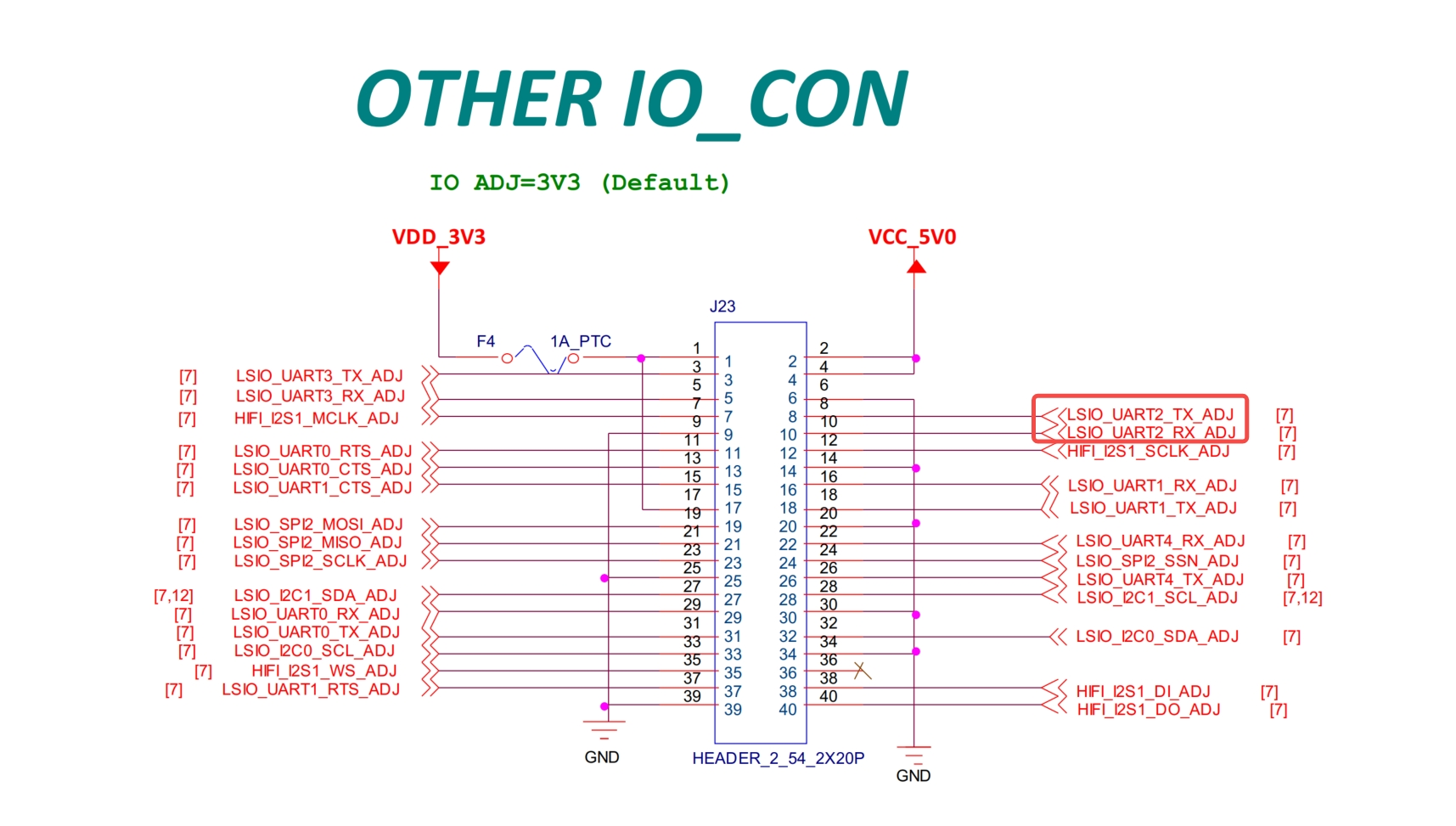
并
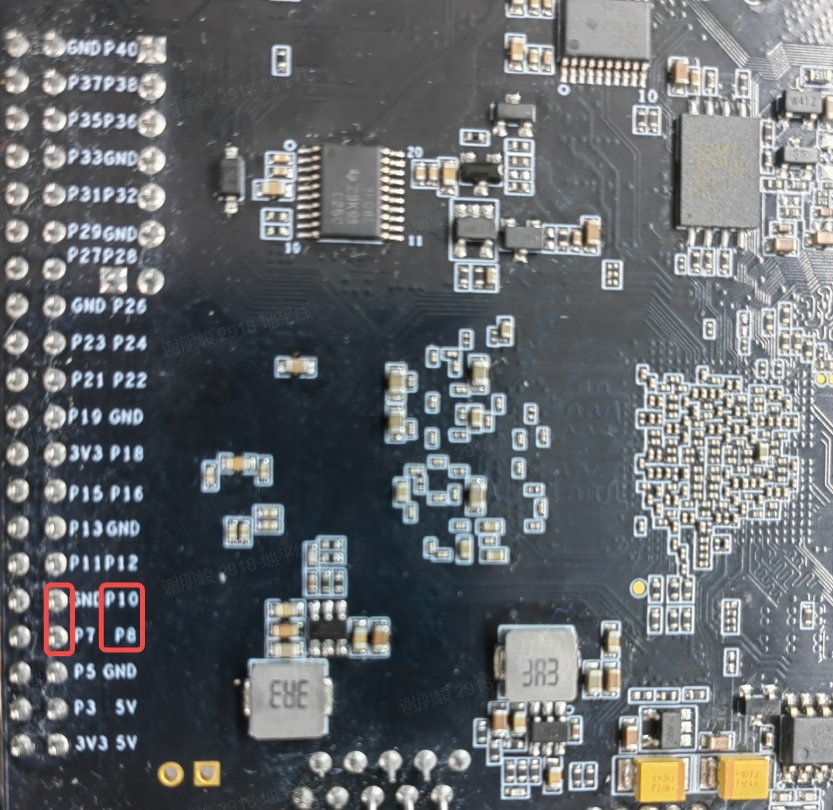
2. 确认uartstress.sh、uart_test.c、uart_test 三个
(base) root@DESKTOP-BD9DR0J:/app/samples/platform_samples/chip_base_test/04_uart_test# tree
.
├── uart_test
├── uart_test.c
└── uartstress.sh
3. 可
/opt/arm-gnu-toolchain-11.3.rel1-x86_64-aarch64-none-linux-gnu/bin/aarch64-none-linux-gnu-gcc -o uart_test uart_test.c
确保uart_test 以及 uartstress.sh 推送/userdata 目录
./uartstress.sh
运行
root@buildroot:/app/platform_samples/chip_base_test/04_uart_test# ./uartstress.sh
Uart test starting...
Test configuration:
  Baudrate: 115200
  Device: /dev/ttyS2
  Stress count: 100
  Output directory: /app/platform_samples/chip_base_test/log
  Log file: /app/platform_samples/chip_base_test/log/uart_test_log2.txt
此时
root@buildroot:# cat /app/platform_samples/chip_base_test/log/uart_test_log2.txt
Test uart device:/dev/ttyS2
Test size: 512 KBytes, baudrate: 115200
Performing uart recv...
Performing uart send...
Performing data check...
Starting send thread
Starting receive thread
This is receive test 1 times
This is uart send test 1 times
This is receive test 2 times
Data verification successful. Received data matches sent data. Test total data count: 0x80000
This is uart send test 2 times
This is receive test 3 times
Data verification successful. Received data matches sent data. Test total data count: 0x100000
This is uart send test 3 times
This is receive test 4 times
Data verification successful. Received data matches sent data. Test total data count: 0x180000
This is uart send test 4 times
4.5.6.3. 测试指标
测试程序/app/platform_samples/chip_base_test/log/ 目录
uart_test_log*.txt:记录
压 测时 的 打印信息 与 当前 状态。
测试fail、 error、 timeout 等
cd "/app/platform_samples/chip_base_test/log/" && grep -iE 'error|fail|timeout' uart_test_log*.txt
串口压测结果
运行
This is receive test 48 times
Data verification successful. Received data matches sent data. Test total data count: 0x1780000
This is uart send test 48 times
This is receive test 49 times
Data verification successful. Received data matches sent data. Test total data count: 0x1800000
This is uart send test 49 times
This is receive test 50 times
Data verification successful. Received data matches sent data. Test total data count: 0x1880000
This is uart send test 50 times