6.3.4. Model Quantization and Compilation
The conversion of the floating-point model to the D-Robotics Hybrid Heterogeneous Model will be completed in the Convert Model phase, after which you will get a model that can run on the D-Robotics computing platform. Before performing the conversion, make sure you have successfully passed the model check as described in the Check the Model section.
During the model conversion, some important procedures such as model optimization and calibration quantization must prepare the data in line with model pre-processing requirements. You can refer to Prepare Calibration Data section to prepare the calibration data in advance.
6.3.4.1. Convert the Model Using the hb_mapper makertbin Command
The model conversion process is performed using the hb_mapper makertbin tool, please refer to section Model Compiling Tool (hb_mapper makertbin) for the usage of the tool and the related specific configuration and parameters.
6.3.4.2. Model Conversion Interpretation
Model conversion is completed from a floating-point model to a hybrid heterogeneous model supported by D-Robotics’s computing platform. To make this heterogeneous model run quickly and efficiently on the embedded end, the model conversion focuses on solving two problems, input data processing and model optimization compilation, and this section will focus on these two problems in turn.
In terms of Input data processing, D-Robotics’s edge computing platform can provide hardware-level solutions for specific types of input channels, but the output of these solutions may not comply with the input requirements of your models. For example, the video processing sub-systems for video channels have the abilities to crop and scale images or optimize the image quality. The output of these sub-systems are mostly in the YUV420 format, however, the algorithm models are often trained based on commonly-used image formats such as bgr/rgb.
To solve this problem, D-Robotics provides 2 kinds of input descriptions for each converted model:
The one is used for the original floating-point model input (input_type_train and input_layout_train); while the other one is used for the input data (input_type_rt and input_layout_rt) of the edge platform that you are going to use.
For the frequently-used image data pre-processing, such as mean and scale, the edge platform data formats such as yuv420 are no longer suitable for such operations, therefore, we integrate these common image pre-processing into the model. After the above two processes, the input part of the converted heterogeneous model will be shown as follows

There are only 2 types of data layouts in the above diagram: NCHW and NHWC. Wherein, N denotes quantity, C denotes channel, H denotes height and W denotes width. The two different layouts reflect different memory access characteristics. The NHWC layout are more often used by the TensorFlow models; while the NCHW layout is used by the Caffe models. Although D-Robotics’s edge platform doesn’t restrict the data layout, there are still 2 requirements:
The
input_layout_trainmust be consistent with the data layout of the original floating-point model.The data must be prepared in the edge platform with a consistent data layout with
input_layout_rt, as specifying correct data layout is the basis for smooth data parsing.
Model Optimization and Compilation: It completes several important steps, including model parsing, model optimization, model calibration and quantification, and model compilation, and its internal working process is shown in the figure below.
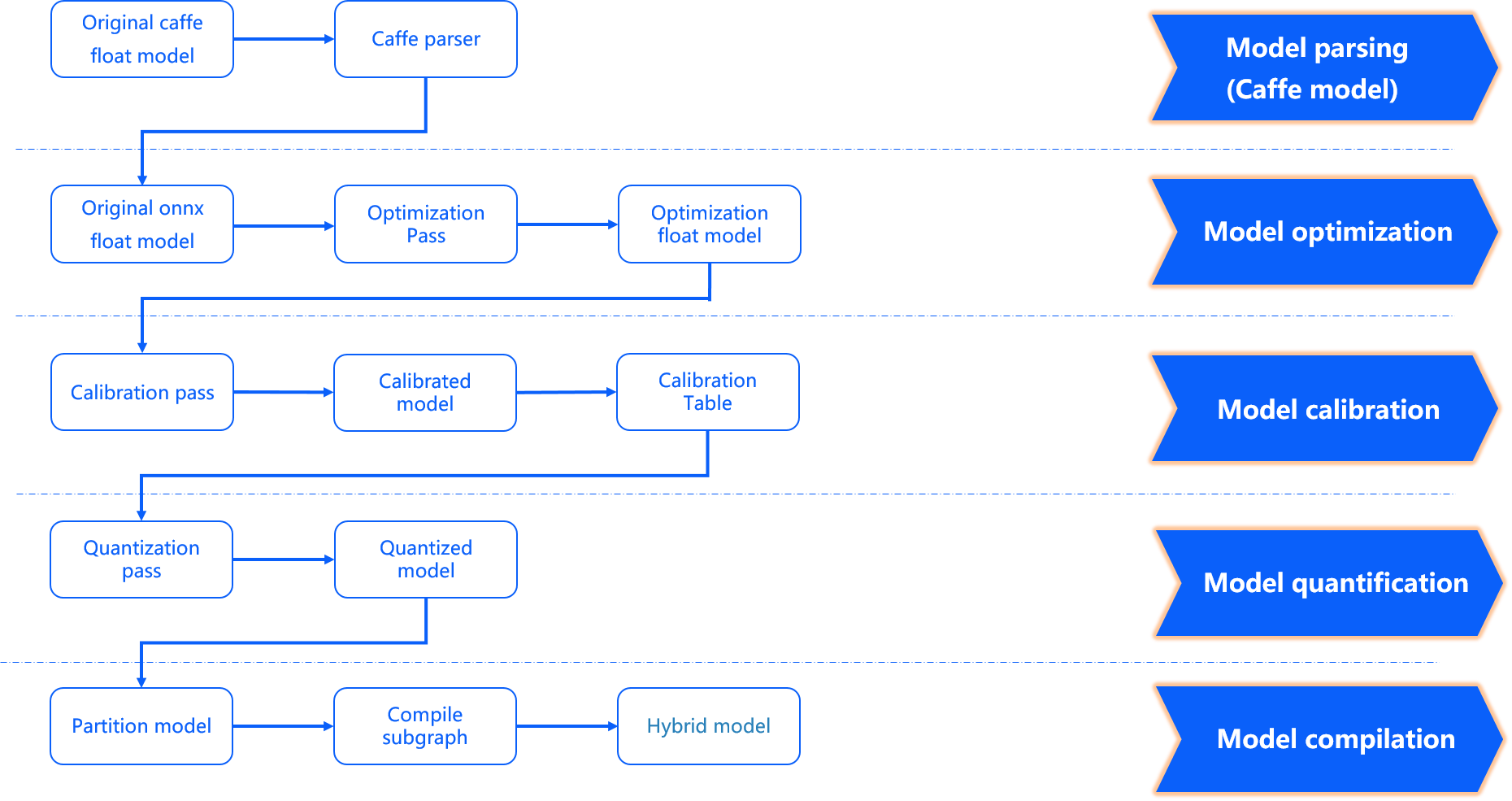
model parse stage: It completes the conversion from Caffe floating-point model to ONNX floating-point model and determines whether to add a data pre-processing node to the original floating-point model according to the configuration parameters. An original_float_model.onnx will be produced at this stage. This ONNX model is still computed with float32 precision, and a data pre-processing node is added into the input.
Ideally, this pre-processing node should complete the conversion from input_type_rt to input_type_train.
Actually, the conversion of model types also relies on the D-Robotics processor hardware, but the ONNX model doesn’t include the hardware conversion, so the actual ONNX input uses an intermediate format which matches the processing results of the input_type_rt.
The data layout (NCHW/NHWC) will keep the input layout of the original floating-point model consistent.
Each type of input_type_rt has a specific corresponding intermediate type, as follows:
nv12 |
yuv444 |
rgb |
bgr |
gray |
featuremap |
|---|---|---|---|---|---|
yuv444_128 |
yuv444_128 |
RGB_128 |
BGR_128 |
GRAY_128 |
featuremap |
Note
The bolded characters in the first row of the table is the data type specified by input_type_rt, and the second row is the intermediate type corresponding to the specific input_type_rt.
This intermediate type is the input type of original_float_model.onnx. Among them:
*_128 is the result of subtracting 128 from its data type. Each value is represented by int8.
Featuremap is tensor data and each value is represented by float32.
Model Optimization Stage: It implements some operator optimization strategies for the model that are applicable to the D-Robotics platform, such as BN fusion to Conv, etc. The output of this phase is an optimized_float_model.onnx. The computational accuracy of this ONNX model is still float32, which will not affect the computational results of the model after optimization. The input data requirements of the model are still the same as the previous original_float_model.
Model Calibration Stage: It uses the calibration data you provide to calculate the necessary quantization parameters, and the quantization parameters corresponding to each node calculated from the calibration data will be saved in the calibration node. The output of this phase is a calibrated_model.onnx.
Model Quantization Stage: The model quantization is completed using the parameters obtained from the calibration.
The output of this phase is a quantized_model.onnx. The computational accuracy of this model is already int8, and the loss of accuracy due to model quantization can be evaluated using this model.
The model requires the same basic data format and layout as original_float_model, but the range of values has changed. The overall change in the input compared to original_float_model is described as follows:
When input_type_rt takes a value other than featuremap, the input data types are all INT8, and conversely, when input_type_rt takes a value of featuremap, the input data type is float32.
The layout relationship is: the input_layout_train and the input layouts of the origin.onnx, calibrated_model.onnx and quanti.onnx are the same as the original model input layouts.
Attention
Please note that if input_type_rt is nv12, the input layout of quanti.onnx is NHWC.
Model Compilation Stage: It uses D-Robotics’s model compiler to convert the quantized model computational instructions and data supported by the D-Robotics platform. The output of this stage is a *.bin model, this bin model is the model that will be subsequently run on the D-Robotics Edge embedded platform, which is the final output result of the model conversion.
6.3.4.3. Interpret Conversion Results
This section will introduce the interpretation of successful model conversion status and the analysis of unsuccessful conversions in turn.
To confirm the success of the model conversion, you need to check the makertbin status information, the similarity information and the working_dir output.
For the makertbin status information, a successful conversion will be indicated by a clear message at the end of the console output message as follows:
2023-12-06 11:13:08,337 INFO Convert to runtime bin file successfully!
2023-12-06 11:13:08,337 INFO End Model Convert
Similarity information is also present before the makertbin status message in the console output of makertbin, which takes the following form:
======================================================================
Node    ON   Subgraph  Type     Cosine Similarity  Threshold
----------------------------------------------------------------------
...    ...     ...     ...       0.999936           127.000000
...    ...     ...     ...       0.999868           2.557209
...    ...     ...     ...       0.999268           2.133924
...    ...     ...     ...       0.996023           3.251645
...    ...     ...     ...       0.996656           4.495638
As shown above, the Node, ON, Subgraph, and Type in the header should be the same as the
hb_mapper checker tool’s console output. Please refer to the Interpret Model Check Results section.
The Threshold refers to the calibration threshold at each layer, which is used to provide feedback to D-Robotics technical support in abnormal states and is not of concern in normal conditions..
The Cosine Similarity reflects the cosine similarity between the original floating-point model and the quantized model results in those nodes specified by the Node.
Attention
Note that the Cosine Similarity field only serves as a reference to indicate the stability of the quantized data. It cannot directly tell the model accuracy loss. In general, there is a significant loss of accuracy if the similarity of the output nodes is below 0.8. Of course, since there is no absolute direct correlation with accuracy, a fully accurate accuracy situation should be described in Model Accuracy Analysis section.
The conversion output is stored in the path specified by the conversion configuration parameter working_dir.
You can get the following files in this directory (* part is what you specify by the conversion configuration parameter output_model_file_prefix).
*_original_float_model.onnx
*_optimized_float_model.onnx
*_calibrated_model.onnx
*_quantized_model.onnx
*.bin
The Interpret Conversion Output section explains the function of each output. However, before running on the board, we strongly recommend you to proceed the procedures as described in the sections Model Performance Analysis and Model Accuracy Analysis, to avoid extending the model conversion problem to the subsequent embedded terminal.
If any of the above-mentioned 3 outputs of verifying the success of the model conversion is missing,
there must be something wrong with the conversion. In such cases, the makertbin tool will output error messages to your console in case of errors. For example, if we do not configure the prototxt and caffe_model parameters during the Caffe model conversion, the tool gives the following message:
2023-12-06 14:45:34,085 ERROR Key 'model_parameters' error:
Missing keys: 'caffe_model', 'prototxt'
2023-12-06 14:45:34,085 ERROR yaml file parse failed. Please double check your input
2023-12-06 14:45:34,085 ERROR exception in command: makertbin
If the steps above cannot help you find the problem, you are welcome to post your question on the D-Robotics Developer Community, and we will provide support within 24 hours.
6.3.4.4. Interpret Conversion Output
The outputs of the successful conversion of the model mentioned above include the following components. This section explains the use of each output.
*_original_float_model.onnx
*_optimized_float_model.onnx
*_calibrated_model.onnx
*_quantized_model.onnx
*.bin
The output process of *_original_float_model.onnx can be found in Model Conversion Interpretation. The computing accuracy of this model is the same as the original floating-point model. With the important change of adding some data preprocessing calculations to adapt to the D-Robotics platform. In general, you don’t need to use this model. In case of errors in the conversion results, it would be helpful to provide this model to D-Robotics’s technical support to help you solve the problem quickly.
The output process of *_optimized_float_model.onnx can be found in Model Conversion Interpretation. This model undergoes some operator-level optimization operations, commonly known as operator fusion. You can visually compare it with the original_float model, and clearly find out some operator structural changes, which will not affect the computational accuracy of the model. In general, you do not need to use this model. In case of errors in the conversion results, it would be helpful to provide this model to D-Robotics’s technical support to help you solve the problem quickly.
The output process of *_calibrated_model.onnx can be found in Model Conversion Interpretation. This model is an intermediate product obtained by the model transformation tool chain by taking the floating-point model after structural optimization, calculating the quantization parameters corresponding to each node from the calibration data and saving them in the calibration node.
The output process of the *_quantized_model.onnx can be found in Model Conversion Interpretation. This model has completed the calibration and quantization process, and the quantized accuracy loss can be viewed here. This model is a mandatory model in the accuracy verification process, please refer to the introduction of Model Accuracy Analysis.
The *.bin is the model that can be used to load and run on the D-Robotics computing platform. After reading Embedded Application Development, You can then deploy the model to run on the computing platform quickly. However, to ensure that the performance and accuracy of the model is as good as you expect, we strongly recommend completing the the Model Performance Analysis and Model Accuracy Analysis, before moving on to application development and development.