6.5. Custom OP Development
6.5.1. General Descriptions
In most cases, your models should be able to be deployed into D-Robotics’s computing platform because the algorithm toolchain has provided rich OPs. The supported operators can be found in Toolchain Operator Support Constraint List section. But if you find that there are unsupported OP(s) in the models, we strongly suggested you to try to replace the unsupported OP(s) with those supported ones, so as to utilize D-Robotics’s computing platform capacities to the full, and the development cost will be lower.
The customized OP provides the ability to allow a customized operator to be computed on the CPU. A complete custom OP development process should include template creation, OP implementation, OP compilation, model conversion of customized OPs included and model execution of customized OPs included. Please refer to the following diagram:
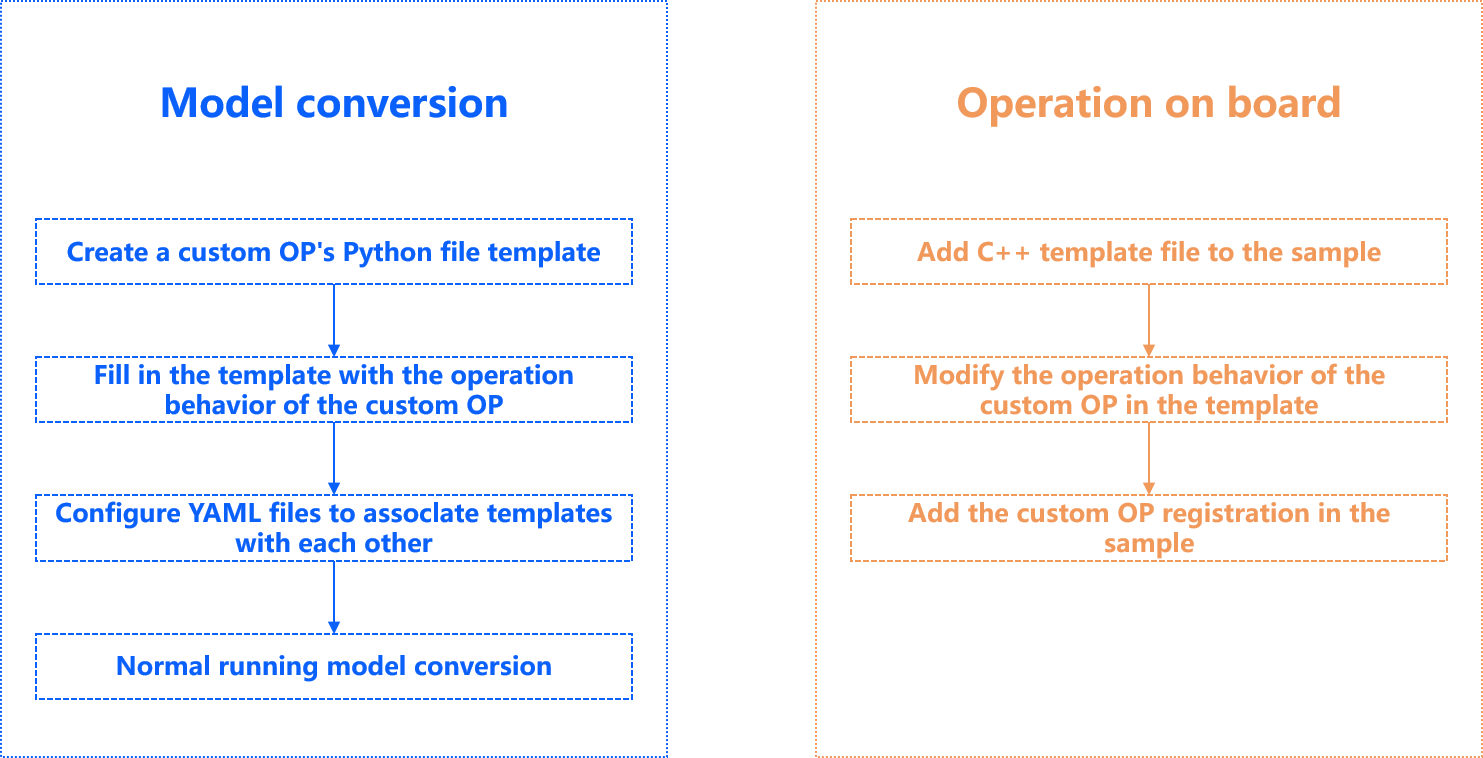
As above shown, it takes 2 stages to define a customized OP: At model conversion stage, there must be the Python code of the customized OP; At simulator/dev board inference stage, there must be the customized OP and its C++ code. In addition, computation the codes in 2 stages must be consistent.
6.5.2. Custom OP Included Model Conversion
6.5.2.1. Modify Model File
After preparing your customized operator implementation, to run the customized OP, you need to modify both the original model file and the configuration file for model conversion (Take the Caffe model and the ONNX model as examples respectively below):
In the original model file, change the OP type mark of corresponding customized OP into Custom and fill in a custom_param group as shown below:
6.5.2.1.1. Caffe Model
In the original model file, the operator type corresponding to the custom operator is marked as``Custom``,
and a set of custom_param is provided. The example is as follows.
layer {
  name: "hr_op"
  type: "Custom"
  bottom: "res3d_in"
  top: "res3d"
  custom_param {
    kind: "CustomIdentity"
    shape {
      dim: 1
      dim: 512
      dim: 28
      dim: 28
    }
    params: "'kernel_size': 10 \n'threshold': 0.5"
  }
}
In the above custom_param set example:
The
kindrefers to the name of costum OP’s internal implementation, as the custom OP is an identical OP, it is named asCustomIdentity. This name will be shown in the succeeding Python and C++ codes.The
shaperefers to OP’s output size and needs to be completely specified.The
params``refers to OP's incoming parameters and it should be specified like this: ``'param_name': param_value. Note that multiple parameters should be separated using\n.
While in the configuration file for model conversion, a new custom OP parameter must be added into the file as shown below:
#...

custom_op:
  # custom OP's calibration method
  custom_op_method: register

  # custom OP's implementing file
  op_register_files: sample_custom.py
For the Caffe model, both parameters in the above parameter group must be configured.
custom_op_method should be specified as register.
op_register_files is the implementation file of the custom operator calculation, please use the relative path.
When all configurations are done, the succeeding model conversion steps are the same as the other ordinary models.
6.5.2.1.2. ONNX Model
1.Obtain the Onnx model with custom operators:
Converted from other frameworks such as pytorch
import torch
from horizon_nn.horizon_onnx.onnx_pb import TensorProto
from torch.onnx.symbolic_helper import parse_args
from torch.onnx.utils import register_custom_op_symbolic
from torch import Tensor

model = torch.hub.load('pytorch/vision:v0.10.0', 'googlenet', pretrained=True)

def _transform_input(x: Tensor) -> Tensor:
    return x

model._transform_input = _transform_input

@parse_args("v", "v")
def horizon_pool(g, input, output_size):
    return g.op(
        'horizon.custom::PyOp', #required, ! must be 'horizon.custom' domain !
        input,
        class_name_s="GlobalAveragePool",  #required ! must match the class def name in sample_custom python file !
        compute_s="compute",  #optional, 'compute' by default
        module_s="sample_custom",  #required ! must match the file name of the "op_register_files" !
        input_types_i=[TensorProto.FLOAT],  #required
        output_types_i=[TensorProto.FLOAT],  #required
        output_shape_s=["1, 1024, 1, 1"]) #required

d_input = torch.rand(1, 3, 224, 224)
register_custom_op_symbolic('::adaptive_avg_pool2d',
                            horizon_pool,
                            opset_version=11)
torch.onnx.export(model, d_input, "googlenet_cop.onnx", opset_version=11)
Generate the onnx model directly
Reference Code:
import onnx
import numpy as np
from onnx import helper, checker, shape_inference, numpy_helper, TensorProto


def make_normal_data(shape):
    return np.random.normal(loc=0.0, scale=1.0, size=shape).astype(np.float32)


# conv
def make_simple_model():

    # create nodes
    conv_input_shape = (1, 3, 224, 224)
    conv_output_shape = (1, 3, 224, 224)

    add_param_shape = (1, 3, 224, 224)
    add_1_param_data = np.zeros(add_param_shape).astype(np.float32)
    add_2_param_data = np.ones(add_param_shape).astype(np.float32)

    conv_weight_shape = (3, 3, 3, 3)
    conv_output_shape = (1, 3, 224, 224)
    conv_weight_data = make_normal_data(conv_weight_shape)

    add_1_node = helper.make_node(
        "PyOp",  # required, the type must be 'PyOp'
        name="add_1",  # required, different op names cannot be the same
        inputs=["input0", "add_1_param"],  # required, it needs to be a list, and it needs to be consistent with the number of inputs in the implementation file
        outputs=["add_1_out"],  # required, it needs to be a list, and it needs to be consistent with the number of outputs in the implementation file
        domain="horizon.cop1",  # required, Custom operator implementations with different implementation logics need to be implemented with different domain names
        class_name="Cop1",  # required, it needs to be the same as the class name in the implementation file of the custom operator
        module="custom_op.horizon_ops",  # required, it needs to be the same as the path to the implementation file containing the custom operator
        compute="compute",  # required, it needs to be consistent with the computational logic functions in the custom operator implementation class
        input_types=[
            TensorProto.FLOAT,
            TensorProto.FLOAT,
        ],  # required, it needs to be a list, its length needs to be the same as the number of inputs attributes of the operator, and the same as the number of inputs in the implementation file
        output_types=[
            TensorProto.FLOAT
        ],  # required, it needs to be a list, its length needs to be the same as the number of outputs attributes of the operator, and the same as the number of inputs in the implementation file
        output_shape=["1, 3, 224, 224"],  # optional, if the output value_info of pyop is not added to the model, it must be filled in
    )

    add_2_node = helper.make_node(
        "PyOp",
        name="add_2",
        inputs=["input1", "add_1_out", "add_2_param"],
        outputs=["add_2_out", "output0"],
        domain="horizon.cop2",
        class_name="Cop2",
        module="custom_op.horizon_ops",
        compute='compute',
        input_types=[TensorProto.FLOAT, TensorProto.FLOAT,
                     TensorProto.FLOAT],  #required
        output_types=[TensorProto.FLOAT, TensorProto.FLOAT],  #required
        output_shape=["1, 3, 224, 224", "1, 3, 224, 224"])

    conv_1_node = helper.make_node("Conv",
                                   inputs=["add_2_out", "W0"],
                                   outputs=["output1"],
                                   dilations=(1, 1),
                                   group=1,
                                   kernel_shape=(3, 3),
                                   pads=(1, 1, 1, 1),
                                   name="conv_1")
    # nodes
    nodes = [add_1_node, add_2_node, conv_1_node]

    # inputs
    model_input_1 = helper.make_tensor_value_info("input0", TensorProto.FLOAT,
                                                  conv_input_shape)
    model_input_2 = helper.make_tensor_value_info("input1", TensorProto.FLOAT,
                                                  conv_input_shape)

    # Outputs
    model_output_1 = helper.make_tensor_value_info("output0",
                                                   TensorProto.FLOAT,
                                                   conv_output_shape)
    model_output_2 = helper.make_tensor_value_info("output1",
                                                   TensorProto.FLOAT,
                                                   conv_output_shape)

    # Intermediate tensors
    add_1_out = helper.make_tensor_value_info("add_1_out", TensorProto.FLOAT,
                                              conv_output_shape)
    add_2_out = helper.make_tensor_value_info("add_2_out", TensorProto.FLOAT,
                                              conv_output_shape)

    # create constant tensor
    W0_tensor = helper.make_tensor("W0", TensorProto.FLOAT, conv_weight_shape,
                                   conv_weight_data.flatten())

    add_1_param = helper.make_tensor("add_1_param",
                                     TensorProto.FLOAT, add_param_shape,
                                     add_1_param_data.flatten())
    add_2_param = helper.make_tensor("add_2_param",
                                     TensorProto.FLOAT, add_param_shape,
                                     add_2_param_data.flatten())

    # make graph
    graph = helper.make_graph(
        nodes,
        "simple_conv_model",
        inputs=[model_input_1, model_input_2],  # input
        outputs=[model_output_1, model_output_2],  # output
        initializer=[W0_tensor, add_1_param, add_2_param],  # initializer
        value_info=[add_1_out, add_2_out],  # value_info
    )

    # make model
    onnx_model = helper.make_model(graph,
                                   opset_imports=[
                                       helper.make_opsetid("", 11),
                                       helper.make_opsetid("horizon.cop1", 1),
                                       helper.make_opsetid("horizon.cop2", 1)
                                   ],
                                   producer_name="onnx-test")

    # shape inference
    onnx_model = shape_inference.infer_shapes(onnx_model)

    # # model check
    checker.check_model(onnx_model)

    # save model
    onnx.save(onnx_model, "custom_op.onnx")
Attention
Points to note about the PyOp attributes in the Onnx model:
The domain attribute must be set, otherwise it will be defaulted to the onnx standard domain and an error will be reported. Different implementations of custom operators need to be set under different domains.
The module needs to have the same name as the registration file used during registration. If the registration file is in a subfolder of the current directory, you need to modify the content of the module. For example: If
sample_custom.pyis in the custom_op folder of the current path, the module should set tocustom_op.sample_custom.Currently only the onnx model supports multiple types of custom operators, if you need to support multiple types of custom operators in other frameworks please contact horizon.
2.Consistent with the Caffe model, you need to add a new custom op parameter group to the configuration file to use a custom operator in the model conversion configuration as follows:
#...

custom_op:
  # Customize the calibration method of op
  custom_op_method: register

  # Custom OP's implementation file
  op_register_files: sample_custom.py
For the ONNX model, both parameters in the above parameter group must be configured. custom_op_method always uses register;
op_register_files is the implementation file of the custom operator calculation, please use the relative path.
After completing these configurations, the subsequent steps of model conversion are consistent with other general model conversion processes.
6.5.2.2. OP Implementation
In the model conversion phase, a Python implementation of a customized operator is provided, which the tool uses to complete the inference phase necessary for model calibration.
Attention
Please note that, as the tool will use working_dir as the working directory during the PTQ conversion, we strongly recommend when you need to specify the working directory during the implementation of the operator,
please specify it as the absolute path, and if you need to specify it as the relative path, please specify it as the relative path with working_dir as the working directory.
A Python template file (sample_custom.py) is shown as follows:
from horizon_nn.custom.op_registration import op_implement_register, op_shape_infer_register

@op_implement_register("CustomIdentity")
class CustomIdentity(object):
    def __init__(self, kernel_size, threshold):
        self._kernel_size = kernel_size
        self._default_threshold = threshold

    def compute(self, X):
        return X

@op_shape_infer_register("CustomIdentity")
def infer_shape(inputs_shape):
    outputs_shape = inputs_shape
    return outputs_shape
The configuration file (horizon_ops.py) in the custom_op example is shown as follows:
from horizon_nn.custom.op_registration import op_implement_register

@op_implement_register("Cop1")
class Cop1(object):
    def __init__(self, ):
        pass

    def compute(self, x1, x2):
        out = x1 + x2 + 1
        return out


@op_implement_register("Cop2")
class Cop2(object):
    def __init__(self, ):
        pass

    def compute(self, x1, x2, x3):
        out = x1 + x2 + x3 + 1
        return out, out
The filename (sample_custom.py) must be filled into the op_register_files in YAML configuration file,
otherwise the tool will not be able to import custom operator definition;
the op_implement_register modifier registered custom op name CustomIdentity must be the same
with the property kind of the Caffe custom op or the property class_name of the Onnx custom op.
For the Caffe model, the (kernel_size, threshold) parameters of the init function are passed in from the params in prototxt file,
they are used for initiating the custom OP module. op_shape_infer_register is used for the registration of the operator shape for the Caffe model.
For the Onnx model, there are two ways to resolve the shape of the custom op, either by adding the value_info of the pyop output to the onnx model
when creating the onnx model, or by creating the output_shape attribute in the corresponding pyop.
Note also that the module in the custom operator must be consistent with the file that holds the custom operator implementation.
If the property is set to custom_op.horizon_ops, then the custom operator implementation file is named horizon_ops and should be placed in the custom_op folder,
maintaining a hierarchical relationship with the onnx model hierarchy.
Since the implementation of an operator with the same name in the same domain must be the same, the domain property needs to be different for different custom operators.
Model conversion can be executed to get the BIN file when all abovementioned operations are done.
6.5.3. Run Custom OP on Dev Board
Before running the conversion obtained BIN model, it is required to provided costum OP’s C++ implementing code. You can simply modify the following template file.
You can also use the template file to test the customized OP feature. As the input values are assigned as output values, the customized OP in template file won’t affect results.
6.5.3.1. A C++ Template of Custom OP
Runtime template file is shown as follows:
// custom_identity_add1.h
#ifndef ADVANCED_SAMPLES_CUSTOM_IDENTITY_ADD1_H_
#define ADVANCED_SAMPLES_CUSTOM_IDENTITY_ADD1_H_

#include <string>
#include <vector>

#include "dnn/hb_dnn.h"
#include "dnn/plugin/hb_dnn_layer.h"
#include "dnn/plugin/hb_dnn_ndarray.h"

namespace hobot {
namespace dnn {

Layer *Cop1_layer_creator();

class Cop1 : public Layer {
public:
  Cop1() = default;
  ~Cop1() override = default;

public:
  int32_t Init(const Attribute &attributes) override;

  int32_t Forward(const std::vector<NDArray *> &bottomBlobs,
                  std::vector<NDArray *> &topBlobs,
                  const hbDNNInferCtrlParam *inferCtrlParam) override;

  std::string GetType() const override { return "Cop1"; }

  uint32_t GetInputCount() const override { return num_args_; }

private:
  std::string custom_op_name_;
  int32_t num_args_;
};

}  // namespace dnn
}  // namespace hobot

#endif
// custom_identity_add1.cpp
#include "custom_identity_add1.h"

namespace hobot {
namespace dnn {

Layer *Cop1_layer_creator() { return new Cop1; }

int32_t Cop1::Init(const Attribute &attributes) {
  // unused attribute, just demonstrating
  attributes.GetAttributeValue(&custom_op_name_, "custom_op_name");
  // node's input count
  attributes.GetAttributeValue(&num_args_, "num_args");
  return 0;
}

int32_t Cop1::Forward(const std::vector<NDArray *> &bottomBlobs,
                      std::vector<NDArray *> &topBlobs,
                      const hbDNNInferCtrlParam *inferCtrlParam) {
  const NDArray *input0 = bottomBlobs[0];
  const NDArray *input1 = bottomBlobs[1];
  NDArray *out = topBlobs[0];

  const auto *input0_data = input0->Dptr<float>();
  const auto *input1_data = input1->Dptr<float>();

  auto *out_data = out->Dptr<float>();
  uint32_t size = out->Size();

  for (uint32_t i = 0U; i < size; i++) {
    out_data[i] = input0_data[i] + input1_data[i] + 1;
  }
  return 0;
}
}  // namespace dnn
}  // namespace hobot
// custom_identity_add2.h
#ifndef ADVANCED_SAMPLES_CUSTOM_IDENTITY_ADD2_H_
#define ADVANCED_SAMPLES_CUSTOM_IDENTITY_ADD2_H_

#include <string>
#include <vector>

#include "dnn/hb_dnn.h"
#include "dnn/plugin/hb_dnn_layer.h"
#include "dnn/plugin/hb_dnn_ndarray.h"

namespace hobot {
namespace dnn {

Layer *Cop2_layer_creator();

class Cop2 : public Layer {
public:
  Cop2() = default;
  ~Cop2() override = default;

public:
  int32_t Init(const Attribute &attributes) override;

  int32_t Forward(const std::vector<NDArray *> &bottomBlobs,
                  std::vector<NDArray *> &topBlobs,
                  const hbDNNInferCtrlParam *inferCtrlParam) override;

  std::string GetType() const override { return "Cop2"; }

  uint32_t GetInputCount() const override { return num_args_; }

  uint32_t GetOutputCount() const override { return 2U; }

private:
  std::string custom_op_name_;
  int32_t num_args_;
};

}  // namespace dnn
}  // namespace hobot

#endif
// custom_identity_add2.cpp
#include "custom_identity_add2.h"

namespace hobot {
namespace dnn {

Layer *Cop2_layer_creator() { return new Cop2; }

int32_t Cop2::Init(const Attribute &attributes) {
  // unused attribute, just demonstrating
  attributes.GetAttributeValue(&custom_op_name_, "custom_op_name");
  // node's input count
  attributes.GetAttributeValue(&num_args_, "num_args");
  return 0;
}

int32_t Cop2::Forward(const std::vector<NDArray *> &bottomBlobs,
                      std::vector<NDArray *> &topBlobs,
                      const hbDNNInferCtrlParam *inferCtrlParam) {
  const NDArray *input0 = bottomBlobs[0];
  const NDArray *input1 = bottomBlobs[1];
  const NDArray *input2 = bottomBlobs[2];
  NDArray *out0 = topBlobs[0];
  NDArray *out1 = topBlobs[1];

  const auto *input0_data = input0->Dptr<float>();
  const auto *input1_data = input1->Dptr<float>();
  const auto *input2_data = input2->Dptr<float>();

  auto *out0_data = out0->Dptr<float>();
  auto *out1_data = out1->Dptr<float>();

  uint32_t size = out0->Size();

  for (uint32_t i = 0U; i < size; i++) {
    out0_data[i] = input0_data[i] + input1_data[i] + input2_data[i] + 1;
    out1_data[i] = out0_data[i];
  }
  return 0;
}
}  // namespace dnn
}  // namespace hobot
Note
The prefix of function name ( Cop1 and Cop2) must be the same with comstum OP Type (kind).
The incoming parameters are:
bottom_blobs: Input data of custom OP node.top_blobs: Output data of custom OP node.inferCtrlParam: Initializing incoming paramter of custom OP.
Attention
The calculation rule in the template is that the output is equal to the sum of all input data plus the value 1, so if you want to define other behaviors, you can change the calculation rule accordingly.
6.5.3.2. Custom OP Registration
When you finish modifying C++ template file, you will only need to add descriptions of the template file into the CMakeLists.txt and add customized OP registration in application. Please refer to the following code block:
#include "custom_identity_add1.h"
#include "custom_identity_add2.h"

hbDNNRegisterLayerCreator("Cop1", hobot::dnn::Cop1_layer_creator);
hbDNNRegisterLayerCreator("Cop2", hobot::dnn::Cop2_layer_creator);
....
You will be able to execute those models that contain customized OPs after adding customized OP dependency information and customized OP registration.
Attention
Before using the customized OP, please confirm that the name of model’s customized OP is the same with the registered customized OP name.
For reference documentation, please refer to advanced_samples in the advanced_samples .