6.3.2. Model Checking
To ensure that the model can run smoothly and efficiently on the D-Robotics platform, the operators used in the model need to conform to the operator constraints of the platform. The OP Restriction section gives a list of the specific operators we support, each with specific parameter constraints. For more details, please refer to the Toolchain Operator Support Constraint List section.
6.3.2.1. Use the hb_mapper checker Command to Check Your Model
Considering the large number of operators supported by D-Robotics, we provide the hb_mapper checker tool to check the details of each OP and to save users’ trouble of verifying each OP manually.
Please refer to section Model Checking Tool (hb_mapper checker) for tool usage.
6.3.2.2. Exception Handling
When the floating-point model check fails, the hb_mapper checker tool will report an Error message.
A file named hb_mapper_checker.log will be generated in current directory to provide error details.
In the following example, the configuration file contains an unrecognizable OP whose type is Accuracy:
layer {
  name: "data"
  type: "Input"
  top: "data"
  input_param { shape: { dim: 1 dim: 3 dim: 224 dim: 224 } }
}
layer {
  name: "Convolution1"
  type: "Convolution"
  bottom: "data"
  top: "Convolution1"
  convolution_param {
    num_output: 128
    bias_term: false
    pad: 0
    kernel_size: 1
    group: 1
    stride: 1
    weight_filler {
      type: "msra"
    }
  }
}
layer {
  name: "accuracy"
  type: "Accuracy"
  bottom: "Convolution3"
  top: "accuracy"
  include {
    phase: TEST
  }
}
Run hb_mapper checker to check this model and you will see the details in the hb_mapper_checker.log file:
ValueError: Not support layer name=accuracy type=Accuracy
6.3.2.3. Interpret Model Check Results
If there is no ERROR, then the checker passes successfully. The hb_mapper checker tool will output the following message directly:
==============================================
Node         ON   Subgraph  Type
----------------------------------------------
conv1        BPU  id(0)     HzSQuantizedConv
conv2_1/dw   BPU  id(0)     HzSQuantizedConv
conv2_1/sep  BPU  id(0)     HzSQuantizedConv
conv2_2/dw   BPU  id(0)     HzSQuantizedConv
conv2_2/sep  BPU  id(0)     HzSQuantizedConv
conv3_1/dw   BPU  id(0)     HzSQuantizedConv
conv3_1/sep  BPU  id(0)     HzSQuantizedConv
...
In the above code block, each line represents the model check result of a model node and consists of 4 rows: Node, ON, Subgraph and Type. Wherein, Node denotes node name, ON denotes the hardware to process node computing, Subgraph denotes the subgraph to which the node belongs and Type denotes the name of D-Robotics’s internal implementation that mapped the node. D-Robotics’s tool will divide those CPU computing OPs at the non-input and output part of the model into 2 Subgraphs at the BPU computing unit.
6.3.2.4. A Guide to Optimize the Check Results
Ideally, both the non-input and the output should run on the BPU, i.e., there is only one subgraph.
If there are multiple subgraphs caused by CPU OPs, the hb_mapper checker tool will report the cause of CPU OPs.
For example, the structure of Mul + Add + Mul appears in the following ONNX model.
From the supported_op_list_and_restrictions, we can see that the Mul and Add operators support BPU operation in five dimensions with constraints.
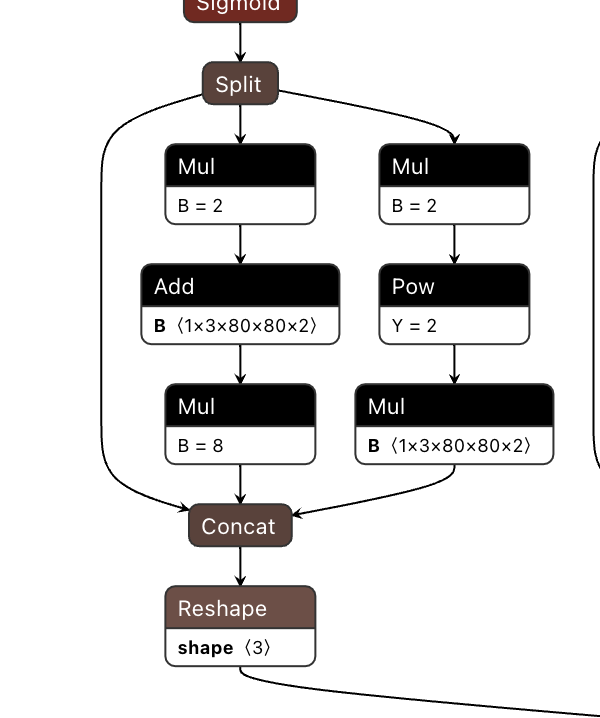
Therefore, the final check result of the model will also be segmented, as follows:
====================================================================================
Node                                    ON   Subgraph  Type
-------------------------------------------------------------------------------------
Reshape_199                             BPU  id(0)     Reshape
Transpose_200                           BPU  id(0)     Transpose
Sigmoid_201                             BPU  id(0)     HzLut
Split_202                               BPU  id(0)     Split
Mul_204                                 CPU  --        Mul
Add_206                                 CPU  --        Add
Mul_208                                 CPU  --        Mul
Mul_210                                 CPU  --        Mul
Pow_211                                 BPU  id(1)     HzLut
Mul_213                                 CPU  --        Mul
Concat_214                              CPU  --        Concat
Reshape_215                             CPU  --        Reshape
Conv_216                                BPU  id(0)     HzSQuantizedConv
Reshape_217                             BPU  id(0)     Reshape
Transpose_218                           BPU  id(0)     Transpose
Sigmoid_219                             BPU  id(0)     HzLut
Split_220                               BPU  id(0)     Split
Mul_222                                 CPU  --        Mul
Add_224                                 CPU  --        Add
Mul_226                                 CPU  --        Mul
Mul_228                                 CPU  --        Mul
Pow_229                                 BPU  id(2)     HzLut
Mul_231                                 CPU  --        Mul
Concat_232                              CPU  --        Concat
Reshape_233                             CPU  --        Reshape
Conv_234                                BPU  id(0)     HzSQuantizedConv
Reshape_235                             BPU  id(0)     Reshape
Transpose_236                           BPU  id(0)     Transpose
Sigmoid_237                             BPU  id(0)     HzLut
Split_238                               BPU  id(0)     Split
Mul_240                                 CPU  --        Mul
Add_242                                 CPU  --        Add
Mul_244                                 CPU  --        Mul
Mul_246                                 CPU  --        Mul
Pow_247                                 BPU  id(3)     HzLut
Mul_249                                 CPU  --        Mul
Concat_250                              CPU  --        Concat
Reshape_251                             CPU  --        Reshape
Concat_252                              CPU  --        Concat
Attention
Please note that the log result here is only used as an example, in the process of using, please refer to the actual log printed by the version you are using.
According to the hint given by hb_mapper checker, in general the operator running on BPU will have better performance. Of course, multiple subgraphs will not affect the entire conversion process, but they will greatly affect the model performance, therefore it is recommended to try to adjust to full BPU execution.