4.1.1.4. Check the Model
To ensure that the model can run smoothly and efficiently on the D-Robotics platform, the operators used in the model need to conform to the operator constraints of the platform.
The OP Restriction section gives a list of the specific operators we support, each with specific parameter constraints. For more details, please refer to the Model Conversion Toolchain Operator Support Constraint List section.
Considering the large number of operators supported by D-Robotics, we provide the hb_mapper checker tool to check the details of each OP and to save users’ trouble of verifying each OP manually.
4.1.1.4.1. Use the hb_mapper checker Command to Check Your Model
The hb_mapper checker tool is used in the following way:
hb_mapper checker --model-type ${model_type} \
                  --march ${march} \
                  --proto ${proto} \
                  --model ${caffe_model/onnx_model} \
                  --input-shape ${input_node} ${input_shape} \
                  --output ${output}
hb_mapper checker parameter explanation:
--model-type
This parameter is used for specifying the input model type. Presently it can support
CaffeorONNXmodel input.--march
This parameter is used for specifying the matched processor type. It should be specified as
bernoulli2orbayes, for the X3 processors or the J5 processors. You can just choose the platform you need to adapt to.--proto
This parameter is used for specifying the prototxt filename of Caffe model. It is only valid when the
model-typeis specified ascaffe.--model
This parameter is used for specifying your floating-point model name. In other words, when the
model-typeis specified ascaffe, it should be specified as the caffemodel filename; while when themodel-typeis specified asonnx, it should be specified as the ONNX model name.--input-shape
This is an optional parameter to specify the input shape of the floating-point model. It should be written as:
{input_name} {NxHxWxC/NxCxHxW}, where theinput_nameand the shape must be separated by space. For instance, let theinput_nameasdata1and input shape as[1,224,224,3], it should be written as:--input-shape data1 1x224x224x3. Note that your model shape is subject to the value here when it is different from that of the actual model shape.Note
Note that the
--input-shapecan contain only one name and shape combination. In other words, users will need to configure it multiple times when there are multiple input nodes.
Attention
The --output parameter has been already deprecated. The log information is stored in hb_mapper_checker.log by default.
4.1.1.4.2. Exception Handling
When the floating-point model check fails, the hb_mapper checker tool will report an Error message.
A file named hb_mapper_checker.log will be generated in current directory to provide error details.
In the following example, the configuration file contains an unrecognizable OP whose type is Accuracy:
layer {
  name: "data"
  type: "Input"
  top: "data"
  input_param { shape: { dim: 1 dim: 3 dim: 224 dim: 224 } }
}
layer {
  name: "Convolution1"
  type: "Convolution"
  bottom: "data"
  top: "Convolution1"
  convolution_param {
    num_output: 128
    bias_term: false
    pad: 0
    kernel_size: 1
    group: 1
    stride: 1
    weight_filler {
      type: "msra"
    }
  }
}
layer {
  name: "accuracy"
  type: "Accuracy"
  bottom: "Convolution3"
  top: "accuracy"
  include {
    phase: TEST
  }
}
Run hb_mapper checker to check this model and you will see the details in the hb_mapper_checker.log file:
ValueError: Not support layer name=accuracy type=Accuracy
4.1.1.4.3. Interpret Model Check Results
If there is no ERROR, then the checker passes successfully. The hb_mapper checker tool will output the following message directly:
==============================================
Node         ON   Subgraph  Type
----------------------------------------------
conv1        BPU  id(0)     HzSQuantizedConv
conv2_1/dw   BPU  id(0)     HzSQuantizedConv
conv2_1/sep  BPU  id(0)     HzSQuantizedConv
conv2_2/dw   BPU  id(0)     HzSQuantizedConv
conv2_2/sep  BPU  id(0)     HzSQuantizedConv
conv3_1/dw   BPU  id(0)     HzSQuantizedConv
conv3_1/sep  BPU  id(0)     HzSQuantizedConv
...
In the above code block, each line represents the model check result of a model node and consists of 4 rows: Node, ON, Subgraph and Type. Wherein, Node denotes node name, ON denotes the hardware to process node computing, Subgraph denotes the subgraph to which the node belongs and Type denotes the name of D-Robotics’ internal implementation that mapped the node. D-Robotics’ tool will divide those CPU computing OPs at the non-input and output part of the model into 2 Subgraphs at the BPU computing unit.
4.1.1.4.4. A Guide to Optimize the Check Results
Ideally, both the non-input and the output should run on the BPU, i.e., there is only one subgraph.
If there are multiple subgraphs caused by CPU OPs, the hb_mapper checker tool will report the cause of CPU OPs.
For example, the structure of Reshape + Pow + Reshape appears in the following Caffe model.
From the supported_op_list_and_restrictions we can see that the Reshape operator is an operator running on the CPU, and the POW shape is also non-4-dimensional.
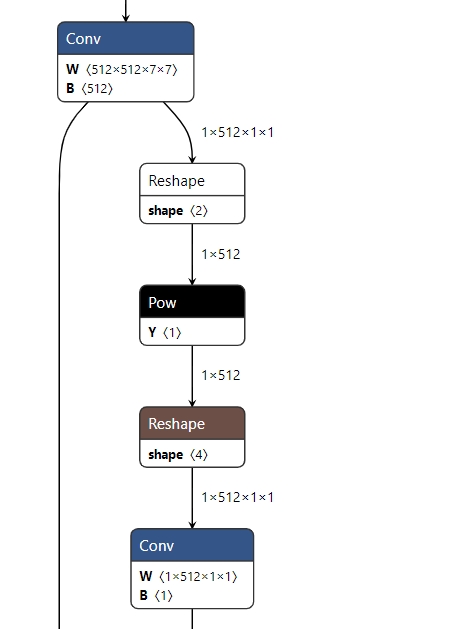
Therefore, the final check result of the model will also be segmented, as follows:
2022-05-25 15:16:14,667 INFO The converted model node information:
====================================================================================
Node                                    ON   Subgraph  Type
-------------------------------------------------------------------------------------
conv68                                  BPU  id(0)     HzSQuantizedConv
sigmoid16                               BPU  id(0)     HzLut
axpy_prod16                             BPU  id(0)     HzSQuantizedMul
UNIT_CONV_FOR_eltwise_layer16_add_1     BPU  id(0)     HzSQuantizedConv
prelu49                                 BPU  id(0)     HzPRelu
fc1                                     BPU  id(0)     HzSQuantizedConv
fc1_reshape_0                           CPU  --        Reshape
fc_output/square                        CPU  --        Pow
fc_output/sum_pre_reshape               CPU  --        Reshape
fc_output/sum                           BPU  id(1)     HzSQuantizedConv
fc_output/sum_reshape_0                 CPU  --        Reshape
fc_output/sqrt                          CPU  --        Pow
fc_output/expand_pre_reshape            CPU  --        Reshape
fc_output/expand                        BPU  id(2)     HzSQuantizedConv
fc1_reshape_1                           CPU  --        Reshape
fc_output/expand_reshape_0              CPU  --        Reshape
fc_output/op                            CPU  --        Mul
Attention
Please note that the log result here is only used as an example, in the process of using, please refer to the actual log printed by the version you are using.
According to the hint given by hb_mapper checker, in general the operator running on BPU will have better performance. Of course, multiple subgraphs will not affect the entire conversion process, but they will greatly affect the model performance, therefore it is recommended to try to adjust to full BPU execution.