6.4.3. Development Guide
6.4.3.1. Requirements for Floating-Point Models
symbolic_trace
Similar to PyTorch’s quantization-aware training, horizon_plugin_pytorch is designed and developed based on fx. Therefore, the floating-point model must be capable of correctly performing symbolic_trace.
Partial Operator Support
Since the BPU supports only a limited number of operators, horizon_plugin_pytorch only supports operators in the operator list and specially defined custom operators constrained by BPU limitations.
Building Quantization-Friendly Models
Converting a floating-point model into a fixed-point model inevitably introduces some precision errors. The more quantization-friendly the floating-point model, the easier it is to improve QAT accuracy, and the higher the accuracy after quantization. Generally, the following situations may make a model less quantization-friendly:
Using operators with high precision risks. For example: softmax, layernorm, etc. (see operator documentation). These operators are typically implemented via lookup tables or combinations of multiple ops, making them prone to accuracy degradation.
Calling the same operator multiple times within a single forward pass. When the same operator is called multiple times, the output distributions may differ, but only one set of quantization parameters will be recorded. If the output distributions vary significantly across calls, quantization error increases.
Large value differences among inputs to multi-input operators such as add or cat may lead to significant errors.
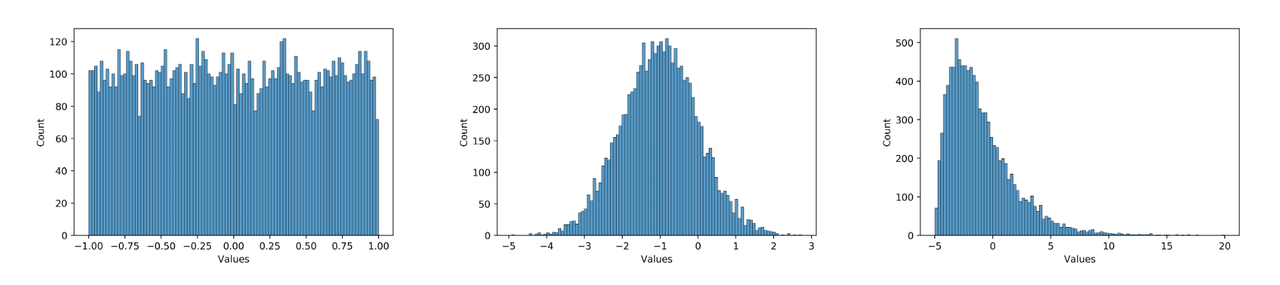
Unreasonable data distribution. The plugin uses uniform symmetric quantization, so zero-mean uniform distributions are optimal. Long-tail distributions and outliers should be avoided as much as possible. Additionally, the numerical range must match the quantization bit width. For instance, using int8 to quantize uniformly distributed data in the range [-1000, 1000] would clearly result in insufficient precision. For example, among the three distribution diagrams below, from left to right, quantization-friendliness decreases progressively. Most values in the model should exhibit a distribution similar to the middle one. In practice, use debug tools to check whether the weight and feature map distributions in your model are quantization-friendly. Due to model redundancy, some operators with seemingly poor quantization-friendly distributions may not significantly degrade final model accuracy. Consider this alongside actual QAT training difficulty and final quantized accuracy.
How can we make models more quantization-friendly? Specifically:
Minimize usage of operators with high precision risks. See operator documentation for details.
Ensure that repeated calls to shared operators produce output distributions that do not differ significantly, or split shared operators into separate instances.
Avoid large differences in numerical ranges among inputs to multi-input operators.
Use int16 quantization for operators with extremely large value ranges and errors. Debug tools can help identify such operators.
Prevent model overfitting by increasing weight decay or data augmentation. Overfitted models tend to produce large values and are highly sensitive to input; minor errors may lead to completely incorrect outputs.
Use Batch Normalization (BN).
Normalize model inputs symmetrically around zero.
Note that QAT itself has some adjustment capability—being less quantization-friendly does not mean the model cannot be quantized. In many cases, even when the above non-ideal conditions occur, good quantization results can still be achieved. Since the above suggestions may reduce floating-point model accuracy, try them only when QAT accuracy fails to meet requirements, especially suggestions 1–5. Ultimately, a balance should be found between floating-point model accuracy and quantized model accuracy.
6.4.3.2. Detailed Explanation of qconfig
What is qconfig?
The model’s quantization method is determined by qconfig. Before preparing a QAT or calibration model, you must first set the qconfig for the model. We do not recommend customizing qconfig; instead, use predefined qconfig variables whenever possible. Custom qconfig requires deep understanding of specific processor constraints and training tool mechanics. Misconfiguration may lead to issues such as model non-convergence or compilation failure, wasting significant time and effort.
Currently, the Plugin maintains two versions of qconfig. The earlier version will be deprecated soon. We only recommend using the qconfig methods described in this document.
How to Obtain qconfig
Use pre-packaged qconfig variables. These qconfig settings are located in
horizon_plugin_pytorch/quantization/qconfig.pyand are suitable for most scenarios. They include:
from horizon_plugin_pytorch.quantization.qconfig import (
    default_calib_8bit_fake_quant_qconfig,
    default_qat_8bit_fake_quant_qconfig,
    default_qat_8bit_fixed_act_fake_quant_qconfig,
    default_calib_8bit_weight_16bit_act_fake_quant_qconfig,
    default_qat_8bit_weight_16bit_act_fake_quant_qconfig,
    default_qat_8bit_weight_16bit_fixed_act_fake_quant_qconfig,
    default_qat_8bit_weight_32bit_out_fake_quant_qconfig, # Refer to the operator list; operators supporting high-precision output can use this qconfig for higher accuracy
    default_calib_8bit_weight_32bit_out_fake_quant_qconfig, # Refer to the operator list; operators supporting high-precision output can use this qconfig for higher accuracy
)
Use the
get_default_qconfiginterface. This interface is more flexible than fixed qconfig variables. We recommend using it only after gaining a clear understanding of quantization and hardware constraints. Common parameters and explanations are as follows:
from horizon_plugin_pytorch.quantization.qconfig import get_default_qconfig

qconfig = get_default_qconfig(
    activation_fake_quant="fake_quant",  # Supports: fake_quant, lsq, pact; commonly uses fake_quant
    weight_fake_quant="fake_quant", # Supports: fake_quant, lsq, pact; commonly uses fake_quant
    activation_observer="min_max", # Supports: min_max, fixed_scale, clip, percentile, clip_std, mse, kl
    weight_observer="min_max", # Supports: min_max, fixed_scale, clip, percentile, clip_std, mse, kl
    activation_qkwargs={
        "dtype": qint16, # Whether int16 is supported depends on the specific operator
        "is_sync_quantize": False, # Whether to synchronize statistics; default is off to improve forward speed
        "averaging_constant": 0.01 # Smoothing coefficient; when set to 0, scale does not update
    },
    weight_qkwargs={ # Only supports dtype = qint8, qscheme = torch.per_channel_symmetric, ch_axis = 0; additional configuration is not recommended
        "dtype": qint8,
        "qscheme": torch.per_channel_symmetric,
        "ch_axis": 0,
    },
)
How to Set qconfig
There are three methods to set qconfig. We recommend the first two. The third method will be deprecated.
Directly set the qconfig attribute. This method has the highest priority; other methods will not override a directly set qconfig.
model.qconfig = default_qat_8bit_fake_quant_qconfig
qconfig template. Specify qconfig setter and example_inputs in the prepare interface to automatically set qconfig for the model.
model = prepare_qat_fx(
	model,
	example_inputs=data,
	qconfig_setter=default_qat_qconfig_setter,
)
qconfig_dict. Specify qconfig_dict in the prepare_qat_fx interface. This usage will be gradually deprecated. Unless compatibility is required, its use is not recommended. Details are not elaborated here.
model = prepare_qat_fx(
	model,
	qconfig_dict={"": default_qat_qconfig_setter},
)
qconfig Templates
For a long time, misconfiguration of qconfig has been a common issue. Therefore, we developed qconfig templates. Based on a subclass tracing approach, qconfig templates perceive the model’s graph structure and automatically set qconfig according to predefined rules. This is our most recommended method. Usage example:
qat_model = prepare_qat_fx(
    model,
    example_inputs=example_input,  # Used to perceive graph structure
    qconfig_setter=( # qconfig template; supports multiple templates, priority from high to low.
        sensitive_op_qat_8bit_weight_16bit_act_qconfig_setter(table, ratio=0.2),
        default_calibration_qconfig_setter,
    )
)
Template priority is lower than directly setting the qconfig attribute. If the model has already been configured via model.qconfig = xxx before prepare, the template will not take effect. Unless there are special requirements, we do not recommend mixing both methods, as this can easily lead to basic errors. In most cases, we recommend using either templates or model.qconfig = xxx—just one of these two methods is sufficient to meet needs.
Templates are categorized into three types:
Fixed templates. The difference among calibration / qat / qat_fixed_act_scale in fixed templates lies in the observer type used and scale update logic, intended for calibration, QAT training, and fixed activation scale QAT training, respectively. The default template (default_calibration_qconfig_setter / default_qat_qconfig_setter / default_qat_fixed_act_qconfig_setter) performs three actions: First, it sets high-precision outputs wherever possible and issues warnings for unsupported high-precision outputs; second, it searches backward from the grid input of grid sample operators until encountering the first gemm-class operator or QuantStub, setting all intermediate operators to int16. Empirically, the grid here usually has a wide range, and int8 may not satisfy precision requirements; finally, it sets remaining operators to int8. The int16 template (qat_8bit_weight_16bit_act_qconfig_setter / qat_8bit_weight_16bit_fixed_act_qconfig_setter / calibration_8bit_weight_16bit_act_qconfig_setter) performs two actions: First, it sets high-precision outputs wherever possible and issues warnings for unsupported outputs; second, it sets all other operators to int16.
from horizon_plugin_pytorch.quantization.qconfig_template import (
	default_calibration_qconfig_setter,
	default_qat_qconfig_setter,
	default_qat_fixed_act_qconfig_setter,
	qat_8bit_weight_16bit_act_qconfig_setter,
	qat_8bit_weight_16bit_fixed_act_qconfig_setter,
	calibration_8bit_weight_16bit_act_qconfig_setter,
)
Sensitivity templates. Sensitivity templates include sensitive_op_calibration_8bit_weight_16bit_act_qconfig_setter, sensitive_op_qat_8bit_weight_16bit_act_qconfig_setter, and sensitive_op_qat_8bit_weight_16bit_fixed_act_qconfig_setter. Their differences mirror those in fixed templates and are used for calibration, QAT training, and fixed activation scale QAT training, respectively. The first input of a sensitivity template is the sensitivity result generated by a precision debug tool; the second parameter can specify either ratio or topk. The sensitivity template sets the topk most quantization-sensitive operators to int16. Combined with fixed templates, this enables easy mixed-precision tuning.
from horizon_plugin_pytorch.quantization.qconfig_template import (
	default_calibration_qconfig_setter,
	default_qat_qconfig_setter,
	default_qat_fixed_act_qconfig_setter,
	qat_8bit_weight_16bit_act_qconfig_setter,
	qat_8bit_weight_16bit_fixed_act_qconfig_setter,
	calibration_8bit_weight_16bit_act_qconfig_setter,
	sensitive_op_qat_8bit_weight_16bit_act_qconfig_setter,
	sensitive_op_qat_8bit_weight_16bit_fixed_act_qconfig_setter,
	sensitive_op_calibration_8bit_weight_16bit_act_qconfig_setter,
)

table = torch.load("output_0-0_dataindex_1_sensitive_ops.pt")

qat_model = prepare_qat_fx(
	model,
	example_inputs=example_input,
	qconfig_setter=(
		sensitive_op_qat_8bit_weight_16bit_fixed_act_qconfig_setter(table, ratio=0.2),
		default_calibration_qconfig_setter,
	)
)
Custom templates. Only ModuleNameQconfigSetter is available as a custom template. It requires a dictionary mapping module names to corresponding qconfigs, typically used for special requirements such as fixed scales. It can be used in combination with fixed or sensitivity templates.
from horizon_plugin_pytorch.quantization.qconfig_template import (
	default_calibration_qconfig_setter,
	default_qat_qconfig_setter,
	default_qat_fixed_act_qconfig_setter,
	qat_8bit_weight_16bit_act_qconfig_setter,
	qat_8bit_weight_16bit_fixed_act_qconfig_setter,
	calibration_8bit_weight_16bit_act_qconfig_setter,
	sensitive_op_qat_8bit_weight_16bit_act_qconfig_setter,
	sensitive_op_qat_8bit_weight_16bit_fixed_act_qconfig_setter,
	sensitive_op_calibration_8bit_weight_16bit_act_qconfig_setter,
	ModuleNameQconfigSetter,
)

table = torch.load("output_0-0_dataindex_1_sensitive_ops.pt")

module_name_to_qconfig = {
	"op_1": default_qat_8bit_fake_quant_qconfig,
	"op_2": get_default_qconfig(
		activation_observer="fixed_scale",
		activation_qkwargs={
			"dtype": qint16,
			"scale": OP2_MAX / QINT16_MAX,
		},
	)
}

qat_model = prepare_qat_fx(
	model,
	example_inputs=example_input,
	qconfig_setter=(
		ModuleNameQconfigSetter(module_name_to_qconfig),
		sensitive_op_qat_8bit_weight_16bit_fixed_act_qconfig_setter(table, ratio=0.2),
		default_calibration_qconfig_setter,
	)
)
6.4.3.3. Calibration Guide
In quantization, an important step is determining quantization parameters. Reasonable initial quantization parameters can significantly improve model accuracy and accelerate convergence. Calibration involves inserting Observers into the floating-point model and using a small amount of training data to statistically analyze data distributions at various points during model forward passes, thereby determining appropriate quantization parameters. Although quantization training can proceed without Calibration, it is generally beneficial and harmless. Therefore, we recommend users treat this step as mandatory.
Procedure and Example
The overall workflow of Calibration and QAT is shown in the figure below:
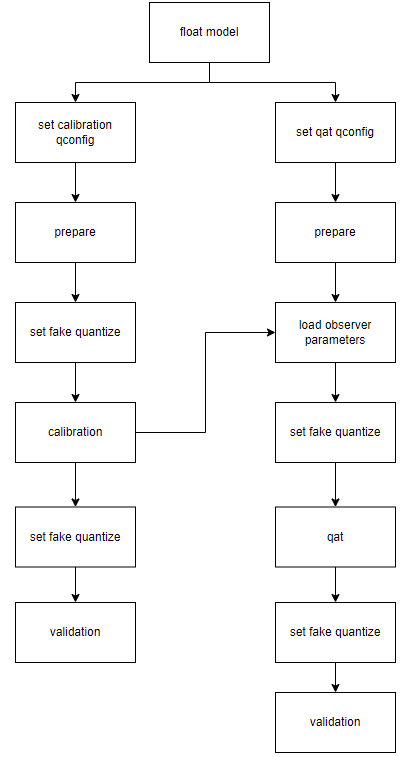
Each step is introduced as follows:
Build and train a floating-point model. Refer to the Obtain Floating-Point Model section in the horizon_plugin_pytorch Quick Start chapter.
Insert Observer nodes into the floating-point model. Refer to the Calibration section in the horizon_plugin_pytorch Quick Start chapter. Before using the
prepare_qat_fxmethod to convert the floating-point model, you need to setqconfigfor the model.model.qconfig = horizon.quantization.get_default_qconfig()
get_default_qconfigcan set differentobservers forweightandactivation. Currently, available observers for calibration include “min_max”, “percentile”, “mse”, “kl”, and “mix”. Unless there are special requirements, we recommend using the default “min_max” forweight_observerand “mse” foractivation_observer. See the Common Algorithms section below for special usages and debugging techniques.The
fake_quantparameter has no effect on Calibration results; keep it at default.def get_default_qconfig( activation_fake_quant: Optional[str] = "fake_quant", weight_fake_quant: Optional[str] = "fake_quant", activation_observer: Optional[str] = "min_max", weight_observer: Optional[str] = "min_max", activation_qkwargs: Optional[Dict] = None, weight_qkwargs: Optional[Dict] = None, ):
Set the
fake quantizestate toCALIBRATION.horizon.quantization.set_fake_quantize(model, horizon.quantization.FakeQuantState.CALIBRATION)
There are three
fake quantizestates in total. The model’sfake quantizestate must be set accordingly beforeQAT,calibration, andvalidation. In calibration mode, only statistics of operator inputs and outputs are observed. In QAT mode, both statistics observation and fake quantization operations are performed. In validation mode, no statistics are observed—only fake quantization is performed.class FakeQuantState(Enum): QAT = "qat" CALIBRATION = "calibration" VALIDATION = "validation"
Perform calibration. Feed the prepared calibration data into the model. During the forward pass, observers collect relevant statistics.
Set the model to eval mode and set the
fake quantizestate toVALIDATION.model.eval() horizon.quantization.set_fake_quantize(model, horizon.quantization.FakeQuantState.VALIDATION)
Validate the
calibrationresults. If satisfied, you can directly convert the model to fixed-point or proceed with quantization training. If not satisfied, adjust parameters in thecalibration qconfigand repeat calibration.
Introduction to Common Algorithms
Note:
For parameter descriptions of each operator, please refer to the API documentation at the end of this document.
| Algorithm | Speed Rank | Accuracy Rank | Usability Rank |
|---|---|---|---|
| min_max | 1 | 5 | 1 |
| percentile | 2 | 4 | 4 |
| mse | 4 | 1 | 2 |
| kl | 5 | 2 | 3 |
| mix | 3 | 2 | 1 |
The performance of several common calibration methods is shown in the table above. Lower numbers indicate better performance. Speed refers to calibration time with the same dataset, accuracy reflects calibration effectiveness across most models, and usability reflects parameter tuning complexity.
For the same model, the accuracy and speed of different methods and parameters can vary significantly. Recent research also shows that no single method achieves optimal accuracy across all models, requiring targeted parameter adjustments. Therefore, we recommend users try all these calibration methods.
min_max. This method only tracks the moving average of minimum and maximum values, used to quickly determine general parameters such as batch size and averaging_constant, with little tuning complexity.
percentile. This method has the highest potential accuracy among all methods but is also the most complex to tune. If accuracy requirements are met using default parameters or other methods, we do not recommend spending excessive time tuning this method. Two adjustable parameters are available: bins and percentile. More bins mean finer granularity for max candidates and finer tuning resolution, but also higher computational cost. We suggest determining percentile first, then adjusting bins, iterating alternately to narrow down the parameter space until satisfactory results are achieved. In most cases, bins=2048 provides sufficient tuning granularity and does not require individual adjustment. Below is an example tuning path:
| Order | percentile | bins | Accuracy |
|---|---|---|---|
| 1 | 99.99 | 2048 | 53.75 |
| 2 | 99.99 | 4096 | 54.38 |
| 3 | 99.995 | 4096 | 16.25 |
| 4 | 99.985 | 4096 | 32.67 |
| 5 | 99.9875 | 4096 | 57.06 |
| 6 | 99.9875 | 8192 | 62.84 |
| 7 | 99.98875 | 8192 | 57.62 |
| 8 | 99.988125 | 8192 | 63.15 |
In this example, careful tuning improved accuracy by approximately 10%.
Input and output distributions of different ops in the model can vary greatly. A single global percentile parameter may struggle to meet all op requirements. For high-accuracy needs, first find good global parameters using the above method, then use debug tools to identify a few ops with large errors, and set percentile parameters individually for these ops. Refer to qconfig setting methods for details. Below are several common data distributions prone to large errors:
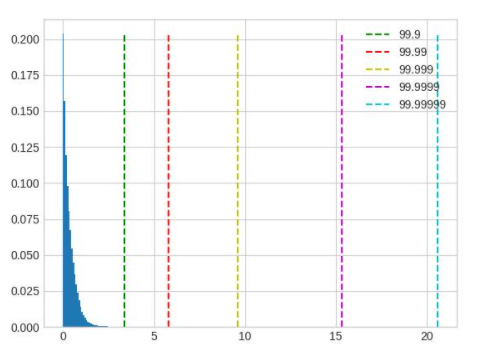
Extremely long-tail distribution: percentile should be set smaller; 99.9 in the figure is a good choice.
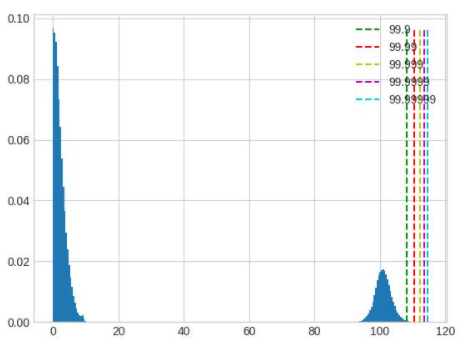
Excessively wide range with scattered distribution: retaining or ignoring tails leads to significant accuracy loss. Avoid this during floating-point model training by adjusting parameters like weight decay.
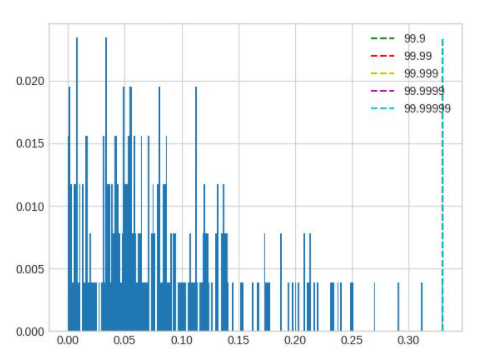
LayerNorm output distributions often show several highly concentrated regions. In such cases, normal percentile tuning has no effect on quantization results; larger adjustment steps are needed.
mse. Only one parameter, stride, is adjustable. The default stride is 1, which tries percentiles of the maximum value in 100 steps and selects the one minimizing the L2 distance between original and quantized-reconstructed values. This method is computationally expensive for large models. Increasing stride within reasonable limits reduces computation time without significantly affecting accuracy. Excessive stride degrades accuracy. Note: tuning this method’s parameters only optimizes speed, not significantly improving accuracy.
kl. Two parameters are adjustable: bin and update_interval. Due to high computational cost, we do not recommend changing the default bin count. update_interval defaults to 1, meaning KL divergence is computed every few forward steps. Increasing it reduces computation time (without affecting accuracy), but update_interval must not exceed the total calibration steps, otherwise valid quantization parameters cannot be obtained. Generally, set update_interval equal to the total calibration steps. This way, earlier forward steps only collect data to update histograms, and KL and scale are computed only in the final step, minimizing KL computation time. Since the final histogram includes statistics from all input data, accuracy is not compromised.
mix. This is a hybrid calibration method. For each point requiring statistics, it tries different parameters with the percentile method and selects the one with the smallest quantization error (L2 distance). It is highly automated with no parameters to tune.
Parameter Tuning Tips
More calibration data is better, but due to diminishing returns, accuracy improvement becomes negligible beyond a certain amount. If the training set is small, use all of it for calibration. If large, select a reasonably sized subset considering calibration time. We recommend at least 10–100 calibration steps.
Data can be augmented with operations like horizontal flipping, but avoid mosaicing. Use inference-stage preprocessing combined with training data for calibration.
Use as large a batch size as possible. If data is noisy or the model has many outliers, slightly reduce batch size. Determine this parameter when trying the min-max method.
averaging_constant determines the impact of each step on min/max values. A smaller averaging_constant means less influence from the current step and more from historical moving averages. Adjust this parameter between 0.01 and 0.5 based on data volume. With sufficient data (steps > 100), use 0.01; with insufficient data, increase it appropriately. In extreme cases with only 2 steps, use 0.5. Determine this parameter during min-max trials and reuse it across other methods.
When calibration model accuracy is good, fixing feature map quantization parameters during QAT training may yield better results. If calibration accuracy is poor, do not fix the obtained quantization parameters. There is no clear standard for what constitutes “good” accuracy—it requires experimentation. For example, if a model has floating-point accuracy of 100 and calibration accuracy of 50, it’s clearly not good. But if calibration accuracy is 95, whether it’s sufficient to fix feature map quantization parameters needs to be tested. Typically, run experiments with and without fixed parameters for comparison.
Prioritize trying the min-max method—it’s the fastest—for validating the calibration workflow and determining batch size and averaging_constant. Then try percentile, kl, mse, and mix methods, selecting the best-performing one.
Observer Parameter Documentation
class horizon_plugin_pytorch.quantization.observer_v2.KLObserver(bins: int = 512, update_interval: int = 1, averaging_constant: float = 0.01, ch_axis: int = - 1, dtype: Union[torch.dtype, horizon_plugin_pytorch.dtype.QuantDType] = 'qint8', qscheme: torch.qscheme = torch.per_tensor_symmetric, quant_min: int = None, quant_max: int = None, is_sync_quantize: bool = False, factory_kwargs: Dict = None)
KL observer.
KL observer based on histogram. Histogram is calculated online and won’t be saved.
Parameters
bins – Number of histograms bins.
update_interval – Interval of computing KL entropy and update min/max. KLObserver will constantly collect histograms of activations, but only perform KL calculation when update_interval is satisfied. if it is set to 1, KL entropy will be computed every forward step. Larger interval guarantees less time and does no harm to calibration accuracy. Set it to the total calibration steps can achieve best performance. update_interval must be no greater than total calibration steps, otherwise no min/max will be computed.
averaging_constant – Averaging constant for min/max.
ch_axis – Channel axis.
dtype – Quantized data type.
qscheme – Quantization scheme to be used.
quant_min – Min quantization value. Will follow dtype if unspecified.
quant_max – Max quantization value. Will follow dtype if unspecified.
is_sync_quantize – If sync statistics when training with multiple devices.
factory_kwargs – kwargs which are passed to factory functions for min_val and max_val.
forward(x_orig)
Defines the computation performed at every call.
Should be overridden by all subclasses.
Tip:
Although the recipe for forward pass needs to be defined within this function, one should call the Module instance afterwards instead of this since the former takes care of running the registered hooks while the latter silently ignores them.
class horizon_plugin_pytorch.quantization.observer_v2.MSEObserver(stride: int = 1, averaging_constant: float = 0.01, ch_axis: int = - 1, dtype: Union[torch.dtype, horizon_plugin_pytorch.dtype.QuantDType] = 'qint8', qscheme: torch.qscheme = torch.per_tensor_symmetric, quant_min: int = None, quant_max: int = None, is_sync_quantize: bool = False, factory_kwargs: Dict = None)
MSE observer.
Observer module for computing the quantization parameters based on the Mean Square Error (MSE) between the original tensor and the quantized one.
This observer linear searches the quantization scales that minimize MSE.
Parameters
stride – Searching stride. Larger value gives smaller search space, which means less computing time but possibly poorer accuracy. Default is 1. Suggests no greater than 20.
averaging_constant – Averaging constant for min/max.
ch_axis – Channel axis.
dtype – Quantized data type.
qscheme – Quantization scheme to be used.
quant_min – Min quantization value. Will follow dtype if unspecified.
quant_max – Max quantization value. Will follow dtype if unspecified.
is_sync_quantize – If sync statistics when training with multiple devices.
factory_kwargs – kwargs which are passed to factory functions for min_val and max_val.
forward(x_orig)
Defines the computation performed at every call.
Should be overridden by all subclasses.
Tip:
Although the recipe for forward pass needs to be defined within this function, one should call the Module instance afterwards instead of this since the former takes care of running the registered hooks while the latter silently ignores them.
class horizon_plugin_pytorch.quantization.observer_v2.MinMaxObserver(averaging_constant: float = 0.01, ch_axis: int = - 1, dtype: Union[torch.dtype, horizon_plugin_pytorch.dtype.QuantDType] = 'qint8', qscheme: torch.qscheme = torch.per_tensor_symmetric, quant_min: int = None, quant_max: int = None, is_sync_quantize: bool = False, factory_kwargs: Dict = None)
Min max observer.
This observer computes the quantization parameters based on minimums and maximums of the incoming tensors. The module records the moving average minimum and maximum of incoming tensors, and uses this statistic to compute the quantization parameters.
Parameters
averaging_constant – Averaging constant for min/max.
ch_axis – Channel axis.
dtype – Quantized data type.
qscheme – Quantization scheme to be used.
quant_min – Min quantization value. Will follow dtype if unspecified.
quant_max – Max quantization value. Will follow dtype if unspecified.
is_sync_quantize – If sync statistics when training with multiple devices.
factory_kwargs – kwargs which are passed to factory functions for min_val and max_val.
forward(x_orig)
Record the running minimum and maximum of x.
class horizon_plugin_pytorch.quantization.observer_v2.MixObserver(averaging_constant: float = 0.01, ch_axis: int = - 1, dtype: Union[torch.dtype, horizon_plugin_pytorch.dtype.QuantDType] = 'qint8', qscheme: torch.qscheme = torch.per_tensor_symmetric, quant_min: int = None, quant_max: int = None, is_sync_quantize: bool = False, factory_kwargs: Dict = None)
Mix observer.
This observer computes the quantization parameters based on multiple calibration methods and selects the quantization parameters with the smallest quantization error.
Parameters
averaging_constant – Averaging constant for min/max.
ch_axis – Channel axis.- dtype – Quantized data type.
qscheme – Quantization scheme to be used.
quant_min – Min quantization value. Will follow dtype if unspecified.
quant_max – Max quantization value. Will follow dtype if unspecified.
is_sync_quantize – If sync statistics when training with multiple devices.
factory_kwargs – kwargs which are passed to factory functions for min_val and max_val.
forward(x_orig)
Defines the computation performed at every call.
Should be overridden by all subclasses.
Tips:
Although the recipe for forward pass needs to be defined within this function, one should call the Module instance afterwards instead of this since the former takes care of running the registered hooks while the latter silently ignores them.
class horizon_plugin_pytorch.quantization.observer_v2.PercentileObserver(percentile: float = 99.99, bins: int = 2048, averaging_constant: float = 0.01, ch_axis: int = - 1, dtype: Union[torch.dtype, horizon_plugin_pytorch.dtype.QuantDType] = 'qint8', qscheme: torch.qscheme = torch.per_tensor_symmetric, quant_min: int = None, quant_max: int = None, is_sync_quantize: bool = False, factory_kwargs: Dict = None)
Percentile observer.
Percentile observer based on histogram. Histogram is calculated online and won’t be saved. The minimum and maximum are moving averaged to compute the quantization parameters.
Parameters
percentile – Index percentile of histogram
bins – Number of histogram bins.
averaging_constant – Averaging constant for min/max.
ch_axis – Channel axis.
dtype – Quantized data type.
qscheme – Quantization scheme to be used.
quant_min – Min quantization value. Will follow dtype if unspecified.
quant_max – Max quantization value. Will follow dtype if unspecified.
is_sync_quantize – If sync statistics when training with multiple devices.
factory_kwargs – kwargs which are passed to factory functions for min_val and max_val.
forward(x_orig)
Defines the computation performed at every call.
Should be overridden by all subclasses.
Tips:
Although the recipe for forward pass needs to be defined within this function, one should call the Module instance afterwards instead of this since the former takes care of running the registered hooks while the latter silently ignores them.
class horizon_plugin_pytorch.quantization.MovingAverageMinMaxObserver(averaging_constant=0.01, dtype=torch.qint8, qscheme=torch.per_tensor_symmetric, quant_min=None, quant_max=None, is_sync_quantize=False, factory_kwargs=None)
MovingAverageMinMax Observer.
Observer module for computing the quantization parameters based on the moving average of the min and max values.
This observer computes the quantization parameters based on the moving averages of minimums and maximums of the incoming tensors. The module records the average minimum and maximum of incoming tensors, and uses this statistic to compute the quantization parameters.
Parameters
averaging_constant – Averaging constant for min/max.
dtype – Quantized data type
qscheme – Quantization scheme to be used, only support per_tensor_symmetric scheme
reduce_range – Reduces the range of the quantized data type by 1 bit
quant_min – Minimum quantization value.
quant_max – Maximum quantization value.
is_sync_quantize – Whether use sync quantize
factory_kwargs – Arguments for register data buffer
forward(x_orig)
Record the running minimum and maximum of x.
class horizon_plugin_pytorch.quantization.MovingAveragePerChannelMinMaxObserver(averaging_constant=0.01, ch_axis=0, dtype=torch.qint8, qscheme=torch.per_channel_symmetric, quant_min=None, quant_max=None, is_sync_quantize=False, factory_kwargs=None)
MovingAveragePerChannelMinMax Observer.
Observer module for computing the quantization parameters based on the running per channel min and max values.
This observer uses the tensor min/max statistics to compute the per channel quantization parameters. The module records the running minimum and maximum of incoming tensors, and uses this statistic to compute the quantization parameters.
Parameters
averaging_constant – Averaging constant for min/max.
ch_axis – Channel axis
dtype – Quantized data type
qscheme – Quantization scheme to be used, Only support per_channel_symmetric
quant_min – Minimum quantization value.
quant_max – Maximum quantization value.
is_sync_quantize – whether use sync quantize
factory_kwargs – Arguments for register data buffer
forward(x_orig)
Defines the computation performed at every call.
Should be overridden by all subclasses.
Tips:
Although the recipe for forward pass needs to be defined within this function, one should call the Module instance afterwards instead of this since the former takes care of running the registered hooks while the latter silently ignores them.
6.4.3.4. Quantization-Aware Training Guide
Quantization-aware training (QAT) inserts pseudo-quantization nodes into the model, aiming to minimize accuracy loss when converting the trained model into a fixed-point model.
QAT is similar to traditional model training. Developers can build a pseudo-quantized model from scratch and then train it.
However, due to various constraints of the deployment hardware platform, it can be challenging for developers to understand these constraints and build appropriate pseudo-quantized models accordingly. The QAT tool reduces this barrier by automatically inserting pseudo-quantization operators into a developer-provided floating-point model based on the limitations of the deployment platform.
Due to various constraints imposed during quantization, QAT is generally more difficult than training pure floating-point models. The goal of the QAT tool is to reduce the difficulty of QAT and simplify the engineering effort required for deploying quantized models.
Workflow and Example
Although the QAT tool does not require users to start from a pre-trained floating-point model, experience shows that starting QAT from a high-accuracy pre-trained floating-point model usually significantly reduces the difficulty of QAT.
from horizon_plugin_pytorch.quantization import get_default_qconfig
# Convert model to QAT mode
default_qat_8bit_fake_quant_qconfig = get_default_qconfig(
    activation_fake_quant="fake_quant",
    weight_fake_quant="fake_quant",
    activation_observer="min_max",
    weight_observer="min_max",
    activation_qkwargs=None,
    weight_qkwargs={
        "qscheme": torch.per_channel_symmetric,
        "ch_axis": 0,
    },
)
default_qat_out_8bit_fake_quant_qconfig = get_default_qconfig(
    activation_fake_quant=None,
    weight_fake_quant="fake_quant",
    activation_observer=None,
    weight_observer="min_max",
    activation_qkwargs=None,
    weight_qkwargs={
        "qscheme": torch.per_channel_symmetric,
        "ch_axis": 0,
    },
)
qat_model = prepare_qat_fx(
    float_model,
    {
        "": default_qat_8bit_fake_quant_qconfig,
        "module_name": {
            "classifier": default_qat_out_8bit_fake_quant_qconfig,
        },
    },
).to(device)
# Load quantization parameters from calibration model
qat_model.load_state_dict(calib_model.state_dict())
# Perform quantization-aware training
# As a fine-tuning process, QAT typically requires a small learning rate
optimizer = torch.optim.SGD(
    qat_model.parameters(), lr=0.0001, weight_decay=2e-4
)

for nepoch in range(epoch_num):
    # Note the control of QAT model training state
    qat_model.train()
    set_fake_quantize(qat_model, FakeQuantState.QAT)

    train_one_epoch(
        qat_model,
        nn.CrossEntropyLoss(),
        optimizer,
        None,
        train_data_loader,
        device,
    )

    # Note the control of QAT model evaluation state
    qat_model.eval()
    set_fake_quantize(qat_model, FakeQuantState.VALIDATION)

    # Evaluate QAT model accuracy
    top1, top5 = evaluate(
        qat_model,
        eval_data_loader,
        device,
    )
    print(
        "QAT model: evaluation Acc@1 {:.3f} Acc@5 {:.3f}".format(
            top1.avg, top5.avg
        )
    )

# Evaluate quantized model accuracy
quantized_model = convert_fx(qat_model.eval()).to(device)

top1, top5 = evaluate(
    quantized_model,
    eval_data_loader,
    device,
)
print(
    "Quantized model: evaluation Acc@1 {:.3f} Acc@5 {:.3f}".format(
        top1.avg, top5.avg
    )
)
Note:
Due to underlying platform limitations, the QAT model cannot fully represent the final on-device accuracy. Please monitor the quantized model’s accuracy carefully to ensure it remains normal; otherwise, accuracy degradation may occur after deployment.
From the example above, we can see that compared to traditional floating-point model training, QAT introduces two additional steps:
prepare_qat_fxLoading calibration model parameters
prepare_qat_fx
The purpose of this step is to transform the floating-point network by inserting pseudo-quantization nodes.
Loading Calibration Model Parameters
By loading pseudo-quantization parameters obtained from calibration, we achieve a better initialization.
Training Iteration
At this point, the pseudo-quantized model has been constructed and initialized. Standard training iterations and parameter updates can proceed, while monitoring the accuracy of the quantized model.
Pseudo-Quantization Operators
The main difference between QAT and traditional floating-point training lies in the insertion of pseudo-quantization operators. Different QAT algorithms are also reflected through these operators. Therefore, we introduce pseudo-quantization operators here.
Note:
Since the BPU only supports symmetric quantization, the following explanations are based on symmetric quantization.
Pseudo-Quantization Process
Taking int8 QAT as an example, the computation process of a pseudo-quantization operator is generally as follows:
fake_quant_x = clip(round(x / scale), -128, 127) * scale
Similar to how Conv2d optimizes weight and bias parameters during training, the pseudo-quantization operator aims to optimize the scale parameter through training. However, since the round operation is a step function with zero gradient, direct backpropagation cannot train the operator. Two common solutions to this problem are statistical methods and “learning”-based methods.
Statistical Methods
The goal of quantization is to uniformly map floating-point values in a Tensor to the int8 range [-128, 127] using the scale parameter. Given this uniform mapping, the scale can be computed as:
def compute_scale(x: Tensor):
    xmin, xmax = x.max(), x.min()
    return max(xmin.abs(), xmax.abs()) / 256.0
Due to non-uniform data distributions and outliers, various methods have been developed to compute xmin and xmax. See MovingAverageMinMaxObserver for examples.
For usage in the tool, refer to default_qat_8bit_fake_quant_qconfig and related interfaces.
Learning-Based Methods
Although the gradient of round is zero, researchers have found experimentally that setting its gradient to 1 directly allows the model to converge to the expected accuracy.
def round_ste(x: Tensor):
    return (x.round() - x).detach() + x
For usage in the tool, refer to default_qat_8bit_lsq_quant_qconfig and related interfaces.
Interested users can refer to the following paper: Learned Step Size Quantization
6.4.3.5. Heterogeneous Model Guide
Introduction to Heterogeneous Models
A heterogeneous model is one where part of the model runs on the BPU and another part runs on the CPU during deployment, whereas non-heterogeneous models run entirely on the BPU. Typically, the following two types of models become heterogeneous upon deployment:
Models containing operators not supported by the BPU.
Models where certain operators are explicitly specified by the user to run on the CPU due to excessive quantization accuracy loss.
Workflow

Use prepare to convert the floating-point model into a QAT model, train it, then export to ONNX format, and finally use the hb_mapper tool to convert it into a bin model.
Note:
Users can obtain a heterogeneous fixed-point model via the convert process for accuracy evaluation purposes.
Operator Limitations
Since heterogeneous models interface with horizon_nn, their supported operators are identical to those supported by horizon_nn.
Main Interface Parameters
horizon_plugin_pytorch.quantization.prepare_qat_fx
Set
hybrid=Trueto enable heterogeneous model functionality.Users can use the
hybrid_dictparameter to force certain BPU-supported operators to run on the CPU.
def prepare_qat_fx(
    model: Union[torch.nn.Module, GraphModule],
    qconfig_dict: Dict[str, Any] = None,
    prepare_custom_config_dict: Dict[str, Any] = None,
    optimize_graph: bool = False,
    hybrid: bool = False,
    hybrid_dict: Dict[str, List] = None,
) -> ObservedGraphModule:
    """Prepare QAT model
        `model`: torch.nn.Module or GraphModule (model after fuse_fx)
        `qconfig_dict`: Define Qconfig. If qconfig is also defined inside modules using eager mode, the module-level qconfig takes precedence. The configuration format of qconfig_dict is:
            qconfig_dict = {
                # Optional, global configuration
                "": qconfig,
                # Optional, configuration by module type
                "module_type": [(torch.nn.Conv2d, qconfig), ...],
                # Optional, configuration by module name
                "module_name": [("foo.bar", qconfig),...],
                # Priority: global < module_type < module_name < module.qconfig
                # For non-module operators, their qconfig defaults to that of their parent module. To set separately, wrap them into a module.
            }
        `prepare_custom_config_dict`: Custom configuration dictionary
            prepare_custom_config_dict = {
                # Currently only supports preserved_attributes. Attributes are automatically preserved; this option is rarely used.
                "preserved_attributes": ["preserved_attr"],
            }
        `optimize_graph`: Keep cat input/output scales consistent; currently only effective on Bernoulli architecture.
        `hybrid`: Whether to use hybrid mode. Hybrid mode must be enabled in the following cases:
            1. Model contains BPU-unsupported operators or user wants certain BPU operators to fall back to CPU.
            2. User wants the QAT model to interface with horizon_nn for fixed-point conversion.
        `hybrid_dict`: Define user-specified CPU operators.
            hybrid_dict = {
                # Optional, configuration by module type
                "module_type": [torch.nn.Conv2d, ...],
                # Optional, configuration by module name
                "module_name": ["foo.bar", ...],
                # Priority: module_type < module_name
                # Similar to qconfig_dict, to run non-module operators on CPU, wrap them into a module.
            }
    """
horizon_plugin_pytorch.utils.onnx_helper.export_to_onnx
Export the model to ONNX format for interfacing with hb_mapper.
Note:
This interface also supports non-heterogeneous models; the exported ONNX model is only for visualization purposes.
def export_to_onnx(
    model,
    args,
    f,
    export_params=True,
    verbose=False,
    training=TrainingMode.EVAL,
    input_names=None,
    output_names=None,
    operator_export_type=OperatorExportTypes.ONNX_FALLTHROUGH,
    opset_version=11,
    do_constant_folding=True,
    example_outputs=None,
    strip_doc_string=True,
    dynamic_axes=None,
    keep_initializers_as_inputs=None,
    custom_opsets=None,
    enable_onnx_checker=False,
):
    """This interface is largely consistent with torch.onnx.export, hiding unmodifiable parameters. Key parameters include:
        `model`: Model to be exported
        `args`: Model inputs, used to trace the model
        `f`: Filename or file descriptor for saving the ONNX file
        `operator_export_type`: Type of operator export
            1. For non-heterogeneous models, ONNX is only for visualization and does not need to be functional—use default OperatorExportTypes.ONNX_FALLTHROUGH.
            2. For heterogeneous models, ONNX must be functional—use None to ensure standard ONNX operators are exported.
        `opset_version`: Must be 11. horizon_plugin_pytorch registers specific mapping rules in opset 11.
        Note: If using the standard torch.onnx.export, ensure the above parameters are correctly set,
        and import horizon_plugin_pytorch.utils._register_onnx_ops
        to register specific mapping rules into opset 11.
    """
horizon_plugin_pytorch.quantization.convert_fx
The hybrid mode can reuse convert_fx to convert the pseudo-quantized model into a heterogeneous quantized model for accuracy evaluation.
Note:
The heterogeneous quantized model obtained via convert_fx cannot be deployed. It is currently only used for accuracy evaluation.
def convert_fx(
    graph_module: GraphModule,
    convert_custom_config_dict: Dict[str, Any] = None,
    _remove_qconfig: bool = True,
) -> QuantizedGraphModule:
    """Convert QAT model, only for evaluating fixed-point model accuracy.
        `graph_module`: Model after prepare->(calibration)->train
        `convert_custom_config_dict`: Custom configuration dictionary
            convert_custom_config_dict = {
                # Currently only supports preserved_attributes. Attributes are automatically preserved; this option is rarely used.
                "preserved_attributes": ["preserved_attr"],
            }
        `_remove_qconfig`: Whether to remove qconfig after conversion; rarely used
    """
Workflow and Example
Modify the floating-point model.
Insert
QuantStubandDeQuantStub, consistent with non-heterogeneous usage.If the first op is a
cpu op,QuantStubis not needed.If the last op is a
cpu op,DeQuantStubcan be omitted.
For non-
moduleoperations, if you need to set a separateqconfigor specify CPU execution, wrap them into amodule, as shown in the_SeluModuleexample.
Set
march. Use bernoulli2 for X3, and bayes-e for X5.Set
qconfig. The method of settingqconfiginsidemodulefrom non-heterogeneous mode is preserved. Additionally,qconfigcan be passed via theqconfig_dictparameter inprepare_qat_fx. See interface parameter descriptions for details.For
BPU op, aqconfigmust be provided. If its input op is notQuantStub, the input op must have anactivation qconfig.For
CPU op,qconfighas no effect, but if followed by aBPU op, aqconfigis required.Recommended approach: Set a global
qconfigtohorizon.quantization.default_qat_8bit_fake_quant_qconfig(orhorizon.quantization.default_calib_8bit_fake_quant_qconfig, depending on calibration or QAT phase), then modify as needed. Generally, only ops requiring int16 or high-precision output need individualqconfigsettings.
Note:
Currently, only X5 with BPU architecture
BAYES_Esupports settingint16quantization.Set
hybrid_dict. Optional. Refer to interface parameter descriptions. If no CPU operators are explicitly specified,hybrid_dictcan be omitted.Call
prepare_qat_fxand performcalibration. Refer to the Calibration section in the horizon_plugin_pytorch Developer Guide.Call
prepare_qat_fx, load thecalibrationmodel, and perform QAT training. Refer to the Quantization section in the horizon_plugin_pytorch Developer Guide.Call
convert_fx. Optional—can be skipped if there’s no need to evaluate fixed-point model accuracy.Call
export_to_onnx.torch.onnx.exportcan also be used, but must follow the notes in theexport_to_onnxinterface description.Use
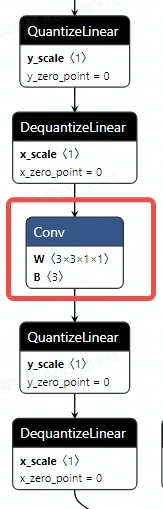
hb_mapperto convert the ONNX model. After conversion, verify that operators run on the intended device. In some cases,hb_mapperstill requires setting therun_on_cpuparameter. For example: althoughconvwas not quantized during QAT, if its input (output from the previous operator) was pseudo-quantized,hb_mapperwill default to quantizing it.
import copy
import numpy as np
import torch
from horizon_plugin_pytorch.march import March, set_march
from horizon_plugin_pytorch.nn import qat
from horizon_plugin_pytorch.quantization import (
    prepare_qat_fx,
    convert_fx,
    set_fake_quantize,
    FakeQuantState,
    load_observer_params,
)
from horizon_plugin_pytorch.quantization.qconfig import (
    default_calib_8bit_fake_quant_qconfig,
    default_calib_out_8bit_fake_quant_qconfig,
    default_qat_8bit_fake_quant_qconfig,
    default_qat_out_8bit_fake_quant_qconfig,
)
from torch import nn
from torch.quantization import DeQuantStub, QuantStub
from horizon_plugin_pytorch.utils.onnx_helper import export_to_onnx

class _ConvBlock(nn.Module):
    def __init__(self, channels=3):
        super().__init__()
        self.conv = nn.Conv2d(channels, channels, 1)
        self.prelu = torch.nn.PReLU()

    def forward(self, input):
        x = self.conv(input)
        x = self.prelu(x)
        return torch.nn.functional.selu(x)

# Wrap functional selu as a module for easier individual configuration
class _SeluModule(nn.Module):
    def forward(self, input):
        return torch.nn.functional.selu(input)

class HybridModel(nn.Module):
    def __init__(self, channels=3):
        super().__init__()
        # Insert QuantStub
        self.quant = QuantStub()
        self.conv0 = nn.Conv2d(channels, channels, 1)
        self.prelu = torch.nn.PReLU()
        self.conv1 = _ConvBlock(channels)
        self.conv2 = nn.Conv2d(channels, channels, 1)
        self.conv3 = nn.Conv2d(channels, channels, 1)
        self.conv4 = nn.Conv2d(channels, channels, 1)
        self.selu = _SeluModule()
        # Insert DequantStub
        self.dequant = DeQuantStub()
        self.identity = torch.nn.Identity()

    def forward(self, input):
        x = self.quant(input)
        x = self.conv0(x)
        x = self.identity(x)
        x = self.prelu(x)
        x = torch.nn.functional.selu(x)
        x = self.conv1(x)
        x = self.conv2(x)
        x = self.conv3(x)
        x = self.identity(x)
        x = self.conv4(x)
        x = self.selu(x)
        return self.dequant(x)

# Set march **X3** to BERNOULLI2, **X5** to BAYES_E.
set_march(March.XXX)
data_shape = [1, 3, 224, 224]
data = torch.rand(size=data_shape)
model = HybridModel()
qat_model = copy.deepcopy(model)
# Inference with float model should not be placed after prepare_qat_fx, as prepare_qat_fx modifies the float model in-place
float_res = model(data)

calibration_model = prepare_qat_fx(
    model,
    {
        "": default_calib_8bit_fake_quant_qconfig,
        # selu is a CPU operator; conv4 is actually the output of the BPU model, set to high-precision output
        "module_name": [("conv4", default_calib_out_8bit_fake_quant_qconfig)]
    },
    hybrid=True,
    hybrid_dict={
        "module_name": ["conv1.conv", "conv3"],
        "module_type": [_SeluModule],
    },
)
# During calibration phase, ensure the original model remains unchanged
calibration_model.eval()
set_fake_quantize(calibration_model, FakeQuantState.CALIBRATION)

for i in range(5):
    calibration_model(torch.rand(size=data_shape))

qat_model = prepare_qat_fx(
    qat_model,
    {
        "": default_qat_8bit_fake_quant_qconfig,
        # selu is a CPU operator; conv4 is actually the output of the BPU model, set to high-precision output
        "module_name": [("conv4", default_qat_out_8bit_fake_quant_qconfig)]
    },
    hybrid=True,
    hybrid_dict={
        "module_name": ["conv1.conv", "conv3"],
        "module_type": [_SeluModule],
    },
)

load_observer_params(calibration_model, qat_model)
set_fake_quantize(calibration_model, FakeQuantState.QAT)

# qat training start
# ......
# qat training end

# Export qat.onnx
export_to_onnx(
    qat_model,
    data,
    "qat.onnx",
    operator_export_type=None,
)

# Evaluate the quantized model
quantize_model = convert_fx(qat_model)
quantize_res = quantize_model(data)
Print the result of the QAT model.
HybridModel(
  (quant): QuantStub(
    (activation_post_process): FakeQuantize(
      fake_quant_enabled=tensor([1], dtype=torch.uint8), observer_enabled=tensor([1], dtype=torch.uint8),            quant_min=-128, quant_max=127, dtype=qint8, qscheme=torch.per_tensor_symmetric, ch_axis=-1,         scale=tensor([0.0078]), zero_point=tensor([0])
      (activation_post_process): MovingAverageMinMaxObserver(min_val=tensor([-0.9995]), max_val=tensor([0.9995]))
    )
  )
  (conv0): Conv2d(
    3, 3, kernel_size=(1, 1), stride=(1, 1)
    (weight_fake_quant): FakeQuantize(
      fake_quant_enabled=tensor([1], dtype=torch.uint8), observer_enabled=tensor([1], dtype=torch.uint8),            quant_min=-128, quant_max=127, dtype=qint8, qscheme=torch.per_channel_symmetric, ch_axis=0,         scale=tensor([0.0038, 0.0041, 0.0016]), zero_point=tensor([0, 0, 0])
      (activation_post_process): MovingAveragePerChannelMinMaxObserver(min_val=tensor([-0.4881, -0.4944,  0.0787]), max_val=tensor([-0.1213,  0.5284,  0.1981]))
    )
    (activation_post_process): FakeQuantize(
      fake_quant_enabled=tensor([1], dtype=torch.uint8), observer_enabled=tensor([1], dtype=torch.uint8),            quant_min=-128, quant_max=127, dtype=qint8, qscheme=torch.per_tensor_symmetric, ch_axis=-1,         scale=tensor([0.0064]), zero_point=tensor([0])
      (activation_post_process): MovingAverageMinMaxObserver(min_val=tensor([-0.8159]), max_val=tensor([0.8159]))
    )
  )
  (prelu): PReLU(num_parameters=1)
  (conv1): _ConvBlock(
    (conv): Conv2d(3, 3, kernel_size=(1, 1), stride=(1, 1))
    (prelu): PReLU(num_parameters=1)
  )
  (conv2): Conv2d(
    3, 3, kernel_size=(1, 1), stride=(1, 1)
    (weight_fake_quant): FakeQuantize(
      fake_quant_enabled=tensor([1], dtype=torch.uint8), observer_enabled=tensor([1], dtype=torch.uint8),            quant_min=-128, quant_max=127, dtype=qint8, qscheme=torch.per_channel_symmetric, ch_axis=0,         scale=tensor([0.0040, 0.0044, 0.0040]), zero_point=tensor([0, 0, 0])
      (activation_post_process): MovingAveragePerChannelMinMaxObserver(min_val=tensor([-0.5044, -0.4553, -0.5157]), max_val=tensor([0.1172, 0.5595, 0.4104]))
    )
    (activation_post_process): FakeQuantize(
      fake_quant_enabled=tensor([1], dtype=torch.uint8), observer_enabled=tensor([1], dtype=torch.uint8),            quant_min=-128, quant_max=127, dtype=qint8, qscheme=torch.per_tensor_symmetric, ch_axis=-1,         scale=tensor([0.0059]), zero_point=tensor([0])
      (activation_post_process): MovingAverageMinMaxObserver(min_val=tensor([-0.7511]), max_val=tensor([0.7511]))
    )
  )
  (conv3): Conv2d(3, 3, kernel_size=(1, 1), stride=(1, 1))
  (conv4): Conv2d(
    3, 3, kernel_size=(1, 1), stride=(1, 1)
    (weight_fake_quant): FakeQuantize(
      fake_quant_enabled=tensor([1], dtype=torch.uint8), observer_enabled=tensor([1], dtype=torch.uint8),            quant_min=-128, quant_max=127, dtype=qint8, qscheme=torch.per_channel_symmetric, ch_axis=0,         scale=tensor([0.0025, 0.0037, 0.0029]), zero_point=tensor([0, 0, 0])
      (activation_post_process): MovingAveragePerChannelMinMaxObserver(min_val=tensor([-0.2484, -0.4718, -0.3689]), max_val=tensor([ 0.3239, -0.0056,  0.3312]))
    )
    (activation_post_process): None
  )
  (selu): _SeluModule()
  (dequant): DeQuantStub()
  (identity): Identity()
  (prelu_input_dequant): DeQuantStub()
  (selu_1_activation_post_process): _WrappedCalibFakeQuantize(
    (activation_post_process): FakeQuantize(
      fake_quant_enabled=tensor([1], dtype=torch.uint8), observer_enabled=tensor([1], dtype=torch.uint8),            quant_min=-128, quant_max=127, dtype=qint8, qscheme=torch.per_tensor_symmetric, ch_axis=-1,         scale=tensor([0.0042]), zero_point=tensor([0])
      (activation_post_process): MovingAverageMinMaxObserver(min_val=tensor([-0.5301]), max_val=tensor([0.5301]))
    )
  )
  (conv3_activation_post_process): _WrappedCalibFakeQuantize(
    (activation_post_process): FakeQuantize(
      fake_quant_enabled=tensor([1], dtype=torch.uint8), observer_enabled=tensor([1], dtype=torch.uint8),            quant_min=-128, quant_max=127, dtype=qint8, qscheme=torch.per_tensor_symmetric, ch_axis=-1,         scale=tensor([0.0072]), zero_point=tensor([0])
      (activation_post_process): MovingAverageMinMaxObserver(min_val=tensor([-0.9156]), max_val=tensor([0.9156]))
    )
  )
  (conv3_input_dequant): DeQuantStub()
  (selu_2_input_dequant): DeQuantStub()
)

def forward(self, input):
    input_1 = input
    quant = self.quant(input_1);  input_1 = None
    conv0 = self.conv0(quant);  quant = None
    identity = self.identity(conv0);  conv0 = None
    prelu_input_dequant_0 = self.prelu_input_dequant(identity);  identity = None
    prelu = self.prelu(prelu_input_dequant_0);  prelu_input_dequant_0 = None
    selu = torch.nn.functional.selu(prelu, inplace = False);  prelu = None
    conv1_conv = self.conv1.conv(selu);  selu = None
    conv1_prelu = self.conv1.prelu(conv1_conv);  conv1_conv = None
    selu_1 = torch.nn.functional.selu(conv1_prelu, inplace = False);  conv1_prelu = None
    selu_1_activation_post_process = self.selu_1_activation_post_process(selu_1);  selu_1 = None
    conv2 = self.conv2(selu_1_activation_post_process);  selu_1_activation_post_process = None
    conv3_input_dequant_0 = self.conv3_input_dequant(conv2);  conv2 = None
    conv3 = self.conv3(conv3_input_dequant_0);  conv3_input_dequant_0 = None
    conv3_activation_post_process = self.conv3_activation_post_process(conv3);  conv3 = None
    identity_1 = self.identity(conv3_activation_post_process);  conv3_activation_post_process = None
    conv4 = self.conv4(identity_1);  identity_1 = None
    selu_2_input_dequant_0 = self.selu_2_input_dequant(conv4);  conv4 = None
    selu_2 = torch.nn.functional.selu(selu_2_input_dequant_0, inplace = False);  selu_2_input_dequant_0 = None
    dequant = self.dequant(selu_2);  selu_2 = None
    return dequant
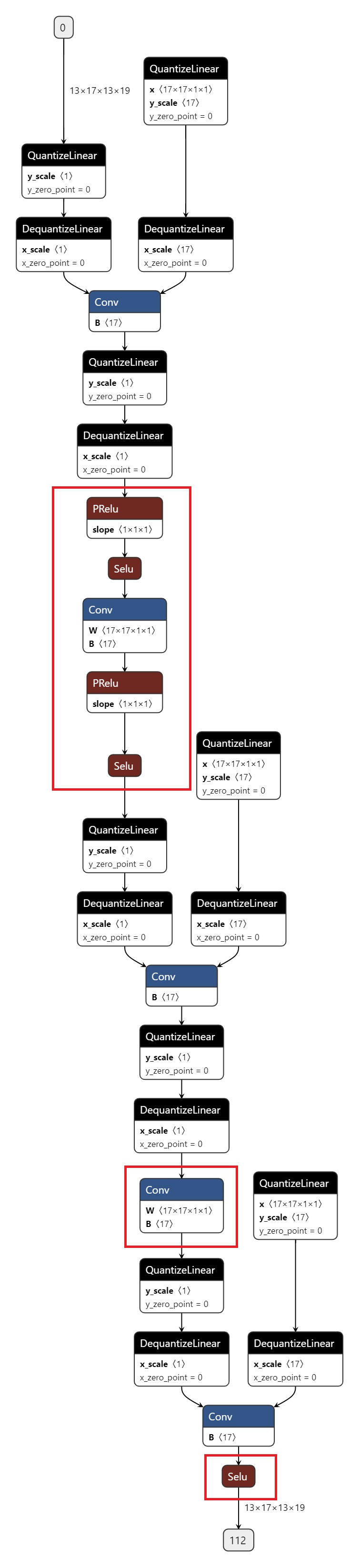
The exported ONNX is shown in the figure below, with the CPU operators highlighted in red.
6.4.3.6. Guide to Precision Tuning Tools
Due to errors introduced during the conversion from floating-point to fixed-point arithmetic, you may encounter accuracy degradation when using quantization-aware training (QAT) tools. Generally, there are three main causes for such accuracy drops:
The original floating-point model is not quantization-friendly, e.g., contains shared ops or shared structures;
Abnormal QAT network structure or configuration, such as unfused patterns or missing high-precision output settings;
Certain operators are highly sensitive to quantization, where quantization errors accumulate layer by layer during forward propagation, eventually leading to large output deviations.
To address these issues, the quantization training tool provides precision debugging tools to help quickly identify and resolve accuracy problems. The main components include:
Model Structure Checker: Checks for shared ops, unfused patterns, or unexpected quantization configurations in the model;
QuantAnalysis: Automatically compares and analyzes two models to identify abnormal or quantization-sensitive operators in the quantized model;
ModelProfiler: Obtains numerical characteristics of each operator in the model, such as input/output min/max values.
Quick Start
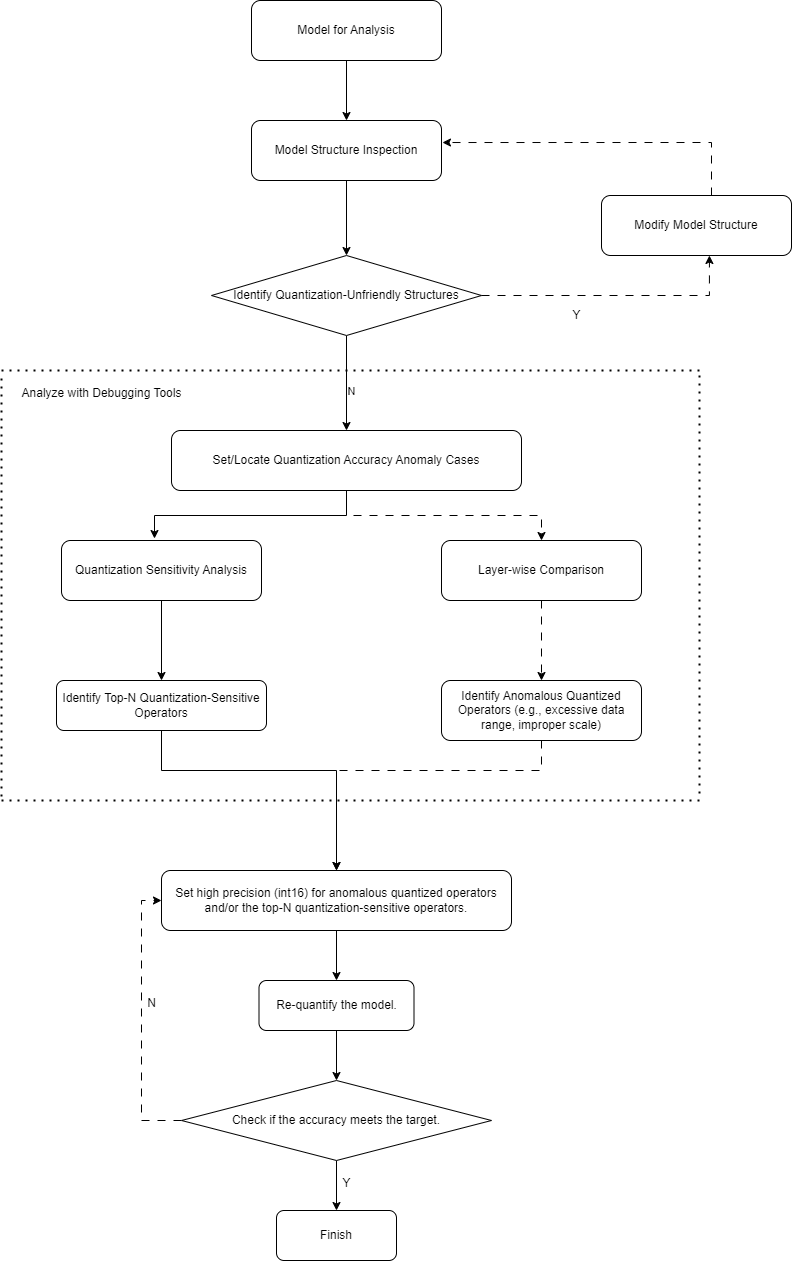
When encountering accuracy degradation in a quantized model, we recommend following this workflow using the precision tuning tools:
Check the model for quantization-unfriendly structures or abnormal configurations;
Use the QuantAnalysis module for detailed analysis, with the following steps:
Identify a bad case as model input. A bad case refers to the input for which the outputs of the baseline model and the analyzed model differ the most;
Perform quantization sensitivity analysis. Empirically, the top-n operators ranked by L1 sensitivity are often quantization-sensitive (the value of n varies across models; no automatic method exists yet, so manual tuning is required, e.g., top 10, 20, etc.). Set these sensitive operators to high-precision quantization (e.g., int16) and re-run the quantization flow;
Alternatively, compare input/output information layer by layer between the two models to detect operators with abnormal data ranges or unreasonable scales, such as operators with physical meaning that should use fixed scales.
The overall workflow is illustrated below:
A complete example is shown below.
    from copy import deepcopy

    import torch
    from torch import nn
    from torch.quantization import DeQuantStub, QuantStub

    from horizon_plugin_pytorch.march import March, set_march
    from horizon_plugin_pytorch.quantization.qconfig import (
        default_qat_8bit_fake_quant_qconfig,
    )
    from horizon_plugin_pytorch.quantization.quantize_fx import prepare_qat_fx
    from horizon_plugin_pytorch.quantization import hbdk4 as hb4
    from horizon_plugin_pytorch.utils.check_model import check_qat_model
    from horizon_plugin_profiler import QuantAnalysis, ModelProfiler


    class Net(nn.Module):
        def __init__(self):
            super(Net, self).__init__()
            self.conv = nn.Conv2d(3, 3, 1)
            self.relu = nn.ReLU()
            self.quant = QuantStub()
            self.dequant = DeQuantStub()

        def forward(self, x):
            x = self.quant(x)
            x = self.conv(x)
            x = self.relu(x)
            x = torch.nn.functional.interpolate(
                x, scale_factor=1.3, mode="bilinear", align_corners=False
            )
            x = self.dequant(x)
            return x

    data = torch.rand((1, 3, 32, 32))
    float_net = Net()
    float_net(data)

    set_march(March.XXX)
    float_net.qconfig = default_qat_8bit_fake_quant_qconfig

    qat_net = deepcopy(float_net)
    qat_net = prepare_qat_fx(qat_net)

    ############################### Model Structure Check ##############################
    # Confirm whether the reported abnormal layers meet expectations
    check_qat_model(qat_net, data, save_results=True)
    ##########################################################################

    qat_net(data)

    quantized_net = deepcopy(qat_net)
    quantized_net = convert_fx(quantized_net)

    ############################### quant analysis ############################

    # 1. Initialization
    qa = QuantAnalysis(
        baseline_model=float_net,
        analysis_model=qat_net,
        analysis_model_type="fake_quant",
        out_dir="./floatvsqat",
    )

    # Also supports comparing qat and quantized models
    # qa = QuantAnalysis(
    #     baseline_model=qat_net,
    #     analysis_model=quantized_net,
    #     analysis_model_type="quantized",
    #     out_dir="./qatvsquantized",
    # )

    # 2. Set bad case input
    qa.set_bad_case(data)

    # In real scenarios, it's recommended to use auto_find_bad_case to search over the entire dataloader
    # Also supports setting num_steps to control search scope
    # qa.auto_find_bad_case(your_dataloader, num_steps=100)

    # 3. Run both models
    qa.run()

    # 4. Compare layer by layer. Confirm whether the abnormal layers reported in abnormal_layer_advisor.txt are expected
    # qa.compare_per_layer()

    # 5. Compute sensitivity nodes. Top-k sensitive nodes can be set to higher precision to improve quantized model accuracy
    qa.sensitivity()

    ##########################################################################
API Reference
Model Structure Checker
    # from horizon_plugin_pytorch.utils.check_model import check_qat_model

    def check_qat_model(
        model: torch.nn.Module,
        example_inputs: Any,
        save_results: bool = False,
        out_dir: Optional[str] = None,
    ):
Checks whether the calibration/QAT model contains structures unfavorable for quantization and whether the quantization qconfig settings are as expected.
Parameters
model: The model to be checked
example_inputs: Model input
save_results: Whether to save the check results to a txt file. Default is False.
out_dir: Path to save the result file ‘model_check_result.txt’. Default is empty, saving to the current directory.
Output
Console output: Abnormal layers detected
model_check_result.txt: Generated when save_results = True. Consists of five main parts:
Unfused patterns
Number of calls per module. Normally each op is called once; 0 means not called, more than 1 means shared;
qconfig settings for each op’s output;
qconfig settings for each op’s weight (if any);
Warnings for abnormal qconfig (if any).
Fusable modules are listed below:
name    type
------  -----------------------------------------------------
conv    <class 'horizon_plugin_pytorch.nn.qat.conv2d.Conv2d'>
relu    <class 'horizon_plugin_pytorch.nn.qat.relu.ReLU'>


Each module called times:
name       called times
-------  --------------
conv                  1
relu                  1
quant                 1
dequant               1

Each layer out qconfig:
+---------------+-----------------------------------------------------------+---------------+---------------+----------------+-----------------------------+
| Module Name   | Module Type                                               | Input dtype   | out dtype     | ch_axis        | observer                    |
|---------------+-----------------------------------------------------------+---------------+---------------+----------------+-----------------------------|
| quant         | <class 'horizon_plugin_pytorch.nn.qat.stubs.QuantStub'>   | torch.float32 | qint8         | -1             | MovingAverageMinMaxObserver |
| conv          | <class 'horizon_plugin_pytorch.nn.qat.conv2d.Conv2d'>     | qint8         | qint8         | -1             | MovingAverageMinMaxObserver |
| relu          | <class 'horizon_plugin_pytorch.nn.qat.relu.ReLU'>         | qint8         | qint8         | qconfig = None |                             |
| dequant       | <class 'horizon_plugin_pytorch.nn.qat.stubs.DeQuantStub'> | qint8         | torch.float32 | qconfig = None |                             |
+---------------+-----------------------------------------------------------+---------------+---------------+----------------+-----------------------------+

Weight qconfig:
+---------------+-------------------------------------------------------+----------------+-----------+---------------------------------------+
| Module Name   | Module Type                                           | weight dtype   |   ch_axis | observer                              |
|---------------+-------------------------------------------------------+----------------+-----------+---------------------------------------|
| conv          | <class 'horizon_plugin_pytorch.nn.qat.conv2d.Conv2d'> | qint8          |         0 | MovingAveragePerChannelMinMaxObserver |
+---------------+-------------------------------------------------------+----------------+-----------+---------------------------------------+
This interface is already integrated into the `prepare_qat/prepare_qat_fx` process. You can enable this check by setting `verbose=1`. We recommend checking your model with this interface before starting QAT training and making targeted adjustments based on the results.
QuantAnalysis Class
The QuantAnalysis class can automatically find the worst-case input (bad case) where the outputs of two models differ the most, and use it as input to compare outputs layer by layer. Additionally, QuantAnalysis provides sensitivity computation: you can try setting the top-k most sensitive nodes to higher precision (e.g., int16 quantization) to improve quantized model accuracy.
class QuantAnalysis(object):
    def __init__(
        self,
        baseline_model: torch.nn.Module,
        analysis_model: torch.nn.Module,
        analysis_model_type: str,
        out_dir: Optional[str] = None,
    )
Parameters
baseline_model: Baseline model (high precision)
analysis_model: Model to be analyzed (with accuracy drop)
analysis_model_type: Type of the model being analyzed. Two options supported:
fake_quant: The model being analyzed can be a calibration/QAT model with accuracy drop. The baseline can be the original floating-point model or a well-performing mixed int8/int16 calibration/QAT model.
quantized: The model being analyzed is a fixed-point model with accuracy drop. The baseline must be a well-performing calibration/QAT model.
out_dir: Output directory for comparison results
Methods in this class are described below.
auto_find_bad_case
    def auto_find_bad_case(
        self,
        data_generator: Iterable,
        num_steps: Optional[int] = None,
        metric: str = "L1",
        device: Optional[Union[torch.device, str, int]] = None,
        custom_metric_func: Optional[Callable] = None,
        custom_metric_order_seq: Optional[str] = None,
    ):
Automatically finds the worst-case input (bad case) that maximizes the output difference between two models.
Parameters
data_generator: Dataloader or a custom iterator that yields one data sample per iteration
num_steps: Number of steps to iterate
metric: Metric used to identify the bad case. Default is worst L1. Supported: Cosine/MSE/L1/KL/SQNR/custom. If “custom”, a user-defined metric function must be provided via custom_metric_func, and custom_metric_order_seq must not be None.
device: Device to run the models
custom_metric_func: Custom function to compare model outputs
custom_metric_order_seq: Sorting order for the custom metric, only “ascending”/”descending” supported
set_bad_case
def set_bad_case(self, data)
Manually set a bad case.
Parameters
data: Input data for the bad case
load_bad_case
def load_bad_case(self, filename: Optional[str] = None)
Load a bad case from a specified file.
Parameters
filename: Path to the file
save_bad_case
def save_bad_case(self)
Save the bad case to {self.out_dir}/badcase.pt.
set_model_profiler_dir
    def set_model_profiler_dir(
        self,
        baseline_model_profiler_path: str,
        analysis_model_profiler_path: str,
    ):
Manually specify the output paths for model profilers.
In some cases, ModelProfiler may have already been defined and run before QuantAnalysis initialization. In such cases, you can directly specify existing profiler paths to skip the QuantAnalysis run step and proceed directly to comparing outputs.
Parameters
baseline_model_profiler_path: Profiler path for the baseline model
analysis_model_profiler_path: Profiler path for the analysis model
run
    def run(
        self,
        device: Optional[Union[torch.device, str, int]] = None,
    )
Run both models and save the output of each layer.
Parameters
device: Device to run the models
compare_per_layer
def compare_per_layer(self)
Compare outputs of each layer between the two models.
Output
abnormal_layer_advisor.txt: Lists all abnormal layers, including those with low similarity, excessive data range, non-normalized inputs, or lack of high-precision outputs.
profiler.html: Visualizes all metric indicators and data range differences per layer.
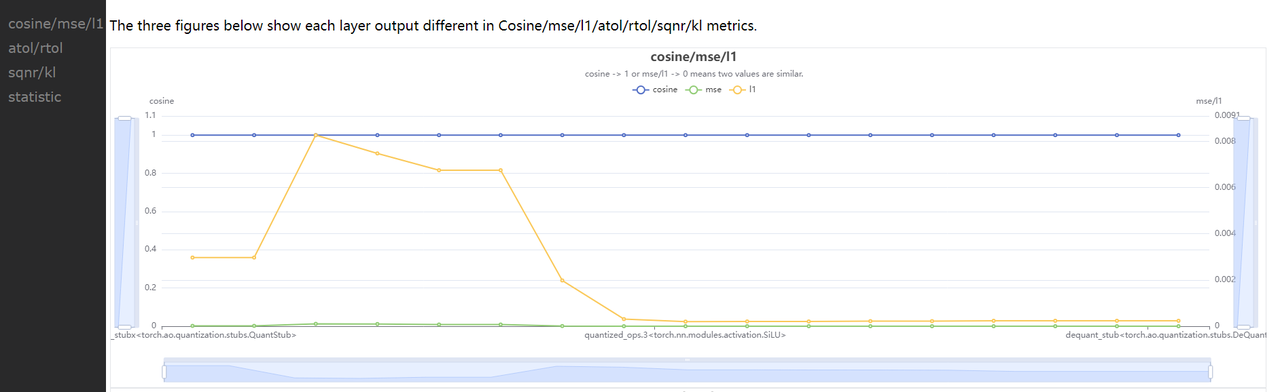
compare_per_layer_out.txt: Tabular display of detailed information for each layer, including various metrics, data ranges, quantization dtypes, etc. Columns from left to right represent:
Index: op index
mod_name: Name of the op; if it’s a module, shows the prefix name in the model; if a function, left blank
base_op_type: Type of the op in the baseline model (module type or function name)
analy_op_type: Type of the op in the analysis model
Shape: Output shape of the op
quant_dtype: Quantization data type of the op output
Qscale: Quantization scale of the op output
Cosine: Cosine similarity of the op outputs between the two models
MSE: MSE distance between the op outputs
L1: L1 distance
KL: KL divergence
SQNR: Signal-to-Quantization-Noise Ratio
Atol: Absolute error
Rtol: Relative error
base_model_min: Minimum value of the op output in the baseline model
analy_model_min: Minimum value in the analysis model
base_model_max: Maximum value in the baseline model
analy_model_max: Maximum value in the analysis model
base_model_mean: Mean value in the baseline model
analy_model_mean: Mean value in the analysis model
base_model_var: Variance in the baseline model
analy_model_var: Variance in the analysis model
+----+------------+--------------------------------------------------------------------+--------------------------------------------------------------------+----------------------------+---------------+-----------+-----------+-----------+-----------+-----------+------------+-----------+-------------------------------------------------+------------------+-------------------+------------------+-------------------+-------------------+--------------------+------------------+-------------------+
|    | mod_name   | base_op_type                                                       | analy_op_type                                                      | shape                      | quant_dtype   |    qscale |    Cosine |       MSE |        L1 |        KL |       SQNR |      Atol |                                            Rtol |   base_model_min |   analy_model_min |   base_model_max |   analy_model_max |   base_model_mean |   analy_model_mean |   base_model_var |   analy_model_var |
|----+------------+--------------------------------------------------------------------+--------------------------------------------------------------------+----------------------------+---------------+-----------+-----------+-----------+-----------+-----------+------------+-----------+-------------------------------------------------+------------------+-------------------+------------------+-------------------+-------------------+--------------------+------------------+-------------------|
|  0 | quant      | torch.ao.quantization.stubs.QuantStub                              | horizon_plugin_pytorch.nn.qat.stubs.QuantStub                      | torch.Size([1, 3, 32, 32]) | qint8         | 0.0078354 | 0.9999924 | 0.0000052 | 0.0019757 | 0.0000006 | 48.1179886 | 0.0039178 |                                       1.0000000 |        0.0003164 |         0.0000000 |        0.9990171 |         0.9950994 |         0.5015678 |          0.5014852 |        0.0846284 |         0.0846521 |
|  1 | conv       | torch.nn.modules.conv.Conv2d                                       | horizon_plugin_pytorch.nn.qat.conv2d.Conv2d                        | torch.Size([1, 3, 32, 32]) | qint8         | 0.0060428 | 0.9999037 | 0.0000085 | 0.0023614 | 0.0000012 | 37.1519432 | 0.0096008 |                                      48.2379990 |       -0.7708085 |        -0.7674332 |        0.4674263 |         0.4652941 |        -0.0411330 |         -0.0412943 |        0.0423415 |         0.0422743 |
|  2 | relu       | torch.nn.modules.activation.ReLU                                   | horizon_plugin_pytorch.nn.qat.relu.ReLU                            | torch.Size([1, 3, 32, 32]) | qint8         | 0.0060428 | 0.9998640 | 0.0000037 | 0.0010231 | 0.0000004 | 35.5429153 | 0.0093980 |                                      48.2379990 |        0.0000000 |         0.0000000 |        0.4674263 |         0.4652941 |         0.0641222 |          0.0639115 |        0.0090316 |         0.0089839 |
|  3 |            | horizon_plugin_pytorch.nn.interpolate.autocasted_interpolate_outer | horizon_plugin_pytorch.nn.interpolate.autocasted_interpolate_outer | torch.Size([1, 3, 41, 41]) | qint8         | 0.0060428 | 0.9234583 | 0.0012933 | 0.0245362 | 0.0001882 |  8.1621437 | 0.1928777 | 340282346638528859811704183484516925440.0000000 |        0.0000000 |         0.0000000 |        0.3509629 |         0.3504813 |         0.0643483 |          0.0639483 |        0.0043305 |         0.0043366 |
|  4 | dequant    | torch.ao.quantization.stubs.DeQuantStub                            | horizon_plugin_pytorch.nn.qat.stubs.DeQuantStub                    | torch.Size([1, 3, 41, 41]) | torch.float32 |           | 0.9234583 | 0.0012933 | 0.0245362 | 0.0001882 |  8.1621437 | 0.1928777 | 340282346638528859811704183484516925440.0000000 |        0.0000000 |         0.0000000 |        0.3509629 |         0.3504813 |         0.0643483 |          0.0639483 |        0.0043305 |         0.0043366 |
+----+------------+--------------------------------------------------------------------+--------------------------------------------------------------------+----------------------------+---------------+-----------+-----------+-----------+-----------+-----------+------------+-----------+-------------------------------------------------+------------------+-------------------+------------------+-------------------+-------------------+--------------------+------------------+-------------------+
compare_per_layer_out.csv: CSV format of the same information for easy analysis in Excel or similar tools.
sensitivity
    def sensitivity(
        self,
        device: Optional[torch.device] = None,
        metric: str = "L1",
        reserve: bool = False
    ):
Ranking of node sensitivities in the model. Applicable to accuracy degradation issues in float-to-calibration/QAT conversion.
The sensitivity function does not support computing sensitivity for hbir models.
Parameters
device: Device to run the model
metric: Metric for sensitivity ranking. Default is L1. Supported: Cosine/MSE/L1/KL/SQNR
reserve: Whether to reverse the sensitivity order, useful for downgrading certain int16 ops back to int8 to improve deployment performance
Output
sensitive_ops.txt: List of ops ranked from highest to lowest quantization sensitivity. Columns:
op_name: Operator name
sensitive_type: Type of sensitivity computation:
activation: Sensitivity of quantizing only the op’s output
weight: Sensitivity of quantizing only the op’s weights
both: Sensitivity of quantizing both output and weights
op_type: Operator type
metric: Sensitivity metric used for ranking. Supports Cosine/L1/MSE/KL/SQNR. Default is L1.
L1: Range [0, $+\infty$], larger values indicate higher sensitivity (descending order)
Cosine: Range [0,1], closer to 0 means higher sensitivity (ascending order)
MSE: Range [0, $+\infty$], larger values mean higher sensitivity (descending)
KL: Range [0, $+\infty$], larger values mean higher sensitivity (descending)
SQNR: Range [0, $+\infty$], smaller values mean higher sensitivity (ascending)
sensitive_ops.pt: A sensitivity-ranked list saved with torch.save for later reuse. Format described in Return Value.
Return Value
Sensitivity list. Each element is a sublist containing sensitivity info for one op: [op_name, sensitive_type, op_type, metric1, metric2, ...].
Example:
[
    [op1, "activation", op1_type, L1],
    [op2, "activation", op2_type, L1],
    [op3, "activation", op3_type, L1],
    [op1, "weight", op1_type, L1],
    [op2, "both", op2_type, L1],
    ...
]
You can configure the top-n most sensitive ops with higher precision (e.g., int16) to improve quantized model accuracy.
op_name    sensitive_type    op_type                                                         L1
---------  ----------------  -------------------------------------------------------  ---------
```quant      activation        <class 'horizon_plugin_pytorch.nn.qat.stubs.QuantStub'>  0.0245567
conv       activation        <class 'horizon_plugin_pytorch.nn.qat.conv2d.Conv2d'>    0.0245275
conv       both              <class 'horizon_plugin_pytorch.nn.qat.conv2d.Conv2d'>    0.0245275
conv       weight            <class 'horizon_plugin_pytorch.nn.qat.conv2d.Conv2d'>    0.024501
clean
def clean(self)
Clear intermediate results. Only keep comparison results and related files.
ModelProfiler Class
Collect information about input/output and other details of each operator during the model’s forward pass.
# from horizon_plugin_profiler import ModelProfiler

class ModelProfiler(object):
    def __init__(
        self,
        model: torch.nn.Module,
        out_dir: str,
    )
Parameters
model: The model to be profiled
out_dir: Path to save related files
This class only supports usage via the `with` statement.
with ModelProfiler(net, "./profiler_dir") as p:
    net(data)

p.get_info_manager.table()
p.get_info_manager.tensorboard()
The methods in this class are described below.
get_info_manager
def get_info_manager(self)
Obtain the structure managing information for each operator.
Returns
A structure OpRunningInfoManager that manages stored information for each operator. Two important interfaces are described below.
table
class OpRunningInfoManager:
    def table(
        self,
        out_dir: str = None,
        prefixes: Tuple[str, ...] = None,
        types: Tuple[Type, ...] = None,
        with_stack: bool = False,
    )
Display statistics of a single model in a table. Saved to statistic.txt.
Parameters
out_dir: Path to save
statistic.txt. Default is None, which saves toself.out_dir.prefixes: Prefixes of operators in the model to be profiled. By default, all operators are profiled.
types: Types of operators in the model to be profiled. By default, all operators are profiled.
with_stack: Whether to show the code location corresponding to each operator.
Output
A statistic.txt file, where columns from left to right are:
Index: op index
Op Name: op type, module class name or function name
Mod Name: for module classes, shows the prefix name of the module in the model; for functions, shows the prefix name of the module containing the function
Attr: input/output/weight/bias
Dtype: data type of the tensor
Scale: scale of the tensor
Min: minimum value of the current tensor
Max: maximum value of the current tensor
Mean: mean value of the current tensor
Var: variance of values in the current tensor
Shape: tensor shape
+---------+--------------------------------------------------------------------+------------+--------+---------------+-----------+------------+-----------+------------+-----------+----------------------------+
| Index   | Op Name                                                            | Mod Name   | Attr   | Dtype         | Scale     | Min        | Max       | Mean       | Var       | Shape                      |
|---------+--------------------------------------------------------------------+------------+--------+---------------+-----------+------------+-----------+------------+-----------+----------------------------|
| 0       | horizon_plugin_pytorch.nn.qat.stubs.QuantStub                      | quant      | input  | torch.float32 |           | 0.0003164  | 0.9990171 | 0.5015678  | 0.0846284 | torch.Size([1, 3, 32, 32]) |
| 0       | horizon_plugin_pytorch.nn.qat.stubs.QuantStub                      | quant      | output | qint8         | 0.0078354 | 0.0000000  | 0.9950994 | 0.5014852  | 0.0846521 | torch.Size([1, 3, 32, 32]) |
| 1       | horizon_plugin_pytorch.nn.qat.conv2d.Conv2d                        | conv       | input  | qint8         | 0.0078354 | 0.0000000  | 0.9950994 | 0.5014852  | 0.0846521 | torch.Size([1, 3, 32, 32]) |
| 1       | horizon_plugin_pytorch.nn.qat.conv2d.Conv2d                        | conv       | weight | torch.float32 |           | -0.5315086 | 0.5750652 | 0.0269936  | 0.1615299 | torch.Size([3, 3, 1, 1])   |
| 1       | horizon_plugin_pytorch.nn.qat.conv2d.Conv2d                        | conv       | bias   | torch.float32 |           | -0.4963555 | 0.4448483 | -0.0851902 | 0.2320642 | torch.Size([3])            |
| 1       | horizon_plugin_pytorch.nn.qat.conv2d.Conv2d                        | conv       | output | qint8         | 0.0060428 | -0.7674332 | 0.4652941 | -0.0412943 | 0.0422743 | torch.Size([1, 3, 32, 32]) |
| 2       | horizon_plugin_pytorch.nn.qat.relu.ReLU                            | relu       | input  | qint8         | 0.0060428 | -0.7674332 | 0.4652941 | -0.0412943 | 0.0422743 | torch.Size([1, 3, 32, 32]) |
| 2       | horizon_plugin_pytorch.nn.qat.relu.ReLU                            | relu       | output | qint8         | 0.0060428 | 0.0000000  | 0.4652941 | 0.0639115  | 0.0089839 | torch.Size([1, 3, 32, 32]) |
| 3       | horizon_plugin_pytorch.nn.interpolate.autocasted_interpolate_outer |            | input  | qint8         | 0.0060428 | 0.0000000  | 0.4652941 | 0.0639115  | 0.0089839 | torch.Size([1, 3, 32, 32]) |
| 3       | horizon_plugin_pytorch.nn.interpolate.autocasted_interpolate_outer |            | output | qint8         | 0.0060428 | 0.0000000  | 0.3504813 | 0.0639483  | 0.0043366 | torch.Size([1, 3, 41, 41]) |
| 4       | horizon_plugin_pytorch.nn.qat.stubs.DeQuantStub                    | dequant    | input  | qint8         | 0.0060428 | 0.0000000  | 0.3504813 | 0.0639483  | 0.0043366 | torch.Size([1, 3, 41, 41]) |
| 4       | horizon_plugin_pytorch.nn.qat.stubs.DeQuantStub                    | dequant    | output | torch.float32 |           | 0.0000000  | 0.3504813 | 0.0639483  | 0.0043366 | torch.Size([1, 3, 41, 41]) |
+---------+--------------------------------------------------------------------+------------+--------+---------------+-----------+------------+-----------+------------+-----------+----------------------------+
tensorboard
class OpRunningInfoManager:
    def tensorboard(
        self,
        out_dir: str = None,
        prefixes: Tuple[str, ...] = None,
        types: Tuple[Type, ...] = None,
        force_per_channel: bool = False,
    ):
Display histograms of input/output for each layer in TensorBoard.
Parameters
out_dir: Directory to save TensorBoard files. Default is
self.out_dir/tensorboard.prefixes: Prefixes of operators in the model to be profiled. By default, all are included.
types: Types of operators in the model to be profiled. By default, all are included.
force_per_channel: Whether to display histograms in per-channel quantization mode.
Output
TensorBoard files. Screenshot after opening:
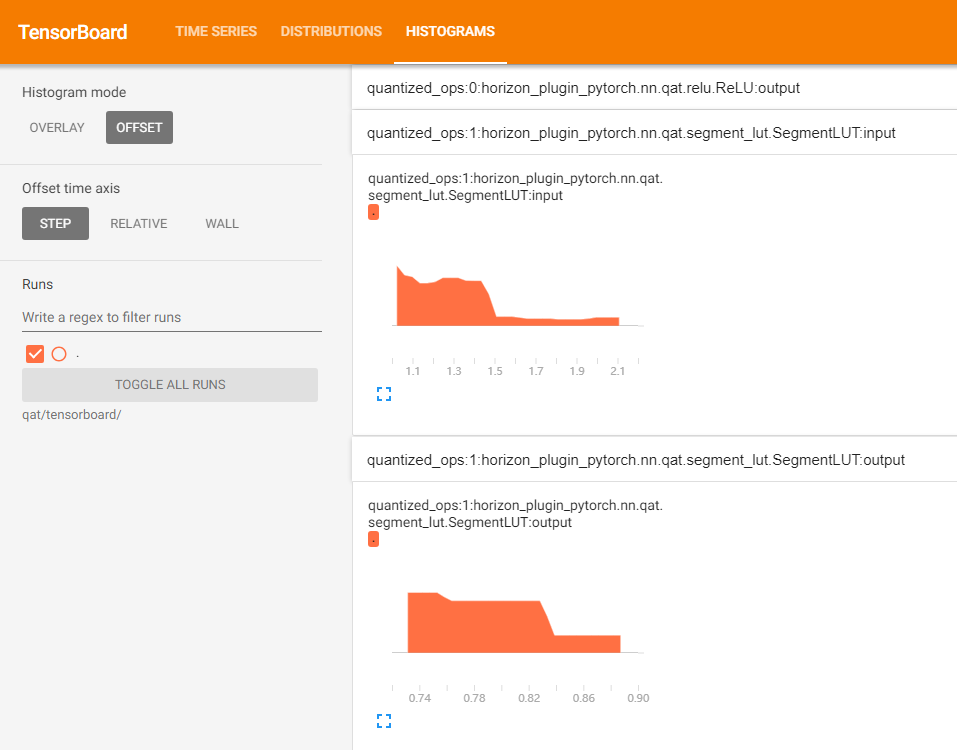
6.4.3.7. Cross-Device Inference Instructions for Quantized Deployment of PT Models
For quantized deployment of PT models, the device used during tracing must be consistent with the device used during subsequent inference.
If users attempt to directly modify the device of a PT model via to(device), forward execution errors may occur. This behavior is explained by the official PyTorch documentation, see TorchScript-Frequently Asked Questions — PyTorch documentation.
Example below:
import torch


class Net(torch.nn.Module):
    def forward(self, x: torch.Tensor):
        y = torch.ones(x.shape, device=x.device)
        z = torch.zeros_like(x)

        return y + z


script_mod = torch.jit.trace(
    Net(), torch.rand(2, 3, 3, 3, device=torch.device("cpu"))
)
script_mod.to(torch.device("cuda"))
print(script_mod.graph)

# graph(%self : __torch__.Net,
#       %x : Float(2, 3, 3, 3, strides=[27, 9, 3, 1], requires_grad=0, device=cpu)):
#   %4 : int = prim::Constant[value=0]()
#   %5 : int = aten::size(%x, %4)
#   %6 : Long(device=cpu) = prim::NumToTensor(%5)
#   %16 : int = aten::Int(%6)
#   %7 : int = prim::Constant[value=1]()
#   %8 : int = aten::size(%x, %7)
#   %9 : Long(device=cpu) = prim::NumToTensor(%8)
#   %17 : int = aten::Int(%9)
#   %10 : int = prim::Constant[value=2]()
#   %11 : int = aten::size(%x, %10)
#   %12 : Long(device=cpu) = prim::NumToTensor(%11)
#   %18 : int = aten::Int(%12)
#   %13 : int = prim::Constant[value=3]()
#   %14 : int = aten::size(%x, %13)
#   %15 : Long(device=cpu) = prim::NumToTensor(%14)
#   %19 : int = aten::Int(%15)
#   %20 : int[] = prim::ListConstruct(%16, %17, %18, %19)
#   %21 : NoneType = prim::Constant()
#   %22 : NoneType = prim::Constant()
#   %23 : Device = prim::Constant[value="cpu"]()
#   %24 : bool = prim::Constant[value=0]()
#   %y : Float(2, 3, 3, 3, strides=[27, 9, 3, 1], requires_grad=0, device=cpu) = aten::ones(%20, %21, %22, %23, %24)
#   %26 : int = prim::Constant[value=6]()
#   %27 : int = prim::Constant[value=0]()
#   %28 : Device = prim::Constant[value="cpu"]()
#   %29 : bool = prim::Constant[value=0]()
#   %30 : NoneType = prim::Constant()
#   %z : Float(2, 3, 3, 3, strides=[27, 9, 3, 1], requires_grad=0, device=cpu) = aten::zeros_like(%x, %26, %27, %28, %29, %30)
#   %32 : int = prim::Constant[value=1]()
#   %33 : Float(2, 3, 3, 3, strides=[27, 9, 3, 1], requires_grad=0, device=cpu) = aten::add(%y, %z, %32)
#   return (%33)
As shown, after calling to(torch.device("cuda")), the device parameters recorded in the model’s graph for aten::ones and aten::zeros_like remain prim::Constant[value="cpu"](). Therefore, during model forward pass, their outputs remain CPU Tensors. This is because to(device) can only move buffers (e.g., weights, biases) within the model, but cannot modify the ScriptModule’s graph.
The official PyTorch solution to this limitation is to determine the target device before tracing and perform tracing on that specific device.
Given this constraint, the training tool recommends selecting one of the following solutions based on specific scenarios:
PT model execution device differs from tracing device
For cases where it is certain that the PT model will only run on GPU and only the GPU index needs to be changed, we recommend using cuda:0 (i.e., GPU 0) for tracing. When using the model, users can map any physical GPU to logical “GPU 0” via the torch.cuda.set_device interface. Thus, a model traced with cuda:0 will effectively run on the specified physical GPU.
If there is a CPU-GPU mismatch between the tracing device and execution device, users can use the horizon_plugin_pytorch.jit.to_device interface to migrate the PT model’s device. This interface searches for device parameters in the model graph and replaces them with desired values. Example:
from horizon_plugin_pytorch.jit import to_device

script_mod = to_device(script_mod, torch.device("cuda"))
print(script_mod.graph)

# graph(%self : __torch__.Net,
#       %x.1 : Tensor):
#   %38 : bool = prim::Constant[value=0]()
#   %60 : Device = prim::Constant[value="cuda"]()
#   %34 : NoneType = prim::Constant()
#   %3 : int = prim::Constant[value=0]()
#   %10 : int = prim::Constant[value=1]()
#   %17 : int = prim::Constant[value=2]()
#   %24 : int = prim::Constant[value=3]()
#   %41 : int = prim::Constant[value=6]()
#   %4 : int = aten::size(%x.1, %3)
#   %5 : Tensor = prim::NumToTensor(%4)
#   %8 : int = aten::Int(%5)
#   %11 : int = aten::size(%x.1, %10)
#   %12 : Tensor = prim::NumToTensor(%11)
#   %15 : int = aten::Int(%12)
#   %18 : int = aten::size(%x.1, %17)
#   %19 : Tensor = prim::NumToTensor(%18)
#   %22 : int = aten::Int(%19)
#   %25 : int = aten::size(%x.1, %24)
#   %26 : Tensor = prim::NumToTensor(%25)
#   %32 : int = aten::Int(%26)
#   %33 : int[] = prim::ListConstruct(%8, %15, %22, %32)
#   %y.1 : Tensor = aten::ones(%33, %34, %34, %60, %38)
#   %z.1 : Tensor = aten::zeros_like(%x.1, %41, %3, %60, %38, %34)
#   %50 : Tensor = aten::add(%y.1, %z.1, %10)
#   return (%50)
Multi-GPU Parallel Inference
In this scenario, users need to obtain a PT model on cuda:0 via tracing or to_device, and launch a separate process for each GPU. Each process should set a different default GPU via torch.cuda.set_device. A simple example is shown below:
import os
import torch
import signal
import torch.distributed as dist
import torch.multiprocessing as mp
from horizon_plugin_pytorch.jit import to_device

model_path = "path_to_pt_model_file"

def main_func(rank, world_size, device_ids):
    torch.cuda.set_device(device_ids[rank])
    dist.init_process_group("nccl", rank=rank, world_size=world_size)

    model = to_device(torch.jit.load(model_path), torch.device("cuda"))

    # Data loading, model forward, accuracy computation, etc., omitted here

def launch(device_ids):
    try:
        world_size = len(device_ids)
        mp.spawn(
            main_func,
            args=(world_size, device_ids),
            nprocs=world_size,
            join=True,
        )
    # Terminate all child processes when Ctrl+C is pressed
    except KeyboardInterrupt:
        os.killpg(os.getpgid(os.getpid()), signal.SIGKILL)

launch([0, 1, 2, 3])
This approach aligns with how torch.nn.parallel.DistributedDataParallel handles PT models. For data loading and model accuracy computation, refer to Getting Started with Distributed Data Parallel — PyTorch Tutorials.
6.4.3.8. Common Issues
Import Errors
Error 1: Cannot find the extension library(_C.so)
Solution:
Ensure the horizon_plugin_pytorch version matches the CUDA version.
In python3, locate the execution path of horizon_plugin_pytorch and verify whether the .so file exists in that directory. Multiple versions of horizon_plugin_pytorch may coexist; uninstall all except the required one.
Error 2: RuntimeError: Cannot load custom ops. Please rebuild the horizon_plugin_pytorch
Solution: Verify the local CUDA environment (e.g., paths, versions) is correct.
Unable to properly prepare_calibration/qat
RuntimeError: Only Tensors created explicitly by the user (graph leaves) support the deepcopy protocol at the moment
Solution: This error usually occurs when the model contains non-leaf tensors. Try the following:
Set the inplace parameter of prepare_calibration/qat to True.
Normally, operators defined by horizon_plugin_pytorch do not cause this error. Check if any custom operators in the model define non-leaf tensors.
Forward fails after prepare_qat
TypeError: when calling function <built-in method conv2d of type object at >
Solution: Custom operator inherits from a torch Module operator, causing prepare_qat to fail in converting it to a QAT module. It is recommended to call conv2d via submodule.
Compilation Error
ValueError 'unsupported node', aten::unbind
Solution: Passing tensor as a list into zip processing ultimately invokes tensor’s native iter, which internally uses unbind operation causing the error. Please review your code.
Quantization Accuracy Anomalies
QAT/Quantized accuracy does not meet expectations, NAN appears, or initial QAT loss is significantly abnormal compared to float
Solution: Refer to Quantization Training Accuracy Tuning Guide
Error when loading pt file using torch.jit.load
RuntimeError: Unknown builtin op: horizon::bpu_scale_quantization
Solution: Check whether import horizon_plugin_pytorch is executed before torch.jit.load. Otherwise, the corresponding horizon operators cannot be found during loading. It is recommended to use horizon.jit.save/load to save and load pt files to avoid such errors. Additionally, horizon.jit.save saves the version number of horizon_plugin_pytorch, and horizon.jit.load checks compatibility between the current and saved versions, issuing warnings if incompatible.
6.4.3.9. Common Usage Misconceptions
Configuration Errors
Warning Error: Non-None qconfig is set for modules that do not require quantization, such as pre/post-processing or loss functions.
Correct Practice: Set qconfig only for modules that require quantization.
Warning Error: Incorrect march setting, which may lead to model compilation failure or inconsistent deployment accuracy.
Correct Practice: Select the correct BPU architecture based on the target processor, for example:
## X5 requires Bayes-e
horizon.march.set_march(horizon.march.March.Bayes)

## X3 requires Bernoulli2
horizon.march.set_march(horizon.march.March.Bernoulli2)
Warning Error: Model output nodes are not set to high precision, resulting in unexpected quantization accuracy.
Incorrect Example: Assume the model is defined as follows:
class ToyNet(nn.Module):
    def __init__(self):
        self.conv0 = nn.Conv2d(4,4,3,3)
        self.relu0 = nn.ReLU()
        self.classifier = nn.Conv2d(4,4,3,3)

    def forward(self, x):
        out = self.conv0(x)
        out = self.relu(out)
        out = self.classifier(out)
        return out

# Incorrect qconfig setup example:

float_model = ToyNet()

qat_model = prepare_qat_fx(
    float_model,
    {
        "": default_qat_8bit_fake_quant_qconfig, # Entire network set to int8 quantization
    },
)
Correct Practice: To improve model accuracy, set model output nodes to high precision, for example:
qat_model = prepare_qat_fx(
    float_model,
    {
        "module_name": {
            "classifier": default_qat_out_8bit_fake_quant_qconfig, # Set output layer 'classifier' to high precision
        },
        "": default_qat_8bit_fake_quant_qconfig, # Other layers set to int8 quantization
    },
)
Methodological Errors
Warning Error: Using multi-GPU during Calibration.
Due to underlying limitations, Calibration currently does not support multi-GPU; use single GPU for Calibration.
Warning Error: Model input image data uses formats like RGB instead of centered YUV444, which may lead to inconsistent deployment accuracy.
Correct Practice: Since Horizon hardware supports centered YUV444 image format, it is recommended that users use YUV444 format as network input from the beginning of model training.
Warning Error: Using QAT models for accuracy evaluation and monitoring during quantization training, which may prevent timely detection of accuracy issues during deployment.
Correct Practice: The discrepancy between QAT and Quantized arises because QAT cannot fully simulate pure fixed-point computation logic in Quantized. It is recommended to use quantized models for accuracy evaluation and monitoring.
quantized_model = convert_fx(qat_model.eval())
acc = evaluate(quantized_model, eval_data_loader, device)
Network Structure Errors
Warning Error:
Calling the same member defined via FloatFunctional() multiple times.
Incorrect Example:
class ToyNet(nn.Module):
    def __init__(self):
        self.add = FloatFunctional()

    def forward(self, x, y, z)
        out = self.add(x, y)
        return self.add(out, z)
Correct Practice: Do not call the same variable defined via FloatFunctional() multiple times in forward.
class ToyNet(nn.Module):
    def __init__(self):
        self.add0 = FloatFunctional()
        self.add1 = FloatFunctional()

    def forward(self, x, y, z)
        out = self.add0.add(x, y)
        return self.add1.add(out, z)
Operator-Level Errors
Warning Error: Some operators in the quantized model were not processed during prior calibration or QAT. For example, a post-processing operator intended for acceleration on BPU was not quantized, leading to quantized inference failure or accuracy anomalies during deployment.
Correct Practice: While operators can be added during quantized phase, they must be supported—e.g., color space conversion operators. Refer to documentation for specific guidelines. Not all operators can be directly added; for example, cat requires real quantization parameters statistically obtained during calibration or QAT to avoid accuracy degradation. For such needs, adjust network structure or consult framework R&D.
Model-Level Errors
Warning Error: Floating-point model overfitting.
Common indicators of overfitting:
Output changes significantly with minor input variations
Model parameters have large values
Model activations are large
Correct Practice: Resolve floating-point model overfitting independently.