6.4.2. Quick Start
Horizon Plugin Pytorch (hereinafter referred to as Plugin) refers to PyTorch’s official quantization API and design philosophy. The Plugin adopts the Quantization Aware Training (QAT) approach. Therefore, users are advised to first read the QAT-related sections in the PyTorch Official Documentation to become familiar with the usage of PyTorch’s quantization training and deployment tools.
6.4.2.1. Basic Workflow
The basic usage workflow of the quantization training tools is as follows:
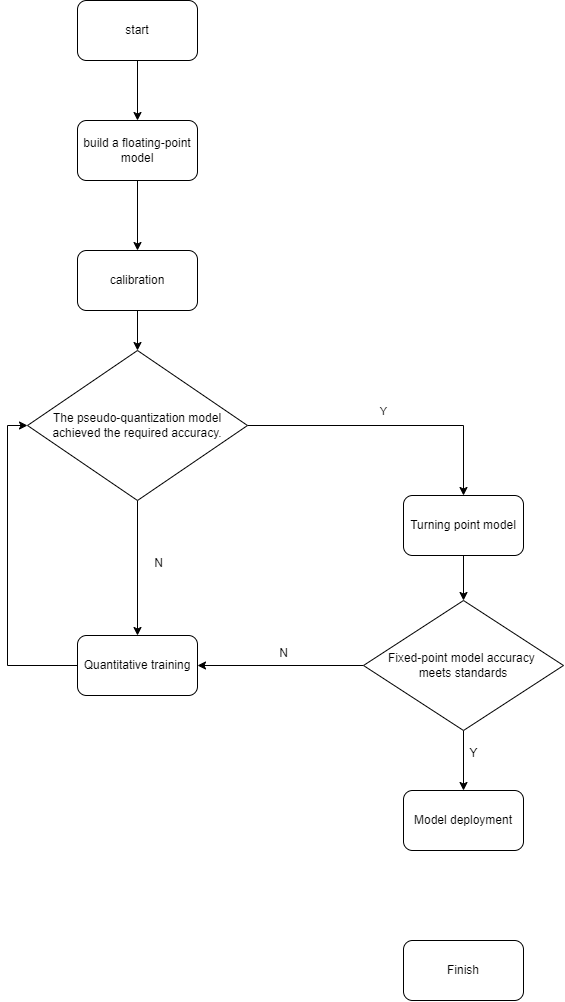
Below, we use the MobileNetV2 model from torchvision as an example to illustrate the specific operations at each stage of the workflow.
For faster execution during workflow demonstration, we use the cifar-10 dataset instead of the ImageNet-1K dataset.
import os
import copy
import numpy as np
import torch
import torch.nn as nn
import torchvision.transforms as transforms
from torch import Tensor
from torch.quantization import DeQuantStub
from torchvision.datasets import CIFAR10
from torchvision.models.mobilenetv2 import MobileNetV2
from torch.utils import data
from typing import Optional, Callable, List, Tuple

from horizon_plugin_pytorch.functional import rgb2centered_yuv

import torch.quantization
from horizon_plugin_pytorch.march import March, set_march
from horizon_plugin_pytorch.quantization import (
    QuantStub,
    convert_fx,
    prepare_qat_fx,
    set_fake_quantize,
    FakeQuantState,
    check_model,
    compile_model,
    perf_model,
    visualize_model,
)
from horizon_plugin_pytorch.quantization.qconfig import (
    default_calib_8bit_fake_quant_qconfig,
    default_qat_8bit_fake_quant_qconfig,
    default_qat_8bit_weight_32bit_out_fake_quant_qconfig,
    default_calib_8bit_weight_32bit_out_fake_quant_qconfig,
)

import logging
logging.basicConfig(level=logging.INFO, format="%(levelname)s: %(message)s")
class AverageMeter(object):
    """Computes and stores the average and current value"""

    def __init__(self, name: str, fmt=":f"):
        self.name = name
        self.fmt = fmt
        self.reset()

    def reset(self):
        self.val = 0
        self.avg = 0
        self.sum = 0
        self.count = 0

    def update(self, val, n=1):
        self.val = val
        self.sum += val * n
        self.count += n
        self.avg = self.sum / self.count

    def __str__(self):
        fmtstr = "{name} {val" + self.fmt + "} ({avg" + self.fmt + "})"
        return fmtstr.format(**self.__dict__)


    def accuracy(output: Tensor, target: Tensor, topk=(1,)) -> List[Tensor]:
        """Computes the accuracy over the k top predictions for the specified
        values of k
        """
        with torch.no_grad():
            maxk = max(topk)
            batch_size = target.size(0)

            _, pred = output.topk(maxk, 1, True, True)
            pred = pred.t()
            correct = pred.eq(target.view(1, -1).expand_as(pred))

            res = []
            for k in topk:
                correct_k = correct[:k].float().sum()
                res.append(correct_k.mul_(100.0 / batch_size))
            return res


    def evaluate(
        model: nn.Module, data_loader: data.DataLoader, device: torch.device
    ) -> Tuple[AverageMeter, AverageMeter]:
        top1 = AverageMeter("Acc@1", ":6.2f")
        top5 = AverageMeter("Acc@5", ":6.2f")

        with torch.no_grad():
            for image, target in data_loader:
                image, target = image.to(device), target.to(device)
                output = model(image)
                output = output.view(-1, 10)
                acc1, acc5 = accuracy(output, target, topk=(1, 5))
                top1.update(acc1, image.size(0))
                top5.update(acc5, image.size(0))
                print(".", end="", flush=True)
            print()

        return top1, top5


    def train_one_epoch(
        model: nn.Module,
        criterion: Callable,
        optimizer: torch.optim.Optimizer,
        scheduler: Optional[torch.optim.lr_scheduler._LRScheduler],
        data_loader: data.DataLoader,
        device: torch.device,
    ) -> None:
        top1 = AverageMeter("Acc@1", ":6.3f")
        top5 = AverageMeter("Acc@5", ":6.3f")
        avgloss = AverageMeter("Loss", ":1.5f")

        model.to(device)

        for image, target in data_loader:
            image, target = image.to(device), target.to(device)
            output = model(image)
            output = output.view(-1, 10)
            loss = criterion(output, target)
            optimizer.zero_grad()
            loss.backward()
            optimizer.step()
            if scheduler is not None:
                scheduler.step()
            acc1, acc5 = accuracy(output, target, topk=(1, 5))
            top1.update(acc1, image.size(0))
            top5.update(acc5, image.size(0))
            avgloss.update(loss, image.size(0))
            print(".", end="", flush=True)
        print()

        print(
            "Full cifar-10 train set: Loss {:.3f} Acc@1"
            " {:.3f} Acc@5 {:.3f}".format(avgloss.avg, top1.avg, top5.avg)
        )
6.4.2.2. Obtain the Floating-Point Model
First, necessary modifications to the floating-point model are required to support quantization-related operations. These modifications include:
Inserting
QuantStubbefore the model inputInserting
DequantStubafter the model output
When modifying the model, please note the following:
The inserted
QuantStubandDequantStubmust be registered as submodules of the model; otherwise, their quantization states cannot be properly handled.Multiple inputs can share a single
QuantStubonly if theirscalevalues are identical; otherwise, define a separateQuantStubfor each input.If the input data source on hardware is specified as
"pyramid", manually set thescaleparameter of the correspondingQuantStubto 1/128.You may also use
torch.quantization.QuantStub, but onlyhorizon_plugin_pytorch.quantization.QuantStubsupports manually fixing the scale via parameters.
The modified model can seamlessly load parameters from the original unmodified model. Therefore, if a pre-trained floating-point model already exists, simply load it. Otherwise, perform normal floating-point training.
Note:
The input image data on hardware is typically in centered_yuv444 format. Therefore, during model training, images should be converted to centered_yuv444 format (note the use of rgb2centered_yuv in the code below).
If conversion to centered_yuv444 format during training is not feasible, refer to the section RGB888 Data Deployment for corresponding model modifications. (Note: this method may lead to reduced model accuracy.)
In this example, the number of epochs for floating-point and QAT training is small, intended only to illustrate the usage flow of the training tools; the accuracy does not represent the model’s best possible performance.
######################################################################
# Users may modify the following parameters as needed
# 1. Path to save model checkpoints and compilation outputs
model_path = "model/mobilenetv2"
# 2. Path to download and save dataset
data_path = "data"
# 3. Batch size used during training
train_batch_size = 256
# 4. Batch size used during evaluation
eval_batch_size = 256
# 5. Number of training epochs
epoch_num = 30
# 6. Device used for model execution and computation
device = (
    torch.device("cuda") if torch.cuda.is_available() else torch.device("cpu")
)
######################################################################


# Prepare data loaders; note the use of rgb2centered_yuv in collate_fn
def prepare_data_loaders(
    data_path: str, train_batch_size: int, eval_batch_size: int
) -> Tuple[data.DataLoader, data.DataLoader]:
    normalize = transforms.Normalize(mean=0.0, std=128.0)

    def collate_fn(batch):
        batched_img = torch.stack(
            [
                torch.from_numpy(np.array(example[0], np.uint8, copy=True))
                for example in batch
            ]
        ).permute(0, 3, 1, 2)
        batched_target = torch.tensor([example[1] for example in batch])

        batched_img = rgb2centered_yuv(batched_img)
        batched_img = normalize(batched_img.float())

        return batched_img, batched_target

    train_dataset = CIFAR10(
        data_path,
        True,
        transforms.Compose(
            [
                transforms.RandomHorizontalFlip(),
                transforms.RandAugment(),
            ]
        ),
        download=True,
    )

    eval_dataset = CIFAR10(
        data_path,
        False,
        download=True,
    )

    train_data_loader = data.DataLoader(
        train_dataset,
        batch_size=train_batch_size,
        sampler=data.RandomSampler(train_dataset),
        num_workers=8,
        collate_fn=collate_fn,
        pin_memory=True,
    )

    eval_data_loader = data.DataLoader(
        eval_dataset,
        batch_size=eval_batch_size,
        sampler=data.SequentialSampler(eval_dataset),
        num_workers=8,
        collate_fn=collate_fn,
        pin_memory=True,
    )

    return train_data_loader, eval_data_loader


# Modify the floating-point model as required
class FxQATReadyMobileNetV2(MobileNetV2):
    def __init__(
        self,
        num_classes: int = 10,
        width_mult: float = 1.0,
        inverted_residual_setting: Optional[List[List[int]]] = None,
        round_nearest: int = 8,
    ):
        super().__init__(
            num_classes, width_mult, inverted_residual_setting, round_nearest
        )
        self.quant = QuantStub(scale=1 / 128)
        self.dequant = DeQuantStub()

    def forward(self, x: Tensor) -> Tensor:
        x = self.quant(x)
        x = super().forward(x)
        x = self.dequant(x)

        return x


if not os.path.exists(model_path):
    os.makedirs(model_path, exist_ok=True)

# Initialize floating-point model
float_model = FxQATReadyMobileNetV2()

# Prepare datasets
train_data_loader, eval_data_loader = prepare_data_loaders(
    data_path, train_batch_size, eval_batch_size
)

# Since the last layer differs from the pretrained model, floating-point fine-tuning is required
optimizer = torch.optim.Adam(
    float_model.parameters(), lr=0.001, weight_decay=1e-3
)
best_acc = 0

for nepoch in range(epoch_num):
    float_model.train()
    train_one_epoch(
        float_model,
        nn.CrossEntropyLoss(),
        optimizer,
        None,
        train_data_loader,
        device,
    )

    # Evaluate floating-point accuracy
    float_model.eval()
    top1, top5 = evaluate(float_model, eval_data_loader, device)

    print(
        "Float Epoch {}: evaluation Acc@1 {:.3f} Acc@5 {:.3f}".format(
            nepoch, top1.avg, top5.avg
        )
    )

    if top1.avg > best_acc:
        best_acc = top1.avg
        # Save best floating-point model checkpoint
        torch.save(
            float_model.state_dict(),
            os.path.join(model_path, "float-checkpoint.ckpt"),
        )
Files already downloaded and verified
Files already downloaded and verified
....................................................................................................................................................................................................
Full cifar-10 train set: Loss 2.158 Acc@1 19.574 Acc@5 68.712
........................................
Float Epoch 0: evaluation Acc@1 30.270 Acc@5 84.650
....................................................................................................................................................................................................
Full cifar-10 train set: Loss 1.855 Acc@1 31.136 Acc@5 82.658
........................................
Float Epoch 1: evaluation Acc@1 40.310 Acc@5 89.640
....................................................................................................................................................................................................
Full cifar-10 train set: Loss 1.693 Acc@1 37.250 Acc@5 87.292
........................................
Float Epoch 2: evaluation Acc@1 46.500 Acc@5 92.000
....................................................................................................................................................................................................
Full cifar-10 train set: Loss 1.596 Acc@1 41.956 Acc@5 89.068
........................................
Float Epoch 3: evaluation Acc@1 48.400 Acc@5 92.650
....................................................................................................................................................................................................
Full cifar-10 train set: Loss 1.520 Acc@1 44.974 Acc@5 90.322
........................................
Float Epoch 4: evaluation Acc@1 52.620 Acc@5 93.360
....................................................................................................................................................................................................
Full cifar-10 train set: Loss 1.441 Acc@1 48.216 Acc@5 91.434
........................................
...
....................................................................................................................................................................................................
Full cifar-10 train set: Loss 0.722 Acc@1 75.058 Acc@5 98.132
........................................
Float Epoch 29: evaluation Acc@1 75.940 Acc@5 98.030
6.4.2.3. Calibration
After model modification and floating-point training are completed, calibration can be performed. This process inserts Observers into the model to collect statistics on data distribution during forward passes, enabling the calculation of appropriate quantization parameters:
For some models, calibration alone may achieve sufficient accuracy, eliminating the need for the more time-consuming quantization-aware training.
Even if calibration fails to meet accuracy requirements, this step can reduce the difficulty of subsequent QAT, shorten training time, and improve final accuracy.
######################################################################
# Users may modify the following parameters as needed
# 1. Batch size used during calibration
calib_batch_size = 256
# 2. Batch size used during validation
eval_batch_size = 256
# 3. Number of examples used for calibration; set to inf to use all data
num_examples = float("inf")
# 4. Target hardware platform code; using "bayes" as example; replace according to actual deployment platform
march = March.BAYES
######################################################################

# Before model conversion, set the target hardware platform
set_march(march)

# Convert model to calibration mode to collect data distribution statistics
calib_model = prepare_qat_fx(
    # The output model shares attributes with the input model; to avoid affecting float_model,
    # we use deepcopy here
    copy.deepcopy(float_model),
    {
        "": default_calib_8bit_fake_quant_qconfig,
        "module_name": {
            # When the model's output layer is Conv or Linear, use out_qconfig
            # to configure high-precision output
            "classifier": default_calib_8bit_weight_32bit_out_fake_quant_qconfig,
        },
    },
).to(
    device
)  # prepare_qat_fx does not guarantee the output model has the same device as input

# Prepare datasets
calib_data_loader, eval_data_loader = prepare_data_loaders(
    data_path, calib_batch_size, eval_batch_size
)

# Perform calibration (no backward pass required)
# Note model state control: model should be in eval mode for proper BN behavior
calib_model.eval()
set_fake_quantize(calib_model, FakeQuantState.CALIBRATION)
with torch.no_grad():
    cnt = 0
    for image, target in calib_data_loader:
        image, target = image.to(device), target.to(device)
        calib_model(image)
        print(".", end="", flush=True)
        cnt += image.size(0)
        if cnt >= num_examples:
            break
    print()

# Evaluate pseudo-quantized accuracy
# Note model state control
calib_model.eval()
set_fake_quantize(calib_model, FakeQuantState.VALIDATION)

top1, top5 = evaluate(
    calib_model,
    eval_data_loader,
    device,
)
print(
    "Calibration: evaluation Acc@1 {:.3f} Acc@5 {:.3f}".format(
        top1.avg, top5.avg
    )
)

# Save calibration model checkpoint
torch.save(
    calib_model.state_dict(),
    os.path.join(model_path, "calib-checkpoint.ckpt"),
)
Files already downloaded and verified
Files already downloaded and verified
....................................................................................................................................................................................................
........................................
Calibration: evaluation Acc@1 76.190 Acc@5 98.180
If the quantized accuracy after calibration meets requirements, proceed directly to Convert to Fixed-Point Model. Otherwise, proceed to Quantization Aware Training to further improve accuracy.
6.4.2.4. Quantization Aware Training
Quantization training inserts fake quantization nodes into the model so that during training, the model becomes aware of the effects of quantization. Under this condition, model parameters are fine-tuned to improve post-quantization accuracy.
######################################################################
# Users may modify the following parameters as needed
# 1. Batch size used during training
train_batch_size = 256
# 2. Batch size used during validation
eval_batch_size = 256
# 3. Number of training epochs
epoch_num = 3
######################################################################

# Prepare datasets
train_data_loader, eval_data_loader = prepare_data_loaders(
    data_path, train_batch_size, eval_batch_size
)

# Convert model to QAT mode
qat_model = prepare_qat_fx(
    copy.deepcopy(float_model),
    {
        "": default_qat_8bit_fake_quant_qconfig,
        "module_name": {
            "classifier": default_qat_8bit_weight_32bit_out_fake_quant_qconfig,
        },
    },
).to(device)

# Load quantization parameters from the Calibration model
qat_model.load_state_dict(calib_model.state_dict())

# Perform Quantization-Aware Training (QAT)
# As a fine-tuning process, QAT typically requires a small learning rate
optimizer = torch.optim.Adam(
    qat_model.parameters(), lr=1e-3, weight_decay=1e-4
)

best_acc = 0

for nepoch in range(epoch_num):
    # Note the method for controlling QAT model's training state
    qat_model.train()
    set_fake_quantize(qat_model, FakeQuantState.QAT)

    train_one_epoch(
        qat_model,
        nn.CrossEntropyLoss(),
        optimizer,
        None,
        train_data_loader,
        device,
    )

    # Note the method for controlling QAT model's evaluation state
    qat_model.eval()
    set_fake_quantize(qat_model, FakeQuantState.VALIDATION)

    top1, top5 = evaluate(
        qat_model,
        eval_data_loader,
        device,
    )
    print(
        "QAT Epoch {}: evaluation Acc@1 {:.3f} Acc@5 {:.3f}".format(
            nepoch, top1.avg, top5.avg
        )
    )

    if top1.avg > best_acc:
        best_acc = top1.avg

        torch.save(
            qat_model.state_dict(),
            os.path.join(model_path, "qat-checkpoint.ckpt"),
        )
Files already downloaded and verified
Files already downloaded and verified
....................................................................................................................................................................................................
Full cifar-10 train set: Loss 0.770 Acc@1 73.462 Acc@5 97.816
........................................
QAT Epoch 0: evaluation Acc@1 77.620 Acc@5 98.310
....................................................................................................................................................................................................
Full cifar-10 train set: Loss 0.737 Acc@1 74.494 Acc@5 98.016
........................................
QAT Epoch 1: evaluation Acc@1 76.590 Acc@5 98.370
....................................................................................................................................................................................................
Full cifar-10 train set: Loss 0.732 Acc@1 74.830 Acc@5 98.066
........................................
QAT Epoch 2: evaluation Acc@1 77.950 Acc@5 98.480
6.4.2.5. Convert to Fixed-Point Model
Once the accuracy of the fake-quantized model meets the requirement, the model can be converted to a fixed-point model. The output of the fixed-point model is generally considered to be numerically identical to that of the compiled model.
Note:
There may be slight numerical differences between the fake-quantized model and the fixed-point model. Therefore, the accuracy of the fixed-point model should be used as the final reference. If the fixed-point accuracy is insufficient, further quantization-aware training is required.
######################################################################
# Users can modify the following parameters as needed
# 1. Which model to use as input: choose between calib_model or qat_model
base_model = qat_model
######################################################################

# Convert the model to fixed-point (quantized) state
quantized_model = convert_fx(base_model).to(device)

# Evaluate the accuracy of the fixed-point model
top1, top5 = evaluate(
    quantized_model,
    eval_data_loader,
    device,
)
print(
    "Quantized model: evaluation Acc@1 {:.3f} Acc@5 {:.3f}".format(
        top1.avg, top5.avg
    )
)
........................................
Quantized model: evaluation Acc@1 78.000 Acc@5 98.480
6.4.2.6. Model Deployment
After verifying the accuracy of the fixed-point model and confirming it meets requirements, proceed to model deployment procedures, including model checking, compilation, performance testing, and visualization.
Note:
You may skip the actual calibration and QAT steps and perform model checking first to ensure there are no operations in the model that cannot be compiled.
Since the compiler only supports CPU, both the model and data must be placed on the CPU.
######################################################################
# Users can modify the following parameters as needed
# 1. Optimization level for compilation (0–3). Higher levels yield faster execution
#    on device but slower compilation.
compile_opt = "O1"
######################################################################

# The example_input can be randomly generated, but using real data is recommended
# to improve performance testing accuracy
example_input = next(iter(eval_data_loader))[0]

# Use torch.jit.trace to serialize the model and generate computation graph.
# Ensure both model and input are on CPU.
script_model = torch.jit.trace(quantized_model.cpu(), example_input)
torch.jit.save(script_model, os.path.join(model_path, "int_model.pt"))

# Model checking
check_model(script_model, [example_input])
torch.Size([1, 3, 32, 32])
/home/users/horizon/qat_docs/horizon_plugin_pytorch/qtensor.py:1178: TracerWarning: Converting a tensor to a Python boolean might cause the trace to be incorrect. We can't record the data flow of Python values, so this value will be treated as a constant in the future. This means that the trace might not generalize to other inputs!
if scale is not None and scale.numel() > 1:
/home/users/horizon/qat_docs/horizon_plugin_pytorch/nn/quantized/conv2d.py:290: TracerWarning: Converting a tensor to a Python boolean might cause the trace to be incorrect. We can't record the data flow of Python values, so this value will be treated as a constant in the future. This means that the trace might not generalize to other inputs!
per_channel_axis=-1 if self.out_scale.numel() == 1 else 1,
This model is supported!
HBDK model check PASS
# Compile the model; the generated .hbm file is the deployable model
compile_model(
    script_model,
    [example_input],
    hbm=os.path.join(model_path, "model.hbm"),
    input_source="pyramid",
    opt=compile_opt,
)
INFO: launch 16 threads for optimization
[==================================================] 100%
WARNING: arg0 can not be assigned to NCHW_NATIVE layout because it's input source is pyramid/resizer.
consumed time 0.655841
HBDK model compilation SUCCESS
# Performance testing of the model
perf_model(
    script_model,
    [example_input],
    out_dir=os.path.join(model_path, "perf_out"),
    input_source="pyramid",
    opt=compile_opt,
    layer_details=True,
)
INFO: launch 16 threads for optimization
[==================================================] 100%
WARNING: arg0 can not be assigned to NCHW_NATIVE layout because it's input source is pyramid/resizer.
consumed time 0.587685
HBDK model compilation SUCCESS
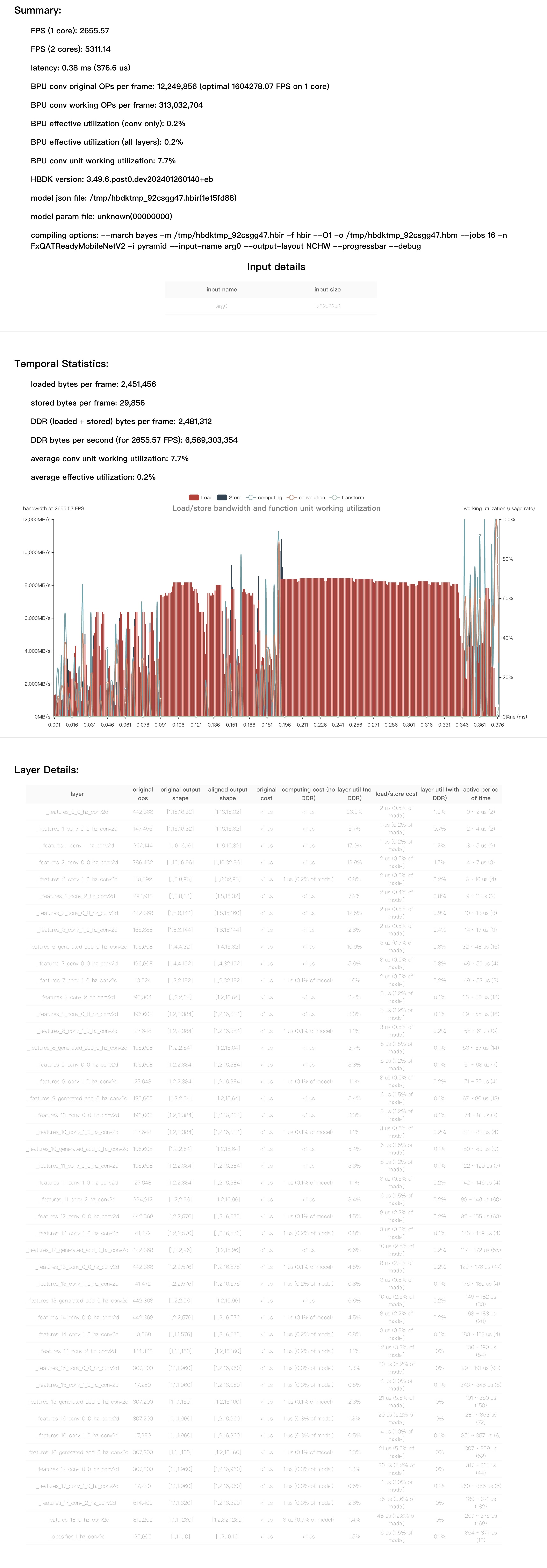
    FPS=2655.57, latency = 376.6 us, DDR = 2481312 bytes   (see model/mobilenetv2/perf_out/FxQATReadyMobileNetV2.html)
HBDK model compilation SUCCESS
HBDK performance estimation SUCCESS
As suggested, locate the performance report file. The content is shown below:
# Visualize the model
visualize_model(
    script_model,
    [example_input],
    save_path=os.path.join(model_path, "model.svg"),
    show=False,
)
INFO: launch 1 threads for optimization
consumed time 0.424022
HBDK model compilation SUCCESS