5.5.2 Model Inference
Supported Platforms
| Platform | Runtime Environment |
|---|---|
| RDK X3, RDK X3 Module | Ubuntu 20.04 (Foxy), Ubuntu 22.04 (Humble) |
The theory covered in this section applies to all platforms. The code examples are based on the RDK X3 platform. Using them on other platforms will require code adaptation.
Model Inference Development
Background
hobot_dnn is the on-board algorithm inference framework in the TogetheROS.Bot software stack. It uses the BPU processor on RDK to perform algorithm inference and supports secondary development based on the D-Robotics algorithm inference framework and ROS2 Node. It provides simpler and easier-to-use model integration development interfaces for robot application development, including model management, input processing and result parsing based on model descriptions, and model output memory allocation management.
By reading this section, users can use models provided by D-Robotics to create and run a human body detection algorithm Node on RDK based on hobot_dnn . With components provided by tros.b, subscribe to images captured and published by the camera, perform algorithm inference on the images to detect human body bounding boxes, use multi-target tracking ( MOT ) to track detection boxes and assign target IDs, and finally render images, human body detection, and target tracking results in real time in a Web browser on a PC.
Prerequisites
- RDK development board with the following software installed:
-
Ubuntu system image.
-
tros.b software package.
-
ROS2 package build and compile tools. Install command:
sudo apt install ros-dev-tools
-
F37 or GC4663 camera installed on RDK.
-
A PC that can access RDK over the network.
For detailed usage of hobot_dnn , refer to README.md and the API Manual in the hobot_dnn code. The usage workflow of hobot_dnn is as follows:
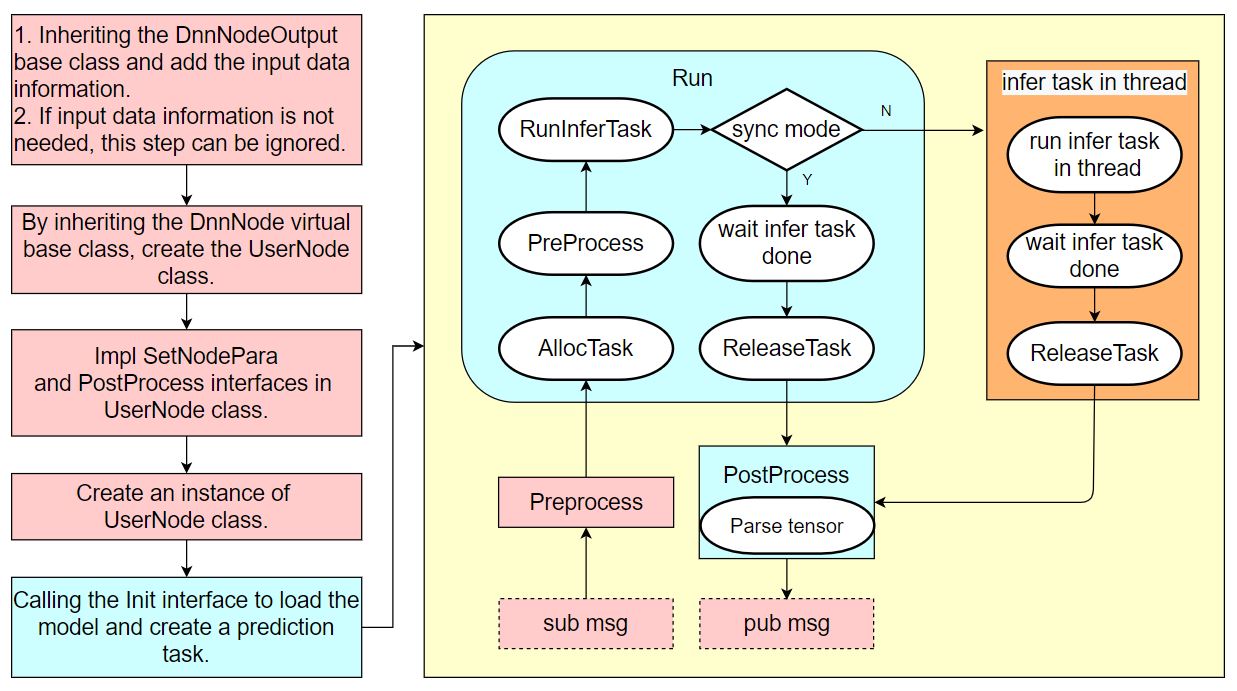
Even without understanding the hobot_dnn usage workflow, users can follow this section to develop a model inference example using hobot_dnn .
Task Content
1 Create Package
- Foxy
- Humble
source /opt/tros/local_setup.bash
source /opt/tros/humble/local_setup.bash
mkdir -p ~/dev_ws/src
cd ~/dev_ws/src
ros2 pkg create --build-type ament_cmake cpp_dnn_demo --dependencies rclcpp sensor_msgs hbm_img_msgs ai_msgs dnn_node hobot_mot
cd cpp_dnn_demo
touch src/body_det_demo.cpp
2 Write the Example
The project path after creation is as follows:
root@ubuntu:~# cd ~
root@ubuntu:~# tree dev_ws/
dev_ws/
└── src
    └── cpp_dnn_demo
        ├── CMakeLists.txt
        ├── include
        │   └── cpp_dnn_demo
        ├── package.xml
        └── src
            └── body_det_demo.cpp

5 directories, 3 files
On RDK, use vi/vim or other tools to open the created source file body_det_demo.cpp : vi ~/dev_ws/src/cpp_dnn_demo/src/body_det_demo.cpp
Copy the following code into the file:
#include "dnn_node/dnn_node.h"
#include "dnn_node/util/image_proc.h"
#include "dnn_node/util/output_parser/detection/fasterrcnn_output_parser.h"
#include "sensor_msgs/msg/image.hpp"
#include "ai_msgs/msg/perception_targets.hpp"
#include "hbm_img_msgs/msg/hbm_msg1080_p.hpp"
#include "hobot_mot/hobot_mot.h"

// Create the algorithm inference output data structure and add the message header member
struct FasterRcnnOutput : public hobot::dnn_node::DnnNodeOutput {
  std::shared_ptr<std_msgs::msg::Header> image_msg_header = nullptr;
};

// Inherit from the DnnNode virtual base class to create the algorithm inference node
class BodyDetNode : public hobot::dnn_node::DnnNode {
 public:
  BodyDetNode(const std::string &node_name = "body_det",
  const rclcpp::NodeOptions &options = rclcpp::NodeOptions());

 protected:
  // Implement the pure virtual interface of the base class to configure node parameters
  int SetNodePara() override;
  // Implement the virtual interface of the base class to wrap the parsed model output data into a ROS Msg and publish it
  int PostProcess(const std::shared_ptr<hobot::dnn_node::DnnNodeOutput> &node_output)
    override;

 private:
  // Width and height of the image data input to the algorithm model
  int model_input_width_ = -1;
  int model_input_height_ = -1;
  // Model output index corresponding to the human detection box results
  const int32_t box_output_index_ = 1;
  // Set of detection box output indices
  const std::vector<int32_t> box_outputs_index_ = {box_output_index_};

  // Image message subscriber
  rclcpp::Subscription<hbm_img_msgs::msg::HbmMsg1080P>::ConstSharedPtr
      ros_img_subscription_ = nullptr;
  // Algorithm inference result message publisher
  rclcpp::Publisher<ai_msgs::msg::PerceptionTargets>::SharedPtr
      msg_publisher_ = nullptr;
  // Multi-object tracking algorithm engine
  std::shared_ptr<HobotMot> hobot_mot_ = nullptr;

  // Image message subscription callback
  void FeedImg(const hbm_img_msgs::msg::HbmMsg1080P::ConstSharedPtr msg);
};

BodyDetNode::BodyDetNode(const std::string & node_name, const rclcpp::NodeOptions & options) :
  hobot::dnn_node::DnnNode(node_name, options) {
  // Algorithm inference is initialized in the SetNodePara() method implemented by the BodyDetNode subclass in Init
  if (Init() != 0 ||
    GetModelInputSize(0, model_input_width_, model_input_height_) < 0) {
    RCLCPP_ERROR(rclcpp::get_logger("dnn_demo"), "Node init fail!");
    rclcpp::shutdown();
  }

  // Create a message subscriber to receive image messages from the camera node
  ros_img_subscription_ =
          this->create_subscription<hbm_img_msgs::msg::HbmMsg1080P>(
          "/hbmem_img", 10, std::bind(&BodyDetNode::FeedImg, this, std::placeholders::_1));
  // Create a message publisher to publish algorithm inference messages
  msg_publisher_ = this->create_publisher<ai_msgs::msg::PerceptionTargets>(
      "/cpp_dnn_demo", 10);
  // Create the multi-object tracking (MOT) algorithm engine
  hobot_mot_ = std::make_shared<HobotMot>("config/iou2_method_param.json");
}

int BodyDetNode::SetNodePara() {
  if (!dnn_node_para_ptr_) return -1;
  // Specify the model file path and model name used by algorithm inference
  dnn_node_para_ptr_->model_file = "config/multitask_body_kps_960x544.hbm";
  dnn_node_para_ptr_->model_name = "multitask_body_kps_960x544";
  return 0;
}

void BodyDetNode::FeedImg(const hbm_img_msgs::msg::HbmMsg1080P::ConstSharedPtr img_msg) {
  if (!rclcpp::ok()) {
    return;
  }

  // Validate the received image message; this example only processes NV12 image data
  if (!img_msg) return;
  if ("nv12" != std::string(reinterpret_cast<const char*>(img_msg->encoding.data()))) {
    RCLCPP_ERROR(rclcpp::get_logger("dnn_demo"), "Only support nv12 img encoding!");
    return;
  }

  // Create the model input data with the method provided by DnnNode, based on the model input image resolution
  auto inputs = std::vector<std::shared_ptr<hobot::dnn_node::DNNInput>>{
    hobot::dnn_node::ImageProc::GetNV12PyramidFromNV12Img(
      reinterpret_cast<const char*>(img_msg->data.data()),
      img_msg->height, img_msg->width, model_input_height_, model_input_width_)};

  // Create the model output data and fill in the message header information
  auto dnn_output = std::make_shared<FasterRcnnOutput>();
  dnn_output->image_msg_header = std::make_shared<std_msgs::msg::Header>();
  dnn_output->image_msg_header->set__frame_id(std::to_string(img_msg->index));
  dnn_output->image_msg_header->set__stamp(img_msg->time_stamp);

  // Run inference in asynchronous mode
  Run(inputs, dnn_output, nullptr, false);
}

int BodyDetNode::PostProcess(const std::shared_ptr<hobot::dnn_node::DnnNodeOutput> &node_output) {
  if (!rclcpp::ok()) {
    return 0;
  }

  // Validate the output data
  if (node_output->output_tensors.empty() ||
    static_cast<int32_t>(node_output->output_tensors.size()) < box_output_index_) {
    RCLCPP_ERROR(rclcpp::get_logger("dnn_demo"), "Invalid outputs");
    return -1;
  }

  // Create the parsed output data
  // The dimension of the detection box results equals the number of detected object categories
  std::vector<std::shared_ptr<hobot::dnn_node::parser_fasterrcnn::Filter2DResult>>
      results;
  // Keypoint data
  std::shared_ptr<hobot::dnn_node::parser_fasterrcnn::LandmarksResult> output_body_kps = nullptr;

  // Parse the algorithm output with the built-in Parse method of hobot dnn
  if (hobot::dnn_node::parser_fasterrcnn::Parse(node_output, nullptr,
  box_outputs_index_, -1, -1, results, output_body_kps) < 0) {
    RCLCPP_ERROR(rclcpp::get_logger("dnn_node_sample"),
                "Parse node_output fail!");
    return -1;
  }

  auto filter2d_result = results.at(box_output_index_);
  if (!filter2d_result) return -1;

  // Convert the human detection boxes output by the algorithm into the MOT algorithm input data type
  std::vector<MotBox> in_box_list;
  for (auto& rect : filter2d_result->boxes) {
    in_box_list.emplace_back(
        MotBox(rect.left, rect.top, rect.right, rect.bottom, rect.conf));
  }

  // Compute the timestamp of the current frame from the message header
  auto fasterRcnn_output =
      std::dynamic_pointer_cast<FasterRcnnOutput>(node_output);
  time_t time_stamp =
      fasterRcnn_output->image_msg_header->stamp.sec * 1000 +
      fasterRcnn_output->image_msg_header->stamp.nanosec / 1000 / 1000;

  // Create the MOT algorithm output: human detection boxes with target IDs and the IDs of disappeared targets
  std::vector<MotBox> out_box_list;
  std::vector<std::shared_ptr<MotTrackId>> disappeared_ids;

  // Run the multi-object tracking algorithm
  if (hobot_mot_->DoProcess(in_box_list,
                            out_box_list,
                            disappeared_ids,
                            time_stamp,
                            model_input_width_,
                            model_input_height_) < 0) {
    RCLCPP_ERROR(rclcpp::get_logger("dnn_demo"), "Do mot fail");
    return -1;
  }

  // Create the ROS Msg used to publish inference results
  ai_msgs::msg::PerceptionTargets::UniquePtr pub_data(
      new ai_msgs::msg::PerceptionTargets());

  // Fill the message header into the ROS Msg
  pub_data->header.set__stamp(fasterRcnn_output->image_msg_header->stamp);
  pub_data->header.set__frame_id(fasterRcnn_output->image_msg_header->frame_id);

  // Fill the algorithm inference output frame rate into the ROS Msg
  if (node_output->rt_stat) {
    pub_data->set__fps(round(node_output->rt_stat->output_fps));
    // If the algorithm inference statistics are updated, output the frame rate statistics of the model input and output
    if (node_output->rt_stat->fps_updated) {
      RCLCPP_WARN(rclcpp::get_logger("dnn_demo"),
                  "input fps: %.2f, out fps: %.2f",
                  node_output->rt_stat->input_fps,
                  node_output->rt_stat->output_fps);
    }
  }

  for (auto& rect : out_box_list) {
    // Validate the target tracking results
    if (rect.id < 0) {
      continue;
    }
    // Fill the target tracking results and detection boxes into the ROS Msg
    ai_msgs::msg::Target target;
    target.set__type("person");
    target.set__track_id(rect.id);
    ai_msgs::msg::Roi roi;
    roi.type = "body";
    roi.rect.set__x_offset(rect.x1);
    roi.rect.set__y_offset(rect.y1);
    roi.rect.set__width(rect.x2 - rect.x1);
    roi.rect.set__height(rect.y2 - rect.y1);
    target.rois.emplace_back(roi);
    pub_data->targets.emplace_back(std::move(target));
  }

  // Fill the disappeared targets into the ROS Msg
  for (const auto& id_info : disappeared_ids) {
    if (id_info->value < 0 ||
        hobot_mot::DataState::INVALID == id_info->state_) {
      continue;
    }
    ai_msgs::msg::Target target;
    target.set__type("person");
    target.set__track_id(id_info->value);
    ai_msgs::msg::Roi roi;
    roi.type = "body";
    target.rois.emplace_back(roi);
    pub_data->disappeared_targets.emplace_back(std::move(target));
  }

  // Publish the ROS Msg
  msg_publisher_->publish(std::move(pub_data));

  return 0;
}

int main(int argc, char** argv) {
  rclcpp::init(argc, argv);
  rclcpp::spin(std::make_shared<BodyDetNode>());
  rclcpp::shutdown();
  return 0;
}
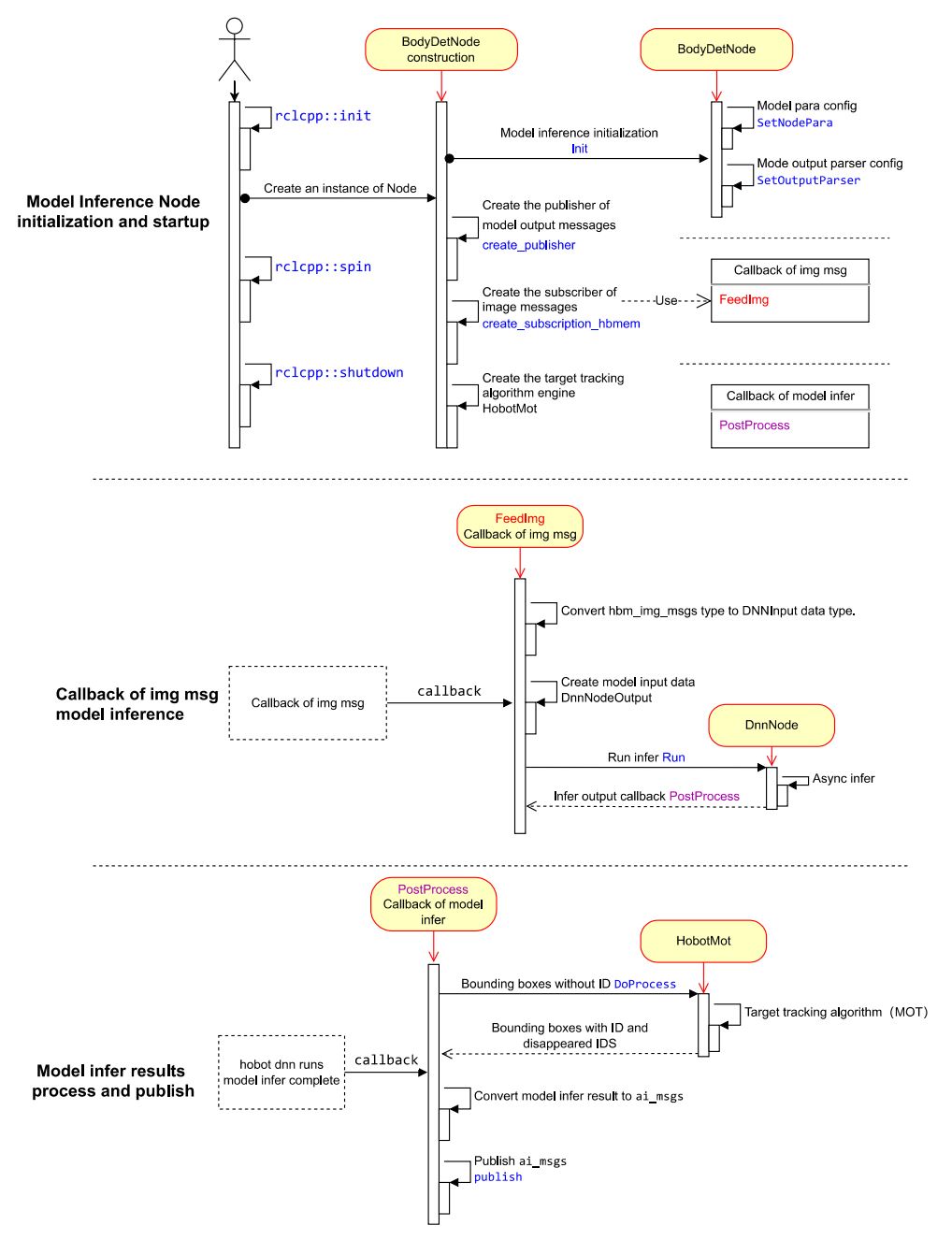
2.1 Node Design
The human body detection algorithm Node in this example mainly consists of three logically independent parts.
(1) Node Initialization and Startup
Configure model information used by the algorithm, create publishers for algorithm inference messages and subscribers for image messages, and start the multi-target tracking algorithm engine.
(2) Message Subscription and Algorithm Inference
When creating the image message subscriber, the message callback FeedImg is registered to process image data for algorithm model inference. The callback does not wait for algorithm inference to complete.
(3) Inference Result Processing and Publishing
After algorithm inference completes, inference results are output through the registered callback PostProcess . The callback processes detection results with the multi-target tracking algorithm ( HobotMot ) and publishes algorithm inference result messages.
The Node design and workflow are shown below:
2.2 Code Description
Add Header Files
Inference framework header file dnn_node/dnn_node.h for algorithm model management and inference.
Algorithm model input processing header file dnn_node/util/image_proc.h for algorithm model input image processing.
Algorithm model output parsing header file dnn_node/util/output_parser/detection/fasterrcnn_output_parser.h for parsing structured data from output addresses after model inference completes (for the human body detection algorithm in this example, the structured data is human body detection boxes).
ROS Msg header files for message subscription and publishing.
MOT algorithm engine header file for target tracking of detected human body boxes.
#include "dnn_node/dnn_node.h"
#include "dnn_node/util/image_proc.h"
#include "dnn_node/util/output_parser/detection/fasterrcnn_output_parser.h"
#include "sensor_msgs/msg/image.hpp"
#include "ai_msgs/msg/perception_targets.hpp"
#include "hbm_img_msgs/msg/hbm_msg1080_p.hpp"
#include "hobot_mot/hobot_mot.h"
Create Algorithm Inference Output Data Structure
Inherit the DnnNodeOutput base class from hobot_dnn and add a message header member to represent image information corresponding to inference output.
struct FasterRcnnOutput : public hobot::dnn_node::DnnNodeOutput {
  std::shared_ptr<std_msgs::msg::Header> image_msg_header = nullptr;
};
Create Algorithm Inference Node
Inherit the DnnNode virtual base class from hobot_dnn , define the algorithm inference node BodyDetNode , and implement the virtual interfaces defined in DnnNode .
int SetNodePara() : Configure model parameters.
int PostProcess(const std::shared_ptr<hobot::dnn_node::DnnNodeOutput> &node_output) : Inference result callback that wraps parsed structured model output data into ROS Msg and publishes it.
class BodyDetNode : public hobot::dnn_node::DnnNode {
 public:
  BodyDetNode(const std::string &node_name = "body_det",
  const rclcpp::NodeOptions &options = rclcpp::NodeOptions());

 protected:
  int SetNodePara() override;
  int PostProcess(const std::shared_ptr<hobot::dnn_node::DnnNodeOutput> &node_output)
    override;
Implement BodyDetNode Subclass Constructor
The BodyDetNode subclass constructor initializes the Node and obtains model input image dimensions via the GetModelInputSize interface, including width model_input_width_ and height model_input_height_ , for model pre-processing. Different models generally have different input image dimensions.
Using zero-copy communication, create an image message subscriber to subscribe to image messages from the camera node for algorithm model inference. The subscribed topic is /hbmem_img , and the message type is the image message type hbm_img_msgs::msg::HbmMsg1080P defined in tros.b.
Create a message publisher to publish algorithm inference messages. The published topic is /cpp_dnn_demo , and the message type is the algorithm message type ai_msgs::msg::PerceptionTargets defined in tros.b.
Create a multi-target tracking (MOT) algorithm engine to track each detected human body box.
BodyDetNode constructor implementation:
BodyDetNode::BodyDetNode(const std::string & node_name, const rclcpp::NodeOptions & options) :
  hobot::dnn_node::DnnNode(node_name, options) {
  // Algorithm inference is initialized in the SetNodePara() method implemented by the BodyDetNode subclass in Init
  if (Init() != 0 ||
    GetModelInputSize(0, model_input_width_, model_input_height_) < 0) {
    RCLCPP_ERROR(rclcpp::get_logger("dnn_demo"), "Node init fail!");
    rclcpp::shutdown();
  }

  // Create a message subscriber to receive image messages from the camera node
  ros_img_subscription_ =
          this->create_subscription<hbm_img_msgs::msg::HbmMsg1080P>(
          "/hbmem_img", 10, std::bind(&BodyDetNode::FeedImg, this, std::placeholders::_1));
  // Create a message publisher to publish algorithm inference messages
  msg_publisher_ = this->create_publisher<ai_msgs::msg::PerceptionTargets>(
      "/cpp_dnn_demo", 10);
  // Create the multi-object tracking (MOT) algorithm engine
  hobot_mot_ = std::make_shared<HobotMot>("config/iou2_method_param.json");
}
Init() is an interface defined and implemented in the DnnNode base class. It performs algorithm inference initialization and only connects the pipeline. The specific SetNodePara() step is implemented by the user (in the subclass). The initialization workflow is as follows:
int DnnNode::Init() {
  RCLCPP_INFO(rclcpp::get_logger("dnn"), "Node init.");

  int ret = 0;
  // 1. set model info in node para
  ret = SetNodePara();
  if (ret != 0) {
    RCLCPP_ERROR(rclcpp::get_logger("dnn"), "Set node para failed!");
    return ret;
  }

  // check node para
  if (ModelTaskType::InvalidType == dnn_node_para_ptr_->model_task_type) {
    RCLCPP_ERROR(rclcpp::get_logger("dnn"), "Invalid model task type");
    return -1;
  }

  // 2. model init
  ret = dnn_node_impl_->ModelInit();
  if (ret != 0) {
    RCLCPP_ERROR(rclcpp::get_logger("dnn"), "Model init failed!");
    return ret;
  }

  // 3. set output parser
  ret = SetOutputParser();
  if (ret != 0) {
    RCLCPP_ERROR(rclcpp::get_logger("dnn"), "Set output parser failed!");
    return ret;
  }

  // 4. task init
  ret = dnn_node_impl_->TaskInit();
  if (ret != 0) {
    RCLCPP_ERROR(rclcpp::get_logger("dnn"), "Task init failed!");
    return ret;
  }

  return ret;
}
Configure Model Parameters
Configure the model file path and model name used for algorithm inference.
int BodyDetNode::SetNodePara() {
  if (!dnn_node_para_ptr_) return -1;
  dnn_node_para_ptr_->model_file = "config/multitask_body_kps_960x544.hbm";
  dnn_node_para_ptr_->model_name = "multitask_body_kps_960x544";
  return 0;
}
Implement Image Subscription Callback
Create DNNInput type model input data. The subscribed message contains image information (encoding, content data, resolution, etc.). Use the algorithm model input image processing interface hobot::dnn_node::ImageProc::GetNV12PyramidFromNV12Img in hobot_dnn to convert the subscribed nv12 format image to model input data type according to model input resolution ( model_input_width_ and model_input_height_ , obtained from the loaded model via the GetModelInputSize interface in the BodyDetNode constructor). The interface definition is as follows:
//   - [in] in_img_data Image data
//   - [in] in_img_height Image height
//   - [in] in_img_width Image width
//   - [in] scaled_img_height Model input height
//   - [in] scaled_img_width Model input width
std::shared_ptr<NV12PyramidInput> GetNV12PyramidFromNV12Img(
    const char* in_img_data,
    const int& in_img_height,
    const int& in_img_width,
    const int& scaled_img_height,
    const int& scaled_img_width);
Create FasterRcnnOutput type model output data. The subscribed message contains a message header (frame_id and timestamp). Use the subscribed message header to fill the output data message header to describe the image information corresponding to algorithm inference output.
Start inference. Use the Run interface in the DnnNode base class to run inference in asynchronous mode. The fourth parameter false indicates the more efficient asynchronous inference mode. The Run interface definition is as follows:
  // - Parameters
  //   - [in] inputs List of input data smart pointers
  //   - [in] outputs Output data smart pointers
  //   - [in] rois ROI crop data, only valid for the ModelRoiInferType model
  //   - [in] is_sync_mode Inference mode; true for synchronous mode, false for asynchronous mode
  //   - [in] alloctask_timeout_ms Timeout for requesting an inference task, in milliseconds
  //                               Defaults to waiting until the request succeeds
  //   - [in] infer_timeout_ms Inference timeout in milliseconds; defaults to 1000 ms
  int Run(std::vector<std::shared_ptr<DNNInput>> &inputs,
          const std::shared_ptr<DnnNodeOutput> &output = nullptr,
          const std::shared_ptr<std::vector<hbDNNRoi>> rois = nullptr,
          const bool is_sync_mode = true,
          const int alloctask_timeout_ms = -1,
          const int infer_timeout_ms = 1000);
Complete image subscription callback FeedImg implementation:
void BodyDetNode::FeedImg(const hbm_img_msgs::msg::HbmMsg1080P::ConstSharedPtr img_msg) {
  if (!rclcpp::ok()) {
    return;
  }

  // Validate the received image message; this example only processes NV12 image data
  if (!img_msg) return;
  if ("nv12" != std::string(reinterpret_cast<const char*>(img_msg->encoding.data()))) {
    RCLCPP_ERROR(rclcpp::get_logger("dnn_demo"), "Only support nv12 img encoding!");
    return;
  }

  // Create the model input data with the method provided by hobot_dnn, based on the model input image resolution
  auto inputs = std::vector<std::shared_ptr<hobot::dnn_node::DNNInput>>{
    hobot::dnn_node::ImageProc::GetNV12PyramidFromNV12Img(
      reinterpret_cast<const char*>(img_msg->data.data()),
      img_msg->height, img_msg->width, model_input_height_, model_input_width_)};

  // Create the model output data and fill in the message header information
  auto dnn_output = std::make_shared<FasterRcnnOutput>();
  dnn_output->image_msg_header = std::make_shared<std_msgs::msg::Header>();
  dnn_output->image_msg_header->set__frame_id(std::to_string(img_msg->index));
  dnn_output->image_msg_header->set__stamp(img_msg->time_stamp);

  // Run inference in asynchronous mode
  Run(inputs, dnn_output, nullptr, false);
}
Implement Inference Result Callback
The algorithm inference result callback processes parsed structured model output data through the MOT algorithm, outputs human body detection boxes with target IDs and disappeared target IDs, wraps them into ROS Msg, and publishes them.
Create Filter2DResult type structured inference result data.
Use the built-in Parse method in hobot dnn to parse human body detection algorithm output.
Run multi-target tracking algorithm. Convert algorithm inference output human body detection boxes to MOT algorithm input data type, calculate the current frame timestamp from the message header, and after MOT algorithm processing, obtain human body detection boxes with target IDs and disappeared target IDs.
Publish algorithm inference results. Create ROS Msg, fill in the image message header (frame ID and timestamp) corresponding to algorithm inference results, human body detection boxes with target IDs, algorithm inference output frame rate statistics, and disappeared target IDs. The published ROS Msg can be subscribed to and used by other ROS Nodes.
int BodyDetNode::PostProcess(const std::shared_ptr<hobot::dnn_node::DnnNodeOutput> &node_output) {
  if (!rclcpp::ok()) {
    return 0;
  }

  // Validate the output data
  if (node_output->output_tensors.empty() ||
    static_cast<int32_t>(node_output->output_tensors.size()) < box_output_index_) {
    RCLCPP_ERROR(rclcpp::get_logger("dnn_demo"), "Invalid outputs");
    return -1;
  }

  // Create the parsed output data
  // The dimension of the detection box results equals the number of detected object categories
  std::vector<std::shared_ptr<hobot::dnn_node::parser_fasterrcnn::Filter2DResult>>
      results;
  // Keypoint data
  std::shared_ptr<hobot::dnn_node::parser_fasterrcnn::LandmarksResult> output_body_kps = nullptr;

  // Parse the algorithm output with the built-in Parse method of hobot dnn
  if (hobot::dnn_node::parser_fasterrcnn::Parse(node_output, nullptr,
  box_outputs_index_, -1, -1, results, output_body_kps) < 0) {
    RCLCPP_ERROR(rclcpp::get_logger("dnn_node_sample"),
                "Parse node_output fail!");
    return -1;
  }

  auto filter2d_result = results.at(box_output_index_);
  if (!filter2d_result) return -1;

  // Convert the human detection boxes output by the algorithm into the MOT algorithm input data type
  std::vector<MotBox> in_box_list;
  for (auto& rect : filter2d_result->boxes) {
    in_box_list.emplace_back(
        MotBox(rect.left, rect.top, rect.right, rect.bottom, rect.conf));
  }

  // Compute the timestamp of the current frame from the message header
  auto fasterRcnn_output =
      std::dynamic_pointer_cast<FasterRcnnOutput>(node_output);
  time_t time_stamp =
      fasterRcnn_output->image_msg_header->stamp.sec * 1000 +
      fasterRcnn_output->image_msg_header->stamp.nanosec / 1000 / 1000;

  // Create the MOT algorithm output: human detection boxes with target IDs and the IDs of disappeared targets
  std::vector<MotBox> out_box_list;
  std::vector<std::shared_ptr<MotTrackId>> disappeared_ids;

  // Run the multi-object tracking algorithm
  if (hobot_mot_->DoProcess(in_box_list,
                            out_box_list,
                            disappeared_ids,
                            time_stamp,
                            model_input_width_,
                            model_input_height_) < 0) {
    RCLCPP_ERROR(rclcpp::get_logger("dnn_demo"), "Do mot fail");
    return -1;
  }

  // Create the ROS Msg used to publish inference results
  ai_msgs::msg::PerceptionTargets::UniquePtr pub_data(
      new ai_msgs::msg::PerceptionTargets());

  // Fill the message header into the ROS Msg
  pub_data->header.set__stamp(fasterRcnn_output->image_msg_header->stamp);
  pub_data->header.set__frame_id(fasterRcnn_output->image_msg_header->frame_id);

  // Fill the algorithm inference output frame rate into the ROS Msg
  if (node_output->rt_stat) {
    pub_data->set__fps(round(node_output->rt_stat->output_fps));
    // If the algorithm inference statistics are updated, output the frame rate statistics of the model input and output
    if (node_output->rt_stat->fps_updated) {
      RCLCPP_WARN(rclcpp::get_logger("dnn_demo"),
                  "input fps: %.2f, out fps: %.2f",
                  node_output->rt_stat->input_fps,
                  node_output->rt_stat->output_fps);
    }
  }

  for (auto& rect : out_box_list) {
    // Validate the target tracking results
    if (rect.id < 0) {
      continue;
    }
    // Fill the target tracking results and detection boxes into the ROS Msg
    ai_msgs::msg::Target target;
    target.set__type("person");
    target.set__track_id(rect.id);
    ai_msgs::msg::Roi roi;
    roi.type = "body";
    roi.rect.set__x_offset(rect.x1);
    roi.rect.set__y_offset(rect.y1);
    roi.rect.set__width(rect.x2 - rect.x1);
    roi.rect.set__height(rect.y2 - rect.y1);
    target.rois.emplace_back(roi);
    pub_data->targets.emplace_back(std::move(target));
  }

  // Fill the disappeared targets into the ROS Msg
  for (const auto& id_info : disappeared_ids) {
    if (id_info->value < 0 ||
        hobot_mot::DataState::INVALID == id_info->state_) {
      continue;
    }
    ai_msgs::msg::Target target;
    target.set__type("person");
    target.set__track_id(id_info->value);
    ai_msgs::msg::Roi roi;
    roi.type = "body";
    target.rois.emplace_back(roi);
    pub_data->disappeared_targets.emplace_back(std::move(target));
  }

  // Publish the ROS Msg
  msg_publisher_->publish(std::move(pub_data));

  return 0;
}
The dnn node has built-in model output parsing methods for various detection, classification, and segmentation algorithms. After installing tros.b on RDK, query supported parsing methods as follows:
root@ubuntu:~# tree /opt/tros/include/dnn_node/util/output_parser
/opt/tros/include/dnn_node/util/output_parser
├── classification
│   └── ptq_classification_output_parser.h
├── detection
│   ├── fasterrcnn_output_parser.h
│   ├── fcos_output_parser.h
│   ├── nms.h
│   ├── ptq_efficientdet_output_parser.h
│   ├── ptq_ssd_output_parser.h
│   ├── ptq_yolo2_output_parser.h
│   ├── ptq_yolo3_darknet_output_parser.h
│   └── ptq_yolo5_output_parser.h
├── perception_common.h
├── segmentation
│   └── ptq_unet_output_parser.h
└── utils.h

3 directories, 12 files
Under the /opt/tros/include/dnn_node/util/output_parser path, there are three directories: classification , detection , and segmentation , corresponding to model output parsing methods for classification, detection, and segmentation algorithms respectively.
perception_common.h defines parsed perception result data types.
Algorithm models and corresponding output parsing methods:
| Algorithm Category | Algorithm | Output Parsing Method |
|---|---|---|
| Object Detection | FCOS | fcos_output_parser.h |
| Object Detection | EfficientNet_Det | ptq_efficientdet_output_parser.h |
| Object Detection | MobileNet_SSD | ptq_ssd_output_parser.h |
| Object Detection | YoloV2 | ptq_yolo2_output_parser.h |
| Object Detection | YoloV3 | ptq_yolo3_darknet_output_parser.h |
| Object Detection | YoloV5 | ptq_yolo5_output_parser.h |
| Human Body Detection | FasterRcnn | fasterrcnn_output_parser.h |
| Image Classification | mobilenetv2 | ptq_classification_output_parser.h |
| Semantic Segmentation | mobilenet_unet | ptq_unet_output_parser.h |
Entry Function
Create an instance of BodyDetNode . In the BodyDetNode constructor, initialize and start the inference task until the user enters an exit signal to stop inference.
int main(int argc, char** argv) {
  rclcpp::init(argc, argv);
  rclcpp::spin(std::make_shared<BodyDetNode>());
  rclcpp::shutdown();
  return 0;
}
2.3 Build Dependencies
In step 1, the ros2 pkg create command created the cpp_dnn_demo package. CMakeLists.txt and package.xml were automatically created under dev_ws/src/cpp_dnn_demo .
The package.xml automatically added build dependency packages, including rclcpp , sensor_msgs , ai_msgs , hbm_img_msgs , dnn_node , and hobot_mot . Among them, ai_msgs is the algorithm output message format defined in TogatherROS, hbm_img_msgs is the image message format defined in TogatherROS for zero-copy communication, dnn_node is the algorithm inference framework, and hobot_mot is the multi-target tracking algorithm. These packages are installed when TogatherROS is installed.
2.4 Build Script
Add package dependencies and build/install information in CMakeLists.txt.
(1) Add multi-target tracking algorithm and algorithm inference engine library dependencies
link_directories(
  /opt/tros/lib/
  /usr/lib/hbbpu/
)
(2) Add package build information
add_executable(${PROJECT_NAME}
  src/body_det_demo.cpp
)

ament_target_dependencies(
  ${PROJECT_NAME}
  rclcpp
  dnn_node
  sensor_msgs
  ai_msgs
  hobot_mot
  hbm_img_msgs
)
(3) Add package install information to run the compiled package via ros2 run
install(
  TARGETS ${PROJECT_NAME}
  RUNTIME DESTINATION lib/${PROJECT_NAME}
)
Complete CMakeLists.txt:
cmake_minimum_required(VERSION 3.5)
project(cpp_dnn_demo)

# Default to C99
if(NOT CMAKE_C_STANDARD)
  set(CMAKE_C_STANDARD 99)
endif()

# Default to C++14
if(NOT CMAKE_CXX_STANDARD)
  set(CMAKE_CXX_STANDARD 14)
endif()

if(CMAKE_COMPILER_IS_GNUCXX OR CMAKE_CXX_COMPILER_ID MATCHES "Clang")
  add_compile_options(-Wall -Wextra -Wpedantic)
endif()

# find dependencies
find_package(ament_cmake REQUIRED)
find_package(rclcpp REQUIRED)
find_package(sensor_msgs REQUIRED)
find_package(ai_msgs REQUIRED)
find_package(hbm_img_msgs REQUIRED)
find_package(dnn_node REQUIRED)
find_package(hobot_mot REQUIRED)

link_directories(
  /opt/tros/lib/
  /usr/lib/hbbpu/
)

add_executable(${PROJECT_NAME}
  src/body_det_demo.cpp
)

ament_target_dependencies(
  ${PROJECT_NAME}
  rclcpp
  dnn_node
  sensor_msgs
  ai_msgs
  hobot_mot
  hbm_img_msgs
)

# Install executables
install(
  TARGETS ${PROJECT_NAME}
  RUNTIME DESTINATION lib/${PROJECT_NAME}
)

ament_package()
3 Build and Run
3.1 Build
On RDK with tros.b installed, run the following commands to build the package:
- Foxy
- Humble
source /opt/tros/local_setup.bash
source /opt/tros/humble/local_setup.bash
cd ~/dev_ws

# Build package
colcon build --packages-select cpp_dnn_demo
If the build succeeds, the cpp_dnn_demo package deployment install directory is created in the build path. The build terminal output is as follows:
Starting >>> cpp_dnn_demo
[Processing: cpp_dnn_demo]
Finished <<< cpp_dnn_demo [32.7s]

Summary: 1 package finished [33.4s]
3.2 Common Build Errors
- ModuleNotFoundError: No module named 'ament_package'
The specific error message is as follows:
# colcon build --packages-select cpp_dnn_demo
Starting >>> cpp_dnn_demo
--- stderr: cpp_dnn_demo
CMake Error at CMakeLists.txt:19 (find_package):
  By not providing "Findament_cmake.cmake" in CMAKE_MODULE_PATH this project
  has asked CMake to find a package configuration file provided by
  "ament_cmake", but CMake did not find one.

  Could not find a package configuration file provided by "ament_cmake" with
  any of the following names:

    ament_cmakeConfig.cmake
    ament_cmake-config.cmake

  Add the installation prefix of "ament_cmake" to CMAKE_PREFIX_PATH or set
  "ament_cmake_DIR" to a directory containing one of the above files.  If
  "ament_cmake" provides a separate development package or SDK, be sure it
  has been installed.


---
Failed   <<< cpp_dnn_demo [2.83s, exited with code 1]

Summary: 0 packages finished [3.44s]
  1 package failed: cpp_dnn_demo
  1 package had stderr output: cpp_dnn_demo
This indicates the ROS2 environment was not configured successfully. Enter the ros2 command in the terminal to check the environment:
# ros2

-bash: ros2: command not found
If "command not found" is displayed, the ROS2 environment was not configured successfully. Check whether the source /opt/tros/setup.bash command executed successfully. Successful configuration output is as follows:
# ros2

usage: ros2 [-h] Call `ros2 <command> -h` for more detailed usage. ...

ros2 is an extensible command-line tool for ROS 2.

optional arguments:
  -h, --help            show this help message and exit
- dnn_node package not found
The specific error message is as follows:
colcon build --packages-select cpp_dnn_demo
Starting >>> cpp_dnn_demo
[Processing: cpp_dnn_demo]
--- stderr: cpp_dnn_demo
CMake Error at CMakeLists.txt:22 (find_package):
 By not providing "Finddnn_node.cmake" in CMAKE_MODULE_PATH this project has
 asked CMake to find a package configuration file provided by "dnn_node",
 but CMake did not find one.
Could not find a package configuration file provided by "dnn_node" with any
 of the following names:
dnn_nodeConfig.cmake
dnn_node-config.cmake
Add the installation prefix of "dnn_node" to CMAKE_PREFIX_PATH or set
 "dnn_node_DIR" to a directory containing one of the above files. If
 "dnn_node" provides a separate development package or SDK, be sure it has
 been installed.
Failed <<< cpp_dnn_demo [59.7s, exited with code 1]
Summary: 0 packages finished [1min 1s]
 1 package failed: cpp_dnn_demo
 1 package had stderr output: cpp_dnn_demo
This indicates the hobot_dnn environment was not configured successfully. Check whether /opt/tros/share/dnn_node exists.
3.3 Run
To better demonstrate algorithm inference results and experience perception capabilities, use tros.b MIPI camera image capture, image encoding, and WEB data display Nodes to provide data sensing and display capabilities. This publishes images captured by the camera on RDK, performs algorithm inference to detect human body boxes, and renders images and human body detection results in real time in a WEB browser on a PC.
The runtime system workflow is as follows:
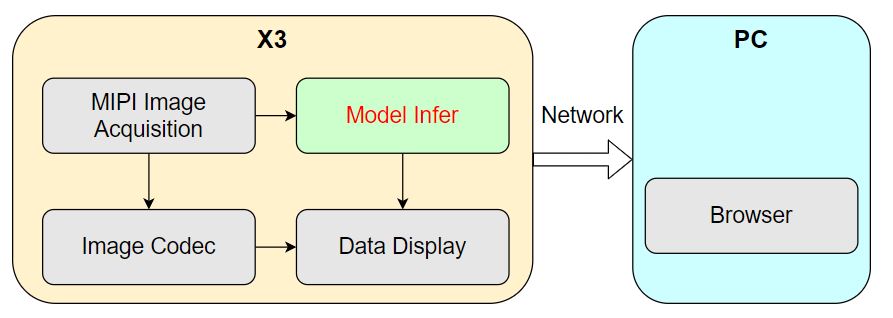
Four nodes run on RDK, including the algorithm inference node in this example.
The system startup workflow is as follows:
(1) Open terminal 1 on RDK and start the algorithm inference node
- Foxy
- Humble
source /opt/tros/local_setup.bash
source /opt/tros/humble/local_setup.bash
cd ~/dev_ws

# Configure cpp_dnn_demo environment
source ./install/local_setup.bash

# Copy configuration files required to run the example from the tros.b installation path.
# Model file
mkdir -p config && cp /opt/tros/lib/dnn_benchmark_example/config/X3/multitask_body_kps_960x544.hbm config/
# Multi-target tracking configuration file
cp -r /opt/tros/${TROS_DISTRO}/lib/hobot_mot/config/iou2_method_param.json config/


# Run cpp_dnn_demo pkg
ros2 run cpp_dnn_demo cpp_dnn_demo --ros-args --log-level warn
(2) Open terminal 2 on RDK and start tros.b image publishing, encoding, and display Nodes
Since many Nodes need to be started, use a launch script to batch start Nodes. Create a launch script cpp_dnn_demo.launch.py in any path on RDK with the following content:
import os

from launch import LaunchDescription
from launch_ros.actions import Node

from launch.actions import IncludeLaunchDescription
from launch.launch_description_sources import PythonLaunchDescriptionSource
from ament_index_python import get_package_share_directory
from ament_index_python.packages import get_package_prefix

def generate_launch_description():
    web_service_launch_include = IncludeLaunchDescription(
        PythonLaunchDescriptionSource(
            os.path.join(
                get_package_share_directory('websocket'),
                'launch/websocket_service.launch.py'))
    )

    return LaunchDescription([
        web_service_launch_include,
        # Start image publishing pkg
        Node(
            package='mipi_cam',
            executable='mipi_cam',
            output='screen',
            parameters=[
                {"out_format": "nv12"},
                {"image_width": 960},
                {"image_height": 544},
                {"io_method": "shared_mem"},
                {"video_device": "F37"}
            ],
            arguments=['--ros-args', '--log-level', 'error']
        ),
        # Start JPEG image encoding & publishing pkg
        Node(
            package='hobot_codec',
            executable='hobot_codec_republish',
            output='screen',
            parameters=[
                {"channel": 1},
                {"in_mode": "shared_mem"},
                {"in_format": "nv12"},
                {"out_mode": "ros"},
                {"out_format": "jpeg"},
                {"sub_topic": "/hbmem_img"},
                {"pub_topic": "/image_jpeg"}
            ],
            arguments=['--ros-args', '--log-level', 'error']
        ),
        # Start web display pkg
        Node(
            package='websocket',
            executable='websocket',
            output='screen',
            parameters=[
                {"image_topic": "/image_jpeg"},
                {"image_type": "mjpeg"},
                {"smart_topic": "/cpp_dnn_demo"}
            ],
            arguments=['--ros-args', '--log-level', 'error']
        )
    ])
Use the launch script:
- Foxy
- Humble
source /opt/tros/local_setup.bash
source /opt/tros/humble/local_setup.bash
# Start image publishing, encoding, and display nodes
ros2 launch cpp_dnn_demo.launch.py
3.4 Common Runtime Errors
If startup reports the following error:
error while loading shared libraries: libdnn_node.so: cannot open shared object file: No such file or directory
This indicates hobot_dnn environment configuration failed. Use the ros2 pkg prefix dnn_node command to check whether dnn_node exists.
3.5 Runtime Results
After successful startup, the terminal output is as follows:
root@ubuntu:~/dev_ws# ros2 run cpp_dnn_demo cpp_dnn_demo
[BPU_PLAT]BPU Platform Version(1.3.1)!
[C][154775][10-25][00:33:53:266][configuration.cpp:49][EasyDNN]EasyDNN version: 0.4.11
[HBRT] set log level as 0. version = 3.14.5
[DNN] Runtime version = 1.9.7_(3.14.5 HBRT)
[WARN] [1666629233.325690884] [dnn]: Run default SetOutputParser.
[WARN] [1666629233.326263403] [dnn]: Set output parser with default dnn node parser, you will get all output tensors and should parse output_tensors in PostProcess.
(MOTMethod.cpp:34): MOTMethod::Init config/iou2_method_param.json

(IOU2.cpp:29): IOU2 Mot::Init config/iou2_method_param.json

[WARN] [1666629234.410291616] [dnn_demo]: input fps: 31.22, out fps: 31.28
[WARN] [1666629235.410357068] [dnn_demo]: input fps: 30.00, out fps: 30.00
[WARN] [1666629236.444863458] [dnn_demo]: input fps: 30.01, out fps: 29.98
[WARN] [1666629237.476656118] [dnn_demo]: input fps: 30.00, out fps: 30.07
[WARN] [1666629238.478156431] [dnn_demo]: input fps: 30.01, out fps: 29.97
[WARN] [1666629239.510039629] [dnn_demo]: input fps: 30.01, out fps: 30.07
[WARN] [1666629240.511561150] [dnn_demo]: input fps: 30.00, out fps: 29.97
[WARN] [1666629241.543333811] [dnn_demo]: input fps: 30.01, out fps: 30.07
[WARN] [1666629242.544654089] [dnn_demo]: input fps: 30.01, out fps: 29.97
[WARN] [1666629243.576435625] [dnn_demo]: input fps: 30.01, out fps: 30.07
The output log shows that during initialization, the model input image resolution used for algorithm inference is 960x544, using one inference task. The configuration file used by the MOT algorithm engine is config/iou2_method_param.json . During inference, algorithm input and output frame rate is 30fps, with frame rate statistics refreshed every second.
On RDK, use the ros2 command to query and output the /cpp_dnn_demo topic message content published by the inference Node:
- Foxy
- Humble
root@ubuntu:~# source /opt/tros/local_setup.bash
root@ubuntu:~# source /opt/tros/humble/local_setup.bash
root@ubuntu:~# ros2 topic list
/cpp_dnn_demo
/hbmem_img08172824022201080202012021072315
/image_jpeg
/parameter_events
/rosout
root@ubuntu:~# ros2 topic echo /cpp_dnn_demo
header:
  stamp:
    sec: 1659938514
    nanosec: 550421888
  frame_id: '7623'
fps: 30
perfs: []
targets:
- type: person
  track_id: 1
  rois:
  - type: body
    rect:
      x_offset: 306
      y_offset: 106
      height: 416
      width: 151
      do_rectify: false
  attributes: []
  points: []
  captures: []
- type: person
  track_id: 2
  rois:
  - type: body
    rect:
      x_offset: 135
      y_offset: 89
      height: 423
      width: 155
      do_rectify: false
  attributes: []
  points: []
  captures: []
- type: person
  track_id: 3
  rois:
  - type: body
    rect:
      x_offset: 569
      y_offset: 161
      height: 340
      width: 123
      do_rectify: false
  attributes: []
  points: []
  captures: []
- type: person
  track_id: 4
  rois:
  - type: body
    rect:
      x_offset: 677
      y_offset: 121
      height: 398
      width: 123
      do_rectify: false
  attributes: []
  points: []
  captures: []
- type: person
  track_id: 5
  rois:
  - type: body
    rect:
      x_offset: 478
      y_offset: 163
      height: 348
      width: 103
      do_rectify: false
  attributes: []
  points: []
  captures: []
disappeared_targets: []
---
The output /cpp_dnn_demo topic message shows that the algorithm detected 5 human body boxes (rois type is body) and output the coordinates (rect) and corresponding target tracking results (track_id) for each detection box.
Enter http://IP:8000 in a WEB browser on a PC (IP is the RDK IP address; e.g., this example uses IP address 10.64.28.88) to view real-time images and algorithm inference rendering results:
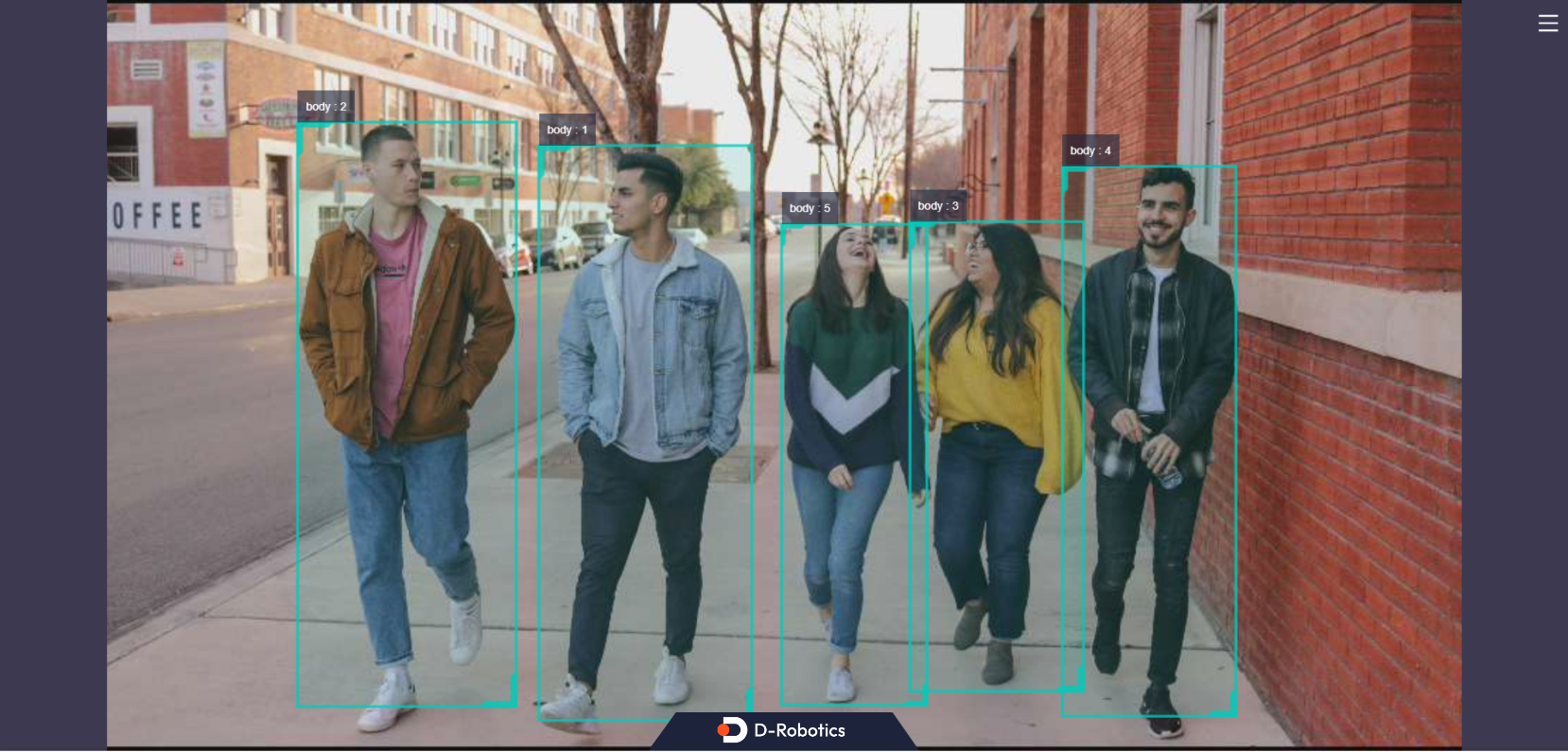
Each detection box renders the detection box type (e.g., body indicates a human body detection box) and target tracking result. The fps field in the lower left corner of the browser indicates the real-time algorithm inference output frame rate.
Enter the Ctrl+C command to exit the program.
Summary
This section describes how to use models provided by D-Robotics to create and run a human body detection algorithm inference example based on hobot_dnn . Use images published from the camera, obtain algorithm output, and render images and algorithm inference results in real time in a PC browser.
Users can refer to README.md and the API Manual in hobot_dnn to learn about more algorithm inference features.
Algorithm Workflow Construction
Background
ROS2 Nodes break complex robot software systems into multiple functionally and logically independent modules. For example, a robot application may include multiple sensing and algorithm perception Nodes. Nodes exchange data through Topics. ROS2 Nodes with different functions in a robot software system are connected via Topics to form a directed acyclic graph (DAG).
The TogetheROS.Bot software stack includes rich robot development components and algorithm Nodes. Sensing Nodes support capturing and publishing image data from cameras for perception algorithm inference. In the perception algorithm library, the hand detection algorithm Node uses image data for inference and outputs hand detection box results; the hand keypoint detection algorithm Node uses image data and hand detection box results for inference and outputs hand keypoint detection results. Therefore, the hand keypoint detection algorithm Node needs to subscribe to hand detection box messages published by the hand detection algorithm Node via Topic communication.
By reading this section, users can use tros.b sensing Nodes, hand detection, and hand keypoint detection algorithm Nodes on RDK, connect sensing and perception Nodes via ROS2 Topic communication, and achieve the goal of developing complex robot algorithm applications.
Prerequisites
- RDK development board with the following software installed:
-
Ubuntu system image.
-
tros.b software package.
-
F37 or GC4663 camera installed on RDK.
-
A PC on the same network segment as RDK (wired or connected to the same wireless network; the first three segments of IP addresses must match). The PC environment requires:
-
Ubuntu system
Task Content
1 Start Data Collection Node
Open a terminal on RDK and start the image publishing Node to capture image data from the F37 camera and publish it for algorithm inference:
- Foxy
- Humble
source /opt/tros/local_setup.bash
source /opt/tros/humble/local_setup.bash
# Start Node
ros2 run mipi_cam mipi_cam --ros-args -p out_format:=nv12 -p image_width:=960 -p image_height:=544 -p video_device:=F37 -p io_method:=shared_mem --log-level warn
2 Start Hand Detection Algorithm Node
Open a terminal on RDK and start the hand detection algorithm Node. Subscribe to image messages published by the data collection Node, detect hands, and publish hand detection box messages.
The startup command specifies the published Topic as hobot_hand_detection .
- Foxy
- Humble
source /opt/tros/local_setup.bash
source /opt/tros/humble/local_setup.bash
# Copy configuration files required to run the example from the tros.b installation path.
cp -r /opt/tros/${TROS_DISTRO}/lib/mono2d_body_detection/config/ .
# Start Node
ros2 run mono2d_body_detection mono2d_body_detection --ros-args --log-level warn --ros-args -p ai_msg_pub_topic_name:=hobot_hand_detection
3 Start Hand Keypoint Detection Algorithm Node
Open a terminal on RDK and start the hand keypoint detection algorithm Node. Subscribe to image messages published by the data collection Node and hand detection box messages published by the hand detection algorithm Node.
The startup command specifies the published message Topic as hobot_hand_lmk_detection and the subscribed message Topic as hobot_hand_detection .
- Foxy
- Humble
source /opt/tros/local_setup.bash
source /opt/tros/humble/local_setup.bash
# Copy configuration files required to run the example from the tros.b installation path.
cp -r /opt/tros/${TROS_DISTRO}/lib/hand_lmk_detection/config/ .
# Start Node
ros2 run hand_lmk_detection hand_lmk_detection --ros-args --log-level warn --ros-args -p ai_msg_pub_topic_name:=hobot_hand_lmk_detection -p ai_msg_sub_topic_name:=hobot_hand_detection
4 View Algorithm Inference Result Output
Open a terminal on RDK and use ROS2 commands to view Topic messages published by algorithm inference Nodes.
View hand detection box messages published by the hand detection algorithm Node
Query command:
- Foxy
- Humble
source /opt/tros/local_setup.bash
source /opt/tros/humble/local_setup.bash
# Start Node
ros2 topic echo /hobot_hand_detection
Output result:
header:
  stamp:
    sec: 1660034025
    nanosec: 429969208
  frame_id: '8049'
fps: 30
targets:
- type: person
  track_id: 10
  rois:
  - type: hand
    rect:
      x_offset: 619
      y_offset: 128
      height: 229
      width: 168
      do_rectify: false
  attributes: []
  points: []
  captures: []
disappeared_targets: []
You can see that the message published by the hand detection algorithm Node contains one hand detection box result (roi type is hand).
View hand keypoint detection messages published by the hand keypoint detection algorithm Node
Query command:
- Foxy
- Humble
source /opt/tros/local_setup.bash
source /opt/tros/humble/local_setup.bash
# Start Node
ros2 topic echo /hobot_hand_lmk_detection
Output result:
header:
  stamp:
    sec: 1660034025
    nanosec: 429969208
  frame_id: '8049'
fps: 30
targets:
- type: person
  track_id: 10
  rois:
  - type: hand
    rect:
      x_offset: 619
      y_offset: 128
      height: 229
      width: 168
      do_rectify: false
  attributes: []
  points:
  - type: hand_kps
    point:
    - x: 715.2421875
      y: 348.0546875
      z: 0.0
    - x: 673.4921875
      y: 315.8515625
      z: 0.0
    - x: 655.2265625
      y: 294.3828125
      z: 0.0
    - x: 639.5703125
      y: 262.1796875
      z: 0.0
    - x: 621.3046875
      y: 229.9765625
      z: 0.0
    - x: 686.5390625
      y: 247.8671875
      z: 0.0
    - x: 683.9296875
      y: 201.3515625
      z: 0.0
    - x: 683.9296875
      y: 176.3046875
      z: 0.0
    - x: 681.3203125
      y: 147.6796875
      z: 0.0
    - x: 712.6328125
      y: 240.7109375
      z: 0.0
    - x: 717.8515625
      y: 194.1953125
      z: 0.0
    - x: 720.4609375
      y: 161.9921875
      z: 0.0
    - x: 723.0703125
      y: 129.7890625
      z: 0.0
    - x: 736.1171875
      y: 247.8671875
      z: 0.0
    - x: 743.9453125
      y: 201.3515625
      z: 0.0
    - x: 749.1640625
      y: 172.7265625
      z: 0.0
    - x: 749.1640625
      y: 140.5234375
      z: 0.0
    - x: 759.6015625
      y: 262.1796875
      z: 0.0
    - x: 770.0390625
      y: 226.3984375
      z: 0.0
    - x: 775.2578125
      y: 204.9296875
      z: 0.0
    - x: 775.2578125
      y: 179.8828125
      z: 0.0
    confidence: []
  captures: []
disappeared_targets: []
You can see that after subscribing to hand detection box messages and using them for inference, the hand keypoint detection algorithm Node publishes a message containing one hand detection box and hand keypoint detection result (roi type is hand, points type is hand_kps). The published hand detection box message content comes from the subscribed hand detection box message and is consistent with the data queried in the previous step.
5 Graph Formed by Chained Nodes
Open a terminal on RDK and use ROS2 commands to view Node and Topic information on the running device:
- Foxy
- Humble
root@ubuntu:~# source /opt/tros/local_setup.bash
root@ubuntu:~# source /opt/tros/humble/local_setup.bash
# Query Node information
root@ubuntu:~# ros2 node list
/hand_lmk_det
/mipi_cam
/mono2d_body_det
# Query Topic information
root@ubuntu:~# ros2 topic list
/hbmem_img08172824022201080202012021072315
/hobot_hand_detection
/hobot_hand_lmk_detection
/image_raw
/parameter_events
/rosout
Three Nodes are running on RDK.
On the PC (the PC must be on the same network segment as RDK), the rqt Node Graph feature can visually display Nodes running on RDK, Topics published and subscribed by Nodes, and the graph formed by Nodes based on these Topics, as shown below:

Oval boxes contain Node names; rectangular boxes contain Topic names. The entire graph consists of 3 Nodes and 2 Topics.
mipi_cam (sensing Node) is the starting point, capturing and publishing images from the camera.
mono2d_body_det (algorithm perception Node) is the intermediate node, subscribing to image data published by the mipi_cam Node to detect hand bounding boxes.
hand_lmk_det (algorithm perception Node) is the endpoint, subscribing to image data published by the mipi_cam Node and hand detection box data published by the mono2d_body_det Node to detect hand keypoints.
Summary
This section describes how to use tros.b sensing Nodes, hand detection, and hand keypoint detection algorithm Nodes on RDK, connect two perception algorithm Nodes via ROS2 Topic communication, and achieve the functionality of capturing images from the camera for algorithm inference and publishing detected hand keypoint messages.
Based on the algorithm chaining principles introduced in this section, users can chain more algorithm Nodes on RDK to develop feature-rich robot algorithm applications.