mobilenetv2
Function Introduction
The mobilenetv2 image classification algorithm example uses images as input, performs algorithm inference using the BPU, and publishes algorithm messages containing object categories.
mobilenetv2 is a caffe model trained using the ImageNet data dataset. The model source is: https://github.com/shicai/MobileNet-Caffe.
It supports a total of 1000 object types, including people, animals, fruits, vehicles, etc. For the specific supported categories, please refer to the RDK board file at /opt/tros/ ${TROS_DISTRO} /lib/dnn_node_example/config/imagenet.list (TogetheROS.Bot installed).
Code repository: https://github.com/D-Robotics/hobot_dnn
Application scenarios: mobilenetv2 can predict the category of a given image, enabling functions such as digit recognition and object recognition, and is mainly used in fields like text recognition and image retrieval.
Food type recognition example: https://github.com/frotms/Chinese-and-Western-Food-Classification
Supported Platforms
| Platform | Operating Mode | Example Features |
|---|---|---|
| RDK X3, RDK X3 Module | Ubuntu 20.04 (Foxy), Ubuntu 22.04 (Humble) | · Start MIPI/USB camera and display inference rendering results via web · Use local image injection, rendering results saved locally |
| RDK X5, RDK X5 Module | Ubuntu 22.04 (Humble) | · Start MIPI/USB camera and display inference rendering results via web · Use local image injection, rendering results saved locally |
| RDK S100, RDK S100P | Ubuntu 22.04 (Humble) | · Start MIPI/USB camera and display inference rendering results via web · Use local image injection, rendering results saved locally |
| RDK S600 | Ubuntu 24.04 (Jazzy) | · Start MIPI/USB camera and display inference rendering results via web · Use local image injection, rendering results saved locally |
Algorithm Information
| Model | Platform | Input Size | Inference Frame Rate (fps) |
|---|---|---|---|
| mobilenetv2 | X3 | 1x3x224x224 | 414.17 |
| Model | Platform | Input Size | Inference Frame Rate (fps) |
|---|---|---|---|
| mobilenetv2 | X5 | 1x3x224x224 | 683.46 |
| Model | Platform | Input Size | Inference Frame Rate (fps) |
|---|---|---|---|
| mobilenetv2 | S100 | 1x3x224x224 | 1722.25 |
| Model | Platform | Input Size | Inference Frame Rate (fps) |
|---|---|---|---|
| mobilenetv2 | S600 | 1x3x224x224 | 2721.90 |
Preparation
RDK Platform
-
The RDK has been flashed with the Ubuntu system image.
-
tros.b has been successfully installed on the RDK.
-
An MIPI or USB camera is installed on the RDK. If no camera is available, experience the algorithm effect by injecting local JPEG/PNG format images or videos in MP4, H.264, and H.265 formats.
-
Ensure that the PC can access the RDK over the network.
Usage Guide
RDK Platform
The mobilenetv2 image classification subscribes to images published by the sensor package, performs inference, and publishes algorithm messages. Through the websocket package, the published images and corresponding algorithm results are rendered and displayed on a PC browser.
Publishing Images Using a MIPI Camera
- Foxy
- Humble
# Configure tros.b environment
source /opt/tros/setup.bash
# Configure tros.b environment
source /opt/tros/humble/setup.bash
- Humble
# Configure tros.b environment
source /opt/tros/humble/setup.bash
- Humble
# Configure tros.b environment
source /opt/tros/humble/setup.bash
- Jazzy
# Configure tros.b environment
source /opt/tros/jazzy/setup.bash
# Configure MIPI camera
export CAM_TYPE=mipi

# Launch the launch file
ros2 launch dnn_node_example dnn_node_example.launch.py dnn_example_config_file:=config/mobilenetv2workconfig.json dnn_example_image_width:=480 dnn_example_image_height:=272
Publishing Images Using a USB Camera
- Foxy
- Humble
# Configure tros.b environment
source /opt/tros/setup.bash
# Configure tros.b environment
source /opt/tros/humble/setup.bash
- Humble
# Configure tros.b environment
source /opt/tros/humble/setup.bash
- Humble
# Configure tros.b environment
source /opt/tros/humble/setup.bash
- Jazzy
# Configure tros.b environment
source /opt/tros/jazzy/setup.bash
# Configure USB camera
export CAM_TYPE=usb

# Launch the launch file
ros2 launch dnn_node_example dnn_node_example.launch.py dnn_example_config_file:=config/mobilenetv2workconfig.json dnn_example_image_width:=480 dnn_example_image_height:=272
Using Local Image Injection
The mobilenetv2 image classification algorithm example uses local JPEG/PNG format images for injection. After inference, the rendered image with algorithm results is saved in the local runtime path.
- Foxy
- Humble
# Configure tros.b environment
source /opt/tros/setup.bash
# Configure tros.b environment
source /opt/tros/humble/setup.bash
- Humble
# Configure tros.b environment
source /opt/tros/humble/setup.bash
- Humble
# Configure tros.b environment
source /opt/tros/humble/setup.bash
- Jazzy
# Configure tros.b environment
source /opt/tros/jazzy/setup.bash
# Launch the launch file
ros2 launch dnn_node_example dnn_node_example_feedback.launch.py dnn_example_config_file:=config/mobilenetv2workconfig.json dnn_example_image:=config/target_class.jpg
Result Analysis
Publishing Images Using a Camera
The following information is output in the running terminal:
[example-3] [WARN] [1655095481.707875587] [example]: Create ai msg publisher with topic_name: hobot_dnn_detection
[example-3] [WARN] [1655095481.707983957] [example]: Create img hbmem_subscription with topic_name: /hbmem_img
[example-3] [WARN] [1655095482.985732162] [img_sub]: Sub img fps 31.07
[example-3] [WARN] [1655095482.992031931] [example]: Smart fps 31.31
[example-3] [WARN] [1655095484.018818843] [img_sub]: Sub img fps 30.04
[example-3] [WARN] [1655095484.025123362] [example]: Smart fps 30.04
[example-3] [WARN] [1655095485.051988567] [img_sub]: Sub img fps 30.01
[example-3] [WARN] [1655095486.057854228] [example]: Smart fps 30.07
The output log shows that the topic publishing algorithm inference results is hobot_dnn_detection , and the topic subscribing to images is /hbmem_img . The frame rate for subscribed images and algorithm inference output is approximately 30fps.
Enter http://IP:8000 in the browser on the PC to view the image and algorithm rendering results (IP is the IP address of the RDK):
Using Local Image Injection
The following information is output in the running terminal:
[example-1] [INFO] [1654767648.897132079] [example]: The model input width is 224 and height is 224
[example-1] [INFO] [1654767648.897180241] [example]: Dnn node feed with local image: config/target_class.jpg
[example-1] [INFO] [1654767648.935638968] [example]: task_num: 2
[example-1] [INFO] [1654767648.946566665] [example]: Output from image_name: config/target_class.jpg, frame_id: feedback, stamp: 0.0
[example-1] [INFO] [1654767648.946671029] [ClassificationPostProcess]: outputs size: 1
[example-1] [INFO] [1654767648.946718774] [ClassificationPostProcess]: out cls size: 1
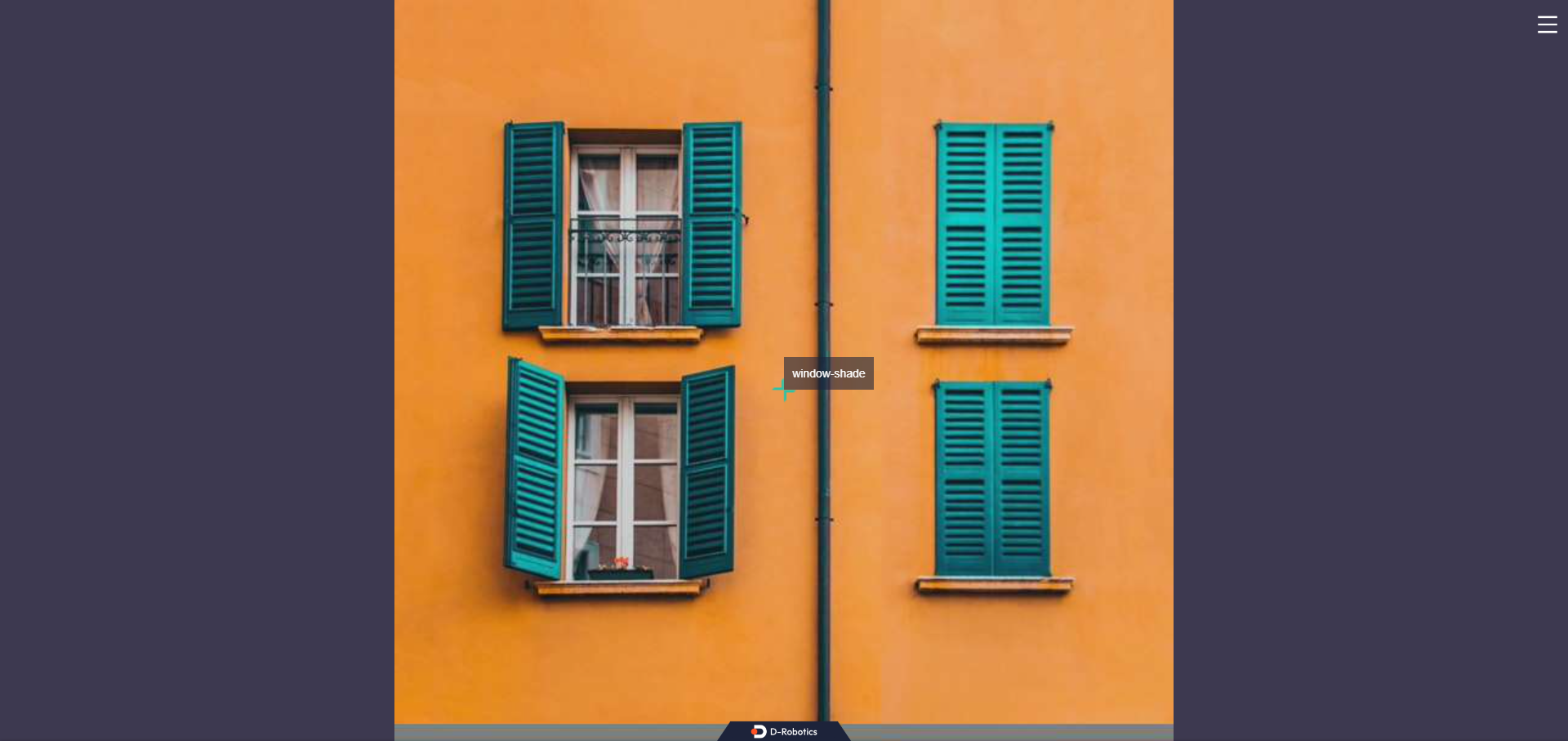
[example-1] [INFO] [1654767648.946773602] [ClassificationPostProcess]: class type:window-shade, score:0.776356
[example-1] [INFO] [1654767648.947251721] [ImageUtils]: target size: 1
[example-1] [INFO] [1654767648.947342212] [ImageUtils]: target type: window-shade, rois.size: 1
[example-1] [INFO] [1654767648.947381666] [ImageUtils]: roi.type: , x_offset: 112 y_offset: 112 width: 0 height: 0
[example-1] [WARN] [1654767648.947563731] [ImageUtils]: Draw result to file: render_feedback_0_0.jpeg
The output log shows that the algorithm, using the input image config/target_class.jpg, infers the image classification result as window-shade with a confidence of 0.776356 (the algorithm only outputs the classification result with the highest confidence). The saved rendered image file is named render_feedback_0_0.jpeg. The rendered image effect: