Quick Start
The GS130W camera is currently supported on the TogetheROS.Bot (TROS) platform.
Software Installation and Upgrade
Prerequisites
- The RDK development board has the latest RDK OS installed.
- The RDK development board has internet access.
- The RDK development board is accessible via remote SSH.
Upgrade to the Latest TROS
Upgrade the tros.b deb package.
sudo apt update
sudo apt upgrade
Check the current tros.b version:
root@ubuntu:~# apt show tros-humble
Package: tros-humble
Version: 2.2.0-jammy.20240410.221258
Priority: optional
Section: misc
Maintainer: zhuo <zhuo.wang@d-robotics.cc>
Installed-Size: 44.0 kB
Depends: hobot-models-basic, tros-humble-ai-msgs, tros-humble-audio-control, tros-humble-audio-msg, tros-humble-   audio-tracking, tros-humble-base, tros-humble-body-tracking, tros-humble-dnn-benchmark-example, tros-humble-dnn-   node, tros-humble-dnn-node-example, tros-humble-dnn-node-sample, tros-humble-elevation-net, tros-humble-gesture-   control, tros-humble-hand-gesture-detection, tros-humble-hand-lmk-detection, tros-humble-hbm-img-msgs, tros-humb   le-hobot-audio, tros-humble-hobot-chatbot, tros-humble-hobot-codec, tros-humble-hobot-cv, tros-humble-hobot-fall   down-detection, tros-humble-hobot-hdmi, tros-humble-hobot-image-publisher, tros-humble-hobot-llm, tros-humble-ho   bot-mot, tros-humble-hobot-shm, tros-humble-hobot-tts, tros-humble-hobot-usb-cam, tros-humble-hobot-vio, tros-hu   mble-hobot-visualization, tros-humble-img-msgs, tros-humble-imu-sensor, tros-humble-line-follower-model, tros-hu   mble-line-follower-perception, tros-humble-mipi-cam, tros-humble-mono2d-body-detection, tros-humble-mono2d-trash   -detection, tros-humble-mono3d-indoor-detection, tros-humble-parking-perception, tros-humble-parking-search, tro   s-humble-rgbd-sensor, tros-humble-websocket, tros-humble-ros-workspace
Download-Size: 5,546 B
APT-Manual-Installed: yes
APT-Sources: http://archive.d-robotics.cc/ubuntu-rdk jammy/main arm64 Packages
Description: TogetheROS Bot
Run Stereo MIPI Image Capture
Overview
To enable stereo environmental perception, robot products often integrate stereo cameras, ToF sensors, and similar devices. To reduce sensor adaptation and usage costs for users, TogetheROS.Bot wraps commonly used sensors into the hobot_sensor module and supports standard ROS image messages. When the configured sensor parameters do not match the connected camera, the program automatically adapts to the correct sensor type.
| Type | Model | Specification | Supported Platforms |
|---|---|---|---|
| Camera | SC230ai | 2 MP | RDK X5, RDK X5 Module, RDK S100, RDK S100P |
| Camera | SC132gs | 2 MP | RDK X5, RDK X5 Module, RDK S100, RDK S100P |
Code repository: hobot_mipi_cam
Usage
1. Start the hobot_sensor node with the following commands
# Configure tros.b environment
source /opt/tros/humble/setup.bash
# Launch
ros2 launch mipi_cam mipi_cam_dual_channel.launch.py mipi_image_width:=1280 mipi_image_height:=1088
2. If the program outputs the following messages, the node has started successfully
[INFO] [launch]: All log files can be found below /root/.ros/log/2024-09-18-19-15-26-160110-ubuntu-3931
[INFO] [launch]: Default logging verbosity is set to INFO
config_file_path is  /opt/tros/humble/lib/mipi_cam/config/
Hobot shm pkg enables zero-copy with fastrtps profiles file: /opt/tros/humble/lib/hobot_shm/config/shm_fastdds.xml
Hobot shm pkg sets RMW_FASTRTPS_USE_QOS_FROM_XML: 1
env of RMW_FASTRTPS_USE_QOS_FROM_XML is  1 , ignore env setting
[INFO] [mipi_cam-1]: process started with pid [3932]
[mipi_cam-1] [WARN] [1726658126.449994704] [mipi_node]: frame_ts_type value: sensor
[mipi_cam-1] [ERROR] [1726658126.455022356] [mipi_factory]: This is't support device type(), start defaule capture.
[mipi_cam-1]
[mipi_cam-1] [WARN] [1726658126.456074125] [mipi_cam]: this board support mipi:
[mipi_cam-1] [WARN] [1726658126.456274529] [mipi_cam]: host 0
[mipi_cam-1] [WARN] [1726658126.456333567] [mipi_cam]: host 2
[mipi_cam-1] [WARN] [1726658128.722451045] [mipi_cam]: [init]->cap default init success.
[mipi_cam-1]
...
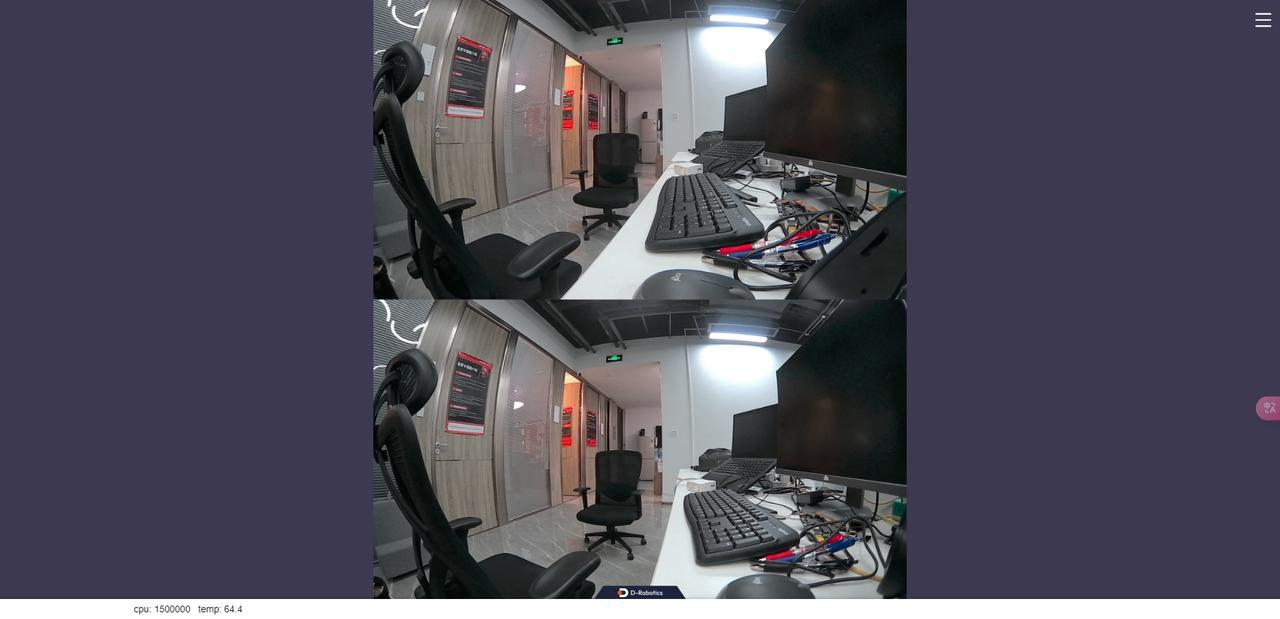
3. View stereo camera images in the web browser
Because raw data is published, a node to encode JPEG images and a node to publish via webservice are required. Start them with the following commands:
# Configure tros.b environment
source /opt/tros/humble/setup.bash
# Launch
ros2 launch mipi_cam mipi_cam_dual_channel_websocket.launch.py
4. On a PC, open a browser (Chrome/Firefox/Edge) and enter http://IP:8000 (where IP is the RDK IP address). Click the web preview button in the upper-left corner to view the live stereo output.