5.2.7 Tools
Image Publisher Tool
Overview
The image publisher tool supports batch reading of local image or video files and publishing them in ROS message format, improving algorithm debugging and deployment efficiency.
For image publishing, it supports reading JPEG/JPG/PNG/NV12 format images and publishing compressed images or converting compressed images to NV12 format for publishing.
For video publishing, it supports H264/H265/MP4 formats, reading video files and extracting the relevant video streams for publishing.
Code repository: (https://github.com/D-Robotics/hobot_image_publisher.git)
Supported Platforms
| Platform | Runtime Environment |
|---|---|
| RDK X3, RDK X3 Module | Ubuntu 20.04 (Foxy), Ubuntu 22.04 (Humble) |
| RDK X5, RDK X5 Module, RDK S100 | Ubuntu 22.04 (Humble) |
| RDK S600 | Ubuntu 24.04 (Jazzy) |
Prerequisites
RDK Platform
-
RDK has been flashed with the Ubuntu system image
-
tros.b has been successfully installed on RDK
-
A PC that can access RDK over the network
Image Publishing Usage
Continuously read a local NV12 format image and publish it. Use the image codec module to compress and encode the image as JPEG format, and display the image on the PC web client.
RDK Platform
- Foxy
- Humble
# Configure tros.b environment
source /opt/tros/setup.bash
# Configure tros.b environment
source /opt/tros/humble/setup.bash
- Humble
# Configure tros.b environment
source /opt/tros/humble/setup.bash
- Humble
# Configure tros.b environment
source /opt/tros/humble/setup.bash
- Jazzy
# Configure tros.b environment
source /opt/tros/jazzy/setup.bash
# Copy the image files required for the example from the tros.b installation path
cp -r /opt/tros/${TROS_DISTRO}/lib/hobot_image_publisher/config/ .

# Start launch file
ros2 launch hobot_image_publisher hobot_image_publisher_demo.launch.py
Image Publishing Result Analysis
The terminal outputs the following information during execution:
[INFO] [launch]: All log files can be found below /root/.ros/log/2022-08-19-12-58-02-288516-ubuntu-24492
[INFO] [launch]: Default logging verbosity is set to INFO
webserver has launch
[INFO] [hobot_image_pub-1]: process started with pid [24511]
[INFO] [hobot_codec_republish-2]: process started with pid [24513]
[INFO] [websocket-3]: process started with pid [24519]
The output log shows that the webserver has started, and hobot_image_pub, hobot_codec_republish, and websocket are all running normally.
Enter http://IP:8000 in a PC browser to view the image display (IP is the RDK device IP address):
Video Publishing Usage
Read the local video.list file to obtain video file paths in the list, continuously read video files and publish them. First use the image codec module to decode the video stream to NV12 format images, then use the image codec module to compress and encode the images as JPEG format, and display them on the PC web client.
RDK Platform
- Foxy
- Humble
# Configure tros.b environment
source /opt/tros/setup.bash
# Configure tros.b environment
source /opt/tros/humble/setup.bash
- Humble
# Configure tros.b environment
source /opt/tros/humble/setup.bash
- Humble
# Configure tros.b environment
source /opt/tros/humble/setup.bash
- Jazzy
# Configure tros.b environment
source /opt/tros/jazzy/setup.bash
# Copy the image files required for the example from the tros.b installation path
cp -r /opt/tros/${TROS_DISTRO}/lib/hobot_image_publisher/config/ .

# Start launch file
ros2 launch hobot_image_publisher hobot_image_publisher_videolist_demo.launch.py
Video Publishing Result Analysis
The terminal outputs the following information during execution:
[INFO] [launch]: All log files can be found below /root/.ros/log/2022-10-22-21-44-03-663907-ubuntu-702475
[INFO] [launch]: Default logging verbosity is set to INFO
webserver has launch
[INFO] [hobot_image_pub-1]: process started with pid [702597]
[INFO] [hobot_codec_republish-2]: process started with pid [702599]
[INFO] [hobot_codec_republish-3]: process started with pid [702601]
[INFO] [websocket-4]: process started with pid [702603]
The output log shows that the webserver has started, and hobot_image_pub, hobot_codec_republish, and websocket are all running normally.
If the output log shows the following warning: [HobotVdec]: findSPSPPSVPS fail. ret: -1, nSPSLen: 0, nLen: 59 and the PC browser does not display images, this is normal behavior. The decoder is checking the video stream; wait a moment and the image should display normally.
Enter http://IP:8000 in a PC browser to view the image display (IP is the RDK device IP address):
Trigger Recording Tool
Overview
A Trigger, based on a predefined Trigger mechanism, monitors changes in messages subscribed by the Trigger module, such as changes in detection box result count or robot control information, triggers the corresponding Trigger event, and records ROS2 messages within a specified time interval. This helps developers locate and reproduce perception, planning, and control issues in robot scenarios.
The trigger_node package is a Trigger base module developed by D-Robotics based on ROS2, used to obtain specified rosbag data after a Trigger event is triggered. The package supports directly subscribing to ai_msg/msg/PerceptionTargets type topics, determining whether to trigger a Trigger event in the topic callback function, recording rosbag packages related to the Trigger event, and finally saving Trigger event information and publishing Trigger event topics of std_msg/msg/String type.
The example shown in this section is a Trigger module usage example developed by D-Robotics based on the custom Trigger base module. This example demonstrates subscribing to trash detection box information and determining whether to trigger a Trigger event based on whether the number of trash detection boxes is greater than or equal to 3. If the detection box count is greater than or equal to 3, a Trigger event is triggered.
Code repository: (https://github.com/D-Robotics/hobot_trigger.git)
Application scenario: robot data closed-loop pipeline, robot Trigger event reporting scenarios. Can be used with perception, planning and control tasks to record rosbag data when Trigger events occur.
Supported Platforms
| Platform | Runtime Environment | Example Function |
|---|---|---|
| RDK X3, RDK X3 Module | Ubuntu 20.04 (Foxy), Ubuntu 22.04 (Humble) | Start MIPI/USB camera; triggered rosbag data is recorded locally |
Usage Instructions
Trigger Initialization Configuration
The Trigger base module defines the parameters required for initialization configuration.
The config_file configuration file uses JSON format with the following configuration:
{
  "domain": Trigger event domain. Such as floor sweeper, humanoid robot, etc. Different Trigger types are distinguished by domain for different robot types.

  "desc": Trigger module description.

  "duration_ts_back": Recording duration after Trigger event occurs.

  "duration_ts_front": Recording duration before Trigger event occurs.

  "level": Trigger event priority. When multiple different Triggers occur, a master node can filter high or low priority Trigger events.

  "src_module_id": Module ID that triggered the event, used to manage different Trigger modules to meet business requirements for different Trigger module management.

  "status": Trigger status, '0': off, '1': on.

  "strategy_version": Trigger module strategy version number.

  "topics": List of topics to record, including topic names.

  "trigger_type": Trigger type ID. Each Trigger module may have multiple trigger conditions. For example, detecting 2 pieces of trash triggers one type, detecting 3 pieces of trash triggers another type.

  "unique_id": Device unique identifier.

  "version": Trigger module version information.

  "extra_kv": Other redundant extended information can be recorded here.
}
Trigger Event Configuration
In the trigger_node base class, a Config struct is defined. Some configurations are consistent with the Trigger configuration at initialization, and the remaining content must be filled in based on the actual situation when the Trigger is triggered.
When developing based on Trigger_node, you only need to instantiate a struct variable each time a Trigger occurs, fill in the relevant information at the time of the Trigger event such as "timestamp" and "gps_pos" into the struct variable, and send it to the Trigger event recording queue "requests_".
On this basis, users can develop custom Trigger modules. For more information, refer to the trigger_node_example implementation in the code repository.
Code repository: (https://github.com/D-Robotics/hobot_trigger.git)
Struct information is as follows:
struct Config {
  std::string domain;       // Trigger event domain
  std::string desc;         // Trigger description
  long duration_ts_back;    // Recording duration after Trigger event
  long duration_ts_front;   // Recording duration before trigger event
  GPS_POS gps_pos;          // GPS positioning
  int level;                // Priority
  std::string rosbag_path;  // Local rosbag file path after Trigger event
  int src_module_id;        // Module that triggered the event
  int status;               // Trigger status
  std::string strategy_version; // Strategy version number
  long timestamp;           // Trigger event timestamp
  std::vector<std::string> topics;    // List of topics to record, including topic names and types
  int trigger_type;         // Trigger type
  std::string unique_id;    // Device unique identifier
  std::string version;      // Trigger version information
  std::vector<EXTRA_KV> extra_kv;   // Additional information
};
Prerequisites
RDK Platform
-
RDK has been flashed with the Ubuntu system image.
-
TogetheROS.Bot has been successfully installed on RDK.
-
Install the package
apt install tros-humble-trigger-node-example.
Usage
RDK Platform
Publish images using MIPI camera
- Foxy
- Humble
# Configure tros.b environment
source /opt/tros/setup.bash
# Install mcap package
apt install ros-humble-rosbag2-storage-mcap

# Configure tros.b environment
source /opt/tros/humble/setup.bash
# Copy the configuration files required for the example from the tros installation path.
cp -r /opt/tros/${TROS_DISTRO}/lib/mono2d_trash_detection/config/ .
cp -r /opt/tros/${TROS_DISTRO}/lib/trigger_node_example/config/ .

# Configure MIPI camera
export CAM_TYPE=mipi

# Start launch file
ros2 launch trigger_node_example hobot_trigger_example.launch.py
Publish images using USB camera
- Foxy
- Humble
# Configure tros.b environment
source /opt/tros/setup.bash
# Configure tros.b environment
source /opt/tros/humble/setup.bash
# Copy the configuration files required for the example from the tros installation path.
cp -r /opt/tros/${TROS_DISTRO}/lib/mono2d_trash_detection/config/ .
cp -r /opt/tros/${TROS_DISTRO}/lib/trigger_node_example/config/ .

# Configure USB camera
export CAM_TYPE=usb

# Start launch file
ros2 launch trigger_node_example hobot_trigger_example.launch.py
Result Analysis
Publish images using MIPI camera
After package initialization, the terminal outputs the following information:
  [INFO] [launch]: All log files can be found below /root/.ros/log/2023-05-13-17-31-53-158704-ubuntu-2981490
   [INFO] [launch]: Default logging verbosity is set to INFO
   [INFO] [trigger_node_example-1]: process started with pid [2981766]
   [trigger_node_example-1] [WARN] [1683970314.850652382] [hobot_trigger]: Parameter:
   [trigger_node_example-1]  cache_path: /home/hobot/recorder/
   [trigger_node_example-1]  config_file: config/trigger_config.json
   [trigger_node_example-1]  format: mcap
   [trigger_node_example-1]  isRecord(1:record, 0:norecord): 1
   [trigger_node_example-1]  agent_msg_sub_topic_name: /hobot_agent
   [trigger_node_example-1]  event_msg_sub_topic_name: /ai_msg_mono2d_trash_detection
   [trigger_node_example-1]  msg_pub_topic_name: /hobot_trigger
   [trigger_node_example-1]  config detail: {"domain":"robot","desc":"trigger lane","duration_ts_back":5000,"duration_ts_front":5000,"level":1,"rosbag_path":"","src_module_id":203,"timestamp":-1,"topic":["/image_raw/compressed","/ai_msg_mono2d_trash_detection"],"trigger_type":1110,"unique_id":"v1.0.0\n","version":"v1.0.0\n"}
   [trigger_node_example-1] [WARN] [1683970314.893573769] [hobot_trigger]: TriggerNode Init Succeed!
   [trigger_node_example-1] [WARN] [1683970314.898132256] [example]: TriggerExampleNode Init.
   [trigger_node_example-1] [WARN] [1683970315.931225440] [example]: Trigger Event!
   [trigger_node_example-1] [WARN] [1683970322.178604839] [rosbag2_storage_mcap]: no message indices found, falling back to reading in file order
   [trigger_node_example-1] [WARN] [1683970323.007470033] [hobot_trigger]: Trigger Event Report. Trigger moudle id: 203, type id: 1110
   [trigger_node_example-1]  Report message: {"domain":"","desc":"trigger lane","duration_ts_back":5000,"duration_ts_front":5000,"level":1,"rosbag_path":"trigger/OriginBot002_20230513-173155-931/OriginBot002_20230513-173155-931_0.mcap","src_module_id":203,"timestamp":1683970315931,"topic":["/image_raw/compressed","/ai_msg_mono2d_trash_detection"],"trigger_type":1110,"unique_id":"bot","version":"v1.0.0"}
After execution, rosbag data generated by Trigger events is recorded in the "trigger" directory under the current working directory. The recorded rosbag data can be played in Foxglove. For instructions on playing rosbag files in Foxglove, refer to section Data Display — Foxglove Display in the manual.
Foxglove playback effect:
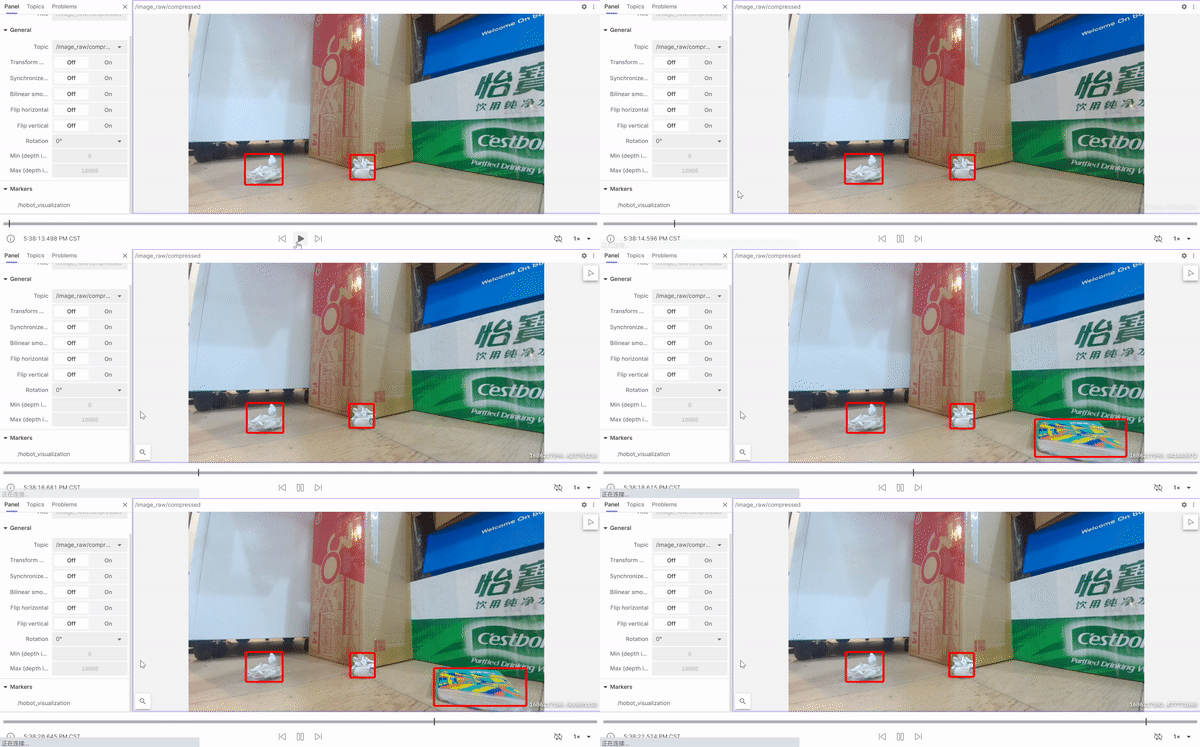
Note: This Trigger example records data from 5 seconds before and 5 seconds after the event. You can also see that at the middle moment of the event, the reason for the Trigger event was recorded: a piece of trash was thrown into the scene, bringing the total number of trash items to three and triggering the event.
Extended Features
Send Tasks to the Trigger Module
The Trigger module supports receiving Trigger tasks from other nodes to control Trigger configuration. Tasks are sent by publishing std_msg topic messages with JSON format String data to the Trigger module.
Trigger Task Protocol
{
   "version": "v0.0.1_20230421",       // Trigger module version information.
   "trigger_status": true,             // Trigger status, 'false': off, 'true': on.
   "strategy": [
      {
            "src_module_id": 203,      // Module ID that triggered the event
            "trigger_type": 1110,      // Trigger type ID.
            "level": 1,                // Trigger event priority
            "desc": "",                // Trigger module description.
            "duration_ts_back": 5000,  // Recording duration after Trigger event
            "duration_ts_front": 3000  // Recording duration before Trigger event
      }
   ]
}
Execution
Based on the previously started Trigger node, open another terminal and publish a std_msg topic message with topic name "/hobot_agent".
- Foxy
- Humble
# Configure tros.b environment
source /opt/tros/setup.bash
# Configure tros.b environment
source /opt/tros/humble/setup.bash
# Publish std_msg topic message with topic name "/hobot_agent"
ros2 topic pub /hobot_agent std_msgs/String "data: '{\"version\":\"v0.0.1_20230421\",\"trigger_status\":true,\"strategy\":[{\"src_module_id\":203,\"trigger_type\":1110,\"status\":true,\"level\":1,\"desc\":\"test\",\"duration_ts_back\":5000,\"duration_ts_front\":3000}]}'"
Log Information
   [WARN] [1691670626.026737642] [hobot_trigger]: TriggerNode Init Succeed!
   [WARN] [1691670626.026859316] [example]: TriggerExampleNode Init.
   [INFO] [1691670626.517232775] [TriggerNode]: Updated Trigger Config: {"domain":"robot","desc":"trigger lane","duration_ts_back":5000,"duration_ts_front":3000,"gps_pos":{"latitude":-1,"longitude":-1},"level":1,"rosbag_path":"","src_module_id":203,"strategy_version":"Robot_sweeper_V1.0_20230526","timestamp":0,"topic":["/image_raw/compressed","/ai_msg_mono2d_trash_detection","/hobot_visualization"],"trigger_type":1110,"unique_id":"OriginBot002","version":"v0.0.1_20230421","extra_kv":[]}
Analysis: When sending a configuration task to the Trigger module, the Trigger node configuration can be successfully updated. (Trigger node log updates are visible when Trigger node log level is INFO)